The Atlassian Strategy Collection is an enterprise-scale strategic portfolio management (SPM) and planning suite designed to connect executive business strategy directly to engineering and product execution. Built on Atlassian's unified cloud platform architecture, the Strategy Collection provides real-time visibility into portfolio health, resource capacities, corporate priorities, funding allocations, and operational outcomes across value streams.
$27,000
per year
Nuclino
Score7.1 out of 10
N/A
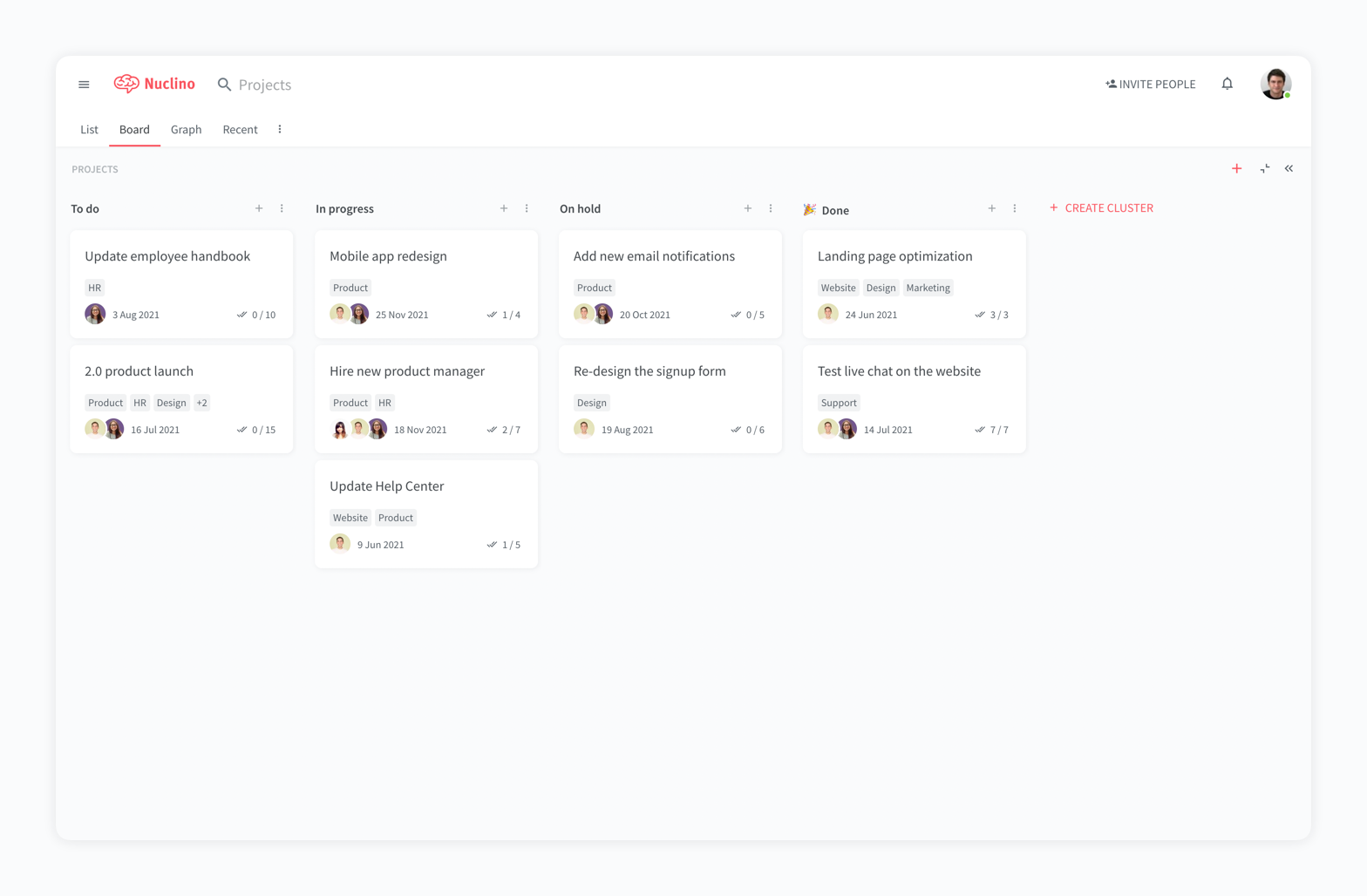
Nuclino is a unified workspace where teams can organize knowledge, manage projects, and share ideas. Progress can be tracked in a Kanban board, work structured in a hierarchical list, or data organized in a visual graph — Nuclino adapts to a team's workflow. Presented as simple and lightweight by design, Nuclino focuses on the essentials, doing away with clunky menus and rarely-used settings, to minimize the learning curve for new users. Teams from across the globe can use Nuclino…
$0
Slite
Score5.7 out of 10
N/A
Slite is a knowledge base designed to provide teams with needed answers even without searching. From onboarding guides to all hands notes, Slite keeps all types of company information centralised.
$10
per month per member
Pricing
Atlassian Strategy Collection, with Align
Nuclino
Slite
Editions & Modules
Starting Price
$27,000.00
per year
Maximum Price
$3,987,600.00
per year
Free
$0
per month per user
Starter
$8
per month per user
Business
$12
per month per user
Standard
$10
per month per member
Premium
$15
per month per member
Enterprise
Contact Sales
Offerings
Pricing Offerings
Atlassian Strategy Collection, with Align
Nuclino
Slite
Free Trial
No
Yes
Yes
Free/Freemium Version
No
Yes
No
Premium Consulting/Integration Services
No
No
No
Entry-level Setup Fee
No setup fee
No setup fee
No setup fee
Additional Details
—
Nuclino offers a free plan for up to 50 items and 2GB total storage. Commercial plans support unlimited items, advanced features, and 10GB storage per user. 25% discount for annual pricing.
The Atlassian Jira Align (formerly AgileCraft) tools help keep our scrum teams moving in the right direction. It gives Sr. Executives visibility into the progress of our digital transformation efforts. It provides information to our program manager to create the necessary artifacts to justify continued funding of our initiatives. It also supports the SAFe framework, along with some others. And the Atlassian Jira Align (formerly AgileCraft) tools provide integration to other tools that we use in our portfolio.
A de minimis incentive was given to thank the reviewer for their time. The incentive was not used to bias or drive a particular response, nor was the incentive contingent on a positive endorsement. More Info
For game design - Perfect for personal notes, recipes, snippets - Perfect for storing some organized data (for example, links to resources) - Perfect for a content playground powered by AI - Very good for diagrams - Very good. Don't know any bad examples. Tool really great. Rich functionality. Especially love different views (table, graph).
It is well suited for entire companies to use not just small teams because you can create so many workspaces and folders which allow better organization for a centralized space. For example, if you want to create for one team a folder thats a Social Media Marketing Hub you can have that with supportive resources, documents, meet the team section, and so much more. You can have another folder for other teams like HR and HR Resources where everyone has visibility into the documents and anything added under that section. It's super helpful.
A de minimis incentive was given to thank the reviewer for their time. The incentive was not used to bias or drive a particular response, nor was the incentive contingent on a positive endorsement. More Info
Effective Sprint planning : Sprint planning can be done using Planning Poker in AgileCraft by clicking Team > Manage > Other > Estimation Games very effectively for distributed teams.
Team Capacity Allocation Report: After tasks are created at team or program level, the report from AgileCraft cab be pulled and can be verified that no team member is under or over allocated. A report can be generated by navigating to Team > Manage > Assign Tasks.
Effective Requirement trace-ability: To maintain requirements trace-ability follow the steps below:
Upload test cases against the story/requirement. once uploaded test cases will be visible under that story
Execute Test cases in AgileCraft and mark them as Pass/Fail based on the actual outcome
Based on test results, The acceptance criterion's can be marked as “Pass” or “Fail” & if marked failed corresponding defect can be logged & can be attached with the story
So against each story we can easily see whether all test cases been executed or not & which acceptance criterion's are failed & how many defects are in open or close state.
Daily Scrum: In AgileCraft, the option to run a daily stand-up is available from Team > Manage > Daily Standups. Selecting the sprint number opens the daily stand-up meeting window in which each team member's tasks are visible and hours can be burned against them. Conduct Scrum meetings in AgileCraft, and burn each associate hour against the tasks created during the meeting. The burn-down chart can be generated & viewed during the stand-up to check whether the team is on track.
A de minimis incentive was given to thank the reviewer for their time. The incentive was not used to bias or drive a particular response, nor was the incentive contingent on a positive endorsement. More Info
The system is extremely fast. The application loads and displays data in milliseconds. This makes the system easy to work with.
It's also easy to edit documentation and information, as information can be editing directly without the use of an "edit" button.
Pricing: Loading speed, ease of use and quick editing are its main advantage that makes it stand out from competitors. Having said that, the pricing is very good as well.
A de minimis incentive was given to thank the reviewer for their time. The incentive was not used to bias or drive a particular response, nor was the incentive contingent on a positive endorsement. More Info
A de minimis incentive was given to thank the reviewer for their time. The incentive was not used to bias or drive a particular response, nor was the incentive contingent on a positive endorsement. More Info
The initial ticket creation screen lacks some important features, such as assigning "point values" (a measure of effort needed for the ticket).
The browser needs to be manually refreshed to see new tickets, which can make things confusing when several people in a meeting are simultaneously creating tickets.
The interface on some smaller portions of the software are sometimes difficult to understand.
A de minimis incentive was given to thank the reviewer for their time. The incentive was not used to bias or drive a particular response, nor was the incentive contingent on a positive endorsement. More Info
A de minimis incentive was given to thank the reviewer for their time. The incentive was not used to bias or drive a particular response, nor was the incentive contingent on a positive endorsement. More Info
I don't love that it doesn't integrate easily with the other tools we use, at least it doesn't as far as I know.
Since there is not an Excel sort of capability there is no way it could ever replace Google, so it is sometimes easier to just use Word docs instead of Slite since everything is in one place.
I think if Slite extended their product line up, it would be more attractive to use exclusively, instead of just using it for documentation.
A de minimis incentive was given to thank the reviewer for their time. The incentive was not used to bias or drive a particular response, nor was the incentive contingent on a positive endorsement. More Info
A de minimis incentive was given to thank the reviewer for their time. The incentive was not used to bias or drive a particular response, nor was the incentive contingent on a positive endorsement. More Info
As I have mentioned, some older, less tech savvy, team members have not found it as intuitive. I found it the same when I started using it although it quickly made sense. I think this is because there are lots of features we do not use so this can get in the way of what we do use
A de minimis incentive was given to thank the reviewer for their time. The incentive was not used to bias or drive a particular response, nor was the incentive contingent on a positive endorsement. More Info
It has a very clean UI for me, the multiple views are so so useful, we can collaborate freely, and fast. This app helped us to grow because now we are giving our time more on generating ideas and of course getting more projects and clients giving real ROI instead of focusing on organizing files. But just like all apps out there, it has some room for improvement
A de minimis incentive was given to thank the reviewer for their time. The incentive was not used to bias or drive a particular response, nor was the incentive contingent on a positive endorsement. More Info
Very clean interface however editing can be a challenge which is a big part of using it so I can't give a 10 until the editing and customization for editing is improved. I love how minimal the look and feel is though and how easy it is to organize different pages and folders.
A de minimis incentive was given to thank the reviewer for their time. The incentive was not used to bias or drive a particular response, nor was the incentive contingent on a positive endorsement. More Info
Overall support from Jira team is good. It comes at an additional price but it is very efficient. There are no long wait times, you get a dedicated team to look into your issues. The support is available throughout the year and they keep a record of your issues. Overall we are very satisfied with the support they have provided us over the years, it has been very effective for the price that we pay.
A de minimis incentive was given to thank the reviewer for their time. The incentive was not used to bias or drive a particular response, nor was the incentive contingent on a positive endorsement. More Info
My team has an individual dedicated to content management and Nuclino is one of her job descriptions. It's nice knowing she is able to handle any issues that arise before we even realize they exist. We haven't had any technical issues since implementation so that's been a very pleasant experience.
A de minimis incentive was given to thank the reviewer for their time. The incentive was not used to bias or drive a particular response, nor was the incentive contingent on a positive endorsement. More Info
Microsoft Azure Devops won't have the major functionality of software management like Jira. The customization provided by Jira is having a cutting edge over any project management tool. Adds-on and Plugins feature in the Jira Tool make it as perfect as desired task management tool for any company. One of the best Agile based Project Management Tools.
A de minimis incentive was given to thank the reviewer for their time. The incentive was not used to bias or drive a particular response, nor was the incentive contingent on a positive endorsement. More Info
Nuclino is the clear winner when it comes to ease of use for both the administrator and user. Less setup time and less "training" time. The streamlined interface is quick and intuitive to learn and is not cluttered as compared to Confluence. Every tool you need to use to create a page or administer the workspace is available immediately on screen or by right-clicking. In contrast, Confluence buries many tools in administrative interfaces and only allows use of some features once you make several clicks to include a "macro" or "plug-in". We use both tools and I get complaints constantly from my team about how complicated Confluence can get just to author a quick page.
A de minimis incentive was given to thank the reviewer for their time. The incentive was not used to bias or drive a particular response, nor was the incentive contingent on a positive endorsement. More Info
[In my opinion,] Slite is cheaper but less mature and feature full. Notion is a much more mature solution, so I'd recommend it for teams who want to be at the front and don't care about cost.
It has positively impacted our tech teams, allowing them to better organize the tasks and items they are working on and has greatly improved their ability to communicate & review these tasks with other teams.
I believe it negatively impacted other departments as lengthy training was required by many associates to attempt using the tool, only to find out it didn't meet our needs, therefore much time was wasted.
A de minimis incentive was given to thank the reviewer for their time. The incentive was not used to bias or drive a particular response, nor was the incentive contingent on a positive endorsement. More Info
A de minimis incentive was given to thank the reviewer for their time. The incentive was not used to bias or drive a particular response, nor was the incentive contingent on a positive endorsement. More Info