Lightning Tools Lightning Conductor vs. Paymo

Overview
ProductRatingMost Used ByProduct SummaryStarting Price
Lightning Tools Lightning Conductor
Score 9.0 out of 10
Mid-Size Companies (51-1,000 employees)
The Lightning Conductor is a content aggregation tool for Microsoft SharePoint Online and Microsoft Teams. Users can build rich, modern content reports based upon SharePoint lists, SharePoint Search, Microsoft Graph or Microsoft 365 Groups. Content can be aggregated from lists and libraries, and other applications such as Planner, To Do, OneDrive, and Teams.
$2,200
per year per installation
Paymo
Score 8.9 out of 10
N/A
Paymo is a collaborative work management platform that helps track team progress, collaborate in context, and make smarter decisions. It acts as a single source of truth, where project planning, resource scheduling, file proofing, time tracking, and billing feed into each other to co-exist under the same roof.
$0
Up to 10 users
Pricing
Lightning Tools Lightning ConductorPaymo
Editions & Modules
Lightning Conductor WSP
From 1950
per year One WFE
Lightning Conductor Enterprise Edition
POA
per year Four or more WFE
Lightning Conductor Online
From 2200
per year per installation
Lightning Conductor Plus (Includes Data Viewer)
From 2500
per year per installation
Lightning Conductor Online Enterprise Edition (>10,000 users)
POA
per year per installation
Free
$0
Up to 10 users
Small Office
$11.95
per user/per month
Business
$18.95
per user/per month
Offerings
Pricing Offerings
Lightning Tools Lightning ConductorPaymo
Free Trial
YesYes
Free/Freemium Version
NoYes
Premium Consulting/Integration Services
YesNo
Entry-level Setup FeeNo setup feeNo setup fee
Additional DetailsPrices stated are minimum per installation for "stock" products. $2.20 per user/year on top of base price. Enterprise editions can be amended to suit business needs if deemed necessary, additional costs incurred and TBD. All packages include free technical support. Free upgrades available to latest versions of tool as they are released. (online version)Free version available for freelancers.
More Pricing Information
Community Pulse
Lightning Tools Lightning ConductorPaymo
Features
Lightning Tools Lightning ConductorPaymo
Project Management
Comparison of Project Management features of Product A and Product B
Lightning Tools Lightning Conductor
8.6
2 Ratings
10% above category average
Paymo
5.9
9 Ratings
27% below category average
Task Management8.82 Ratings3.59 Ratings
Search8.42 Ratings00 Ratings
Resource Management00 Ratings5.36 Ratings
Gantt Charts00 Ratings4.43 Ratings
Scheduling00 Ratings7.06 Ratings
Team Collaboration00 Ratings4.16 Ratings
Support for Waterfall Methodology00 Ratings7.82 Ratings
Document Management00 Ratings5.06 Ratings
Email integration00 Ratings5.04 Ratings
Mobile Access00 Ratings5.37 Ratings
Timesheet Tracking00 Ratings9.09 Ratings
Budget and Expense Management00 Ratings8.88 Ratings
Professional Services Automation
Comparison of Professional Services Automation features of Product A and Product B
Lightning Tools Lightning Conductor
-
Ratings
Paymo
9.2
3 Ratings
17% above category average
Quotes/estimates00 Ratings8.93 Ratings
Invoicing00 Ratings9.93 Ratings
Project & financial reporting00 Ratings8.93 Ratings
Best Alternatives
Lightning Tools Lightning ConductorPaymo
Small Businesses
Stackby
Stackby
Score 8.9 out of 10
Stackby
Stackby
Score 8.9 out of 10
Medium-sized Companies
Troop Messenger
Troop Messenger
Score 9.8 out of 10
InEight
InEight
Score 8.4 out of 10
Enterprises
HCL Connections
HCL Connections
Score 9.0 out of 10
InEight
InEight
Score 8.4 out of 10
All AlternativesView all alternativesView all alternatives
User Ratings
Lightning Tools Lightning ConductorPaymo
Likelihood to Recommend
9.0
(4 ratings)
8.0
(10 ratings)
Likelihood to Renew
9.1
(1 ratings)
-
(0 ratings)
Usability
-
(0 ratings)
9.0
(1 ratings)
Support Rating
9.1
(1 ratings)
8.9
(3 ratings)
User Testimonials
Lightning Tools Lightning ConductorPaymo
Likelihood to Recommend
Lightning Tools
Having experience of SharePoint On Premise and also SharePoint Online, there isn't an out of the box app/webpart that enables you to 'roll up content' from a variety of source's (in my case SP Lists, but there are many other data sources it works with) across site collections with an easy to use and intuitive interface which is what Lightning tools excels at.
Read full review
ProfitSolv
Beautiful interface throughout, easy setup, most natural progressions are fluid and easy to use. Browser functionality allows us to use it cross-platform. Very reasonable pricing model as well. We have had a little trouble using Paymo for the entire creative process to have proofs reviewed and approved. Also, have to use external forms to have work submitted from campus.
Read full review
Pros
Lightning Tools
  • Aggregate documents across SharePoint site & libraries
  • Filtering for owner/person responsible & due dates
  • Ease of end-user filtering on columns
  • Color-coding & other formatting
Read full review
ProfitSolv
  • The ability to code exactly what time I worked on a project enables me to bill clients more accurately and within different minimums, which besides more accurately tracking time, this has been extremely helpful as I negotiate contracts for services and offer different deals with potential clients. Some are billed to the minute, some in 15-minute minimums, and some in 20-minute blocks.
  • The live reports are great, showing time spent in the minimums that I've set, while also including as much detail as I wish to share.
  • I've now started just writing my notes into the tracker, which are then carried into the live reports - this eases my needing to send logs to clients, as well as helping me to keep projects on track.
Read full review
Cons
Lightning Tools
  • Mobile Friendly
  • Calendar/Gantt views
  • Complex/Custom Logic
Read full review
ProfitSolv
  • It would be really helpful if on the timer tool, they asked you to switch projects when you stop the timer, so it could fill that time in right away for you.
  • I never use the 'My Tasks' because I don't fully understand how to integrate it to be useful to what our purposes are in Paymo. Some Youtube tutorials might be helpful
Read full review
Usability
Lightning Tools
No answers on this topic
ProfitSolv
It is a complete, a bit overambitious app but with many features that are needed. I didn't need most of the features but managed to make the most of the two I was using. Also, I think it is a well-rounded app and I am considering moving some team collab there.
Read full review
Support Rating
Lightning Tools
The Lightning Tools support team responds quickly, and team members are very friendly and helpful.
Read full review
ProfitSolv
Good! Fast, excellent, speedy responses. They always wanted to know why and how they could improve on something (good on receiving feedback, too). Not that they were much needed, but my limited experience with them is good; they were really keen to understand what the problem was really about and how they could help with it.
Read full review
Alternatives Considered
Lightning Tools
I haven't found another product to compare this one to. Only in SharePoint Online which has a similar App 'Highlight Webpart' ... it's far too complicated to set up and requires learning yet another language and exporting and importing via PowerShell to get any real results that would be useful.
Read full review
ProfitSolv
We still use Trello and Slack, but Basecamp and HubSpot are too much for our operation to manage or integrate. Paymo is missing some of the tracking features of HubSpot and isn't as universally used as Basecamp but we've been with them for 8 years and they seem to know what matters most to their user base
Read full review
Return on Investment
Lightning Tools
  • Policies easier to portray
Read full review
ProfitSolv
  • Gives me more accurate time that I've spent on projects compared to older methods I've used.
  • Has data that I can pull together, for example my boss wanted to know the percentage of time I'd spent working on projects for one client compared to everything else - I was able to give them an accurate percentage.
  • Forces you to stay on top of jobs, which can lengthen the time to complete something
Read full review
ScreenShots

Lightning Tools Lightning Conductor Screenshots

Screenshot of MODERN SHAREPOINT LIST ROLLUP
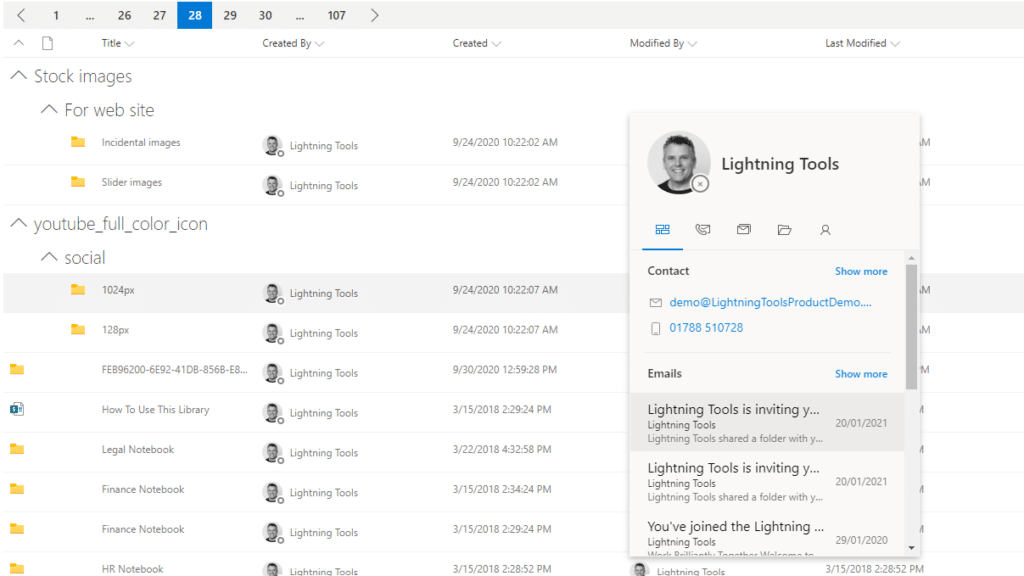
The Lightning Conductor is a SharePoint Content Aggregator that can be configured quickly by business users. The Lightning Conductor can be used to aggregate content from SharePoint Lists such as Tasks, Document Libraries, Contact Lists, and Custom Lists making it easy to view content in one place even if it is distributed across many sites and site collections. Key data can be highlighted using conditional formatting and data-bars as shown. Content from Search and Microsoft Graph can also be aggregated with the Lightning Conductor.Screenshot of CONTENT AGGREGATION WITHIN MICROSOFT TEAMS
The Lightning Conductor Web Part can be used within Microsoft SharePoint or Microsoft Teams. Even if content is stored within SharePoint sites, it is useful to have aggregated Documents, Tasks, Announcements, Calendars or Custom Lists from multiple sites displayed in a single handy view in Microsoft Teams. The Lightning Conductor can be added as a Teams Tab in any Microsoft Teams Channel.Screenshot of BUILDING REPORTS ON MICROSOFT GRAPH
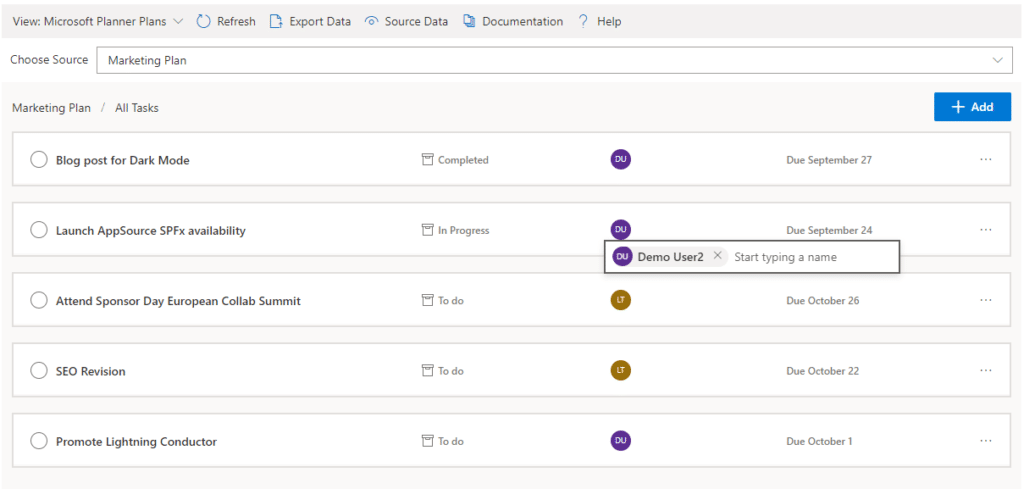
The Lightning Conductor can be used (without code) to aggregate content from Microsoft Graph as well as Search and SharePoint Lists. This example displays Microsoft Planner Plans and Microsoft Planner Tasks where users can Add new Tasks, Assign Users to Planner Tasks, Delete Tasks, and Complete Tasks. The same can be performed on Microsoft To Do items and displayed within Modern SharePoint pages or Microsoft Teams Tabs. The Lighting Conductor can also contain multiple views of content, making it ideal to display all of your tasks from SharePoint Task lists, Microsoft To Do and Microsoft Planner in a single web part or Teams Tab.

*Microsoft Graph Reports are only available for SharePoint Online and not SharePoint 2019.Screenshot of BUILDING REPORTS ON MICROSOFT 365 GROUPS
Powered by Microsoft Graph, the Microsoft 365 Group Rollup Provider enables users to aggregate content by browsing and selecting Microsoft 365 Groups. Within Microsoft 365 Groups, you’ll be able to select entities such as Drive Items, Owners, Members, Planner Plans, Planner Tasks, Events, Posts,  Sites, Lists, and Calendars.

*Microsoft Graph Reports are only available for SharePoint Online and not SharePoint 2019.Screenshot of AGGREGATING USING SEARCH
When performance is critical, search can be used for rollups. The Lightning Conductor offers three data source configurations to get to content. Object Model (Real Time Aggregation from SharePoint Lists), Microsoft Graph (Aggregation from Graph Entities such as Planner, OneDrive, Outlook), and Search. The Search Data Source enables the aggregation of content from large SharePoint lists and libraries when performance is critical. Thousands of documents can be displayed in under a second using Search.Screenshot of HIGHLIGHTING KEY BUSINESS DATA WITHIN VIEWS
End users and Site Owners can highlight the data that is important to them, the data that they need to prioritize. Using conditional formatting, data bars, and icons, conditions can be configured to highlight the data that is most important. Icons and Data Bars can be any color or size desired. Examples include highlighting High Priority tasks, Showing data bars for the completion progress of Tasks, or indicating which tasks are assigned to any particular user.

Paymo Screenshots

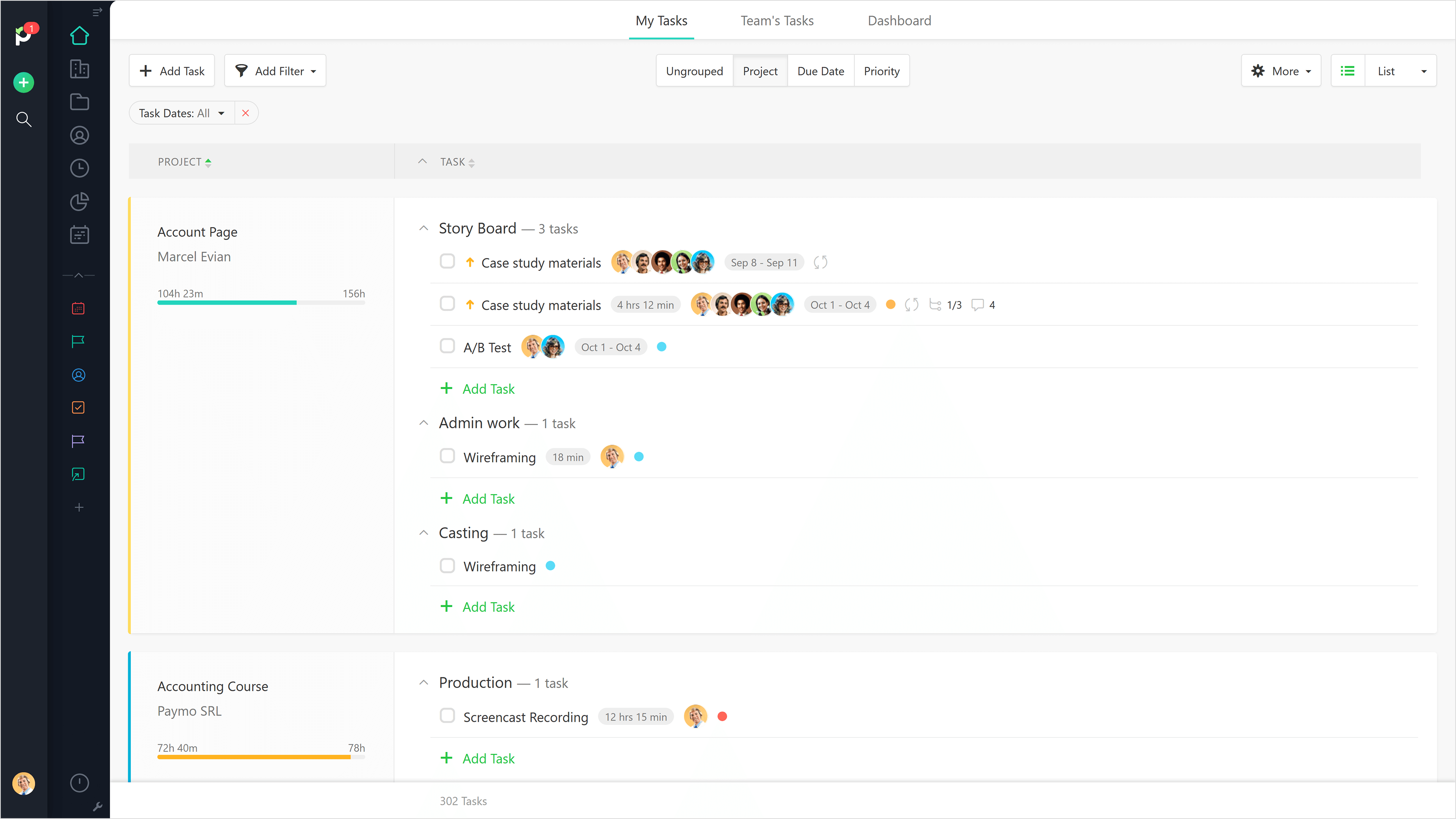
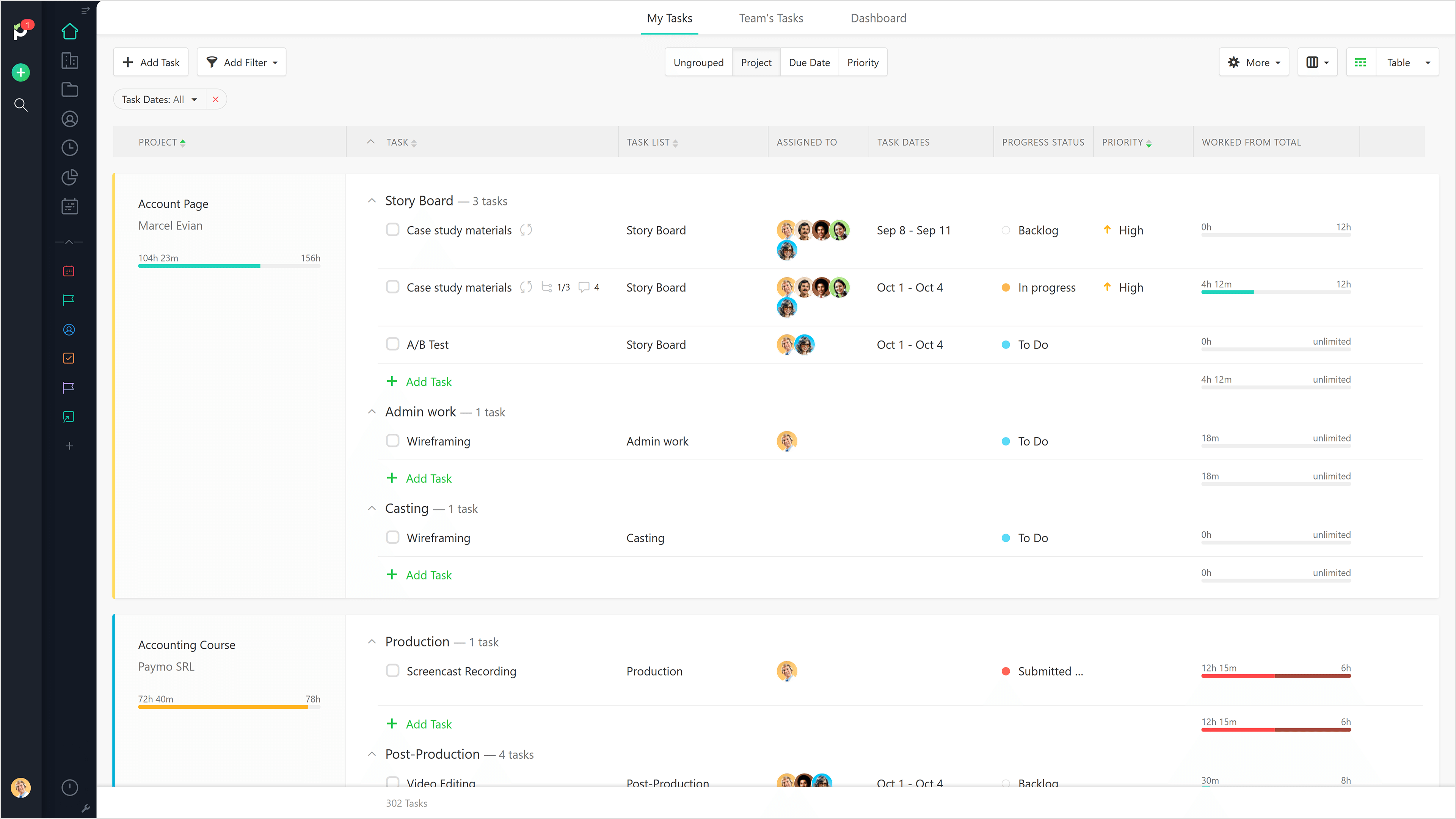
Screenshot of List View.Screenshot of Table View.Screenshot of Gantt Chart View.Screenshot of Full Task Details.Screenshot of Team Scheduling.Screenshot of Leave Planner.