Overview
ProductRatingMost Used ByProduct SummaryStarting Price
Lightning Tools Lightning Conductor
Score 9.0 out of 10
Mid-Size Companies (51-1,000 employees)
The Lightning Conductor is a content aggregation tool for Microsoft SharePoint Online and Microsoft Teams. Users can build rich, modern content reports based upon SharePoint lists, SharePoint Search, Microsoft Graph or Microsoft 365 Groups. Content can be aggregated from lists and libraries, and other applications such as Planner, To Do, OneDrive, and Teams.
$2,200
per year per installation
Nextcloud
Score 8.3 out of 10
N/A
Nextcloud offers their open source, self-hosted Content Collaboration Platform, combining what they describe as an easy user interface for consumer-grade cloud solutions with the security and compliance measures enterprises need. Nextcloud brings together universal access to data through mobile, desktop and web interfaces with next-generation, on-premise secure communication and collaboration features like real-time document editing, chat and video calls, putting them under…N/A
OneDrive
Score 7.4 out of 10
N/A
OneDrive from Microsoft is a cloud storage and file syncing service.
$5
per month
Pricing
Lightning Tools Lightning ConductorNextcloudOneDrive
Editions & Modules
Lightning Conductor WSP
From 1950
per year One WFE
Lightning Conductor Enterprise Edition
POA
per year Four or more WFE
Lightning Conductor Online
From 2200
per year per installation
Lightning Conductor Plus (Includes Data Viewer)
From 2500
per year per installation
Lightning Conductor Online Enterprise Edition (>10,000 users)
POA
per year per installation
No answers on this topic
OneDrive for Business Plan 1
$5.00
Per Month (Annual Commitment)
Microsoft 365 Business Basic
$5.00
Per Month (Annual Commitment)
OneDrive for Business Plan 2
$10.00
Per Month (Annual Commitment)
Microsoft 365 Business Standard
$12.50
Per Month (Annual Commitment)
Offerings
Pricing Offerings
Lightning Tools Lightning ConductorNextcloudOneDrive
Free Trial
YesYesYes
Free/Freemium Version
NoYesNo
Premium Consulting/Integration Services
YesYesNo
Entry-level Setup FeeNo setup feeOptionalNo setup fee
Additional DetailsPrices stated are minimum per installation for "stock" products. $2.20 per user/year on top of base price. Enterprise editions can be amended to suit business needs if deemed necessary, additional costs incurred and TBD. All packages include free technical support. Free upgrades available to latest versions of tool as they are released. (online version)OneDrive can be purchased as a standalone tool, or as part of a Microsoft 365's business suite.
More Pricing Information
Community Pulse
Lightning Tools Lightning ConductorNextcloudOneDrive
Considered Multiple Products
Lightning Tools Lightning Conductor

No answer on this topic

Nextcloud
Chose Nextcloud
Nextcloud is easy to set up an[d] easy to use because of its user-friendly interface. Some of the features offered by this application [are] much better and effective compared to OneDrive.
Overall, Nextcloud is just amazing and as an organization we are extremely happy with …
Chose Nextcloud
Dropbox was no longer an option due to their hosting policy. We needed an EU-based solution, preferably open source and self-hosted. There were also security leaks with Dropbox in the past. OneDrive is dreadfully slow, Nextcloud is as fast as you want it to be. On a dedicated …
Chose Nextcloud
Nextcloud was the only solution that would authenticate with Microsoft 365 while also running on all of their machines, handle absurdly high file number counts, and the occasional large file. We couldn't find other platforms that would do that at all, or that would say they …
Chose Nextcloud
Main feature is the possibility to self host your files and have control over your data (especially if it is sensitive and you want to host the data in house). Others provide good services too, but thinking about GDPR this is the easiest route you can take. Since we use it for …
Chose Nextcloud
On-premise solution good for control and cost (in our case).
Chose Nextcloud
I'm comparing, but it wasn't a problem for me, because I couldn't use it because of the security of the company that manages our Office 365. But, both allow practically the same options, they are fast, among others. Maybe Office 365 handles the Word, Excel, etc. files better, …
OneDrive

No answer on this topic

Features
Lightning Tools Lightning ConductorNextcloudOneDrive
Project Management
Comparison of Project Management features of Product A and Product B
Lightning Tools Lightning Conductor
8.6
2 Ratings
10% above category average
Nextcloud
-
Ratings
OneDrive
-
Ratings
Task Management8.82 Ratings00 Ratings00 Ratings
Search8.42 Ratings00 Ratings00 Ratings
File Sharing & Management
Comparison of File Sharing & Management features of Product A and Product B
Lightning Tools Lightning Conductor
-
Ratings
Nextcloud
8.9
13 Ratings
7% above category average
OneDrive
7.1
119 Ratings
16% below category average
Versioning00 Ratings8.511 Ratings7.695 Ratings
Video files00 Ratings8.012 Ratings6.3106 Ratings
Audio files00 Ratings9.511 Ratings6.3100 Ratings
Document collaboration00 Ratings8.010 Ratings8.4113 Ratings
Access control00 Ratings9.013 Ratings6.8114 Ratings
File search00 Ratings9.012 Ratings7.0119 Ratings
Device sync00 Ratings10.013 Ratings7.5117 Ratings
Cloud Storage Security & Administration
Comparison of Cloud Storage Security & Administration features of Product A and Product B
Lightning Tools Lightning Conductor
-
Ratings
Nextcloud
9.2
13 Ratings
6% above category average
OneDrive
7.3
113 Ratings
17% below category average
User and role management00 Ratings8.013 Ratings7.1101 Ratings
File organization00 Ratings9.512 Ratings7.8113 Ratings
Device management00 Ratings10.010 Ratings6.996 Ratings
Cloud Storage Platform
Comparison of Cloud Storage Platform features of Product A and Product B
Lightning Tools Lightning Conductor
-
Ratings
Nextcloud
8.5
12 Ratings
2% below category average
OneDrive
8.0
116 Ratings
8% below category average
Performance00 Ratings8.012 Ratings8.4115 Ratings
Reliability00 Ratings9.012 Ratings8.1116 Ratings
Storage Reports00 Ratings8.510 Ratings7.489 Ratings
Best Alternatives
Lightning Tools Lightning ConductorNextcloudOneDrive
Small Businesses
Stackby
Stackby
Score 8.9 out of 10
SugarSync
SugarSync
Score 4.1 out of 10
SugarSync
SugarSync
Score 4.1 out of 10
Medium-sized Companies
Troop Messenger
Troop Messenger
Score 9.8 out of 10
Druva Security Cloud
Score 9.4 out of 10
Druva Security Cloud
Score 9.4 out of 10
Enterprises
HCL Connections
HCL Connections
Score 9.0 out of 10
Druva Security Cloud
Score 9.4 out of 10
Druva Security Cloud
Score 9.4 out of 10
All AlternativesView all alternativesView all alternativesView all alternatives
User Ratings
Lightning Tools Lightning ConductorNextcloudOneDrive
Likelihood to Recommend
9.0
(4 ratings)
8.6
(11 ratings)
5.4
(118 ratings)
Likelihood to Renew
9.1
(1 ratings)
-
(0 ratings)
6.0
(6 ratings)
Usability
-
(0 ratings)
-
(0 ratings)
5.9
(17 ratings)
Performance
-
(0 ratings)
-
(0 ratings)
9.0
(1 ratings)
Support Rating
9.1
(1 ratings)
9.0
(1 ratings)
8.0
(36 ratings)
User Testimonials
Lightning Tools Lightning ConductorNextcloudOneDrive
Likelihood to Recommend
Lightning Tools
Having experience of SharePoint On Premise and also SharePoint Online, there isn't an out of the box app/webpart that enables you to 'roll up content' from a variety of source's (in my case SP Lists, but there are many other data sources it works with) across site collections with an easy to use and intuitive interface which is what Lightning tools excels at.
Read full review
Nextcloud
For a SOHO business, this solution is ideal. You don't need to administrative overhead of other products like GSuite, and it saves licensing costs. The maintenance effort is minimal as long as you use their default applications. Migrations to newer versions can be done with a few commands and run automatically. If you're planning on using Nextcloud in large deployments with many users, you'll start to see higher costs on your resources and maintenance. There will be a point at which Gsuite becomes easier to manage.
Read full review
Microsoft
I can speak from my own experience: in cases where workstations are switched every year or so, one drive makes it very simple to keep things synced, even for very large files. This is even true for large files (such as video or CAD files) that are enormous.
Read full review
Pros
Lightning Tools
  • Aggregate documents across SharePoint site & libraries
  • Filtering for owner/person responsible & due dates
  • Ease of end-user filtering on columns
  • Color-coding & other formatting
Read full review
Nextcloud
  • Remote collaboration platform with just the right tools.
  • Ease of access from any device, anywhere.
  • Solid templates for development teams to collaborate without distraction.
Read full review
Microsoft
  • Allows for easy organization of documents
  • Secures files separate from general documentation
  • Allows for documents to be collaborated on in live real time with multiple editors accessing the same copy
  • Provides online access across the globe to resources for teams development and project needs
Read full review
Cons
Lightning Tools
  • Mobile Friendly
  • Calendar/Gantt views
  • Complex/Custom Logic
Read full review
Nextcloud
  • Slow in comparison to other solutions
  • May be complex for the start since there are lots of apps and features
  • May be not focusing on core topics
Read full review
Microsoft
  • Some functions and apps are not available to all countries/regions
  • The one drive app takes too much space in mobile devices
  • The apps for mobile devices lack some tools, like the option to search templates
  • It could allow to manually plan when to sync, specially photos, which take long times to sync
Read full review
Likelihood to Renew
Lightning Tools
No answers on this topic
Nextcloud
No answers on this topic
Microsoft
I like Box better. If you sign into Microsoft using a personal account, be EXTREMELY careful. All of your downloads could suddenly be available to your entire company, and that is incredibly embarrassing. Did that happen to me? Not going to say, but just always check which MS account you sign into.
Read full review
Usability
Lightning Tools
No answers on this topic
Nextcloud
It's easy to use and easy to maintain. It also provides many useful programs and plugins to make work even more productive; just check what's available and how you could use them to your advantage. Also, check the Nextcloud Files app on your phone, which makes everything available at the touch of your fingers.
Read full review
Microsoft
Using OneDrive is very intuitive and has been improved over the years. It's just like using native file management on either your Mac or PC. It's drag and drop functionality is easy and it clearly shows when files are uploaded to the cloud or if there are errors
Read full review
Performance
Lightning Tools
No answers on this topic
Nextcloud
No answers on this topic
Microsoft
It has a good performance, the pages load normally, access to the files, management, reports, everything is working well. With regard to integration with other systems, we have not done so yet.
Read full review
Support Rating
Lightning Tools
The Lightning Tools support team responds quickly, and team members are very friendly and helpful.
Read full review
Nextcloud
I never needed support as everything always worked fine. The documentation on Nextcloud website is extensive and clear. The community is very active on the forum and should support you if you don't already find what you are looking for.
Read full review
Microsoft
It's a Microsoft product so there is a wealth of information online both from Microsoft directly and from millions of users but as a corporate user we also have access to direct Microsoft support through a variety of avenues (phone, email, etc.). This makes finding answers to issues more accessible, however, it does also mean that any new feature requests will get buried.
Read full review
Alternatives Considered
Lightning Tools
I haven't found another product to compare this one to. Only in SharePoint Online which has a similar App 'Highlight Webpart' ... it's far too complicated to set up and requires learning yet another language and exporting and importing via PowerShell to get any real results that would be useful.
Read full review
Nextcloud
Nextcloud stacks up pretty well against Mattermost and ownCloud. I really appreciate the fact that Nextcloud seems to integrate with other products pretty seamlessly and allows for extensibility that our product team can extend and improve functionality without a tremendous ramp-up time. We once used ownCloud in previous years, but they went the wrong way, and have found Nextcloud to be the right direction over time.
Read full review
Microsoft
Box is another file-sharing application that is very similar to OneDrive. Box falls short of OneDrive in its syncing capabilities. OneDrive is very quick with syncing so you never have to be concerned that you are not using the most up-to-date materials. Box was always a bit delayed and did not always accurately sync across systems. OneDrive benefits from being backed by Microsoft, so you expect the connection across applications that it allows. OneDrive also provides consistency for use and intuitive understanding because of that Microsoft consistency. I'd prefer OneDrive over Box.
Read full review
Return on Investment
Lightning Tools
  • Policies easier to portray
Read full review
Nextcloud
  • It allowed us access to our files from any device over the internet.
  • It helped manage and organize our file sharing with third parties.
  • It provided a secure wrapper for accessing files.
Read full review
Microsoft
  • OneDrive allows us to save much time on creating and archiving backup copies of our data. Microsoft gives a guarantee on the possibility of recovery of files or folders even from 30 days ago. It provides a great comfort of work.
Read full review
ScreenShots

Lightning Tools Lightning Conductor Screenshots

Screenshot of MODERN SHAREPOINT LIST ROLLUP
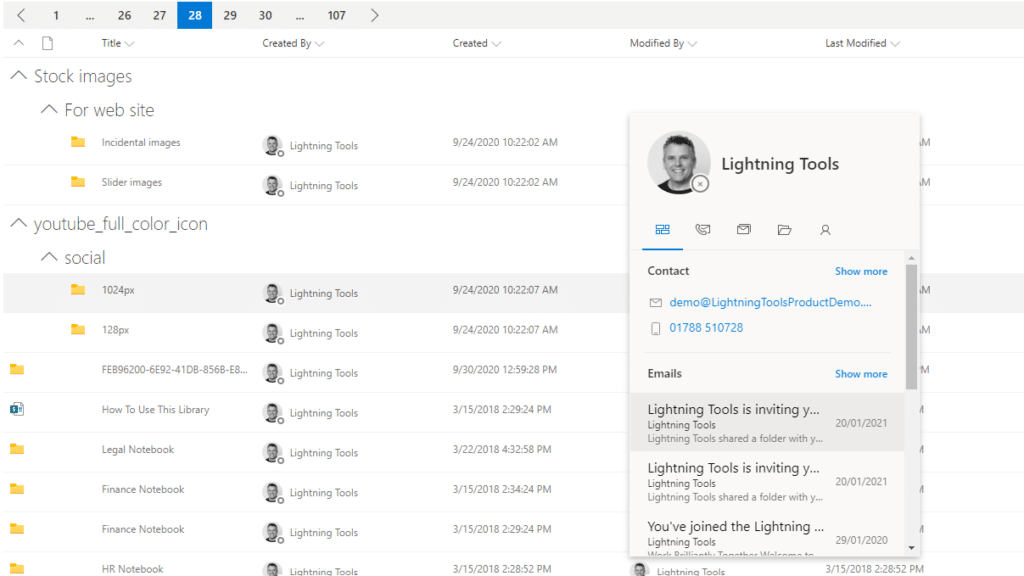
The Lightning Conductor is a SharePoint Content Aggregator that can be configured quickly by business users. The Lightning Conductor can be used to aggregate content from SharePoint Lists such as Tasks, Document Libraries, Contact Lists, and Custom Lists making it easy to view content in one place even if it is distributed across many sites and site collections. Key data can be highlighted using conditional formatting and data-bars as shown. Content from Search and Microsoft Graph can also be aggregated with the Lightning Conductor.Screenshot of CONTENT AGGREGATION WITHIN MICROSOFT TEAMS
The Lightning Conductor Web Part can be used within Microsoft SharePoint or Microsoft Teams. Even if content is stored within SharePoint sites, it is useful to have aggregated Documents, Tasks, Announcements, Calendars or Custom Lists from multiple sites displayed in a single handy view in Microsoft Teams. The Lightning Conductor can be added as a Teams Tab in any Microsoft Teams Channel.Screenshot of BUILDING REPORTS ON MICROSOFT GRAPH
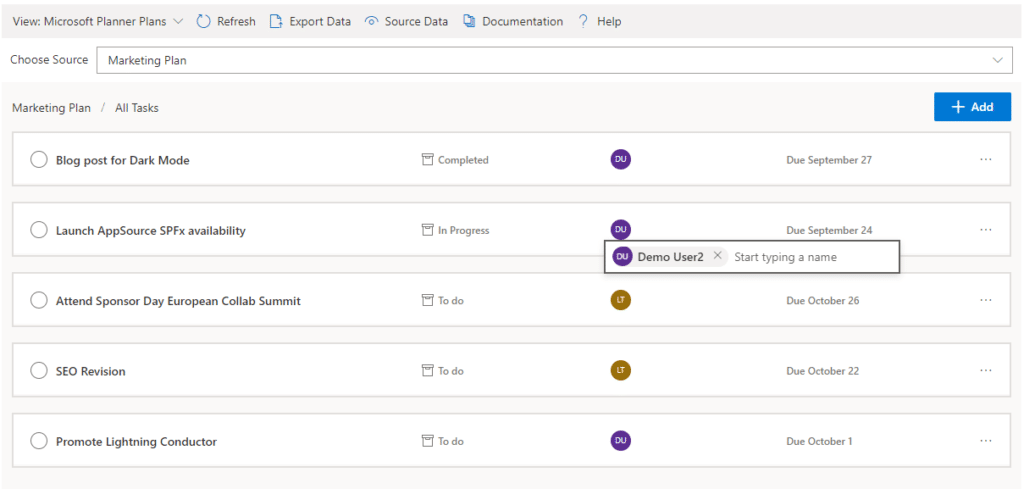
The Lightning Conductor can be used (without code) to aggregate content from Microsoft Graph as well as Search and SharePoint Lists. This example displays Microsoft Planner Plans and Microsoft Planner Tasks where users can Add new Tasks, Assign Users to Planner Tasks, Delete Tasks, and Complete Tasks. The same can be performed on Microsoft To Do items and displayed within Modern SharePoint pages or Microsoft Teams Tabs. The Lighting Conductor can also contain multiple views of content, making it ideal to display all of your tasks from SharePoint Task lists, Microsoft To Do and Microsoft Planner in a single web part or Teams Tab.

*Microsoft Graph Reports are only available for SharePoint Online and not SharePoint 2019.Screenshot of BUILDING REPORTS ON MICROSOFT 365 GROUPS
Powered by Microsoft Graph, the Microsoft 365 Group Rollup Provider enables users to aggregate content by browsing and selecting Microsoft 365 Groups. Within Microsoft 365 Groups, you’ll be able to select entities such as Drive Items, Owners, Members, Planner Plans, Planner Tasks, Events, Posts,  Sites, Lists, and Calendars.

*Microsoft Graph Reports are only available for SharePoint Online and not SharePoint 2019.Screenshot of AGGREGATING USING SEARCH
When performance is critical, search can be used for rollups. The Lightning Conductor offers three data source configurations to get to content. Object Model (Real Time Aggregation from SharePoint Lists), Microsoft Graph (Aggregation from Graph Entities such as Planner, OneDrive, Outlook), and Search. The Search Data Source enables the aggregation of content from large SharePoint lists and libraries when performance is critical. Thousands of documents can be displayed in under a second using Search.Screenshot of HIGHLIGHTING KEY BUSINESS DATA WITHIN VIEWS
End users and Site Owners can highlight the data that is important to them, the data that they need to prioritize. Using conditional formatting, data bars, and icons, conditions can be configured to highlight the data that is most important. Icons and Data Bars can be any color or size desired. Examples include highlighting High Priority tasks, Showing data bars for the completion progress of Tasks, or indicating which tasks are assigned to any particular user.

Nextcloud Screenshots

Screenshot of Nextcloud HubScreenshot of Nextcloud CalendarScreenshot of Nextcloud Talk