
ManageEngine ADAudit Plus vs. Panda Systems Management vs. TeamViewer
ManageEngine ADAudit Plus vs. Panda Systems Management vs. TeamViewer
| Product | Rating | Most Used By | Product Summary | Starting Price |
|---|---|---|---|---|
 ManageEngine ADAudit Plus | N/A | ADAudit Plus offers real-time monitoring, user and entity behaviour analytics, and change audit reports that helps users keep AD and IT infrastructure secure and compliant. Track all changes to Windows AD objects including users, groups, computers, GPOs, and OUs. Achieve hybrid AD monitoring with a single, correlated view of all the activities happening across both on-premises AD and Azure AD. Monitor every user's logon and logoff activity, including… | $595 per year | |
 Panda Systems Management | N/A | Panda Security now offers system monitoring, client-less device management, patch management, and other capabilities via Panda Systems Management. | N/A | |
 TeamViewer | N/A | TeamViewer provides software for both remote management and online collaborations. With TeamViewer, users have access to fully integrated online conference solutions for audio and video communication, including interactive screen sharing and remote access features. | $299 per year |
| ManageEngine ADAudit Plus | Panda Systems Management | TeamViewer | ||||||||||||||||||||||
|---|---|---|---|---|---|---|---|---|---|---|---|---|---|---|---|---|---|---|---|---|---|---|---|---|
| Editions & Modules |
| No answers on this topic |
| |||||||||||||||||||||
| Offerings |
| |||||||||||||||||||||||
| Entry-level Setup Fee | No setup fee | No setup fee | Optional | |||||||||||||||||||||
| Additional Details | Pricing is dependent on the number of domain controllers and starts at $595/year for the Standard edition, and $945/year for the Professional edition. | — | — | |||||||||||||||||||||
| More Pricing Information | ||||||||||||||||||||||||
| ManageEngine ADAudit Plus | Panda Systems Management | TeamViewer |
|---|
| ManageEngine ADAudit Plus | Panda Systems Management | TeamViewer | |||||||||||||||||||||||||||
|---|---|---|---|---|---|---|---|---|---|---|---|---|---|---|---|---|---|---|---|---|---|---|---|---|---|---|---|---|---|
| Monitoring Tasks |
| ||||||||||||||||||||||||||||
| Management Tasks |
| ||||||||||||||||||||||||||||
| Reporting |
| ||||||||||||||||||||||||||||
| Security |
| ||||||||||||||||||||||||||||
| Application Performance Management |
| ||||||||||||||||||||||||||||
| Remote Access |
| ||||||||||||||||||||||||||||
| Security |
| ||||||||||||||||||||||||||||
| Remote Administration |
| ||||||||||||||||||||||||||||
| Platform & Infrastructure |
|
| ManageEngine ADAudit Plus | Panda Systems Management | TeamViewer | |
|---|---|---|---|
| Small Businesses | Panda Systems Management Score 7.6 out of 10 |  Action1 Score 9.5 out of 10 |  Getscreen.me Score 9.7 out of 10 |
| Medium-sized Companies |  ManageEngine Site24x7 Score 9.5 out of 10 | Action1 Score 9.5 out of 10 | Action1 Score 9.5 out of 10 |
| Enterprises | ManageEngine Site24x7 Score 9.5 out of 10 | TeamViewer Score 8.6 out of 10 |  Remote Desktop Manager Score 9.5 out of 10 |
| All Alternatives | View all alternatives | View all alternatives | View all alternatives |
| ManageEngine ADAudit Plus | Panda Systems Management | TeamViewer | |
|---|---|---|---|
| Likelihood to Recommend | 9.5 (51 ratings) | 10.0 (3 ratings) | 8.7 (553 ratings) |
| Likelihood to Renew | 9.0 (4 ratings) | - (0 ratings) | 10.0 (64 ratings) |
| Usability | 8.2 (2 ratings) | - (0 ratings) | 9.1 (57 ratings) |
| Availability | 8.2 (1 ratings) | - (0 ratings) | 9.1 (5 ratings) |
| Performance | 7.3 (1 ratings) | - (0 ratings) | 9.1 (5 ratings) |
| Support Rating | 8.0 (44 ratings) | 7.0 (2 ratings) | 9.6 (50 ratings) |
| In-Person Training | - (0 ratings) | - (0 ratings) | 9.1 (2 ratings) |
| Online Training | 7.3 (1 ratings) | - (0 ratings) | 9.1 (4 ratings) |
| Implementation Rating | 7.7 (2 ratings) | - (0 ratings) | 8.9 (114 ratings) |
| Configurability | 6.4 (1 ratings) | - (0 ratings) | 9.1 (4 ratings) |
| Ease of integration | - (0 ratings) | - (0 ratings) | 9.1 (5 ratings) |
| Product Scalability | 8.2 (1 ratings) | - (0 ratings) | 9.1 (5 ratings) |
| Vendor post-sale | 8.2 (1 ratings) | - (0 ratings) | 8.4 (5 ratings) |
| Vendor pre-sale | 7.3 (1 ratings) | - (0 ratings) | 9.1 (5 ratings) |
| ManageEngine ADAudit Plus | Panda Systems Management | TeamViewer | |
|---|---|---|---|
| Likelihood to Recommend | ManageEngine, A Div of Zoho Corporation Pvt Ltd
 Ken Lubar CTO | WatchGuard Technologies
|  TeamViewer
|
| Pros | ManageEngine, A Div of Zoho Corporation Pvt Ltd
 Zwier Dijkhuis Systems Engineer | WatchGuard Technologies
| TeamViewer
|
| Cons | ManageEngine, A Div of Zoho Corporation Pvt Ltd
| WatchGuard Technologies
 Marco Prandin Proprietario | TeamViewer
 Sander de Beus IT Service Coördinator |
| Likelihood to Renew | ManageEngine, A Div of Zoho Corporation Pvt Ltd
| WatchGuard Technologies No answers on this topic | TeamViewer
 Yvonne Graber President, Owner |
| Usability | ManageEngine, A Div of Zoho Corporation Pvt Ltd
| WatchGuard Technologies No answers on this topic | TeamViewer
|
| Reliability and Availability | ManageEngine, A Div of Zoho Corporation Pvt Ltd
 Michael Baxley Information Technology Director | WatchGuard Technologies No answers on this topic | TeamViewer
|
| Performance | ManageEngine, A Div of Zoho Corporation Pvt Ltd
Michael Baxley Information Technology Director | WatchGuard Technologies No answers on this topic | TeamViewer
 Mike Robinson Internet Director / UNIX Administrator |
| Support Rating | ManageEngine, A Div of Zoho Corporation Pvt Ltd
| WatchGuard Technologies
| TeamViewer
 Andrew Shannon Senior System Administrator |
| In-Person Training | ManageEngine, A Div of Zoho Corporation Pvt Ltd No answers on this topic | WatchGuard Technologies No answers on this topic | TeamViewer
|
| Online Training | ManageEngine, A Div of Zoho Corporation Pvt Ltd
Michael Baxley Information Technology Director | WatchGuard Technologies No answers on this topic | TeamViewer
 Jordan Paquette IT Support Technician |
| Implementation Rating | ManageEngine, A Div of Zoho Corporation Pvt Ltd
| WatchGuard Technologies No answers on this topic | TeamViewer
 J Rio Fultz CEO |
| Alternatives Considered | ManageEngine, A Div of Zoho Corporation Pvt Ltd
| WatchGuard Technologies
| TeamViewer
|
| Scalability | ManageEngine, A Div of Zoho Corporation Pvt Ltd
Michael Baxley Information Technology Director | WatchGuard Technologies No answers on this topic | TeamViewer
|
| Return on Investment | ManageEngine, A Div of Zoho Corporation Pvt Ltd
| WatchGuard Technologies
Marco Prandin Proprietario | TeamViewer
|
| ScreenShots | ManageEngine ADAudit Plus Screenshots   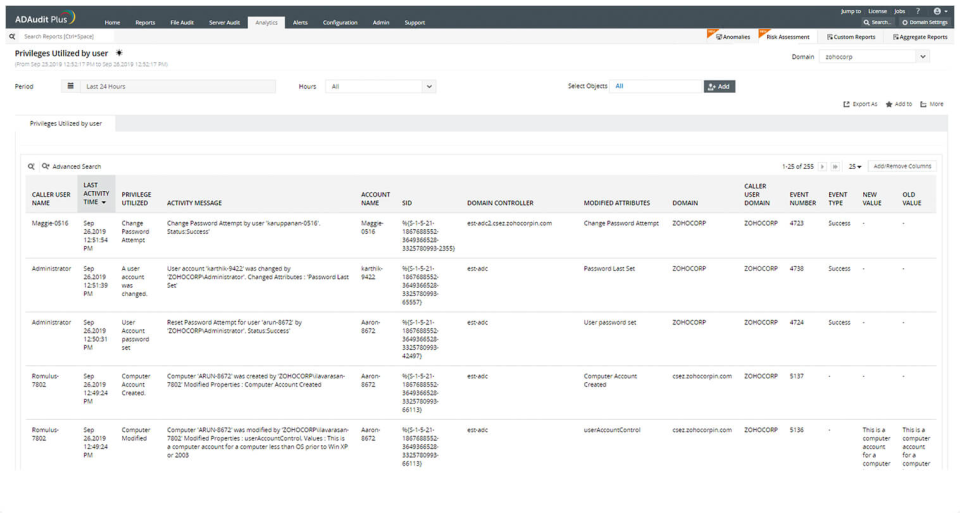  | TeamViewer Screenshots    |
