monday CRM provides control over the entire sales funnel and helps users close deals faster by automating manual work and streamlining sales activities from A-Z.
$45
per month 3 seats (minimum)
OutboundEngine
Score10 out of 10
N/A
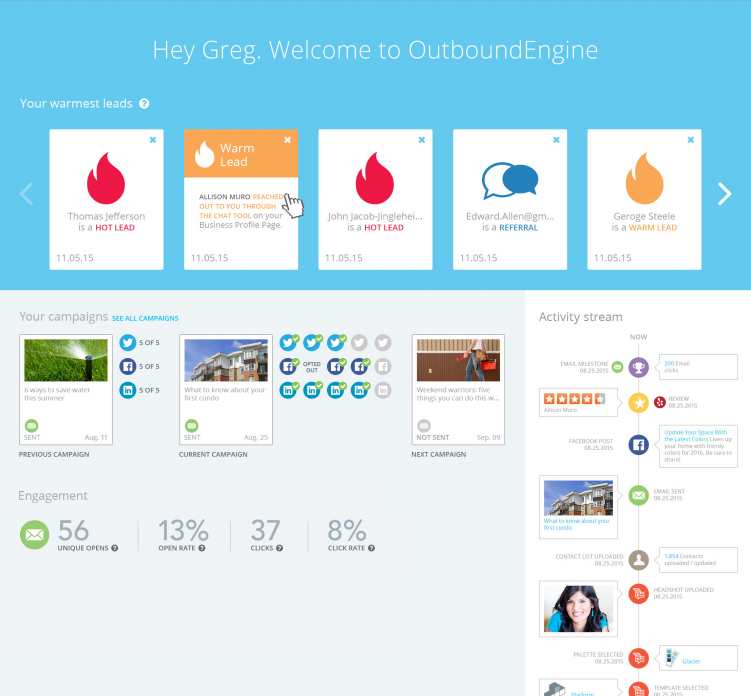
OutboundEngine provides a hands-off way for small business owners to market and grow their business. The product aims to provide small businesses with what big companies have achieved with marketing automation. The service aims to help users keep in touch with clients and prospects with professionally designed, branded campaigns. Benefits include: driving engagement, surfacing warm leads from current contacts, generating referrals and repeat business from their existing contacts, social…
$199
per user
Pricing
monday CRM
OutboundEngine
Editions & Modules
Basic
$15
per month per seat
Standard
$20
per month per seat
Pro
$33
per month per seat
Ultimate
Contact Sales
Essential
$199
per user
Value
$299
per user
Premium
$499
per user
Offerings
Pricing Offerings
monday CRM
OutboundEngine
Free Trial
Yes
No
Free/Freemium Version
No
No
Premium Consulting/Integration Services
No
No
Entry-level Setup Fee
Optional
$99 per user
Additional Details
Plans start with 3 seats. Yearly save 33%
More information is available on the vendor's website.
Our Integrated/brand marketing and Lifecycle marketing teams find monday CRM to be particularly useful for project management. Integrated marketing uses monday to build out our yearly promotional calendar, which keeps the entire company informed on all the launch and sale details for the year, across both retail and digital channels. The Lifecycle marketing team uses monday CRM to track individual campaign projects, mainly consisting of email asset creation. There are times when monday is not the preferred CRM platform, such as data and analytics tracking, project performance tracking, or scenarios when immediate feedback is required.
A de minimis incentive was given to thank the reviewer for their time. The incentive was not used to bias or drive a particular response, nor was the incentive contingent on a positive endorsement. TR verified that a representative sample of customers was invited. More Info
OutboundEngine does a referral campaign and I've been able to close a couple of deals based on getting in touch with people who engage with this campaign and state they could use my services in the next 6 months. This is a great follow up tool for those you may or may not know are going to be needing your services.
A de minimis incentive was given to thank the reviewer for their time. The incentive was not used to bias or drive a particular response, nor was the incentive contingent on a positive endorsement. TR verified that a representative sample of customers was invited. More Info
A de minimis incentive was given to thank the reviewer for their time. The incentive was not used to bias or drive a particular response, nor was the incentive contingent on a positive endorsement. More Info
The content that they generate to send to our clients is relevant and the clients want to engage with us. It makes us appear more professional and consistent, even though we are a smaller company.
It helps us stay in touch with clients and helps us stay top of mind. We are able to generate more new business leads if we are in consistent contact with current, former, and potential clients.
Their customer service and support is outstanding. All my questions were answered and I went into the program feeling confident and knowledgeable.
It takes a while to get used to the UX if you are used to Hubspot or another CRM
We are still testing mass email functionality, it's a little less intuitive vs Hubspot
The quote/invoice forms are not pre-built into the CRM the way they are in Hubspot, so you have to manually set those up. Some might see that as a positive thing because it's more flexible with your respective tech stack, but it required more research on our end to make sure we set it up to flow efficiently.
A de minimis incentive was given to thank the reviewer for their time. The incentive was not used to bias or drive a particular response, nor was the incentive contingent on a positive endorsement. More Info
I do not like the use of drawings to attract new customers, and they have ignored my requests to eliminate that for my personal emails.
I do not like it when a competitor in my immediate market has the same posts. It cheapens the service or makes it appear that I am simply sharing another's post.
A de minimis incentive was given to thank the reviewer for their time. The incentive was not used to bias or drive a particular response, nor was the incentive contingent on a positive endorsement. TR verified that a representative sample of customers was invited. More Info
A de minimis incentive was given to thank the reviewer for their time. The incentive was not used to bias or drive a particular response, nor was the incentive contingent on a positive endorsement. More Info
The biggest issue is poor ROI. The second biggest issue is rigid customer service process, lack of a sense of urgency, and inability to reach out to upper management with issues.
It's a really easy to use and improve tool, that helps you to quickly master its functions and then helps you to improve the features usage as quickly as you learned the basis. Any doubts you have are easily solved by the contents and tutorials it provides, and if it doesn't solve it, the team is always quick to reply and help you.
A de minimis incentive was given to thank the reviewer for their time. The incentive was not used to bias or drive a particular response, nor was the incentive contingent on a positive endorsement. More Info
Overall, OutboundEngine is very user friendly. It is simple to set up and explore, and if there are any issues or questions, the customer service team and account managers are always available to help. They are very knowledgeable and were able to explain everything in detail to me. The program is easy to navigate and helps me stay organized, and an uncomplicated and straightforward solution was exactly what I was looking for
I haven't had to contact Outbound Engine because I haven't had any application errors or unplanned outages. I basically have had such a trouble free experience with them that I haven't had to call. Everything is automated and I get a notice to review every isse. I suppose if I personalized the newsletter a bit more and added some of my own articles, I would need to contact them, (which I should really start to do) but so far things have been so on point, I haven't felt the need.
A de minimis incentive was given to thank the reviewer for their time. The incentive was not used to bias or drive a particular response, nor was the incentive contingent on a positive endorsement. TR verified that a representative sample of customers was invited. More Info
When I have requested customer service from monday.com account the person who I spoke with was really helpful but the set up to get a hold of someone in customer service was a little complicated and time-consuming. I had to get a ticket in an email and then wait for a specific person to call me back at a certain time, that's why I gave a six.
The customer service was excellent! Everyone I spoke to was kind and knowledgeable. My account manager was easily reachable. Setup of the OutboundEngine program was explained really thoroughly, and we knew how we could best use the product to meet the needs of our clients and get our online and social media presence off the ground.
A de minimis incentive was given to thank the reviewer for their time. The incentive was not used to bias or drive a particular response, nor was the incentive contingent on a positive endorsement. More Info
Monday is significantly better. Not only is it more aesthetically pleasing it is just better overall. I feel as if Monday has a better system in regard to keeping track of all the files we have. Moreover, I also feel like the fact that it allows me to tag my other coworkers enables me to have better communication in the office.
A de minimis incentive was given to thank the reviewer for their time. The incentive was not used to bias or drive a particular response, nor was the incentive contingent on a positive endorsement. More Info
I selected it for the ability to have an automated system do 3 things all at once, social media posts, emails and the instant communication with the chat box. I have never seen a chat come through that lead to a helpful client touchpoint. I have never used another product but have since begun to weigh some of the less expensive options.
A de minimis incentive was given to thank the reviewer for their time. The incentive was not used to bias or drive a particular response, nor was the incentive contingent on a positive endorsement. TR verified that a representative sample of customers was invited. More Info
A de minimis incentive was given to thank the reviewer for their time. The incentive was not used to bias or drive a particular response, nor was the incentive contingent on a positive endorsement. TR verified that a representative sample of customers was invited. More Info
A de minimis incentive was given to thank the reviewer for their time. The incentive was not used to bias or drive a particular response, nor was the incentive contingent on a positive endorsement. More Info