monday.com Work OS is an open platform designed so that anyone can create the tools they need to run all aspects of their work. It includes ready-made templates or the ability to customize any work solution ranging from sales pipelines to marketing campaigns, CRMs, and project tracking.
$12
per month per user
Roadmunk
Score 5.6 out of 10
N/A
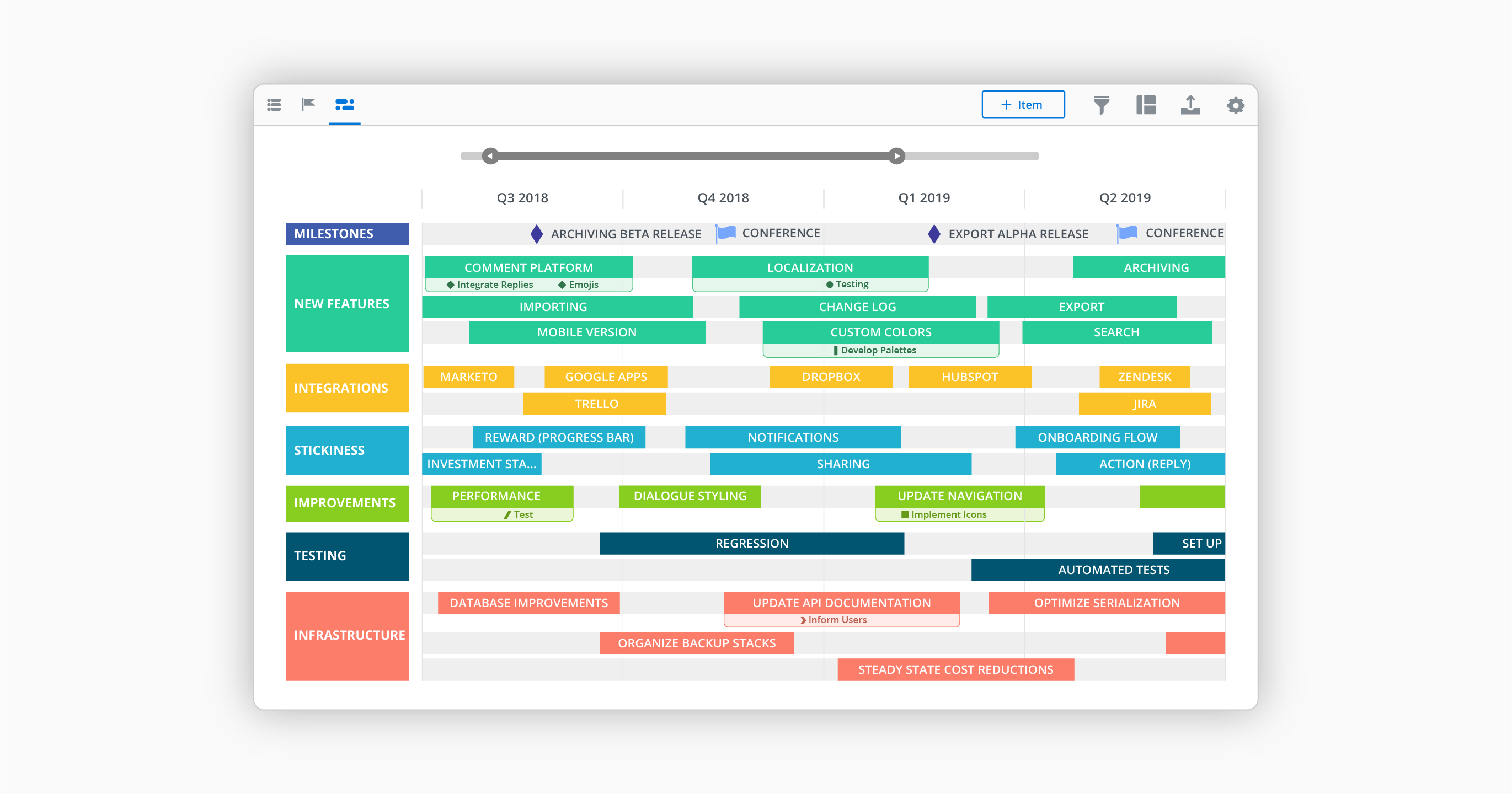
Roadmunk is a roadmap visualization platform that is designed to enable product managers and their teams to communicate the strategic roadmap throughout their organization. The vendor says product leaders can easily input milestones, roadmap data and create unlimited pivots in real time. The vendor says it has differentiated itself through intuitive user-centric design, seamless manipulation of roadmap views and enterprise data security. Since late 2021, Roadmunk is part of Tempo.
$19
per seat
Wrike
Score 8.6 out of 10
Mid-Size Companies (51-1,000 employees)
Wrike is a project management and collaboration software. This solution connects tasks, discussions, and emails to the user’s project plan. Wrike is optimized for agile workflows and aims to help resolve data silos, poor visibility into work status, and missed deadlines and project failures.
$0
per month per user
Pricing
monday.com
Roadmunk
Wrike
Editions & Modules
Basic
$12
per month per user
Standard
$14
per month per user
Pro
$24
per month per user
Enterprise
Contact Sales
Contact us
Starter
$19
per seat
Business
$49
per seat
Professional
$99
per seat
Enterprise
Custom
per seat
Wrike Free
$0
per month per user
Wrike Team
$10
per month (billed annually) per user (2-15 users)
Wrike Business
$25
per month (billed annually) per user (5-200 users)
Apex
Request a quote
per month per user
Pinnacle
Request a quote
per month per user
Offerings
Pricing Offerings
monday.com
Roadmunk
Wrike
Free Trial
Yes
Yes
Yes
Free/Freemium Version
Yes
No
Yes
Premium Consulting/Integration Services
No
No
No
Entry-level Setup Fee
Optional
No setup fee
No setup fee
Additional Details
An 18% discount is available for annual billing.
Ready to roadmap? All our plans start with a free 14-day trial.
Every premium plan begins with a 14-day trial period.
monday.com feels like it offers a lower barrier to entry as well as more versatility, extensibility without becoming too complex. Atlassian is geared more for larger companies requiring a greater degree of granular controls.
Both platforms have a number of integrations (though, …
I used Pipedrive in my previous roles, so I did not evaluate monday.com as an alternative to Pipedrive. Similarly, Salesforce is not positioned as an alternative to monday.com for us. We currently use both Salesforce and monday.com, as they serve different purposes and …
Planner is very hard to figure out. Insightly is a good resource to keeping track of customers and their info but for tasks, monday.com is far superior
Workfront offered a more intuitive user interface, which made team adoption easier. It also included additional products that aligned well with the needs of our Dev, Work Management, and Service teams.
Cost is a big factor as the alternatives stacked up poorly in user costs and built in features. Also, the business was already using a different facet of monday.com so it was a quick setup and we already had experience and people were Jo knew the platform. Less complex and also …
monday is more capable and comprehensive when it comes to project and task management as well as the CRM side. However, Odoo is better suited for managing other areas that monday doesn’t cover, such as employee management, payroll, and invoicing. If one were to prioritize cost …
We have not used anything like Monday.com before. We used to do all of what I described on Google Sheets and share them with the company. It was very time consuming and cumbersome to remake new sheets every year, Monday.com gives us the freedom to add on year by year and not …
monday.com is far superior to Microsoft Planner and Basecamp, and arguably superior to Trello and Slack Lists as well. Asana (for work management and Zendesk (for request management) put it to shame. My main monday-using client selected it primarily because of its slightly …
We have only ever tried one other software that was designed to work similarly to monday.com. I will not name the company but our experience with it was just short of harrowing. The company was friendly and supportive but the product they designed was not user friendly. It did …
monday.com is so much better and cheaper. We moved from Zendesk because, in our experience, their customer service was terrible, they kept raising prices, and there was limited functionality relevant to our organization. The tools within monday.com allow us to use it as more …
It's been a while since trying Asana, so it's hard to say. I think they are very similar from what I remember, but maybe monday.com has more reporting and customization possibilities?
monday.com offer much of the standard tools and seems to be ever evolving. They seem to take feedback and constantly upgrade the tools. If all the tools are there, the differentiating factor might be the cost, any integrations you may need, and the visual "chemistry". To me, …
We chose to move from Zoho to monday.com when our company started growing exponentially. Overall, our team was thankful for the change because we were growing at far to fast of a speed for Zoho's tools to keep up with us. monday.com is a better, beefier platform with far better …
We decided to go with monday.com because they offered a free tier for nonprofits and because they are easier to use and offered additional features that we could not find on the other choices. Hands down, there was no better choice for us than monday.com.
When I arrived at my org, I was initially disappointed to hear that we used something other than Asana for project management. Fast forward just a few months, and I became a complete monday.com convert. While its organization is similar to Asana's, it's user interface, …
Roadmunk beats Aha! through visualization and Gantt connections between work items. We originally turned to Lucid (Spark and Chart) and Miro to get away from Aha's difficulties, but those platforms presented significant challenges in terms of relationships and dependencies.
We've used Google Calendar, Microsoft Office products, Trello, and others. Roadmunk seems to combine the best of all of those, and then offers a little more.
Roadmunk has an actual product management workflow design built into it vs trying to use eg generic e-post-it software like Trello. Trello is better at free-forming prioritization, which is actually much better than (again) the awkward item navigation in Roadmunk, but the …
Much easier to use Roadmunk than PowerPoint. The template is already set and the box heights are fixed. Having less flexibility is actually useful here, since you don’t have to build everything from scratch, you can just focus on the insights. The Gantt chart functionality in …
Sr. Director, Emerging Products at Swagbucks, a Prodege Company
Chose Roadmunk
To be quite transparent, Roadmunk was the cheaper option. However, it also provided a ready-to-use solution for the team that required little to no training to get up and running. It provided the needed results almost from Day 1. Aha! had the more robust feature set and the …
In my opinon Roadmunk has the best UX and very friendly interface. The decision to purchase Roadmunk was based also on the great customer service and help provided by the team. Roadmunk team is open to suggestions and is constantly working on their product. It's great to see …
Wrike has a broader application than task management apps like Toggl or Todoist. I do use Toggl as a basic time tracking software, however Wrike covers more ground. It is robust and user-friendly, and much less expensive than MS Project.
We used RoboHead prior to Wrike for document control and project management. Wrike is by far more advanced and interactive. It gives us so many more opportunities for communication.
Wrike's UI, combined with its low-cost solutions, has been the standout factor compared to the other options sought. They have multiple license types suited to different usage, a standout compared to others that don't leave you stuck paying high license fees for licenses you …
I utilized basecamp at my last position and I just remember it was extremely limited in what you could do. If I remember correctly there was no workflow integration of the platform, it was essentially just an app that you could create folders in that housed all of the files. No …
Cost and functionality. We were able to gain consensus on Wrike across numerous stakeholders. It may not be the best at everything but it's capable at a wide range of things.
Wrike was more capable that ProWorkflow (at least when we compared them several years ago) and more team/smaller workflow real time oriented than MS Project - where Project is better for detailed PM work. ClickUp is far more flexible and better value for a similar price at the …
our past products have been so hard to customize, streamline, and make work for all types of roles in the company. i feel like wrike is a great fit for everyone to work together well.
Honestly for me, it depends what you’re utilizing these tools for. In my experience, some of the other project management tools I’ve used the past such as Jira are way too complex for the use case we run into with our business. I feel like the overall goal of Wrike is to …
I think Wrike is very similar to other project management platforms such as Monday, Asana and Teamwork that I have used before. As they all provide strong tools for task and project organization, one feature particularly liked by me in TW was its time-tracking functionality, …
Monday wasn't as customizable as Wrike. Basecamp is great for tracking simple tasks and communicating with outside agencies, but isn't complex enough to track projects. Smartsheet is basically a fancy spreadsheet.
We have been using Wrike for over seven years, so I don't recall the specific reason why we chose it over Asana. I recall that the functions were similar, but I think we found that Wrike offered flexibility and structure that we felt would function the best for our department.
Wrike is more robust and suited for enterprise teams. Learning curve is more difficult and involved. Other platforms you can learn in a day or two. Wrike takes a month or two to get the hang of
Monday is a easier for project management and task tracking. Where Wrike excels is with the ticketing system for our IT, legal, or other specific teams.
The platform is very well suited for our nonprofit programs that serve low-income clients who need diapers, wipes, and period products. It has helped us run our programs, capturing information and allowing us to view the data for reporting purposes. The ability to filter data is very helpful by allowing us to categorize information to get a better picture of the progress of our programs.
Roadmunk allows us to configure and share customized views of our roadmaps. As a platform, it has demonstrated progress in its scalability and performance, which has accommodated the growth our team has seen over the last two-plus years. Particular strengths include configurability and customization, along with options for views, exports, and sharing with internal and external audiences.
I believe it's well suited if you have multiple jobs/projects that you need to keep organized. We work with multiple job types from print/creative to web, copy and digital ads so it helps us stay organized. I don't think it would be suitable for a company that doesn't have a lot of jobs to manage. We average over 1,200 requests a year.
I like summary of subitems, especially with subitasks as subitems and add item tracking for each subtask it can show total tracked in parent item. Similar with other columns, like numbers, status, date.
Dashboard features, Many kinds of dashboard view available, we can utilize on the basis of requirements.
monday.com workform is very powerful, easily share form link when submitted it will create line item in board with provided data.
monday.com automation is very helpful in order to automate steps with specific rules and easy setup.
monday.com also provides integrations in order to automate processes if need to integrate multiple app together. or need to transfer data between multiple apps.
Collaboration – Roadmunk makes it very easy to work and edit within a team structure.
User Experience – The usability of the product made it quite easy for the entirety of the team to hit the ground running (i.e. very little training was required).
Rollups – Each product line and therefore each product owner could easily focus on their particular roadmap without having to sort through the master roadmap making it highly efficient, while at the same time making it quite easy to pull all updates into one high-level document.
The desktop app for Mac seems to have a few issues with visual glitches appearing on screen, it only seems to go away when I close the tool and reopen it
Subtasks don't show on the individual users to-do list, only main level tasks
Teams involved in content creation, such as marketing or editorial teams, could use monday.com to manage the entire content lifecycle. Boards might track content ideas, assignments, drafts, reviews, approvals, and publication schedules, helping teams collaborate and keep content production on track.
I wish that Wrike had more drag and drop functionality that would be connected to assignee and also I wish that the finish date of a task would update to the date where you checked completed. It does not do that. Also finishing a task doesn't move the start date of the next task it "protects your time in that way", but our management team wants us to quickly see what we have down the pipeline rather than having to scroll down the list of upcoming tasks.
It's really about ease of use. I use Click-Up as well, which I really enjoy, but monday.com is a lot less complex to use. Its structure is a bit easier to understand and I got accustomed to the functionality very quickly. I have not explored enough of its functionality to comment any further but it's a really great tool for tracking progress and for capturing absolutely everything I need to save, including ideas, brain-dump, insights, continuous improvement on tasks and processes. I am lucky to be able to use monday.com as a member of my client's team.
Performance has improved meaningfully over the last 12 months or so, especially in our views that contain many roadmap items. Some challenges remain, however, particularly when changing the timeline and in scenarios of multiple users interacting with the roadmap simultaneously.
It does take some time and work to really understand and use it properly, but I think the accessibility to help and documentation make that completely feasible. Once you know how to use it, I find it to be very user-friendly, and have very few complaints.
Over two years of (almost) daily usage without outages. Don't remember any errors. I give it 9 only because some Wrike plugins (for online document edit) are based on NPAPI architecture. These types of plugins are being phased out in new browsers, and NPAPI plugins are disabled by default in recent versions of Chrome so you have to do some browser adjustments when you switch browsers or move to another computer.
Everything performs fairly well. Every now and then there are user errors where an employee will not click "ok" on a note they've created and simply exit out (I do wish that something was in place to prevent this, such as a pop "are you finished?")
Wrike tasks loads fine, but I hate clicking files and wait for a bit of time since it is powerpoint or word, Wrike assumes I want to open those on Wrike. My suggestion is to link it to office 365 so we do not need Wrike based decoder for PPTX and DOCX
monday.com only really care about accounts that have 20 seats or more. While this is great for monday.com, it pushes smaller organisations to evaluate alternatives. We rate monday.com highly in our organisation because key staff have already got good experience with the application and we know we will get to 20+ seats one day. But, till then the billing model and lack of permanent enterprise features is a dread.
The Roadmunk team has been great to work with...whether proactive communications about new features or the occasional outage, or when we reach out to them with feature requests, assistance/support, or even license management and renewals - they are top notch.
Time and time again, Wrike has proved that they listen to their customers and put us first. From sales to support - they are quick to respond, encourcage community engagement and I never feel like i am callling a help center
To have someone walk you thru the features and capabilities of Monday.com is priceless. Someone also coming along later in the contract to see if you are maximizing the program to suit your company needs is beyond helpful. The staff that have provided this training are fun, creative and very patient.
I love the Wrike training options. Wrike Discover has tons of courses, learning plans, certifications, etc. This is an area where Wrike definitely shines! I wish these resources were more in your face for new people, because it seems like a lot of coworkers didn't know all of this training was available to them.
We signed up for the accounts. Created the accounts. Ran the trial version and tested it live while we were running multiple projects and found that it was fitting our needs perfectly. When the trial ended and we were asked to purchase the full version, we did. We have found other ways to use it and it's a breeze.
There are a lot of bells and whistles in Wrike, and not all of it is easy or intuitive to understand once it's plopped in your lap. It's easier when there are a few choice people who understand Wrike as a platform and articulate it in such a way where it makes it easy to pass it along to others in the group
monday.com feels like it offers a lower barrier to entry as well as more versatility, extensibility without becoming too complex. Atlassian is geared more for larger companies requiring a greater degree of granular controls. Both platforms have a number of integrations (though, Atlassian may have "more" because of it's marketplace and longer tenure), but monday.com may be easier to configure, though with potentially more limited functionality. monday.com definitely lends itself well to getting a business off the ground with simpler automations and the ability to grow you to the point of "graduating" to a more specialized tools.
Roadmunk has an actual product management workflow design built into it vs trying to use eg generic e-post-it software like Trello. Trello is better at free-forming prioritization, which is actually much better than (again) the awkward item navigation in Roadmunk, but the other Roadmunk advantages post-prioritization win out in the end.
Wrike's UI, combined with its low-cost solutions, has been the standout factor compared to the other options sought. They have multiple license types suited to different usage, a standout compared to others that don't leave you stuck paying high license fees for licenses you won't use to that extent.
For it to work across multiple departments and sites, I would like to see improvements made with integrations and automation. For this question, I am acknowledging not only the addition of internal triggers/automation, but also an expansion on external ones.
I’d go with a 9/10. It scales really well across teams and use cases, especially once you set things up properly. The only reason it’s not a full 10 is that it can take some effort to structure everything cleanly at the start.
By using monday.com as an enablement tool for templated onboarding plans, we have been able to begin calculating the number of manager hours saved through our work (not defined yet).
monday.com's reporting tools also allow us to more easily report on the productivity and output of our team since we keep up with all projects and subitems in monday.com.
Roadmunk has reduced the number of meetings that product needs to attend with customers by 20-25%
Roadmunk has eliminated a whole set of churn in our workstream management tool (JIRA) by abstracting the planning step away from the steps where we monitor work progress