TrustRadius: an HG Insights company

Save this comparison

Save this comparison

Add Product

Recommended Comparisons

    Overview
    ProductRatingMost Used ByProduct SummaryStarting Price

    PandaDoc

    Score8.5 out of 10
    N/APandaDoc headquartered in San Francisco offers their eponymous electronic signature platform for sales teams, containing sales proposal automation and CPQ (configure, price, quote) features, and integration with CRMs.

    $35

    per month per seat

    SAP CPQ

    Score7.9 out of 10
    N/ASAP CPQ (replacing the former CallidusCloud CPQ solution) has been built to be independent of any CRM. The vendor says that this makes their solution more flexible. The vendor also says their solution provides businesses the flexibility to customize and enhance the solution without the constraints of CRM code. Pricing and product catalog changes can also be made by the users without having to rely on a CRM administrator.N/A
    Pricing
    PandaDocSAP CPQ
    Editions & Modules
    Starter
    $35
    per month per seat
    Business
    $65
    per month per seat
    Enterprise
    Contact Sales
    No answers on this topic
    Offerings
    Pricing Offerings
    PandaDocSAP CPQ
    Free Trial
    YesYes
    Free/Freemium Version
    NoNo
    Premium Consulting/Integration Services
    YesYes
    Entry-level Setup FeeOptionalOptional
    Additional DetailsPandaDoc offers a free eSign plan and 3 paid packages for eSigning and document automation. All plans include unlimited documents and eSignatures. Evaluations start with a free 14-day trial. Up to a 46% discount for annual pricing.
    More Pricing Information
    Features
    PandaDocSAP CPQ
    CPQ
    Comparison of CPQ features of PandaDoc and SAP CPQ
    Feature
    PandaDoc
    -
    Ratings
    SAP CPQ
    8.4
    8 Ratings
    4% below category average
    Quote sharing/sending00 Ratings8.88 Ratings
    Product configuration00 Ratings8.48 Ratings
    Configuration options00 Ratings8.78 Ratings
    Pricing rules00 Ratings8.08 Ratings
    Price adjustment00 Ratings8.78 Ratings
    Purchase history and open contracts00 Ratings8.57 Ratings
    Guided selling/Sales portal00 Ratings7.16 Ratings
    CPQ reporting & analytics00 Ratings8.36 Ratings
    CPQ-CRM integration00 Ratings8.37 Ratings
    Attachments to quotes00 Ratings9.27 Ratings
    Order capturing00 Ratings8.77 Ratings
    Best Alternatives
    PandaDocSAP CPQ
    Small Businesses
    BoldSign, by Syncfusion
    Score10 out of 10
    QuoteWerks
    Score9.7 out of 10
    Medium-sized Companies
    OneSpan Sign
    Score9.6 out of 10
    QuoteWerks
    Score9.7 out of 10
    Enterprises
    DocuSign
    Score8.7 out of 10
    Agentforce Revenue Management
    Score8.6 out of 10
    All AlternativesView all alternativesView all alternatives
    User Ratings
    PandaDocSAP CPQ
    Likelihood to Recommend
    8.5
    (329 ratings)
    8.0
    (8 ratings)
    Likelihood to Renew
    9.1
    (18 ratings)
    9.5
    (2 ratings)
    Usability
    8.3
    (23 ratings)
    7.8
    (8 ratings)
    Availability
    9.1
    (4 ratings)
    -
    (0 ratings)
    Performance
    9.6
    (21 ratings)
    -
    (0 ratings)
    Support Rating
    6.1
    (23 ratings)
    8.0
    (2 ratings)
    Implementation Rating
    6.3
    (4 ratings)
    10.0
    (1 ratings)
    Configurability
    2.8
    (3 ratings)
    -
    (0 ratings)
    Ease of integration
    9.0
    (20 ratings)
    -
    (0 ratings)
    Product Scalability
    8.6
    (4 ratings)
    -
    (0 ratings)
    Vendor post-sale
    9.7
    (20 ratings)
    -
    (0 ratings)
    Vendor pre-sale
    6.7
    (4 ratings)
    -
    (0 ratings)
    User Testimonials
    PandaDocSAP CPQ
    Likelihood to Recommend
    PandaDoc
    Best suited for after demonstrations when requested by the prospect when they are looking for pricing with T&C. The data room is also great that acts like a drop box for opportunities and their contacts. Helps share pertinent information with others in the organization.
    Incentivized
    Read full review
    SAP
    I would recommend SAP CPQ because it is powerful and works really well for handling complex pricing quotes and approvals. It save time and keep everything in one systems.
    Incentivized
    Read full review
    Pros
    PandaDoc
    • Allows clients to remotely execute documents.
    • Tracks the progress of document execution.
    • Emails clients to remind them to sign documents so we don't have to follow up.
    • Emails us when documents have been fully executed.
    • Provides an easy-to use interface to place signatures, dates, and other information on our forms.
    Incentivized
    Read full review
    SAP
    • Simple order entry
    • Fast order entry
    • Quick contracts creations and pricings
    Incentivized
    Read full review
    Cons
    PandaDoc
    • Sometimes the fillable fields don't automatically map properly and you have to manually adjust.
    • Plan tiers and pricing recently changed, so now we get less value and less features (limited templates, no more pricing tables or invoicing/connected payment) for the same price, which is pricy for a small business.
    • Easier, integrated invoicing as an included feature (so we don't have to use a different software for invoicing/payment collection) would be ideal. You have to upgrade to the Business Plan for this.
    Incentivized
    Read full review
    SAP
    • It is a complex solution and could do better on ease of use
    • Perhaps give mini explainer tutorials as you begin using it
    Incentivized
    Read full review
    Likelihood to Renew
    PandaDoc
    The reason I gave it a rating of 7 is because it's probable, but not for sure. This is because there are a few little things we don't love about pandadoc. Mostly that there is not conditional logic such as: they must either fill this field out OR this one. Also it's a little pricey. But we'll probably stay because it's good enough and a pain to switch to something new
    Incentivized
    Read full review
    SAP
    We definitely want to renew based on the functionality and the use we give to it. However you never know 100% so that's why it is not a 10. Let's imagine if pricing changed significantly or they made sudden changes to the product which we considered negative... Then we would move elsewhere. This is highly unlikely though
    Read full review
    Usability
    PandaDoc
    Once you get the hang of it, it's very easy to use. There can be a slightly steep learning curve to get fully in on the system. The new editor v2 has really improved usability and allows us to collaborate on documents simultaneously. Once the templates and library items are set up, a new document, whether it be a sales or HR document, takes very little time to complete.
    Incentivized
    Read full review
    SAP
    it make the pricing and quoting part easier and able to integrate with other sap products easily but the ui could have been better and the customizations is not straight forward, requires deep expertise. which make the work more difficult. but instead of custom designing. this way we can reduce the coding and can go straight ahead with custom pricing part
    Incentivized
    Read full review
    Reliability and Availability
    PandaDoc
    We haven't had any real issues regarding downtime as of yet.
    Incentivized
    Read full review
    SAP
    No answers on this topic
    Performance
    PandaDoc
    The documents load quickly for the most part but sometimes if there are larger documents with a high number of variables it could take a bit longer to get the document to show up. Most of the time the document comes on the screen relatively quickly allowing for quick access to documents to be edited and sent out.
    Incentivized
    Read full review
    SAP
    No answers on this topic
    Support Rating
    PandaDoc
    Recently I could not upload a pdf to a contract - support was very responsive and easy to work with. They got back to me the next day with an apparent fix - however when I opened the document nothing had changed. I then could not respond to the rep who was helping me because it was a "no-reply address", the problem still has not been solved and we had to make alternate arrangements to get this to the client. Never had it happen before and was only with this one contract.
    Incentivized
    Read full review
    SAP
    Not used
    Read full review
    Implementation Rating
    PandaDoc
    Implementation was before the time I was here at Riafox, however, support has been great in assisting to merge spaces and upgrade to 2.0 Editor.
    Incentivized
    Read full review
    SAP
    No answers on this topic
    Alternatives Considered
    PandaDoc
    We used Dropbox back when it was still HelloSign. At the time, new templates were very hard to create. We had to upload a PDF and then add the fields from there. With PandaDoc, we are able to drag and drop the text, images, logos, and fields we need easily. This has saved our team an immense amount of time.
    Incentivized
    Read full review
    SAP
    It connect much better with our existing SAP system like ERP and S/4HANA. keeping everything in sync automatically. Approval processes and automation are faster. reducing email and manual work.
    Incentivized
    Read full review
    Scalability
    PandaDoc
    It's scalable
    Incentivized
    Read full review
    SAP
    No answers on this topic
    Return on Investment
    PandaDoc
    • We have greatly increased the efficiency in which we can get signatures from individuals for documents and increase productivity.
    • We have been able to find older documents very easily.
    • W-9 have been very difficult due to Section 3, but this was addressed with conditional logic
    Incentivized
    Read full review
    SAP
    • Helped us make a lot of sales easier and quicker
    • More revenue we have made since doing this
    • Only negative is sometimes can be slow or want to attach custom email templates for send outs
    Incentivized
    Read full review
    ScreenShots

    PandaDoc Screenshots

    Screenshot of some of the custom-designed themes, templates, embedded rich media, and interactivity to give every deal the opportunity to get noticed.Screenshot of automatic notifications, on-the-fly editing, CRM Integrations, and integrated eSignatures.Screenshot of reporting, with drill down to the deal level with proposals, to pick which deals to include (or exclude).Screenshot of legally binding eSignaturesScreenshot of centralized communications to streamline the negotiation process, and make revisions in real-time in a single location.Screenshot of document analytics that display what’s really happening after documents are sent with real-time reporting on engagement and activity on the documents. This enables teams to respond faster to prospects.

    SAP CPQ Screenshots

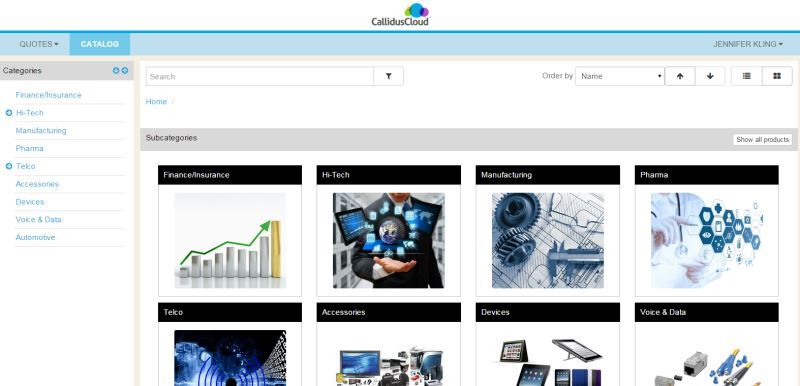
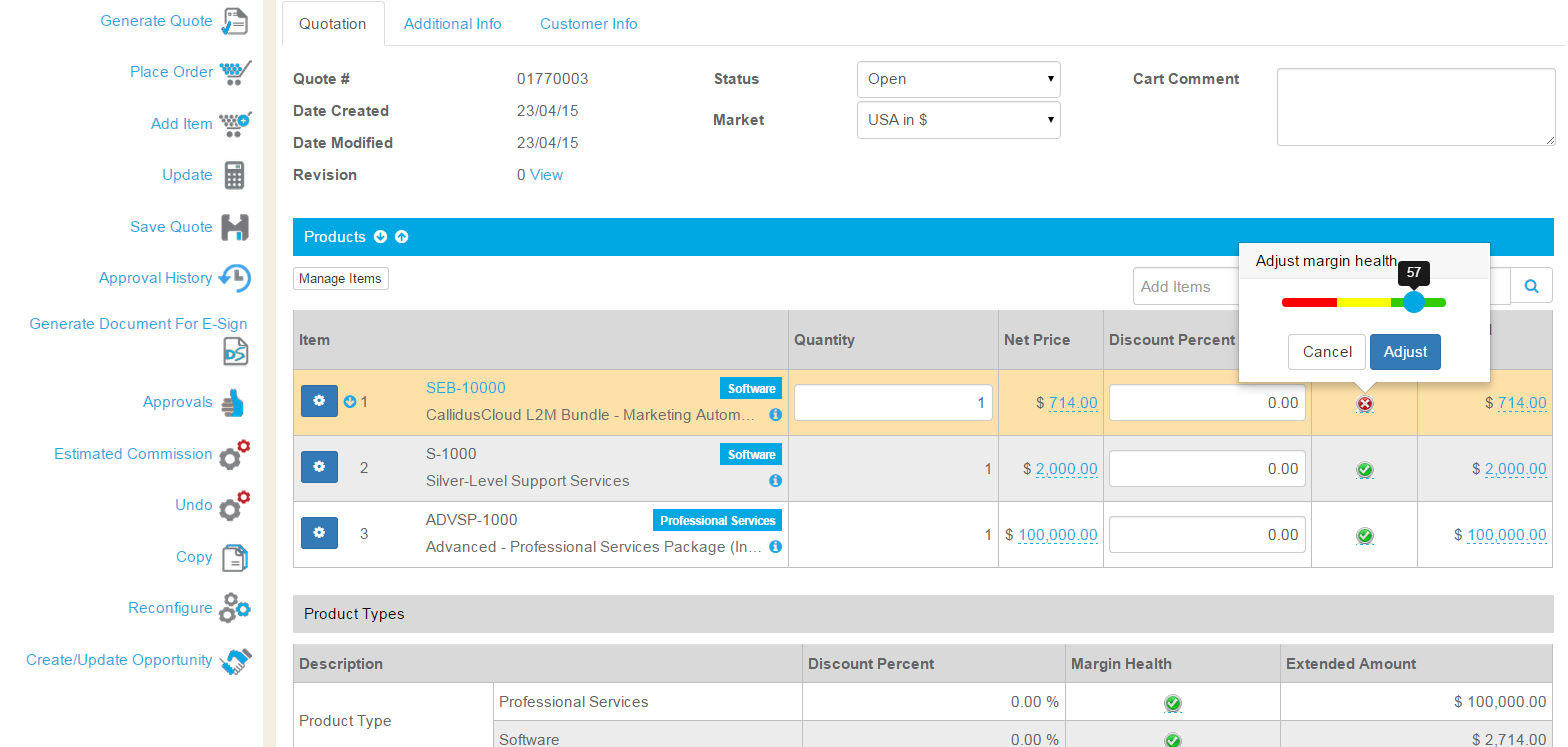
    Screenshot of CPQ Catalog - configurable to support multiple catalogs, graphics, and easy to follow guides.Screenshot of CPQ Configurator - guides users through configuration, indicating when a valid configuration is met, and showing commissions in real-time.Screenshot of CPQ Margin Health Indicator - sliding scale to make pricing easy while protecting margins.Screenshot of CPQ and Salesforce integration is seamless. Users never need to leave Salesforce to create a quote.