Procore is a project management software designed specifically for the construction industry. Procore is cloud-based and allows unlimited users per instance, so that construction team members and stakeholders can all access project information and documents.
N/A
QuickBooks Time
Score8.8 out of 10
N/A
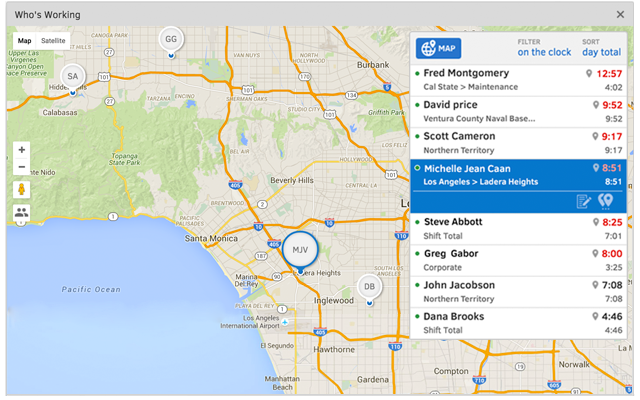
QuickBooks Time (formerly TSheets) is a cloud-based time tracking and scheduling app that allows employees to clock in and out from the job site with the devices they’ve already got in their pockets. The vendor aims to help companies replace paper timesheets with accurate, electronic time data as well as make payroll and invoicing faster and less costly. QuickBooks Time also accurately tracks time and GPS points (even without cell or internet service) then automatically syncs when back…
$0
1 user, unlimited projects
Pricing
Procore
QuickBooks Time
Editions & Modules
Custom Bundle
Custom Quote
annually
Free
$0
1 user, unlimited projects
Premium
$8
per user/month + $20 base fee/month (paid annually)
Elite
$10
per user/month + $40 base fee/month (paid annually)
Offerings
Pricing Offerings
Procore
QuickBooks Time
Free Trial
No
Yes
Free/Freemium Version
No
Yes
Premium Consulting/Integration Services
No
No
Entry-level Setup Fee
No setup fee
No setup fee
Additional Details
Procore charges an upfront annual fee by product and based upon Annual Construction Volume (ACV) - the aggregate dollar value of the construction work across the customer's projects. Procore contracts include access for unlimited users, customer support, unlimited data storage, and product enhancements, at no additional cost.
Multi-year pools: Contract volume is set for the entire multi-year term and can be consumed at any time during that period to help smooth out variability in consumption.
Volume opt-in: Up-front contractual pricing is put in place for additional volume that might need to be added mid-term, to increase predictability of costs.
Renewal rate protection: Up-front setting of rates is locked now, so businesses can budget accordingly for future renewals and improve cost predictability in future years.
It works great for project management and putting all job-specific documents in one place. We are able to share drawings, submittals, and forms with our customers and subcontractors in a safe and reliable platform. However, getting reporting data is somewhat lacking, so if your business needs advanced options, you might try and find a better product.
A de minimis incentive was given to thank the reviewer for their time. The incentive was not used to bias or drive a particular response, nor was the incentive contingent on a positive endorsement. TR verified that a representative sample of customers was invited. More Info
It would be very useful for certain remote jobs that require a high level of presence, as in the case of web development, or remote maintenance sessions, so that when reviewing the work data it is possible to ensure that there will be no failures. By being able to include files in the management, from the equipment tab, it is possible to fully control the hours in which each change in these files were made.
A de minimis incentive was given to thank the reviewer for their time. The incentive was not used to bias or drive a particular response, nor was the incentive contingent on a positive endorsement. More Info
A de minimis incentive was given to thank the reviewer for their time. The incentive was not used to bias or drive a particular response, nor was the incentive contingent on a positive endorsement. TR verified that a representative sample of customers was invited. More Info
Support (their help desk team is incredibly helpful and always quick to respond).
Ease of access and use (the app is user-friendly an intuitive, and the desktop version is equally as approachable).
Manager functionality (it's useful to be able to clock employees in and out at multiple events on the same day by sorting them into different groups by manager/event).
A de minimis incentive was given to thank the reviewer for their time. The incentive was not used to bias or drive a particular response, nor was the incentive contingent on a positive endorsement. More Info
A de minimis incentive was given to thank the reviewer for their time. The incentive was not used to bias or drive a particular response, nor was the incentive contingent on a positive endorsement. More Info
The desktop version of the TSheets schedule does not have a search feature. This makes it challenging to find things you are looking for without extra work
The app can be a bit buggy. Though it is a great app, there are many reasons that the app will stop syncing and can cause problems with staff scheduling
A de minimis incentive was given to thank the reviewer for their time. The incentive was not used to bias or drive a particular response, nor was the incentive contingent on a positive endorsement. More Info
We will undoubtedly renew Procore as it has proven itself to be a means to better track and improve upon our efficiency and communications between job sites and their project managers as well as all other departments. Procore has made an incredible impact on how we, as a company, do our job on all levels; it is one of our most powerful and effective resources.
A de minimis incentive was given to thank the reviewer for their time. The incentive was not used to bias or drive a particular response, nor was the incentive contingent on a positive endorsement. More Info
TSheets tech support people, like Shawn Sommer, from Tsheets. She has been instrumental, after terminating the person in charge of TSheets I was left with a learning curve too high to climb but after 10 mins of her instructions I was able to make payroll in no time. She cleared all errors that nobody had fixed before. TSheets is not a vendor for me, TSheets is my partner in business. Thank you TSheets.
90% of Procore is very intuitive and any user can pick it up and go. There are a few elements, more so on the Financials side that need some prior knowledge of systems in order to understand how and why it functions as it does. Once this is understood, it flows effortlessly
A de minimis incentive was given to thank the reviewer for their time. The incentive was not used to bias or drive a particular response, nor was the incentive contingent on a positive endorsement. TR verified that a representative sample of customers was invited. More Info
Our employees find TSheets easy to use and spend minimal time at reporting hours using it. As an administrator and user of the TSheets "data and information" I am extremely positive on the functionality and reporting that it has provided me. From its ease of set-up to training to reporting, TSheets has made us so much more efficient from an administration standpoint
A de minimis incentive was given to thank the reviewer for their time. The incentive was not used to bias or drive a particular response, nor was the incentive contingent on a positive endorsement. More Info
If you are working in an area with little to no signal, Procore will still allow you to get in the system and use it fully and will then update once you are at a place with a strong enough signal. Whether it be with wifi or LTE cell phone reception.
A de minimis incentive was given to thank the reviewer for their time. The incentive was not used to bias or drive a particular response, nor was the incentive contingent on a positive endorsement. TR verified that a representative sample of customers was invited. More Info
A de minimis incentive was given to thank the reviewer for their time. The incentive was not used to bias or drive a particular response, nor was the incentive contingent on a positive endorsement. TR verified that a representative sample of customers was invited. More Info
General Support for Project Management and Financials is consistent. The ERP support is never consistent and I do end up at times in a black hole. I have to continually reach out to get the issue resolved or get an update. The ERP support needs more of Procore's attention
A de minimis incentive was given to thank the reviewer for their time. The incentive was not used to bias or drive a particular response, nor was the incentive contingent on a positive endorsement. TR verified that a representative sample of customers was invited. More Info
I have never failed to have an issue resolved within minutes of contacting Support. Jen D recently assisted my with an export issue and I was back on track in less the 10 minutes. She was knowledgable and thought about the current and future contexts of the issue and assured there would be no recurrence next payroll.
Procore's Implementation Team does a great job of ensuring users are confident in using the system. They run through a process of training sessions based on the tools you have purchased, and lay ou ta plan to help the power users configure the tool to suit the company's needs. They provide useful resources for certifications, support and ongoing training as well.
A de minimis incentive was given to thank the reviewer for their time. The incentive was not used to bias or drive a particular response, nor was the incentive contingent on a positive endorsement. TR verified that a representative sample of customers was invited. More Info
Procore's certification program and focused how-to training videos allowed for easy training that did not feel overwhelming. The way the certification programs were broken up into small parts made it seem much less daunting to complete. The training feels focused and does not overload users with too much information all at once.
A de minimis incentive was given to thank the reviewer for their time. The incentive was not used to bias or drive a particular response, nor was the incentive contingent on a positive endorsement. More Info
Iron out your cost code list in your accounting software before you link with Procore. Once the link is established that list is more or less permanent. Review the permission matrix carefully. It controls so much. You want to ensure the information provided to your users adequate but you also want to protect your sensitive data. Procore Financials are organized in a total contract value style. Any markup or Profit will need to be sent somewhere on your budget. This may be significantly different than the Cost budgeting that many contractors do
A de minimis incentive was given to thank the reviewer for their time. The incentive was not used to bias or drive a particular response, nor was the incentive contingent on a positive endorsement. TR verified that a representative sample of customers was invited. More Info
A de minimis incentive was given to thank the reviewer for their time. The incentive was not used to bias or drive a particular response, nor was the incentive contingent on a positive endorsement. More Info
Procore has a clearer user interface and a wider variety of tools than any program I've used. Procore also lives up to their name in terms of helpful and fast customer service. There is always a Procore rep. that is available to contact, making any problems just a mini hurdle.
Besides Intuit Payroll (Sage), the only program I've used is WorkBrain through Menards, and it's more as a scheduling guideline for management, employees don't use it to punch in or out or record hours. However, WorkBrain does show scheduling and it matches with a punch clock to record those hours. Every other place I've used has used either punch clocks or handwritten time cards. I think the TSheets is modern, user-friendly, convenient, accessible, and cost-effective for the owners. It also streamlines payroll for the Accountant instead of manually entering all hours for multiple employees by hand into a software program like Sage.
A de minimis incentive was given to thank the reviewer for their time. The incentive was not used to bias or drive a particular response, nor was the incentive contingent on a positive endorsement. More Info
A de minimis incentive was given to thank the reviewer for their time. The incentive was not used to bias or drive a particular response, nor was the incentive contingent on a positive endorsement. TR verified that a representative sample of customers was invited. More Info
A de minimis incentive was given to thank the reviewer for their time. The incentive was not used to bias or drive a particular response, nor was the incentive contingent on a positive endorsement. More Info
A de minimis incentive was given to thank the reviewer for their time. The incentive was not used to bias or drive a particular response, nor was the incentive contingent on a positive endorsement. More Info