Overview
ProductRatingMost Used ByProduct SummaryStarting Price
Quadient Accounts Payable
Score 7.1 out of 10
N/A
Quadient Accounts Payable by Beanworks is an accounts payable solution that uses custom rules to automate and show every step of an organization's AP workflow, and is used to route POs, invoices, and payment approvals.N/A
Yooz
Score 8.8 out of 10
Small Businesses (1-50 employees)
Yooz delivers intelligent financial operations automation that aims to reduce waste, mitigate risk, prevent fraud, and eliminate errors from the AP process. Yooz provides Lean Financial Operations™ for companies of all sizes, offering clarity and control in the most complex environments. The Yooz platform combines a workflow engine, real-time applied AI, and transparency, with advanced fraud detection. Boasting over 7,000 customers worldwide and processing more than 300 million…N/A
Pricing
Quadient Accounts PayableYooz
Editions & Modules
No answers on this topic
Offerings
Pricing Offerings
Quadient Accounts PayableYooz
Free Trial
NoYes
Free/Freemium Version
NoNo
Premium Consulting/Integration Services
NoNo
Entry-level Setup FeeRequiredNo setup fee
Additional DetailsSubscription price based on the volume of documents processed. Unlimited number of users. 4 hours of complimentary service to start.
More Pricing Information
Community Pulse
Quadient Accounts PayableYooz
Considered Both Products
Quadient Accounts Payable
Chose Quadient Accounts Payable
These are all user friendly with great tracking. I can simply navigate through this program and reuse all the information. I like simple and fast programs because i need to move from one thing to another and this make that ease for me. i don't know how in would work with out …
Chose Quadient Accounts Payable
We considered a few products, met with their implementation teams, and watched their demo videos. Quadient won; the deciding factors were cost + functionality/integration with QuickBooks + ease of use.
Chose Quadient Accounts Payable
i had a homebrew solution before which was terrible in comparison
Chose Quadient Accounts Payable
We had a demo session on Yooz when we were switching our accounting software to Sage Intacct. We found that Yooz appeared to have better integration with Sage Intacct, and also allowed a variety of different formats for invoices to be submitted, such as Word documents and …
Chose Quadient Accounts Payable
We use this Quadient Accounts Payable program for cheque processing because it is Canadian and works well for us. We found too many delays with an American-based company that had to send mail from the US to Canada.
Chose Quadient Accounts Payable
More detailed and better for larger organizations. Quickbooks works well for a small business but wouldn't want to use it for our size of an organization. Quadient Accounts Payable keeps things simple even with multiple programs in our organization and hundreds of invoices to …
Yooz
Chose Yooz
We looked at a couple of different products, and Yooz came out the winner based on overall interface and cost. Our bank also pitched a solution, but it was not as robust as Yooz.
Chose Yooz
Selected Yooz because of the dynamic workflow ability.
Chose Yooz
Deltek Maconomy, Citrix Endpoint Management and KlearStack
Chose Yooz
PDF is too much slow in OCR reading, comparing to Yooz. you can't compare it even.
Chose Yooz
Chrome River is slow and full of inconsistencies. Capturing invoices is confusing, as you have to assign approvers and coding at that time. No time to save it and research those details. It has multiple screens labeled inbox but are for different stages in the approval process …
Chose Yooz
it better with uploading invoice and easier to use and very assessable and easy to learn and has a lot of verification so errors on payments are avoided and also used to know which invoice is late and needs to be paid and coded
Chose Yooz
I did not choose yooz myself as it was a company decision
Chose Yooz
They are all different for each other. In our scenario, since we do not use QuickBooks as our software system, Yooz works better with integration to Sage Intacct
Chose Yooz
Yooz is much more user friendly and provides more features
Chose Yooz
We looked at other products when we chose Yooz and all were comparable, the key focus was that Yooz integrated with our ERP
Chose Yooz
Yooz has better accuracy and it is more automated to do tasks itself.
Chose Yooz
We used POs or excel sheets you had to manually enter and scan in invoices so it was definitely a pain and super time consuming.
Chose Yooz
We liked Yooz better and it was competitive on the monthly payment basis
Chose Yooz
Our corporate team chose the switch - I see why the change and it is beneficial, however, not very time saving!
Chose Yooz
Have not used other products in the past. This one is great! Don't plan on changing !
Chose Yooz
Yooz is more simple to use but doesn't have as many features.
Chose Yooz
Yooz comes close to Coupa, but Coupa is much more robust and can handle much larger batches of information.

Yooz performed well against Bank of America's Checkbook product, because it was more efficient.
Features
Quadient Accounts PayableYooz
Payment Management
Comparison of Payment Management features of Product A and Product B
Quadient Accounts Payable
8.0
Ratings
6% above category average
Yooz
8.7
Ratings
14% above category average
Customizable Approval Policies8.40 Ratings8.90 Ratings
Financial Document Management8.30 Ratings8.20 Ratings
Payment Status Tracking7.80 Ratings8.70 Ratings
Payment Audit Trail7.70 Ratings8.90 Ratings
Advanced OCR7.60 Ratings8.80 Ratings
Duplicate Bill Detection00 Ratings8.70 Ratings
Electronic Funds Transfer00 Ratings8.70 Ratings
Accounts Payable
Comparison of Accounts Payable features of Product A and Product B
Quadient Accounts Payable
7.9
Ratings
12% above category average
Yooz
8.5
Ratings
19% above category average
Automated Accounts Payable Processes8.00 Ratings9.00 Ratings
Vendor Management7.80 Ratings8.10 Ratings
Best Alternatives
Quadient Accounts PayableYooz
Small Businesses
Square 9 Softworks
Square 9 Softworks
Score 9.3 out of 10
Square 9 Softworks
Square 9 Softworks
Score 9.3 out of 10
Medium-sized Companies
Square 9 Softworks
Square 9 Softworks
Score 9.3 out of 10
Square 9 Softworks
Square 9 Softworks
Score 9.3 out of 10
Enterprises
Webexpenses
Webexpenses
Score 8.7 out of 10
Webexpenses
Webexpenses
Score 8.7 out of 10
All AlternativesView all alternativesView all alternatives
User Ratings
Quadient Accounts PayableYooz
Likelihood to Recommend
8.1
(0 ratings)
8.6
(0 ratings)
Likelihood to Renew
2.7
(0 ratings)
8.6
(0 ratings)
Usability
8.5
(0 ratings)
8.8
(0 ratings)
User Testimonials
Quadient Accounts PayableYooz
Likelihood to Recommend
Use it when you have a small workforce or handle most tasks alone. It's an ecosystem of relationships, and explaining the relationships between components can be hard for others. Like approval channels setup and how it affects invoice coding for approval. Better to separate these aspects between the admin and the clerk. Incredibly helpful in evaluating your workload and planning weekly check runs. Allows you to see far ahead what's coming down the pipeline and course-correct as appropriate. Seamless sync with QuickBooks. Great customer service, always responding promptly and on point.
Read full review
when you have put the amount in, and the amount does not match the invoice yooz sends an alert to indicate that there is a missing amount that you have not added, and it also helps to let you know when some invoice amounts are more than the usual get for that vendor so you can take note
Read full review
Pros
  • GL Coding
  • Approval System
  • Updates
Read full review
  • Strong integtation with Intacct (our GL)
  • Strong OCR capabilities that capture the key information of an invoice with accuracy
  • Very responsive Support Team if we encounter a problem or have a question.
  • In depth documentation for users (pdf's videos) to learn the product
Read full review
Cons
  • I wish the export function allowed more options for the posting date of invoices. All invoices have the same posting date once they reach Sage 300, but this must be changed when they reach the transaction file. We should have the option of using the invoice date as the posting date or a selected date.
Read full review
  • when exporting we have to change the total column's to numbers or it will export with the incorrect totals.
  • Yooz needs to not allow itself to add a line to the total and change what you are posting. instead it needs to freeze you from moving on.
Read full review
Likelihood to Renew
At this time we don't really need to review the use of the program. In the future as we grow with new partnerships, purchases and expenses and revenue we may at some point look at reviewing our use but for now and the immediate future there is no need to review such
Read full review
ALSOME PROGRAM MAKE EVERYDAY SO MUCH EASIER
Read full review
Usability
Beanworks takes some time to set up initially, but once it's ready on your computer, it is very easy to use in conjunction with QuickBooks. They have representatives that are readily available or can schedule an appointment to walk you through it if you are ever having issues. Uploading invoices is quick and easy. Approvers can easily make changes to coding before approving.
Read full review
Usability of Yooz is close to 10, solves the issue that many companies have and serve to its purpose. The platform is simple, but well design and it is always improving. Since we started using it almost 8 months ago, the invoicing process of our company enhanced sharply. But there is also room for improvement that is why a 9/10
Read full review
Alternatives Considered
We had a demo session on Yooz when we were switching our accounting software to Sage Intacct. We found that Yooz appeared to have better integration with Sage Intacct, and also allowed a variety of different formats for invoices to be submitted, such as Word documents and emails. It synced immediately with Intacct when ready, and the OCR technology appeared to be further along than Quadient. We stayed with Quadient though because the user interface was substantially better and there was less work required to process an invoice
Read full review
Chrome River is slow and full of inconsistencies. Capturing invoices is confusing, as you have to assign approvers and coding at that time. No time to save it and research those details. It has multiple screens labeled inbox but are for different stages in the approval process that aren't specified unless you go into the invoice and review. When you go to exit the invoice, it takes you back to the main menu instead of the inbox you were currently working in. It is live, but the updates are every 10-15 minutes as opposed to immediately.
Read full review
Return on Investment
  • Saves manpower, but we don't track the numbers closely.
  • Improved transparency of approval and access to information.
  • Reliability and peace of mind.
  • Ease of operation
Read full review
  • Yooz helped us process thousands of invoices in a more efficient manner than our previous process called Checkbook with Bank of America.
  • Yooz allowed for a more efficient invoice approval process than the previous systems that were used. If the invoices were three way matched, they would be processed quicker.
  • Yooz made the integration of the invoice and credit memo process into NetSuite more efficient than the previous software, however, there some limitations with Yooz because it did allow for duplicate invoices to be processed, and that was a big issue.
Read full review
ScreenShots

Quadient Accounts Payable Screenshots

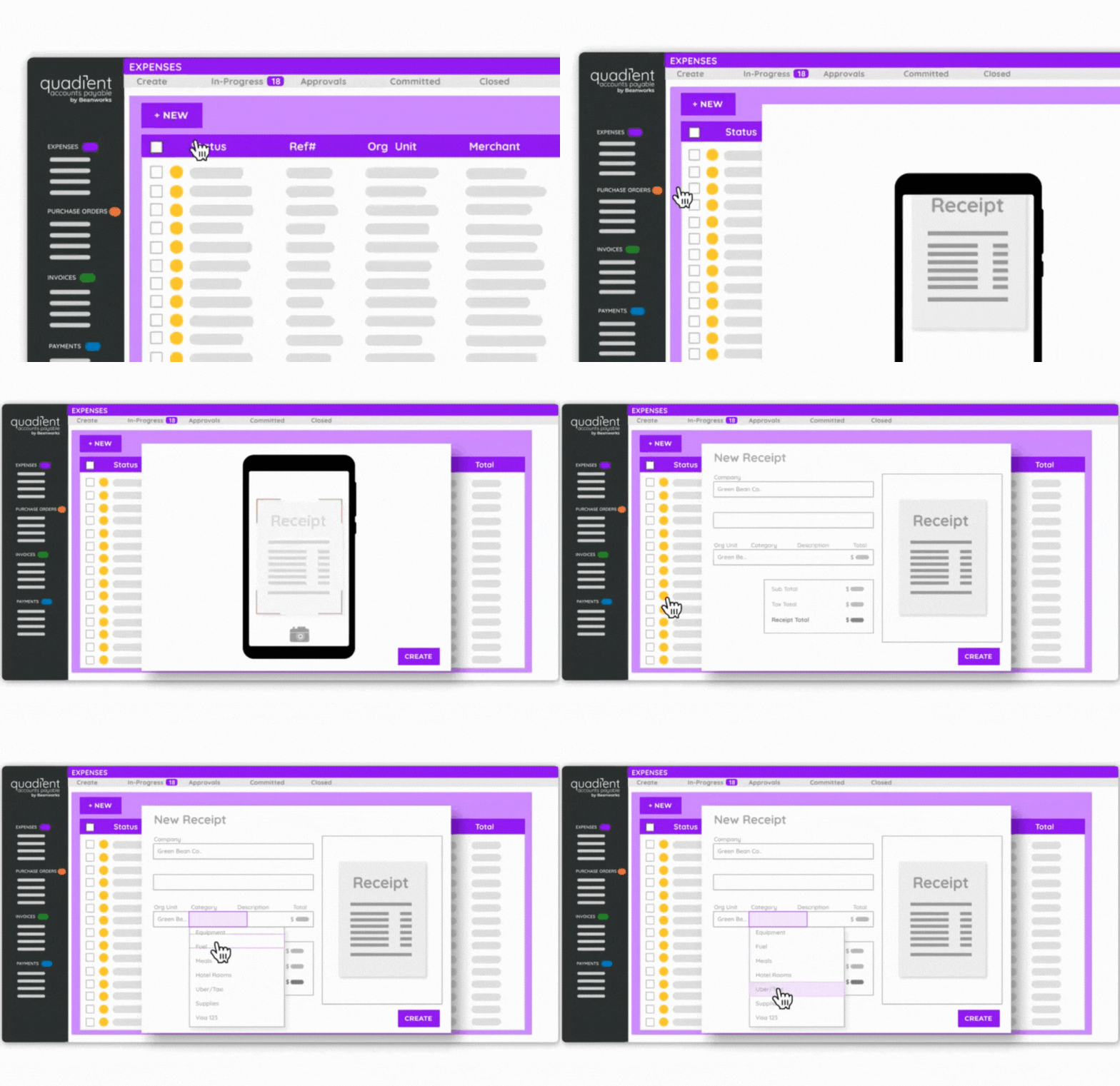
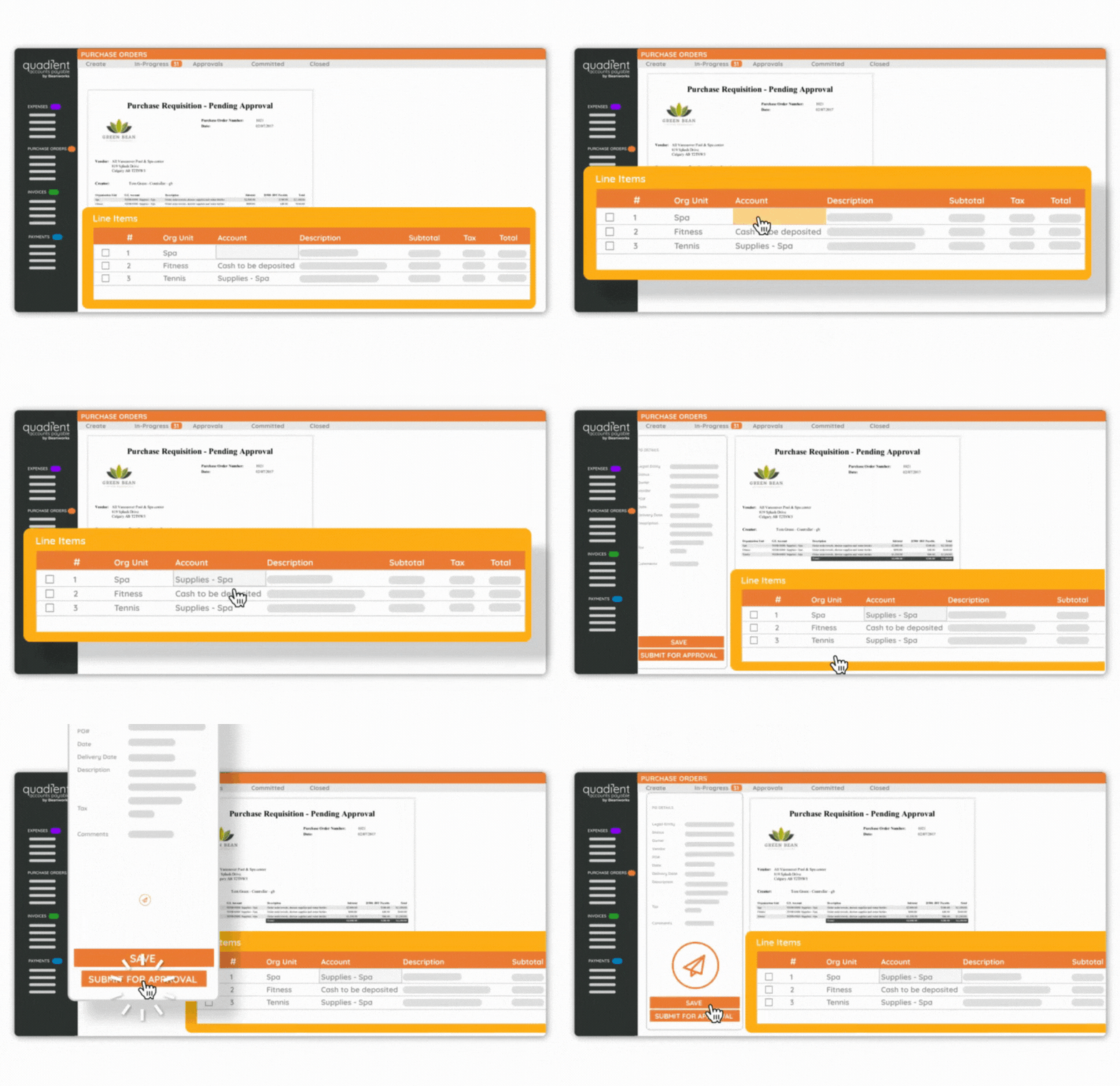
Screenshot of the expenses interface.Screenshot of a purchase order.

Yooz Screenshots

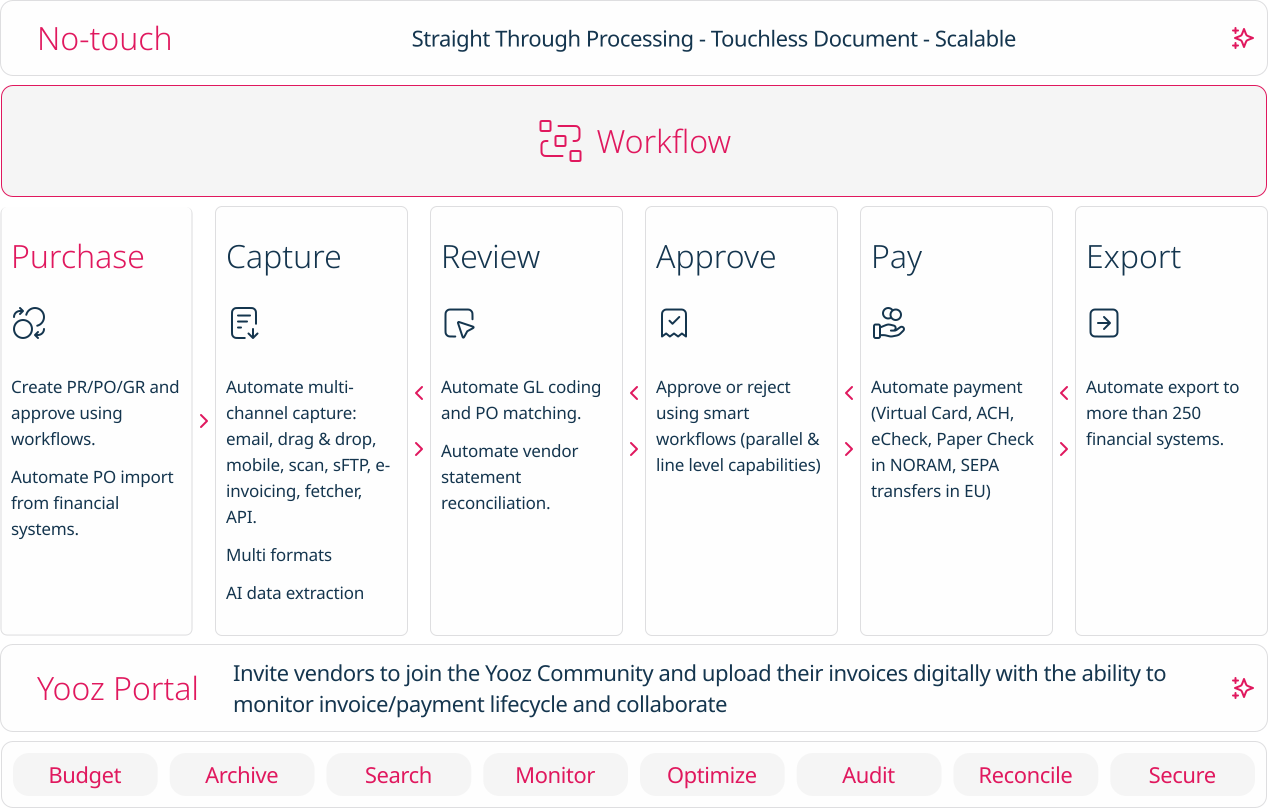
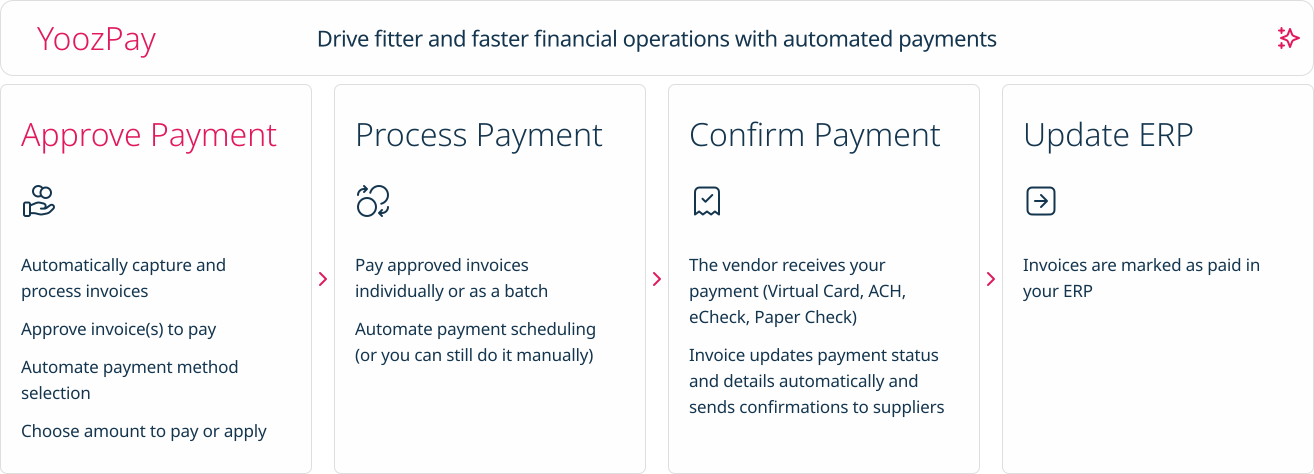
Screenshot of how Yooz works - The solution provides artificial intelligence (AI) and machine learning technologies to help AP teams with invoice automation.Screenshot of Purchase: Automates PR/PO and approvals using workflows. Additionally users can create purchase requests, automate approval workflows, automatically generate purchase orders, manage deliveries and monitor the budget.Screenshot of Capture: AI based data extraction to extract invoices. Works for almost any format (PDF, Factur-X, UBL, CII, EDIFACT, etc.)Screenshot of No touch: Intelligent workflows to automate approvals and paymentsScreenshot of Pay: A Digital Invoice Payment Workflow. Invoices can be paid individually or as a batch,  and vendors receive payment through Virtual Card, ACH, eCheck, or Paper Check.Screenshot of Export: Invoice capture and automation that integrates with accounting software, or with more than 200 ERPs worldwide.