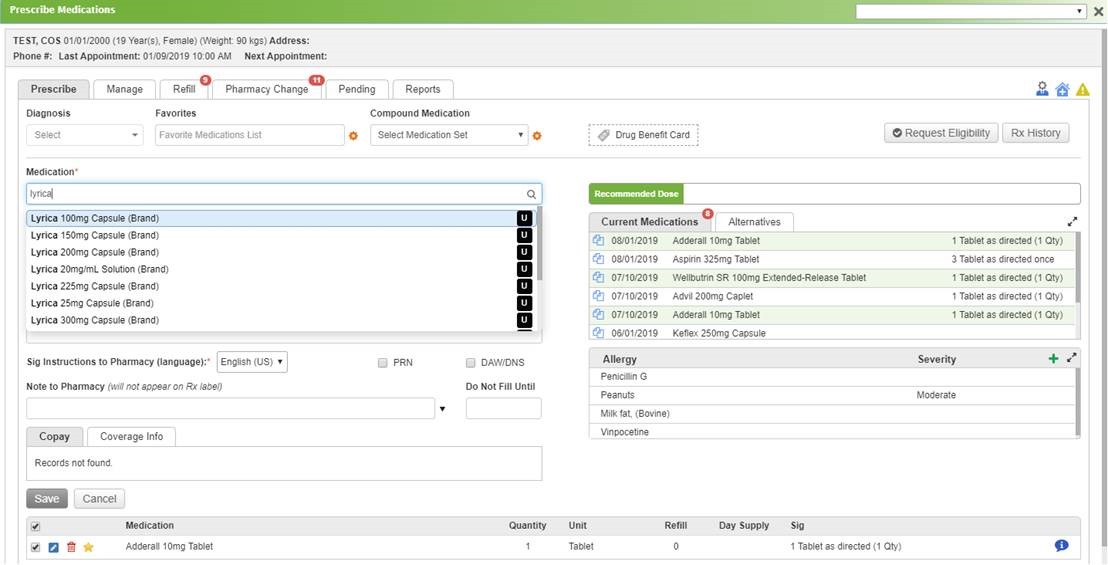
Qualifacts InSync offers a cloud-based healthcare IT solutions configured specifically to the user's practice and workflows. EHR, practice management, medical billing, telemedicine, e-prescribing and patient portal for practices of all sizes.
N/A
Salesforce Experience Cloud
Score8.3 out of 10
N/A
Salesforce Marketing Cloud Engagement (formerly Salesforce Experience Cloud or Salesforce Community Cloud) is an online forum powered by Salesforce that enables businesses to connect with their employees, customers, partner organizations, and prospects. Designed to help facilitate communication and information sharing, customers can ask questions and request help, administrators can integrate data from third-party apps, and employees can collaborate across projects and…
This software is a giant piece of flaming garbage. I would never recommend this to my worst enemy. I cannot tell you how frustrating it is that I have gone more than four months to try to get benefit eligibility to consistently work. I have submitted over 40 different attachments of images and videos showing what we are seeing. I have had to have tickets open with Inovalon and Qualifacts on the issue, escalating the issue to top tech support people, escalating it to our account manager, and escalating it with billing. Still, after numerous tickets, complaints, and tech support phone calls, we still haven't gotten a resolution.On top of that, Qualifacts has no problem billing us for this feature that isn't even working properly or responding to any emails regarding the excess use charges for a service that has been tested for the past four-plus months by tech support, and then charging us for that extra use.
For well-suited, this product is great for your external clientele groups that you would not necessarily want to have a high user fee rate for. So basically general public or a group that will be authorized to come in and just do a few things here and there, but you don't necessarily want them access to all of your systems and your data points for groups that it would not be a great use for. I'd say probably your high level internal staff, they're going to be using a lot of the backend functionality automations, evaluating data, managing data, and doing custom inputs. That's just not what's intended for.
A de minimis incentive was given to thank the reviewer for their time. The incentive was not used to bias or drive a particular response, nor was the incentive contingent on a positive endorsement. More Info
Easy to use, just like Salesforce's other products. Many users can sit down and figure it out in no time, and with a little training become power users.
Fast and secure - Salesforce is a leader in the cloud world so you get consistently fast results and security that is top notch in the industry.
Accessible from anywhere - if you use cloud CMS already this is a no-brainer, but for those that do in-house CMS still, this is a major difference. Mobile access from anywhere on the planet without a VPN is something you just can't do without the cloud.
A de minimis incentive was given to thank the reviewer for their time. The incentive was not used to bias or drive a particular response, nor was the incentive contingent on a positive endorsement. More Info
We would love to be able to send reports via secure email (the functionality s there, but the other party needs the same software, and that is rare in our area
We would love to have electronic visit verification integrated into the software - right now we need to use a 3rd party software package
Unlike other CMS platforms like Wordpress and Adobe Experience Manager, Salesforce does not provide a fully featured editor with a drag-and-drop design tool.
Our content creators and marketing team often struggle with permissions and how to distribute content across different experience cloud sites.
Also, there is no side-to-side comparison view for content editors to update the content easily.
A de minimis incentive was given to thank the reviewer for their time. The incentive was not used to bias or drive a particular response, nor was the incentive contingent on a positive endorsement. More Info
A de minimis incentive was given to thank the reviewer for their time. The incentive was not used to bias or drive a particular response, nor was the incentive contingent on a positive endorsement. More Info
Can be overly complicated at times. They emphasize that it's nearly fully customizable without addressing the implications of customizing everything and the fact that it's virtually impossible for them to test the functionality of all of these customizations from practice to practice. We were promised many things during our build out phase and pre-launch, only to find out after we went live that a lot of these features didn't actually function the way that they indicated they would, had ongoing issues, had intermittent functionality without any resolution, or just simply did not work
Strengths: - Intuitive for Salesforce Users – If you’re already working within the Salesforce ecosystem, the Salesforce CMS is easy to navigate, with a clean UI, drag-and-drop content management, and reusable assets for quick updates. - Seamless Integration – Since it connects natively with Experience Cloud, Marketing Cloud, and CRM, it allows for efficient multi-channel content distribution without needing extra third-party tools. - AI-Powered Personalization – The ability to deliver dynamic content based on user profiles and engagement data is a huge plus, making content delivery more relevant and impactful. Challenges: - Learning Curve for New Users – If you're not already familiar with Salesforce, the interface can feel overwhelming, requiring training to fully leverage all features. - Limited Customization & Workflow Automation – While it works well for structured content, advanced approval workflows and deep editorial customization are limited compared to enterprise CMS platforms like Adobe Experience Manager. - Media & Design Limitations – Salesforce CMS is not as robust for managing rich media-heavy content, which can be frustrating for teams needing more flexibility in multimedia presentation.
A de minimis incentive was given to thank the reviewer for their time. The incentive was not used to bias or drive a particular response, nor was the incentive contingent on a positive endorsement. More Info
Again, since we provide and recommend solutions, I can't speak to every client's individual experience, but can offer general reflections as to keep their collaborations private, that they are satisfied with the experience. We hear a lot about how this system helps to encourage collaborations between their own business partners, customers, and internal members, and enables quality integrations with other products that help drive revenue.
A de minimis incentive was given to thank the reviewer for their time. The incentive was not used to bias or drive a particular response, nor was the incentive contingent on a positive endorsement. More Info
Every call is capped at 15 to 30 minutes, and if the issue isn't fixed in that window, the fix is to reschedule another 15-to-30-minute call rather than escalate or extend the session. That loop can, and does, repeat indefinitely. We've had our core eligibility issue open since March 16, 2026 with a second formal case open since April 9, 2026 specifically for the batch eligibility failures, and neither has produced a resolution in over four months. We have submitted more than 40 attachments to tech support on this single issue and sat through repeated calls with both InSync support and Inovalon directly. Support has stayed engaged in the sense of taking more calls and opening more tickets, but not in the sense of ever fixing anything or committing to a resolution date. When we escalated in writing, requesting a credit and a named owner for the fix, and looped in both our account manager and finance in the first week of July, we got no response at all, written or otherwise. The pattern across every support interaction is the same: acknowledge the ticket, burn a short call, reschedule, repeat, with no accountability if the deadline slips because there's never a real deadline set in the first place. For a platform handling billing, eligibility, and clinical documentation, that level of support is not adequate for the stakes involved.
Although support from Salesforce itself can be quite unresponsive sometimes, the community hub is incredibly helpful. The large user base of Salesforce products contribute to troubleshooting and the forums are a powerful tool for finding solutions and possible bugs and response times can be quite fast compared to your regular support channels.
A de minimis incentive was given to thank the reviewer for their time. The incentive was not used to bias or drive a particular response, nor was the incentive contingent on a positive endorsement. More Info
NO MORE "CIRCLE OF DEATH"!!!!!!!!!!!!! No need to find "workarounds" for everyday tasks. No more need to scan and upload paper documents! Billing is much clearer. Claims and statements are easy to monitor. [Insync Healthcare Solutions] has listened [to] its clients and built a system that caters to all!!!!!!! No regrets with our decision to go with [Insync Healthcare Solutions]!!!!
Salesforce Experience Cloud was selected due to its tight integration with our existing Salesforce CRM platform. Customization of the portal was much, much simpler compared to Sharepoint - especially with role-based security parameters that are ultimately inherited based on attributes within the Salesforce CRM platform. Salesforce Experience Cloud was a natural fit for this customer-facing purpose.
A de minimis incentive was given to thank the reviewer for their time. The incentive was not used to bias or drive a particular response, nor was the incentive contingent on a positive endorsement. More Info
We love the ease of use, it really creates a smooth process between departments.
We have had some issues with the billing, but it is partially staffing and partially training- we are still working with our staff and our representative from Insync to fix these errors, so it is difficult to put the blame on Insync [Healthcare Solutions]. I believe some of it is user error.
The conflicting information we receive from Insync support has created a lot of issues in the billing department. I would like more consistency from their support team, as I have witnessed two people ask the same question, and get a completely different answer. Again, this could be a user error contributing to the confusion, but consistent responses would be helpful to solve the issues.
A de minimis incentive was given to thank the reviewer for their time. The incentive was not used to bias or drive a particular response, nor was the incentive contingent on a positive endorsement. More Info
A de minimis incentive was given to thank the reviewer for their time. The incentive was not used to bias or drive a particular response, nor was the incentive contingent on a positive endorsement. More Info