PandaDoc vs. SignRequest, now part of Box

Overview
ProductRatingMost Used ByProduct SummaryStarting Price
PandaDoc
Score 8.6 out of 10
N/A
PandaDoc headquartered in San Francisco offers their eponymous electronic signature platform for sales teams, containing sales proposal automation and CPQ (configure, price, quote) features, and integration with CRMs.
$35
per month per seat
SignRequest, now part of Box
Score 9.7 out of 10
Small Businesses (1-50 employees)
SignRequest was an e-signature platform acquired by Box in 2021. The eSignature tool is the basis for Box Sign, a feature now included in Box's core offering.
$0
per user
Pricing
PandaDocSignRequest, now part of Box
Editions & Modules
Starter
$35
per month per seat
Business
$65
per month per seat
Enterprise
Contact Sales
Start
$0.00
per user
Professional
$8.00
per user
SME
minimal $16.00
$4.00 per user
Enterprise
Custom
per user
API
Custom
per installation
Offerings
Pricing Offerings
PandaDocSignRequest, now part of Box
Free Trial
YesYes
Free/Freemium Version
NoYes
Premium Consulting/Integration Services
NoNo
Entry-level Setup FeeOptionalNo setup fee
Additional DetailsPandaDoc offers a free eSign plan and 3 paid packages for eSigning and document automation. All plans include unlimited documents and eSignatures. Evaluations start with a free 14-day trial. Up to a 46% discount for annual pricing.For text message verification and bank payment verification additional fees apply
More Pricing Information
Community Pulse
PandaDocSignRequest, now part of Box
Considered Both Products
PandaDoc
Chose PandaDoc
We've used PandaDoc at previous organizations, and we liked this the best because of how modern it looks and how easy it is to use.
Chose PandaDoc
Our office selected PandaDoc since it was better in terms of saving money. The cost was the most important factor when determining which site to use.
Chose PandaDoc
PandaDoc is a more polished, professional, and 'legitimate' software site than other solutions, since PandaDoc really specializes in creating professional proposals, quotes and invoices. The eSignature capacity and pricing table capacity embedded in the documents as well as …
Chose PandaDoc
I think PandaDoc is more modern and has a more user-friendly nature than DocuSign. We preferred Pandadoc because it allowed multiple workspaces, enabling different teams to have varying levels of access. This was incredibly useful, as it meant HR and Legal could only view …
Chose PandaDoc
I find it easier to automate and create templates in PandaDoc. Specifically the templates. Also, connecting through API is easier (our IT team says so, I'm not qualified to evaluate that). Pricing is also something important, when we acquired PandaDoc it was cheaper so we were …
Chose PandaDoc
PandaDoc is a less clunky user experience, not only on the signature process and review, but also on the document creation process.
Chose PandaDoc
PandaDoc is equal to DocuSign in every significant way except for its level of adoption; however, the pricing of PandaDoc is so much better that it's clearly the best choice for our firm.
Chose PandaDoc
ease of use and simplicity for the customer experience
Chose PandaDoc
PandaDoc has a simple, integrated eSignature component, which is our primary reason for using it over its competitors.
Chose PandaDoc
We used Dropbox back when it was still HelloSign. At the time, new templates were very hard to create. We had to upload a PDF and then add the fields from there. With PandaDoc, we are able to drag and drop the text, images, logos, and fields we need easily. This has saved our …
Chose PandaDoc
While great, HubSpot Sales Hub creates agreements and collectible payments but is not as UX/UI friendly as PandaDoc.
Chose PandaDoc
PandaDoc and DocuSign are very similar in functionality and design, but I prefer to use PandaDoc's interface. It is so easy to use and I prefer PandaDoc's interface and UI. It feels a little cleaner and a little more professional to me when compared with DocuSign's interface …
Chose PandaDoc
much better. The pricing structures worked a lot better than the other companies because we are a small clinic
Chose PandaDoc
PandaDoc provided similar features and functionality at a better price, but the "tipping point" was integrated e-signatures.
Chose PandaDoc
To be able to block certain fields within templates and contracts, so that the commercial team can negotiate the rest and adapt them but cannot change those purely legal clauses that should not be negotiated or changed without the approval of the legal department. I also find …
Chose PandaDoc
We briefly used Proposify, and it had some nice options for creating more ascetically pleasing proposals and contracts. However, it was far more time-consuming, and any gain in asceticism did not outweigh the significant loss in efficiency, simplicity, and reliability of using …
Chose PandaDoc
There is no comparison. PandaDoc is far superior to any others I've seen. That's why I moved my company over when I saw the were using docusign
Chose PandaDoc
Conga was difficult to build template contracts and not as simple to set up templates, etc., for our sales contracts as Pandadoc has been (simple drag-and-drop in Pandadoc). The automation and integration between our Salesforce and Conga accounts were not working correctly, so …
Chose PandaDoc
PandaDoc serves its purpose, but I feel it is behind large competitors like DocuSign in managing contracts.
Chose PandaDoc
We chose PandaDoc for its ease of use and tools that allow a professional feel. The convenience for our clients to review and sign agreements also helped us make the decision to go with PandaDoc.
SignRequest, now part of Box
Chose SignRequest, now part of Box
SignRequest is far and away more afforable than its competitors. Their support is also very responsive and willing to make improvements whereas its competitors seem to be a bit more unapproachable as far as their support goes. I have been able to resolve billing and reporting …
Chose SignRequest, now part of Box
Friendly interface, affordable costs, easy to understand and use, personalized language. You can manage users, templates and documents.
Chose SignRequest, now part of Box
I haven't used this in my role, but as a customer, I have used this program and it was nice. The pricing model, however, is far outside the reach for most small businesses. This is why I didn't consider Adobe Sign when trying to find a solution that meets our business needs.
Chose SignRequest, now part of Box
Less money and easier to set up than more well-branded e-signature platforms. Unlimited contracts on paid plans, which is a lot more than any other e-signature software I've used before. And under the free plan, you can get 15 contracts signed with limited features. For smaller …
Chose SignRequest, now part of Box
When I started this company in 2017, I looked for alternative solutions to getting e-signatures on business documents but never found anything that met our needs well until I encountered SignRequest. At this point we've been using it so long that I honestly can't remember the …
Chose SignRequest, now part of Box
We actually ended up switching to HelloSign after about three months. The main reason was the depth of the Salesforce integration that we needed to have. SignRequest is a really top-notch product for the market they play in. Small businesses especially will be able to use the …
Chose SignRequest, now part of Box
They have an unlimited free plan. In other words, you can sign as many documents as you want for free each month. The others (last I checked) limited your total number of signed docs on the freemium plan. That's certainly nice. SignRequest's upgrades come from more features …
Chose SignRequest, now part of Box
SignRequest is actually easier to use than SigningHub. It's much easier to just go to wherever you need a signature in the document and add the field. It's also got a cleaner interface, in my opinion, which makes it easier to figure out what's going on. I think that for someone …
Chose SignRequest, now part of Box
SignRequest is easier and quicker to use, integrates into Google services, and really is a smooth process overall. I found the other e-sign product I've used to be less user-friendly, and perhaps more dated in its design. With the other product I tried, there were several …
Chose SignRequest, now part of Box
I think SignRequest offers more and more powerful customization options thank competitors. I wasn't a fan of the user interface and usability when trying to customize documents on competitors' products, but SignRequest was easy. I also like SignRequest's template functionality …
Chose SignRequest, now part of Box
Unlike Adobe Acrobat DC, SignRequest is actually designed to request signatures and presents itself as such to my clients. DocuSign is not as user-friendly and approachable as SignRequest in my opinion. Even the free version of SignRequest offers more options and functionality …
Chose SignRequest, now part of Box
Adobe Acrobat left me frustrated and annoyed. I was wasting hours each week trying to upload contracts and agreements and customize them for each client. It never sent right and ended up being more frustrating for us and our clients in the end. So I tested some other tools …
Chose SignRequest, now part of Box
Adobe Sign (formerly EchoSign), DocuSign and Zoho Sign
Chose SignRequest, now part of Box
DocuSign is used in other areas of our business (client contracts, MSAs, SOWs, etc.) because it integrates with Salesforce and because we are a partner. We don't use DocuSign for HR purposes because DocuSign automatically creates a copy of the document in Salesforce, which …
Chose SignRequest, now part of Box
Unfortunately, I have no experience with alternatives. SignRequest seemed the most value for money at the time we made the decision to start e-signing.
Best Alternatives
PandaDocSignRequest, now part of Box
Small Businesses
Foxit eSign
Foxit eSign
Score 9.2 out of 10
Foxit eSign
Foxit eSign
Score 9.2 out of 10
Medium-sized Companies
MSB Docs
MSB Docs
Score 9.4 out of 10
MSB Docs
MSB Docs
Score 9.4 out of 10
Enterprises
DocuSign
DocuSign
Score 8.7 out of 10
DocuSign
DocuSign
Score 8.7 out of 10
All AlternativesView all alternativesView all alternatives
User Ratings
PandaDocSignRequest, now part of Box
Likelihood to Recommend
8.6
(0 ratings)
8.0
(0 ratings)
Likelihood to Renew
9.1
(0 ratings)
-
(0 ratings)
Usability
8.3
(0 ratings)
10.0
(0 ratings)
Availability
9.1
(0 ratings)
-
(0 ratings)
Performance
9.6
(0 ratings)
-
(0 ratings)
Support Rating
6.1
(0 ratings)
8.8
(0 ratings)
Implementation Rating
6.3
(0 ratings)
-
(0 ratings)
Configurability
2.8
(0 ratings)
-
(0 ratings)
Ease of integration
9.0
(0 ratings)
-
(0 ratings)
Product Scalability
8.6
(0 ratings)
-
(0 ratings)
Vendor post-sale
9.7
(0 ratings)
-
(0 ratings)
Vendor pre-sale
6.7
(0 ratings)
-
(0 ratings)
User Testimonials
PandaDocSignRequest, now part of Box
Likelihood to Recommend
Best suited for after demonstrations when requested by the prospect when they are looking for pricing with T&C. The data room is also great that acts like a drop box for opportunities and their contacts. Helps share pertinent information with others in the organization.
Read full review
It's great for a law firm--especially ours which is paperless--and for any business that needs reviews and signatures constantly. I have recommended it to courts, my general contractor working on our house, and to other law firms that have a hard time getting us their clients' signatures. I think most businesses would benefit from SignRequest!
Read full review
Pros
  • Allows clients to remotely execute documents.
  • Tracks the progress of document execution.
  • Emails clients to remind them to sign documents so we don't have to follow up.
  • Emails us when documents have been fully executed.
  • Provides an easy-to use interface to place signatures, dates, and other information on our forms.
Read full review
  • SignRequest is extremely user-friendly and its interface is smooth and straightforward. It takes the guesswork out of sending contracts and agreements online for review and signatures.
  • SignRequest is easy to set up and customize. I truly like how well its setup is structured. I've had zero issues uploading documents and customizing them.
  • SignRequest also allows you to save documents and use over and over. I really liked this feature as we send a lot of a similar contract out to our clients. We are able to change the amount and tweak the client information quickly and streamline the process.
  • SignRequest sends a final signed document after reach party signs it. I like adding this final PDF to our invoices when we send it out so our clients can keep a digital record of our agreements.
Read full review
Cons
  • I would like to see the ability to LOCK a field instead of locking an entire block or document.
  • I would like to see more standard features that need to be part of the service instead of add-ons.
  • Would like to see an option to allow different levels of users than just the two standard options.
Read full review
  • Clunky UI when filling in documents that require long-form responses. (Doesn't allow for entering of multiple lines at one time; lots of clicks required to complete a document with many fields)
  • In the free version, can only send one document at a time
Read full review
Likelihood to Renew
We have been using it for a few years now and find it vital to getting our bids out quickly and accurately to our customers. We can get a request for information from a customer and once we have their basic parameters create a professional bid in minutes. It's actually usually harder to find out what the customer wants than to use PandaDoc and create a document with it
Read full review
No answers on this topic
Usability
Once you get the hang of it, it's very easy to use. There can be a slightly steep learning curve to get fully in on the system. The new editor v2 has really improved usability and allows us to collaborate on documents simultaneously. Once the templates and library items are set up, a new document, whether it be a sales or HR document, takes very little time to complete.
Read full review
I have found it easy to use and self-explanatory from day one. I love how clear and easy it is to use since I am not techy!
Read full review
Reliability and Availability
We haven't had any real issues regarding downtime as of yet.
Read full review
No answers on this topic
Performance
As I mentioned earlier - performance is near perfect as I can create, send, adjust my documents. I love the tracking feature as well as I can tell when my documents have been seen and by whom. The only issue I have run into is with saving and formatting - occasionally the file document does not save with the newly assigned name or the content of the document does not stay formatted nicely.
Read full review
No answers on this topic
Support Rating
Recently I could not upload a pdf to a contract - support was very responsive and easy to work with. They got back to me the next day with an apparent fix - however when I opened the document nothing had changed. I then could not respond to the rep who was helping me because it was a "no-reply address", the problem still has not been solved and we had to make alternate arrangements to get this to the client. Never had it happen before and was only with this one contract.
Read full review
Easy to understand supporting documents with a great search feature to easily find the information I need for legal purposes, API connections, how to connect Gmail or G Suite, along with the ability to send a message to them. They don't seem to have an online chat feature or a call option, but that's why it's so inexpensive. Since it's already easy to use, it takes less time to find out information.
Read full review
Implementation Rating
Implementation was before the time I was here at Riafox, however, support has been great in assisting to merge spaces and upgrade to 2.0 Editor.
Read full review
No answers on this topic
Alternatives Considered
PandaDoc is a more polished, professional, and 'legitimate' software site than other solutions, since PandaDoc really specializes in creating professional proposals, quotes and invoices. The eSignature capacity and pricing table capacity embedded in the documents as well as fillable fields, pre-made, customizable and reusable templates also make PandaDoc stand out.
Read full review
When I started this company in 2017, I looked for alternative solutions to getting e-signatures on business documents but never found anything that met our needs well until I encountered SignRequest. At this point we've been using it so long that I honestly can't remember the specific names of other products or vendors.
Read full review
Scalability
I agree. We have created folders for multiple departments and have been successful with the usage.
Read full review
No answers on this topic
Return on Investment
  • We have greatly increased the efficiency in which we can get signatures from individuals for documents and increase productivity.
  • We have been able to find older documents very easily.
  • W-9 have been very difficult due to Section 3, but this was addressed with conditional logic
Read full review
  • We ended up switching vendors after about 3 months due to CRM integration with Salesforce not meeting our needs.
  • The cost was low enough where we did not feel it would be overly expensive with a growing sales team.
  • It allowed us to quickly get set up, and get e-signed contracts out to customers.
Read full review
ScreenShots

PandaDoc Screenshots

Screenshot of some of the custom-designed themes, templates, embedded rich media, and interactivity to give every deal the opportunity to get noticed.Screenshot of automatic notifications, on-the-fly editing, CRM Integrations, and integrated eSignatures.Screenshot of reporting, with drill down to the deal level with proposals, to pick which deals to include (or exclude).Screenshot of legally binding eSignaturesScreenshot of centralized communications to streamline the negotiation process, and make revisions in real-time in a single location.Screenshot of document analytics that display what’s really happening after documents are sent with real-time reporting on engagement and activity on the documents. This enables teams to respond faster to prospects.

SignRequest, now part of Box Screenshots

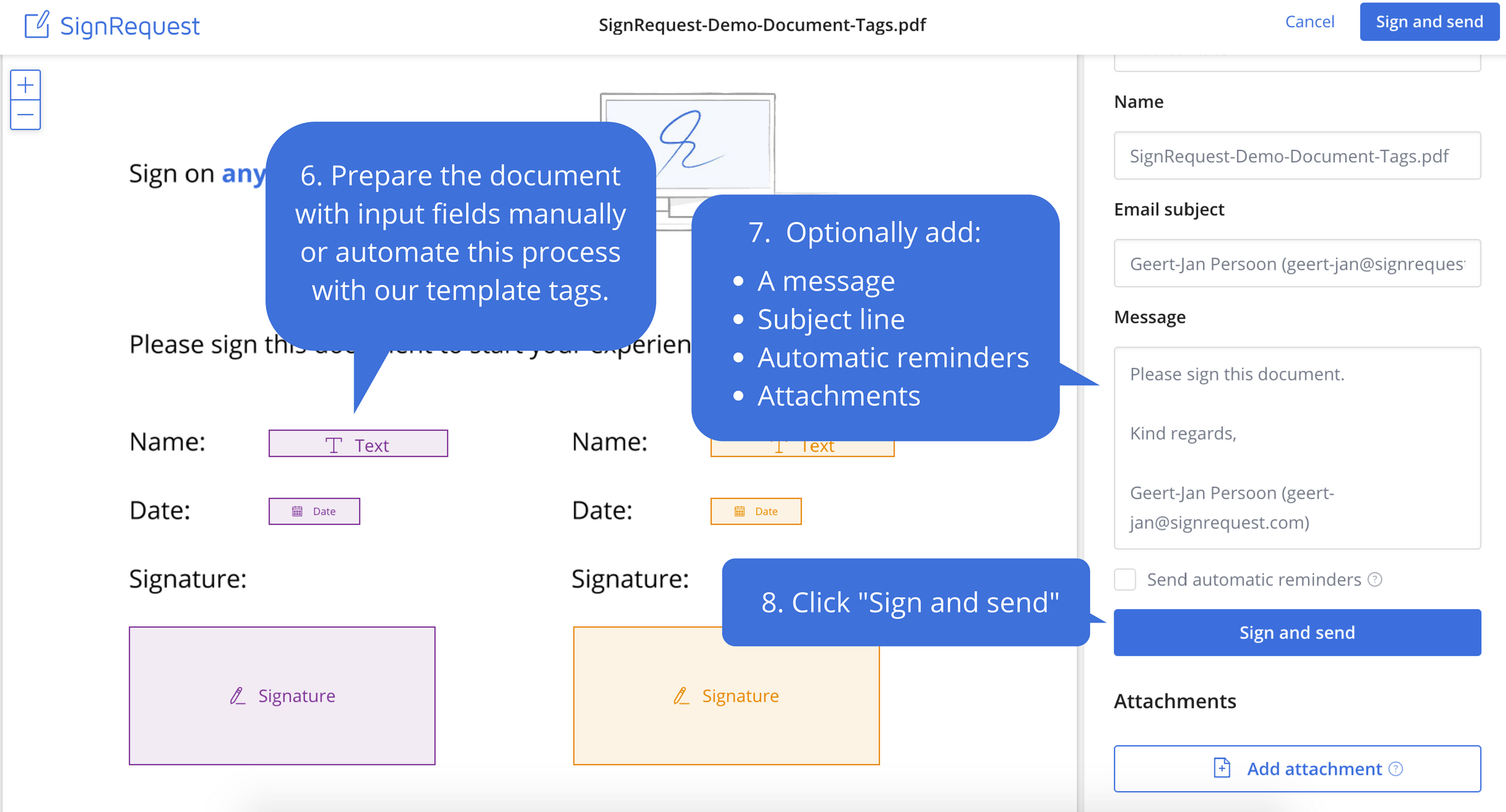
Screenshot of Step 1: Upload the document that needs to be signedScreenshot of Step 2: Prepare document before sendingScreenshot of Step 3: Your customers experience the ease of e-signingScreenshot of Step 4: Signed documents are stored and shared with your customerScreenshot of Step 5: Every alteration to a document is logged for legal purposes