Snap Surveys offers both Survey Software and Feedback Management Solutions, including desktop survey software, online feedback management solutions, and survey research services. Snap Surveys offers complete tools for survey design, administration, data collection, and analysis. Snap Surveys supports all survey modes, including: Online, Mobile (including iPad/iPhone/Android), Paper, Kiosk, Phone, Scanning, and Tablet PC, in any language with robust analysis and reporting capabilities,…
$695
per year
WalkMe
Score8 out of 10
N/A
WalkMe is a Digital Adoption Platform (DAP) that promises to transform the user experience in "today’s overwhelming digital world." Using artificial intelligence, analytics, engagement, guidance and automation, WalkMe offers a transparent overlay that assists users to complete tasks easily within any enterprise software, mobile application or website. Founded in 2011, WalkMe software is used by more than 1,500 enterprises globally, including over 30 percent of Fortune 500 companies.…
I think it is very important to go through their training videos and user guides. Devote the time to learning it correctly from the beginning. In the long run you will enjoy it much more than plowing right into it and then trying to find out if you did it right. Also, while you are not required to buy the annual maintenance contract, I think if you are going to use the program, don't skimp, buy the annual maintenance contract. The free technical support is necessary, especially when you are up against deadlines.
New system implementation - if you're switching or upgrading systems, you can ease users through the transition by providing in-system contextual guidance, extra tips, and automating clicks they don't need to worry about.
Data integrity - if you have users making mistakes in the system, you can add validation with WalkMe without the need for developer time and reduce those errors and upstream problems, and related costs
Reducing support tickets - if you have support tickets coming through about how to do tasks in a system, you can reduce the time and cost of your support staff answering these tickets by addressing the queries with WalkMe content
Change management - ease users through change with guidance and provide in-system surveys
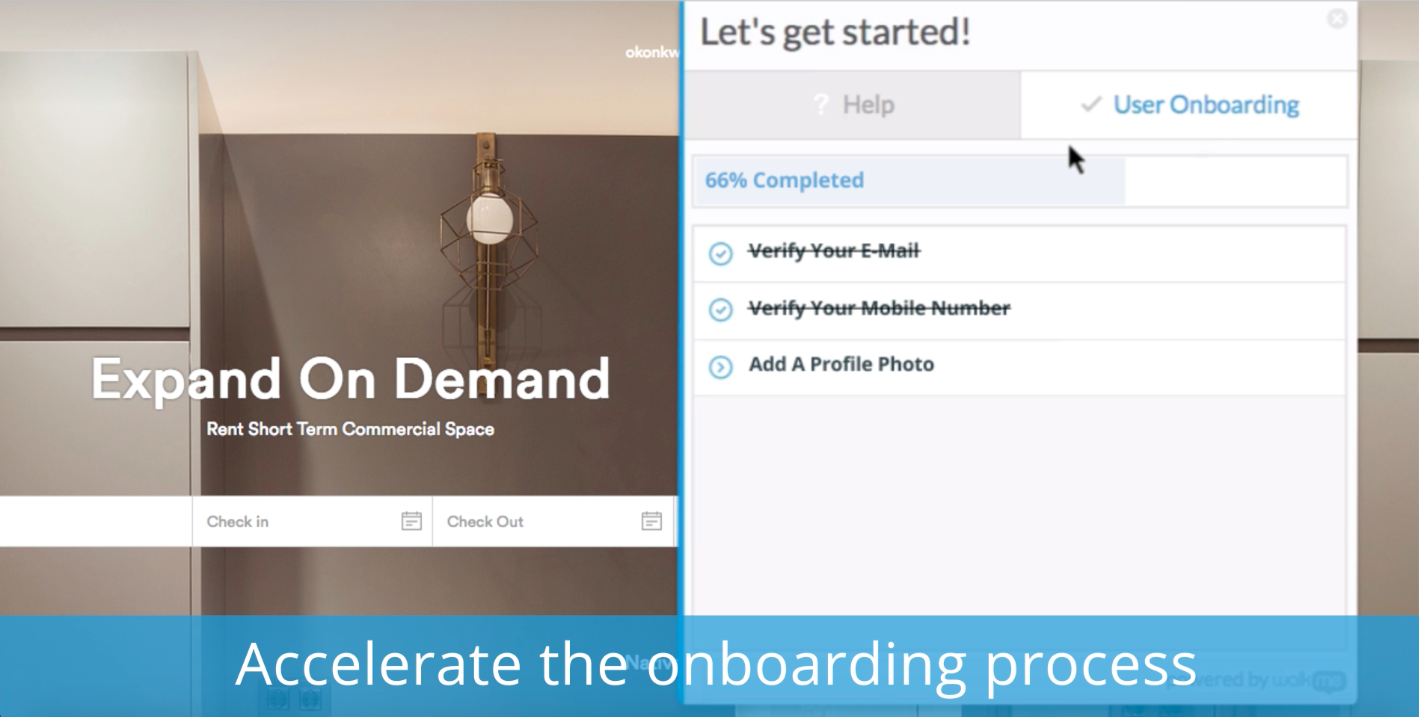
Onboarding - bring new users quickly up to speed with onboarding tasks
Automation - automate your regular processes and cut system time, freeing users up for more important tasks
Process/system analysis - use the analytics to track where users are dropping off in processes and making errors and address these with WalkMe content
User experience - make your system more user friendly
A de minimis incentive was given to thank the reviewer for their time. The incentive was not used to bias or drive a particular response, nor was the incentive contingent on a positive endorsement. More Info
A de minimis incentive was given to thank the reviewer for their time. The incentive was not used to bias or drive a particular response, nor was the incentive contingent on a positive endorsement. More Info
Ease of use and getting up-to-speed in a few days only. WalkMe can be used by new users easily and quickly, yet provides a many advance features for power users to keep exploring and creating innovative solutions--there are always some things that you have not used earlier
Great analytics on our platform, usage and adoption by users, and surveys
Very friendly community of users who help each other all the time and structured upskilling programs, weekly tips keep the learning going
Firefox plugin: The only time I use Firefox is when building a walk-thru. I would like to be able to use Chrome to build the walk-thrus.
Logic: Walk-thrus, Launchers, Shoutouts and walk-thru steps use different logic. I can't always fire something based on a click or URL when sometimes I would like to.
Design: You can use CSS to customize the look of your walk-thrus, but there isn't a way to remove the sidebar color of the walk-thrus.
A de minimis incentive was given to thank the reviewer for their time. The incentive was not used to bias or drive a particular response, nor was the incentive contingent on a positive endorsement. More Info
I think as an organization there is always room to grow, however, this application has really helped us with our dilemma with offline, online, and paper surveys. We are able to make our surveys fun and engaging and the interface for the person creating the survey is user-friendly. Customer service is very helpful if you need additional support.
A de minimis incentive was given to thank the reviewer for their time. The incentive was not used to bias or drive a particular response, nor was the incentive contingent on a positive endorsement. More Info
WalkMe has done a great job of making their tool easy to use. However because it is a Firefox plugin it causes me to need another browser and sacrifice the left 2 - 3 inches of my display, when working on a laptop this makes it a bit painful. Also when publishing you can organize your list of walk-thrus, the window size is small and limited to the constraints of the WalkMe tool.
A de minimis incentive was given to thank the reviewer for their time. The incentive was not used to bias or drive a particular response, nor was the incentive contingent on a positive endorsement. More Info
The WalkMe Support Team was phenomenal. My support rep made a genuine effort to ensure my success with using the WalkMe Software. She was kind, patient, and very knowledgeable on the software. If there was a question she did not know the answer too, she would find the answer and get back to me as soon as possible
A de minimis incentive was given to thank the reviewer for their time. The incentive was not used to bias or drive a particular response, nor was the incentive contingent on a positive endorsement. More Info
It is an in between option. The options we evaluated were Qualtrics and SurveyGizmo. It's cheaper than Qualtrics and easier to design surveys than SurveyGizmo. Nonetheless it's not the worst option out there like SurveyMonkey.
A de minimis incentive was given to thank the reviewer for their time. The incentive was not used to bias or drive a particular response, nor was the incentive contingent on a positive endorsement. More Info
My understanding is that WalkMe was selected based on its capability to support our requirements for our enterprise software. We wanted a product that allows us to provide help at the point of need, provide as little or as much help to guide the user to successfully use the product, and a product that is scalable and can support our growing capabilities.
With a promise to help onboard, we found that as people interacted with the walk throughs they didn't get any significant value. Self-service wasn't improved, in fact, we got more complaints from the walk throughs than help from them.
NPS surveys were a nightmare to try and integrate with our CRM so we could action the results. Lost time and energy without much support from the WalkMe team
No improvement to our Product Adoption, so all cost and time and energy spent on implementation was a loss.