
Stormboard vs. Trello vs. WorkflowMax
Stormboard vs. Trello vs. WorkflowMax
| Product | Rating | Most Used By | Product Summary | Starting Price |
|---|---|---|---|---|
 Stormboard | N/A | Work better together. Stormboard enables users to set up meetings beforehand, capture, organize, and discuss ideas in real-time, and then assign tasks and monitor progress in a digital workspace that can be returned to again and again. Built-in templates for Agile, Project Management, and more help streamline business processes, and work can be exported into one of many dynamic reporting options. Stormboard works on any device from a 4" phone to an 85" Microsoft… | N/A | |
 Trello | N/A | Trello from Atlassian is a project management tool based on a Kanban framework. Trello is ideal for task-management in a to-do list format. It supports sharing boards and cards across users or teams. The product offers a free version, and paid versions add greater automation, collaboration, and administrative control. | $6 per month per user | |
 WorkflowMax | Small Businesses (1-50 employees) | WorkflowMax is a web-based project management solution.The platform offers end-to-end functionality standard to project management software, including time tracking, lead management, collaboration with external stakeholders, invoicing, integrations, and customizable reporting. | $20 per month |
| Stormboard | Trello | WorkflowMax | ||||||||||||||||||||||
|---|---|---|---|---|---|---|---|---|---|---|---|---|---|---|---|---|---|---|---|---|---|---|---|---|
| Editions & Modules | No answers on this topic |
|
| |||||||||||||||||||||
| Offerings |
| |||||||||||||||||||||||
| Entry-level Setup Fee | Optional | No setup fee | No setup fee | |||||||||||||||||||||
| Additional Details | — | A discount is offered for annual billing and for larger numbers of users. | — | |||||||||||||||||||||
| More Pricing Information | ||||||||||||||||||||||||
| Stormboard | Trello | WorkflowMax |
|---|
| Stormboard | Trello | WorkflowMax | |||||||||||||||||||||||||||||||||||||||||||||||||||||||||||
|---|---|---|---|---|---|---|---|---|---|---|---|---|---|---|---|---|---|---|---|---|---|---|---|---|---|---|---|---|---|---|---|---|---|---|---|---|---|---|---|---|---|---|---|---|---|---|---|---|---|---|---|---|---|---|---|---|---|---|---|---|---|
| Project Management |
| ||||||||||||||||||||||||||||||||||||||||||||||||||||||||||||
| Professional Services Automation |
|
| Stormboard | Trello | WorkflowMax | |
|---|---|---|---|
| Small Businesses |  Canva Score 9.1 out of 10 |  Stackby Score 8.9 out of 10 | Stackby Score 8.9 out of 10 |
| Medium-sized Companies | Canva Score 9.1 out of 10 |  InEight Score 8.4 out of 10 | InEight Score 8.4 out of 10 |
| Enterprises |  Whimsical Score 9.3 out of 10 | InEight Score 8.4 out of 10 | InEight Score 8.4 out of 10 |
| All Alternatives | View all alternatives | View all alternatives | View all alternatives |
| Stormboard | Trello | WorkflowMax | |
|---|---|---|---|
| Likelihood to Recommend | 7.7 (7 ratings) | 9.4 (222 ratings) | 8.8 (28 ratings) |
| Likelihood to Renew | - (0 ratings) | 10.0 (6 ratings) | 9.0 (1 ratings) |
| Usability | - (0 ratings) | 9.4 (60 ratings) | 9.0 (2 ratings) |
| Availability | - (0 ratings) | 10.0 (1 ratings) | - (0 ratings) |
| Performance | - (0 ratings) | 10.0 (1 ratings) | - (0 ratings) |
| Support Rating | - (0 ratings) | 9.9 (81 ratings) | 7.0 (2 ratings) |
| In-Person Training | - (0 ratings) | 10.0 (1 ratings) | - (0 ratings) |
| Implementation Rating | - (0 ratings) | 8.0 (2 ratings) | 9.1 (1 ratings) |
| Configurability | - (0 ratings) | 5.0 (1 ratings) | - (0 ratings) |
| Product Scalability | - (0 ratings) | 10.0 (1 ratings) | - (0 ratings) |
| Vendor post-sale | - (0 ratings) | 10.0 (1 ratings) | - (0 ratings) |
| Stormboard | Trello | WorkflowMax | |
|---|---|---|---|
| Likelihood to Recommend | Stormboard
|  Atlassian
 Ellen Valdez, CMP Event Manager |  Xero
|
| Pros | Stormboard
| Atlassian
| Xero
 Inés Prieto R&D / Product Development Engineer - Quality |
| Cons | Stormboard
| Atlassian
 Nick Butler Trainer and coach | Xero
|
| Likelihood to Renew | Stormboard No answers on this topic | Atlassian
 Sahr Saffa CXO | Xero
 Lindsay Simpson Office Co-ordinator |
| Usability | Stormboard No answers on this topic | Atlassian
| Xero
|
| Reliability and Availability | Stormboard No answers on this topic | Atlassian
| Xero No answers on this topic |
| Performance | Stormboard No answers on this topic | Atlassian
| Xero No answers on this topic |
| Support Rating | Stormboard No answers on this topic | Atlassian
 Jared DeLong Onboarding & Services Manager | Xero
 Mary Moore Chief Bookkeeper and Xero Setup Expert |
| In-Person Training | Stormboard No answers on this topic | Atlassian
| Xero No answers on this topic |
| Implementation Rating | Stormboard No answers on this topic | Atlassian
 Raylene Wall Owner | Xero
Mary Moore Chief Bookkeeper and Xero Setup Expert |
| Alternatives Considered | Stormboard
| Atlassian
 Courtney Wolf Founder | Xero
 Caroline Laredo Managing Director |
| Scalability | Stormboard No answers on this topic | Atlassian
| Xero No answers on this topic |
| Professional Services | Stormboard No answers on this topic | Atlassian
| Xero No answers on this topic |
| Return on Investment | Stormboard
| Atlassian
| Xero
|
| ScreenShots | Stormboard Screenshots     | WorkflowMax Screenshots  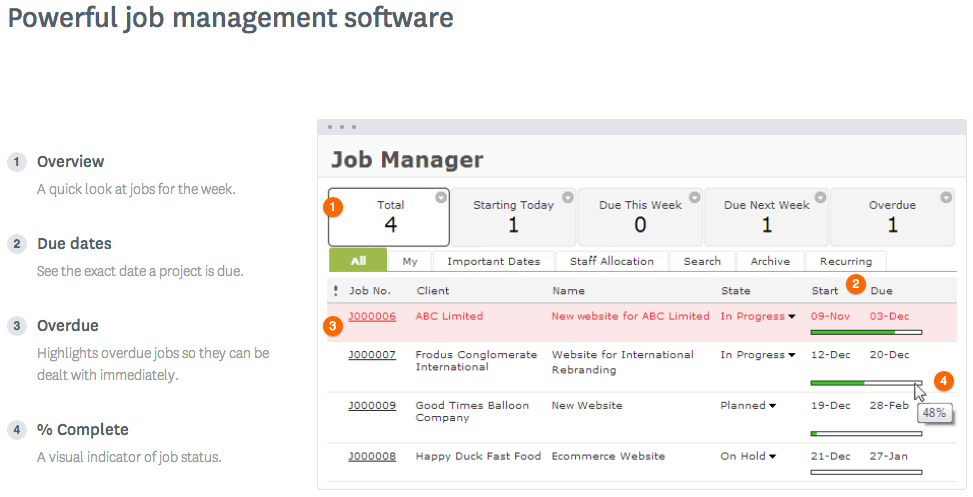  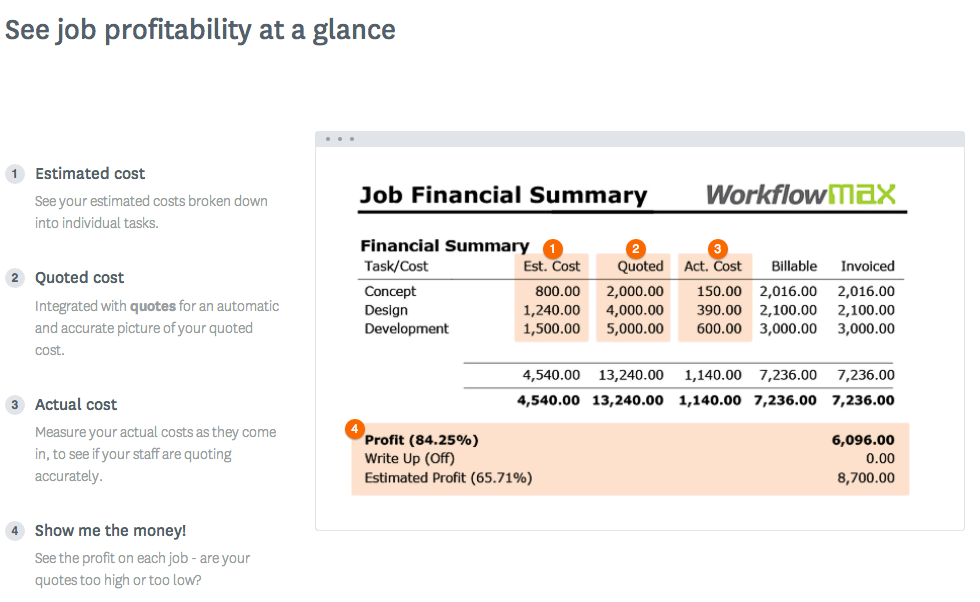  |
