Zoho Social vs. ZoomSphere

Overview
ProductRatingMost Used ByProduct SummaryStarting Price
Zoho Social
Score 9.2 out of 10
N/A
Zoho Social is a comprehensive social media management platform designed for businesses of all sizes and agencies. It is used to schedule and publish posts, manage conversations—including direct messages, comments, and mentions—across multiple platforms, track keywords, competitors, and hashtags, and generate reports from one dashboard. Supported platforms: Meta (Facebook, Instagram, and Threads), Google Business Profile, YouTube, Pinterest, Mastodon, X (formerly Twitter),…
$15
per month
ZoomSphere
Score 9.1 out of 10
N/A
ZoomSphere is a social media scheduling and management solution designed for teams to plan, schedule, auto-publish, and analyze their social media content across multiple platforms. ZoomSphere is primarily used by social media managers, marketing teams, and agencies to streamline content workflows, improve collaboration, and track performance across various social media platforms, including Instagram, Facebook, TikTok, LinkedIn, YouTube, and X. The software helps users automate…
$29
per month
Pricing
Zoho SocialZoomSphere
Editions & Modules
Free
$0
per month per user
Standard
$15
per month per user
Professional
$40
per month per user
Premium
$65
per month 3 users
Agency
$320
per month 5 users
Agency Plus
$460
per month 5 users
Leads Manager
$29
per month
ZoomSphere
$199
per month
Offerings
Pricing Offerings
Zoho SocialZoomSphere
Free Trial
YesYes
Free/Freemium Version
YesNo
Premium Consulting/Integration Services
NoNo
Entry-level Setup FeeNo setup feeNo setup fee
Additional DetailsAdd Ons Users at $10 / user / month Brands $10 / brand / month Discount available for annual pricing.Two month discount available for annual billing.
More Pricing Information
Community Pulse
Zoho SocialZoomSphere
Features
Zoho SocialZoomSphere
Listening/monitoring
Comparison of Listening/monitoring features of Product A and Product B
Zoho Social
8.6
417 Ratings
12% above category average
ZoomSphere
-
Ratings
Sentiment analysis8.3296 Ratings00 Ratings
Broad channel coverage9.0411 Ratings00 Ratings
Publishing
Comparison of Publishing features of Product A and Product B
Zoho Social
9.0
492 Ratings
11% above category average
ZoomSphere
8.0
1 Ratings
1% below category average
Content planning and scheduling9.4490 Ratings8.01 Ratings
Audience targeting8.7346 Ratings7.01 Ratings
Content optimization8.6405 Ratings00 Ratings
Workflow management9.329 Ratings9.01 Ratings
Engagement
Comparison of Engagement features of Product A and Product B
Zoho Social
8.9
399 Ratings
9% above category average
ZoomSphere
-
Ratings
Automated routing and prioritization8.5340 Ratings00 Ratings
Customer interaction histories8.7374 Ratings00 Ratings
Bulk actions9.525 Ratings00 Ratings
Marketing
Comparison of Marketing features of Product A and Product B
Zoho Social
8.7
349 Ratings
12% above category average
ZoomSphere
9.0
1 Ratings
16% above category average
Lead generation8.3263 Ratings00 Ratings
Content marketing9.0340 Ratings9.01 Ratings
Channel coverage/integration
Comparison of Channel coverage/integration features of Product A and Product B
Zoho Social
9.3
482 Ratings
11% above category average
ZoomSphere
8.4
1 Ratings
1% above category average
Twitter9.4431 Ratings10.01 Ratings
Facebook9.4471 Ratings10.01 Ratings
LinkedIn9.4424 Ratings8.01 Ratings
Google+9.1277 Ratings00 Ratings
Instagram9.5401 Ratings7.01 Ratings
YouTube00 Ratings7.01 Ratings
Reporting/analytics
Comparison of Reporting/analytics features of Product A and Product B
Zoho Social
8.6
395 Ratings
11% above category average
ZoomSphere
8.3
1 Ratings
7% above category average
Campaign success analytics8.8391 Ratings8.01 Ratings
Real-time tracking9.325 Ratings7.01 Ratings
Competitor analysis7.7239 Ratings10.01 Ratings
Account management
Comparison of Account management features of Product A and Product B
Zoho Social
9.2
432 Ratings
15% above category average
ZoomSphere
8.5
1 Ratings
7% above category average
Role-based user permissions & privileges9.0336 Ratings10.01 Ratings
Mobile access9.3410 Ratings7.01 Ratings
Best Alternatives
Zoho SocialZoomSphere
Small Businesses
CoSchedule Marketing Suite
Score 10.0 out of 10
CoSchedule Marketing Suite
Score 10.0 out of 10
Medium-sized Companies
CoSchedule Marketing Suite
Score 10.0 out of 10
CoSchedule Marketing Suite
Score 10.0 out of 10
Enterprises
Social Suite by Reputation.com
Score 9.4 out of 10
Social Suite by Reputation.com
Score 9.4 out of 10
All AlternativesView all alternativesView all alternatives
User Ratings
Zoho SocialZoomSphere
Likelihood to Recommend
9.4
(492 ratings)
8.0
(1 ratings)
Likelihood to Renew
8.8
(14 ratings)
-
(0 ratings)
Usability
9.5
(320 ratings)
9.0
(1 ratings)
Availability
8.2
(2 ratings)
-
(0 ratings)
Performance
8.2
(3 ratings)
-
(0 ratings)
Support Rating
9.3
(220 ratings)
9.0
(1 ratings)
Online Training
8.2
(1 ratings)
-
(0 ratings)
Implementation Rating
8.4
(5 ratings)
-
(0 ratings)
Configurability
7.3
(2 ratings)
-
(0 ratings)
Ease of integration
3.6
(2 ratings)
-
(0 ratings)
Product Scalability
8.2
(3 ratings)
-
(0 ratings)
Vendor post-sale
8.2
(2 ratings)
-
(0 ratings)
Vendor pre-sale
8.2
(2 ratings)
-
(0 ratings)
User Testimonials
Zoho SocialZoomSphere
Likelihood to Recommend
Zoho
We have a few videos to share on our social media accounts: Linked in, facebook, instagram, twitter, youtube, another personal youtube account, and tiktok. First of the videos will be shared now, but the second one should be shared 3 hours later, and the third one 6 hours later. Also, with some text, on each share... You give this job to a personnel and thrust they will be fast enough to login those accounts and share the content almost at the same time, with no mistakes on the texts we use, and you thing you are done, right? It doesn't work that way in real life situations. However, you can share the same text and video to every platform momentarily by clicking a button by Zoho Social. you can also schedule posts to be shared later at a certain time and date. Now, you can concentrate to develop the character and details of your campaign. And, also, now, you have a personnel who can be useful at some other work
Read full review
ZoomSphere
ZoomSphere is suited for all companies - from small to big, for one brand or more brands within company. With ZoomSphere you can leverage your social media presence - but you need to use lot of apps ZoomSphere has. I think that ZoomSphere is not suited for company that want to use ZoomSphere for only one purpose, for example content creation and publishing. There are plenty of ways how to use ZoomSphere more complex.
Read full review
Pros
Zoho
  • Zoho Social helps us develop posts, and it facilitates the automated publishing, which is vital in sharing the content we want.
  • Besides, Zoho Social is fruitful in customer engagement plan, where the software manages different accounts, and there is free communications throughout.
  • Finally, there is social media evaluation, monitoring, and analytics, and all of them brings to us an inference that is accurate and digital.
Read full review
ZoomSphere
  • Content Creation and Publishing
  • Analytics and Reporting
  • Workflow management
Read full review
Cons
Zoho
  • I wanted to use the ability to have Zoho queue the posts, but I wanted to choose the start time of the first post for a few days in the future and I did not find an easy way to set that.
  • I wish there were a box with a cheat sheet of the sizes that each social media platform allows for it's video and pictures in the dialogue box for posting so I can be sure to choose appropriate content.
  • I do think it's a bit expensive, especially for my needs, but I like the ease of use. I will continue to do what I can to get this service discounted until I can no longer afford it.
Read full review
ZoomSphere
  • Community Management
  • Viewable backlog or product roadmap
Read full review
Likelihood to Renew
Zoho
Zoho Social is the BEST! I have found the perfect solution to social media marketing! It is extremely affordable and I highly recommend it! Create a post once and post it to 5 or more social media platforms! LOVE IT!! :)
Read full review
ZoomSphere
No answers on this topic
Usability
Zoho
The reason behind assigning this rating stems from the software's remarkable ability to seamlessly integrate intricate functionalities with an incredibly user-friendly interface. It strikes an exceptional balance between sophisticated features and ease of use, making it a standout solution in its category. The software's attention to user experience, coupled with its comprehensive project tracking capabilities, has undoubtedly left a positive impression. This rating reflects my appreciation for how effortlessly it empowers teams to manage projects, collaborate effectively, and achieve their goals with utmost efficiency
Read full review
ZoomSphere
There is always a space for improvement, but overall I see ZoomSphere as a valuable partner and tool for our business on social media. Maybe in a future rest of the apps in tool (community management, social media listening,...) will be on a same level as competitors and we will use only one tool for whole social media management. But if not, ZoomSphere is still awesome for the most of it
Read full review
Support Rating
Zoho
I have not needed support for Zoho Social. This comment requirement is confusing to me as I must find text to fill the requirement of a minimum of 50 words. There should be a non-applicable button that allows either user to skip a question or then require a shorter explanation like in my first sentence. Geez, now I have to give a rating while never using the feature.
Read full review
ZoomSphere
Whenever I contacted customer service, I had a great response within minutes. Sometimes was not easy to solve, but somehow we figured it out. I would like to reccommend more proactive communication with clients regarding product roadmap, for example "In 1Q we will launch XY,..." Client should know that before implementation - client can prepare for news, client can test something,...
Read full review
Alternatives Considered
Zoho
Zoho Social is a great social media management tool that allows businesses, and individuals, to manage multiple social media accounts, schedule posts, track analytics, and engage with followers. It competes well with other social media management tools such as Hootsuite, Buffer, Sprout Social, Agora Pulse, and Hubspot. Zoho Social stands out for its integration capabilities with other Zoho applications and affordability for small to medium-sized businesses. Each tool has its own strengths and weaknesses, and businesses should evaluate them based on their specific needs and goals. The biggest fallacy for Zoho is its restriction on scheduling tools on the free plan who have social and personal needs. I believe this can be circumvented by Zoho periodically making an advertisement to one's feed.
Read full review
ZoomSphere
We see ZoomSphere as a better option than Kontentino. They are almost the same in way you can use the tool, but ZoomSphere has better UI and UX and also customer service. We also know that pricing levels are better with ZoomSphere than Kontentino. But both tools are quite awesome for social media management. Just book a demo, have a trial and you will see by yourself.
Read full review
Return on Investment
Zoho
  • I had a month-long delay in launching my website. Zoho Social allowed me to continue to build an audience and anticipation while the website technical issues were worked out.
  • The free trial meant I could give it a good try before spending any of my precious startup budget.
Read full review
ZoomSphere
  • Possitive effect into measure all awareness effects on social channels
  • Time effectiveness
  • Faster workflow management and realtime communication
Read full review
ScreenShots

Zoho Social Screenshots

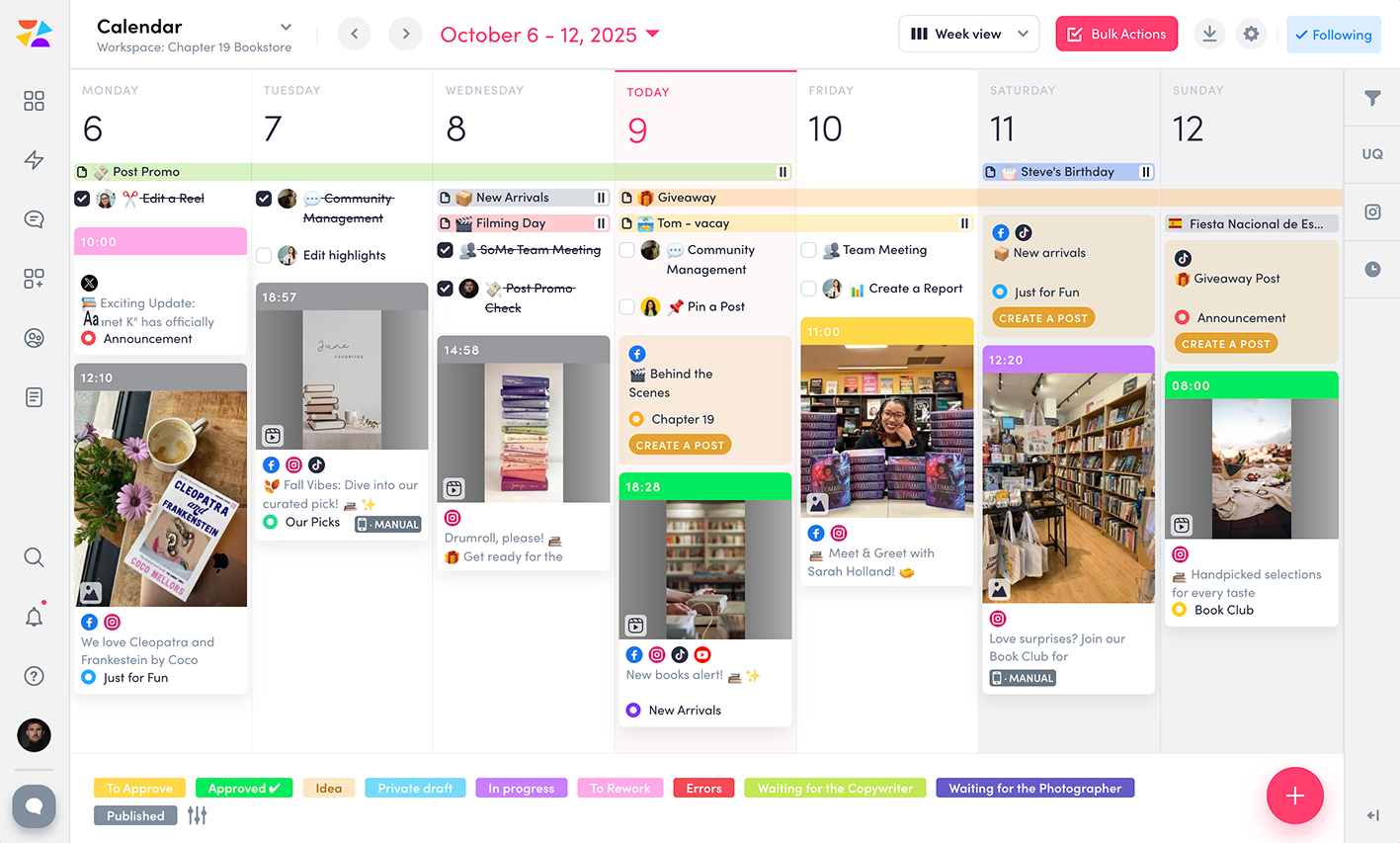
Screenshot of the Zoho Social interface, which appears when logging into an account. It provides navigation to switch between brands, monitor follower growth, and analyze post performance across connected channels—offering a unified view of an organization's social media health, posts, and interactions.Screenshot of the interface to publish content across all connected channels at once, or by selecting specific ones individually. It also offers the option to schedule posts for later or use SmartQ to automatically pick the best time for optimal engagement.Screenshot of the interface to manage all social media conversations, including direct messages, comments, and mentions, across all channels in a single unified inbox.Screenshot of the Monitor feature, used to track keywords, relevant accounts, and content, with notifications.Screenshot of an example of Zoho Social's data-driven insights, used to crunch numbers and generate reports.Screenshot of the Social Media Calendar, used to plan and deliver experiences.

ZoomSphere Screenshots

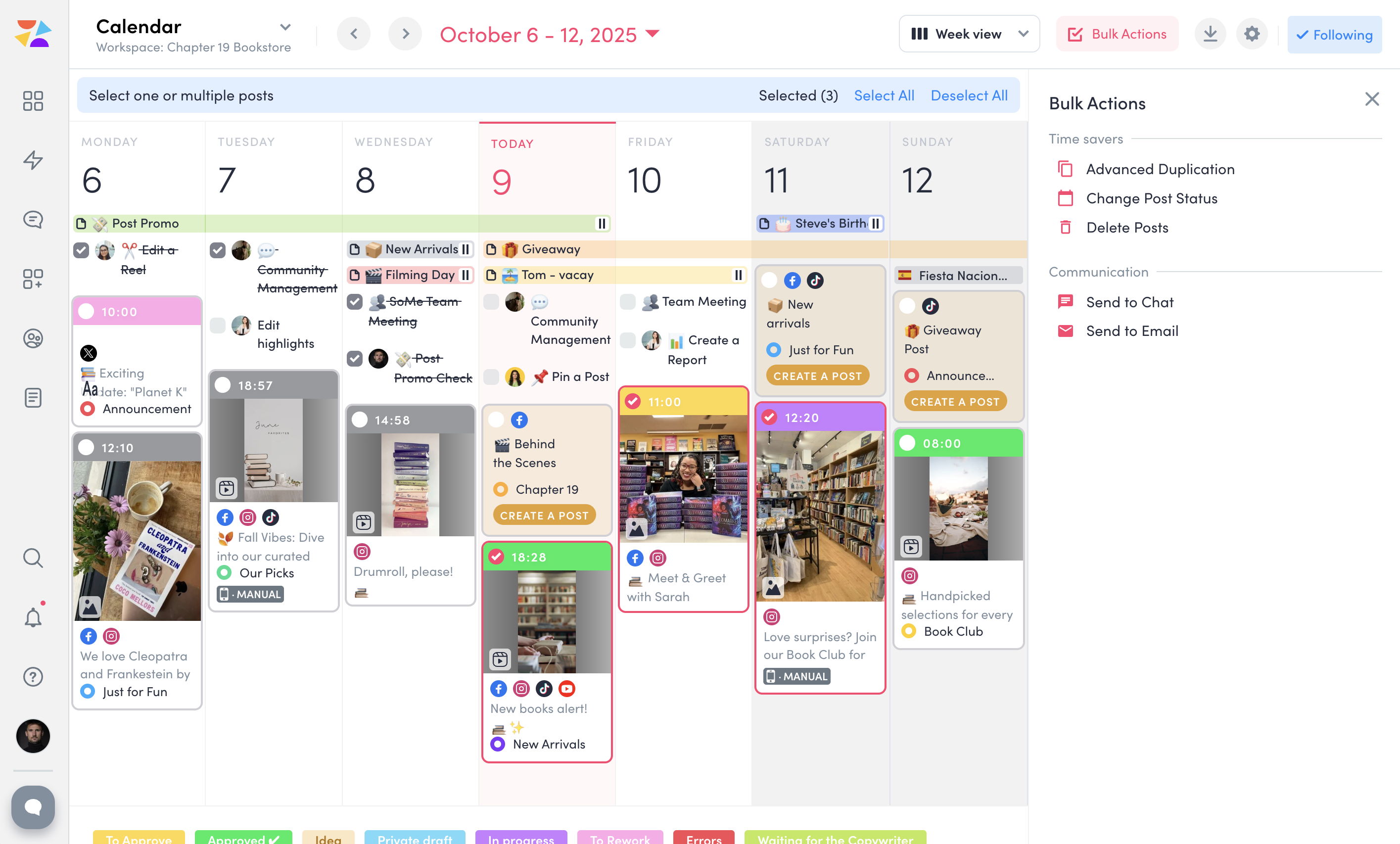
Screenshot of ZoomSphere Workspaces, which lets the user keep clients and projects organized. A separate workspace can be set up for each client with only needed apps—no extra clutter. Each workspace comes with a built-in Chat for easy communication and a Files section to store everything from images and videos to presentations and reports, keeping work in one place.Screenshot of ZoomSphere Scheduler, which simplifies social media planning and publishing across platforms like Instagram, Facebook, TikTok, LinkedIn, YouTube, and X. Users can manage formats like stories, carousels, and short videos, or set up a custom approval flow for fast approval from a manager or client, and enjoy features like Instagram grid preview, post performance panel, and bulk actions.Screenshot of a Kanban-style interface to streamline task management. Here, users can create tasks, set deadlines, attach files, and discuss each task card with a team to keep everything on track. With clear task organization, ZoomSphere Workflow Manager helps teams stay on top of their projects and ensures smooth collaboration from start to finish.Screenshot of ZoomSphere Notes, which makes organizing ideas and plans easy.Screenshot of ZoomSphere Analytics, which offers in-depth insights into social media performance. Content performance can be analyzed with over 100 available metrics, and reports can be generated for any time period.Screenshot of the tool to send multiple posts for approval to client at once. Bulk Actions lets users send entire batches of posts via email or built-in chat, as well as duplicate, update statuses, or delete multiple posts.