TrustRadius: an HG Insights company

Astrato Analytics

Score8.4 out of 10

12 Reviews and Ratings

What is Astrato Analytics?

A self-service BI solution, Astrato puts analytics in the hands of every user, enabling them to build their own reports and answer data questions without IT help. Astrato accelerates adoption, speeds up decision-making, and unifies analytics, embedded analytics, data input, and data apps in one platform.

With Astrato, Self-Service business users can see and understand data that resides in the Data Cloud (Snowflake, Databricks, BigQuery, Redshift, Dremio, PostgreSQL). With Pushdown SQL technology, Astrato expands beyond traditional BI capabilities, and enables bi-directional writeback, workflows, and interaction with parameterized Data Science models, with the goal of providing a modern evolution to Tableau/Power BI/Qlik. With a low-code interface, and fueled with a GenAI copilot and insight generation, Astrato can be used by organizations to build with and consume data, regardless the skill level, for informed decision-making and reporting.

Media

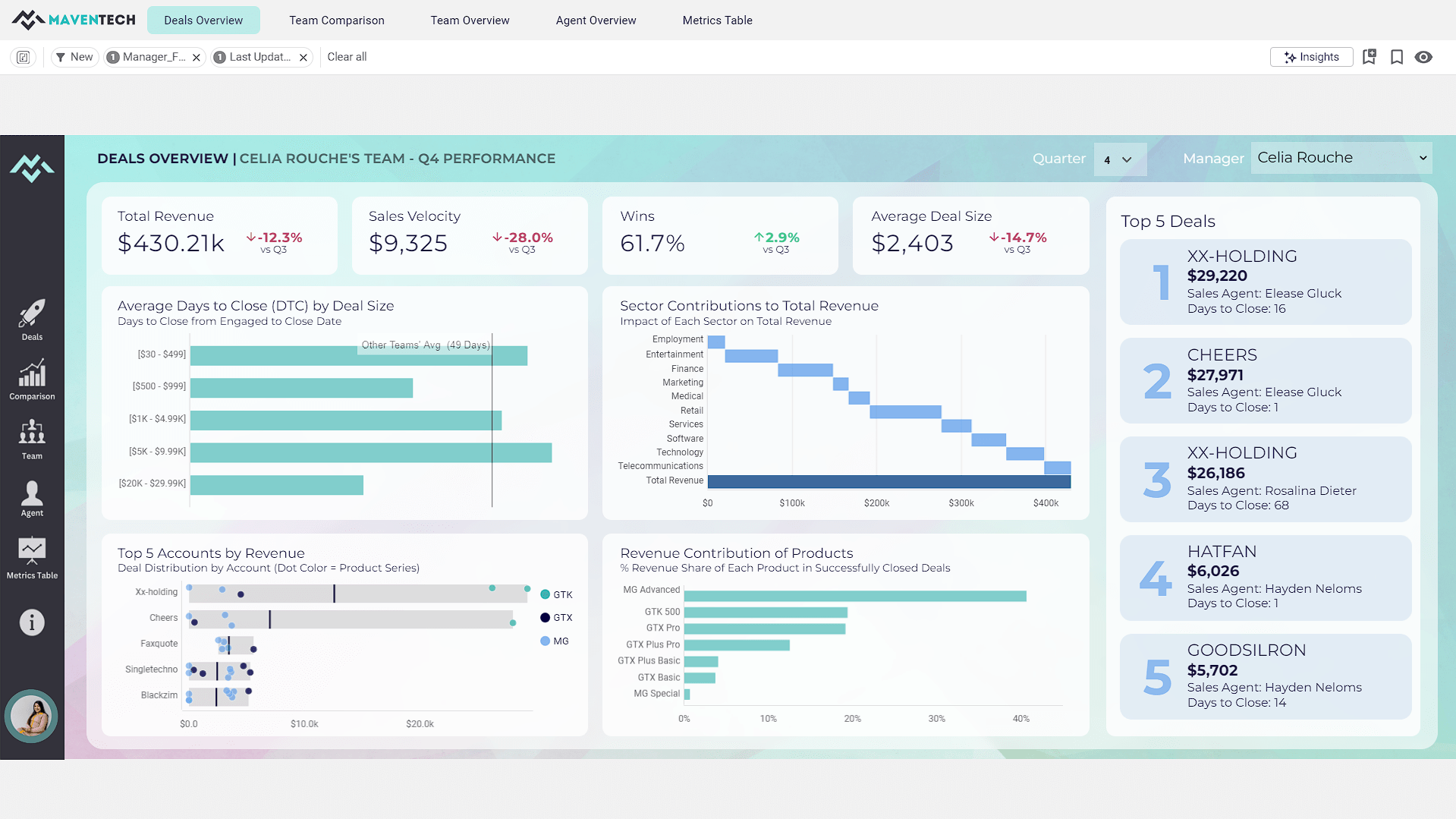
from the Gallery Dashboard: Maventech CRM Sales Performance
from the Gallery Dashboard: Healthcare Analytics
The comprehensive Healthcare System Dashboard was designed for Bedford Health System, a tool leveraging Astrato’s data visualization capabilities. This dashboard provides a holistic view of various critical healthcare metrics, enabling informed decision-making and strategic planning.
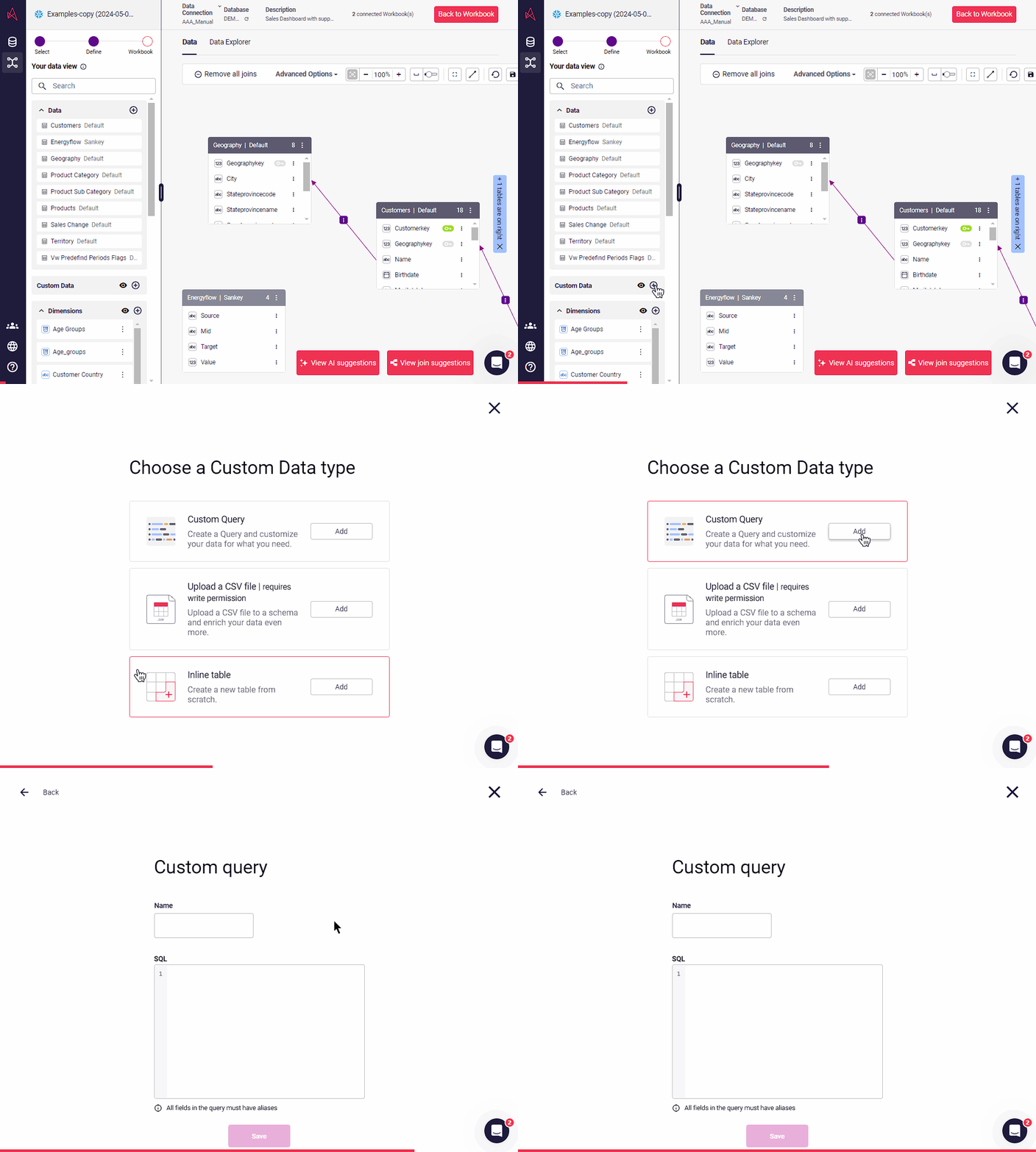
how to add custom data into the semantic layer

1 / 3

Top Performing Features

  • Publish to PDF

    Category average: 8

  • Publish to Web

    Category average: 8.1

  • Multi-User Support (named login)

    Named model access means that users have access based on name and password.

    Category average: 8.3

Areas for Improvement

  • Report Formatting Templates

    Category average: 7.9

  • Formatting capabilities

    Ability to format output e.g. conditional formatting, lines, headers, footers.

    Category average: 7.6

  • Dashboard / Report / Visualization Interactivity on Mobile

    In-app dashboard reports and data visualization.

    Category average: 7.4

Astrato Analytics' robust no-code application is a tremendous value.

Use Cases and Deployment Scope

We have used Astrato Analytics to build a SaaS application that is fully integrated with our Snowflake data platform. Being a small business, with limited staff and financial resources we needed a solution that was affordable and easy to use, yet was feature-rich and could scale large healthcare datasets. We have built several modules within our SaaS application pulling from various sets of healthcare data addressing several different use cases in the healthcare supply chain space.

Pros

  • Astrato Analytics has done a fantastic job of simplifying the process of creating advanced analytics. The "no-code" feature-rich library of options allows the non-technical user to build sophisticated analytics.
  • Astrato Analytics' customer service feels much more like a partnership. They are always willing to jump in, assess, teach, and provide guidance on the best way to approach developing new features within our platform.
  • Astrato Analytics has created exceptional value combining their extensive offering and extremely reasonable pricing.

Cons

  • Would benefit by an enhanced and centralized ability to control themes.

Return on Investment

  • Utilizing Astrato Analytics has allowed us to create a SaaS application that we would have otherwise not been able to do given our company size and resources. The value provided has been transformational.

Usability

Alternatives Considered

Microsoft Power BI

Other Software Used

Snowflake

Groundbreaking Analytics Platform

Use Cases and Deployment Scope

We use Astrato as a internal analytics platform and are building a product on the platform we plan to offer to our customers. We leverage the dashboard functionality for insights and the writeback functionally to provide audit logging and to allow users to input notes on customer interactions. Our homebuilt CRM function inside of Astrato allows us to unify our CRM and analytics tools on one platform and save the cost of maintaining seperate tools.

Pros

  • Writeback to the database is simple and straightforward and allows us to build apps in the tool with a level of interation that is not possible with other BI tools
  • Version control that is built into the workbooks allows us to quickly deploy changes without the fear of losing the older version and maintianing both a historcal updates and the ability to rollback
  • Easy connectivity to a wide range of data platforms including Snowflake, Databricks, and Google Workspace within the same tenant allows us to leverage data from each of these platforms for specific use cases

Cons

  • I would like to see additional support for legacy databases like SQL Server as many organizations need tools that can bridge the gap between legacy platforms and cloud-native platforms
  • I would love to see built-in support for completely isolated Dev, Test, Prod environments within a single tenant

Return on Investment

  • The ability to unify multiple platforms in Astrato provides cost savings.

Usability

Alternatives Considered

Microsoft Power BI, Sigma Computing, Tableau Cloud and Tableau Desktop

Other Software Used

Snowflake, Coalesce, Databricks Data Intelligence Platform

Embedded Dashboards and Exportable Data at its best

Use Cases and Deployment Scope

Our main draw to Astrato was the ability to embed dashboards into web applications without complex code and setup. Astrato's subscription model is economical for doing this type of work, as opposed to several other vendors we looked at. Astrato provides rapid response to issues, as well as the ability to download dashboards to a preformatted excel, complete with formulas and conditional formatting, making it easy to share the data to multiple people.

Pros

  • Responsive product and support team to work through issues
  • Support team does a great job training us and teaching us how to get the most out of the product
  • The product team is knowledgeable in cloud data storage, so they can help provide setup and configuration solutions.

Cons

  • The product is still young, as a consequence, some features aren't as mature as competitors. Astrato has worked to catch up quickly, by rolling out new features regularly
  • Better ability to control icons and themes from a central point, instead of having to add/change them on each report

Return on Investment

  • Allowed us to provide clients direct access to their reports without having to increase license costs

Usability

Alternatives Considered

Sigma Computing, Tableau Cloud and ThoughtSpot

Other Software Used

Tableau Cloud

Great Job, thanks Astrato

Use Cases and Deployment Scope

With Astrato we have sought to restructure our cloud storage systems to maximize the processes of our business sector linked to digital marketing.

It is a dynamic interface that uses a set of functions very focused on our needs, especially the BI team has benefited from data processing prior to delivery to the client.<div>

</div>

Pros

  • Streamlined data compilation in the cloud
  • Expansion in the dynamic spectrum of business processes with our focus on digital marketing
  • Very complete storage capacity

Cons

  • There are Astrato functions related to data agglomeration that I would improve to make it easier to upload to the cloud
  • I think that a bit of its function is lost when we try to link the data with what we obtain, for example, from Google Analytics.

Return on Investment

  • I don't know if the impact has been directly proportional to our ROI but it undoubtedly has a lot to do with it, since we have optimized the BI team's processes to deliver more complete reports to the client.

Usability

Alternatives Considered

Google Ad Manager, Google Cloud AI, SalesMonday and Odoo

Other Software Used

Google Analytics, Odoo, monday.com, Salesforce Experience Cloud

Astrato is a simple to use, free, entry level BI tool!

Use Cases and Deployment Scope

We evaluated it as a low cost, low effort BI Solution for companies that have their data on Snowflake and/or Google Spreadsheets, and do not want or are able to download and install a BI tool. We also consider recommending it as a teaching tool for Business Intelligence, due to the fact that it is free in its entry form.

Pros

  • Beautiful looking graphs
  • Simple Data Connection
  • Simple data joins
  • No install, zero-footprint.

Cons

  • Handling massive amounts of data. Simplicity ends there.
  • Template objects need to be explained better in the documentation.
  • Ability to connect to more data sources.

Most Important Features

  • Simple to use
  • Easy to visualize data relationships
  • Dashboard templates illustrate visual best practices.

Return on Investment

  • Simple to configure and to use when the budget is not large.
  • Nice teaching resource for Business Intelligence consultants
  • Zero cost for personal use, making it a nice way to add a dashboard to a project.

Alternatives Considered

Qlik Sense, Microsoft Power BI and Tableau Desktop

Other Software Used

Qlik Sense, Microsoft Power BI, Tableau Desktop, Zoho CRM, Google Sheets