360Learning headquartered in Paris offers their workforce training learning management system.
$8
per month per user
Confluence
Score 8.1 out of 10
N/A
Confluence is a collaboration and content sharing platform used primarily by customers who are already using Atlassian's Jira project tracking product. The product appeals particularly to IT users.
$6.40
per month per user
MadCap Xyleme
Score 6.0 out of 10
N/A
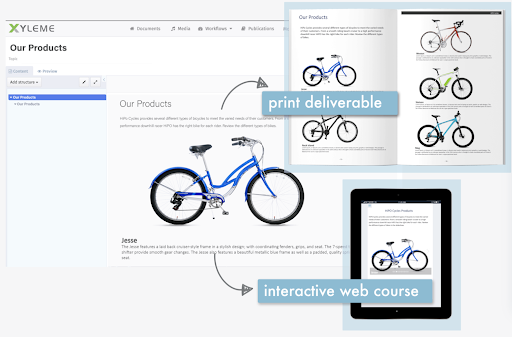
Xyleme is a robust Component and Learning Content Management Solution dedicated to providing users with an easy and safe way to create and disseminate learning materials and other business-related content. It comes equipped with several features that focus on creating a central, single source of truth for an organization’s content.
N/A
Pricing
360Learning
Atlassian Confluence
MadCap Xyleme
Editions & Modules
Team
$8
per user, per month
Business
Contact Sales
Enterprise
Contact Sales
Free
$0
Free for 10 Users
Standard
$6.40
per month per user
Premium
$12.30
per month per user
Data Center
220,000.00
40,001+ Users - Annually
Enterprise
Contact Sales
No answers on this topic
Offerings
Pricing Offerings
360Learning
Confluence
MadCap Xyleme
Free Trial
Yes
Yes
No
Free/Freemium Version
No
No
No
Premium Consulting/Integration Services
No
No
No
Entry-level Setup Fee
No setup fee
No setup fee
No setup fee
Additional Details
—
Prices shown here reflect prices for deployments with 100 users or less. The prices decrease wien the user base surpasses 100.
—
More Pricing Information
Community Pulse
360Learning
Atlassian Confluence
MadCap Xyleme
Features
360Learning
Atlassian Confluence
MadCap Xyleme
Learning Management
Comparison of Learning Management features of Product A and Product B
360Learning
8.3
20 Ratings
1% above category average
Atlassian Confluence
-
Ratings
MadCap Xyleme
-
Ratings
Course authoring
8.919 Ratings
00 Ratings
00 Ratings
Course catalog or library
7.918 Ratings
00 Ratings
00 Ratings
Player/Portal
8.517 Ratings
00 Ratings
00 Ratings
Learning content
8.56 Ratings
00 Ratings
00 Ratings
Mobile friendly
5.516 Ratings
00 Ratings
00 Ratings
Progress tracking & certifications
9.118 Ratings
00 Ratings
00 Ratings
Assignments
9.017 Ratings
00 Ratings
00 Ratings
Compliance management
7.54 Ratings
00 Ratings
00 Ratings
Learning administration
8.819 Ratings
00 Ratings
00 Ratings
Learning reporting & analytics
8.819 Ratings
00 Ratings
00 Ratings
Social learning
8.718 Ratings
00 Ratings
00 Ratings
Gamification
8.513 Ratings
00 Ratings
00 Ratings
Single Sign On (SSO) Enabled Learning
8.94 Ratings
00 Ratings
00 Ratings
Project Management
Comparison of Project Management features of Product A and Product B
360Learning
-
Ratings
Atlassian Confluence
7.0
157 Ratings
11% below category average
MadCap Xyleme
-
Ratings
Task Management
00 Ratings
7.1125 Ratings
00 Ratings
Gantt Charts
00 Ratings
7.912 Ratings
00 Ratings
Scheduling
00 Ratings
7.221 Ratings
00 Ratings
Workflow Automation
00 Ratings
6.389 Ratings
00 Ratings
Mobile Access
00 Ratings
6.7116 Ratings
00 Ratings
Search
00 Ratings
6.8155 Ratings
00 Ratings
Visual planning tools
00 Ratings
7.2126 Ratings
00 Ratings
Communication
Comparison of Communication features of Product A and Product B
360Learning
-
Ratings
Atlassian Confluence
7.9
157 Ratings
1% below category average
MadCap Xyleme
-
Ratings
Chat
00 Ratings
6.415 Ratings
00 Ratings
Notifications
00 Ratings
8.2154 Ratings
00 Ratings
Discussions
00 Ratings
7.7147 Ratings
00 Ratings
Surveys
00 Ratings
7.015 Ratings
00 Ratings
Internal knowledgebase
00 Ratings
9.0148 Ratings
00 Ratings
Integrates with GoToMeeting
00 Ratings
6.03 Ratings
00 Ratings
Integrates with Gmail and Google Hangouts
00 Ratings
9.37 Ratings
00 Ratings
Integrates with Outlook
00 Ratings
9.610 Ratings
00 Ratings
File Sharing & Management
Comparison of File Sharing & Management features of Product A and Product B
360Learning is an ideal choice for organizations looking to decentralize their learning and development initiatives and engage internal experts. With its user-friendly course builder, the platform enables us to easily train employees throughout the organization. The Champion Solution serves as a powerful project management tool, ensuring collaboration and alignment with SMEs to create top-notch content. The transparency in 360Learning's roadmap and the excellent support from the customer success team further enhance the overall experience. By choosing 360Learning, organizations can unlock the potential of their internal experts and revolutionize their learning and development processes
I would recommend Atlassian Confluence for companies that want to have internal documentation and minimum governance processes to ensure documentation is useful and doesn't have a lot of duplicated and non-updated content. I wouldn't recommend Atlassian Confluence for companies with a low budget since this product might be a little costly (especially with add-ons).
Building and keeping up to date modular content (blocks).
Maintaining and updating large content library where meaning team members might be working on the same content but using the content in different context (e.g. learning and internal comms).
Creating learning content by new/recently onboarded team members.
Create simple learning courses with some level of interactively, medium interactivity (tabs, image maps, slider reveal images), create different types of knowledge checks/assessments from multiple choice to drag and drop activities); embed videos and other HTML elements .
Integrate with LMS, apply SCORM rules etc
Better to use in combination with other media creation tools like Vyond, Storyline. Some things can get tricky (compatibility).
Less appropriate: 1. If you need to build highly interactive learning experience 2. When you don't have a team member you can dedicate specifically to customize templates in Xyleme for your organizational needs (looks, functionality etc.) or and to train team members on this software. You'd need someone on your team to collaborate with Xyleme closely to customize functions for your organization's needs. 3. When #2 and you want a modern/in trend looking output and not willing to compromise on what it looks and feels.
Cross product linking - If you use other Atlassian products then Atlassian Confluence is a no-brainer for your source of documentation, knowledge management etc. You can show previews of the linked asset natively E.g. showing a preview of a JIRA ticket in a Atlassian Confluence page.
Simple editing - Though the features available may not be super complex right now, this does come with the benefit of making it easy to edit and create documents. Some documentation editors can be overwhelming, Atlassian Confluence is simple and intuitive.
Native marketplace - If you want to install add-ons to your Atlassian Confluence space it's really easy. Admins can explore the Atlassian marketplace natively and install them to your instance in a few clicks. You can customise your Atlassian Confluence instance in many different ways using add-ons.
Sometimes the platform isn't as intuitive as I'd like
Frequent updates that can impact the guidelines we establish for our internal employees
Catalog access for courses is linked to programs requiring participants to retake a program instead of just replaying a singular course. This is being addressed in a future update.
UI Design is very simplistic and basic could make use of more visually interesting colour choices, layout choices, etc.
Under the 'Content' menu, it defaults to having a landing page for all L1 and L2 category pages. Meaning as long as the broader content category has a sub-category, it still creates a separate landing page. In my team's case, this often creates blank pages, as we only fill out the page at the lowest sub-category (L3).
Hyperlinks are traditionally shown as blue, however, this results into very monotonously blue pages in cases where a lot of information is being linked.
several features advertised as device agnostic or mobile friendly do not work properly on mobile
finicky in many ways, sometimes you need to tinker with details for to long to make things work properly
many UI solutions/elements that are not intuitive at all (even using the tool almost every day you need to make effort to remember how things are done)
I am confident that Atlassian can come with additional and innovative macros and functions to add value to Confluence. In 6 months, Atlassian transformed a good collaborative tools into a more comprehensive system that can help manage projects and processes, as well as "talk" with other Atlassian products like Jira. We are in fact learning more about Jira to evaluate a possible fit to complement our tool box.
You don't really need to be trained to use it, it's like social media. If not, there's full documentation available, it's not a steep learning curve at all. There's lots of advice about how to better use the platform too. I don't see any need for improvement here but left a 9/10 JUST in case.
Great for organizing knowledge in a hierarchical format. Seamless for engineering and product teams managing software development. Helps in formatting pages effectively, reducing manual work. Tracks changes well and allows for easy rollbacks. Granular controls for who can view/edit pages. Search function is not great which needs improvement. Hire some google engineers
We never worked against the tide while using Confluence. Everything loads considerably fast, even media components like videos (hosted on the platform or embed external videos from Youtube, for example). We are not using heavy media components a lot, but in the rare occasion we happen to use one we have no problems whatsoever.
This rating is specifically for Atlassian's self-help documentation on their website. Often times, it is not robust enough to cover a complex usage of one of their features. Frequently, you can find an answer on the web, but not from Atlassian. Instead, it is usually at a power user group elsewhere on the net.
We had a lot of reasons for choosing to partner with PSA for our Learn 360 platform. The others were a much larger price, were not as easy to use, were not as feature-rich, and didn't have us plugged into so many relevant titles at any time. They also didn't seem as adaptable or have an AI component built in.
We chose Atlassian Confluence over SharePoint because it's much more user-friendly and intuitive. Atlassian Confluence makes collaboration and knowledge sharing easier with its simpler interface and better search. While SharePoint can be powerful, it often feels clunky and complex, making it harder for our team to actually use it.