Overview
ProductRatingMost Used ByProduct SummaryStarting Price
Adobe Acrobat Reader
Score 8.6 out of 10
N/A
Acrobat Reader is a PDF viewer and converter, available as a free download from Adobe. Users can view, sign, collaborate on and annotate PDF files, or edit and convert PDFs into file formats like Excel and Word.N/A
Autodesk Build
Score 8.1 out of 10
N/A
Autodesk Build, based on the former PlanGrid, is construction productivity software. It includes tools to collaborate, collect, and manage project information throughout the project’s construction and operations lifespan. It enables document centralization and tracking.
$39
user per month
Bluebeam
Score 9.2 out of 10
N/A
Bluebeam Revu is a PDF management, control, and editing tool. It enables collaboration and markup within shared documents across projects’ life cycles and has takeoff and bid creation capabilities.
$240
per year per user
Pricing
Adobe Acrobat ReaderAutodesk BuildBluebeam
Editions & Modules
No answers on this topic
Nailgun
$39
user per month
Dozer
$59
user per month
Crane
$139
user per month
Revu Standard
$349
per seat
Revu CAD
$449
per seat
Revu eXtreme
$599
per seat
Offerings
Pricing Offerings
Adobe Acrobat ReaderAutodesk BuildBluebeam
Free Trial
NoYesYes
Free/Freemium Version
NoNoNo
Premium Consulting/Integration Services
NoYesYes
Entry-level Setup FeeNo setup feeNo setup feeNo setup fee
Additional Details
More Pricing Information
Community Pulse
Adobe Acrobat ReaderAutodesk BuildBluebeam
Considered Multiple Products
Adobe Acrobat Reader

No answer on this topic

Autodesk Build
Chose Autodesk Build
PlanGrid doesn't have all the capabilities that Bluebeam Revu offers. However, it makes up for that in its ease to use of the capabilities it does offer with regards to documentation, reviewing, and sharing of drawings.
Chose Autodesk Build
I'm not going to lie, I still use Bluebeam Revu on the computer. There is still a big gap on what they are able to do. But on the iPad I use PlanGrid and enjoy it better. Being able to move through drawings is way easier on PlanGrid
Chose Autodesk Build
  • Asana is better at assigning tasks and completing work on a deadline.
  • Bluebeam Revu is used by other consultants, but PlanGrid is preferred by our office.
  • Acrobat is quick and dirty but is difficult to track changes and versions.
Chose Autodesk Build
We currently use both Bluebeam and Adobe in our environment, but PlanGrid makes it much easier to view and do quick markups and annotations.
Chose Autodesk Build
BlueBeam is a program that some of our customers use as their management tool. It is a little more cumbersome than Plan Grid. We would certainly prefer using PlanGrid over other products that we have tried. Our field staff prefers to have a consistent platform to share the …
Chose Autodesk Build
Compared on pricing, PlanGrid was best. Procore does submittals and pay apps, but GoBridgit was completely unrealistic in price for us to consider them. The overall use of PlanGrid along with current pricing makes it worthwhile for us. If pricing goes up, it would no longer be …
Chose Autodesk Build
PlanGrid allows easier collaboration.
Chose Autodesk Build
The programs are not exactly parallel, however, we formerly posted RFIs on Bluebeam and by owner request we are now using Plangrid. I have found that this feature on Plangrid is slightly more intuitive and the interface is more user-friendly. Bluebeam, on the other hand, has …
Chose Autodesk Build
PlanGrid is great for quickly communicating information within the field, however, its office capabilities are more limited compared to some alternative software I have used.
Chose Autodesk Build
I feel that Plangrid does a good job at combining most of the best attributes of the above programs into one solid software. Finishline seems to be a bit stronger punchlist tool but it doesnt have any other features, can't be used a doc control, etc.
Chose Autodesk Build
PlanGrid has several more features in one location, as opposed to using multiple programs to accomplish the same task.
Chose Autodesk Build
Bluebeam is easier to use for plan markups, but the punch list function of PlanGrid is far better.
Chose Autodesk Build
We use Bluebeam and PlanGrid on a daily basis for different purposes. Bluebeam does some things better than PlanGrid, but these are things that PlanGrid was not really designed to do. However, Plangrid is the best when it come to punchlists, and no other product that I have …
Chose Autodesk Build
Bluebeam and PlanGrid work great together, not sure one could replace the other. Bluebeam is really great for more detailed markups, better than PlanGrid in that respect. When you zoom out on the markups for PlanGrid, markups get really thick and unreadable.

For me, Procore is …
Chose Autodesk Build
Have tried different options for plan review on-site (mostly on iPads):

- Pdf viewers (various): Big files, complex process that takes a long time to reduce files for easy and fast access, limited annotation possibilities
Chose Autodesk Build
In comparison to other products, Plangrid excels for field documentation and management. There are other solutions on the market that are well suited for their niche as well, but for field management Plangrid has been the most robust and easiest to use. Have so many features …
Bluebeam
Chose Bluebeam
I believe Bluebeam is actually easier to learn and use versus Adobe Acrobat. With it’s how to videos and great customer support, there’s basically not a problem that cannot be figured out. As far as PDF modification, I believe Bluebeam’s tools and screen configuration is very …
Chose Bluebeam
Adobe is good for viewing PDFs, but as far as how PDFs are utilized in construction, Bluebeam is hands-down the best program I have used.
Chose Bluebeam
The only software I've ever used that even comes close to Revu is Adobe Acrobat Pro, which I find is most confusing and has a less attractive interface. Since Revu 2015 (the oldest version I've used), there's always been a dark mode Adobe does not have. PlanGrid and Procore, …
Chose Bluebeam
Bluebeam is a diverse program with many functions and tools, whereas competitive programs only specialize in one or few tasks. Although there are many tools within the program, users can still quickly learn how to use the program to best fit their needs. There is always a help …
Chose Bluebeam
I personally like the tools that Bluebeam offers over Acrobat and feel that, for my company, Bluebeam was much better suited. Scaling tools, markups, as-builts, RFI’s, submittal approval, and detail creation all really show its strength.
Chose Bluebeam
This program directly replaces our use of Adobe company wide. We have also phased out PlanGrid for the most part as the tools of Procore and Bluebeam both have been more user friendly for our teams.
Chose Bluebeam
If Bluebeam can be compared to any other PDF editing software, the closest competitor would be Adobe Acrobat. Unfortunately, this really isn't a fair comparison because to tools available (and user interface) in Bluebeam FAR outweigh the ones available in Adobe Acrobat. This …
Chose Bluebeam
Bluebeam has more capabilities than both PlanGrid and Acrobat when using it to review and edit PDFs. It is not as intuitive to use as either since it does provide more abilities to markup files. It is not as easy to load and share files as PlanGrid, but it does provide access …
Features
Adobe Acrobat ReaderAutodesk BuildBluebeam
PDF Editors
Comparison of PDF Editors features of Product A and Product B
Adobe Acrobat Reader
9.1
2 Ratings
4% above category average
Autodesk Build
-
Ratings
Bluebeam
-
Ratings
Edit Text and Images9.02 Ratings00 Ratings00 Ratings
Merge or Split PDFs9.52 Ratings00 Ratings00 Ratings
Add Annotations9.02 Ratings00 Ratings00 Ratings
Text Recognition (OCR)8.02 Ratings00 Ratings00 Ratings
Page Management8.52 Ratings00 Ratings00 Ratings
Form Creation and Editing10.01 Ratings00 Ratings00 Ratings
Secure PDFs10.01 Ratings00 Ratings00 Ratings
Convert to Different Formats9.02 Ratings00 Ratings00 Ratings
Comment and Review Tools9.02 Ratings00 Ratings00 Ratings
Undo and Redo Actions8.52 Ratings00 Ratings00 Ratings
Construction Project & Field Management
Comparison of Construction Project & Field Management features of Product A and Product B
Adobe Acrobat Reader
-
Ratings
Autodesk Build
6.5
58 Ratings
13% below category average
Bluebeam
9.6
54 Ratings
26% above category average
Plan distribution & viewing00 Ratings7.057 Ratings9.552 Ratings
Plan markups & sharing00 Ratings6.057 Ratings9.654 Ratings
Issue tracking & punchlists00 Ratings5.052 Ratings9.433 Ratings
Photo documentation00 Ratings9.049 Ratings9.536 Ratings
Jobsite reports00 Ratings9.037 Ratings9.631 Ratings
Document sharing00 Ratings8.056 Ratings9.747 Ratings
RFI tools00 Ratings5.039 Ratings9.635 Ratings
Collaboration & approvals00 Ratings8.043 Ratings9.642 Ratings
As-built drawings00 Ratings5.043 Ratings9.645 Ratings
Mobile app00 Ratings3.055 Ratings10.027 Ratings
Submittal design and management00 Ratings00 Ratings9.621 Ratings
Checklists00 Ratings00 Ratings9.93 Ratings
Change orders00 Ratings00 Ratings9.73 Ratings
Reporting & Analytics
Comparison of Reporting & Analytics features of Product A and Product B
Adobe Acrobat Reader
-
Ratings
Autodesk Build
-
Ratings
Bluebeam
10.0
1 Ratings
26% above category average
Dashboards00 Ratings00 Ratings10.01 Ratings
Standard reports00 Ratings00 Ratings10.01 Ratings
Custom reports00 Ratings00 Ratings10.01 Ratings
Data exportability00 Ratings00 Ratings10.01 Ratings
Estimating
Comparison of Estimating features of Product A and Product B
Adobe Acrobat Reader
-
Ratings
Autodesk Build
-
Ratings
Bluebeam
9.5
29 Ratings
23% above category average
Takeoff tools00 Ratings00 Ratings9.428 Ratings
Job costing00 Ratings00 Ratings8.45 Ratings
Cost databases00 Ratings00 Ratings10.01 Ratings
Cost calculator00 Ratings00 Ratings10.02 Ratings
Bid creation00 Ratings00 Ratings9.88 Ratings
Best Alternatives
Adobe Acrobat ReaderAutodesk BuildBluebeam
Small Businesses
Tungsten Power PDF
Tungsten Power PDF
Score 9.8 out of 10
FollowUp CRM
FollowUp CRM
Score 1.9 out of 10
FollowUp CRM
FollowUp CRM
Score 1.9 out of 10
Medium-sized Companies
pdfFiller
pdfFiller
Score 9.0 out of 10
InEight
InEight
Score 8.3 out of 10
InEight
InEight
Score 8.3 out of 10
Enterprises
Bluebeam
Bluebeam
Score 9.2 out of 10
InEight
InEight
Score 8.3 out of 10
InEight
InEight
Score 8.3 out of 10
All AlternativesView all alternativesView all alternativesView all alternatives
User Ratings
Adobe Acrobat ReaderAutodesk BuildBluebeam
Likelihood to Recommend
9.5
(75 ratings)
7.0
(70 ratings)
9.8
(66 ratings)
Likelihood to Renew
7.2
(2 ratings)
10.0
(1 ratings)
1.0
(2 ratings)
Usability
9.5
(3 ratings)
5.0
(2 ratings)
9.6
(4 ratings)
Support Rating
-
(0 ratings)
9.0
(52 ratings)
1.0
(11 ratings)
Implementation Rating
10.0
(1 ratings)
-
(0 ratings)
-
(0 ratings)
User Testimonials
Adobe Acrobat ReaderAutodesk BuildBluebeam
Likelihood to Recommend
Adobe
After creating a document, converting it into Adobe Acrobat Reader is usually very easy for storage in my computer, sending/sharing via emails, etc. This also saves a significant amount of unnecessary printing and paper waste, which is great for reducing waste. I don't have to worry about not having the right software/app to view, edit, and share with anyone.
Read full review
Autodesk
PlanGrid performs really well in all aspects of construction from the general to the sub/trade. The platform distributes and communicates project documentation in an extremely user-friendly manner. As with most software, it is cheaper the larger the scale of the project. In situations where the project is relatively small, and the trade contracts are also of relatively low dollar value, the product can be cost-prohibitive.
Read full review
Bluebeam, Inc.
The program is great for editing construction drawings, stamping/approving official documents and overlaying revised documents to see design changes. You can use it as an estimating takeoff tool, estimating database, document control, cloud document storage, the list goes on! Bluebeam poses many applications for the user to utilize for the desired needs. There may be some other software that has one specific function that can perform the specific task better, but Bluebeam is a holistic program with many tools for use.
Read full review
Pros
Adobe
  • It has all the tools that individuals need for reading/doing light editing of PDF files.
  • It is the most secure PDF reader on the market, and it tends to get patched with timely updates on a regular basis.
  • It usually works very well, as far as the software itself. It doesn't crash a lot, or is particularly an error prone software platform.
Read full review
Autodesk
  • Plangrid is the best SaaS I have seen for ease of uploading construction plans and automated organization of those plans.
  • For companies that are not using other products for mobile access, the Plangrid mobile apps are perfect to allow people on and off site to share and collaborate in many phases of construction project documentation.
  • Plangrid has a very responsive technical support team (although it is pretty much email only).
  • Plangrid's website layout is easy to use and understand and allows new users to jump right in and do basic to moderate tasks without little training.
Read full review
Bluebeam, Inc.
  • Once you set Bluebeam Revu as your default PDF handler, it launches immediately when clicking a PDF to open. The speed with which it opens documents is impressive.
  • Creating PDF's out of other documents, such as Word, Excel, JPG's, etc. is simple.
  • Digitally signing documents is a simple, secure process. You can keep your signature password-protected, yet still access it quickly.
  • The Bluebeam Revu mobile application ( I use the iOS version on an iPad Pro), is awesome. Not only does it handle PDF's like you would expect it to, it allows for effortless digital signing of documents on the fly. Nice to be able to quickly sign a document and email right back out from the tablet no matter where I am.
Read full review
Cons
Adobe
  • Being able to add image "stamps" to a document is a little tricky as the stamp has to already be in PDF format (at least on Mac) to work. This mean you have to convert the image to PDF before you can use it as a stamp.
  • Being only able to save one signature and one set of initials is a bit of a pain but you can actually use stamps if you need different versions frequently used scribbles for various reasons. The stamp won't secure the document and prevent future changes the same way the signature would though.
  • All of the other features you might want to use are only included with Acrobat Pro but the options are all displayed in the Reader app. When clicked they will offer the free trial that leads to a paid subscription. This is more of an annoyance but you can't fault Adobe for trying to make a sale.
Read full review
Autodesk
  • The photo attachment process is a bit complicated. In ProCore (another similar software I've used), you can upload photos directly into RFIs for your reference, or into e-mails. For PlanGrid, you have to first upload the photo into the documents tab, then link them into the RFI. It's not intuitive and can add confusion to the documents tab.
  • Photos can't be directly uploaded. Between different devices and colleagues, it's possible you'll get an important photo outside of the PlanGrid photo capture feature within its app. Again, it's complicated for users to use.
  • In their new drawings viewer, the icons for actions do not have icons available. I had to use them all in order to understand what they meant, and I'm fairly tech savvy. I'm not sure if a new person to PlanGrid will pick up on each icon's abilities very easily.
  • There's no all-in-one solution in CM, but PlanGrid is fairly barebones, and I don't believe it has any ability to connect to other software. There's no ability to take meeting munites; you can hack the field reports feature to accomplish this, but it's clear that was not the intent of the designers.
Read full review
Bluebeam, Inc.
  • If you have several tabs open and you try to drag one out for a side by side view then you do not have all the modification options and you have to combine them back together.
  • There is a lag time when hitting the print option.
  • There is also a lag time when opening files, sometimes I think the window is frozen.
  • I wish the basic version also had basic file editing, as in editing a document as Adobe does.
Read full review
Likelihood to Renew
Adobe
To be honest, I do not have any say in the renewal of Adobe Acrobat Reader DC. It is managed at an enterprise level, and the decision to renew or not renew is handled well above my pay grade as an external consultant.
Read full review
Autodesk
We are at the point where we have shown our teams what is possible with this software. We cannot take it away and go back to the way we used to do things. I think that they would push back on us to give them access to something electronic. It is a good program that we will continue to use
Read full review
Bluebeam, Inc.
Bluebeam is a powerful PDF viewer and mark-up tool. We are more familiar with it than Adobe Acrobat Pro or other viewers, and it has more features geared towards construction document managers than Acrobat Pro does.
Read full review
Usability
Adobe
Again, Adobe Creative Suite is widely used and backed by an industry leader, making the experience very familiar and common for anyone who has used a PDF and wants more features to interact with it. It also makes copy text a lot easier than just previewing the file.
Read full review
Autodesk
Hard to get the hang of this software, but with time it become very repetitive and easier to navigate. I have used this software for over a year now and the constant updates by Autodesk have made the software better and better to use at work. This allows me to use this tool more effectively
Read full review
Bluebeam, Inc.
I'm constantly finding that Bluebeam Revu does more than I knew it could. And when I find something that it can't do, I've found that Bluebeam truly listens to its user base and will work to incorporate any good suggestion when feasible.
Read full review
Support Rating
Adobe
No answers on this topic
Autodesk
Online chat during business hours is extremely helpful. The Plangrid staff has gone above and beyond many times to help us. One time they even offered to completely rebuild our 900+ sheet project so I could slip sheet a few old drawing revisions! This undoubtedly would have taken hours on Plangrid's end. They are always responsive and are continually improving, listening to user feedback.
Read full review
Bluebeam, Inc.
Its hard for me to give a rating on this one as we rarely have to use the support feature for Bluebeam. However, when we have used it, they have been ultra supportive in helping us get exactly what we needed. I know another engineer was trying to figure out a feature and the rep gave a detailed tutorial on how to complete the task
Read full review
Implementation Rating
Adobe
The application is pretty much "plug and play"
Read full review
Autodesk
No answers on this topic
Bluebeam, Inc.
No answers on this topic
Alternatives Considered
Adobe
We have reviewed DocuSign in comparison to [Adobe] Acrobat Reader [DC's] e-sign capabilities. We found that DocuSign has more robust options when creating contracts and consent capabilities. DocuSign's online UI is much more suited to this type of task as well. However, we decided to stick with [Adobe] Acrobat Reader DC because of the price (DocuSign is more expensive) and we felt we didn't need all of the bells and whistles for contract signature and consent.
Read full review
Autodesk
Plangrid, while not serving the external document distribution function, is unrivaled for internal document distribution and sharing in the construction industry. The speed at which documents are navigatable, the ability to download your projects for viewing without an internet connection, and the document mark-up and photo tools place it head and shoulders above the competition.
Read full review
Bluebeam, Inc.
We feel there is not another program out there that would compare to Bluebeam at this current time. Some of the other programs out there do not include studio or the overlaying process which is one of our main uses. The ease of hyperlinking makes this product stand out the most.
Read full review
Return on Investment
Adobe
  • It's available for free, so there is no excuse to not install
  • Contains features that you would normally have to pay for in competitor software, so it has a positive impact on ROI
  • Reduces the amount of printing
  • Decreases the amount of time spent on regulatory and governance documentation
Read full review
Autodesk
  • It helped us "wow" a joint commission survey in 2016 and have a successful survey because he loved how we could access plans on an iPad, check suite sizes, and didn't have to carry around huge, heavy sets of life safety plans.
Read full review
Bluebeam, Inc.
  • A major positive aspect is being able to take your computer home without taking the entire set of paper drawings. They have made it so easy to navigate a set of drawings that I can work at home using only the digital drawings.
  • Collaboration with owners and architects has been a great feature. Setting up a Bluebeam studio and having everyone get in and mark things up, then having the architect be able to go in and see what markups have been added, has made the constructability review process much much better.
  • Even when not working on drawings, Bluebeam is a very good tool for working with standard PDF documents. The markup tools are very easy to use.
  • The negative aspect is the takeoff function because some people would like estimators to use the Bluebeam takeoff because it would make their job easier down the road; however, the actual act of doing a full scale takeoff in Bluebeam would require much more time.
Read full review
ScreenShots

Autodesk Build Screenshots

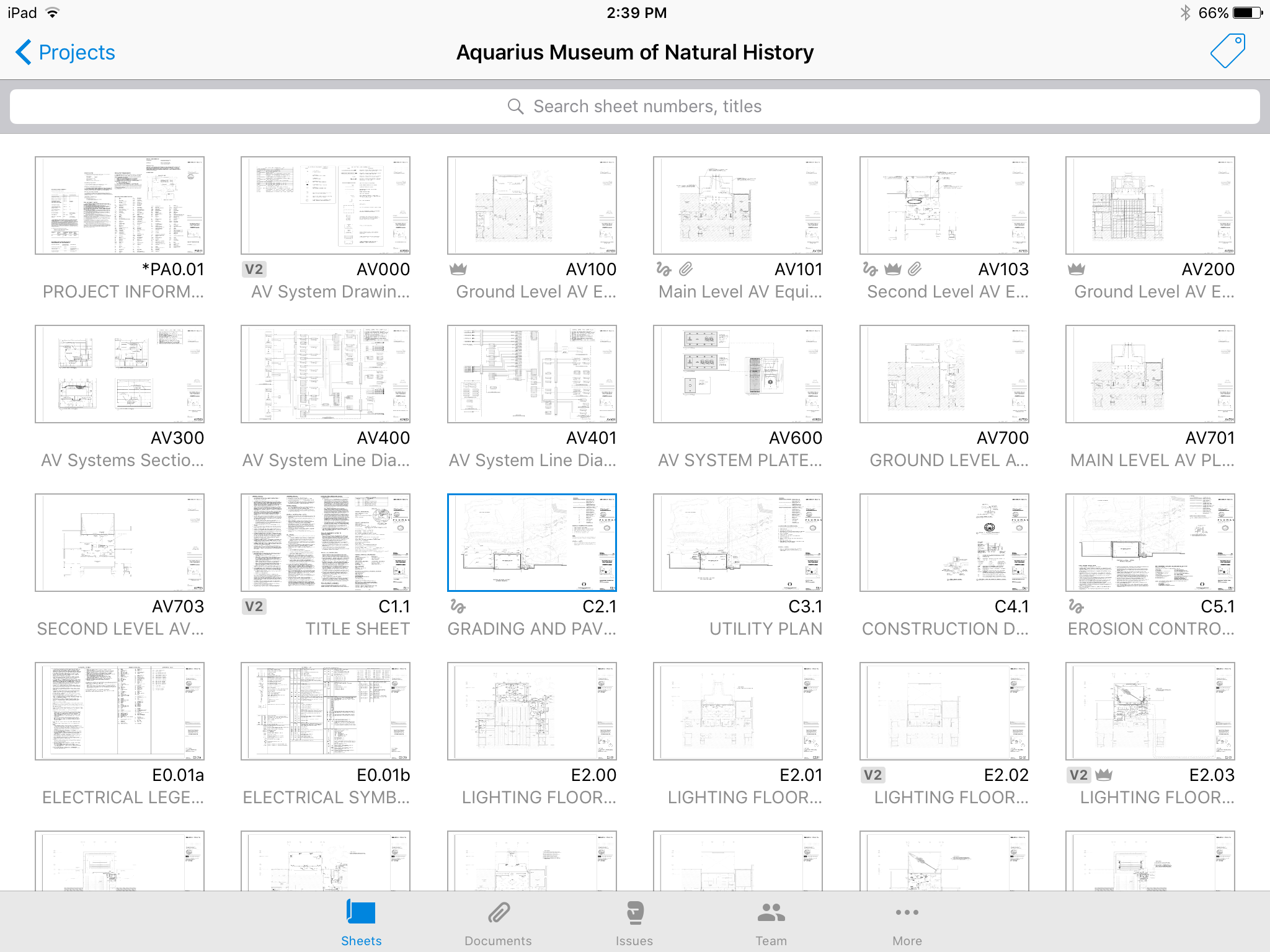
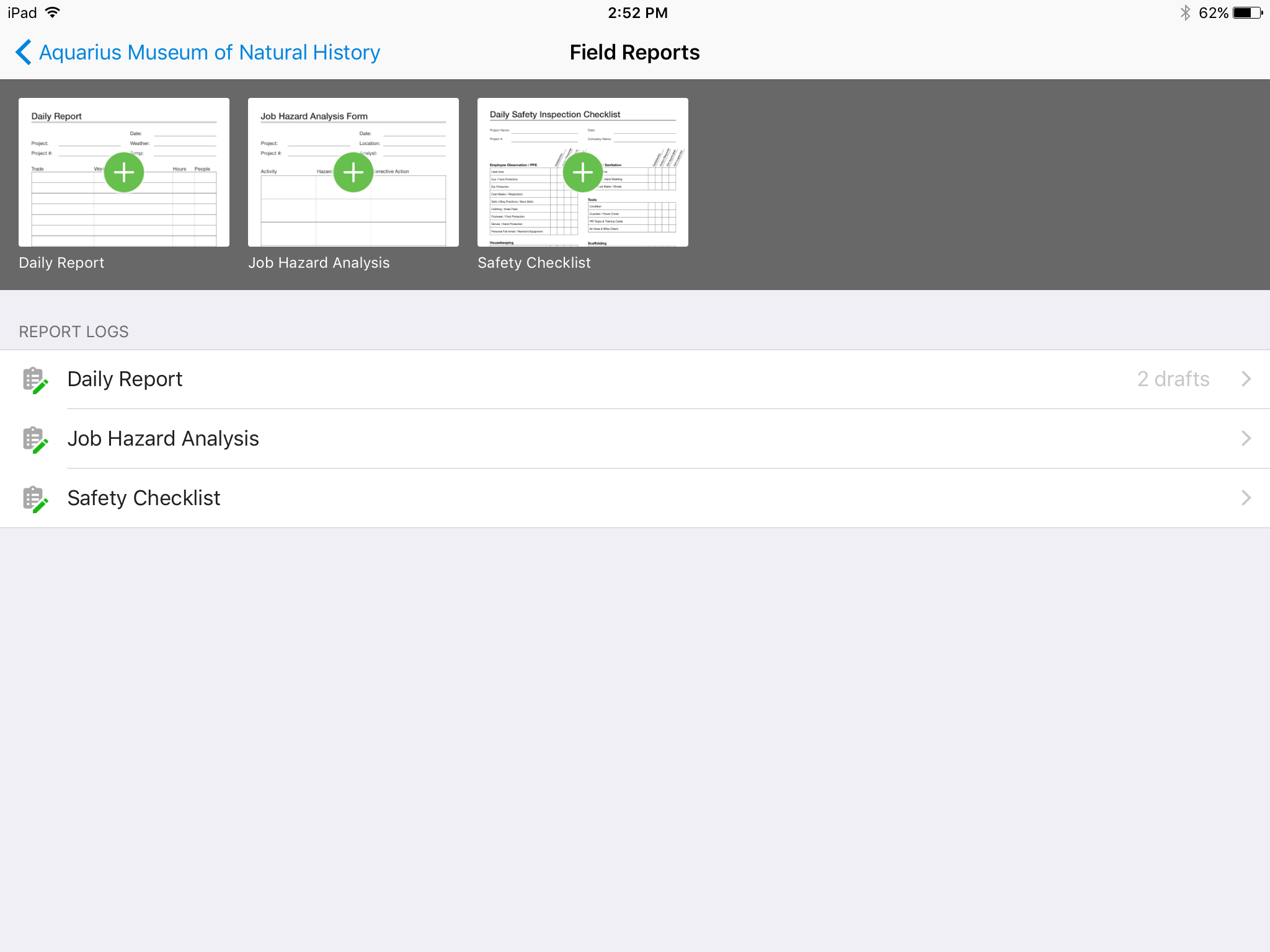
Screenshot of No confusing folders - all your plans at your fingertips.Screenshot of Easy overlay to visually detect changes or clashes.Screenshot of Track issues directly on the plan, including descriptions, photos, cost, and schedule impacts.Screenshot of Mark up plans for instant communication between field and office.Screenshot of Attach any kind of construction documents to your plans, including 360 photos.Screenshot of Track, review, and submit all your field reports on a mobile device.

Bluebeam Screenshots

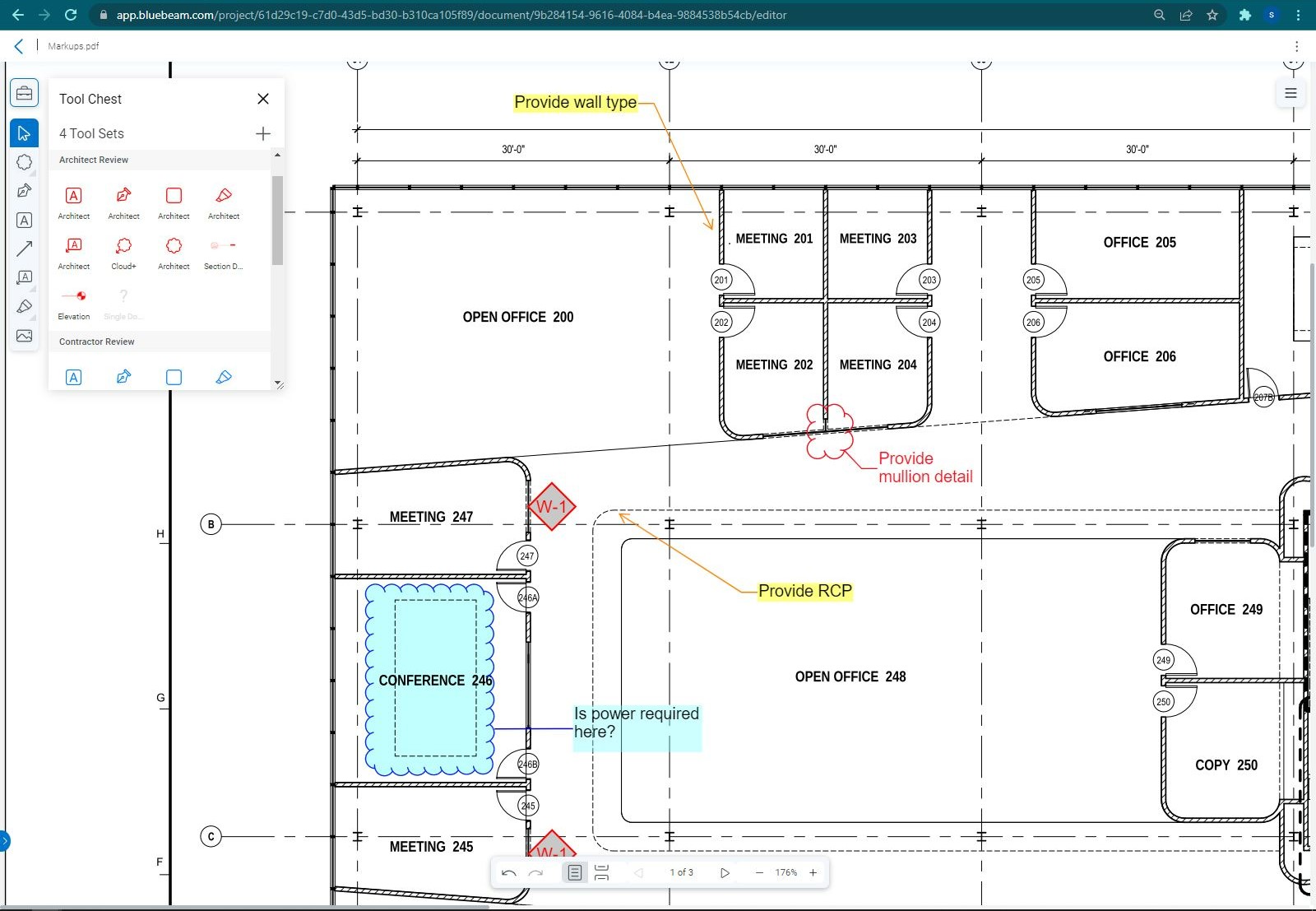
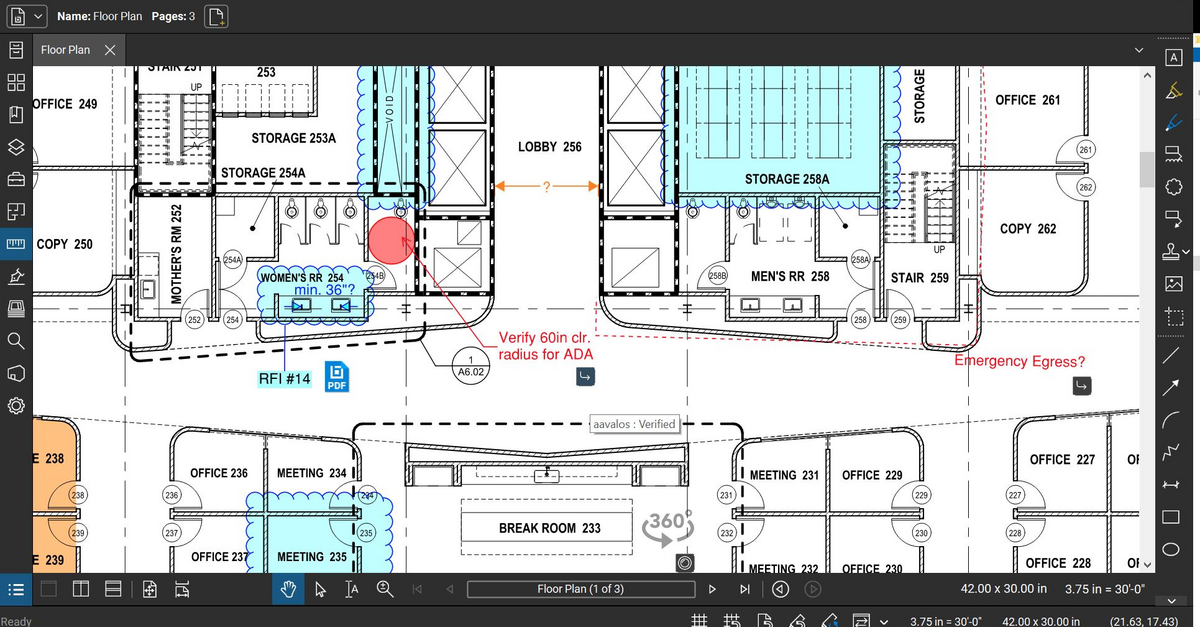
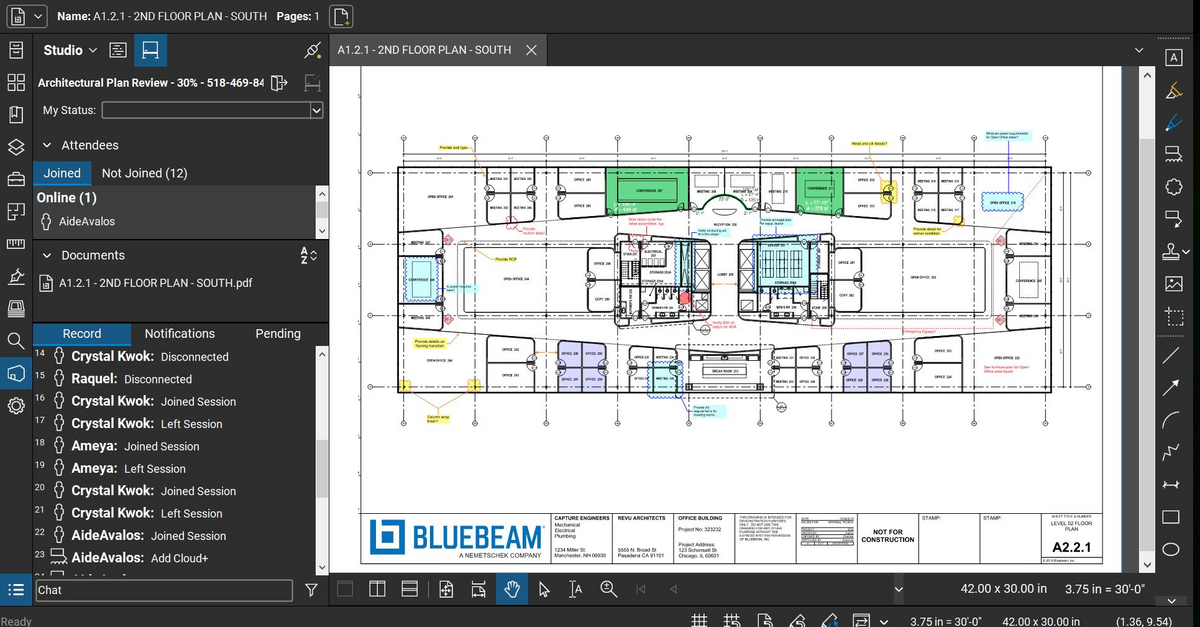
Screenshot of Bluebeam Cloud with Markup ListScreenshot of Bluebeam Cloud with Tool ChestScreenshot of Bluebeam Revu MarkupScreenshot of Bluebeam Revu Studio Session