Overview
ProductRatingMost Used ByProduct SummaryStarting Price
Adobe Acrobat
Score 8.8 out of 10
N/A
Adobe Acrobat DC is the current version of the well-established document / PDF management solution, part of the Adobe Document Cloud (the other part being Adobe's eSign services based on technology acquired with EchoSign in 2011).
$29.99
per month per seat
GoTo Webinar
Score 8.3 out of 10
N/A
GoToWebinar is GoTo’s webinar and online conferencing solution, and offers features like audience polling and Q&A, flexible scheduling experiences, and webinar templates. It offers CRM integrations and reporting & analytics tools to help engage clients’ audiences.
$49
per month per organizer
Wondershare PDFelement
Score 5.0 out of 10
N/A
PDFelement is a document management solution from Wondershare Software headquartered in China.
$79.99
per year per user
Pricing
Adobe AcrobatGoTo WebinarWondershare PDFelement
Editions & Modules
Acrobat Pro for Individuals
$19.99
per month
Acrobat Pro for Teams
$23.99
per month per user
Acrobat Studio for Individuals
$24.99
per month
Lite
$49/month
per month per organizer
Standard
$99/month
per month per organizer
Pro
$199/month
per month per organizer
Enterprise
$399/month
per month per organizer
PDFelement
79.99USD
per year per user
PDFelement
129.99USD
one-time fee per user
Offerings
Pricing Offerings
Adobe AcrobatGoTo WebinarWondershare PDFelement
Free Trial
YesYesYes
Free/Freemium Version
NoYesNo
Premium Consulting/Integration Services
YesYesNo
Entry-level Setup FeeOptionalNo setup feeNo setup fee
Additional DetailsFor Individuals: Yearly Plan: $79.99/user; 2-Year Plan: $109.99/user Perpetual Plan(one-time): $129.99/user For Teams: Yearly plan starts at $109/year for 1 user For Education: Yearly Plan: $47.99/user; Perpetual Plan(one-time): $99.99/user
More Pricing Information
Community Pulse
Adobe AcrobatGoTo WebinarWondershare PDFelement
Considered Multiple Products
Adobe Acrobat
Chose Adobe Acrobat
The ability with this software especially of multiple PDF files management and creation is more productive and the performance is effective and easy usability is cost effective. Data security and integration functionalities are also a big point with this system and final …
Chose Adobe Acrobat
There really is no comparison. Although we use other PDF programs, we mainly utilize Adobe. Not only because we find it to be a better program but also because everyone is more familiar with it. However, the other products are implemented for various reasons, such as a feature …
Chose Adobe Acrobat
We find Adobe Acrobat very easy to use, and the software performs that it has to do with no bad surprises or format problems.
Helps so much to create forms, edit documents, sign documents, other important feature is sharing documents to peers, you can have the control and …
Chose Adobe Acrobat
They have a much less intutive user interface and don't always provide a complete solution one stop shop for all the features that we make use of.
Chose Adobe Acrobat
Although Adobe Acrobat DC is not a lightweight application like some other competitors for just the ease of viewing PDFs, it makes up with all of the features available. It is universal across multiple platforms which was an important factor when we were making a decision for a …
Chose Adobe Acrobat
Adobe is a better product
Chose Adobe Acrobat
Adobe Acrobat DC has been the go-to tool for our organization to handle all our PDF Documents. We use the document signing feature regularly and are very happy with its usage. we have used DocuSign in the past but the best results have been achieved by using Adobe Acrobat DC.
Chose Adobe Acrobat
I've had very little interaction with these other three, PDF Studio was probably the most I've played with. But honestly, I just wasn't impressed really. Not impressed enough to see much of a difference or improvement. Adobe has always been the chosen one for our company so …
Chose Adobe Acrobat
Adobe is very similar to Microsoft products in that the user experience is very easy. It's compatible with all the programs that I use at work so it makes the process very easy. Plus I feel that younger individuals in the workplace have experience using Adobe which makes …
Chose Adobe Acrobat
Foxit has an easier interface I think. PDF Element was a need for my iPad and I only used it one time. I like the customizations available in FoxIt and it seems to be cheaper all around.
GoTo Webinar
Chose GoTo Webinar
I think GoToWebinar is more user friendly than Adobe. GoToWebinar is easy to access, and the menus are readily available and easy to understand. I would recommend this program over Adobe any day. I also feel that it is easier for participants to use as well.
Chose GoTo Webinar
I haven't formally reviewed these against one another. But I think that GoToWebinar (GTW) is the more robust solution and is the industry standard. I think that more people are familiar with using GTW, and I think that it's better suited for a one to many type meeting like what …
Chose GoTo Webinar
iLinc has inferior VoiP and we ended up paying for a conference line backup for our customers - got pricey. Adobe has a large learning curve - both for administrators and presenters, and isn't the most user-friendly for attendees either.
Wondershare PDFelement
Chose Wondershare PDFelement
Very similiar to Adobe Acrobat. Might actually have more modern features like adding shapes, stamps, and a background color to your PDFs. We ultimately chose this over Adobe because there was a one time fee rather than a monthly subscription.
Chose Wondershare PDFelement
Price was the only factor that drove me to look at other PDF editing software options. I was very pleased to find PDFelement, as it usually met or exceeded the capability of Adobe Acrobat. Obviously, as a long-time user to Acrobat, there is the tendency to become frustrated …
Chose Wondershare PDFelement
I have evaluated Acrobat but found it less user friendly than PDFelement and very expensive on a product to product comparison
Chose Wondershare PDFelement
PDFelement is the ideal solution for Adobe Acrobat because of its small size, clean interface, quick start, strong features, light system resource usage, and low pricing.
Chose Wondershare PDFelement
PDFelement is more intuitive, and snapper, with more wow factors.
Chose Wondershare PDFelement
Both of the programs mentioned above have worked much better for my needs.
Chose Wondershare PDFelement
We haven't used any other similar products, and don't feel any desire to stop using PDFelement.
Chose Wondershare PDFelement
The experience is different. From a cost perspective, PDFelement is more cost effective and can get things done.
Chose Wondershare PDFelement
Adobe PDF is the alternative for me but much more expensive. It has more features but I don’t need them. For a small business PDFelement's affordability makes it a cost effective option.
Chose Wondershare PDFelement
I didn't try or buy other programs, but did a good bit of research on them. I went with PDFelement because of the lower pricing, and because of the rich features I learned it had.

I also appreciated the great customer service I received from reps in the community forums, which …
Chose Wondershare PDFelement
PDFelement has among the several options available in the market, a productivity solution with relevant acquisition costs associated with the benefits offered. Among the functions available in the application, other companies have the same function with lower performance and …
Chose Wondershare PDFelement
Just as good, and just as clean; but easier to use. Just as many options and an easy to use format and layout.
Chose Wondershare PDFelement
PDFelement was much easier to use compared to Adobe and Foxit, it has much better user interface and feels like native app in Mac
Chose Wondershare PDFelement
Adobe, it's the top leader in web software solutions. They use SaaS licenses instead of an alternative. This kind of license needs to be paid periodically, and this can be a high-cost solution. PDFelement uses user licenses, that reduces the cost and help to make software less …
Chose Wondershare PDFelement
Easy to use and much cheaper than the Adobe products that do the same functions.
Features
Adobe AcrobatGoTo WebinarWondershare PDFelement
Reporting & Analytics
Comparison of Reporting & Analytics features of Product A and Product B
Adobe Acrobat
-
Ratings
GoTo Webinar
7.1
153 Ratings
8% below category average
Wondershare PDFelement
-
Ratings
Dashboards00 Ratings7.2145 Ratings00 Ratings
Data exportability00 Ratings7.1141 Ratings00 Ratings
Performance & Compatibility of Online Events Software
Comparison of Performance & Compatibility of Online Events Software features of Product A and Product B
Adobe Acrobat
-
Ratings
GoTo Webinar
7.6
170 Ratings
7% below category average
Wondershare PDFelement
-
Ratings
High quality audio00 Ratings8.2170 Ratings00 Ratings
Mobile support00 Ratings7.6120 Ratings00 Ratings
Online Meetings / Events
Comparison of Online Meetings / Events features of Product A and Product B
Adobe Acrobat
-
Ratings
GoTo Webinar
7.2
170 Ratings
12% below category average
Wondershare PDFelement
-
Ratings
Calendar integration00 Ratings7.7147 Ratings00 Ratings
Record meetings / events00 Ratings8.4165 Ratings00 Ratings
Slideshows00 Ratings8.5148 Ratings00 Ratings
Event registration00 Ratings8.6161 Ratings00 Ratings
Online Events Collaboration
Comparison of Online Events Collaboration features of Product A and Product B
Adobe Acrobat
-
Ratings
GoTo Webinar
8.2
215 Ratings
3% below category average
Wondershare PDFelement
-
Ratings
Audience polling00 Ratings7.9193 Ratings00 Ratings
Q&A00 Ratings8.6211 Ratings00 Ratings
Online Events Security
Comparison of Online Events Security features of Product A and Product B
Adobe Acrobat
-
Ratings
GoTo Webinar
7.9
166 Ratings
6% below category average
Wondershare PDFelement
-
Ratings
Participant roles & permissions00 Ratings7.8163 Ratings00 Ratings
Confidential attendee list00 Ratings8.0143 Ratings00 Ratings
Online Events Marketing
Comparison of Online Events Marketing features of Product A and Product B
Adobe Acrobat
-
Ratings
GoTo Webinar
8.1
133 Ratings
2% above category average
Wondershare PDFelement
-
Ratings
Branding options00 Ratings8.1129 Ratings00 Ratings
Integration to Marketing Automation00 Ratings8.0113 Ratings00 Ratings
Best Alternatives
Adobe AcrobatGoTo WebinarWondershare PDFelement
Small Businesses
Square 9 Softworks
Square 9 Softworks
Score 9.7 out of 10
BigMarker
BigMarker
Score 6.0 out of 10
Square 9 Softworks
Square 9 Softworks
Score 9.7 out of 10
Medium-sized Companies
MSB Docs
MSB Docs
Score 9.4 out of 10
Zoho Meeting
Zoho Meeting
Score 8.8 out of 10
MSB Docs
MSB Docs
Score 9.4 out of 10
Enterprises
M‑Files
M‑Files
Score 8.9 out of 10
ON24
ON24
Score 7.6 out of 10
M‑Files
M‑Files
Score 8.9 out of 10
All AlternativesView all alternativesView all alternativesView all alternatives
User Ratings
Adobe AcrobatGoTo WebinarWondershare PDFelement
Likelihood to Recommend
8.8
(811 ratings)
7.6
(226 ratings)
9.1
(55 ratings)
Likelihood to Renew
9.1
(45 ratings)
9.2
(8 ratings)
10.0
(1 ratings)
Usability
9.2
(254 ratings)
8.6
(222 ratings)
8.6
(5 ratings)
Availability
9.1
(3 ratings)
9.0
(2 ratings)
10.0
(1 ratings)
Performance
5.7
(10 ratings)
7.9
(2 ratings)
7.5
(2 ratings)
Support Rating
9.3
(63 ratings)
7.3
(4 ratings)
8.4
(8 ratings)
Online Training
9.0
(1 ratings)
-
(0 ratings)
-
(0 ratings)
Implementation Rating
9.8
(15 ratings)
7.0
(5 ratings)
10.0
(1 ratings)
Configurability
8.0
(4 ratings)
5.8
(2 ratings)
10.0
(1 ratings)
Contract Terms and Pricing Model
4.5
(2 ratings)
-
(0 ratings)
-
(0 ratings)
Ease of integration
8.0
(8 ratings)
-
(0 ratings)
7.5
(2 ratings)
Product Scalability
7.0
(4 ratings)
7.8
(2 ratings)
10.0
(1 ratings)
Vendor post-sale
1.0
(2 ratings)
7.8
(2 ratings)
10.0
(1 ratings)
Vendor pre-sale
1.0
(1 ratings)
7.0
(2 ratings)
10.0
(1 ratings)
User Testimonials
Adobe AcrobatGoTo WebinarWondershare PDFelement
Likelihood to Recommend
Adobe
When preparing artwork for print production from an application like Adobe Illustrator, Photoshop, or InDesign, the best way to preview and preflight the work is to export to PDF and use Adobe Acrobat's output preview to check process colors, spot colors, dielines, and any special requirements, like foil stamping or varnish. Adobe Acrobat is also where you make any needed final adjustments to ensure correct reproduction on press. Documents intended for screen viewing must be exported to PDF and edited in Adobe Acrobat so as to add and edit needed accessibility features critical for legislative compliance.
Read full review
GoTo (formerly LogMeIn)
It is great for big events like training or product demos. It's good for marketing webinars with features like polls and Q&A. It's not ideal for small, casual meetings. It can be too expensive for some businesses. For smaller events, other tools might be better.
Read full review
Wondershare Technology
It's a wonderful asset to have when you lose your original Word doc, etc. so you can still edit a document (and not have to start from ground zero). That feature alone is why I bought this product and why I will continue to recommend.
Read full review
Pros
Adobe
  • Ability to manipulate a PDF in various ways.
  • Print production is incredibly helpful for checking off and making sure PDFs are ready for print.
  • Commenting in Adobe Acrobat is awesome! So nice to be able to hand off a PDF and get it back with edits that are easy to navigate and resolve!
Read full review
GoTo (formerly LogMeIn)
  • We launched a product for a mass and more than 500 people attended the webinar and it was seamless.
  • Recording capability for the later usage
  • Setup is very simple for both admins and end users
  • Polls are helpful in assessing the engagement of the customers
Read full review
Wondershare Technology
  • PDFelement provides the same powerful features as Adobe Acrobat, but the interface is easy to learn and use. The product is extremely intuitive, which saves our clients from becoming frustrated as they learn the product.
  • PDFelement Pro's ability to create fillable forms with the click of one button is one of our clients favorite features. I was impressed at how accurately PDFelement performed this task and the ease with which these fields can be edited, if needed.
  • Security is more important than ever these days and PDFelement provides the encryption and permissions to protect documents quickly and easily. I especially like the batch encrypt feature, this makes it easy to protect multiple files with the same password.
  • PDFelement makes it easy to extract the data from form fields. This is a huge plus for our clients.
Read full review
Cons
Adobe
  • More printing settings, like being able to adjust the margins and place the print area on the page when the file size is larger than the page, and I only want to print one section. Illustrator has this feature. Often, we print from Illustrator instead, because of this limitation.
Read full review
GoTo (formerly LogMeIn)
  • Can't schedule recurring webinars twice per week or every other week--must manually add or delete instances.
  • Can't schedule recurring webinars more than 'x' number of instances (less than a year's worth).
  • If you want a recurring webinar to continue past the last instance (in order to keep the same link), your only option is to manually add future instances before the last one occurs. If the last instance occurs, the webinar (and corresponding link) are archived with no recourse and you must recreate it from scratch and update every bit of external collateral with a new link. So I have to have reminders on my calendar every 6 months to go in and add additional dates for all my recurring webinars in order to keep my links active.
  • Canceling/changing seats is a huge pain.
  • The default 'join' screen is app-based rather than web based, so registrants often have to download GTW. I have a lot of clients whose computers are locked down from unapproved apps and have missed the webinar because the ability to join on the web is very unintuitive.
Read full review
Wondershare Technology
  • I wish there was a lighter program for just reviewing a document and then to transition seamlessly to an editing mode. It takes a few seconds longer to load than Preview on my Mac, and based on that frustration, I use Preview to view documents.
  • A lower price for upgrades.
Read full review
Likelihood to Renew
Adobe
Adobe Acrobat works seamlessly with the other Adobe products we use that are industry-standard. We will certainly continue to use Adobe InDesign, Photoshop, and Illustrator, meaning it will always be convenient to work seamlessly with Adobe Acrobat for our organization. We are happy with the performance of Acrobat and it's meets our expectations.
Read full review
GoTo (formerly LogMeIn)
Our largest issue with GoTo have been the limitations on recording and using recordings to host a webinar, and the biggest of those is the ability to record. We have had most of our webinars recorded successfully, but when it failed to save, it failed in a big way. Their customer service team was there to help, but they were unable to truly fix the problem. There are, of course, other providers, but as we are still seeing where hosted webinars fit in our marketing strategy, cost is an important factor. Since our company already uses GoToMeeting, it makes more sense for us to stay with the entire suite of products, especially while we are testing the strategy as a whole.
Read full review
Wondershare Technology
Excellent, easy to use product
Read full review
Usability
Adobe
It’s a very easy app to learn and software is essential. I feel like the app could load a bit faster but overall, is one of my go to apps. Makes reading and editing pdfs easy and I enjoy the usability of the app. It is definitely something I make sure to have downloaded on any computer I’m working from
Read full review
GoTo (formerly LogMeIn)
This is very easy to set up, configure, onboard, and use. The features can be explored without much ado. In-webinar and post-webinar features are also used seamlessly. Any new person can self-train in minutes and be hands-on. I love the overall usability of this tool.
Read full review
Wondershare Technology
I am a novice and I am using it like a pro because it is so easy to work with
Read full review
Reliability and Availability
Adobe
We have not had availability issues with Adobe Acrobat, or at least none that I am personally aware of. Some may encounter crashes of the software during outages of electricity in their city or neighborhood, which no one can plan for, but with generators in our organization, we have been lucky not to have outages
Read full review
GoTo (formerly LogMeIn)
I rated GoTo Webinar a 9 out of 10 for availability because it generally performs reliably, with minimal application errors or unplanned outages. The platform’s high uptime ensures that it’s usually accessible when needed, supporting a seamless experience for scheduling and conducting webinars. While occasional minor issues may arise, they are infrequent and typically well-managed, contributing to a strong overall rating for availability.
Read full review
Wondershare Technology
No issues. Works perfect
Read full review
Performance
Adobe
One of the best features of Adobe Acrobat is its speed and stability. When dealing with massive multi-page files, having to reload a crashed program over and over again would slow down progress unnecessarily. And expanding on that, having the table of contents generated allows me to skip to different pages with ease, a necessary feature with exceptionally long files. word searches are even more helpful with text recognition.
Read full review
GoTo (formerly LogMeIn)
I rated GoTo Webinar an 8 out of 10 for performance due to its generally robust capabilities. Pages load quickly, and reports are generated efficiently, even for complex data sets. The platform’s integration with other systems typically doesn’t introduce significant latency or performance issues. However, during peak usage times or when handling very large data volumes, there can be occasional slowdowns. Despite these instances, GoTo Webinar consistently provides strong performance and reliability in its core functions.
Read full review
Wondershare Technology
There is a lot of learning. Although some of the functions you can probably pick up relatively quickly, some of them, including compressing the size or using a different language, remains a myth to me.
Read full review
Support Rating
Adobe
For a while, Acrobat DC crashed pretty frequently. I contacted Adobe Acrobat support about the problem. At first support was unable to provide a solution. After about a month Adobe's software engineers provided a fix. I just wish it had taken less than a month to solve the problem.
Read full review
GoTo (formerly LogMeIn)
I was always able to get someone on the phone when I needed to. They were very thorough and ensuring my questions were answered. And if I was asking for a solution or request that they didn't offer, they told me so I could at least stop trying to search for it.
Read full review
Wondershare Technology
PDFelement is always in contact with me, by email and by giving constant tips and recommendations. But what makes me give you a 10, was the outstanding support service received on July 9th by one of your support professionals Amanda, who helped me with a tariff issue, and makes me [rate] your product.
Read full review
Online Training
Adobe
Answered basic questions.
Read full review
GoTo (formerly LogMeIn)
No answers on this topic
Wondershare Technology
No answers on this topic
Implementation Rating
Adobe
I was not involved with the implementation process, so I cannot answer this question. However, when it was installed on my computer system, they did so virtually. I just sat there while they took control of my computer over the network and watch them install it, lickety split
Read full review
GoTo (formerly LogMeIn)
I didn't participate in the implementation nor did my company. As far as I know we have an IT office running alla these projects and we just use the final products for our educational purposes. I also didn't notice implementation at any level while using the desktop interface, but would immediately recognize it, if so.
Read full review
Wondershare Technology
Just pay, download, activate and start using it
Read full review
Alternatives Considered
Adobe
In my opinion, both complement each other. Microsoft clearly has with Copilot the AI Edge. However, the visual dynamics of Adobe Creative are Outstanding and provide a balanced approach to creativity, utilizing both Excellent, user-friendly Tools.
Read full review
GoTo (formerly LogMeIn)
GoToWebinar has a user-friendly interface and intuitive controls. When comparing it with other platforms, assess how easily you can navigate through features, set up events, and engage with participants. Connection stability, audio and video quality seem pretty much ok. Interactive polls, Q&A sessions, recording options are also working fine and provide to the user experience
Read full review
Wondershare Technology
I didn't try or buy other programs, but did a good bit of research on them. I went with PDFelement because of the lower pricing, and because of the rich features I learned it had. I also appreciated the great customer service I received from reps in the community forums, which showed me they have an aim in keeping their customers happy - which is always good to have when using fairly complex technical apps.
Read full review
Contract Terms and Pricing Model
Adobe
I am not responsible for sales or purchasing
Read full review
GoTo (formerly LogMeIn)
No answers on this topic
Wondershare Technology
No answers on this topic
Scalability
Adobe
I find that many users aren't aware of many features of the software they use, nor may they be comfortable with learning multiple-step processes. For the simplest of PDF purposes (scanning, downloading, exporting), it gets a thumbs-up. For anything involving electronic signatures, meh--causes eyes to glaze over, or forgetting what all is involved.
Read full review
GoTo (formerly LogMeIn)
I rated GoTo Webinar an 8 out of 10 for scalability because it effectively supports deployment across multiple departments and sites with its flexible features. It allows for easy management of large-scale webinars and integration with various systems, accommodating a growing number of users and sessions. However, some users might find limitations in advanced customization or specific integration needs as their requirements become more complex. Overall, its robust capabilities and adaptability make it a strong choice for scalable webinar solutions.
Read full review
Wondershare Technology
Super easy Word style layout and format.
Read full review
Return on Investment
Adobe
  • Adobe Acrobat has saved us time in managing documents. In this day, everything is fast, moves fast, and keeping up with that pace demands software that functions at the same level. Adobe Acrobat does that. It has streamlined the steps I need to take to edit and create documents we need to manage our customers.
  • Adobe Acrobat removes the worry and stress associated with managing a large influx of documents. Something as simple as a document featuring an image that was sent to us upside down. Using the old method, I would have to open other software, click 'Edit', find the 'Rotate Image' button, click it a couple of times, save it as a JPEG, then attach it to Word, and finally save it as a PDF. It was a grueling process that consumed a great deal of time. Now, I simply open the image, and Adobe automatically recognizes it is upside down and fixes it for me. I can save and move on; it literally takes me seconds. Amazing.
  • Adobe Acrobat is intuitive and easy to use, and the additional apps are relevant to the needs that come up. If I have an idea, I can go to the available apps and find exactly what I need. Impressive and speaks to the years of experience this company has had to fine-tune its product and make it obvious that it is aggressive in staying on top.
Read full review
GoTo (formerly LogMeIn)
  • GoTo Webinar has been an excellent way to stay relevant and to get current topics/information to our target audience.
  • We usually get 100-200 attendees per session in a niche market, many are international attendees
  • The ability to get specific data from the audience via custom registration questions allows us to really focus on what they want to see.
Read full review
Wondershare Technology
  • For me, it's been very important to me that my business as a pet sitter and dog walker not leave a negative footprint on the environment. To that end, it's been very important that i'm able to do as much paperwork as possible without using paper. PDFelement is wonderful at helping me meet those goals.
Read full review
ScreenShots

Adobe Acrobat Screenshots

Screenshot of where to create, edit, convert, and share PDF files all from within Microsoft Teams – as part of Acrobat integrations with Microsoft 365 apps.Screenshot of Liquid Mode in Adobe Acrobat Reader mobile app, where users can read PDFs on phones and tablets without having to pinch and zoom. Navigate lengthy documents with intelligent outline and search tools, while maximizing readability and comfort with font size and line spacing that are adjustable.Screenshot of where to fill and sign PDF forms from anywhere and on any device. Here, users can collect signatures, digitally track progress, and automatically archive the signed document.Screenshot of the Adobe Scan mobile app, used to capture and convert documents into high-quality, interactive PDF documents that can be filled out, signed, and shared. This eliminates the hassle of finding a printer, filling a form by hand, and scanning it again.

GoTo Webinar Screenshots

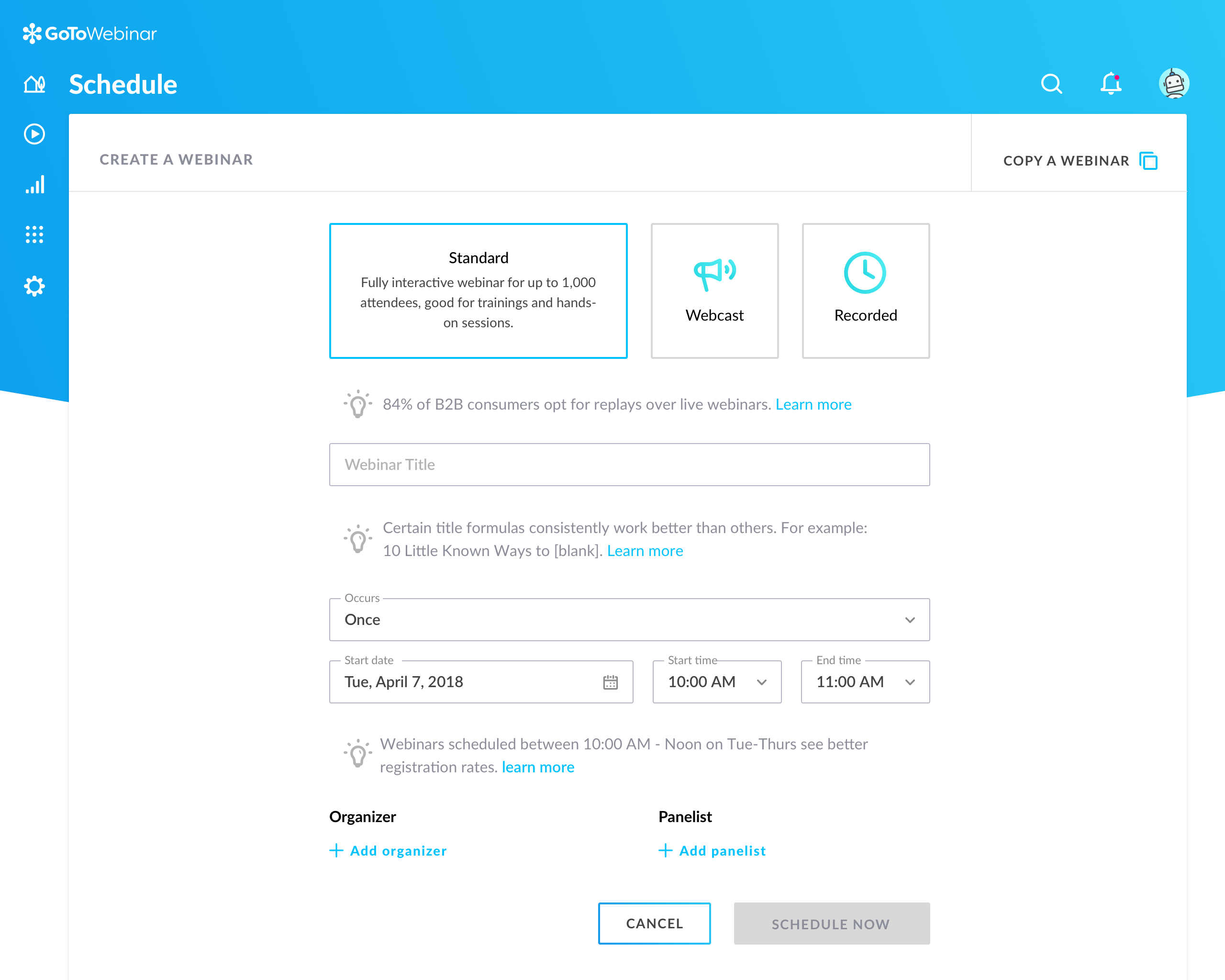
Screenshot of Setup flow for a new webinar in GoTo Webinar.Screenshot of Organizer's Control Panel and in-session experience

Wondershare PDFelement Screenshots

Screenshot of AI-powered support for chatting with PDFs/summaring/proofreading/rewriting/explaining/translating the PDF file content.Screenshot of file conversion to and from PDF format in high quality.Screenshot of PDF generation, which can be done from images, Word documents, and various formats, including batch create.Screenshot of certificate-based legal signatures, and documents can be sent to bulk signers, and signatures collected and tracked from anywhere, on any device.Screenshot of text recognition, from scanned PDFs and images.Screenshot of the PDF text editor, with images, forms, and pages.