Adobe Experience Manager is a combined web content management system and digital asset management system. The combined applications of Adobe Experience Manager Sites and Adobe Experience Manager Assets is offered by the vendor as an end-to-end solution for managing and delivering marketing content.
N/A
Nuclino
Score 7.1 out of 10
N/A
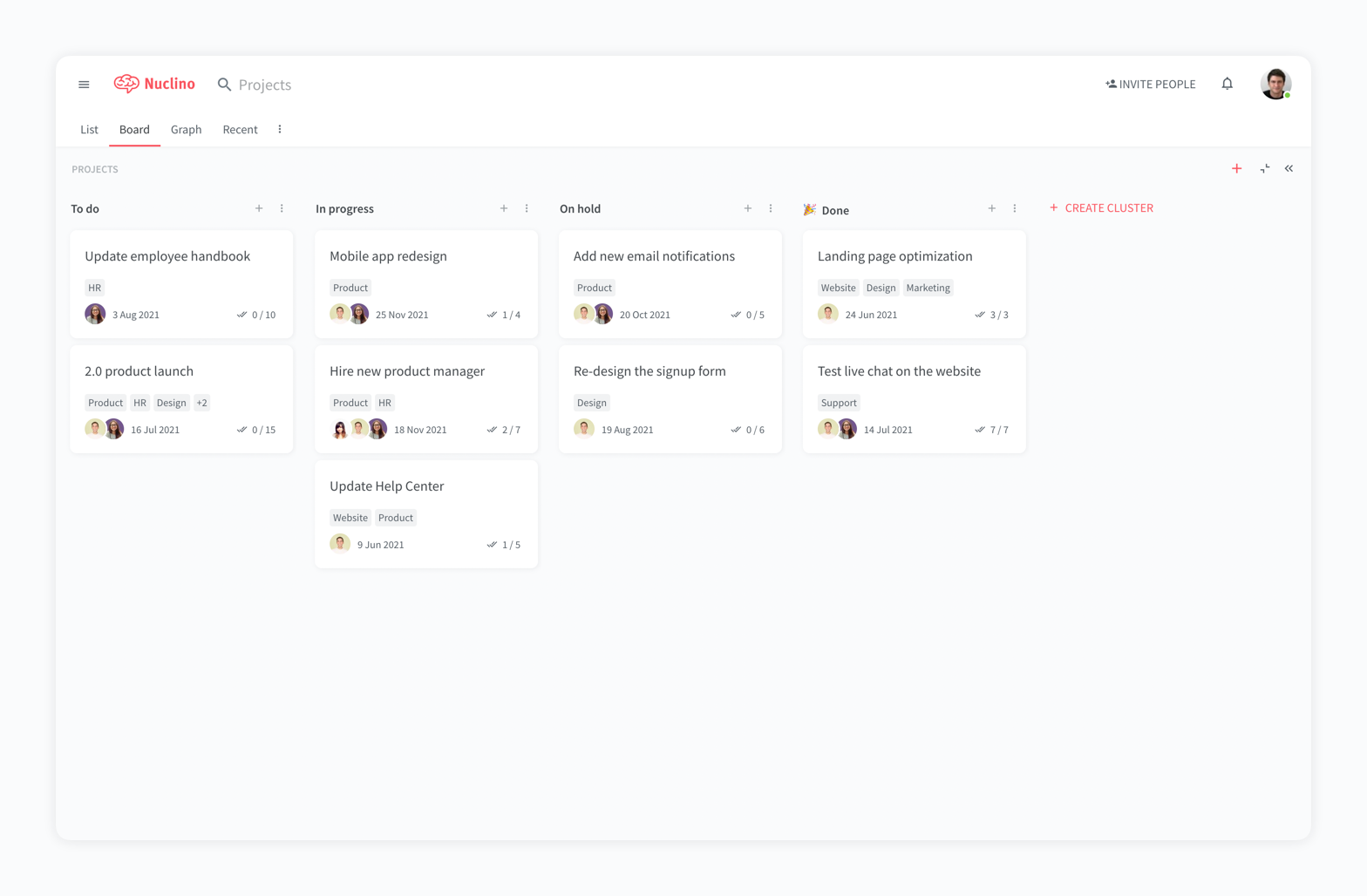
Nuclino is a unified workspace where teams can organize knowledge, manage projects, and share ideas. Progress can be tracked in a Kanban board, work structured in a hierarchical list, or data organized in a visual graph — Nuclino adapts to a team's workflow. Presented as simple and lightweight by design, Nuclino focuses on the essentials, doing away with clunky menus and rarely-used settings, to minimize the learning curve for new users. Teams from across the globe can use Nuclino…
$0
Pricing
Adobe Experience Manager
Nuclino
Editions & Modules
No answers on this topic
Free
$0
per month per user
Starter
$8
per month per user
Business
$12
per month per user
Offerings
Pricing Offerings
Adobe Experience Manager
Nuclino
Free Trial
No
Yes
Free/Freemium Version
No
Yes
Premium Consulting/Integration Services
No
No
Entry-level Setup Fee
No setup fee
No setup fee
Additional Details
—
Nuclino offers a free plan for up to 50 items and 2GB total storage. Commercial plans support unlimited items, advanced features, and 10GB storage per user. 25% discount for annual pricing.
I'll answer the second one because I mean, the first one I don't have an issue with. The second scenario is we oftentimes have the need to spin off very small campaign style sites or sites that generate leads but are unbranded and that sort of thing. So that's hard to do in AEM because you have to then create another organization within AEM to do that. And we're talking about sites that are maybe five to 10 pages in size. So we've been investigating Edge, but then that's a different workflow, so we'd have to train people on that. So it would be nice if there was something within the AEM structure that could allow you to do something very similar to Edge, where you make some small micro sites that are not necessarily branded, that you could still host within the platform and not have to retrain everybody on a completely different platform.
For game design - Perfect for personal notes, recipes, snippets - Perfect for storing some organized data (for example, links to resources) - Perfect for a content playground powered by AI - Very good for diagrams - Very good. Don't know any bad examples. Tool really great. Rich functionality. Especially love different views (table, graph).
It allows us to scale so that we can make a change on a global footer. And it applies to all of the different property websites. It allows us to set up components and compartmentalize things in a way. The big thing is that it's scalable. And then it also ties into Adobe Analytics and other Adobe products. So we are a complete Adobe shop. Every Adobe product that we can use, we use. I don't think we do it for marketing so much, but for doing target testing and analytics, data scientists are using the same product and so it all speaks.
The system is extremely fast. The application loads and displays data in milliseconds. This makes the system easy to work with.
It's also easy to edit documentation and information, as information can be editing directly without the use of an "edit" button.
Pricing: Loading speed, ease of use and quick editing are its main advantage that makes it stand out from competitors. Having said that, the pricing is very good as well.
Can sometimes be difficult to troubleshoot bugs/issues as they arise
Sometimes difficult to set up restrictions on how components can be designed to make sure they fit in with existing content
While the integration with Adobe target works fairly well, the process can be a bit opaque and hard to understand, making it difficult to troubleshoot when issues arise
We had and still have a fantastic experience using Adobe CQ. Lots of flexibility, great integration with other Adobe products we already use and a powerful technology make it a great fit for our corporate environment. Also as the community grows, it makes it easier to network with other developers and users to get new ideas on how to continue to get the best out of the software.
It depends if it is from an administrator point of view or from a business content author point of view. I think from business author point of view the solution is good and with the GEN AI capabilities coming it is doing better and better, however from an administration point of view there are still a lot of improvements to ease the maintenance of user access management and as well as the integration configuration aspect.
It has a very clean UI for me, the multiple views are so so useful, we can collaborate freely, and fast. This app helped us to grow because now we are giving our time more on generating ideas and of course getting more projects and clients giving real ROI instead of focusing on organizing files. But just like all apps out there, it has some room for improvement
Being part of Adobe Suite means you are already notified when the tool has any outages. However, I have never faced unplanned outages. Whenever you face any issue with the site, it is clearly stated if there were any planned outages and how quickly you will be back to normal. So, I will say that even the outages are planned and managed in a great way like their other services.
With respect to performance, Adobe experience manager is one of the best in the CMS space. We didn't observe frequent slowness on platform, however the systems which are accessing experience manager should be of good specifications without which slowness would be observed. Adobe experience manager works well in integration with other solutions, unless the destination application is designed to trigger frequent calls to AEM.
Adobe Experience Manager, in all its capacity, is a great alternative to any other CMS you are using. It helps in rapid development and makes life easier for maintaining the website for multi-language sites. Technical know-how is eliminated at content authoring. Better documentation in terms of live examples with videos would be appreciated.
My team has an individual dedicated to content management and Nuclino is one of her job descriptions. It's nice knowing she is able to handle any issues that arise before we even realize they exist. We haven't had any technical issues since implementation so that's been a very pleasant experience.
Depending on your individual needs, It is really quite simple to create an authoring experience for a website that looks really good. I have been part of many implementations and many teams and have seen many projects that were super successful and others that were not implemented well. AEM has room for a lot of flexibility in the implementation process compared to other CMS like SharePoint
Overall, I prefer AEM as an enterprise site management tool. It allows levels of access control and delegation, while leaving the server management and updates to a specialized team. I do miss the flexibility of being able to search and replace that I have in a WordPress site, and I miss the ability to have one file for redirects like I had in percussion
Nuclino is the clear winner when it comes to ease of use for both the administrator and user. Less setup time and less "training" time. The streamlined interface is quick and intuitive to learn and is not cluttered as compared to Confluence. Every tool you need to use to create a page or administer the workspace is available immediately on screen or by right-clicking. In contrast, Confluence buries many tools in administrative interfaces and only allows use of some features once you make several clicks to include a "macro" or "plug-in". We use both tools and I get complaints constantly from my team about how complicated Confluence can get just to author a quick page.
Instead of being directly involved in the tool purchase, I am involved in analysis or what we can use to maximize the tool. Small organizations may find it expensive. However, if the team or organization focuses more on your ROI or the features you will get, then it will definitely be worth it. Pricing is based on a number of factors, including team size or the use of the tool. The user can select the pricing option that best fits their needs based on the number of form submissions they make or the number of pages they wish to publish on their global/multisite sites.
The professional services team within adobe is one of the best in terms of technical and solutioning knowledge. However, considering the billing charges of adobe professional services team, it is always recommended to involve them during platform initial setup or when a complex solution is to be built with platform customizations.
too soon to tell on increased conversion rates based on external marketing factors in play but having increased visibility into customer engagement trends will most likely lead to improvement of our conversion rates.
There have been productivity gains from the perspective of actually migrating all of our externally managed sites to the same in-house Adobe Experience Manager platform and then being able to utilize those universal components.