Assistive is a field CRM that helps field teams and service team achieve their true potential. It offers unlimited configuration options to ensure it is the CRM solution that fits the business's needs, no matter its industry, region and use case. Assistive is a Field-First CRM that helps sales teams achieve their best possible results through Intelligent Assists based on machine learning, peer analysis, context and location awareness. It is a tool…
N/A
Really Simple Systems
Score 7.6 out of 10
Small Businesses (1-50 employees)
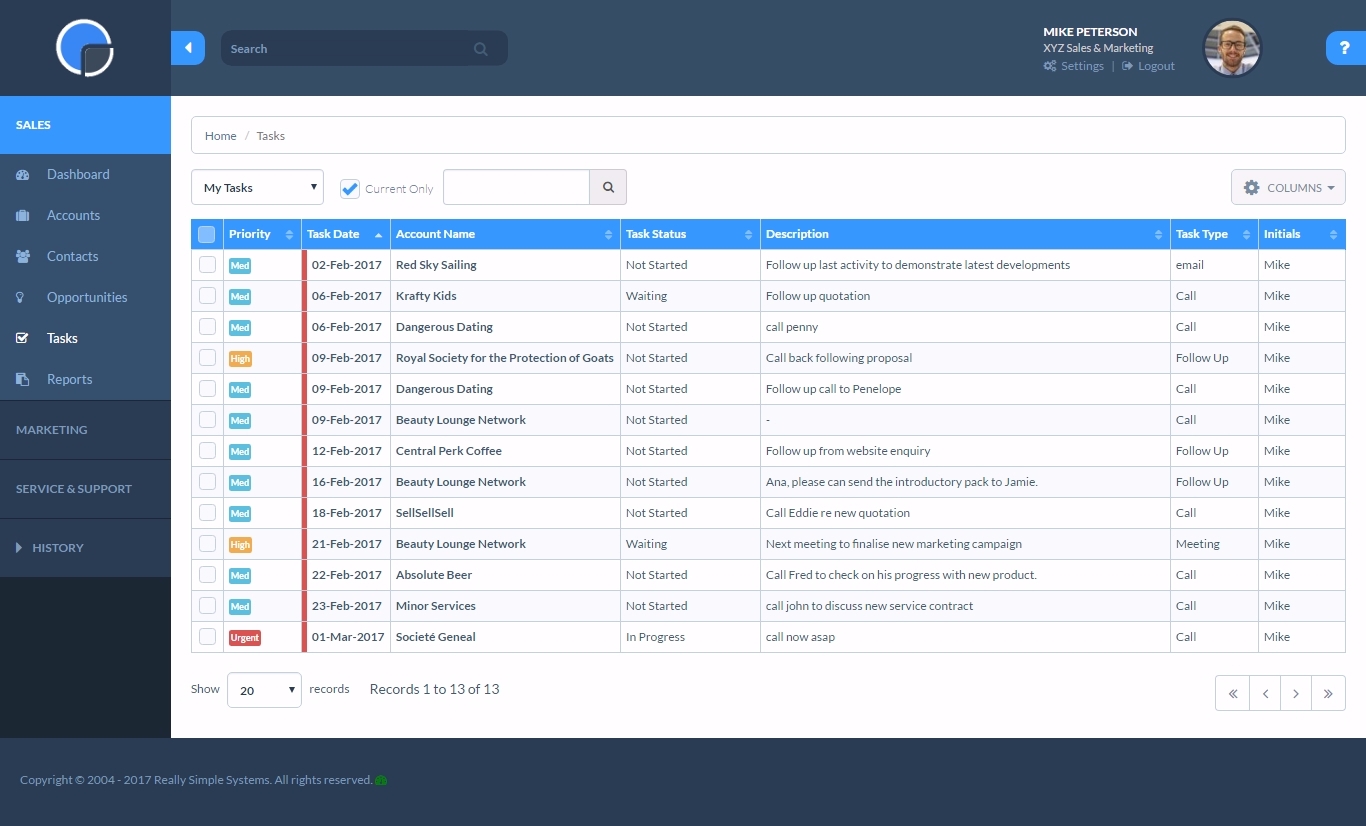
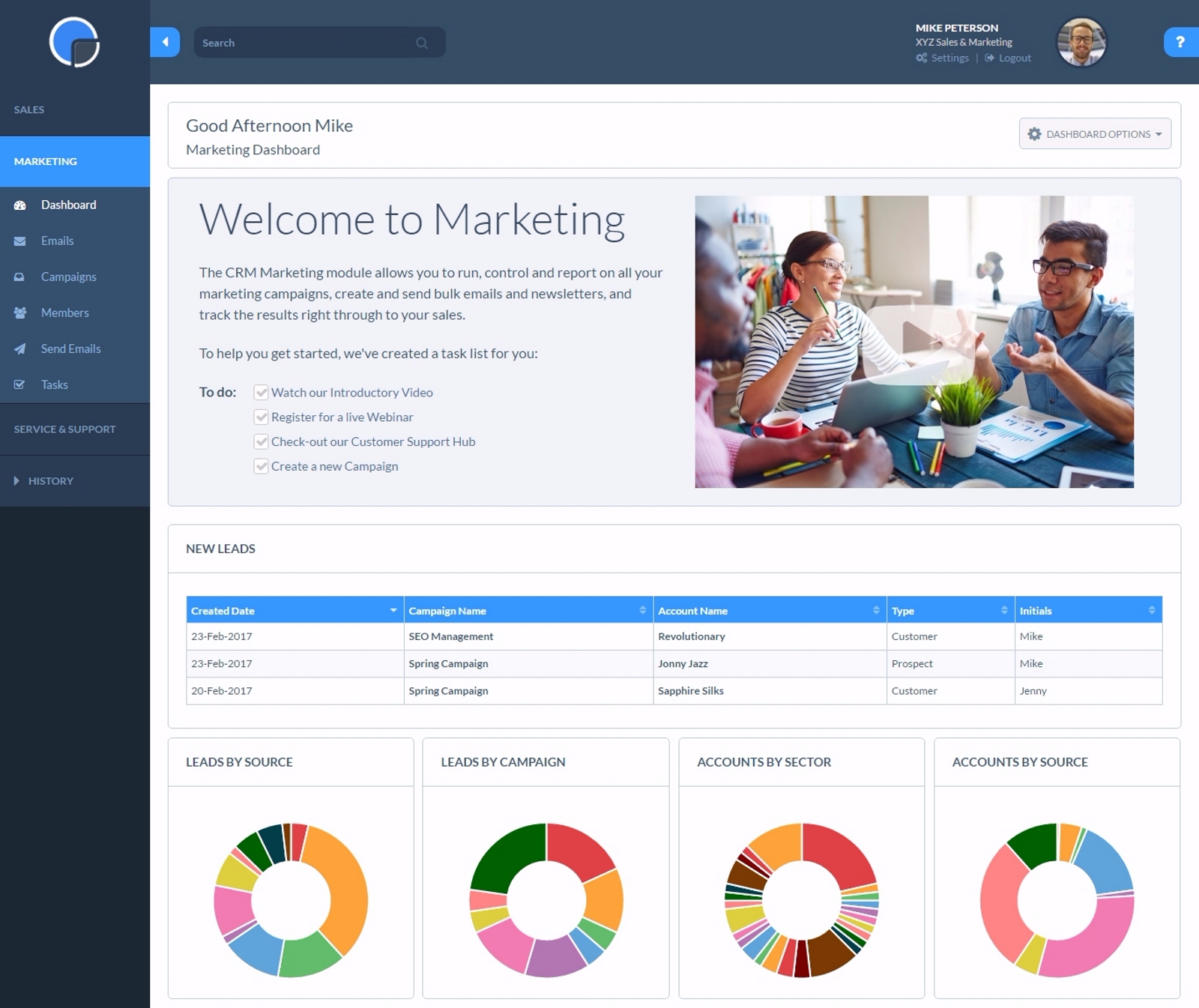
Really Simple Systems is a customer relationship management (CRM) software deployed via cloud with built-in features like email marketing, pipeline management, and case management.
$0
2 Users and 100 Company Records
Agentforce Sales
Score 8.8 out of 10
N/A
Salesforce' Agentforce Sales (formerly Salesforce Sales Cloud) is the company's flagship CRM platform. The AI CRM for Sales features data built right in.
$25
per month per user
Pricing
Assistive CRM
Really Simple Systems
Salesforce Agentforce Sales
Editions & Modules
No answers on this topic
Free CRM
$0
2 Users and 100 Company Records
Starter
$15
per User, 1000 Company Records, Unlimited Contacts, 1 GB Document Storage, MailSync, Custom Settings, Custom Reports, API Integration, Online ‘self-service’ Support Hub, Email and Online Chat Support, Optional Marketing Module
Professional
$33
per User, 5000 Company Records, Unlimited Contacts, 5 GB Document Storage, MailSync, Custom Settings, Custom Reports, API Integration, Advanced User Permission Levels, Online ‘self-service’ Support Hub, Free Email, Chat and Phone Support, Priority Technical Support, Optional Marketing and Service Desk Modules
Enterprise
$50
per User, Unlimited Company Records, Unlimited Contacts, Unlimited Document Storage, MailSync, Advanced Reporting, Custom Settings, Advanced User Permission Levels, API Integration, Online ‘self-service’ Support Hub, Free Email, Chat and Phone Support , Top Priority Technical Support, Dedicated Account Manager, Free Online Team Training , Optional Marketing and Service Desk Modules
Starter
$25.00
per month per user
Professional
$80.00
per month per user
Enterprise
$165.00
per month per user
Unlimited
$330.00
per month per user
Agentforce 1 Sales
$550
per month per user
Offerings
Pricing Offerings
Assistive CRM
Really Simple Systems
Agentforce Sales
Free Trial
Yes
Yes
Yes
Free/Freemium Version
Yes
Yes
No
Premium Consulting/Integration Services
No
No
No
Entry-level Setup Fee
Optional
No setup fee
Optional
Additional Details
—
All plans include free customer support and setup help.
Customization Easy to use offline UI/UX Better Customer Support Services Infinitely configurable Streamlined sales process through effective pipeline management Automated workflows for increased efficiency Provided valuable insights into deals, sales team performance, …
Really Simple Systems has less features than Zoho [CRM] but is a lot easier to use and therefore more suitable for our smaller business with employees using it who also have many other tasks.
It's like it takes the best bits from the above and puts it all into one easy-to-use system. Nowhere near as complicated. A couple of tweaks to be perfect but [it] certainly does the job I need it to.
Really simpler systems [are] a lot more simple to use for employees are not as confident with computers/technology, in comparison Zoho CRM was a lot more complicated to use. Really Simple Systems was the better option for our business.
We choose RSS due to cost. We are a startup and needed a great solution that did not cost [a lot]. RSS [fits] all our needs at the perfect price. We could not be more thrilled with our choice and it has simplified our client interaction[.]
I originally used Zoho CRM, but made the switch to REally Simple Systems and haven't looked back. Really Simple Systems at the time provided a more comprehensive customer database management and task tool than Zoho. Easier to use and nicer to look at. Never regretted the …
I was placing all my client information on Trello by using an excel file and adding to the upload documents cards on the Marketing Moon office board. This was all for the employees to see what going on with clients. The problem is, it was so frustrating excel UX was not as …
Goldmine was an older technology platform [that] became outdated in look, feel, and functionality. Sage CRM was really built for Sage account users and is well integrated but limited in its marketing functionality. Microsoft Dynamics took too long to build and implement. [We] got …
We evaluated multiple products, and for our purposes Really Simple Systems appeared to be the best fit. Other than a couple of little quirks, we are not disappointed at all.
While Really Simple Systems doesn't have an APP Exchange like Sales Force does, most small businesses will find Really Simple Systems easy to use, affordable, and most of all their customer service is EXCELLENT! When you wear multiple hats like I do, Really Simple Systems …
I'm very familiar with salesforce.com and frankly speaking, they place a high mark for anyone in the space. I like the simplicity of Really Simple but I'm concerned that it comes at a price (giving a more comprehensive CRM).
RSS was just significantly cheaper, I was able to manage everything myself, and I didn't get bogged down with an implementation team. I spent probably 5% of what I would have spent on these larger systems. I also really like the fact that I am not "tied" to RSS, and can switch …
simpler, less expensive, default organization is by company instead of by contact. RSS does not overcomplicate things. You don't have to take a 20 hour course before you can start using RSS to good effect.
Really Simple Systems has the ability to be tailored by the user to the needs of the business with help if required provided very quickly and efficient processing and if very much part of our culture not simply a tool to process data. THe key selling point is the fact that we …
We were limited in terms of budget and our IT department wanted the data hosted in the UK. RSS fit with all of our requirements. We looked very closely at Kinetix as this also has an integrated event booking system which would have been ideal for us but it was too expensive.
Based on my experience, I’ve used Odoo — it’s an open-source ERP system. It’s not exactly the same as Salesforce or Sales Cloud, but it serves a similar purpose. And I feel that Sales Cloud is better. Personally, I find it easier to use and better than what Odoo offers, …
Over the years, I’ve helped many people move from different sales solutions — like Dynamics, HubSpot, and Act, which was one of the first ones. I’ve supported a lot of organizations in moving from those platforms to Salesforce.
So I've evaluated, implemented Microsoft Dynamics in the past. I've used Oracle CRM solutions. I've used Daylight, which is a very niche CRM system the last couple of years. And I've evaluated a variety from Legacy Microsoft Ones to Zoho and Sugar when making implementation …
Actually, we have not. By the time I joined my company, we already had Sales Cloud. It was already there and the decision was made. I'm sure that there were other small companies that the upper management team evaluated very quickly, but they came to a decision very quickly. I …
Raiser's Edge, CSING. Those are the primary ones. There's no competition at all. I mean, in terms of tracking duplicate contact, I mean contacts ability to be secure and provide the right access for different levels. Salesforce was able to do that. Oh yeah. Yes. Whereas the …
We have used HubSpot and we have used jojo CRM. So the customer who cannot afford the licensing model of Salesforce, jojo CRM is a very good platform and another for assembly level, hub Spot does the work as well.
Salesforce is magnificently more robust and functions much better when managing complex sales cycles with multiple individuals and products. With simple sales cycles and few products, Excel is a strong contender.
Salesforce CMS stacks up as a Customer management system because it has a more user friendly snd intuitive interface. The UX is better and more modern. It can be customised and extended. There are always learning opportunities and updates for the system so it keeps on …
Salesforce more so compliments these products, rather than stacks against them. We don't have any products similar to Salesforce CMS, so in lieu of that, these are the products we were using that mesh the easiest with Salesforce CMS in terms of proceeding through the …
In my opinion, Salesforce CMS is the most complex of these offerings, and probably the most complex platform of its kind. It was selected by another stakeholder - I would likely have chosen something less expensive and more intuitive to use. The robust feature set is amazing, …
We used the Catalyst product of Totango. It was not great as it was hard to navigate, and it did not offer any reporting capabilities at all, nor did it speed up our day-to-day tasks.
Sharing some of the use cases where Assistive CRM is best suited, Best for Funnel tracking 0% Lead leakage BFSI Best Mobile CRM for Reports and insights FMCG Healthtech Field first CRM Edutech I'm personally using Assistive CRM for managing my leads and improving sales productivity, earlier I was using excel and was not able to track the sales person and manage the funnel but Assistive CRM has streamlined our sales process and increased our revenue
I think one of the plus points is the simplicity of sending a simple email to your database and managing your prospects list. However, if you wanted to manage your sales pipeline in more depth it might not be right for you.
In the end, I think we can always make it fit — and that’s one of the powers of Salesforce. Because of its flexibility and wide range of possibilities, you can really make it work for almost any need. The key, though, is to make thoughtful decisions upfront and plan carefully how you set it up. If you do that, you’ll end up with a truly flexible and effective system.
Customer Service is EXCELLENT! Fast response time, professional, and helpful.
Platform is very intuitive and love the FREE WEBINARS they offer. Really Simple Systems gave us some ideas of how to use their product that we hadn't thought of ourselves.
Very reasonably priced even at the Enterprise level, which we have chosen for our company.
Wish I could sort by tags a bit easier. I manage this by using their Reports feature. But I would like to assign the same task to a list of prospects with the same tag, and the only way I can do that is to either add the task one-by-one or export a report with all the accounts with that tag, add the task in excel, and then import it. Not ideal.
I’d say the only thing that can be a bit tricky — and I know Tableau helps address this — is that sometimes we’re limited in how deep we can go with the data in terms of reporting. It would be great to have a bit more robustness within the app itself. However, we’ve figured out our workarounds, and overall, I think it’s a fantastic product — which is why I’ve been working with it for 23 years.
There are days when I wish we hadn't switched, but I know that if we put in the time, we will get to where we want to be with the software and that it has many more capabilities than anything else we looked at. However, the amount of time and onboarding we need to do is also far greater than we realized/were told when we originally bought the product. They told us we should hire onboarding support, but at the end, after we had already reached our budget maximum for this, so it's been slower than we had hoped.
Ease of Use Easy to configure Simple, Light and Fast UI Loved by the team No coding needed Helped us streamline our sales Process Automated tasks and reminders through prompt notifications Helps to close deals and no lead leakage Better customer support team who helped us in every step Reduce time spent on manual tracking and helped to get actionable insights
Simple systems is great for smaller sales and marketing teams to log their territories and report on progress on their opportunities. There are many useful features such as tasks and reporting to show to management how opportunities are progressing and when the estimated close date would occur. The two main issues are scalability within larger [organizations] and the ease to duplicate contacts.
All in all, it's a great product that use all day, every day. It's aesthetically pleasing overall and specifically provides information in a clean, concise way. It's easy to manipulate and seems to play well with the other products I use such as Pardot, Gmelius, and our company's proprietary data system. It increases my efficieny in my admin tasks so I have more time to focus on revenue-generation and account management. It's also easy to use from everywhere where it be on a university campus, in a hotel room, one of a million Starbucks, or at home
All Force.com apps run on world-class data centers with backup, failover, and disaster-recovery facilities. Force.com has had a proven 99.9 percent uptime record for years. Accordingly, I only recall our instance of Salesforce having one unscheduled, brief down time over 6 years. I can't remember for sure, but it may have been due to our Internet Service Provider (ISP) versus Salesforce itself. Also, Salesforce does it's best to keep customers in the loop:
Trust.salesforce.com is the salesforce.com community's home for real-time information on system performance and security. On this site you'll find:
Live and historical data on system performance Up-to-the minute information on planned maintenance Phishing, malicious software and social engineering threats Best security practices for your organization Information on how we safeguard your data
For a SaaS provider, I'd rate their performance to be one of the best. At times, reporting tends to slow down if the data set is very large, which is the case in any system. But, that's a very rare phenomenon
The team is super responsive and helped us in every step. We contacted their support team whenever we face any kind of queries while using the web or application, every query raised is tracked and TAT is shared. The CS team is even available on weekends if there is any requests from our end, and for any extended support.
Whenever I have had any issues, which is probably only 3 times in 10 years, the back office support has been fantastic and got me up and running again in a very short time. Cannot fault them at all. But as I stated, problems have been very few and far between.
The overall support has been good. More and more features are being released quite frequently. Very small features are also making big difference in how the tool can be adapted and used better. If there is anything we need or are stuck, the support team sets up a call and helps in resolving the issue/provides workarounds.
I attended two training sessions. I would rate them a 4 as an advanced user. It was very basic – great for someone new – would give 8+ for new person.
I had 3 years of experience at the time. I skipped basic and went onto advanced and still not helpful. A lot of it was best practices that didn’t feel relevant for our business
I have gone through multiple. The content that’s delivered is quite basic – I wish they had more advanced training.
We are grandfathered into premium support plus training. We get unlimited access to instructor led and online training for free. We have taken advantage of this
Just from an organizational standpoint - we standardized our data prior to moving to Salesforce. But we essentially standardized it wrong. That's created a big disgusting mess for us know that I'll have to deal with as the Admin. Be sure you think through use cases prior to doing something like that - seek outside opinions on how the data will work best, especially depending on what else you're going to integrate with Salesforce.
Customization Easy to use offline UI/UX Better Customer Support Services Infinitely configurable Streamlined sales process through effective pipeline management Automated workflows for increased efficiency Provided valuable insights into deals, sales team performance, and revenue Enabled engagement with prospects across multiple channels Sales Pipeline Management In-Depth Insights and Reports for Sales Geo-Awareness feature to increase sales Productivity
Really simpler systems [are] a lot more simple to use for employees are not as confident with computers/technology, in comparison Zoho CRM was a lot more complicated to use. Really Simple Systems was the better option for our business.
Based on my experience, I’ve used Odoo — it’s an open-source ERP system. It’s not exactly the same as Salesforce or Sales Cloud, but it serves a similar purpose. And I feel that Sales Cloud is better. Personally, I find it easier to use and better than what Odoo offers, especially in terms of customization and achieving business objectives. That’s where Salesforce Sales Cloud really stands out in comparison to Odoo.
It's very scalable as it has a ton of features (but you do need an admin who understands how to leverage these features). Because of the various features, we've also needed to host onboarding sessions with our users so that they can familiarize themselves with the platform, which isn't always super user-friendly or intuitive.
Moved away from Excel based worksheets to an on-line system
Multi-device used on laptop, iPad, and iPhone effectively and up to the minute access
I can simply review my opportunities, companies, and contacts regularly and do ongoing reviews at my own leisure having built the CRM system and committed the right quality of data
It helps us achieve our objectives, especially now with Agentforce — we can get more insights to help our sellers sell more. It’s really nice because it’s almost like you can use the standard part of Salesforce to train your agents and teach your sellers how to improve their sales. So that’s really nice.