Overview
ProductRatingMost Used ByProduct SummaryStarting Price
Atera
Score 8.8 out of 10
N/A
Atera is presented as an Agentic AI platform for IT management, that offers a digital workforce of AI agents that proactively and autonomously support entire IT operations. Atera’s all-in-one IT management platform consolidates RMM, helpdesk, ticketing, and automation, so IT teams and MSPs can manage and protect infrastructure, automate tasks, and boost service quality by reducing downtime and improving SLAs. Atera has shifted focus from automation to AI-powered autonomy in IT. With…
$139
per month per user
GoToMyPC
Score 8.3 out of 10
N/A
GoToMyPC is a remote administration offering from GoTo (formerly LogMeIn) with mobile deployment to work on files, programs, and networks from home or while traveling.
$28
per month per computer
Syncro
Score 7.4 out of 10
N/A
Syncro offers an Extended Monitoring and Management (XMM) platform for midsized MSPs and internal IT teams. The platform integrates RMM (endpoint management), professional services automation (PSA), and Microsoft 365 multi-tenant management to help organizations simplify operations, strengthen security, and scale.
$159
per month per user
Pricing
AteraGoToMyPCSyncro
Editions & Modules
MSP - Pro
$129
per month (billed annually) per user
IT Department - Professional
$149
per month (billed annually) per user
MSP - Growth
$179
per month (billed annually) per user
IT Department - Expert
$189
per month (billed annually) per user
MSP - Power
$209
per month (billed annually) per user
IT Department - Master
$219
per month (billed annually) per user
Corporate
$28
per month per computer
Pro
$33
per month per computer
Personal
$35
per month per computer
Core
$159
per month per user
Team
$209
per month per user
Offerings
Pricing Offerings
AteraGoToMyPCSyncro
Free Trial
YesNoYes
Free/Freemium Version
NoNoNo
Premium Consulting/Integration Services
YesNoNo
Entry-level Setup FeeNo setup feeNo setup feeNo setup fee
Additional DetailsUnlimited devices.Discount available for annual payment.
More Pricing Information
Community Pulse
AteraGoToMyPCSyncro
Considered Multiple Products
Atera
Chose Atera
This Year I started an IT company and was in need of monitoring and PSA software. In the past I've worked with Datto, Datto RMM and Ncentral so one of these would be a logical choice for me to choose. However their pricing is from a different world. For a starting company, …
Chose Atera
Atera was very similar with Syncro but a bit more user friendly. There were a few features with Syncro I really liked that Atera does not have yet like custom reporting.
Chose Atera
Atera is very similar to Syncro in feature set and pricing, but we liked Atera just a bit better. (We switched from Atera to Syncro and then back to Atera, and have stuck with Atera for several years now.) Kaseya gave us bad vibes from their sales department and we ultimately …
Chose Atera
Atera has so many features that are fully functional.
Atera is easy to use.
Chose Atera
Any RMM that supports licensing around agents / technicians rather than devices is always a win in my mind. Primarily Atera was chosen due to the specific features it provides (we didn't need a lot of bells and whistles) and did what it needed to do, well. Remote access, patch …
GoToMyPC

No answer on this topic

Syncro
Chose Syncro
Syncro does not have every bell or whistle (especially when compared with Kaseya VSA). However from a cost versus feature perspective, Syncro wins hands down.

Syncro versus Atera - they are very similar products and also use the per agent pricing. This was a big driver for us …
Features
AteraGoToMyPCSyncro
Application Performance Management
Comparison of Application Performance Management features of Product A and Product B
Atera
9.5
7 Ratings
30% above category average
GoToMyPC
-
Ratings
Syncro
6.7
3 Ratings
5% below category average
Virtualization monitoring10.01 Ratings00 Ratings7.43 Ratings
IT Asset Discovery9.07 Ratings00 Ratings6.12 Ratings
Monitoring Tasks
Comparison of Monitoring Tasks features of Product A and Product B
Atera
9.2
123 Ratings
23% above category average
GoToMyPC
-
Ratings
Syncro
7.5
4 Ratings
3% above category average
Remote monitoring9.1122 Ratings00 Ratings8.54 Ratings
Network device monitoring8.3108 Ratings00 Ratings6.63 Ratings
Activity Monitoring9.07 Ratings00 Ratings7.33 Ratings
Management Tasks
Comparison of Management Tasks features of Product A and Product B
Atera
9.1
122 Ratings
26% above category average
GoToMyPC
-
Ratings
Syncro
7.5
3 Ratings
7% above category average
Patch Management8.4121 Ratings00 Ratings7.93 Ratings
Policy-based automation8.3107 Ratings00 Ratings7.23 Ratings
Remote Access
Comparison of Remote Access features of Product A and Product B
Atera
7.8
1 Ratings
16% above category average
GoToMyPC
-
Ratings
Syncro
7.3
3 Ratings
9% above category average
Attended device access10.01 Ratings00 Ratings8.73 Ratings
Unattended device access10.01 Ratings00 Ratings7.63 Ratings
Mobile device access1.01 Ratings00 Ratings7.01 Ratings
Virtual device access10.01 Ratings00 Ratings8.02 Ratings
Multiple-display support7.01 Ratings00 Ratings4.52 Ratings
Multiple concurrent sessions9.01 Ratings00 Ratings7.83 Ratings
Remote Administration
Comparison of Remote Administration features of Product A and Product B
Atera
-
Ratings
GoToMyPC
4.1
103 Ratings
63% below category average
Syncro
-
Ratings
Screen sharing00 Ratings7.067 Ratings00 Ratings
File transfer00 Ratings5.383 Ratings00 Ratings
Instant message00 Ratings2.920 Ratings00 Ratings
Secure remote access with Smart Card authentication00 Ratings3.014 Ratings00 Ratings
Access to sleeping/powered-off computers00 Ratings2.048 Ratings00 Ratings
Over-the-Internet remote session00 Ratings7.684 Ratings00 Ratings
Initiate remote control from mobile00 Ratings2.753 Ratings00 Ratings
Remote management of servers & workstations00 Ratings3.956 Ratings00 Ratings
Remote Active Directory® management00 Ratings3.324 Ratings00 Ratings
Centralized management dashboard00 Ratings3.028 Ratings00 Ratings
Session record00 Ratings3.126 Ratings00 Ratings
Annotations00 Ratings3.09 Ratings00 Ratings
Monitoring and Alerts00 Ratings6.821 Ratings00 Ratings
Multi-platform remote control00 Ratings3.224 Ratings00 Ratings
Best Alternatives
AteraGoToMyPCSyncro
Small Businesses
Panda Systems Management
Score 7.7 out of 10
Getscreen.me
Getscreen.me
Score 9.6 out of 10
Panda Systems Management
Score 7.7 out of 10
Medium-sized Companies
Action1
Action1
Score 9.5 out of 10
Remote Desktop Manager
Score 9.5 out of 10
Action1
Action1
Score 9.5 out of 10
Enterprises
TeamViewer
TeamViewer
Score 8.6 out of 10
Remote Desktop Manager
Score 9.5 out of 10
TeamViewer
TeamViewer
Score 8.6 out of 10
All AlternativesView all alternativesView all alternativesView all alternatives
User Ratings
AteraGoToMyPCSyncro
Likelihood to Recommend
8.7
(120 ratings)
7.7
(104 ratings)
6.8
(5 ratings)
Likelihood to Renew
7.3
(5 ratings)
9.1
(5 ratings)
-
(0 ratings)
Usability
8.8
(67 ratings)
7.6
(22 ratings)
7.1
(4 ratings)
Availability
-
(0 ratings)
9.1
(2 ratings)
-
(0 ratings)
Performance
-
(0 ratings)
9.1
(2 ratings)
-
(0 ratings)
Support Rating
9.1
(6 ratings)
9.1
(13 ratings)
-
(0 ratings)
Implementation Rating
6.4
(1 ratings)
9.1
(3 ratings)
-
(0 ratings)
Configurability
-
(0 ratings)
9.1
(2 ratings)
-
(0 ratings)
Product Scalability
-
(0 ratings)
9.1
(2 ratings)
-
(0 ratings)
User Testimonials
AteraGoToMyPCSyncro
Likelihood to Recommend
Atera
Atera is doing well in the monitoring part as it is informing the real time ping of running devices and if any device goes down, it is informing us on the real time. It is helping us to monitor the last reboot status, current logged in users, time zone, IP addresses and other things so that we can track our end devices status. In the patching part Atera is pathing our all devices with the notification stating user to restart device at their convenient time. It is also patching our third party applications. It is good in installing and uninstalling of the third party application but limited to availability in the Atera inventory. Atera is not good in some parts such as in the patching part of applications, sometime it fails to update all 3rd party applications that were not installed via Atera. It is not good if you have to transfer a file to multiple systems at the same time.
Read full review
GoTo (formerly LogMeIn)
I think GoToMyPC is well-suited for any scenario I have encountered, although I only have experience using it in a small firm setting. Otherwise, for working from home and traveling or file retrieval, it has proved more than adequate. I have not encountered a scenario that I thought was less than appropriate.
Read full review
SyncroMSP Servably Inc
SyncroMSP is great for MSPs starting out or wanting to keep their costs low. Some RMM software will charge per install - and price breaks only available as your base grows to a significant number. As Syncro is a "per agent" cost, the costs for an MSP are (a) known and (b) easily to manage as the team grows. The third-party integration element is very useful for MSPs looking to be able to not only onsell additional services, but the management of these services is simple for anybody to use
Read full review
Pros
Atera
  • Atera is very helpful in monitoring the servers and end-user devices for high CPU, memory, hard disk uses, and temperature monitoring.
  • Atera is good at installing third-party applications and also helps to remove it from the end systems.
  • Atera is perfect for patching as you can select the patches as per your need and reject those that are not required for you or going to disturb any of your internal applications.
  • Atera is good for managing software inventory as it provides you with the complete software list that is used in your infrastructure.
Read full review
GoTo (formerly LogMeIn)
  • I am able to easily access both of my home monitors on GoToMyPC by simply clicking on a slider bar.
  • I have access to all of my drives and programs as if I were sitting in my office.
  • GoToMyPC allows me to print to my office printers so I can complete paperwork and print it for my colleagues back in the office to use.
Read full review
SyncroMSP Servably Inc
  • Due to the cloud based platform, we could scale the based on our needs relatively with ease.
  • We also utilized the auto billing features which were convenience.
  • The consolidation of both RMM and RSA decreased the amount of software we needed.
  • Also, the user friendliness of the platform allowed employees to use easy.
Read full review
Cons
Atera
  • Atera does not yet have a MDM system, but I have been told that it is in the works!
  • Sometimes getting around the admin section of the IT side of Atera can be tricky, but the webinars and chat support help.
  • Many of the demo and onboarding agents are based in Israel, so it can be a challenge to find available times during the day while living in the United States.
Read full review
GoTo (formerly LogMeIn)
  • Transfer or copy files from the computer drive (c drive) to your active desktop file folders.
  • The ability to set your own "Time Out" too often I have to log back in if switching between computer screens.
  • Easier way to print documents to printers not connected to the computer being accessed.
Read full review
SyncroMSP Servably Inc
  • Better project management
  • Ability to create teams
Read full review
Likelihood to Renew
Atera
As of right now, we have found nothing that can offer as many features as Atera does along with the affordability. They are doing monthly releases each month and not just making small changes (shared scripting library, chocolatey support, Install packages, Splashtop SOS support, Scheduled tickets to name a few). The uptimes are great and accessibility to the dashboard has yet to be limited. We are a happy customer and bordering on fanboy status now
Read full review
GoTo (formerly LogMeIn)
I have been using GotomyPC for 20 years and it's gotten better with time. It's the best remote app that I've tried. The others were harder to use and not as functional. It allows us to work from anywhere just as if we were in the office. Even being able to print to my remote location is a wonderful way of doing work. I don't have to drag it to my remote device, It will just print without any hassle
Read full review
SyncroMSP Servably Inc
No answers on this topic
Usability
Atera
Atera's remote monitoring feature is one of it's best features. The laptops and servers we used it on responded quickly to our administrative task requests and made our work light. We were able to increase the resources, manage patches, windows updates and quite a few other tasks remotely and that too 24×7.
Read full review
GoTo (formerly LogMeIn)
Really easy to use-even if you forget your password frequently like me. The reset password feature is not cumbersome and does not require phoning Customer Service. Just a few clicks and a bit of creativity to come up with a new password. I like this "easy button" approach. Definitely recommend.
Read full review
SyncroMSP Servably Inc
Too expensive for what it is and the lack of support and bug fixes is annoying
Read full review
Reliability and Availability
Atera
No answers on this topic
GoTo (formerly LogMeIn)
I've never had a problem unless the host computer itself is having an issue - such as being off line.
Read full review
SyncroMSP Servably Inc
No answers on this topic
Performance
Atera
No answers on this topic
GoTo (formerly LogMeIn)
Everything loads quickly. The only lag has been when our internet provider didn't fix our connection. Once that was resolved, no problems.
Read full review
SyncroMSP Servably Inc
No answers on this topic
Support Rating
Atera
Atera support provides answers to my questions lightning fast. They have never left me feeling like I'm out there on my own. I can ask questions by email, or by chat, or by opening a ticket with them and they are always on it quickly. They also have a forum where other Atera users can help you if you need it, and you can also add feature requests via the forum.
Read full review
GoTo (formerly LogMeIn)
I have never had to contact support. The product is so easy to use I have not needed help (yet). But if I had to contact them, I am sure they would be just as great to work with as the product itself is.
Read full review
SyncroMSP Servably Inc
No answers on this topic
Implementation Rating
Atera
The implementation was performed by the system administrator so I don't have much insight into this
Read full review
GoTo (formerly LogMeIn)
It set up quickly and assigning log ins to various computers was simple. I don't think you need many insights into the product. It's easy to implement and easy to use. Since it's a work tool, it needs be that way. I wouldn't want the tool to have any learning curve when some of the people using it are not tech savvy. They are accessing their work computers for files or to work on apps that their remote devices might not have loaded.
Read full review
SyncroMSP Servably Inc
No answers on this topic
Alternatives Considered
Atera
Because Atera is a much more effective and efficient solution to manage all our IT operations, it automates each of our business processes. It offers us the best support to respond to any problem that may arise. I think Atera is much more cost-effective and reliable; its value is justified with each function and satisfies all our business needs and requirements.
Read full review
GoTo (formerly LogMeIn)
I recently started having problems with Splashtop - slow response/freezes/drops, and after troubleshooting everything
internet and hardware related, decided to check out GoToMyPC as one step
in troubleshooting. GoToMyPC has better response
time and has been more reliable. So far I am pleased with the switch with just a couple of minor matters mentioned earlier in review.
Read full review
SyncroMSP Servably Inc
Much easier to learn and use
Read full review
Scalability
Atera
No answers on this topic
GoTo (formerly LogMeIn)
I can use it on all of my devices - even my Galaxy phone. Once you log into your device, you work on it as if you were physically in front of it. Not much complexity in that. If you can work on your own device, you can work on it through another device - even a phone.
Read full review
SyncroMSP Servably Inc
No answers on this topic
Return on Investment
Atera
  • The intuitive user interface has enabled both users and support technicians to familiarize themselves quickly with the functionality, and the learning curve is less.
  • Some features need to be accessed through documentation; they're not available directly on the dashboard.
  • Sometimes, internet access plays a significant role, whereas low connectivity is a hindrance.
Read full review
GoTo (formerly LogMeIn)
  • Increased productivity since I can access remotely
  • Ability to use my laptop making my desktop a mobile workstation
  • Ability to provide answers at closed-door meetings about budgeting, expenses, invoices without needing to leave the room to look it up on my desktop.
Read full review
SyncroMSP Servably Inc
  • The integrated AV solution with Bitdefender is very cheap - yet very a very high quality NGAV solution. It allows us to ensure our clients have access to an NGAV solution at an affordable price
  • Syncro has allowed us to expend our business into new areas which were not able to be accessed previously. This means that we can now service our clients in different ways than previously.
  • The fixed cost pricing allows our teams to understand what their costs are - but also allow us to grow the business and customer base with no increase in costs until we increase our technical team.
Read full review
ScreenShots

Atera Screenshots

Screenshot of Atera’s AI-powered solution.Screenshot of Atera's process automation.Screenshot of Atera's real-time monitoring, which gives visibility and control of the IT environment.Screenshot of Atera's ticketing, where users can deliver end-user support and issue resolution at scale.

Syncro Screenshots

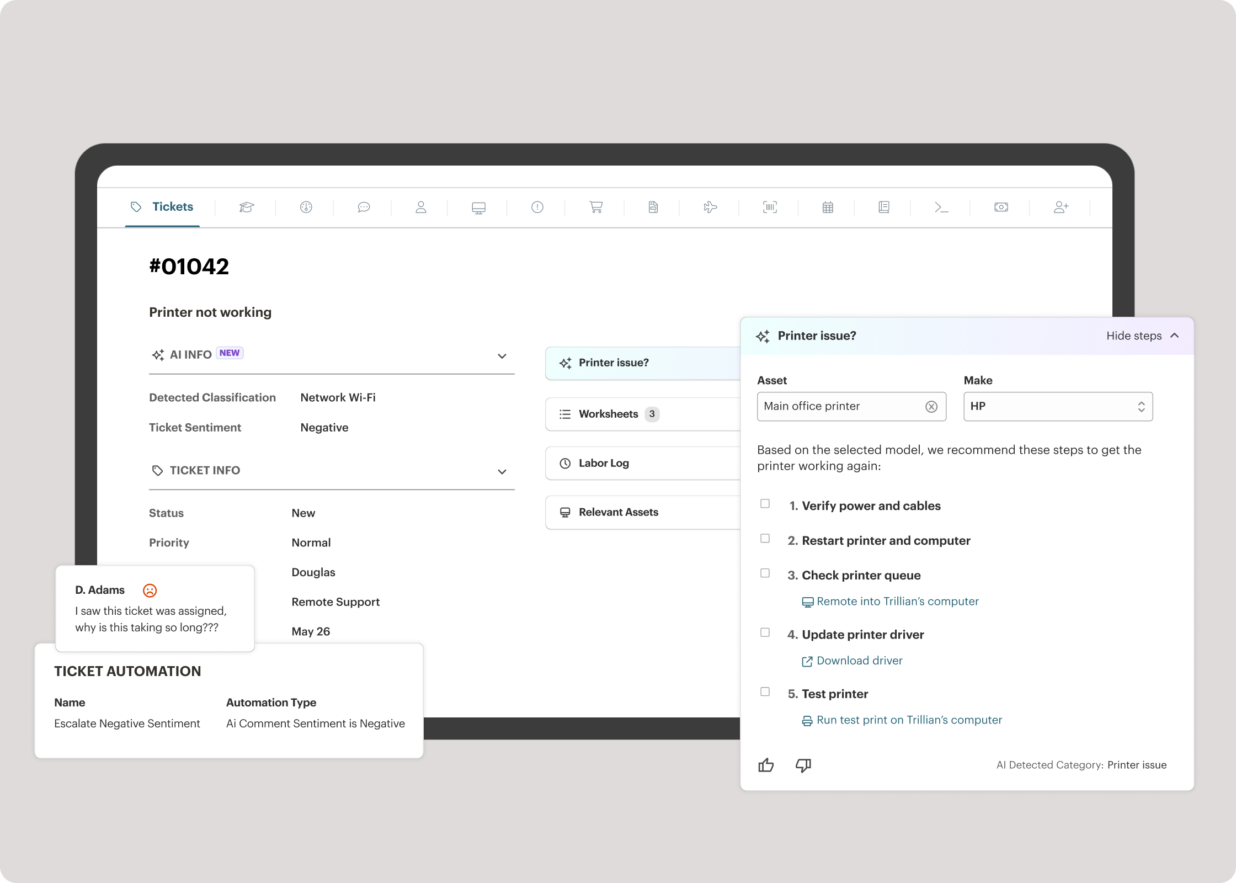
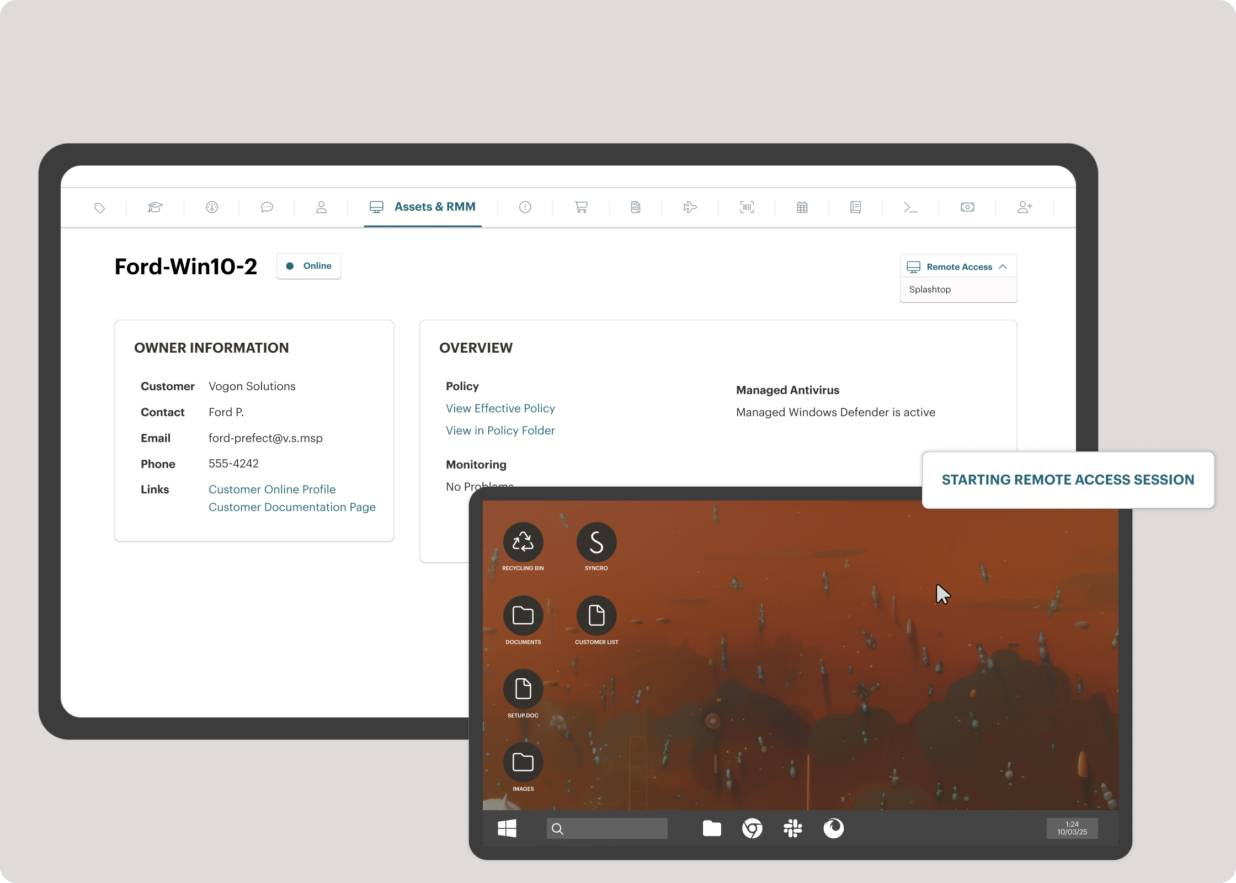
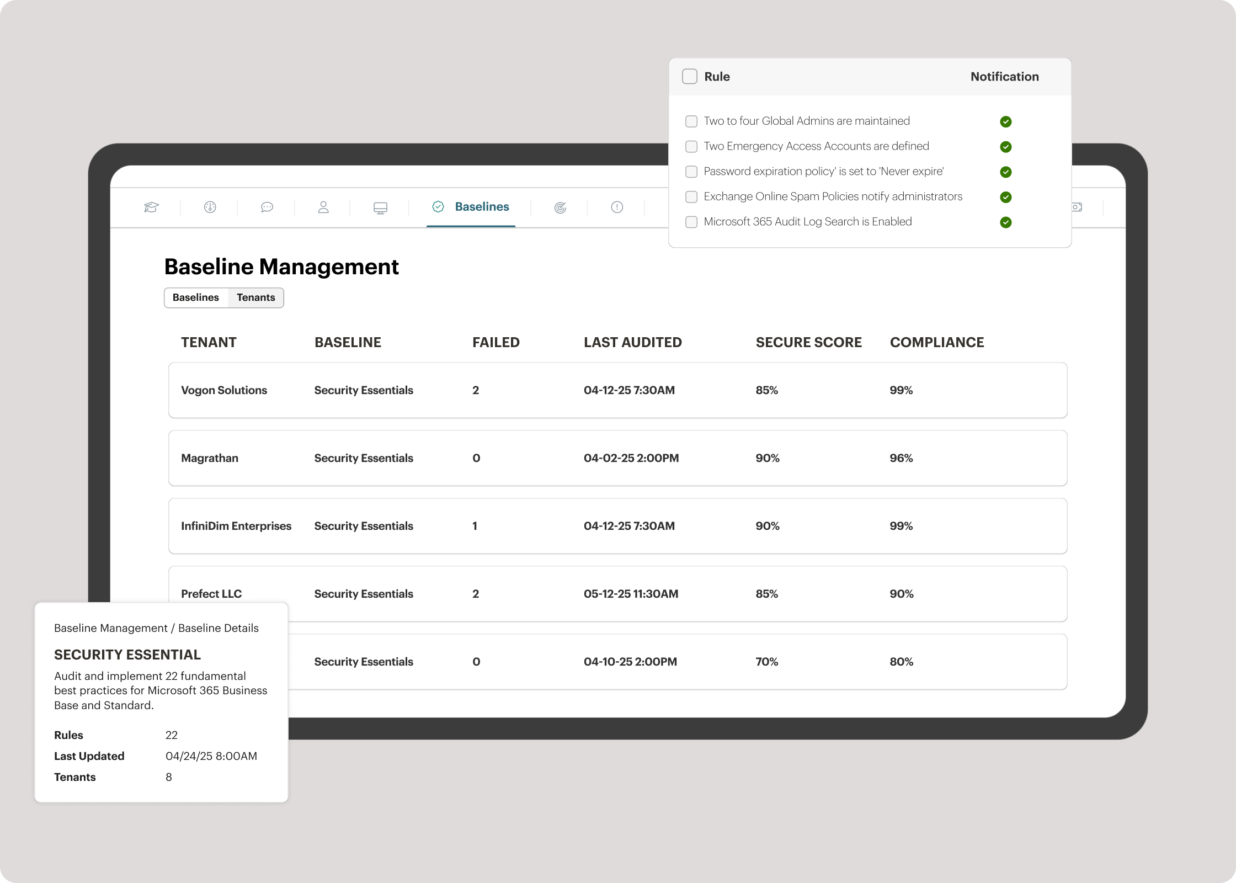
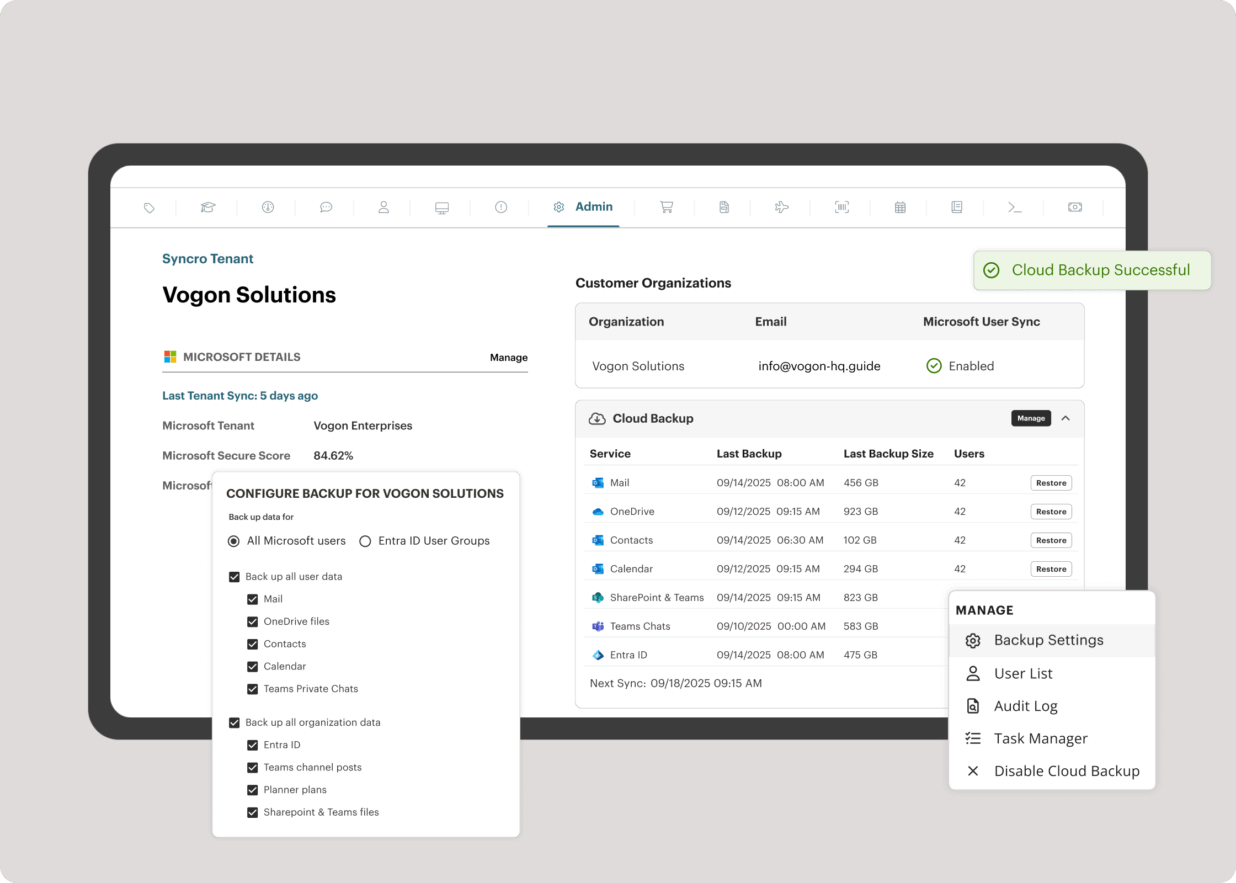
Screenshot of the interface to monitor unlimited endpoints, run scripts, deploy patches, customize alerts, and proactively address potential issues before they become problems.Screenshot of Syncro’s intelligent Smart Ticket Management, which automatically routes tickets and gets information in front of techs, displays relevant context from prior tickets, and surfaces recommended remediation steps to speed up resolution times.Screenshot of where to securely access endpoints and resolve issues anytime, from anywhere, via Splashtop — included with the Syncro subscription at no extra cost.Screenshot of Syncro automating Entra ID tasks and admin work including user syncs, password resets, and license billing.Screenshot of the interface to benchmark M365 tenants against CIS-aligned best practices — offering guided configuration, centralized visibility, drift detection, and automated alerts to help maintain compliance.Screenshot of Microsoft 365 and Entra ID backup, which helps to safeguard against data loss, reinforce compliance, and ensure business continuity without compromise.