
Atlassian Confluence vs. GitKraken
Atlassian Confluence vs. GitKraken
| Product | Rating | Most Used By | Product Summary | Starting Price |
|---|---|---|---|---|
 Confluence | N/A | Confluence is a collaboration and content sharing platform used primarily by customers who are already using Atlassian's Jira project tracking product. The product appeals particularly to IT users. | $6.40 per month per user | |
 GitKraken | N/A | GitKraken's commit graph helps visualize branch structure and commit history. It helps verify recent Git actions on the repo, and also shows who made what code changes and when, so it’s easier to track down when a bug was introduced and revert back to a previous version. GitKraken Client is a Git GUI that detects and alerts users of potential conflicts so as to prevent them from happening. With itsuser Activity Status, the user can know who is online in the GitKraken Client. | $0 |
| Atlassian Confluence | GitKraken | |||||||||||||||
|---|---|---|---|---|---|---|---|---|---|---|---|---|---|---|---|---|
| Editions & Modules |
|
| ||||||||||||||
| Offerings |
| |||||||||||||||
| Entry-level Setup Fee | No setup fee | No setup fee | ||||||||||||||
| Additional Details | Prices shown here reflect prices for deployments with 100 users or less. The prices decrease wien the user base surpasses 100. | — | ||||||||||||||
| More Pricing Information | ||||||||||||||||
| Atlassian Confluence | GitKraken |
|---|
| Atlassian Confluence | GitKraken | ||||||||||||||||||||||||||||||
|---|---|---|---|---|---|---|---|---|---|---|---|---|---|---|---|---|---|---|---|---|---|---|---|---|---|---|---|---|---|---|---|
| Project Management |
| ||||||||||||||||||||||||||||||
| Communication |
| ||||||||||||||||||||||||||||||
| File Sharing & Management |
| ||||||||||||||||||||||||||||||
| Version Control Software Features |
|
| Atlassian Confluence | GitKraken | |
|---|---|---|
| Small Businesses |  Stackby Score 8.9 out of 10 |  Git Score 10.0 out of 10 |
| Medium-sized Companies |  Troop Messenger Score 9.8 out of 10 | Git Score 10.0 out of 10 |
| Enterprises |  HCL Connections Score 9.0 out of 10 |  Perforce P4 Score 7.3 out of 10 |
| All Alternatives | View all alternatives | View all alternatives |
| Atlassian Confluence | GitKraken | |
|---|---|---|
| Likelihood to Recommend | 8.2 (173 ratings) | 10.0 (5 ratings) |
| Likelihood to Renew | 9.0 (21 ratings) | - (0 ratings) |
| Usability | 8.0 (61 ratings) | 10.0 (2 ratings) |
| Availability | 9.0 (3 ratings) | - (0 ratings) |
| Performance | 8.0 (5 ratings) | - (0 ratings) |
| Support Rating | 5.4 (25 ratings) | 5.0 (1 ratings) |
| Implementation Rating | 8.8 (4 ratings) | - (0 ratings) |
| Configurability | 6.0 (1 ratings) | - (0 ratings) |
| Ease of integration | 8.0 (4 ratings) | - (0 ratings) |
| Product Scalability | 8.0 (2 ratings) | - (0 ratings) |
| Vendor post-sale | 8.0 (1 ratings) | - (0 ratings) |
| Vendor pre-sale | 8.0 (1 ratings) | - (0 ratings) |
| Atlassian Confluence | GitKraken | |
|---|---|---|
| Likelihood to Recommend |  Atlassian
|  GitKraken (formerly Axosoft)
|
| Pros | Atlassian
| GitKraken (formerly Axosoft)
|
| Cons | Atlassian
| GitKraken (formerly Axosoft)
|
| Likelihood to Renew | Atlassian
 Charles Thomasset, MBA Director, Project/Process Management | GitKraken (formerly Axosoft) No answers on this topic |
| Usability | Atlassian
| GitKraken (formerly Axosoft)
|
| Reliability and Availability | Atlassian
 Normand Whitehead Senior R&D Eng. Technologist | GitKraken (formerly Axosoft) No answers on this topic |
| Performance | Atlassian
| GitKraken (formerly Axosoft) No answers on this topic |
| Support Rating | Atlassian
| GitKraken (formerly Axosoft) No answers on this topic |
| Implementation Rating | Atlassian
 Bill Kratzer Chief Innovation Officer | GitKraken (formerly Axosoft) No answers on this topic |
| Alternatives Considered | Atlassian
| GitKraken (formerly Axosoft)
|
| Scalability | Atlassian
| GitKraken (formerly Axosoft) No answers on this topic |
| Return on Investment | Atlassian
| GitKraken (formerly Axosoft)
|
| ScreenShots | GitKraken Screenshots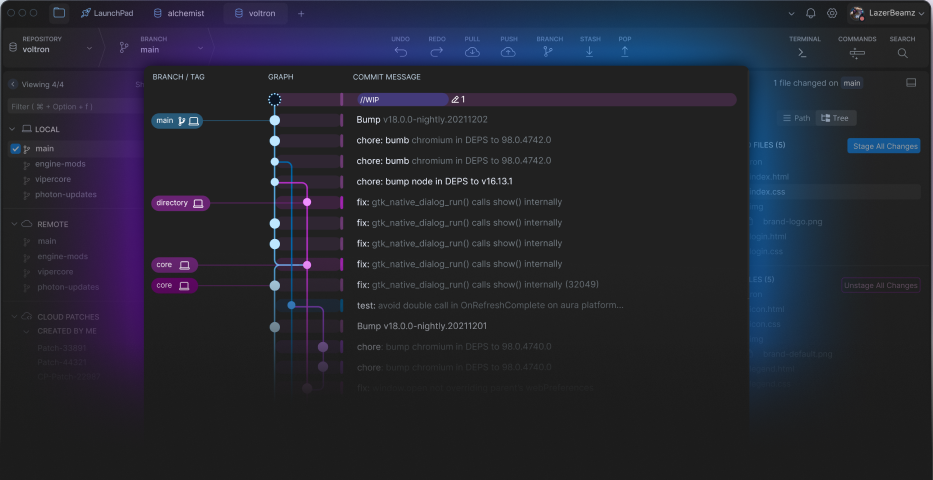 |
