Overview
ProductRatingMost Used ByProduct SummaryStarting Price
BigTime Software
Score 6.3 out of 10
N/A
BigTime IQ is time and expense tracking software from Chicago-based BigTime Software.
$20
User per Month
Sage Intacct
Score 8.6 out of 10
N/A
Sage Intacct is a cloud ERP system targeted at high-growth small and medium-sized businesses. Intacct includes applications for core financials and accounting, purchasing, order management, and financial reporting and business intelligence. It also integrates with 3rd party software like Salesforce.N/A
Pricing
BigTime SoftwareSage Intacct
Editions & Modules
Essentials
$20
User per Month
Advanced
$35
User per Month
Premier
$45
User per Month
Projector
$60
No answers on this topic
Offerings
Pricing Offerings
BigTime SoftwareSage Intacct
Free Trial
YesNo
Free/Freemium Version
NoNo
Premium Consulting/Integration Services
YesYes
Entry-level Setup FeeOptionalNo setup fee
Additional DetailsMust contact sales team for pricing.
More Pricing Information
Community Pulse
BigTime SoftwareSage Intacct
Considered Both Products
BigTime Software

No answer on this topic

Sage Intacct
Chose Sage Intacct
Sage Intacct has better features than Microsoft SL. I used SL at a past employee, the system was outdated and didn't offer a lot of features Intacct does. SL was slow and the usability / functionality were not highly rated. Intacct I still believe needs to continue to develop …
Features
BigTime SoftwareSage Intacct
Payroll Management
Comparison of Payroll Management features of Product A and Product B
BigTime Software
-
Ratings
Sage Intacct
7.0
355 Ratings
8% below category average
Pay calculation00 Ratings7.05 Ratings
Benefit plan administration00 Ratings6.45 Ratings
Direct deposit files00 Ratings7.14 Ratings
Salary revision and increment management00 Ratings6.94 Ratings
Reimbursement management00 Ratings7.6355 Ratings
Customization
Comparison of Customization features of Product A and Product B
BigTime Software
-
Ratings
Sage Intacct
7.7
845 Ratings
2% above category average
API for custom integration00 Ratings7.9795 Ratings
Plug-ins00 Ratings7.5641 Ratings
Security
Comparison of Security features of Product A and Product B
BigTime Software
-
Ratings
Sage Intacct
8.7
1279 Ratings
6% above category average
Single sign-on capability00 Ratings8.81046 Ratings
Role-based user permissions00 Ratings8.61244 Ratings
Reporting & Analytics
Comparison of Reporting & Analytics features of Product A and Product B
BigTime Software
-
Ratings
Sage Intacct
7.9
1371 Ratings
1% above category average
Dashboards00 Ratings7.81233 Ratings
Standard reports00 Ratings8.11334 Ratings
Custom reports00 Ratings7.71318 Ratings
General Ledger and Configurable Accounting
Comparison of General Ledger and Configurable Accounting features of Product A and Product B
BigTime Software
-
Ratings
Sage Intacct
8.0
1507 Ratings
5% above category average
Accounts payable00 Ratings8.31400 Ratings
Accounts receivable00 Ratings8.11230 Ratings
Cash management00 Ratings8.11303 Ratings
Bank reconciliation00 Ratings8.11293 Ratings
Expense management00 Ratings8.0917 Ratings
Time tracking00 Ratings7.1496 Ratings
Fixed asset management00 Ratings7.6669 Ratings
Multi-currency support00 Ratings7.9505 Ratings
Multi-division support00 Ratings8.6824 Ratings
Regulations compliance00 Ratings7.6502 Ratings
Electronic tax filing00 Ratings7.7373 Ratings
Self-service portal00 Ratings7.5629 Ratings
Global Financial Support00 Ratings8.0367 Ratings
Intercompany Accounting00 Ratings8.5869 Ratings
Journals and Reconciliations00 Ratings8.81207 Ratings
Enterprise Accounting00 Ratings8.1525 Ratings
Configurable Accounting00 Ratings8.2708 Ratings
Centralized Rules Framework00 Ratings7.9514 Ratings
Standardized Processes00 Ratings8.3832 Ratings
Inventory Management
Comparison of Inventory Management features of Product A and Product B
BigTime Software
-
Ratings
Sage Intacct
6.8
488 Ratings
7% below category average
Inventory tracking00 Ratings7.8359 Ratings
Automatic reordering00 Ratings5.58 Ratings
Location management00 Ratings8.5454 Ratings
Manufacturing module00 Ratings5.25 Ratings
Order Management
Comparison of Order Management features of Product A and Product B
BigTime Software
-
Ratings
Sage Intacct
7.6
723 Ratings
2% above category average
Pricing00 Ratings7.8453 Ratings
Order entry00 Ratings8.0641 Ratings
Credit card processing00 Ratings7.6455 Ratings
Cost of goods sold00 Ratings6.314 Ratings
End-to-end order visibility00 Ratings8.2371 Ratings
Best Alternatives
BigTime SoftwareSage Intacct
Small Businesses
HaloPSA
HaloPSA
Score 8.1 out of 10
QuickBooks Self-Employed (discontinued)
Score 5.7 out of 10
Medium-sized Companies
Planview AdaptiveWork
Score 8.3 out of 10
Zoho Books
Zoho Books
Score 9.1 out of 10
Enterprises
Planview AdaptiveWork
Score 8.3 out of 10
SAP Cloud ERP
SAP Cloud ERP
Score 8.6 out of 10
All AlternativesView all alternativesView all alternatives
User Ratings
BigTime SoftwareSage Intacct
Likelihood to Recommend
6.4
(33 ratings)
8.4
(1556 ratings)
Likelihood to Renew
10.0
(4 ratings)
5.6
(83 ratings)
Usability
6.2
(4 ratings)
5.4
(140 ratings)
Availability
8.2
(1 ratings)
9.0
(14 ratings)
Performance
9.1
(1 ratings)
10.0
(15 ratings)
Support Rating
9.0
(5 ratings)
3.0
(129 ratings)
In-Person Training
-
(0 ratings)
8.2
(6 ratings)
Online Training
-
(0 ratings)
1.0
(14 ratings)
Implementation Rating
10.0
(2 ratings)
1.0
(22 ratings)
Configurability
-
(0 ratings)
3.0
(13 ratings)
Ease of integration
-
(0 ratings)
6.7
(311 ratings)
Product Scalability
8.2
(1 ratings)
2.0
(12 ratings)
Vendor post-sale
-
(0 ratings)
1.0
(11 ratings)
Vendor pre-sale
-
(0 ratings)
1.0
(11 ratings)
User Testimonials
BigTime SoftwareSage Intacct
Likelihood to Recommend
BigTime Software
I'd like to start by saying, I rarely give 10's on anything, almost always 9's, the main reason for my 10 rating is the support I've received from this team/company. BigTime Software has been well suited for our company b/c it's giving a window into the project budget and time frames to our Project Managers to proactively manage their projects and look for areas to improve and celebrate with support staff. I would say efficiency in time management. BigTime Software is not an accounting software and I love that about it. We were looking for a tool for staff to manage their projects and stay on budget and track time and generate invoices all in one place and we've found that with BigTime Software.
Read full review
Sage
Sage Intacct is well suited for organizations that have outgrown a basic accounting system and need real integrations, better reporting, and the ability to centralize financial operations without significantly adding headcount. For us specifically, it was the right fit because we needed to connect multiple systems, bring invoicing in house, and give leadership real time visibility into our financials. It works particularly well for small but complex finance teams that need the system to absorb work rather than create it.
The system is powerful but it requires someone who understands accounting well enough to configure and maintain it properly. It is also worth noting that some of the more advanced features, like bank feeds and certain automation capabilities, can be harder to fully utilize depending on your banking relationships and technical setup.
Read full review
Pros
BigTime Software
  • I like the functionality of being able to make payments electronically and the amount of banks and payment methods that are available.
  • Another very useful feature of this tool is that the system allows to set a parameter to perform automatic invoices.
  • I also really like the amount of templates that this tool has. Since it allows us to make customizable reports to our clients.
Read full review
Sage
  • Custom, real-time financial reporting. I am able to streamline my reporting to pull in various account groups and calculations which save me time from having to do it in Excel.
  • Out of the box standard reports for clients who don't require as custom of reporting or even as a great starting point to build out reports.
  • Integrations with other platforms, such as Airbase, various banks, Rippling, etc.
  • The dashboard module is extremely helpful in my monthly review of various entities.
Read full review
Cons
BigTime Software
  • For some types of projects, we are unable to use BigTime's invoicing feature. It would be nice if we could further customize invoices to fit our needs. We still have to use Quickbooks to complete certain invoices.
  • Being able to create Purchase Orders in BigTime would be extremely useful to us. We currently use Quickbooks for this.
Read full review
Sage
  • The budgeting module is archaic. It needs to have more application features, including tracking changes made throughout the year.
  • The creation of reports is complicated and lacks sufficient filtering options during the process.
  • The Purchasing module should be more flexible, allowing users to add change orders to an existing PO rather than creating a new one.
Read full review
Likelihood to Renew
BigTime Software
Its been a huge help in saving time and making billing more efficient. Would like to see the product grow and be able to continue to use it.
Read full review
Sage
Sage Intacct is continuously evolving and increasing it's functionalities. I am excited to attend conferences to learn what is in the roadmap for future releases. Additionally, using Sage Intacct allows me grow as a professional, I am really enjoy the knowledge that I have within the product to be able to share my experiences.
Read full review
Usability
BigTime Software
Overall most areas of the software are easy to use. I tend to spend a lot of time in analytics and reports. Those are not as user friendly, in my opinion, and could use some improvements. I think it just takes time to get familiar with where items are stored in the program and what changes affect what.
Read full review
Sage
The ease of use as a seasoned user is wonderful; however, new users struggle to adapt to the program efficiently. Better training videos--all in one location--would be beneficial. The use of a "sandbox" environment is a great tool for new employees or for the fiscal department to test certain journal entries or other transactions to verify accuracy of data.
Read full review
Reliability and Availability
BigTime Software
BigTime is available 99% of the time. At times there are bugs, but most are resolved quickly
Read full review
Sage
There has only been one occurrence where Sage Intacct was not available to me, however I had already been working a number of hours trying to get a project completed. It honestly allowed me to step back and take a much needed break.
Read full review
Performance
BigTime Software
have not noticed a slow integration issue using QBO
Read full review
Sage
As fas as integration is concerned I don't feel this slows Sage Intacct down at all. However, sometimes I do feel it takes some larger reports more time to load due to all the detail. As well as, I "move very fast" in my motions so sometimes I double click on fuctions too quickly and the system seems to think that I have a duplicate request.
Read full review
Support Rating
BigTime Software
The support is amazing! They are always available through the chat interface in the program. Each support person has fully answered my questions the first time. I have had a positive experience with each inquiry. It is very important to me that I am able to get instant access to help so that I can make the most of the software and all of its capabilities.
Read full review
Sage
Only a few times have we had to reach out to support, and every time we did, we received a relatively quick response and a solution was found fairly quickly. Only once was there an issue that took longer than a week to resolve, but it still did eventually get solved.
Read full review
In-Person Training
BigTime Software
No answers on this topic
Sage
I have taken in person training classes at several of the annual Sage Intacct user conferences. It is very interactive and the trainers are very easy to follow and understand. They are great at getting everyone in the class involved. They also make sure everyone has learned to task before moving to a new one.
Read full review
Online Training
BigTime Software
No answers on this topic
Sage
The free training is very minimal. For what we pay for the service, I would like more training. We end up training new users in-house because the provided free training is not nearly comprehensive enough. That being said, the training provided, for the material covered, was adequate and relevant for the given topics.
Read full review
Implementation Rating
BigTime Software
I touched on this briefly, in another survey section, but my implementation manager, Kevin, was exceptional. The actual implementation process took 3 months, not 1 before I was comfortable rolling it out to staff. We also had to wait/schedule time and coordinate for our custom xml. invoice to be generated and in a place we felt comfortable sending it out to clients. In the end I was very satisfied, but during the first few months it was challenging.
Read full review
Sage
I would not use a thrid party administrator to implement your system, especially if you are going to be modifying the system at all. Use Intacct implementors as they will be able to better support you on any issues that come up after you go live.
Read full review
Alternatives Considered
BigTime Software
I liked the client management, but it didn't do time tracking, billing or syncing with quickbooks. It was too robust for my needs. I tried it for the client management and thought I might use it along with bigtime, but it was too cumbersome and would involve too much double entry. And it didn't track time or bill which are necessary functions
Read full review
Sage
Sage Intacct was selected as the best fit for our core financial management needs, reporting requirements, and finance team operating model. Sage Intacct’s dimensional model was a major factor. It allowed us to report by department, entity, business unit, customer, vendor, project, or other dimensions without creating an overly complex chart of accounts. The approval workflows, transaction history, supporting documentation, and reporting structure helped strengthen financial controls.
Read full review
Scalability
BigTime Software
The product is useful for faster billing and efficient timesheet logs. I do like the report features however there are many options and can be overwhelming for the user. It is most helpful to set up reports speaking to an agent to ensure the right fields are set, etc.
Read full review
Sage
You can do a lot with this system and integrate it with a lot of your additional systems you use daily.
Read full review
Return on Investment
BigTime Software
  • Before BigTime, we were using Excel to track everything, creating invoices, and run reports. Getting on BigTime has saved us tons of time and effort which equates to dollars saved on labor.
  • From a legal standpoint, BigTime has allowed us to be organized and prepared in the event we would need to present financial details to anyone.
Read full review
Sage
  • Positive - It runs better than our old software when we all work together, rather than having to sign off on each other and deal with syncing issues.
  • Negative - It's not as easy to go back to fix an amount, a date, etc. Sometimes, a very small mistake needs to be corrected by voiding and redoing the entire transaction.
  • We can successfully sync other software we use with Intacct! It reduces workload when things are automated.
Read full review
ScreenShots

BigTime Software Screenshots

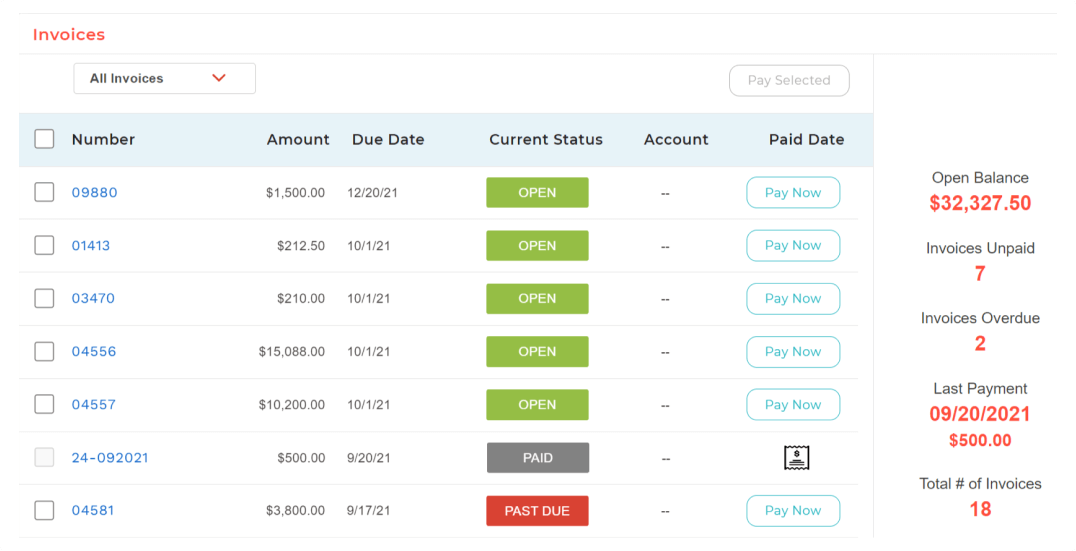
Screenshot of BigTime Wallet provides clients with a personalized experience to pay on time from anywhere, in one click.Screenshot of A big-picture view into operational insights to make adjustments to how resources are managed.Screenshot of Real-time, actionable insights for professional services firms.Screenshot of The platform is designed to work within existing workflows and software stack, acting as a single source of truth for data.Screenshot of BigTime's invoicing engine supports dozens of industry-standard billing scenarios and enough options to satisfy exacting customer needs.

Sage Intacct Screenshots

Screenshot of Accounts Receivable: Automate accounts receivable processes.Screenshot of Revenue Recognition: Automated and compliant revenue recognition with complete support for ASC 606 and IFRS 15.Screenshot of Real-Time Reporting: Real-time reporting with up-to-minute financials across multiple business dimensions. Show only the metrics that matter based on the user viewing the dashboard.Screenshot of the times and expense management dashboard, which is customized to reflect the user's role, displaying relevant information that aligns with their position, thereby presenting each individual with the data most pertinent to their responsibilities.Screenshot of the detailed company metrics used to forecast business growth.Screenshot of the order management workflows, which are automated to accelerate quote-to-cash sales