Chrome Remote Desktop from Google is a cross-platform remote administration and remote desktop tool that requires the Chrome browser and an extension. It is free to use.
$0
ServiceTitan
Score7.4 out of 10
N/A
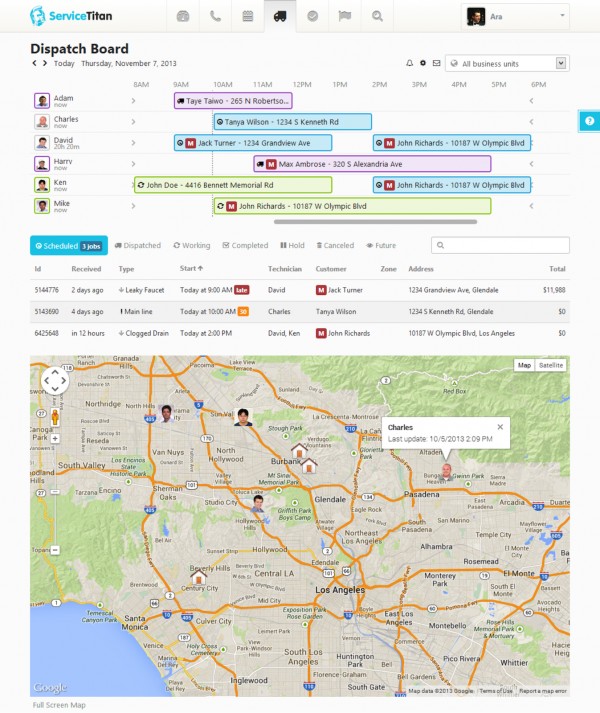
ServiceTitan is a cloud-based field
service management solution. The platform includes CRM, intelligent dispatch,
comprehensive reporting, marketing management tools, mobile connectivity for
field techs, and QuickBooks integration.
The platform's core product offers
advanced job booking, drag and drop dispatch board, communication with
technicians via integrated texting, email and calls, and advanced reporting.
The technician mobile solution allows for paperless invoicing, virtual…
It is well suited in cases where your company/organization is looking for a low/no cost remote desktop solution, or is looking for something that can be used by most anyone right away. Most organizations don't want things to be too complex, especially with a remote desktop solution, which is generally not very complex software to begin with. It would be less appropriate in cases where the company/organization has already purchased licensing for a commercial product, and/or has been heavily using a commercial product for some time.
A de minimis incentive was given to thank the reviewer for their time. The incentive was not used to bias or drive a particular response, nor was the incentive contingent on a positive endorsement. More Info
ServiceTitan seems to be incredibly customizable depending on what is needed, and therefore I would recommend it in any case where customers and jobs are recorded and scheduled. It can be used in a variety of ways and has multiple functions, including revenue and inventory tracking. Whether a big or small company, I feel with proper training anyone could utilize ServiceTitan very effectively to improve both productivity and record-keeping.
A de minimis incentive was given to thank the reviewer for their time. The incentive was not used to bias or drive a particular response, nor was the incentive contingent on a positive endorsement. More Info
Unlike Microsoft's Remote Desktop, this program is the same across platforms, which is helpful for users.
This program also allows direct control over the desktop (like TeamViewer) and doesn't give you a simulated log on (like Remote Desktop). This is advantageous for seeing exactly what's on the screen but can make it a little laggy.
The interface is very nice and clear once it's set up. It's obvious which computer is which and it's just a couple of clicks from opening the program to a connection.
A de minimis incentive was given to thank the reviewer for their time. The incentive was not used to bias or drive a particular response, nor was the incentive contingent on a positive endorsement. More Info
Real-time tracking. The biggest problem in logistics in, my opinion, is knowing if your products are arriving on time or not especially as it pertains to food, that was huge here.
Most of our managers travel constantly from corporate to distribution because of how centralized the company is they needed something flexible that allowed them to run reports whenever and however.
Ease of use - I'll be honest in that our employees are not the cream of the crop as it pertains to their education, this software made the learning process simple.
A de minimis incentive was given to thank the reviewer for their time. The incentive was not used to bias or drive a particular response, nor was the incentive contingent on a positive endorsement. More Info
A de minimis incentive was given to thank the reviewer for their time. The incentive was not used to bias or drive a particular response, nor was the incentive contingent on a positive endorsement. More Info
We'd like to be able to text estimates (currently, email is the only function)
We'd like to have audit trails on Customer and Location records (currently only at the job level)
We'd like to be able to email/text the customer multiple options within estimates, like the techs can do on their tablet, it's just not a function that can be presented by the office.
A de minimis incentive was given to thank the reviewer for their time. The incentive was not used to bias or drive a particular response, nor was the incentive contingent on a positive endorsement. More Info
A very easy lightweight tool that is completely scalable and deployed via google admin platform. The tool is free to use and works extremely well with the chrome devices we currently have deployed. Any organization using chrome or google suites should look into this tool as it's much easier to use then other remote software in the market
A de minimis incentive was given to thank the reviewer for their time. The incentive was not used to bias or drive a particular response, nor was the incentive contingent on a positive endorsement. More Info
Just a great product that has saved countless hours of commute to work and given the flexibility to be able to work from anywhere, whether at home or when away on holiday overseas. I love that it is a free product and is just as great as its competitors' products. It has also allowed me to prepare for work for the following day.
A de minimis incentive was given to thank the reviewer for their time. The incentive was not used to bias or drive a particular response, nor was the incentive contingent on a positive endorsement. More Info
I rarely run into any issues while using ServiceTitan other than the occasional scheduled maintenance. It is very intuitive and easy to learn, with many capabilities that can be suited to any job position in a business. The functions are consistent regardless of your department or use case, and can be easily customized to fit any and all of a company's needs.
A de minimis incentive was given to thank the reviewer for their time. The incentive was not used to bias or drive a particular response, nor was the incentive contingent on a positive endorsement. More Info
The only support I ever accessed were help files and web tutorials. I never tried to access personal support, mostly because I don't believe much of it is available. As a free service, my expectations for support are pretty low; that said, Chrome Remote Desktop is easy enough to configure and troubleshoot even with limited technical knowledge.
A de minimis incentive was given to thank the reviewer for their time. The incentive was not used to bias or drive a particular response, nor was the incentive contingent on a positive endorsement. More Info
A de minimis incentive was given to thank the reviewer for their time. The incentive was not used to bias or drive a particular response, nor was the incentive contingent on a positive endorsement. More Info
Chrome Remote Desktop seems to be a an easy to use and efficient program. Such as TeamViewer, however TeamViewer offers more program features such as able to control a device's function (shutting down, restarting, audio input, cmd etc). With those added program features I believe Chrome Remote Desktop can almost be up to par with TeamViewer.
A de minimis incentive was given to thank the reviewer for their time. The incentive was not used to bias or drive a particular response, nor was the incentive contingent on a positive endorsement. TR verified that a representative sample of customers was invited. More Info
autotask has a sales team that can work with you to understand your specific business scenario. They have offered to scope an integration project with us. We are looking forward to making progress on a tailored solution with them
A de minimis incentive was given to thank the reviewer for their time. The incentive was not used to bias or drive a particular response, nor was the incentive contingent on a positive endorsement. More Info
A de minimis incentive was given to thank the reviewer for their time. The incentive was not used to bias or drive a particular response, nor was the incentive contingent on a positive endorsement. More Info