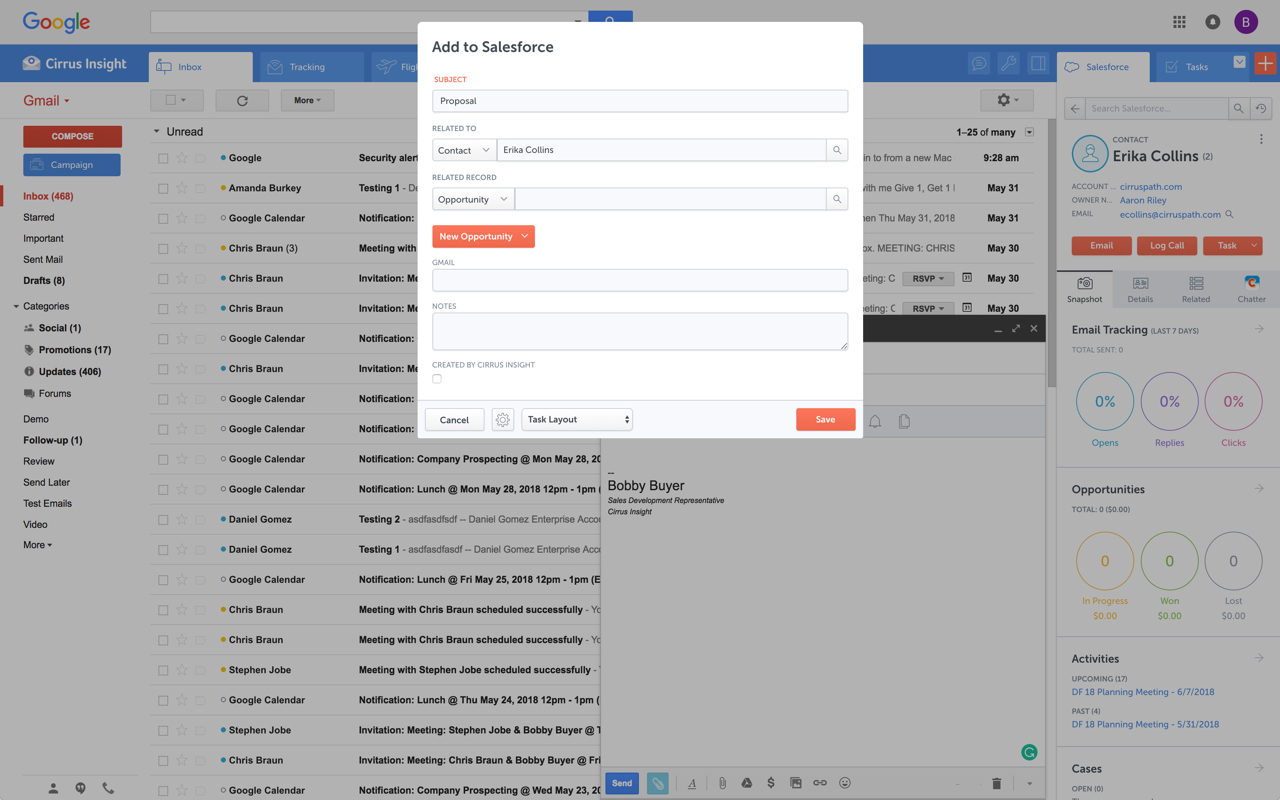
Cirrus Insight integrates Salesforce with Gmail, Google Calendar, and Google Contacts. Instantly View Contextual Salesforce Information in Your Inbox. Save Emails & Attachments to Salesforce with a Click. Sync Your Google & Salesforce Calendars. Create & Edit Salesforce Records on the Fly. Customize Your Salesforce Workflow in Gmail. Add Google Contacts to Salesforce. Salesforce Tasks Integration. Salesforce Templates Integrated with Gmail.
$15
per month
LeadSquared
Score7.4 out of 10
N/A
LeadSquared is a unified Sales Force Automation and Marketing Automation platform designed for high-velocity sales environments. The system utilizes machine learning (ML) models to automate lead distribution and prioritize customer interactions across sales, marketing, and field operations teams.
$50
per month per user
Pricing
Cirrus Insight
LeadSquared
Editions & Modules
Starter
$27
per user/month
Closer
$45
per user/month
Rainmaker
$72
per user/month
Sales Super
$50
per month per user
LeadSquared Sales Pro
$60
per month per user
Offerings
Pricing Offerings
Cirrus Insight
LeadSquared
Free Trial
Yes
Yes
Free/Freemium Version
No
No
Premium Consulting/Integration Services
Yes
Yes
Entry-level Setup Fee
$500 per installation
Optional
Additional Details
Pricing based on annual billing.
Additional add-ons and modules available for expanded functionality.
For someone who uses both Gmail and Salesforce as part of their main role, this software is an invaluable connector for them both. Some of the features are also not Salesforce specific - such as the Meeting Scheduler, which has proved invaluable to me, and I would recommend to any Gmail user who frequently set up meetings (either internally or externally).
A de minimis incentive was given to thank the reviewer for their time. The incentive was not used to bias or drive a particular response, nor was the incentive contingent on a positive endorsement. More Info
1. Very suitable for an omnichannel business, as it can capture both online and offline lead sources and allows for follow ups. 2. Very suitable for call centers as lead and call tracking can be done very easily using LeadSquared. 3. Not very suitable for on field sales. Even though the mobile app does facilitate portability, the overall experience does not come close to the desktop version which is not feasible for an on field sales representative to use.
Log email to Salesforce. You click one button and it logs for you. This is easier than adding the BCC email address that Salesforce provides as a way to log email.
Track views and engagement on these emails. It's nice to know if the email was opened and if links were clicked.
Update quick fields in Salesforce directly from their inbox using Cirrus. This prevented reps from needing to click into Salesforce, wait for it to load, then update fields like the phone number or name.
If the rep did need to open Salesforce, Cirrus provides a quick button to navigate to the Lead/Contact/Opportunity page quickly.
A de minimis incentive was given to thank the reviewer for their time. The incentive was not used to bias or drive a particular response, nor was the incentive contingent on a positive endorsement. More Info
Call history is recorded like dialed calls, connected calls, total talktime in a daily, weekly, monthly, yearly, and on a custom basis.
The activity history of both customers, and employees are shown clearly, which help us a lot in understanding the interest of the customer, and their communication history with the organization.
Daily attendance history and man-days management can be done.
Sales performance and their values are mapped clearly.
Outlook for Mac could use some work as an add-on because it's hard to read sometimes on my laptop. It's not a sidebar, like the Windows functionality, so it's harder to read.
Doesn't always find an opportunity, even though I know it's in our Salesforce system.
Randomly shuts down and doesn't log in properly at times. I've had to remove and re-download more than once.
A de minimis incentive was given to thank the reviewer for their time. The incentive was not used to bias or drive a particular response, nor was the incentive contingent on a positive endorsement. More Info
A de minimis incentive was given to thank the reviewer for their time. The incentive was not used to bias or drive a particular response, nor was the incentive contingent on a positive endorsement. More Info
It is the best google to salesforce integration on the market. support is incredibly responsive and very helpful. They are constantly adding new features, and the current feature set is well beyond anything else that is currently offered in the market
It is an excellent value for money solution and is fulfilling all our needs quite efficiently. They keep working on the product and each month sees an update allowing for a bug free experience and faster incorporation of newer tools. I see no reason why I would not like to renew the subscription for this fabulous product.
Very easy to use. Everything opens in a familiar interface right inside the google apps sidebar. It brings in salesforce records, so as long as you know google apps / gmail and salesforce you'll be all set. It's point and click.
Having talked about all other things in detail in my previous responses, this question I feel is redundant but then I will highlight the points again - Easy to Use - Flexible - Robust System - Ever-evolving - Support & Service - Integrations with third party tools & technologies - LMS - Data Management & Reports - Landing Page Options
Great to work with and also Easy to work with Do not just listen to the problem but provide upfront solutions Always available and are ready to support on holidays Considerate of user's knowledge and always ready to explain the smallest / dumbest doubt a user can ask Always available to help with the internal tasks as well like creating automations, drip creations etc
The plugin is installed inside your internet browser as an extension/add-on. It can be found in most add on stores and is easy to install. Usually just a few clicks. It handles authorization for you once you sign in, and then takes care of all the rest. It couldn't be easier to get working right out of the box. You're up in running in less than 5 minutes.
Yesware regularly sent me alerts that my emails had been opened by someone who I hadn't sent them to, from locations they couldn't possibly have been. I also don't recall its Salesforce activity logging working as smoothly, though I last used Yesware more than 12 months ago so my memory isn't as fresh as it could be
A de minimis incentive was given to thank the reviewer for their time. The incentive was not used to bias or drive a particular response, nor was the incentive contingent on a positive endorsement. More Info
I looked closely at Infusionsoft. While the nurturing/decision tree tool of Infusionsoft was far more sophisticated, the many negative reviews of Infusionsoft lead me to look elsewhere. Leadsquared had very positive reviews and aggressive pricing. It has less features, but the features they have were the ones I wanted to focus on.
A de minimis incentive was given to thank the reviewer for their time. The incentive was not used to bias or drive a particular response, nor was the incentive contingent on a positive endorsement. More Info
Automated Lead Nurturing helps reduce a lot of manual work.
A lot of our time goes into creating custom reports. Making the reporting feature more flexible and robust will help in saving a lot of time and energy.