
ClickUp vs. ProProfs Project vs. YouTrack
ClickUp vs. ProProfs Project vs. YouTrack
| Product | Rating | Most Used By | Product Summary | Starting Price |
|---|---|---|---|---|
 ClickUp | Small Businesses (1-50 employees) | ClickUp is a productivity platform that brings together work apps, data, and workflows. Also presented as a Converged AI Workspace, ClickUp eliminates work sprawl to provide context and a single place for humans and agents to work together. The platform currently boasts over 20 million users worldwide. | $0 per month per seat | |
 ProProfs Project | Mid-Size Companies (51-1,000 employees) | ProProfs Project is an online project management software for managing both teams and multiple projects on one dashboard. From creating project goals and objectives to tracking work progress, this PM tool aims to allow users to meet project deadlines efficiently. The PM tool allows users to communicate with in-house or remote teams - anytime, anywhere. Moreover, the vendor says users can generate insightful reports and accurate invoices in just a few clicks. Along with these features,… | $0 3 Projects | |
 YouTrack | N/A | YouTrack is a project management tool for agile teams. YouTrack allows one to track projects and tasks, use agile boards, plan sprints and releases, keep a knowledge base, work with reports and dashboards, and create workflows that follow business processes. | N/A |
| ClickUp | ProProfs Project | YouTrack | ||||||||||||||||||||||
|---|---|---|---|---|---|---|---|---|---|---|---|---|---|---|---|---|---|---|---|---|---|---|---|---|
| Editions & Modules |
|
| No answers on this topic | |||||||||||||||||||||
| Offerings |
| |||||||||||||||||||||||
| Entry-level Setup Fee | No setup fee | No setup fee | No setup fee | |||||||||||||||||||||
| Additional Details | Discount available for annual billing. | — | — | |||||||||||||||||||||
| More Pricing Information | ||||||||||||||||||||||||
| ClickUp | ProProfs Project | YouTrack |
|---|
| ClickUp | ProProfs Project | YouTrack | |||||||||||||||||||||||||||||||||||||||||||||||||||||||||||
|---|---|---|---|---|---|---|---|---|---|---|---|---|---|---|---|---|---|---|---|---|---|---|---|---|---|---|---|---|---|---|---|---|---|---|---|---|---|---|---|---|---|---|---|---|---|---|---|---|---|---|---|---|---|---|---|---|---|---|---|---|---|
| Project Management |
| ||||||||||||||||||||||||||||||||||||||||||||||||||||||||||||
| Professional Services Automation |
|
| ClickUp | ProProfs Project | YouTrack | |
|---|---|---|---|
| Small Businesses |  Stackby Score 8.9 out of 10 | Stackby Score 8.9 out of 10 | Stackby Score 8.9 out of 10 |
| Medium-sized Companies |  InEight Score 8.3 out of 10 | InEight Score 8.3 out of 10 | InEight Score 8.3 out of 10 |
| Enterprises | InEight Score 8.3 out of 10 | InEight Score 8.3 out of 10 | InEight Score 8.3 out of 10 |
| All Alternatives | View all alternatives | View all alternatives | View all alternatives |
| ClickUp | ProProfs Project | YouTrack | |
|---|---|---|---|
| Likelihood to Recommend | 8.8 (677 ratings) | 8.2 (6 ratings) | 8.0 (4 ratings) |
| Likelihood to Renew | 8.0 (33 ratings) | - (0 ratings) | - (0 ratings) |
| Usability | 8.1 (30 ratings) | - (0 ratings) | 8.5 (2 ratings) |
| Availability | 9.5 (6 ratings) | - (0 ratings) | - (0 ratings) |
| Performance | 8.0 (5 ratings) | - (0 ratings) | - (0 ratings) |
| Support Rating | 9.3 (46 ratings) | 10.0 (1 ratings) | - (0 ratings) |
| Online Training | 10.0 (2 ratings) | - (0 ratings) | - (0 ratings) |
| Implementation Rating | 7.9 (7 ratings) | - (0 ratings) | - (0 ratings) |
| Configurability | 8.0 (2 ratings) | - (0 ratings) | - (0 ratings) |
| Contract Terms and Pricing Model | 5.0 (1 ratings) | - (0 ratings) | - (0 ratings) |
| Ease of integration | 7.0 (2 ratings) | - (0 ratings) | - (0 ratings) |
| Product Scalability | 8.9 (6 ratings) | - (0 ratings) | - (0 ratings) |
| Professional Services | 5.0 (1 ratings) | - (0 ratings) | - (0 ratings) |
| Vendor post-sale | 5.0 (2 ratings) | - (0 ratings) | - (0 ratings) |
| Vendor pre-sale | 5.0 (2 ratings) | - (0 ratings) | - (0 ratings) |
| ClickUp | ProProfs Project | YouTrack | |
|---|---|---|---|
| Likelihood to Recommend | ClickUp
 Asia Wright Founding Member | ProProfs
 Arindam Saha Senior UX Designer | JetBrains
 Andrew Elia CEO (Chief Executive Officer) |
| Pros | ClickUp
| ProProfs
| JetBrains
|
| Cons | ClickUp
 Erica Hernandez Group Director, Client Operations | ProProfs
| JetBrains
|
| Likelihood to Renew | ClickUp
 José Francisco Laguna Technical Writer | ProProfs No answers on this topic | JetBrains No answers on this topic |
| Usability | ClickUp
| ProProfs No answers on this topic | JetBrains
|
| Reliability and Availability | ClickUp
| ProProfs No answers on this topic | JetBrains No answers on this topic |
| Performance | ClickUp
| ProProfs No answers on this topic | JetBrains No answers on this topic |
| Support Rating | ClickUp
 Cassandra Shenning Marketing Director | ProProfs
| JetBrains No answers on this topic |
| Online Training | ClickUp
| ProProfs No answers on this topic | JetBrains No answers on this topic |
| Implementation Rating | ClickUp
 Leon Prather II, CTS Manager, Digital Product Operations | ProProfs No answers on this topic | JetBrains No answers on this topic |
| Alternatives Considered | ClickUp
| ProProfs
 Carlton Smith Owner | JetBrains
Andrew Elia CEO (Chief Executive Officer) |
| Scalability | ClickUp
| ProProfs No answers on this topic | JetBrains No answers on this topic |
| Return on Investment | ClickUp
 Holly Biondo Marketing & Communications Manager | ProProfs
| JetBrains
|
| ScreenShots | ClickUp Screenshots     | ProProfs Project Screenshots  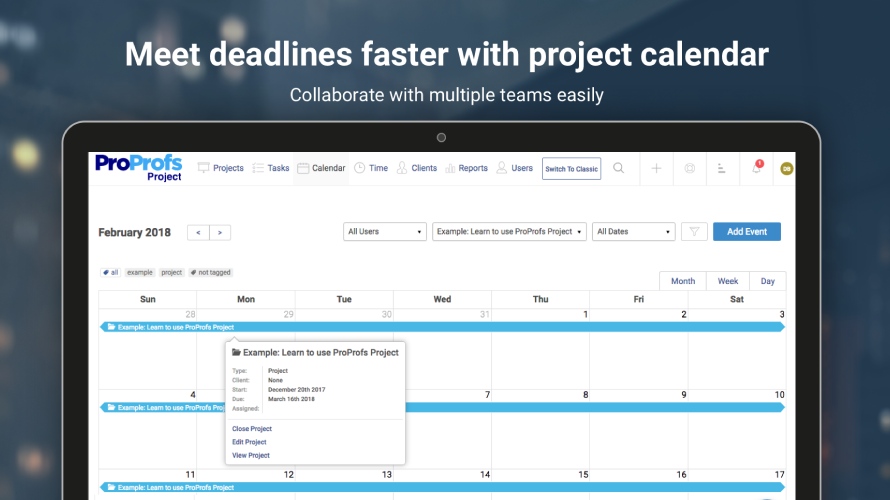   |