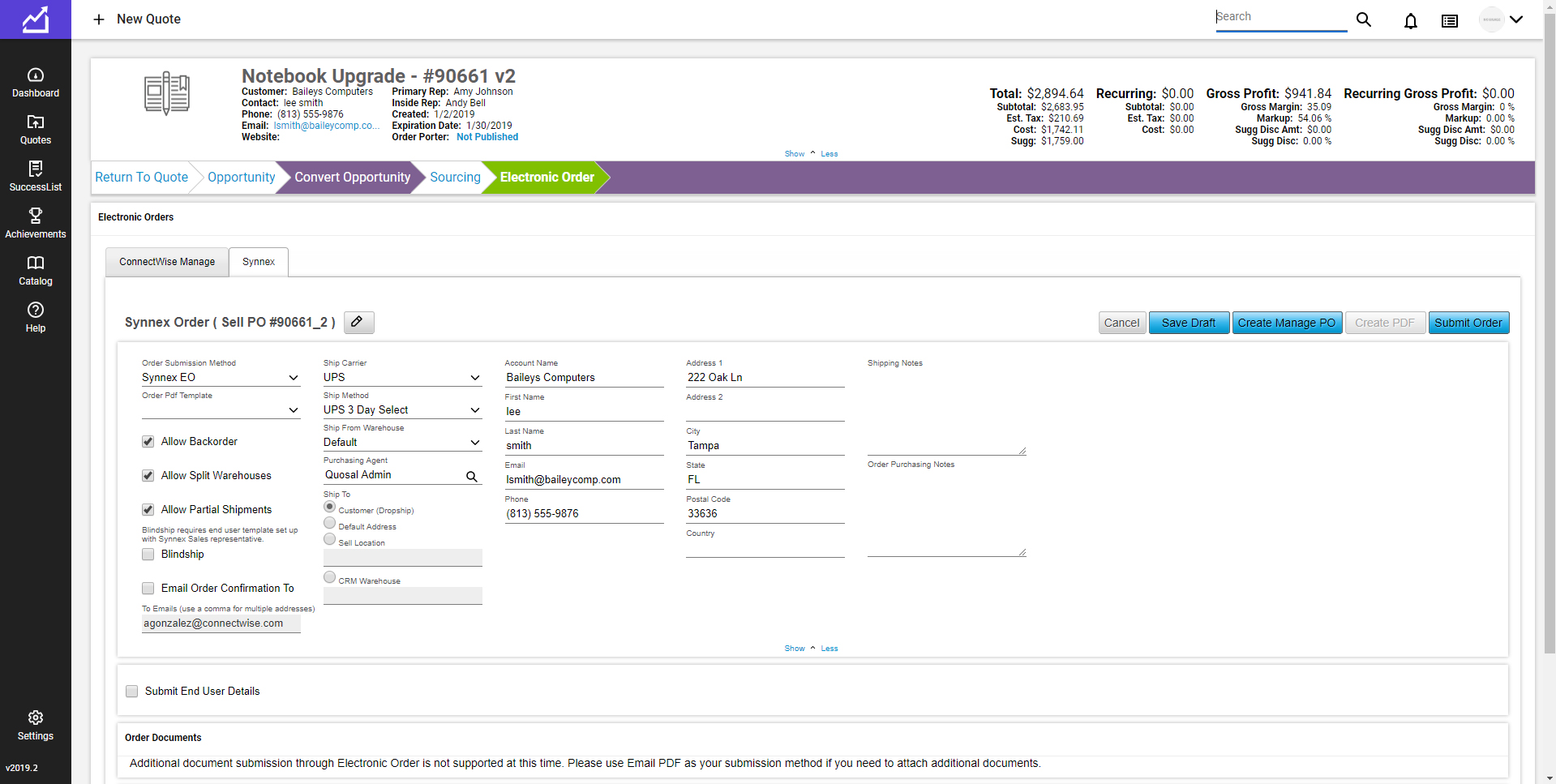
ConnectWise CPQ (formerly ConnectWise Sell, and Quosal) is the quote and proposal
solution of the ConnectWise Suite. With
ConnectWise Sell, users can create professional technology quotes and proposals
that include rich product information, cover letters, and statements of work in
minutes and automatically update their sales pipelines accordingly.
The vendor says key benefits include:
Save time creating IT quotes
and proposals through automation
…
N/A
Nintex
Score7.9 out of 10
N/A
Nintex offers a platform that helps companies discover, automate, and optimize business processes.
The most powerful features are the fact that you can see when your clients have viewed your quote, and that it can pull in real-time information about the products you are selling. It is all online-based, so you can use it from anywhere which is a big advantage over other quoting tools that I have used. We don't use the procurement capabilities, but for quoting pricing and customer visibility it works fantastically.
A de minimis incentive was given to thank the reviewer for their time. The incentive was not used to bias or drive a particular response, nor was the incentive contingent on a positive endorsement. More Info
We use Nintex to automate fundraising outreach at scale. It helps us send personalized emails to a large contact list, and we’d also like to automate follow-ups when there’s no reply. If you need highly customized solutions or clean, fully controllable code, I wouldn’t recommend Nintex. It has many features, but it’s not the same as building your own system from scratch. That said, it can save a lot of time for standard automation workflows.
A de minimis incentive was given to thank the reviewer for their time. The incentive was not used to bias or drive a particular response, nor was the incentive contingent on a positive endorsement. More Info
ConnectWise Sell does an excellent job of neatly presenting quotes and proposals to the end user. There are multiple different options for the look and function of the quotes. There are also options for custom quote templates that are designed directly for your organization.
ConnectWise Sell does a reasonably good job of connecting to and working with Autotask. It took our organization about 6 months to figure out the correct way to flow from quote to invoice with our systems. Sell will easily pull in your customer information from Autotask into a quote and allow you to send the quote direct from your email.
A de minimis incentive was given to thank the reviewer for their time. The incentive was not used to bias or drive a particular response, nor was the incentive contingent on a positive endorsement. More Info
Integrations with other services using various secure authentication methods, along with the seamless integration with SharePoint, are the icing on the cake. This makes it superior to other BPM tools available in the market.
Flexibility in application development - The diverse configurable properties offer multiple ways to utilise the controls and events, affording the flexibility to expand your scope and enabling the creation and use of processes in a myriad of ways.
The streamlined and efficient deployment process significantly accelerates release management, allowing for faster and smoother implementation of updates and new features.
The user interface of the pages offers a more refined and appealing look and feel compared to most other BPM tools.
A de minimis incentive was given to thank the reviewer for their time. The incentive was not used to bias or drive a particular response, nor was the incentive contingent on a positive endorsement. More Info
I'd like to see ConnectWise Sell develop a more user-friendly environment for advanced form and template design that doesn't require developer skills or consulting engagements. in order for us to develop these forms makes us reliant on consultants. These engagements are worth the cost, but sometimes we just don't have time to wait for them to be delivered.
I'd like to see ConnectWise Sell automatically generate a quote for items such as warranties or services that are expiring in ConnectWise Manage. This would save us a tremendous amount of time preparing quotes.
I'd like to see a new version automatically created when changes are made to a quote with the ability to reverse or revert back to a particular version. Sometimes people make mistakes and delete or change something they shouldn't have. Or customers want a change to version 1 only to change their minds when you send them the updated one, and want to go back to the original one.
A de minimis incentive was given to thank the reviewer for their time. The incentive was not used to bias or drive a particular response, nor was the incentive contingent on a positive endorsement. More Info
If you are creating a process with parallel subprocesses, there's no way to see, in a single view in Nintex, all the steps for the subprocesses. You have to view each sub-process in its own view, so it's hard to see what's going on at a high level.
There isn't an easy way to filter the processes by another user (not yourself) in Nintex. There is a report that shows processes and objects by user, but that's not as convenient. This is something that I've seen in other tools (OpenPages by IBM) so I am surprised that it is missing.
Nintex doesn't really have a way to capture iterative processes (which we have a lot of). It's designed for linear processes.
A de minimis incentive was given to thank the reviewer for their time. The incentive was not used to bias or drive a particular response, nor was the incentive contingent on a positive endorsement. TR verified that a representative sample of customers was invited. More Info
We are in our 4th year with Quosal and fully expect to renew again and again. With their development of additional features such as the Order Porter, Visual Quoting and others, we see the adoption rates continuing to rise while making our time to quoted shorter and shorter. Quosal and ConnecWise's vision of automated quoting is an exciting frontier that we are very happy to be a part of
We are currently investigating which collaboration platform best suits our needs. Chances are that we move to SharePoint Online and then we're going to also consider the microsoft power platform (power automate and power apps) to develop forms and workflows. Aspecially the pricing model for the cloud is currently a blocking factor to go for the Nintex solution in the Cloud.
A de minimis incentive was given to thank the reviewer for their time. The incentive was not used to bias or drive a particular response, nor was the incentive contingent on a positive endorsement. TR verified that a representative sample of customers was invited. More Info
Quosal is a very solid product with a LOT of functionality. Quosal has two main products that they offer, 'Quosal Sell' and 'Quosal Create.' If you are looking for an "out-of-the-box" or "ready to use" quoting software, I would recommend Quosal Sell. If you are interested exploring advanced functionality and integration or have a resource on staff willing to assume an "admin" role, I would highly recommend Quosal Create.
Based on the on-prem experience with this tool, I believe that they have a lot of potential to help the online version catch up to where the on-prem left off. Nintex developed their online version and it is not as fully formed or capable compared to the on-prem version, and the licensing model scales back what we would have liked to be an expansion or at least continuous improvement of existing flows. It is also not near as user friendly specifically to non-developers and has an uncanny similarity to Microsoft Flow in the online instance. Consistent with my reviews of the tool - I believe they have some good approaches to design thinking that, if translated well from on-prem to online, could make this a clear winner again.
A de minimis incentive was given to thank the reviewer for their time. The incentive was not used to bias or drive a particular response, nor was the incentive contingent on a positive endorsement. TR verified that a representative sample of customers was invited. More Info
The Nintex Process Platform has never crashed or had any availability issues during my usage. However there was an issue that was of my own making that caused a slowdown of the system. I had set up a process to run once a day and check for employees on a list that had certain parameters selected, and for some reason that I had to troubleshoot, the process instead ran constantly, which filled the cache quickly. I ended up having to dismantle that process so the system didn't crash.
A de minimis incentive was given to thank the reviewer for their time. The incentive was not used to bias or drive a particular response, nor was the incentive contingent on a positive endorsement. TR verified that a representative sample of customers was invited. More Info
A de minimis incentive was given to thank the reviewer for their time. The incentive was not used to bias or drive a particular response, nor was the incentive contingent on a positive endorsement. More Info
Unlike any other process automation product out there. Not only is it a low-code, easy to use tool for building processes in environments like SharePoint or Salesforce, they have really started to expand their tool-set by offering tools to manage other things like process mapping, RPA, mobile,etc.
A de minimis incentive was given to thank the reviewer for their time. The incentive was not used to bias or drive a particular response, nor was the incentive contingent on a positive endorsement. TR verified that a representative sample of customers was invited. More Info
Have to wait till 11pm EST time to get someone knowledgeable. That sucks truly. Almost half my day is gone. They need to provide premium support, where I can contact a "real" Quosal rep, anytime of the day or night 24/7
A de minimis incentive was given to thank the reviewer for their time. The incentive was not used to bias or drive a particular response, nor was the incentive contingent on a positive endorsement. More Info
The support team works as fast as they can and they are usually fast to solver the issues. Sometimes they need more time to solve one of them because our workflows and so on are more complex than usual clients.
A de minimis incentive was given to thank the reviewer for their time. The incentive was not used to bias or drive a particular response, nor was the incentive contingent on a positive endorsement. TR verified that a representative sample of customers was invited. More Info
A de minimis incentive was given to thank the reviewer for their time. The incentive was not used to bias or drive a particular response, nor was the incentive contingent on a positive endorsement. TR verified that a representative sample of customers was invited. More Info
I used the Nintex training software, it was easy to watch and follow along. It didn't go too fast and was descriptive enough to understand what the steps needed were in order to produce efficient workflows and user friendly forms.
A de minimis incentive was given to thank the reviewer for their time. The incentive was not used to bias or drive a particular response, nor was the incentive contingent on a positive endorsement. TR verified that a representative sample of customers was invited. More Info
Great implementation, the Quosal team has a smart and well planned process to guide your team through the process. More importantly, they understand the challenges with change and user adoption.
A de minimis incentive was given to thank the reviewer for their time. The incentive was not used to bias or drive a particular response, nor was the incentive contingent on a positive endorsement. More Info
1.Start with Simple Workflows: Begin with basic workflows to gain user confidence before tackling complex processes. 2.Involve Stakeholders Early: Engage business users and IT early to align workflows with real business needs. 3.Comprehensive Training: Invest in user training to ensure smooth adoption and reduce resistance. 4.Leverage Prebuilt Templates: Use Nintex’s templates to speed up implementation and maintain consistency. 5.Iterate and Optimize: Continuously improve workflows based on user feedback and performance metrics.
A de minimis incentive was given to thank the reviewer for their time. The incentive was not used to bias or drive a particular response, nor was the incentive contingent on a positive endorsement. TR verified that a representative sample of customers was invited. More Info
When it comes to the quoting layout Sell gives you so many more customization options. The item inventory is also easier to maintain. Sell is by far the best selling module that I have used thus far and it has helped keep us more organized.
A de minimis incentive was given to thank the reviewer for their time. The incentive was not used to bias or drive a particular response, nor was the incentive contingent on a positive endorsement. More Info
Microsoft environment does not have the scalability of Nintex; it is perfect for small and medium-sized companies, especially in environments where Microsoft environment is almost entirely used. Although Microsoft offers options to connect to other applications, its platform lacks the development and robustness that Nintex provides. Nintex not only covers Microsoft environments but also Google and other important platforms.
A de minimis incentive was given to thank the reviewer for their time. The incentive was not used to bias or drive a particular response, nor was the incentive contingent on a positive endorsement. More Info
Connectwise Sell is listening and building their software to fit the needs of their customers. Sell is consistently looking to us for feedback and making sure their product is working for us as partners/customers. We feel we are generally behind on getting to know their updates and software upgrades. They are a great vendor and wonderful corporation.
A de minimis incentive was given to thank the reviewer for their time. The incentive was not used to bias or drive a particular response, nor was the incentive contingent on a positive endorsement. More Info
The scalability is really bottlenecked by the imagination of the user. I was able to make processes for my own personal usage, making my daily tasks easier. I was also able to make processes that affected hundreds of employees, making large standardization and efficiency gains. So either way, the system is used the same way, and I was the limiting factor.
A de minimis incentive was given to thank the reviewer for their time. The incentive was not used to bias or drive a particular response, nor was the incentive contingent on a positive endorsement. TR verified that a representative sample of customers was invited. More Info
Customer satisfaction improvement. It's an impressive and professional way to present information that our customers appreciate. They not only have a clear way of knowing exactly what is being proposed, but now have another method they can use to easily track and organize approved/ not-approved quotes.
Improved brand consistency. We have a reputable, trusted image that projects across our client portfolio (not to mention within our community) and this system helps to promote and maintain our transparency and professional image.
Following up and referencing past quotes is made easy and quickly, which has benefited us from a time-cost savings perspective.
A de minimis incentive was given to thank the reviewer for their time. The incentive was not used to bias or drive a particular response, nor was the incentive contingent on a positive endorsement. More Info
People have woken up to the amount of overlap after mapping their processes.
People can be resistant to process changes. You need to have the support from above or support from the 'business' that you are process changing to be able to see the positive impacts.
Numbers talk. if you can get a general salary figure from your HR dept to show savings for 'employee bands', then when you present reports, they will be all the richer in data.
A de minimis incentive was given to thank the reviewer for their time. The incentive was not used to bias or drive a particular response, nor was the incentive contingent on a positive endorsement. TR verified that a representative sample of customers was invited. More Info