Cvent Surveys (formerly Inquisium) is an online survey tool. Cvent's main offering is an event management platform. Cvent Surveys covers several survey use cases, including sample surveys, customer satisfaction & feedback, employee satisfaction & feedback, event feedback, and training & development. Features of the software include survey creation, survey templates, question types, and survey reporting. If you're looking for great online survey software or a feedback management platform, you've…
N/A
Google Forms
Score 8.5 out of 10
N/A
Google Forms is an app for creating forms and surveys, and is part of Google Apps for Work. The product focuses on ease of use; the interface is similar to a document editor, with drop down lists of options and drag and drop question re-ordering. Users can embed images and video into surveys. Users can also program the question flow with custom logic. Google sends users basic summaries of the survey results automatically, or users can export the raw survey results data and analyze it via…
N/A
Medallia
Score 8.9 out of 10
N/A
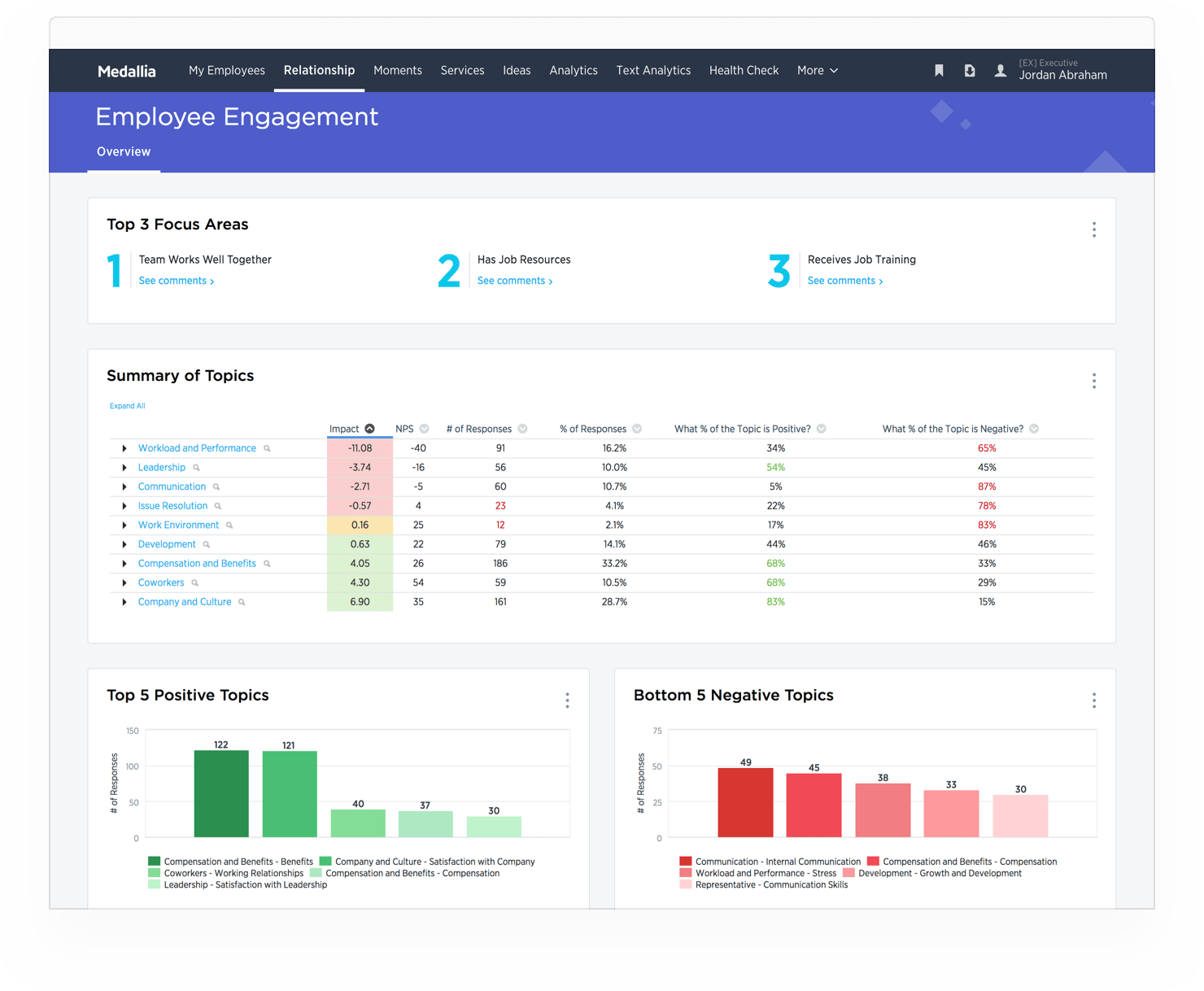
Medallia is an enterprise customer feedback solution that allows companies to collect customer feedback across multiple channels and touchpoints, and analyze, understand and react to it in real time.
I think Cvent surveys feel more secure. It is also a program that we are likely using for the event or meeting already, so it's nice to just use the same program for both things. Cvent surveys are an additional expense which isn't always ideal and can be a hard sell in …
Cvent survey does exactly what we need it to. There is no reason to look at other products. That effort can be used elsewhere. Information that is kept within the same program makes it easier to compare data across the board and certain functions will not have to be repeated …
Inquisium suits our business needs. Live Cvent is easy to use and the customer support is top notch. I've used the other products but Cvent was easy to train our entire team to use because we already used Cvent. While it may not be the most robust tool in terms of style it does …
Other survey technologies are not accepted by many of our clients. Cvent is accepted and has allowed us to reach a greater audience within our client base giving us opportunities to improve customer satisfaction where in the past this was missed. Our legacy survey tool is …
Compared to SurveyMonkey, Cvent is a far more robust tool. There are many more options for survey logic, the email platform is superior, and even the templates are more plentiful and professional. When comparing to Qualtrics (and keep in mind, I have only used Qualtrics a …
Google Forms
Verified User
Anonymous
Chose Google Forms
Google Forms excels at offering a simple way to collect data; however, it lacks robust features like logic questions, email communications (beyond an email confirmation), or dynamic functionality like the ability for respondents to edit responses. For some use cases, the …
Google Forms is my favorite platform. If I'm not in charge of a project, I've been asked to use other services, but none of them are as good as Google Forms. I appreciate the integration with other Google apps as well.
Google Forms is the low cost, easy to use option. In reality, this positions Google Forms as truly a unique product. The only instance where Google Forms doesn’t apply is when you need to source respondents or need to conduct live interviews. But, Google Forms is the best for …
Google Forms is much easier to use than other form/survey platforms like Qualtrics or SurveyMonkey. While the others have much more advanced features, Google Forms can handle about 90% of the forms/surveys that I create.
Even though Google Forms doesn't offer much customization, its survey logic options are more comprehensive than HubSpot's, so we chose Google Forms even though we already had HubSpot messaging integrated into our customer communication workflows. It also helped that all …
I am consistent with what i have mentioned earlier, Google Forms offers flexibility and simplicity on its features, and it is easy to apply in many ways we needed it to be. if Google Forms could serve us this, using different tools for each process that eventually could covered …
SurveyMonkey works well for serious surveys, but it would be too difficult and expensive to use it for every small event. QuestionPro Live Polls is also good, but it is primarily used during specific events, such as Zoom webinars, to collect questions from participants. Google …
They are pretty similar, but Google Forms is better from a cost perspective. They are both simple to use and are great options for creating + sending out surveys.
I haven't used that many other form applications before unless they were standalone applications like Microsoft Word. I used this program, and it was ok, but it requires a paid subscription, and someone renews it yearly. This can be too complicated for some users, such as older …
Cognito forms are really great because of the high degree of customisation that can be done. You can seriously build some amazing workflows using them which we do use for more intricate projects
I think that the Google version of forms is easier to use for both those making the forms and those filling them in than it's Microsoft equivalent. Google's products are more widely used and understood by the public, and they function at a higher level.
JotForm is good too and gives theming & CSS priority. However, I don't think the theme is important in forms, we chose Google Forms because we needed simplicity.
For strictly forms with data driven insights Google forms is the most efficient and hands down easiest choice to go with. It offers a ton of vast and robust features that helps with integrations and many more.
Google Forms is easy to use and affordable. The biggest benefit, however, is that our organization already uses other Google products heavily. Because of this Google Forms was our top choice. Some smaller departments in our organization still use other solutions, such as …
Google Forms is a much more basic tool for collecting feedback. It's better for small events or very basic responses. Survey Monkey is better for getting in-depth insights into data, including insights trends and a better presentation of the data in exportable graphs. But …
I selected Google Forms because of its efficient and quick customer service. I had used other platforms earlier and had trouble connecting with their team for issues.
Google Forms is great because it is free and easy to use. Formative has great features because it is able to give live feedback of responses and it has multiple question types but it is also expensive to subscribe to. Google Forms is very powerful because, in addition to the …
I have been using Google Forms since it started in 2008. I have never explored other alternatives for creating surveys. I like the intuitive design and the visual output of data in charts and graphs. It's easy to share the survey with others. Google Forms embed seamlessly in …
We are also using Salesforce.com for our customers/clients' records, usage, cases, and such. Like Medallia, we are using Salesforce.com to understand the different account usage based on the services we provide. With the data provided by Salesforce.com, we would understand …
Medallia does not only gives us convenience. It also gives us an opportunity to solve real-time feedback and create real-time solutions. The platform is easy to use, with a dashboard that could help our agents check their progress on a daily basis. I am particularly impressed …
Medallia is one of our many tools for our agents and managers. It stands out because, in this tool, we get to hear our customers and build stronger relationships with them. We are able to see reports to keep track of those tasks assigned to agents and see how well they are …
Medallia is a true enterprise solution. Our account management team truly partners with us. The user interface is simple and intuitive to use. Reporting and dashboards make it easy to find data quickly.
Other solutions are great in specific areas (customer support) but did not …
I used MaritzCX in a previous company, and find it to be a far superior product with an exceptional support team. I have evaluated the Qualtrics product for previous companies and my existing company, and it appears to be on par with other platforms.
I reviewed a number of platforms and Medallia was at the top for a B-to-B environment and had an easy way to integrate with Salesforce and have all that was needed right in Salesforce.
If you have a very large business with multiple outlets, Medallia is a reasonable choice to make because of the major scalability and the vast amounts of data you can collect. If you are a small, one-off, or independent business, it can be very costly and not all of the tools …
Our company needs surveys to give feedback to our speakers. Cvent Surveys allows attendees to give honest and accurate feedback on the spot after a session ends. It is easier to collect the data, send it to our marketing team, and have them send the feedback to each speaker so they know their strengths but also what needs to be worked on.
Any customer service industry would benefit from implementing Medallia. This is your one-stop-shop for everything surveying and data analytics. I have personally seen this successfully implemented in both software companies and retail. Medallia offers multiple integration options to create connected applications in your business. This is designed as an enterprise solution, smaller businesses may find it difficult to justify the cost.
Capture of information from clients and/or consultants for real-time analysis.
Knowledge evaluation for our work team, the predefined templates allow the creation of tests and knowledge tests that are very didactic and easy to grade.
The acquired data is cleanly integrated with google spreadsheets allowing for fast and accurate analysis.
The form completion notifications are customizable and do their job well.
I have had some occasional errors that have come up in the system that don't seem to have an obvious cause. These can be frustrating to overcome, but Cvent support has always been able to resolve these issues.
Cvent might be a little to rigid at times on the back-end. It could just be my lack of coding experience, but sometimes the html emails and survey templates can be difficult to make as aesthetically pleasing as I would like.
The opening screen for 'Known Surveys' often bothers me because you cannot add additional fields to the "first page" of the survey. This is only if you are not sending the email through Cvent, so it is not a major flaw.
Edit view limits the questions as seen by viewers. The view function is nice to toggle between to see what the question will look like, but the edit view of some questions (like checkboxes) is confusing for the editor.
It would be wonderful to be able to assign responses to go to specific users. The user needs to go into the responses section and select the option to receive notifications, versus the owner of the form being able to do that.
Having a dependency feature for questions (in addition to sections) would be very helpful, so that if a question is answered a certain way, another question appears.
Our service model does not provide any ownership over the platform. We have to engage our Medallia Project Team to build surveys, troubleshoot issues, make changes to surveys, reports, and dashboards, resulting in long turnaround times and inefficiency.
Medallia charges for both "units" and users. "Units" are defined as named individuals in surveys, but don't have log-in privileges. In our case, they are customer service agents or business consultants that engaged with the client but are not part of our closed-loop case management process or access to the platform.
Ease of itegration to other technologies for automation
Intuitive use of the technology
Performance (not encountering any network or downtime)
Upgrades and updates made frequently enhancing the tool itself
Exceptional support team that are quick to respond to any issues or questions
Security within Cvent allowing for user groups to be created segregating organizations providing for both protection and security of their data and content
Cvent notification process of company changes or improvements
Valuable metrics from both the administrative side as well as the survey side of the tool
Google Forms comes with the rest of the GSuite, so we don't need to renew our access to it specifically. It's nice to have it as an option if we need it, but it's really not professional enough for externally facing surveys at the company I work for now. However, nothing beats it for quick internal polls at a company that uses Google Workspace.
This program is so versatile to be able to do whatever is needed. There isn't a time that I have built a survey that hasn't done exactly what is needed. No matter how complicated the questions are, the data that is put out is easy for leadership to read and understand. That is what is needed. They shouldn't have to go through complex data and spend a lot of time trying to analyze it.
Overall ease of use for staff, volunteers, and adult learners, and easy to get reports and to share reports via Sheets. As a free tool, it does more than expected. Easy to change the look and brand it to your organization, or just make it more fun, depending on what you want to use it for.
Medallia's user interface is simple and intuitive for the end-user. Everyone in our organization from the CEO to store level team members use Medallia to see how we are delivering experiences for our customers. From an administrative side, I would rate Medallia closer to a 7.5, but this part of Medallia is not used as often post-implementation. That being said, you will need a technical/IT resource on staff or will need to pay a premium to a 3rd party to manage it for you.
In the years I've used GoogleForms I've never ran into any issues with the reliability or availability. Google is a gigantic company with essentially limitless resources which makes it very easy to trust that I will continue to be able to enjoy the same reliability I've come to know and expect from GoogleForms
One of the things that comes as a benefit of the lack to create complex logic branching and truly custom design is that there isn't lot of room to bog down the software. GoogleForms has always loaded just as fast as my internet service and device would allow it. I'm not sure about front end integrations or integrations into the form itself, as I've never explored it, but on the backend, I've never had any issues with integrations channeling from GoogleForms from the GoogleForms's end of things.
I have not needed to contact support before for this feature in Cvent. The support team for other features have been great though, so I will provide an answer for that. Cvent is on point with their customer care. They’re prompt and make sure the issue is fixed. They will also follow up with you to make sure everything is still working smoothly or if any additional help is needed
Google has a support team but it isn't the most helpful with Forms. I find most of my answers by searching online and watching tutorial videos. I would recommend utilizing online resources before contacting their live support team for help. Just make sure that they are recent videos or directions. Google is constantly updating their interfaces so it is easy for things to get out of date
Medallia is always there to answer questions and/or support our needs. In some cases it does require a PO if the request does not fall under normal support, but that does not change the fact that they are very responses and available to support your needs
Google Forms doesn't really require "implementation": simply log into GDrive and create a survey! You can configure settings per survey to, for example, automatically write responses to a GSheet.
Cvent survey does exactly what we need it to. There is no reason to look at other products. That effort can be used elsewhere. Information that is kept within the same program makes it easier to compare data across the board and certain functions will not have to be repeated from the foundation since most of the information will flow into other programs within Cvent and we won't have to type all the information over again. It saves time, which is not what a lot of people have.
Google Forms is easy to use and affordable. The biggest benefit, however, is that our organization already uses other Google products heavily. Because of this Google Forms was our top choice. Some smaller departments in our organization still use other solutions, such as SurveyMonkey, but as a whole it has been helpful to standardize on a single product.
We are also using Salesforce.com for our customers/clients' records, usage, cases, and such. Like Medallia, we are using Salesforce.com to understand the different account usage based on the services we provide. With the data provided by Salesforce.com, we would understand where we are lacking, which parts we are strong in, and which part of the service needs improvement. All in all, both products are very helpful and, [conveniently,] both are integrated into one another.
GoogleForms lacks the ability for complex logic branching and the ability to truly design it in a custom manner. It's pretty obvious when you land on a GoogleForm that it is in fact a GoogleForm. This rating solely reflects the lack of flexibility which in turn makes it something that wouldn't usually be scaled. That being said, if needing to scale a simple solution, GoogleForms would be up for the job.
Google Forms provides us a vehicle to gauge faculty and student response to our online courses and their features in real time so that we can keep our courses updated for students and faculty who facilitate them.
Since Google is free, provides storage space, and provides Shared Drives (at least in our institutional account), using Google Forms helps us manage our data. We support over 400 courses with thousands of sections so Google Forms helps us manage the data coming out of these courses, mostly student and faculty feedback about what is working and what is not.
We encourage our faculty to use Google Forms to survey their students for prior knowledge, for interest inventories, and the like. It's incredibly nimble and useful for collecting data quickly and presenting results in easy-to-understand charts and graphs.
It does play a big role when we are running a referral campaign. Referral greatly affects sales and retention since customers are bringing in new clients/customers.
It helps our organization keep track of the accounts that are most likely to churn by checking their feedback and knowing how we can improve our service.