Dropbox Business vs. Nifty

Overview
ProductRatingMost Used ByProduct SummaryStarting Price
Dropbox Business
Score 8.7 out of 10
N/A
Dropbox Business expands on the company's cloud storage service by providing additional features, such as lost file recovery for an extended period, integration with popular office suites (e.g. Office 365), the Dropbox Paper collaboration extension, two-factor authentication (2FA) and single sign-on (SSO), tiered administrator controls and granular permission sharing, remote device wipe, API, and other features of use to larger groups and businesses.
$15
per user/per month
Nifty
Score 8.4 out of 10
N/A
Nifty consolidates projects, work, and communications in one place. Nifty simplifies and automates the tracking of project milestones, communications with teammates and clients, collaborative document creation, and more in a centralized workspace! Nifty enables organizational oversight across projects and teammates with project & team workload overviews. With communications, project management, and workflow collaboration centralized in one place, teams can consolidate their workday as well…N/A
Pricing
Dropbox BusinessNifty
Editions & Modules
Standard
$15
per user/per month
Advanced
$25
per user/per month
Enterprise
Contact sales team
No answers on this topic
Offerings
Pricing Offerings
Dropbox BusinessNifty
Free Trial
YesYes
Free/Freemium Version
NoYes
Premium Consulting/Integration Services
NoNo
Entry-level Setup FeeNo setup fee$89 simple flat-rate pricing
Additional Details
More Pricing Information
Community Pulse
Dropbox BusinessNifty
Considered Both Products
Dropbox Business
Chose Dropbox Business
Dropbox Business is dependable, adaptable, and cost-effective for our businesses. On the inside, it’s comparable to other file-sharing and storage. Also, file access and navigation are much faster. We use it to share documents and store data and files for our business purposes. …
Chose Dropbox Business
We actually use both Redtail CRM and Dropbox Business currently. Dropbox is better than Redtail from the standpoint that it allows easier organization and access to files and documents. The main benefit of Redtail is that it allows a great way to organize client information, …
Chose Dropbox Business
Dropbox Business just works better across multiple platforms without taking up too many resources locally. I use iCloud for my personal stuff as well, but would never even think of using it across an entire organization. The access and navigation to documents is way easier in …
Chose Dropbox Business
We did not evaluate other tools. Dropbox has been used within my organization for quite some time.
Chose Dropbox Business
None of the above have all the functionality that Dropbox Business has.
Chose Dropbox Business
Dropbox Business holds up against the other big boys like Google Drive and Microsoft OneDrive. If you already use those platforms, it would probably make sense to use them. But many users already used Dropbox and were familiar with it. And if you don't already have a …
Chose Dropbox Business
Microsoft Teams works well but doesn't save files well and sometimes pieces go missing. [In] Dropbox Business, you can work simultaneously and files don't get corrupted. It is more user-friendly and makes working more efficient.
Chose Dropbox Business
Dropbox Business does a better job and document organization and sharing compared to Google Drive. Google Drive by default gives you a large list of files for which you create folders and navigating through those can be a hassle. Dropbox Business gives you a good folder …
Chose Dropbox Business
Dropbox Business is basically an industry standard for file storage at this point and most clients and team members will be familiar with it. Sharefile’s main advantage is its security. It provides more security options than Dropbox. The only downside that our team saw with …
Chose Dropbox Business
Dropbox Business is far superior for user experience, file requests, and general stability, but it's a hard sell to use extensively when OneDrive is included with Microsoft 365.
Chose Dropbox Business
Dropbox Business seemed to have many more features when we rated it against our scorecard and was head and shoulders above MyWorkDrive and eFileCabinet. Both competing products seemed more primitive or basic when compared to Dropbox Business. I realize that many features go …
Chose Dropbox Business
Sometimes using products outside the Microsoft ecosystem forces competition and helps to get improvements fast tracked which benefits everyone. Dropbox Business is designed from the ground up as opposed to yet another add on to a wider set of software applications. User …
Chose Dropbox Business
No other products to compare with. This has been the only product I've used so far.
Chose Dropbox Business
The services like OneDrive and Google Drive are pretty identical but, OneDrive for business is more cost-effective as it already is included in all of our user's Microsoft Office 365 subscriptions. They all similar functionality but at the end of the day if we can use a …
Chose Dropbox Business
We also use Microsoft OneDrive, but I prefer Dropbox Business. It’s more intuitive, and frankly, more people have it. We work with a lot of contractors, and almost all of them have Dropbox accounts. It makes it easier to use what everyone else is using. Also, I love the notes …
Chose Dropbox Business
Google drive is a lot cheaper and allows for more GB than Dropbox Business. Hightail also offers a fair amount of storage space and is about the same price as Dropbox. Google Drive offers 15gb and Dropbox only 2gb however there are ways to get more storage. Dropbox though could …
Chose Dropbox Business
We mainly selected Dropbox business for the limited deployments are due to the customers we have already using them. They are not our centralized system of choice.
Chose Dropbox Business
Dropbox Business offers very similar file sharing via the cloud features compared to Ms OneDrive & Box. One major advantage with Dropbox Business is the desktop app. With the app users can monitor both a business Dropbox account as well as their own personal Dropbox account. …
Chose Dropbox Business
The easiest to use and understand. No other platform is as easy to understand and use. Something like Apple iCloud manages files for you and I find that very irritating. Google edits you uses and file names and send notices if you use a word that could mean you copy files
Chose Dropbox Business
Dropbox saves file that can be modified. With procore and plangrid you have to download the document to modify and then send via email unless you have the permissions to add
Chose Dropbox Business
We initially used Intermedia's cloud service, SecuriSync for data rooms but our clients had trouble registering for SecuriSync in order to get file share approval. Dropbox has made this process much easier for our clients.
Chose Dropbox Business
when comparing Dropbox against google drive, it comes first the visualisation of the features, in which google has a clear advantage, as it has been developed with the simplicity and at the same time accessibility to all features in an easy way.
The organisation has chosen …
Chose Dropbox Business
They are very alike-- in the end we need to work locally more often than others, so for that reason we went with Dropbox business as our main internal group collab for files. Box's security is better, but Dropbox's sync and sync control is better.
Chose Dropbox Business
As mentioned before I prefer to use google drive when sharing items with others. Just because google chrome is centered on a lot of what I do so it is easier to just stick with what is there. However, Dropbox works great when my clients prefer that method of sharing documents …
Nifty
Chose Nifty
The one thing that makes this nifty stand out from its peers is its ability to support everything that one can think of while working/managing a project! It has got effective timeline management, charting capabilities, chat functionality, document storage, and the ability to …
Chose Nifty
We've tried several project management tools and most of them lacked the features we exactly needed. Jira was the last we tested and it was complicated to handle as projects grew bigger. Nifty is structured well and has major features that can handle big projects and does well …
Chose Nifty
There's no comparison. Nifty does what all of these do all in one place (with the exception of slack's community aspect with hashtagging - not sure if Nifty can do this, never tried)

Nifty even has the ability to import directly from many other platforms - I've personally …
Features
Dropbox BusinessNifty
File Sharing & Management
Comparison of File Sharing & Management features of Product A and Product B
Dropbox Business
9.0
Ratings
7% above category average
Nifty
-
Ratings
Versioning9.00 Ratings00 Ratings
Video files9.00 Ratings00 Ratings
Audio files9.10 Ratings00 Ratings
Document collaboration9.00 Ratings00 Ratings
Access control9.10 Ratings00 Ratings
File search8.90 Ratings00 Ratings
Device sync8.60 Ratings00 Ratings
Cloud Storage Security & Administration
Comparison of Cloud Storage Security & Administration features of Product A and Product B
Dropbox Business
9.0
Ratings
4% above category average
Nifty
-
Ratings
User and role management9.00 Ratings00 Ratings
File organization9.10 Ratings00 Ratings
Device management9.00 Ratings00 Ratings
Cloud Storage Platform
Comparison of Cloud Storage Platform features of Product A and Product B
Dropbox Business
9.1
Ratings
5% above category average
Nifty
-
Ratings
Performance9.10 Ratings00 Ratings
Reliability9.10 Ratings00 Ratings
Storage Reports9.10 Ratings00 Ratings
Project Management
Comparison of Project Management features of Product A and Product B
Dropbox Business
-
Ratings
Nifty
9.6
Ratings
22% above category average
Task Management00 Ratings8.80 Ratings
Resource Management00 Ratings9.40 Ratings
Gantt Charts00 Ratings10.00 Ratings
Scheduling00 Ratings10.00 Ratings
Workflow Automation00 Ratings9.40 Ratings
Team Collaboration00 Ratings10.00 Ratings
Support for Agile Methodology00 Ratings10.00 Ratings
Support for Waterfall Methodology00 Ratings10.00 Ratings
Document Management00 Ratings9.40 Ratings
Email integration00 Ratings10.00 Ratings
Mobile Access00 Ratings10.00 Ratings
Timesheet Tracking00 Ratings8.50 Ratings
Change request and Case Management00 Ratings9.00 Ratings
Budget and Expense Management00 Ratings10.00 Ratings
Professional Services Automation
Comparison of Professional Services Automation features of Product A and Product B
Dropbox Business
-
Ratings
Nifty
9.3
Ratings
19% above category average
Quotes/estimates00 Ratings8.60 Ratings
Project & financial reporting00 Ratings10.00 Ratings
Best Alternatives
Dropbox BusinessNifty
Small Businesses
SugarSync
SugarSync
Score 3.8 out of 10
Stackby
Stackby
Score 8.9 out of 10
Medium-sized Companies
Druva Security Cloud
Score 9.4 out of 10
InEight
InEight
Score 8.2 out of 10
Enterprises
Druva Security Cloud
Score 9.4 out of 10
InEight
InEight
Score 8.2 out of 10
All AlternativesView all alternativesView all alternatives
User Ratings
Dropbox BusinessNifty
Likelihood to Recommend
8.6
(0 ratings)
9.0
(0 ratings)
Likelihood to Renew
5.0
(0 ratings)
-
(0 ratings)
Usability
9.0
(0 ratings)
-
(0 ratings)
Availability
8.0
(0 ratings)
-
(0 ratings)
Performance
8.0
(0 ratings)
-
(0 ratings)
Support Rating
8.4
(0 ratings)
-
(0 ratings)
Implementation Rating
9.0
(0 ratings)
-
(0 ratings)
Configurability
9.0
(0 ratings)
-
(0 ratings)
Ease of integration
8.0
(0 ratings)
-
(0 ratings)
Product Scalability
9.0
(0 ratings)
-
(0 ratings)
Vendor post-sale
8.0
(0 ratings)
-
(0 ratings)
Vendor pre-sale
5.0
(0 ratings)
-
(0 ratings)
User Testimonials
Dropbox BusinessNifty
Likelihood to Recommend
Everywhere as aforementioned it is well suited ... The largest and most appropriate... A business can never ever have too many locations of its data stored. This option allows my company to have our data stored in one location and everyone works it in real time whereas the updates go in "Real time" no matter who is working that file. This is the most awesome trick of the entire program not to mention that I can see everything that Bobbiesue is working on out west at the same time pull another activity report to see if indeed Peggy logged in for work from home at 2p yesterday as she stated she did. Its a check and balance for small businesses such as ours that runs on the honor system for telework employees. At this time, there just is not any less appropriate!
Read full review
Nifty speeds up project lifecycles, aligns teams to work together to avoid missing deadlines and automates the process of reporting. Individual team members use Nifty to set their own project goals so that they can complete tasks on time. This app brings feedback together and offers teams dynamic collaboration to help them focus on the completion of the project.
Read full review
Pros
  • It enables us to share documents and workflow to all employees for whom access is allowed regardless of where in the world they may be located.
  • Dropbox Business provides a means to safely store our documents without having to have physical copies.
  • Dropbox also allows for easy organization of our documents in folders and such in the system.
Read full review
  • Versatility
  • Project Management
  • Neurodiverse - Allowing user to choose view of their choice (kanban, swimlane, list, calendar)
  • Ability to break down projects and tasks with multiple variables
  • Task Management
  • Integrations
  • Consistently adding new features / improving software
Read full review
Cons
  • I deeply dislike the navigation. I find it very clunky and hard and not intuitive. A few years ago Dropbox redesigned its navigation and I'm frequently at a loss to figure out where to access the option I need.
  • It should be quicker and easier to figure out how to send a file. I wish I could do that from the drop-down menu in my taskbar under the Dropbox logo.
  • I wish I had the option under the same drop-down menu in my taskbar under the Dropbox logo to go to where the files are on my laptop, which I find much easier to navigate.
Read full review
  • It is not possible to edit time logs because there are no comment sections in time logs.
  • I just want to see more templates added.
Read full review
Likelihood to Renew
First, because it's very price reasonable and second because it fulfills the promise it makes. It is simple to use, the learning curve is not that steep and it's easier for the new hires to understand and start using the tool as soon as they are on-boarded. It doesn't just save time but also effort
Read full review
No answers on this topic
Usability
Well-designed, smart, packed with functionality without being overwhelming—Dropbox knows what they are doing and they do it well. They know what users want from the service and they make sure that all the normal use cases are intuitive and at your fingertips. I have never had a hard time finding things with Dropbox and I think their usability is excellent.
Read full review
No answers on this topic
Reliability and Availability
At least once a week the app crashes on my computer and causes files to stop syncing. It is an easy fix to re-open the app, however I have to notice the app stopped working to realize it needs to be reopened.
Read full review
No answers on this topic
Performance
The Dropbox site and tools load in a reasonable amount of time. I don't feel like their site and app performance is any better or worse than any other paid product that I've seen offered by any other large company. Compared to a competing product like Google Drive, the performance is probably about the same.
Read full review
No answers on this topic
Support Rating
I give it a nine because I haven't ever had to use the support or help. I would give it a ten but since I've never had to use them, I can't really give a full review of how their support works. I've talked to market research teams from Dropbox about new features, but have not had to get any assistance with a problem yet.
Read full review
No answers on this topic
Implementation Rating
The implementation was actually very simple. Again, as stated previously, the most intriguing part of the entire exercise was the implementation of the directory structure for each account. Once you design and implement it for one, it becomes quite simple to replicate for each account you implement thereafter. You just really need to take time to ensure you implement the first perfectly and those that follow on will be likewise work efficiently and easily.
Read full review
No answers on this topic
Alternatives Considered
Dropbox Business is dependable, adaptable, and cost-effective for our businesses. On the inside, it’s comparable to other file-sharing and storage. Also, file access and navigation are much faster. We use it to share documents and store data and files for our business purposes. And I’ve never been convinced of other tools’ integrity or dependability. Dropbox Business has good connectivity and is smooth to use.
Read full review
There's no comparison. Nifty does what all of these do all in one place (with the exception of Slack's community aspect with hashtagging - not sure if Nifty can do this, never tried) Nifty even has the ability to import directly from many other platforms - I've personally imported projects from Trello and Asana, saving tons of time in migration.
Read full review
Scalability
We've used this when we were 2 users and when we were 20. It did not make any difference. Even when we've had to scale down and fire 10 employees, it was still easy to salvage all the material and keep it organized within Dropbox.
Read full review
No answers on this topic
Return on Investment
  • Improved risk mitigation - know our files are encrypted.
  • Expiring Shared Links are a must have.
  • Positive impact from Happy Customers. No more trying to send cumbersome encrypted emails that customers struggle with. Dropbox makes it easy for them to retrieve their files.
  • Collaboration makes it faster for us to complete plan documents with our customers.
Read full review
  • Improvised the overall project management, task tracking across business lines where we introduced Nifty replacing the previous PM platform
  • Increase efficiency of our team
  • Better integrated with our tech stack including email and meeting apps - easier to collaborate and have logs of everything at one place.
Read full review
ScreenShots

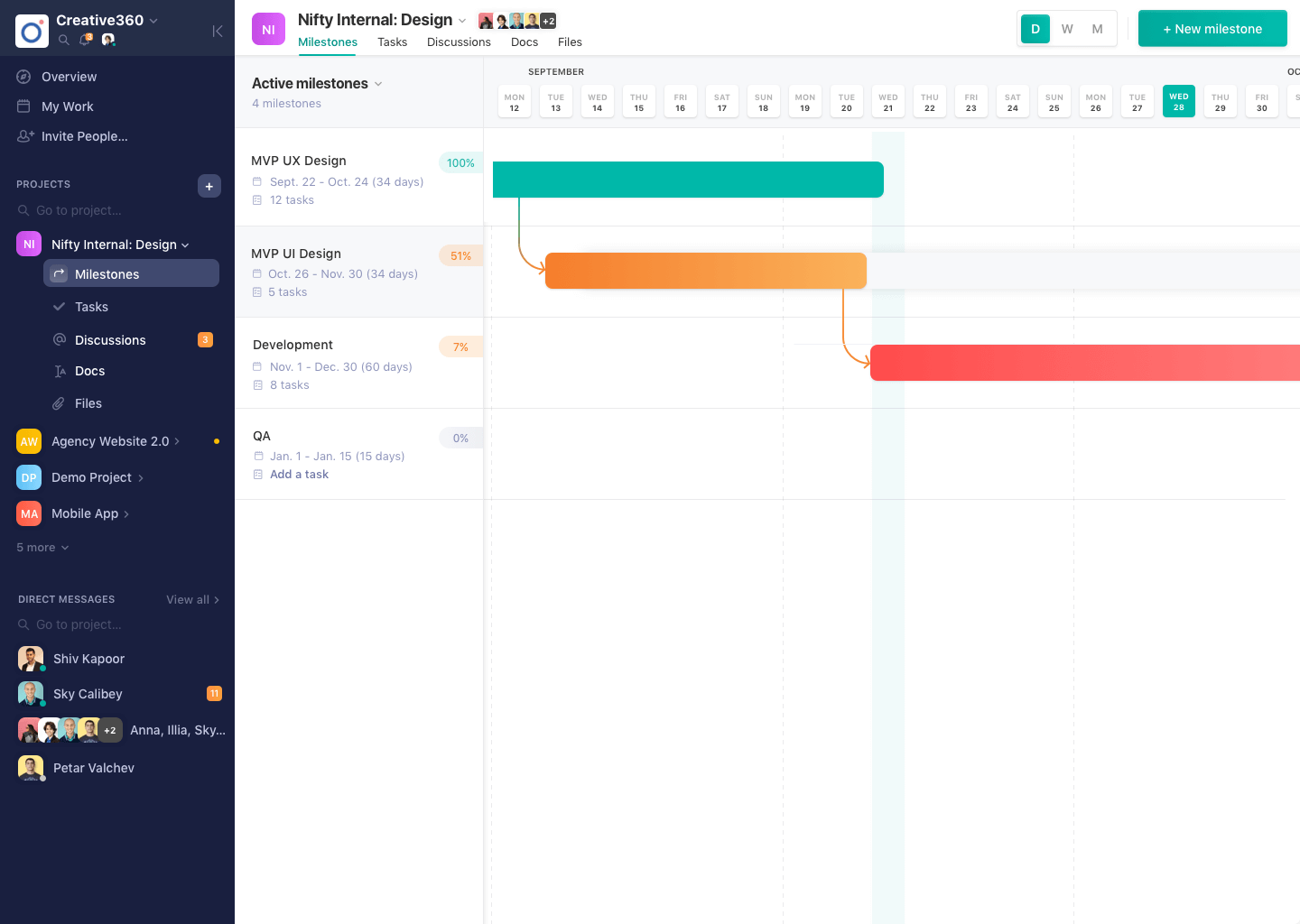
Nifty Screenshots

Screenshot of Project DiscussionsScreenshot of Project MilestonesScreenshot of Project Overview