FreshBooks vs. Microsoft Dynamics GP

Overview
ProductRatingMost Used ByProduct SummaryStarting Price
FreshBooks
Score 9.1 out of 10
Small Businesses (1-50 employees)
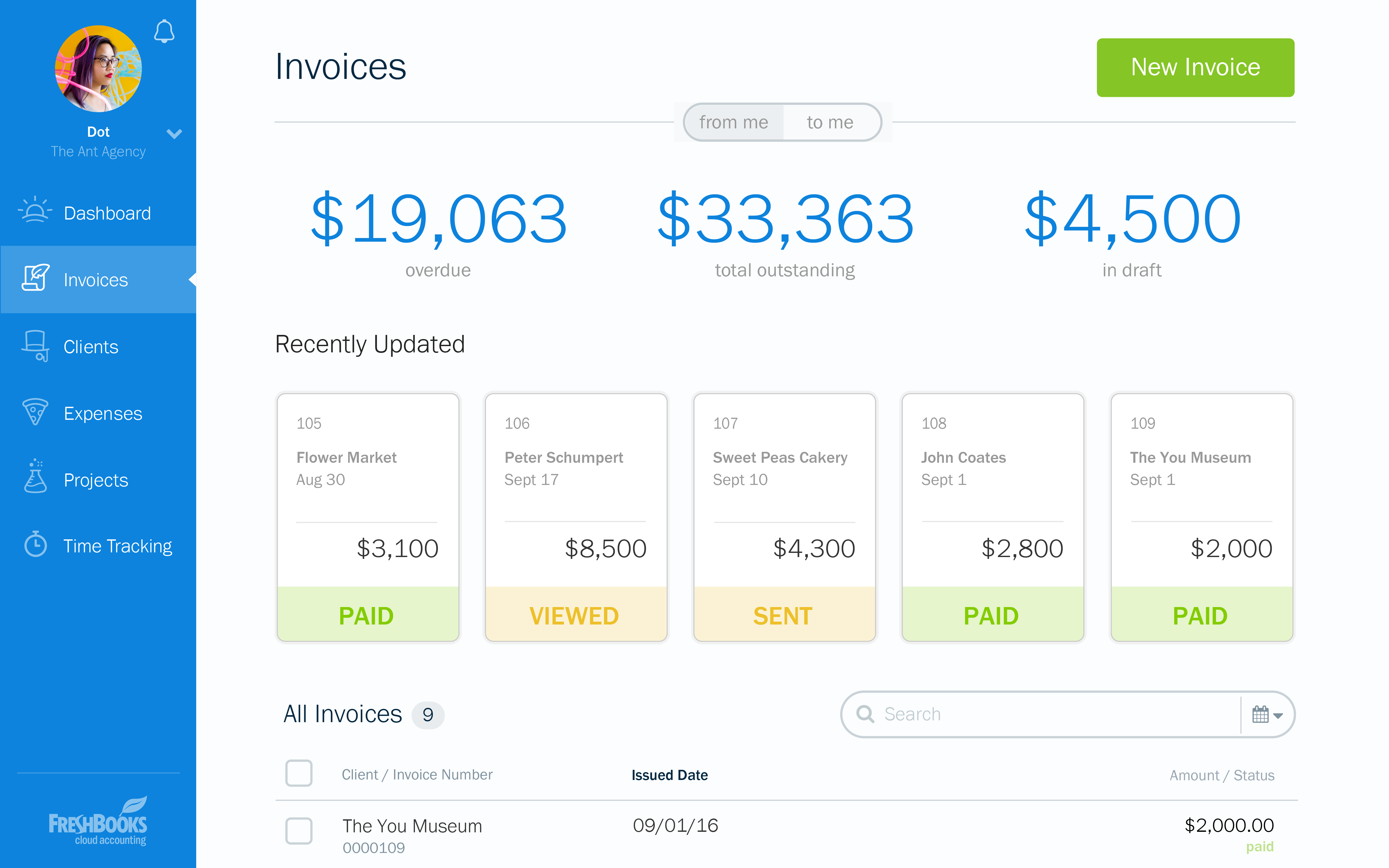
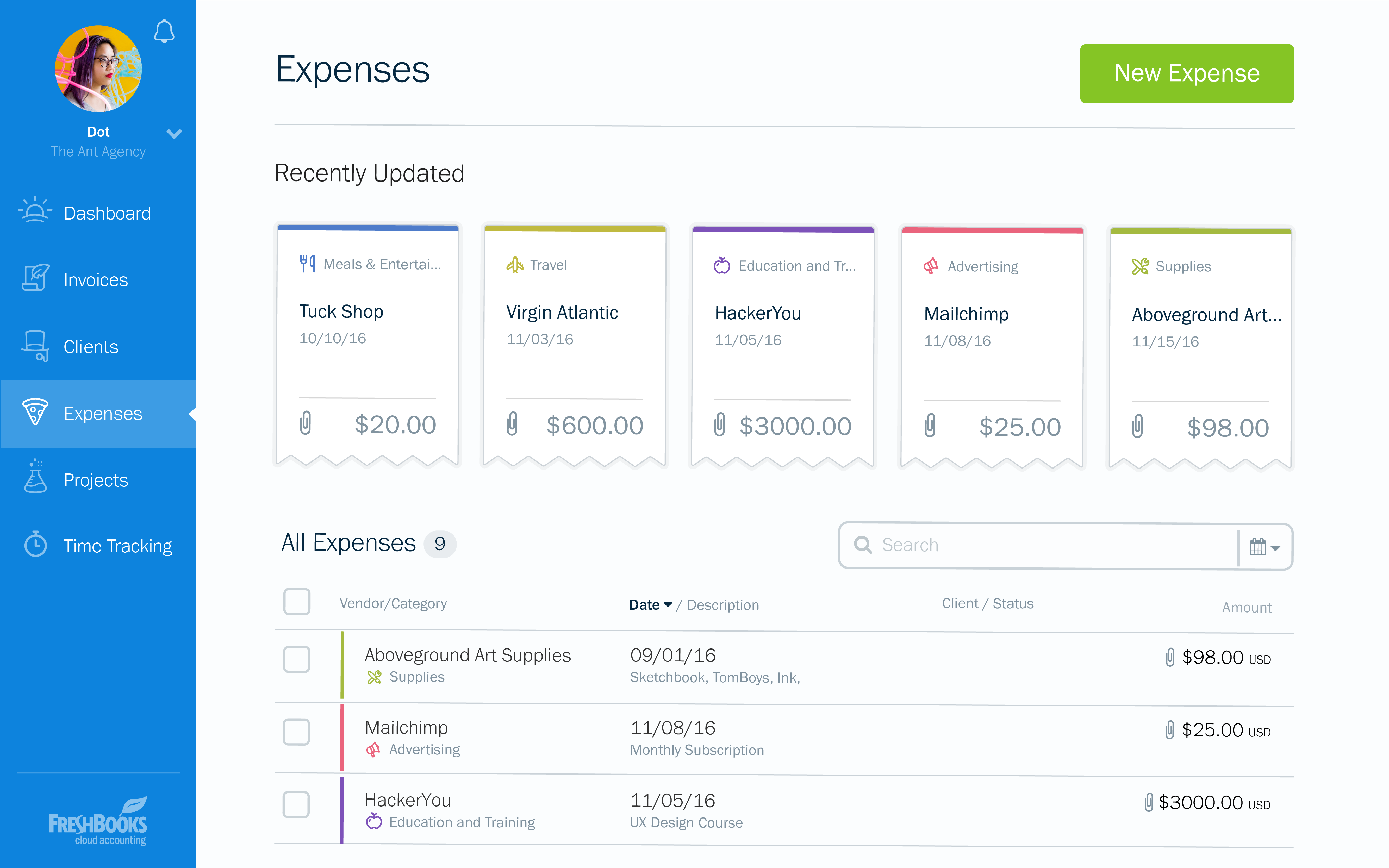
FreshBooks is an accounting service for small businesses. The solution enables users to send and manage invoices, track billable time and collect online payments. The vendor’s value proposition this that their solution provides a straightforward service that simplifies the billing process.
$21
per month
Microsoft Dynamics GP
Score 5.4 out of 10
N/A
Microsoft Dynamics GP is an ERP software with accounting capabilities. It includes various packs for customizability and features tailored to specific industries’ needs. GP is offered as a perpetual license or subscription.N/A
Pricing
FreshBooksMicrosoft Dynamics GP
Editions & Modules
Lite
$21
per month
Plus
$38
per month
Premium
$65
per month
Select
Custom Pricing
No answers on this topic
Offerings
Pricing Offerings
FreshBooksMicrosoft Dynamics GP
Free Trial
YesNo
Free/Freemium Version
YesNo
Premium Consulting/Integration Services
NoNo
Entry-level Setup FeeNo setup feeNo setup fee
Additional Details10% discount for annual pricing.
More Pricing Information
Community Pulse
FreshBooksMicrosoft Dynamics GP
Considered Both Products
FreshBooks
Chose FreshBooks
QuickBooks' interface is clunky, confusing, and slow. QuickBooks support is worse than if there were no support at all. FreshBooks' UI is clean, intuitive, and even when changes are rolled out, easy to quickly learn. Their support is second to none and never disappointed us.
Chose FreshBooks
FreshBooks does very well in comparison, especially since it is free software for Barclays bank users. Sage software is much worse than FreshBooks. However, Xero and QuickBooks, the market leaders, are still ahead with usability, additional features, reporting, and connection …
Chose FreshBooks
For its simplicity, if your business is just a basic process of billing repeat clients and recording expenses, anyone can use this software.
Chose FreshBooks
There is no fluff and feature overload with FreshBooks. I can get to what I need quickly and easily. I don't have to deal with unnecessary features and fields the system considers essential. The payment features are streamlined and have lots of flexibility when receiving …
Chose FreshBooks
FreshBooks interface is better than QuickBooks. Xero's interface is more basic than both, but seems to work fine.
Chose FreshBooks
In my experience, quickbooks customer service was terrible, and program was very complicated to use. We switched to FreshBooks to simplify day to day use.
Chose FreshBooks
FreshBooks people were friendly and helpful up-front. Because of the inability to receive payments correctly, I will be moving to Stripe.
Chose FreshBooks
FreshBooks is a relative novice compared to the giant Quickbooks application that has been around for years and it is established as the go-to app for account management and invoicing. I would say that in a few years, FreshBooks can become a threat to QuickBooks but it will …
Chose FreshBooks
We do not consider other options since our client wants the implementation of this platform in order to use it in the two countries where it has operations. At the moment, full integration was not possible and we still share the information with a Mexican system to complete …
Chose FreshBooks
I selected FreshBooks because it combined Toggl, Harvest and Quickbooks features into a single system. This simple move allowed for me to save money on the tools and in turn bring all client data into a single portal.

FreshBooks is easy to use and automatically generates the …
Chose FreshBooks
FreshBooks is easy to implement and the onboarding process is straightforward. It has great user interface to navigate and any user can easily start using it. It also offers customization of the modules/reports. Most importantly invoice tracking is a great module. It is offered …
Chose FreshBooks
Freshbooks was willing to work with us on all needs and compliance issues specific to our processes.
Chose FreshBooks
I looked at QuickBooks but they only had desktop products and I was interested in a hosted solution. Freshbooks has always been ahead of their competition in this area of mobile, on the go use cases where a modern platform can be used to stay up to date and accessible from …
Chose FreshBooks
We considered using Xero for our invoicing due to the more advanced accounting features but chose FreshBooks because it offered recurring payments. Xero did not offer this critical feature at the time of purchase. And since invoicing was our main priority, FreshBooks did a …
Chose FreshBooks
It was not my choice to select FreshBooks, but my client finds it easier to do billing with FreshBooks over QuickBooks.
Chose FreshBooks
Freshbooks offers its finances in a secure and easy manner. they are also simple yet they can efficiently manage expenses, invoices, reports, and time tracking.
Chose FreshBooks
FreshBooks is an invoicing software that wants to do accounting.
Xero is an accounting software that wants to do billing.
Both are pretty solid at their core functionality, and weak on the other. However, it's a shorter step for Xero to add interest and recurring CC billing, so …
Chose FreshBooks
Years ago we started using FreshBooks and then decided to look for a less expensive option. After trying multiple solutions, we went back to FreshBooks and haven't looked back since. That was over 10 years ago.

No service can compete with their functionality, pricing, and …
Chose FreshBooks
The software we selected is because the learning curve is very kind. Once we draw the way we manage our business, we understand we have to make some changes in order to adjust to the new software. This software allows us to reflect every aspect of the business, costs and …
Chose FreshBooks
I really liked Wave Apps for a bit. It had some limitations, but I really like how easy it was to use and intuitive. Great pricing too. So I would recommend that over Freshbooks at this point for someone who is just getting started. Quickbooks is great for accounting. Super …
Chose FreshBooks
Don't get me wrong — I like Xero for accounting purposes. But Xero's invoicing isn't great. There's too many features I depend on that FreshBooks has that Xero just does not. I need to be able to take deposits, send automatic reminders, and create an extremely user-friendly …
Chose FreshBooks
FreshBooks is hands down the best software for collecting invoices, payments, tracking time and managing expenses we have ever used. I am an avid user and fan and have been and will continue to be. They are keen on the updates, on listening to customers feedback and making …
Chose FreshBooks
You have to know why you want to establish an online solution. Understanding what you want to accomplish will probably lead you to FreshBooks as it has the cleanest, simplest design going and it accomplished its tasks without being a burden.
Chose FreshBooks
I love that I can truly give an estimate on the spot and afterward transform it into a receipt. I can begin working with my customer instantly. It is similarly wonderful that I can do it anywhere and it incorporates with Stripe, which collects numerous monetary forms so we can …
Microsoft Dynamics GP
Chose Microsoft Dynamics GP
Microsoft Dynamics GP is obviously superior to the other platforms I’ve used simply in its robustness and GAAP compliance features, but with far less usability and even in someways less usable reporting.
Chose Microsoft Dynamics GP
Business Central wasn't out then. Nav, the predecessor, was out, but its user interface was dated until 2009, when the role-tailored client came out; it was much better afterwards. If your company has manufacturing, then Business Central is the way to go. It's unfortunate that …
Chose Microsoft Dynamics GP
It is more powerful in features and ease of use as Microsoft GP provides an intuitive user interface leading to quicker adoption.
Chose Microsoft Dynamics GP
Xero is easier to use, closer to Quickbooks. Most of the background GL is automated, where as in GP it is not.
Chose Microsoft Dynamics GP
Due to the size of our company Microsoft Dynamics GP works better for us than Quickbooks because of the reporting capabilities. However, the NetSuite demo proved to be much more user-friendly with more reporting capabilities.
Chose Microsoft Dynamics GP
Because GP doesn't do CRM we have looked at D365 Customer Engagement for our field service, and F&O as a replacement. Vaporware, no direct upgrade path, and if you want to continue with GP for your back office and just use Field Service it's an insanely complex integration …
Chose Microsoft Dynamics GP
Quickbooks, SAP, and Netsuite. We are a small-sized business so Dynamics GP is better for our business.
Chose Microsoft Dynamics GP
There are more features and products overall in the Microsoft package at a better price point. Overall, Salesforce has a much sleeker and more user-friendly design.
Chose Microsoft Dynamics GP
We moved from Epicor Eagle N Series to Dynamics GP as an accounting solution for our new POS system. I believe Dynamics GP has more options to create and present financial statements for a large company with many regions and districts. However, because of the weakness of our …
Chose Microsoft Dynamics GP
They both accomplish the same thing, I think Oracle was what I first learned and thus making the change to Microsoft Dynamics GP just took a little bit of time to learn the technology. After you get the hang of it, it becomes much easier and I taught my coworkers how to use it.
Chose Microsoft Dynamics GP
I did not pick Dynamics over Salesforce, my company was using it and eventually switched over to Salesforce. I would say that Dynamics is user-friendly and the interface is quite easy to understand. I really like the reporting capabilities as well. Once again, the aesthetic …
Chose Microsoft Dynamics GP
GP is more robust than QuickBooks bar none.
Chose Microsoft Dynamics GP
At the time of purchase, Microsoft Dynamics GP seemed more appropriate and more in sync with the needs of our company. The software was more responsive, user-friendly and it allowed for more flexibility with the way it was intended to be used. We were also promised better …
Chose Microsoft Dynamics GP
My recollection of Quickbooks pro isn't great, and it was over 10 years ago. Obviously many things have changed in that time frame, so any comparison would likely not be relevant.
Chose Microsoft Dynamics GP
The only product with have shopped was Sage Intacct. It is somewhat unfair to compare the two solutions, because Sage Intacct is a cloud-based solution. That said, Intacct appears to advertise better reporting/business intelligence capabilities. MS Dynamics GP should be aware …
Chose Microsoft Dynamics GP
Microsoft Dynamics GP is one of the best ERP's for a medium or small business in the market today. When we were looking for the right software, it had already a connection developed with our 3rd party logistics system, so the decision was pretty easy since the logistic / supply …
Chose Microsoft Dynamics GP
Dynamics GP is much more flexible and enterprise-oriented than Quickbooks Pro or similar software. It can support many more users and scenarios. However it requires more dedicated infrastructure (such as servers and databases) and more dedicated IT resources to maintain and …
Chose Microsoft Dynamics GP
I love Dayforce for payroll. It has been configured to meet all our needs, is user-friendly and the customer support is fantastic. We originally moved from MDGP payroll to Ceridian Insync payroll due to the issues we had. We upgraded to Dayforce and are very happy with the …
Chose Microsoft Dynamics GP
Learning GP with so many resources from the GP community has been easy. Someone always has the answer or suggestions to point me in the right direction. I've had very few instances where the systems caused an error that required research in order to fix the glitch.
Chose Microsoft Dynamics GP
We looked at several general ledger software packages. We had excellent customer service and implementation guidance through a third party. Having a knowledgeable consultant is critical to a successful implementation.
Chose Microsoft Dynamics GP
Quickbooks Pro and GP are not on the same playing field. GP is a full account system adhering to GAAP, while QuickBooks is designed for the small business market. While starting out with QuickBooks is easy, if you plan to grow, you will soon outgrow it.
Chose Microsoft Dynamics GP
Microsoft Dynamics is a good, easy to use product for entities that do not have advanced manufacturing.
If I were to go into a distribution or service type business I would highly recommend it.
If I were to go into an advanced manufacturing environment I would not consider GP.
Chose Microsoft Dynamics GP
More user friendly in certain areas and much more cost effective to manage and support
Chose Microsoft Dynamics GP
TechSoup had great privcing, I had experince with GP in previous companys and there are a lot of staff accountants who have relevant experience.
Features
FreshBooksMicrosoft Dynamics GP
Customization
Comparison of Customization features of Product A and Product B
FreshBooks
9.1
Ratings
18% above category average
Microsoft Dynamics GP
4.3
Ratings
55% below category average
API for custom integration9.30 Ratings2.50 Ratings
Plug-ins9.00 Ratings6.00 Ratings
Security
Comparison of Security features of Product A and Product B
FreshBooks
10.0
Ratings
20% above category average
Microsoft Dynamics GP
6.9
Ratings
17% below category average
Single sign-on capability10.00 Ratings5.70 Ratings
Role-based user permissions10.00 Ratings8.20 Ratings
Reporting & Analytics
Comparison of Reporting & Analytics features of Product A and Product B
FreshBooks
7.5
Ratings
5% below category average
Microsoft Dynamics GP
5.4
Ratings
37% below category average
Dashboards9.00 Ratings3.40 Ratings
Standard reports8.80 Ratings6.20 Ratings
Custom reports4.80 Ratings6.40 Ratings
General Ledger and Configurable Accounting
Comparison of General Ledger and Configurable Accounting features of Product A and Product B
FreshBooks
7.5
Ratings
2% below category average
Microsoft Dynamics GP
5.0
Ratings
42% below category average
Accounts payable8.00 Ratings6.30 Ratings
Accounts receivable9.40 Ratings5.80 Ratings
Cash management7.00 Ratings6.30 Ratings
Bank reconciliation7.00 Ratings5.60 Ratings
Expense management6.60 Ratings4.40 Ratings
Time tracking7.60 Ratings8.00 Ratings
Multi-currency support7.00 Ratings2.80 Ratings
Regulations compliance6.00 Ratings3.20 Ratings
Self-service portal9.10 Ratings7.00 Ratings
Fixed asset management00 Ratings4.50 Ratings
Multi-division support00 Ratings3.00 Ratings
Electronic tax filing00 Ratings9.00 Ratings
Global Financial Support00 Ratings6.00 Ratings
Primary and Secondary Ledgers00 Ratings4.70 Ratings
Intercompany Accounting00 Ratings3.80 Ratings
Localizations00 Ratings4.50 Ratings
Journals and Reconciliations00 Ratings4.60 Ratings
Enterprise Accounting00 Ratings2.80 Ratings
Configurable Accounting00 Ratings3.80 Ratings
Centralized Rules Framework00 Ratings3.50 Ratings
Standardized Processes00 Ratings6.20 Ratings
Order Management
Comparison of Order Management features of Product A and Product B
FreshBooks
9.5
Ratings
24% above category average
Microsoft Dynamics GP
3.6
Ratings
70% below category average
Pricing8.80 Ratings3.60 Ratings
Order entry9.30 Ratings3.60 Ratings
Credit card processing9.70 Ratings1.00 Ratings
Cost of goods sold10.00 Ratings5.10 Ratings
Order Orchestration00 Ratings5.20 Ratings
End-to-end order visibility00 Ratings3.60 Ratings
Order exception Resolution00 Ratings3.40 Ratings
Payroll Management
Comparison of Payroll Management features of Product A and Product B
FreshBooks
-
Ratings
Microsoft Dynamics GP
6.4
Ratings
17% below category average
Pay calculation00 Ratings6.20 Ratings
Benefit plan administration00 Ratings5.90 Ratings
Direct deposit files00 Ratings7.50 Ratings
Salary revision and increment management00 Ratings6.50 Ratings
Reimbursement management00 Ratings6.00 Ratings
Inventory Management
Comparison of Inventory Management features of Product A and Product B
FreshBooks
-
Ratings
Microsoft Dynamics GP
4.4
Ratings
50% below category average
Inventory tracking00 Ratings5.90 Ratings
Automatic reordering00 Ratings1.00 Ratings
Location management00 Ratings4.00 Ratings
Manufacturing module00 Ratings4.10 Ratings
Best Alternatives
FreshBooksMicrosoft Dynamics GP
Small Businesses
QuickBooks Self-Employed (discontinued)
Score 5.2 out of 10
QuickBooks Self-Employed (discontinued)
Score 5.2 out of 10
Medium-sized Companies
Zoho Books
Zoho Books
Score 9.0 out of 10
Zoho Books
Zoho Books
Score 9.0 out of 10
Enterprises
SAP Cloud ERP
SAP Cloud ERP
Score 8.6 out of 10
SAP Cloud ERP
SAP Cloud ERP
Score 8.6 out of 10
All AlternativesView all alternativesView all alternatives
User Ratings
FreshBooksMicrosoft Dynamics GP
Likelihood to Recommend
8.0
(0 ratings)
4.1
(0 ratings)
Likelihood to Renew
7.6
(0 ratings)
9.9
(0 ratings)
Usability
9.6
(0 ratings)
5.4
(0 ratings)
Availability
10.0
(0 ratings)
10.0
(0 ratings)
Performance
8.0
(0 ratings)
7.0
(0 ratings)
Support Rating
6.0
(0 ratings)
7.0
(0 ratings)
Implementation Rating
10.0
(0 ratings)
8.2
(0 ratings)
Product Scalability
-
(0 ratings)
9.1
(0 ratings)
User Testimonials
FreshBooksMicrosoft Dynamics GP
Likelihood to Recommend
FreshBooks is the perfect tool for businesses who have hundreds of clients and customers whom they invoice regularly. It removes the need to manually send invoices to clients and customers, by streamlining inputted information to create an automated invoicing system which keeps clients and customers up to date with their bills. It is also a great tool for managing expenses, especially for companies with different teams working on varying projects, ensuring these teams do not exceed the budget ceiling.
Read full review
Microsoft Dynamics GP is well-suited for our environment, as we pay a diverse group of employees, including on-the-road drivers, shop employees (some in other locations), and office employees. It easily tracks time off, taxes, pay, etc. The reporting allows us to verify with our drivers how they are paid each week, whether it be through mileage or stop-offs.
Read full review
Pros
  • FreshBooks is pretty intuitive to use. I did have some questions when I first started using the system, but it wasn't a long learning curve.
  • FreshBooks provides more capability than other billing applications such as PaySimple or BlinkSale. FreshBooks does provide an easy invoicing function. It's easy to create invoices that can be sent via email or snail mail to one or more individuals (for example, the decision-maker and the accounting dept). Clients can pay online or send a check and then I note that the payment has been received. If paid by credit card, the system automatically marks the invoice paid. Your business accounts such as bank accounts can be linked to FreshBooks. Then, the system can automatically draw in expenses and will create simple P&L reports, overdue invoices, client history, etc. If you don't have inventory and complex payroll, etc. FreshBooks provides just the right level of capability to make financial tracking simple.
  • FreshBooks integrates with a number of credit card companies. I use Stripe, which has fees similar to Paypal, but much more reliable processing. I can accept all credit cards, including American Express, for a reasonable fee.
Read full review
  • User friendly interface
  • Able to be extended into multiple areas of your business
  • One feature we have been using for a few years is EFT for payables - it has significantly reduced the time spent paying vendors and reduced our check printing and mailing costs. It is very easy to setup and use.
Read full review
Cons
  • Pricing structure is very poor for us. $10/user per month when we have staff that comes and goes. And it's impossible to change a free contractor to a paid staff and vice-versa. This is my biggest complaint.
  • They only allow one admin owner user. Emails must come from that account. This is annoying, as other staff cannot log in with the same power.
  • The user interface is quite dated. I've made recommendations to improve it and all have been ignored. It's skinny and not fluid. Also, there is no way to link between invoices and clients.
Read full review
  • Supply chain management is adequate but not exceptional, and there are challenges tying the product to a website front end. These features are present and work fine in many environments but are often lacking for customers who need more robust systems.
  • Reporting tools often require consulting expertise or an internal business analyst to develop. Many smaller companies don't have this skill set, so it can be costly to upgrade to GP from a smaller packages like QuickBooks.
  • Some features that are available in competing products are still not present in GP, such as full copy-paste functionality and more intelligent workflow/batch processing functions.
Read full review
Likelihood to Renew
At the current needs of our business, FreshBooks suits us perfectly - it allows online access by our accountant to the system for GST purposes, easy input of expenses and tracking of Profit and Loss statements. FreshBooks customer service is great as well - very understanding and accommodating.
Read full review
Due the economic challenges that Puerto Rico is having, the company has had to merge some companies in order to be more efficient. It has been easy in GP to process those merges, even thought we had to spend days to accomplish that the process was smooth and accurate. In addition we were able to streamline the purchasing and sales process and the organization is confident to keep renewing GP for the future versions.
Read full review
Usability
It is well-built software with no significant drawbacks. It offers all the necessary futures expected from online software. However, it is not yet up there with Xero and QuickBooks regarding connections with other software and advanced reporting features. The developers work closely with accountants, and therefore, I expect further development of the software.
Read full review
Menus are generally quite difficult to navigate, user-friendliness is lacking, platform can at times be unstable (crashes, etc), reports tha would seem to report one thing do not actually return that data. Usability is probably the biggest weakness of Microsoft Dynamics GP.
Read full review
Reliability and Availability
FreshBooks is easy to use and always works!
Read full review
No answers on this topic
Support Rating
I think the support level for FreshBooks is on par with a 6 because the folks behind this application do a fairly good job at providing support for their customer base. I still don't think they are at an elite level when it comes to supporting but are getting there although too slow in my opinion.
Read full review
The rating is directed to the thrid party serive provider that we use. I do not now how good the Microsoft direct support is.
Read full review
Implementation Rating
I haven't changed my mind since my first evaluation. Freshbooks is still meeting my needs, easy to use, etc.
Read full review
Basically the challenge with this implementation was the Business Portal, too many errors and even the aplication is up and running the users are still having issues. We will start planning the migraton to GP 2015 soon.
Read full review
Alternatives Considered
There is no fluff and feature overload with FreshBooks. I can get to what I need quickly and easily. I don't have to deal with unnecessary features and fields the system considers essential. The payment features are streamlined and have lots of flexibility when receiving payments. I love FreshBooks support, and it is 100 more customer-friendly and easier to work with than its primary competitors from my experience.
Read full review
Because GP doesn't do CRM we have looked at D365 Customer Engagement for our field service, and F&O as a replacement. Vaporware, no direct upgrade path, and if you want to continue with GP for your back office and just use Field Service it's an insanely complex integration import/export. D365 F&O is a huge implementation cost, and without a direct migration path every bit of data has to be custom imported. There really is no straightforward way to stack up GP against these programs currently. Again, the future of GP is in some doubt.
Read full review
Scalability
No answers on this topic
The functionality that GP and related ISV solutions offer and the ease of integration of GP to other systems makes it an extremely scalable solution
Read full review
Return on Investment
  • Since implementing FreshBrooks, 80% of invoices created are paid in less than 30 days from the time the invoice is sent via email to the client. Prior to FreshBooks, we were mailing or hand-delivering our invoices and payment on those invoices was in the 45-90 day range.
  • Time tracking is done directly in FreshBooks (or through a plugin that's connected directly to FreshBooks) and is very easy to use. With this feature we're much better able to track all business activities. This has helped us to quantify the time we're spending on non-billable business-related work in addition to our billable client hours. We've been able to adjust our pricing accordingly, as well as being more efficient with our non-billable activities.
  • When FreshBooks online payments is set-up in your account, payments made with this method are automatically sent to your bank account. We choose between FreshBooks payments and PayPal payments in order to manage how much money stays in the PayPal account for online expenses vs. how much is transferred directly to the bank account.
Read full review
  • We have never missed a payroll using Great Plains. We have the ability to fix any issues that come up quickly.
  • It streamlines our departments that handle money into one unified system. This gives accounting and finance the overall picture in one system.
  • With Integration Manager we have to worry less about taking time to hand key transactions. This cuts down on entry time and increase efficiency for our clerks.
Read full review
ScreenShots

FreshBooks Screenshots

Screenshot of the dashboardScreenshot of an invoice overviewScreenshot of an example of a customizable invoiceScreenshot of an invoice appearing across devicesScreenshot of expensesScreenshot of time tracking