Harvest is used to track time, gain insights from past projects, and get paid for work. Dedicated apps and integrations with popular tools like Asana and Slack allow Harvest to fit into a team’s workflow.
A selection of visual reports are offered to keep projects running smoothly and an organization's team supported. Harvest also helps to turn a team’s tracked time and expenses into professional nvoices and collect payment quickly with integrated online payments.
$13.75
per month per seat
Rippling
Score 8.9 out of 10
N/A
Rippling’s platform for HR, IT, payroll, and spend management automates the entire employee lifecycle, ensures compliance, supports device management, and provides real-time financial visibility from a central dashboard.
$8
per month per user
WorkflowMax
Score 8.0 out of 10
Small Businesses (1-50 employees)
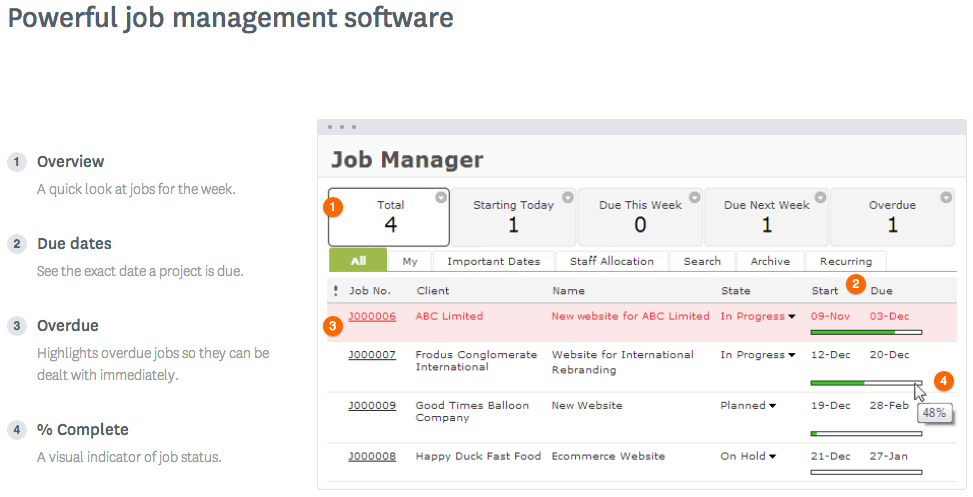
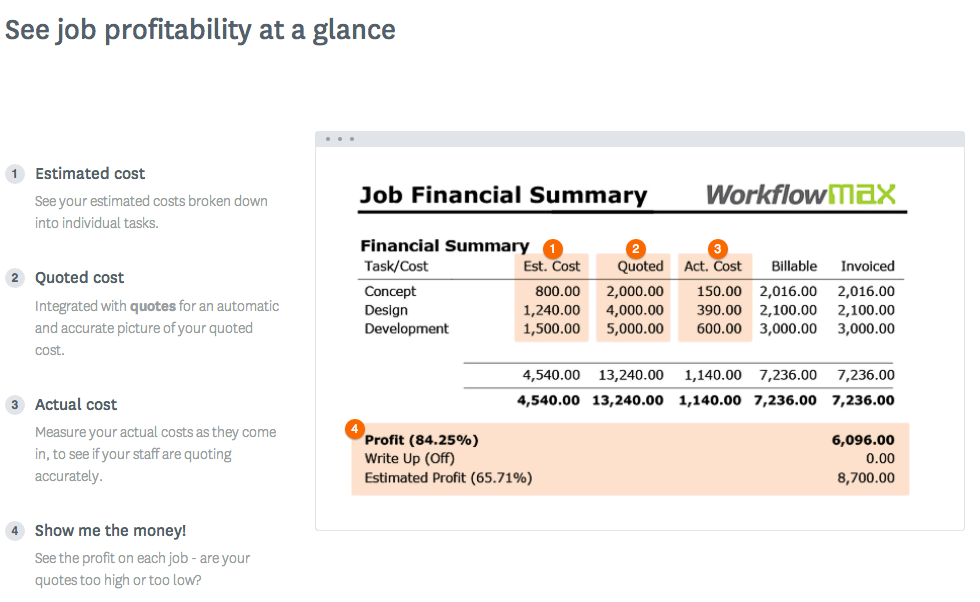
WorkflowMax is a web-based project management solution.The platform offers end-to-end functionality standard to project management software, including time tracking, lead management, collaboration with external stakeholders, invoicing, integrations, and customizable reporting.
$20
per month
Pricing
Harvest
Rippling
WorkflowMax
Editions & Modules
Harvest Pro
$13.75
per month per seat
Harvest Premium
$17.50
per month per seat
Recommended
$8.00
starting price per user, per month
Standard
$20
per month
Standard
$35
per month
Premium
$70
per month
Offerings
Pricing Offerings
Harvest
Rippling
WorkflowMax
Free Trial
Yes
No
Yes
Free/Freemium Version
Yes
No
No
Premium Consulting/Integration Services
No
Yes
No
Entry-level Setup Fee
No setup fee
No setup fee
No setup fee
Additional Details
20% discount for annual billing on Pro and Premium plans.
For additional pricing details visit the Rippling pricing page.
—
More Pricing Information
Community Pulse
Harvest
Rippling
WorkflowMax
Considered Multiple Products
Harvest
No answer on this topic
Rippling
Verified User
Engineer
Chose Rippling
Significant more features and a much better mobile application. Rippling's mobile application is a serious win! Our employees love the ability of submitting human resources related tasks through their phone at any time. In addition, Rippling has a significant larger pool of …
Harvest is ideally suited for a variety of scenarios, particularly in the realms of freelance or consulting work, where accurate hour tracking for billing is crucial. It excels in small to medium businesses managing team projects, allowing for effective resource allocation and time management across multiple concurrent projects. For budgeting and forecasting, Harvest provides valuable data, aiding in accurately estimating the duration and cost of future projects based on past data. It's also highly beneficial for remote or distributed teams, thanks to its cloud-based platform that facilitates seamless coordination. Additionally, its detailed reporting features enhance client transparency, fostering trust through clear communication of time spent on projects. However, Harvest may be less suitable for larger enterprises with complex integration needs or specialized industries requiring more niche features. Small startups or individuals on tight budgets might find the cost challenging, especially if they don't fully utilize all its features. Lastly, for those needing only basic time tracking, simpler or free tools might be more appropriate, making Harvest an unnecessary expenditure for basic needs.
Rippling is extremely user friendly an allows our employees to help themselves in a lot of areas that previously required HR team assistance. Three areas I feel are not well suited for our organization is the inability to reset passwords manually, allocation of hours, and the software's inability to spot a rehire with a new application. We have several associates who moonlight/pick up shifts at other locations. This is infrequent so it woudn't make sense to allocate a percentage of their time to the properties where they're moonlighting. When we manually allocate those hours to the receiving property, the allocations do not take effect on the back end for our accounting department. It's creating a lot of journal entries and back-end corrections in our Accounting software. When it comes to applications, we have a new Director of Talent Acquisition who is not familiar with every previously-hired associate. This has caused duplication of profiles when we rehire an associate. If the DoTA isn't familiar with the associate and hires them in the "talent" portion of the website, it creates a new profile for them rather than recognizing their duplicated information (such as SSN or passport number). This has caused us to end up with dupliate profiles for several rehires. The system is very tech-y it should allow us to either merge the profiles or cause a notification/error to alert the hiring person that this associate/new hire is a rehire. Our previous software (UKG) was able to do this.
WorkflowMax is very well suited for a business that wants to track time billed by project, to have an easy way to generate invoices for those projects, and to keep track of overall productivity and invoice status. I imagine it can also be adapted to different types of businesses that deal in goods rather than services and time. I am not sure for which scenarios or businesses the program is not appropriate.
Offers several options on using the tool, for example, you can use the app on your phone, the app for desktop, or simply have the website open.
The timer integrates with other platforms. For example, our team uses Asana as our project management tool. Now, in real-time, I can know which projects my team is working on and whether we're implementing good time management strategies to meet our goals.
The summary break downs are wonderful! You can view an individual's hours as well as project hours. There are even notifications you could receive when your team is getting close to reaching the allotted time for a client's project.
You can customize the notifications and this has helped us enormously to schedule dates that we overlooked. Also the templates are customizable which gives the company its own branding on its reports.
It is integrated with the Xero platform which makes it very useful to streamline the processes of billing, accounts payable, accounts receivable, petty cash flow and all the accounting and administrative area.
It also has a very complete mobile version, where we can be present and monitor the progress of projects in real time, no matter where we are.
I’m still trying to figure out how tasks best associate to a specific project. There’s a couple different places to edit that and I’m a little confused as to best practice.
Does not integrate into basecamp which is our project management system
The overall look and feel of Rippling is dated; it looks like it's straight out of the 00's.
The could be more functionality in the LMS, expanded features, more options, it works, and it's basic, but it could be really great with a few added features.
The shift from using people's personal email to log in to their work email, not everyone wants to use their personal information to log into a work system.
Currently the timesheet function allows staff to input time for overlapping periods which can cause some headaches when it comes to payroll and invoicing. We understand this is being addressed.
The amount of flexibility in the product can create some challenges when setting up the jobs database at the onset. It is a daunting challenge but worthwhile when completed correctly and rolled out across the firm. Adding new jobs is much easier.
No search function to find a specific job, you have to scroll through all jobs allocated to you.
The AI assistant has always been able to direct me to the correct solution to any question i have about Rippling. Payroll is so easy, it takes about 10 minutes to go through the process.
Again, just a minor compatibility issues using with other platforms such as Basecamp, but it does do everything promised. The only downfall we have found is having to create a job in both platforms and then connecting them later vs being able to create a project once and having them automatically connect.
Very intuitive, user-friendly, and modern interface that doesn't make you cringe when you have to access it for anything. The admin navigation is easier compared to our previous system, and doesn't feel like a maze of complicated jargon. On the user side, the benefits enrollment process was a breeze, and felt so much more informative and efficient. Accessing the benefits post-enrollment is also very straightforward.
I like that the availability in using Rippling at any given time is useful to me. Getting on the site freely when I need gives me security of knowing that I can be in control of viewing health insurance and hours information. I have yet to get any errors in using the Rippling app.
Rippling's performance has been great, no errors or glitches yet so far. I am confident that Going from one page to the next and all its complexity usage does not lag or times out, it works effectively and efficiently. While using Rippling and other apps it does not tend to slow it down, works great. No complaints.
They're very responsive and do their best to answer whatever questions we've had. Sometimes, the question or request we've made is for a feature that doesn't yet exist, however in most cases those features have been built later and did eventually address our need.
The highlight of my customer support experience was my first interaction with them: I had a small issue with my birthdate, and it was fixed very quickly—on the same day. It's pretty incredible to have things like that sorted out in the same day, which is a rare thing to see lately.
It's really easy to implement in comparison to other tools or applications. Different key points are easily configured and implemented as per need, having different configurations in systems. Implementation is something which binds the different parameters of an organization in a single row. Implementation of rippling is much easier, quicker, and error free than any other software. I recommend it strongly!
Decide how to breakdown your ongoing jobs - are they monthly recurring or annual broken into chunks? What are you going to give clients i.e. how will your proposals and invoices look?
Harvest is significantly better than Jira. I think Jira's is not originally intended to be used as a time logging/management system, but we had been previously using it as that. It was much clunkier, and many employees had a difficult time using it as a user interface goes. Harvest is much more user friendly and has simplified the daily time-logging process for everyone in our office
We chose Rippling primarily based on cost and feature set available. As a small organization, budget is a high priority. Rippling gave us enterprise-level features at an affordable cost for an early stage start up. We appreciate that we have the opportunity to expand our feature set within Rippling as our business and workforce grow.
WorkflowMax is much much easier than Streamtime, much more affordable and easier to try out and see if it meets your needs. Streamtime is a great comprehensive product but we lost a year's subscription in investment because we couldn't get answers to the support questions we needed and they had a no refund policy!
I can go on here and see all my hours and pto plus health benefits. I like to have the work handbook handy to refer to legal things. How to work my role within it's limits. Being able to put in my hours and view when they are approved is a huge benefit for me.
Our HR team used to spend almost three days doing payroll calculations before Rippling. This platform has cut that time down by 75%! Now they can devote the time they would've spent on payroll to other important tasks.
Rippling saves employees time by making time-tracking less of a headache.
Rippling has so many so many services that it's essentially a one-stop-shop for centralized HR solutions!
Max enables Loan Assistant to invoice very quickly and easily and integration with Xero for card payments brings our cashflow forward.
Max enables the Loan Assistant team to manage their workflow in an efficient and productive way. The team all work from home. It is the centre of our Loan Assistant universe.