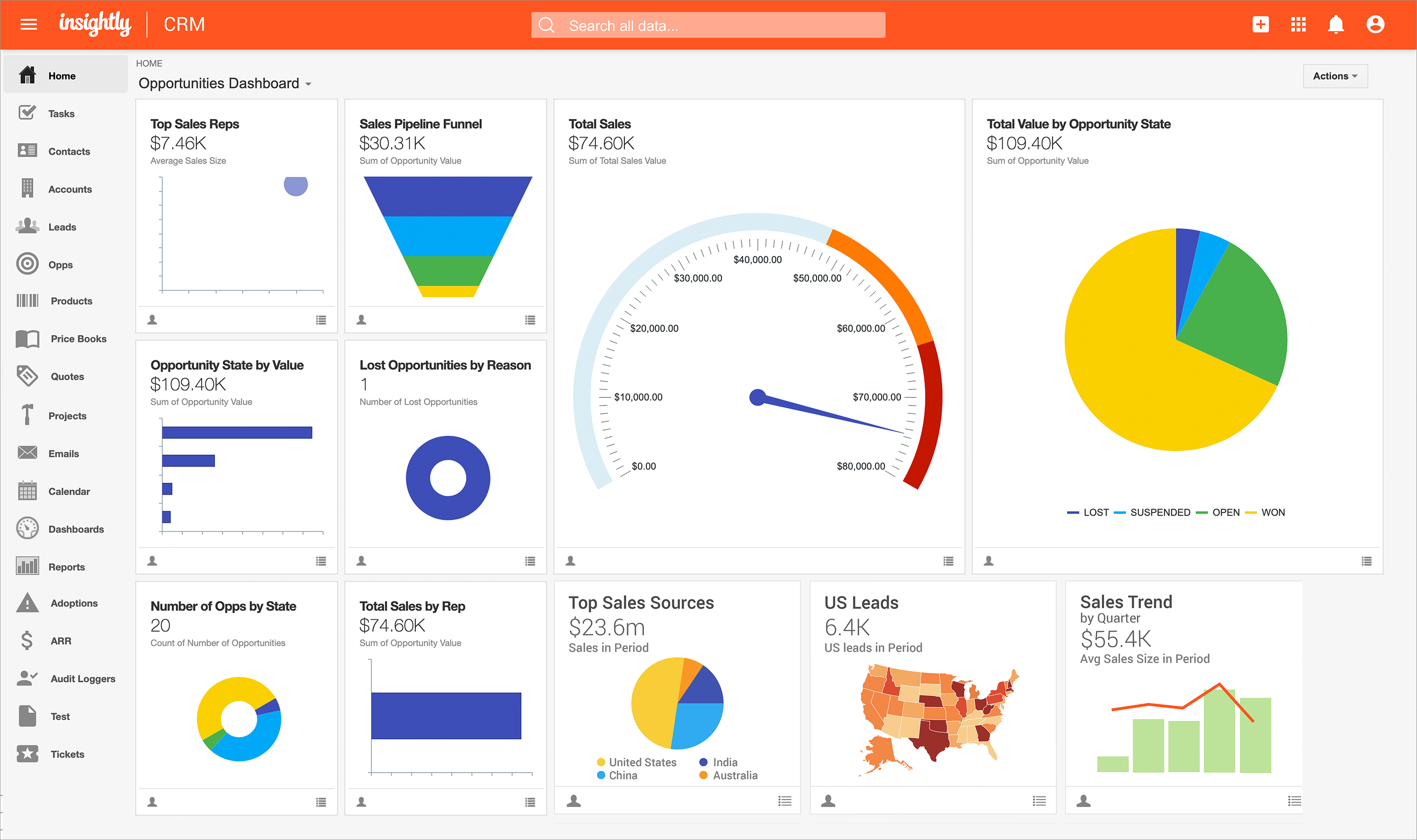
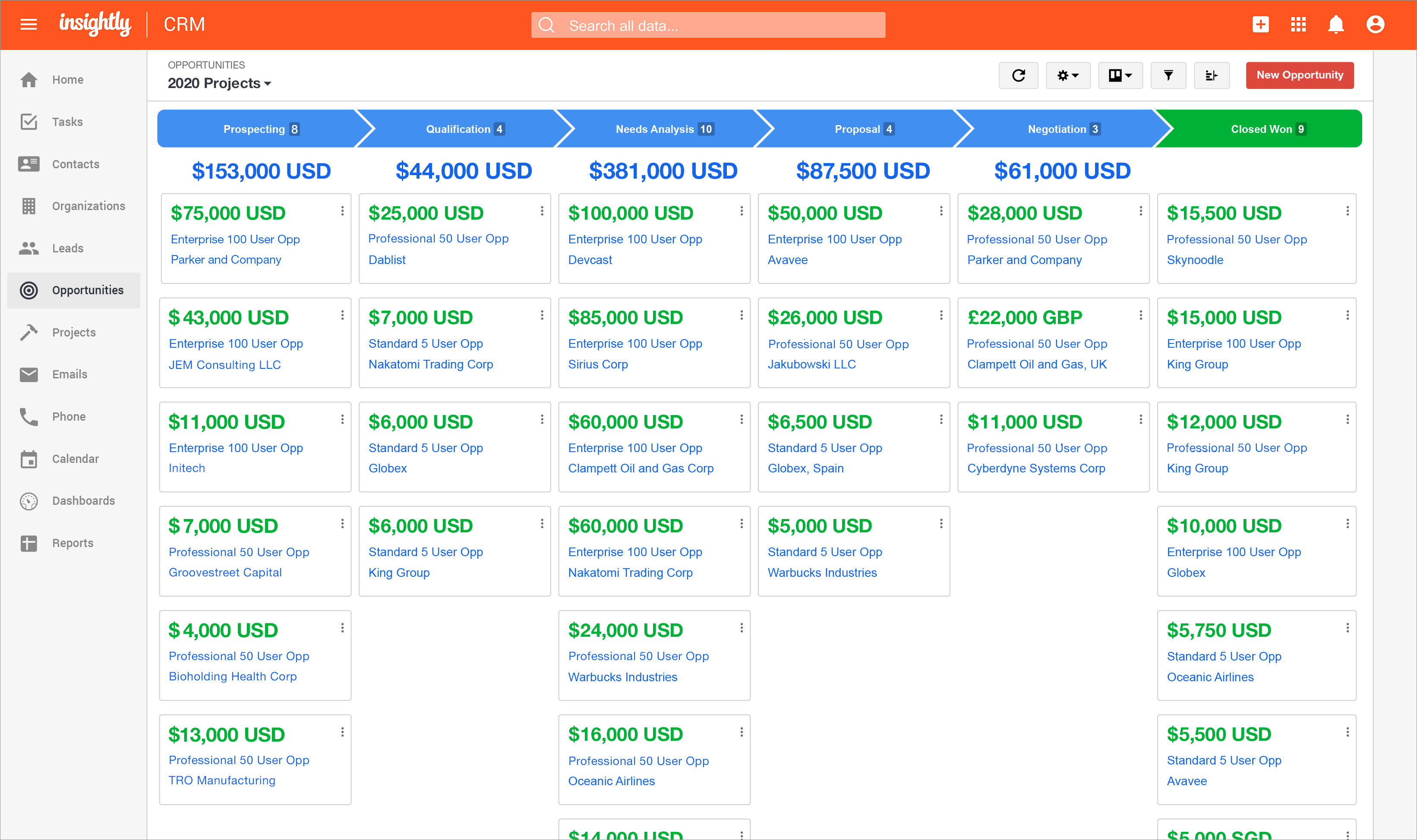
Insightly is presented as a modern, affordable CRM that is easy to use, simple to customize, and that scales with companies as they grow, designed to solve common pain points that legacy CRMs can't. Available in any vertical, Insightly CRM customers can add companion products for marketing automation, customer service, and integrations in the same platform. Insightly has more than a million users worldwide.
$348
per year per user
WordPress
Score8.7 out of 10
N/A
Wordpress is an open-source publishing platform popular with bloggers, and a content management system, known for its simplicity and modifiability. Websites may host their own blogging communities, controlling and moderating content from a single dashboard.
$3
per month 6 GB storage
Pricing
Insightly
WordPress
Editions & Modules
Plus
$29
per month (billed annually) per user
Professional
$49
per month (billed annually) per user
Enterprise
$99
per month (billed annually) per user
Personal
$4
per month 6 GB storage
Premium
$8
per month 13 GB storage
Business
$25
per month 50 GB storage
Commerce
$45
per month 50 GB storage
Enterprise
Contact for pricing
Offerings
Pricing Offerings
Insightly
WordPress
Free Trial
Yes
No
Free/Freemium Version
No
No
Premium Consulting/Integration Services
Yes
No
Entry-level Setup Fee
No setup fee
No setup fee
Additional Details
—
Pricing for Business and Commerce plans vary on number of GB.
Insightly was selected for its ease of use and wealth of integrations. Additionally, its pricing was a lot more favorable than some of its competitors. Overall, I think that Insightly is better suited for smaller teams.
A de minimis incentive was given to thank the reviewer for their time. The incentive was not used to bias or drive a particular response, nor was the incentive contingent on a positive endorsement. More Info
Director in Corporate at Roborave Nigeria (Education Management, 1-10 employees)
Chose Insightly
First it is very rare to find a CRM that combines the traditonal CRM function as well as Project Management. Insightly is not as pricey as other CRMs like Salesforce or Infusionsoft. The free version is a great way for a small business owner to actually use the CRM for as long …
A de minimis incentive was given to thank the reviewer for their time. The incentive was not used to bias or drive a particular response, nor was the incentive contingent on a positive endorsement. TR verified that a representative sample of customers was invited. More Info
Verified User
Chose Insightly
I think that sales software should take sales behavior into account when setting up the UI. Pipedrive and Trello are great because they use Kanban style progress visuals, i.e. the movement of cards through a process from left to right.
Trello is great because it can also be …
A de minimis incentive was given to thank the reviewer for their time. The incentive was not used to bias or drive a particular response, nor was the incentive contingent on a positive endorsement. TR verified that a representative sample of customers was invited. More Info
A de minimis incentive was given to thank the reviewer for their time. The incentive was not used to bias or drive a particular response, nor was the incentive contingent on a positive endorsement. More Info
Verified User
Chose Insightly
Insighlty better matched my needs at a price that was within budget.
A de minimis incentive was given to thank the reviewer for their time. The incentive was not used to bias or drive a particular response, nor was the incentive contingent on a positive endorsement. TR verified that a representative sample of customers was invited. More Info
A de minimis incentive was given to thank the reviewer for their time. The incentive was not used to bias or drive a particular response, nor was the incentive contingent on a positive endorsement. TR verified that a representative sample of customers was invited. More Info
A de minimis incentive was given to thank the reviewer for their time. The incentive was not used to bias or drive a particular response, nor was the incentive contingent on a positive endorsement. TR verified that a representative sample of customers was invited. More Info
Verified User
Chose Insightly
I prefer InSightly's user interface to that of Constant Contact.
A de minimis incentive was given to thank the reviewer for their time. The incentive was not used to bias or drive a particular response, nor was the incentive contingent on a positive endorsement. TR verified that a representative sample of customers was invited. More Info
There are a lot of things Insightly is great with for Career Services but much of my job is updating things manually because Insightly doesn't have a way to help me manage the database the way we need to. We have multiple academic records per students but needed to have fields that are multiselect on our contacts. These are all manually updated which are very tedious and not the best for what we need it to be able to do
A de minimis incentive was given to thank the reviewer for their time. The incentive was not used to bias or drive a particular response, nor was the incentive contingent on a positive endorsement. More Info
Wordpress is a great solution for a website of nearly any type. It may not be as suitable if a fully custom solution or app is needed, and it does have some limitations when it comes to connecting it to external products (especially if the product doesn't have any support from a native system), and it does require a lot of testing. Multiple plugins in one install are common but also increase the risk of conflicts, and when those do occur, it can be exceptionally time-consuming and tedious to identify what is causing the issue. As third parties create many plugins, you're also at risk with each potential security breach, which needs to be kept in mind. I would be cautious to use WordPress to store any sort of sensitive PPI. That said, it's a wonderful, easily customizable solution for many, many different types of websites and can allow even inexperienced client users with low-tech knowledge to update basics.
A de minimis incentive was given to thank the reviewer for their time. The incentive was not used to bias or drive a particular response, nor was the incentive contingent on a positive endorsement. More Info
A de minimis incentive was given to thank the reviewer for their time. The incentive was not used to bias or drive a particular response, nor was the incentive contingent on a positive endorsement. TR verified that a representative sample of customers was invited. More Info
A de minimis incentive was given to thank the reviewer for their time. The incentive was not used to bias or drive a particular response, nor was the incentive contingent on a positive endorsement. More Info
Once you are immersed in the platform, for all of its integration kudos, the platform became "intuitive" if that is the right word for it. There was some push back from staff on deployment.
The service and support team at Insightly was very responsive, but it seemed as if they had fielded similar complaints, and slower learning curves than we expected.
Unfortunately, while all has worked out nicely now and we are very happy with the platform, we had to have additional instruction time for all the staff during onboarding as workflows, dashboards, and pipelines were more time intensive than expected on the demo.
A de minimis incentive was given to thank the reviewer for their time. The incentive was not used to bias or drive a particular response, nor was the incentive contingent on a positive endorsement. TR verified that a representative sample of customers was invited. More Info
WordPress breaks often so you need to have someone who understands how to troubleshoot, which can take time and money.
Some plugins are easier to customize than others, for example, some don't require any coding knowledge while others do. This can limit your project if you are not a coder.
WordPress can be easily hacked, so you also need someone who can ensure your sites are secure.
A de minimis incentive was given to thank the reviewer for their time. The incentive was not used to bias or drive a particular response, nor was the incentive contingent on a positive endorsement. More Info
Insightly offers a great product; it's the right fit for our company at this time. We were, however, considering moving to Contactually due to their cost effective automation features. However, they lacked the project management capabilities of Insightly. As our company grows, we would love to stay with Insightly - and if they can nail the automation and add the ability to customize a little bit more, it would be the perfect solution for us. For a larger company with a more involved sales team, you might find the metrics/reporting to be a bit basic. Insightly offers great customer service even to free customers
The complications we have and the lack of support. Every plugin has a differente team of support in charge and make one plugin work with the other one always affects the website performance. It's a thousand times better to have only one provider with all functionalities included unless you are an expert web developer or have a team dedicated to it
A de minimis incentive was given to thank the reviewer for their time. The incentive was not used to bias or drive a particular response, nor was the incentive contingent on a positive endorsement. More Info
Anyone with any experience with a working knowledge of Facebook or using a Windows computer will be able to quickly adapt to Insightly and use it to suit their needs. It can become more difficult to use as a company might have custom workflows or Insightly customer service might need to customize the program to better suit a company's need. A slow introduction to the system is better than having to learn the program quickly. Parts and knowledge build on each other so it hard to grasp all at once. The learning curve for Insightly is 2-3 weeks while mastery comes with time and exposure to the program
A de minimis incentive was given to thank the reviewer for their time. The incentive was not used to bias or drive a particular response, nor was the incentive contingent on a positive endorsement. TR verified that a representative sample of customers was invited. More Info
Extremely easy to use and train users. It took very little time to get everyone trained and onboarded to start using WordPress. Anytime we had any issues, we were able to find an article or video to help out or we were able to contact support. The menu options are well laid out so it is easy to find what you are looking for.
A de minimis incentive was given to thank the reviewer for their time. The incentive was not used to bias or drive a particular response, nor was the incentive contingent on a positive endorsement. More Info
The provider is 100% available, with no downtime, maintenance, or unexpected outages. We have been able to perform solid continuous services for 12 months without any interruptions. We have backups as well, unlike the in-house backup that they keep on their end. I believe they have a very good redundancy and backup infrastructure in case they get any outages.
A de minimis incentive was given to thank the reviewer for their time. The incentive was not used to bias or drive a particular response, nor was the incentive contingent on a positive endorsement. More Info
Anyone can visit WordPress.org and download a fully functional copy of WordPress free of charge. Additionally, WordPress is offered to users as open-source software, which means that anyone can customize the code to create new applications and make these available to other WordPress users.
Pages normally load quickly, but every now and then, as entering updates to fields, it take a while to update. Sometimes even after refreshing the screen, we have to exit and go back in to get the fields or queries to update.
A de minimis incentive was given to thank the reviewer for their time. The incentive was not used to bias or drive a particular response, nor was the incentive contingent on a positive endorsement. More Info
Mostly, any performance issues have to do with using too many plugins and these can sometimes slow down the overall performance of your site. It is very tempting to start adding lots of plugins to your WordPress site, however, as there are thousands of great plugins to choose from and so many of them help you do amazing things on your site. If you begin to notice performance issues with your WordPress site (e.g. pages being slow to load), there are ways to optimize the performance of your site, but this requires learning the process. WordPress users can learn how to optimize their WordPress sites by downloading the WPTrainMe WordPress training plugin (WPTrainMe.com) and going through the detailed step-by-step WordPress optimization tutorials.
We have used Insightly for almost 2 years now. We have always been able to get in touch with support for a variety of reasons and they have never disappointed us. The support staff have always been very understanding. They have assisted with answers to our questions and have provided great tech support. We would highly recommend them.
A de minimis incentive was given to thank the reviewer for their time. The incentive was not used to bias or drive a particular response, nor was the incentive contingent on a positive endorsement. More Info
I give this rating, which I believe to be a great rating for a community based support system that's surrounding it. Most platforms and products have their own, and as WordPress does have their own team that help here and there, a lot of it's handled by community involvement with dedicated users who are experts with the system who love to help people.
Well, we didn’t get the chance to do this in-person training but rather one-on-one online training with HR in-house. There were PowerPoints to discuss as well as video instructions on how to use the app, so it was okay. We were able to play around with it during the training or onboarding session.
A de minimis incentive was given to thank the reviewer for their time. The incentive was not used to bias or drive a particular response, nor was the incentive contingent on a positive endorsement. More Info
Varies by the person providing training. High marks as it's incredibly easy to find experienced individuals in your community to provide training on any aspect of WordPress from content marketing, SEO, plugin development, theme design, etc. Less than 10 though as the training is community based and expectations for a session you find may fall short.
I've used Insightly's online training &/ or learned as I went. I've found the blogs and online written material helpful. I've also attended a few webinars, which can be useful if you use a J-I-T approach so as not to overwhelm you (or your staff) with functionality that you are using just yet. The fact that it's all available on their website and you can learn at your own pace is invaluable
A de minimis incentive was given to thank the reviewer for their time. The incentive was not used to bias or drive a particular response, nor was the incentive contingent on a positive endorsement. TR verified that a representative sample of customers was invited. More Info
did not participate in the implementation of this product did not participate in the implementation of this product did not participate in the implementation of this product did not participate in the implementation of this product did not participate in the implementation of this product did not participate in the implementation of this product
A de minimis incentive was given to thank the reviewer for their time. The incentive was not used to bias or drive a particular response, nor was the incentive contingent on a positive endorsement. TR verified that a representative sample of customers was invited. More Info
WordPress is not a great solution if you have: 1) A larger site with performance / availability requirements. 2) Multiple types of content you want to share - each with its own underlying data structure. 3) Multiple sites you need to manage. For very small sites where these needs are not paramount, WordPress is a decent solution
Insightly is significantly better than Zendesk. It is easy to use, pleasant to look at, and makes sense. However, I don't think Insightly is fair now compared to Salesforce. Insightly can do many of the same things as Salesforce, but I've only started on some of these features. Insightly has excellent potential, and its support team drives me to make it what I believe it can be. For the price, I believe Insightly is worth it.
A de minimis incentive was given to thank the reviewer for their time. The incentive was not used to bias or drive a particular response, nor was the incentive contingent on a positive endorsement. More Info
WordPress isn't as pretty or easy to use as certain competitors like Jimdo, Squarespace or HubSpot, but it makes up for it with its affordability, familiarity and the ability to find quality outside help easily. The same can't be said for certain competitors, as you might need to find an expert and it could get costly.
A de minimis incentive was given to thank the reviewer for their time. The incentive was not used to bias or drive a particular response, nor was the incentive contingent on a positive endorsement. More Info
I don’t have the exact answers for this, but our accounting or finance department negotiates this. They always handle this kind of stuff and negotiate yearly licenses. Usually, they purchase 10 licenses in bulk and ask for a discount in bulk. Other than that, if there are any issues encountered on the app, they account for that. If it’s broken, that’s also taken into consideration when renewing the contract.
A de minimis incentive was given to thank the reviewer for their time. The incentive was not used to bias or drive a particular response, nor was the incentive contingent on a positive endorsement. More Info
(+) Being able to download my LinkedIn connections was a huge benefit. (+) I use the task function to stay on top of my follow-up activity which is another positive feature. (+) The sorting capabilities also help me pinpoint the contacts that I need to stay on top of. (-) When I add a new lead from an existing organization, I would like the organization's information to automatically populate the fields like address, website, description. I enter all that information manually. (-) My mass mailing experience has been tedious due to the email function being interrupted and crashing due to bad email addresses in some of my records. (-) Many of my leads do not have current email addresses. I wish Insightly offered a tool to help find email addresses. I spend too much time researching to find email addresses.
A de minimis incentive was given to thank the reviewer for their time. The incentive was not used to bias or drive a particular response, nor was the incentive contingent on a positive endorsement. TR verified that a representative sample of customers was invited. More Info
WordPress is completely scalable. You can get started immediately with a very simple "out-of-the box" WordPress installation and then add whatever functionality you need as and when you need it, and continue expanding. Often we will create various WordPress sites on the same domain to handle different aspects of our strategy (e.g. one site for the sales pages, product information and/or a marketing blog, another for delivering products securely through a private membership site, and another for running an affiliate program or other application), and then ties all of these sites together using a common theme and links on each of the site's menus. Additionally, WordPress offers a multisite function that allows organizations and institutions to manage networks of sites managed by separate individual site owners, but centrally administered by the parent organization. You can also expand WordPress into a social networking or community site, forums, etc. The same scalability applies to web design. You can start with a simple design and then scale things up to display sites with amazing visual features, including animations and video effects, sliding images and animated product image galleries, elements that appear and fade from visitor browsers, etc. The scaling possibilities of WordPress are truly endless.
A de minimis incentive was given to thank the reviewer for their time. The incentive was not used to bias or drive a particular response, nor was the incentive contingent on a positive endorsement. More Info
Positive Impact>Visibility is critical when it comes to taking proactive measures within the organization. The Insightly Tool has helped use with that which minimizes costs when it comes to rework. We can proactively plan for upcoming growth and identify areas of improvement.
A de minimis incentive was given to thank the reviewer for their time. The incentive was not used to bias or drive a particular response, nor was the incentive contingent on a positive endorsement. More Info
A de minimis incentive was given to thank the reviewer for their time. The incentive was not used to bias or drive a particular response, nor was the incentive contingent on a positive endorsement. More Info