Intuit Online Payroll was a small business payroll option available as a standalone SaaS solution, that Intuit announced it was discontinuing in favor of Quickbooks Online Payroll, available via Quickbooks.
$22.50
per month
UKG Ready
Score8.2 out of 10
N/A
The UKG Ready® software suite is a centralized HCM solution designed for small to mid-sized businesses. It automates and streamlines HR, payroll, benefits, time, talent, and scheduling processes. UKG Ready's suite of tools offer actionable insights while helping to ensure compliance. Using AI, it draws on work, people, and culture data to boost efficiency and productivity. For example, UKG Ready streamlines core HR functions by centralizing…
I believe the ideal scenario is when you are already using the Intuit family of products and the payroll bolts on to your existing QuickBooks infrastructure. Payroll software products have been around a long time, and this is a very competitive niche. Most of the companies do a good job of filing taxes promptly, reporting W-2 items properly, providing good reports, etc. Where you might really get some extra efficiency and benefit is the fact that the payroll is woven into the accounting system, creating one seamless enterprise solution. Also, where it might be less appropriate is in a really simple use case such as a one person company where there aren't complex fringe benefits to deal with. In that scenario, you can set up the ACH debits directly with the state agency and the IRS and possibly file your own 941, 940, W-2/W-3 and state equivalent forms. Of course, if you're willing to do this and are good with details, you can save yourself some money.
A de minimis incentive was given to thank the reviewer for their time. The incentive was not used to bias or drive a particular response, nor was the incentive contingent on a positive endorsement. More Info
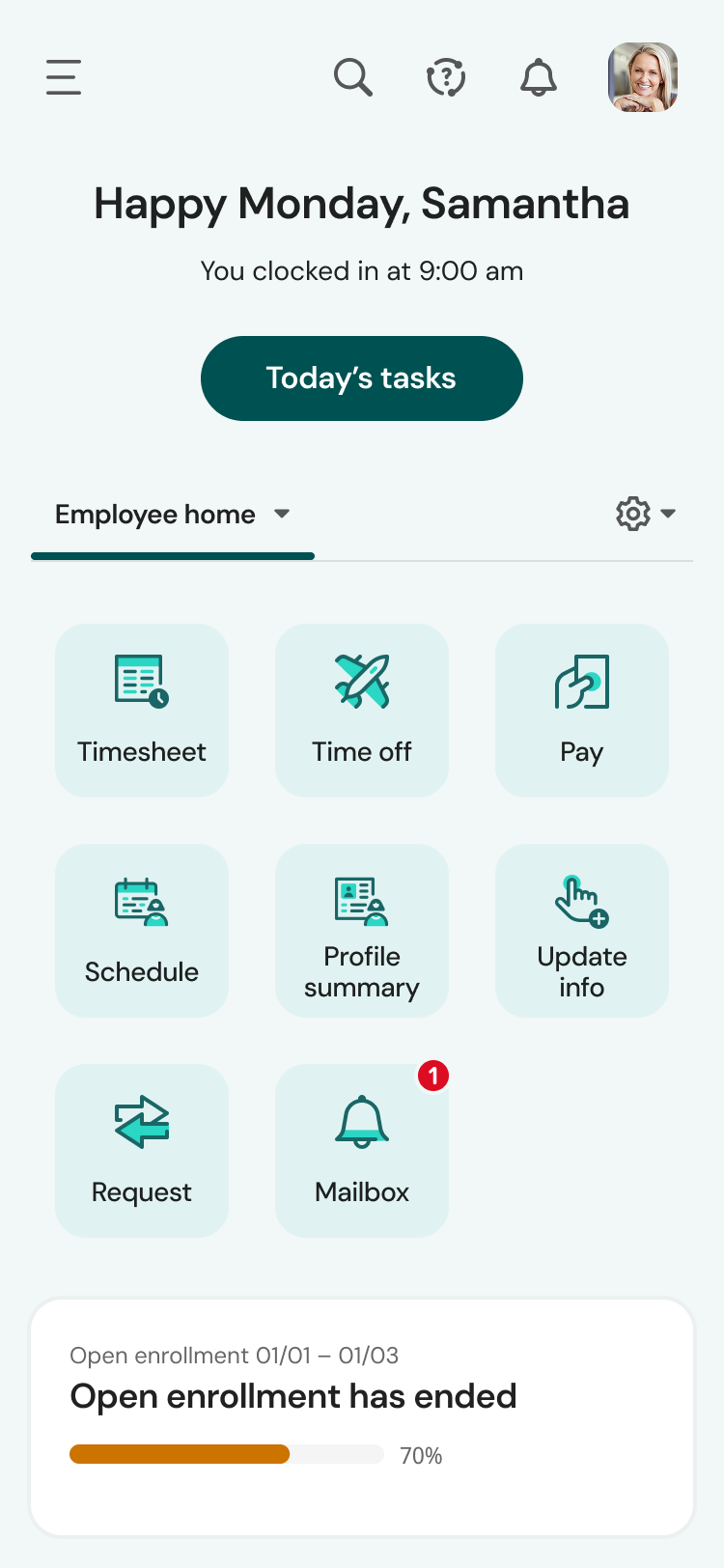
UKG is great for storing personal information and is easy to use for clocking in and out. And you can easily find the next payday at the bottom, your calendar with requested time off, and the available hrs. UKG is less user-friendly and more difficult when editing your personal information, like your phone number, and requesting time off is a little confusing to me.
A de minimis incentive was given to thank the reviewer for their time. The incentive was not used to bias or drive a particular response, nor was the incentive contingent on a positive endorsement. More Info
Integration with QuickBooks Desktop. This is the key strength of IP... it is a complete, native integration and let's you maintain all employee records and time keeping in QuickBooks
Job Costing. Another key differentiation -- some payroll outsources say they do true job costing (by work or item code). Don't believe them. If its' not integrated with your accounting system, you will not get "TRUE" job costing. You can get costs ASSIGNED to jobs (which may be fine), but you won't get item level detail in QuickBooks from anyone but Intuit.
Variety of Payment options. Use Direct Deposit or manual checks... or whatever you want. Since its in QB, you can make payments any way you want.
Cash Flow. This is both good and bad, but IP will not take taxes out of your bank account until they are due. That's different than some other providers that want assurance that you have the tax payments available at the moment you push "SUBMIT."
A de minimis incentive was given to thank the reviewer for their time. The incentive was not used to bias or drive a particular response, nor was the incentive contingent on a positive endorsement. More Info
The mobile app experience is terrific. Once the employees figured out the navigation, they now prefer the app over the web version. The app mirrors the web version, although the navigation is somewhat compressed due to the mobile view. Other than that, the tools in the app work exactly as the web.
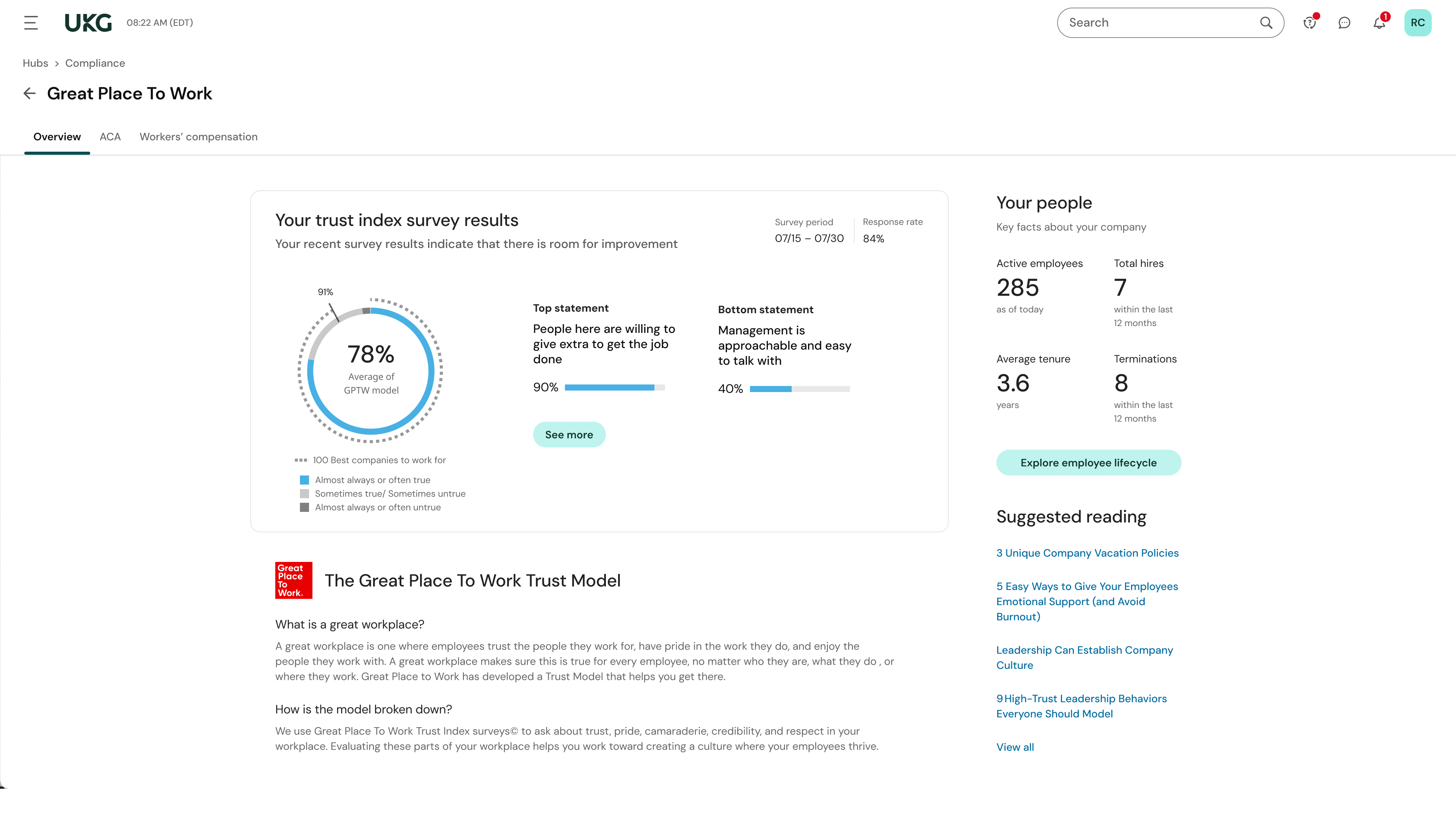
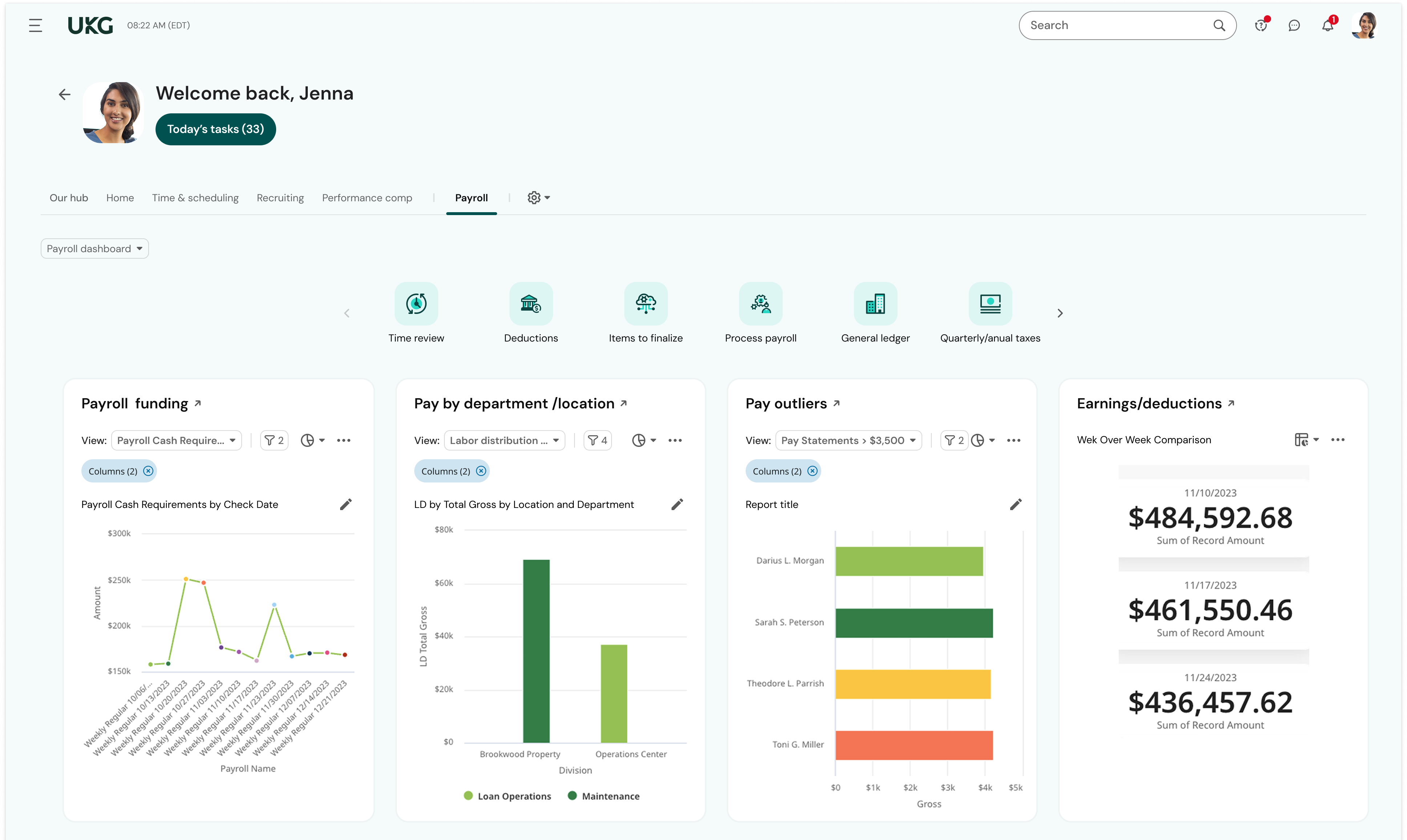
Reporting - there hasn't been a time when I couldn't run a report on the information I needed. And the reports dashboard is very robust - my most important reports were already built in the system. I saved so much time because I didn't have to cobble together the data from multiple reports or contact support to build the report for me.
Community page - I log into UKG's Community page daily. I learn so much from experienced UKG users and the UKG moderators are quick to provide answers and best practices. When I have a question about how to use a feature in UKG Ready, my first stop is the Community - I almost always find what I need without the need to submit a ticket/case or call Support. When I can't find what I need using Community, I can trust that Support will be responsive and helpful. For example, I needed help learning how our onboarding process was configured and submitted a case for assistance. The representative scheduled multiple meetings with me to help me not only navigate the onboarding setup but also to teach me how to revise the associated workflows and test the changes. I was also able to ensure our onboarding was set up correctly as well as modify it as needed.
Employee Self-Service - Once employees were trained to find their HR Actions tool, they quickly adapted to submitting their requests through UKG Ready rather than asking for help from an admin. Now, they readily submit change requests to update their direct deposit, address, and withholding. Sure, they still need a little help from time to time, but employees are initiating these changes without the need for payroll or HR to chase down signatures or paperwork.
A de minimis incentive was given to thank the reviewer for their time. The incentive was not used to bias or drive a particular response, nor was the incentive contingent on a positive endorsement. More Info
My biggest issue is that they do continue to raise their prices on a regular basis and it makes people feel stuck when there are so many clients already using the system.
They do not support roaming employees, so employees that cross over into various tax jurisdictions in one pay period pose a challenge for calculating taxes and pay.
The setup can be a bit daunting still if you are not familiar with the system or the various taxes and requirements for reporting.
A de minimis incentive was given to thank the reviewer for their time. The incentive was not used to bias or drive a particular response, nor was the incentive contingent on a positive endorsement. More Info
Learning and training is poor and has not provided our team with a way to approach our problems in a cost-effective and meaningful way
Consistent glitches in some areas result in errors that persist through multiple payrolls despite a thorough review of all settings
Reports don't live in the same place, multiple types of reports exist in multiple places with little explanation of the difference. We often build custom reports only to have them disappear or have to spend a long time trying to find them.
A de minimis incentive was given to thank the reviewer for their time. The incentive was not used to bias or drive a particular response, nor was the incentive contingent on a positive endorsement. TR verified that a representative sample of customers was invited. More Info
A de minimis incentive was given to thank the reviewer for their time. The incentive was not used to bias or drive a particular response, nor was the incentive contingent on a positive endorsement. More Info
We plan to renew our support and use of UKG Ready each year unless it becomes unavailable or the district seeks another vendor. As of now, there are no plans to changes vendors. The district staff is now familiar with using UKG. Another vendor will need to meet the same expectations we have come to enjoy with using UKG
A de minimis incentive was given to thank the reviewer for their time. The incentive was not used to bias or drive a particular response, nor was the incentive contingent on a positive endorsement. TR verified that a representative sample of customers was invited. More Info
I would rate it a 0. It gets worse and worse all the time. It seems like every time I go into IOP to run a payroll for one of my clients, I have one more problem.
We have been very happy with the product. Occasionally, there are things we run into that do not seem so clear, yet the customer service provided by UKG community and service cases is unparalleled. Their specialists have been great to take the time to walk us through how to properly set up open enrollment and we appreciate the written follow up from the service cases so we can save the instructions.
A de minimis incentive was given to thank the reviewer for their time. The incentive was not used to bias or drive a particular response, nor was the incentive contingent on a positive endorsement. More Info
The system seems very stable. Being hosted in the cloud, we are vulnerable to internet speeds and busy times. The system has been down a couple times over the 3 months we have been live, but Kronos resolved the issues very quickly. To have access from a desktop, tablet, time clock, or phone app is one of the best features....users have almost NO REASON they can't clock in.
A de minimis incentive was given to thank the reviewer for their time. The incentive was not used to bias or drive a particular response, nor was the incentive contingent on a positive endorsement. TR verified that a representative sample of customers was invited. More Info
We were always told that Kronos was the best, but there are reports that we got out of ADP and other payroll providers that we cannot get out of Kronos. One example is a report of Productive/Non-productive hours by department. We also need the dollar amount associated with the hours. This is information that is required on our cost report and we were told that that report is unavailable. It is very frustrating when I can't get what I need.
A de minimis incentive was given to thank the reviewer for their time. The incentive was not used to bias or drive a particular response, nor was the incentive contingent on a positive endorsement. TR verified that a representative sample of customers was invited. More Info
The customer support personnel have always walked me through the steps they need to take to assist me. Never rushed through anything. Always exceptionally thorough, answering all my questions and even sharing my screen visually (I have control, not them). It actually helps me to resolve future issues and questions, if they should arise.
A de minimis incentive was given to thank the reviewer for their time. The incentive was not used to bias or drive a particular response, nor was the incentive contingent on a positive endorsement. More Info
If I was only rating support itself that would be a 10. Every support case I have entered has been addressed efficiently and with the desired result. On the implementation and transition to support there were multiple issues that those doing the implementation or transition could not answer or workflows and various settings left undone only to be discovered later. We implemented 3 different modules and the expertise we got for each one varied widely.
A de minimis incentive was given to thank the reviewer for their time. The incentive was not used to bias or drive a particular response, nor was the incentive contingent on a positive endorsement. TR verified that a representative sample of customers was invited. More Info
Our in-person training was a hybrid. Live online training with an instructor. They were very knowledgeable of the product & the area they were training on. I asked several specific questions and if they didn't know the answer immediately they followed up after class.
A de minimis incentive was given to thank the reviewer for their time. The incentive was not used to bias or drive a particular response, nor was the incentive contingent on a positive endorsement. TR verified that a representative sample of customers was invited. More Info
Pretty good online training, you have many how to options and can watch them several times. It can be hard at times to dig through the amount of data online but can usually find what you are looking for. Also you can download documentation for setting up the profiles and policies.
A de minimis incentive was given to thank the reviewer for their time. The incentive was not used to bias or drive a particular response, nor was the incentive contingent on a positive endorsement. TR verified that a representative sample of customers was invited. More Info
Make sure the people who are doing the build have extensive knowledge on employment law and asking the right questions. I would bet that the people who helped with our builds did not read any of our employment contracts or ordinances; and when I asked questions about how other companies handled certain basic dictates from federal employment laws, they didn't have any idea what FMLA, FLSA, etc were.
A de minimis incentive was given to thank the reviewer for their time. The incentive was not used to bias or drive a particular response, nor was the incentive contingent on a positive endorsement. TR verified that a representative sample of customers was invited. More Info
It's a payroll software with decent customer support readily available and direct integration with my accounting tools. This made it a prime fit for me, and made payment and tax reporting relatively simple, and errors readily correctable. It does not have time tracking, and I still believe that this software is overpriced, but it's the best fit for me right now.
A de minimis incentive was given to thank the reviewer for their time. The incentive was not used to bias or drive a particular response, nor was the incentive contingent on a positive endorsement. More Info
UKG is much easier to use and customize for our business needs. I enjoy that the time piece is directly connected with the payroll function. This is something that we didn't see when working with Paylocity. There was a manual time data upload that we needed to process into the Payroll function to process payroll. UKG has this setup and it's just a click of a button, so simple!
A de minimis incentive was given to thank the reviewer for their time. The incentive was not used to bias or drive a particular response, nor was the incentive contingent on a positive endorsement. TR verified that a representative sample of customers was invited. More Info
A de minimis incentive was given to thank the reviewer for their time. The incentive was not used to bias or drive a particular response, nor was the incentive contingent on a positive endorsement. TR verified that a representative sample of customers was invited. More Info
Positive: Less of a learning curve to train payroll accountants, as they are already familiar with using Intuit. Also, in general there are a larger pool of candidates who know this system than many of the other "niche" lesser known payroll products.
Positive: More options to choose from depending on the level of service needed. For example, there is a Full Service offering if needed. This might apply to an organization that doesn't have the resources available or an internal person who has the time/bandwidth to handle the entire company's payroll. Thus, it is possible to cherry pick the level of service needed depending on the type of company/situation.
Positive: Good audit trail. This can be extremely important and cost efficient when a business is going through an external audit by an outside CPA firm and the payroll accounting function is undergoing testing (ie. less time required by the external auditor would likely lower their bill for their services).
A de minimis incentive was given to thank the reviewer for their time. The incentive was not used to bias or drive a particular response, nor was the incentive contingent on a positive endorsement. More Info
A de minimis incentive was given to thank the reviewer for their time. The incentive was not used to bias or drive a particular response, nor was the incentive contingent on a positive endorsement. More Info