Overview
ProductRatingMost Used ByProduct SummaryStarting Price
Kantata PSA
Score 8.5 out of 10
Mid-Size Companies (51-1,000 employees)
Kantata Cloud (formerly Mavenlink + Kimble) provides project management and collaboration software for small to mid-sized professional services companies. Features include resource management, project dependencies, time and expense tracking, file sharing, versatile user permissions, private messaging, planning and reporting.N/A
OpenAir PSA
Score 5.5 out of 10
N/A
NetSuite OpenAir is a cloud-based Professional Service Automation (PSA) product which includes capabilities around project management, resource management, project accounting, etc.N/A
Planview ChangePoint
Score 7.0 out of 10
N/A
Planview Changepoint is a platform that marries professional services automation (PSA), project portfolio management (PPM) and business analytics to provide managers broad operational visibility and control over their strategic business portfolios.N/A
Pricing
Kantata PSAOpenAir PSAPlanview ChangePoint
Editions & Modules
Premier
Contact Sales Team
per month per seat
Enterprise
Contact Sales Team
No answers on this topic
Offerings
Pricing Offerings
Kantata PSAOpenAir PSAPlanview ChangePoint
Free Trial
NoNoNo
Free/Freemium Version
NoNoNo
Premium Consulting/Integration Services
NoNoNo
Entry-level Setup FeeRequiredNo setup feeNo setup fee
Additional Details
More Pricing Information
Community Pulse
Kantata PSAOpenAir PSAPlanview ChangePoint
Considered Multiple Products
Kantata PSA
Chose Kantata PSA
Microsoft SharePoint, Xero and Jira Service Management
Chose Kantata PSA
Smartsheets is a great tool but it was missing the client communications piece. That has been the best part of Kantata where I don't have to search back for emails anymore and it's very easy to find notifications and signoff for deliverables within Kantata. Smartsheets does …
Chose Kantata PSA
I have not had much experience with this other product, It was only for a few months during a part-time so I did not have to interact with the product on a regular basis.
However, Mavenlink is much more intuitive and requires little to no training prior to using it. It is also …
Chose Kantata PSA
Mavenlink is unique in that it provides a time audit summary that compares the actual hours worked against the capacity of the work weeks or how many they could work in a week; it also allows us to track the progress of work hours and the authorized
Chose Kantata PSA
Mavenlink is a great option that consolidates project and resource management, communication, time tracking, and budgeting into one platform.
Chose Kantata PSA
It was selected as it provides a central base for us to manage to business. The project management tools along with resourcing tools allows us to make the best use of our resources. User interface is intuitive and as it is browser based there is no need for installing any …
Chose Kantata PSA
For holistic project management and finance, Mavenlink blows these competitors out of the water, at least that was the case when we made the switch, though I'm sure both programs have been continuing to improve. As far as time tracking, Mavenlink is so much faster and easier …
Chose Kantata PSA
The biggest benefit of using Mavenlink is that the vendor allows you to pay for only what you use. Mavenlink is capable of connecting projects with people, unifying projects and financials and provides teams with technology and methodology that enable them to complete projects …
Chose Kantata PSA
Prior to Kimble, we were using a system called Deltek Traffic Live. This system was sufficient in handling simple small data but was extremely not user-friendly. It required a lot of manual adjustments with exported data since we couldn't tailor the system to our business …
Chose Kantata PSA
Mavenlink had more broad capabilities and was a tad cheaper.
Chose Kantata PSA
While Trello is very visual, it doesn't have the same, robust abilities that Kantata has for time-tracking, burn rates, and timelines. My design and development teams love the visual aspects of Trello for QA and for Content Layout of website builds, but Trello lacks all the …
Chose Kantata PSA
Note: I used these in other agencies and other companies before coming to Golden Spiral. While the interfaces and mobile functionality for Asana and Trello are much nicer than Mavenlink, they just don't have the power and connectivity of MVL. Microsoft Project requires a slide …
Chose Kantata PSA
Mavenlink is the only platform that gave me a balance between a great, intuitive user experience with good reporting, good templates, and resource/capacity planning.
Chose Kantata PSA
We have since switched over to Jira and let me tell you, it was probably the best decision we have made as a company. We chose Mavenlink based on promises from the sales team about future roadmap work that really never happened. We thought Mavenlink would easily integrate …
Chose Kantata PSA
I preferred Salesforce better. In Salesforce, I would have a query view of all my projects on one page that I'd bookmark. Then, I'd update each project when needed (that's 3 clicks, from bookmark, to clicking on project, to description). Mavenlink, it takes so much more. There …
Chose Kantata PSA
We performed an in-depth review of Wrike and Mavenlink and found Mavenlink to outshine Wrike in every category which mattered to our organization and business units. We looked at several case studies in similar companies as ours and found that Mavenlink best aligned with our …
Chose Kantata PSA
Mavenlink is much more robust than other project management platforms that we have used in the past. The ability to match each task to a preset time, budget and invoice objective is better than their competitors. It is also worth noting that Mavenlink has the built-in time …
Chose Kantata PSA
We have evaluated about 15 different project management platforms and narrowed down our list to only five (Celoxis, Sciforma, Podio, Mavenlink, and Teamwork). Other solutions we evaluated were not able either to meet our vendor security requirements or were not flexible in …
Chose Kantata PSA
Mavenlink is definitely more full featured than Countersofte Gemini (our old system), Basecamp and Asana and felt more refined that Function Point.
Chose Kantata PSA
I found Dropbox (at least the free version) a bit tedious and time consuming. I didn't find the portal as easy to use or organized as Mavenlink.
Chose Kantata PSA
Mavenlink is not a creative agency specific system which Workamajig is. Mavenlink could use more updates to their resourcing tool, time tracking and reporting in order to be more beneficial to a creative based company.
OpenAir PSA
Chose OpenAir PSA
OpenAir accurately reflects changes in real-time as well as lends itself to see where a draw is at, when payment is expected and what percentage of the contract has been billed or approved to date. This helps with project billing and tracking as well as cash flow. Quickbooks …
Chose OpenAir PSA
We use this CRM software to drive our data. It pulls from this platform and truly compliments it well.
Chose OpenAir PSA
I wasn't involved in the initial purchase decision so I don't know what else we evaluated, but I imagine that we selected OA because we selected NetSuite and OA integrated well with it (same product family). We've been hearing a lot of good things with Mavenlink and will likely …
Chose OpenAir PSA
It is very good to time tracking, resource management, etc. But for Sales specifically and accounting Salesforce helped us much better.
Chose OpenAir PSA
Openair is a mid-range PSA tool, there are more advanced tools to use. The key is to configure it correctly and have expertise on staff.
Chose OpenAir PSA
Previously we used a custom application running on top of Oracle ERP. One of the reasons we chose OpenAIR was because it was covering our requirements for time tracking and project/resource management, much better than the custom app. In addition we got other features like: …
Chose OpenAir PSA
Netsuite is a better and more scaleable solution for our agency as we have grown from just a few employees in 2001 to nearly 100 employees today. Netsuite helps us track expenses, time reporting, getting approvals on large purchases, project management from a personnel …
Chose OpenAir PSA
Our team found that OpenAir has better, increased functionality than other project management programs. Instead of using multiple softwares for time tracking, expense reports and project management, OpenAir combines all three into one. Using one tool instead of three saves us …
Chose OpenAir PSA

We used to use QuickArrow which went end of life at the end of 2009.

We were forced to move onto another platform; which was a good thing since QuickArrow did not fulfill all of our business needs.

Ease of reporting was a HUGE thing for my organization. NetSuite OpenAir PSA has …

Chose OpenAir PSA
It was our goal to be on a single vendor solution for all aspects of our business: CRM, Project Management, and Finance. By choosing NetSuite with OpenAir PSA, we were able to eliminate the need for three other vendor solutions that required external integration among the …
Chose OpenAir PSA
We were handling concurrent project in multiple counties with multiple currencies. Netsuite handles multicurrency well. This was essential for our global operations. Because of this we chose OpenAir over Clarizen.
Chose OpenAir PSA
We came from a QuickArrow envirnoment, so going to OpenAir was the path of least resistance and it hit all the requirements. We looked at Financial Force and Changepoint. Financial Force was very intriguing because of the Salesforce platform, but not all our users are on …
Chose OpenAir PSA
Microsoft Project Server was a very complex solution and often unflexible. We needed something less complex but with power and chose OpenAir.
Chose OpenAir PSA
I was not on the selection team that chose OpenAir. However, as I mentioned in my previous comments, I feel that OpenAir is a great stand alone PSA solution. For OpenSymmetry, we outgrew OpenAir and needed a solution that seemlessly integrated with Salesforce.com CRM data. …
Chose OpenAir PSA
I have evaluated Clarity, ConnectWise, SAP, and Tenrox solutions. From my perspective, judging against our internal have-to-have and nice-to-have criteria, they do not offer the level of flexibility and detail our organization needed to continue to support our current service …
Chose OpenAir PSA
OpenAir was the most complete solution and was strong in all areas.
Chose OpenAir PSA
Oracle PAC professional services automation tool. SAP PSA product
Planview ChangePoint
Chose Planview ChangePoint
Planview Changepoint helps us to understand our key customers enabling us to capitalize on every financial opportunity and helps us to forecast demand against the capacities required for new opportunities, and also it automates and monitors contractual terms and conditions. It …
Chose Planview ChangePoint
Financial Force - in 2016, was not suitable for our business.
Open Air - in 2016, was not mobile and had not been managed well after the acquisition.
Chose Planview ChangePoint
Changepoint was selected for its cost and what it can do. I was not involved in the decision to purchase Changepoint, but it appears to be a good decision.
Chose Planview ChangePoint
The system predates me as I was not working for the company when the solution was chosen - I understand this may have been an 'overpromise, underdeliver' scenario. However, we are now moving towards replacing it with Supportworks - and having seen Supportworks in action I …
Chose Planview ChangePoint
We believed that Changepoint matched up well, had better support and provided a better pricing structure that worked better for our budget constraints over time. The team was willing to work with us on the design of the tool for our needs and it wasn't going to break the bank …
Chose Planview ChangePoint
I have not used any other similar products so I cannot compare them. Changepoint was selected before I joined the company.
Chose Planview ChangePoint
We selected Changepoint as our PPM tool over ten years ago. We made this selection based upon their 'completeness of vision' and allowing us to develop our PMO processes with a single footprint. Changepoint has been very successful with product enhancements and maintains their …
Chose Planview ChangePoint
n/a to me, we used to use spread sheets and a sharepoint site to house all the project related information and documents before we went to Changepoint.
Features
Kantata PSAOpenAir PSAPlanview ChangePoint
Project Management
Comparison of Project Management features of Product A and Product B
Kantata PSA
-
Ratings
OpenAir PSA
7.3
Ratings
5% below category average
Planview ChangePoint
-
Ratings
Task Management00 Ratings8.00 Ratings00 Ratings
Resource Management00 Ratings7.50 Ratings00 Ratings
Gantt Charts00 Ratings8.00 Ratings00 Ratings
Scheduling00 Ratings6.00 Ratings00 Ratings
Workflow Automation00 Ratings6.00 Ratings00 Ratings
Team Collaboration00 Ratings8.00 Ratings00 Ratings
Support for Agile Methodology00 Ratings6.00 Ratings00 Ratings
Support for Waterfall Methodology00 Ratings7.00 Ratings00 Ratings
Document Management00 Ratings8.50 Ratings00 Ratings
Email integration00 Ratings7.00 Ratings00 Ratings
Mobile Access00 Ratings7.50 Ratings00 Ratings
Timesheet Tracking00 Ratings7.00 Ratings00 Ratings
Change request and Case Management00 Ratings8.00 Ratings00 Ratings
Budget and Expense Management00 Ratings7.50 Ratings00 Ratings
Professional Services Automation
Comparison of Professional Services Automation features of Product A and Product B
Kantata PSA
-
Ratings
OpenAir PSA
8.6
Ratings
11% above category average
Planview ChangePoint
-
Ratings
Quotes/estimates00 Ratings8.00 Ratings00 Ratings
Invoicing00 Ratings9.00 Ratings00 Ratings
Project & financial reporting00 Ratings8.50 Ratings00 Ratings
Integration with accounting software00 Ratings9.00 Ratings00 Ratings
Best Alternatives
Kantata PSAOpenAir PSAPlanview ChangePoint
Small Businesses
Teamwork.com
Teamwork.com
Score 8.5 out of 10
Stackby
Stackby
Score 8.9 out of 10
HaloPSA
HaloPSA
Score 8.1 out of 10
Medium-sized Companies
Planview AdaptiveWork
Score 8.4 out of 10
InEight
InEight
Score 8.2 out of 10
Planview AdaptiveWork
Score 8.4 out of 10
Enterprises
Planview AdaptiveWork
Score 8.4 out of 10
InEight
InEight
Score 8.2 out of 10
Planview AdaptiveWork
Score 8.4 out of 10
All AlternativesView all alternativesView all alternativesView all alternatives
User Ratings
Kantata PSAOpenAir PSAPlanview ChangePoint
Likelihood to Recommend
9.1
(0 ratings)
8.5
(0 ratings)
7.5
(0 ratings)
Likelihood to Renew
9.0
(0 ratings)
8.2
(0 ratings)
7.6
(0 ratings)
Usability
8.0
(0 ratings)
9.4
(0 ratings)
8.0
(0 ratings)
Availability
9.0
(0 ratings)
10.0
(0 ratings)
-
(0 ratings)
Performance
7.0
(0 ratings)
9.0
(0 ratings)
-
(0 ratings)
Support Rating
9.0
(0 ratings)
5.5
(0 ratings)
-
(0 ratings)
In-Person Training
9.0
(0 ratings)
10.0
(0 ratings)
-
(0 ratings)
Online Training
9.0
(0 ratings)
-
(0 ratings)
-
(0 ratings)
Implementation Rating
9.0
(0 ratings)
10.0
(0 ratings)
-
(0 ratings)
Configurability
8.2
(0 ratings)
8.0
(0 ratings)
-
(0 ratings)
Ease of integration
8.2
(0 ratings)
10.0
(0 ratings)
-
(0 ratings)
Product Scalability
9.0
(0 ratings)
10.0
(0 ratings)
-
(0 ratings)
Vendor post-sale
9.0
(0 ratings)
10.0
(0 ratings)
-
(0 ratings)
Vendor pre-sale
9.0
(0 ratings)
10.0
(0 ratings)
-
(0 ratings)
User Testimonials
Kantata PSAOpenAir PSAPlanview ChangePoint
Likelihood to Recommend
Mavenlink is useful for planning and maximizing our resources. Improved resource visibility and control. It helps us determine who is accessible in terms of skill and competency, as well as the amount of work they are capable of handling. Mavenlink is beneficial for forecasting resource needs and reallocating resources to meet goals. Mavenlink is useful to have a control over the work minute by minute, without having to wait for answers. It's flexible to monitor how time, money and margins are managed from anywhere at any time. Mavenlink allows us to examine and act through an industry-leading
business intelligence layer that provides you with dozens of well-crafted
reports to solve pricing, profit, usage, and availability issues.
Read full review
I would only recommend OpenAir if you are a company of 100+ with complex business processes and have a need to integrate into multiple external systems. I think most project managers find it cumbersome and irritating until they are trained on what not to use. It needs a more simplistic obvious approach rather than having every feature exposed all at once.
Read full review
Changepoint is well-suited for consulting firms and other companies that charge clients for their time and have a need for significant project-management capabilities along with reporting and invoicing. It is not well-suited for companies that want a more basic solution to time reporting and expense reimbursement. The key questions to ask during the selection process revolve around this basic question: how are you going to use this software? Though it has a lot of functionality, the learning curve is steep and basic functionality is not as easy as one would expect.
Read full review
Pros
  • It allows a lot of customization in regards for projects if you want them to be extremely detailed on tasks
  • Master planning feature gives a great overall view for me planning my projects out
  • The design looks better than Salesforce, color coding certain projects indicating for their statuses
Read full review
  • We had a specific process down pat with QuickArrow and wanted similar functionality. It gave us that and more.
  • It has a lot more reporting functionality than QuickArrow. There are hundreds of options for layout, what is reported, etc. I haven’t played too much with those reports yet. We more or less just replicated reports I had in QuickArrow. We needed the professional services/transition team at NetSuite to help me. There are too many options at this point. I imagine we won’t use all of those reports. Quick Arrow had a lot less.
  • Mobile Capabilities – There wasn’t a mobile concept for QuickArrow. OpenAir has been beneficial for iPhone users for time sheet submissions. There is no app for Droid users yet. There are not a lot of users out there, who really know how to use it yet. Managers are not using the app for dashboards/reporting, etc. The field has been pretty quiet but they do really like the mobile app feature. They like not having to go to laptop to enter their time. That’s all we require of them – just time entry. We ran into some glitches - some of the time sheets submitted via iPhone did not get to the tool itself. That happened in one instance. I made QA aware of it. I am not sure what the resolution turned out to be.
Read full review
  • There are lots of reporting options. Once you figure out how to work the parameters of a report, the system is able to provide detailed and accurate compilations of data. There are also many custom reports than can be setup, as well. In my experience, we have told Changepoint PSA administrators what kind of report we were needed and they set it up for us, available in a 'custom reports' folder.
  • You can have several things open at once -- 'portals'. These are up at the top of the screen, much like how Google Chrome has tabs at the top. This is useful.
Read full review
Cons
  • The Gantt chart does not allow for baselines to be stored
  • There is no means to upload an excel task tracker and build a plan using an upload
  • The schedule does not allow for planning of holidays
  • The status report functionality needs to be improved
Read full review
  • The UI of many parts of the system is really poorly designed. Inputting and updating forecasts is a very time-consuming and difficult process for our PMs and it doesn't allow any type of upload from a spreadsheet (which might be easiest in absence of a decent UI).
  • I have extensive experience with the reporting piece of OA and have a list of notes and improvements. The entire module is very inflexible at least pieces of it are not intuitive. Easy example: If you create a custom calc with a filter on Project Type to only include hours from our customer projects (Impl and MS), but then create a report with a filter to only show hours from MS, that custom calc won't work properly. The filter logic is unable to handle multiple filters on the same field.
  • Specific example of a ticket we've filed but not heard back on: When you close a project, any remaining forecasts from that project remain active and show as "committed hours" against those individuals which doesn't make sense on projects that are closed. Why would you not give an option to delete any remaining forecasts when closing a project as default behavior?
Read full review
  • The site could become slow with high volumes of traffic. This may have been due to the way that our infrastructure was setup.
  • Analytic reporting was not available in the version that we used. We created external reports to slice and dice the data and view it as the business demanded.
Read full review
Likelihood to Renew
Although the company I currently work for does not use the product I have recommended that we do switch to Mavenlink. We will be opening some new sites internationally this year and I can see that Mavenlink would be a great product for us to use
Read full review
We plan to continue our use of NetSuite OpenAir for the reasons cited already. Outside factors, behond our control, would be the only reason we would not renew -- such as an executive mandate to use the same platform going forward. If such were to happen, our Services processes would need to be revamped, as other PSA solutions do not support our current have-to-have criteria.
Read full review
Sometimes the decision to renew boils down to an old adage "if it isn't broken don't fix it". Previous to moving to Changepoint, it was obvious that we needed a better project management tool. Projects we completed on time but the time zone difference between the teams and several iterations of back and forth caused a number of communication issues with projects. The difference is night and day.
Read full review
Usability
Only the app is bad; everything else is fantastic. It has a logical user flow and I barely needed any guidance on how to use it when I first started. As with most softwares there are unseen capabilities I've needed to be shown in order to use, but for my day-to-day tasks I could have figured it out without any training
Read full review
In this day and age I should not have to read a manual to understand a product. It should be intuitive to administrate and perform basic tasks. It feels like a ton of intelligence was poured into making OpenAir feature rich but no where near as much attention was given to the user experience.
Read full review
It could be more intuitive and user friendly.
Read full review
Reliability and Availability
Mavenlink gives advance notice for system upgrades, and they're not during our business day. Mavenlink has always been available when we needed it.
Read full review
We have not had any outages.
Read full review
No answers on this topic
Performance
Very good integration with Google apps. Some complexity is called however in the synchronization between Google Tasks and Maven links tasks. This can sometimes lead to duplicate records in Google Tasks. It has been dissolvable that becomes cumbersome if not properly curated.
Read full review
The performance was acceptable. If you had a very large data set you were working with it might take a little longer, but within reason.
Read full review
No answers on this topic
Support Rating
Kantata support is fantastic! Any issues that arise are always handled quickly and efficiently. Granted, we haven't had many issues to report. Typically, my team tends to only reach out to support if they need assistance remembering how to do something or asking about an improvement. We had Kantata build an integration when we first started using the software, and the support team worked hard to listen and improve the integration.
Read full review
As an admin, I've had more contact with OA support than most. I've found their response to tickets typically timely and helpful, however many of the responses to tickets are "we will file an enhancement request" and then I never hear about it again. So not terrible, but not a very fulfilling experience.
Read full review
No answers on this topic
In-Person Training
We prepared questions in advance, and our trainer was an expert in what Mavenlink was and wasn't able to do. We were able to have multiple people trained at once.
Read full review
Very knowledgeable and able to articulate how other customers configured the solution to meet their needs as well as the best practices they recommended.
Read full review
No answers on this topic
Online Training
The training was very well-organized. We were able to send questions in advance so the instructor knew what to cover, and the brought up related topics to maximize the usefulness of what they were teaching us.
Read full review
We did a 3 day online remote course back in April. NetSuite prefers training to occur before migration. We went over the functionality of tool and three months later we migrated. Personally, I didn’t find it that beneficial. Certain parts of it were beneficial as they applied to me – talked a lot about invoicing capabilities that didn’t apply to me. They also have knowledge base / e-learning assets, but I haven’t referred to them
Read full review
No answers on this topic
Implementation Rating
Dedicate as much internal time to the implementation effort as possible, even if you're using a 3rd party or Mavenlink services. Your team knows your processes the best
Read full review
It went fine. Everything came over the way we wanted. In addition to migrating the current projects we wanted to migrate historical data – did that seamlessly. The finished product looked pretty good – just needed to tweak – and they helped us with that
Read full review
No answers on this topic
Alternatives Considered
I have not had much experience with this other product, It was only for a few months during a part-time so I did not have to interact with the product on a regular basis. However, Mavenlink is much more intuitive and requires little to no training prior to using it. It is also more flexible in its ability to display project status in a variety of ways.
Read full review
It was our goal to be on a single vendor solution for all aspects of our business: CRM, Project Management, and Finance. By choosing NetSuite with OpenAir PSA, we were able to eliminate the need for three other vendor solutions that required external integration among the disparate systems (Salesforce.com for CRM, MS Project Server for Project Management, and MS Dynamics for finance).
Read full review
The system predates me as I was not working for the company when the solution was chosen - I understand this may have been an 'overpromise, underdeliver' scenario. However, we are now moving towards replacing it with Supportworks - and having seen Supportworks in action I genuinely cannot wait to switch from Changepoint and move on...
Read full review
Scalability
It's very easy to add users and contractors into Mavenlink. There's also an option that let's you manage access for teams in multiple locations.
Read full review
Once the system is setup, it's easy to manage and maintain.
Read full review
No answers on this topic
Return on Investment
  • Manvenlink is perfect for showing expenses and income over time and across people.
  • Manvenlink is adaptable for the integration and automation of the processes of each of our projects in order to optimize resources and improve operational performance.
  • Mavenlink allows us to determine if our projects are profitable or not, as well as save significant time by automating components such as recurring tasks and having templates, among other things.
  • Manvenlink is advantageous for our operations due to its simple portfolio management of our projects: manage several projects at once and receive a complete perspective of the development of each one at a glance.
  • Manvenlink kindly provides us with robust discussion threads, access restrictions, and built-in document management, allowing us to contextualize communications.
Read full review
  • It covers our requirements for time tracking and project/resource management better than the previous solution we used.
  • Project managers are happier having this tool for their job and also because it is running on the cloud as opposed to running on-prem.
  • It doesn't help in any way improving the "chasing" of the people that don't submit their time-sheets in time. This one stayed the same as before.
Read full review
  • Our ability to maintain a global IS Scorecard helped us to maintain a focus on completing projects on time and within budget.
  • Having a single instance of Changepoint with projects aligned to specific portfolios helps senior management to maintain a focus on the investment of IS resources. It is foundational to our governance processes.
Read full review
ScreenShots

Kantata PSA Screenshots

Screenshot of real-time project status tracking.Screenshot of visualizations that help track resources with confidence.Screenshot of at a glance capacity and staffing monitoring.Screenshot of financials and project margin monitoring.Screenshot of revenue tracking, to scale a business with confidence.

Planview ChangePoint Screenshots

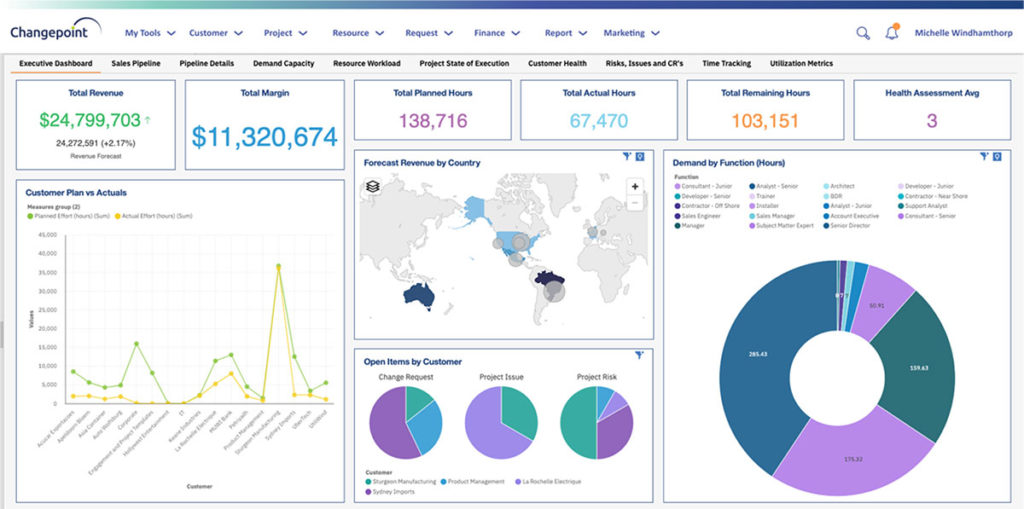
Screenshot of End-to-end view to drive financially successful customer-facing projects.Screenshot of A flexible approach to tracking elaborate contractual terms and conditions.Screenshot of Quote-to-cash success with structured processes.Screenshot of Build project rigor and standardization for services delivery.Screenshot of Improve resource utilization on the work that best meets the needs of customers.Screenshot of Ensure process adherence to drive financial success.