Overview
ProductRatingMost Used ByProduct SummaryStarting Price
Lightning Tools Lightning Conductor
Score 9.0 out of 10
Mid-Size Companies (51-1,000 employees)
The Lightning Conductor is a content aggregation tool for Microsoft SharePoint Online and Microsoft Teams. Users can build rich, modern content reports based upon SharePoint lists, SharePoint Search, Microsoft Graph or Microsoft 365 Groups. Content can be aggregated from lists and libraries, and other applications such as Planner, To Do, OneDrive, and Teams.
$2,200
per year per installation
ProofHub
Score 9.2 out of 10
N/A
ProofHub is a SaaS based project management software from ProofHub LLC in Walnut, CA. It is an online project management and collaboration tool that comes with integrated Group chat, quick Discussions on projects, Workflows and boards, Project reports, among other features. Document (e.g. Excel, Powerpoint) uploading and sharing is supported, along with an integrated an Online proofing tool to aid in image and document review. ProofHub aims to enable teams to…
$50
per month
Wrike
Score 8.6 out of 10
Mid-Size Companies (51-1,000 employees)
Wrike is a project management and collaboration software. This solution connects tasks, discussions, and emails to the user’s project plan. Wrike is optimized for agile workflows and aims to help resolve data silos, poor visibility into work status, and missed deadlines and project failures.
$240
per year 2 users (minimum)
Pricing
Lightning Tools Lightning ConductorProofHubWrike
Editions & Modules
Lightning Conductor WSP
From 1950
per year One WFE
Lightning Conductor Enterprise Edition
POA
per year Four or more WFE
Lightning Conductor Online
From 2200
per year per installation
Lightning Conductor Plus (Includes Data Viewer)
From 2500
per year per installation
Lightning Conductor Online Enterprise Edition (>10,000 users)
POA
per year per installation
Essential
$45
per month (billed annually) unlimited users
Ultimate Control
$89
per month (billed annually) unlimited users
Large Team
$279
per month (billed annually) unlimited users
Wrike Free
$0
per month per user
Wrike Team
$10
per month (billed annually) per user (2-15 users)
Wrike Business
$25
per month (billed annually) per user (5-200 users)
Apex
Request a quote
per month per user
Pinnacle
Request a quote
per month per user
Offerings
Pricing Offerings
Lightning Tools Lightning ConductorProofHubWrike
Free Trial
YesYesYes
Free/Freemium Version
NoNoYes
Premium Consulting/Integration Services
YesNoYes
Entry-level Setup FeeNo setup feeNo setup feeNo setup fee
Additional DetailsPrices stated are minimum per installation for "stock" products. $2.20 per user/year on top of base price. Enterprise editions can be amended to suit business needs if deemed necessary, additional costs incurred and TBD. All packages include free technical support. Free upgrades available to latest versions of tool as they are released. (online version)Every premium plan begins with a 14-day trial period.
More Pricing Information
Community Pulse
Lightning Tools Lightning ConductorProofHubWrike
Considered Multiple Products
Lightning Tools Lightning Conductor

No answer on this topic

ProofHub
Chose ProofHub
Unfortunately ProofHub did not compare very well. The pricing model is fantastic and I think the approach the software takes to creative project management isn't necessarily bad, it's just others do it better. For example, Wrike has very powerful and easy-to-manage form …
Wrike
Chose Wrike
In many ways it is similar and somewhat of a clone of Wrike however the system tended to be significantly slower when being used by our team. Not sure if that was related to our connection internally or not but when we switched to Wrike it worked significantly faster but we …
Features
Lightning Tools Lightning ConductorProofHubWrike
Project Management
Comparison of Project Management features of Product A and Product B
Lightning Tools Lightning Conductor
8.6
2 Ratings
10% above category average
ProofHub
10.0
5 Ratings
26% above category average
Wrike
8.0
914 Ratings
3% above category average
Task Management8.82 Ratings10.05 Ratings9.1905 Ratings
Search8.42 Ratings00 Ratings00 Ratings
Resource Management00 Ratings10.05 Ratings7.8777 Ratings
Gantt Charts00 Ratings10.05 Ratings7.9635 Ratings
Scheduling00 Ratings10.05 Ratings8.4791 Ratings
Workflow Automation00 Ratings10.05 Ratings7.9782 Ratings
Team Collaboration00 Ratings10.05 Ratings8.6905 Ratings
Support for Agile Methodology00 Ratings10.05 Ratings7.7503 Ratings
Document Management00 Ratings10.05 Ratings7.6761 Ratings
Email integration00 Ratings10.05 Ratings7.8682 Ratings
Mobile Access00 Ratings10.05 Ratings7.9658 Ratings
Timesheet Tracking00 Ratings10.05 Ratings7.7427 Ratings
Support for Waterfall Methodology00 Ratings00 Ratings7.9452 Ratings
Change request and Case Management00 Ratings00 Ratings7.723 Ratings
Budget and Expense Management00 Ratings00 Ratings7.6325 Ratings
Professional Services Automation
Comparison of Professional Services Automation features of Product A and Product B
Lightning Tools Lightning Conductor
-
Ratings
ProofHub
10.0
3 Ratings
25% above category average
Wrike
7.8
333 Ratings
1% above category average
Quotes/estimates00 Ratings10.03 Ratings8.21 Ratings
Invoicing00 Ratings10.03 Ratings7.67 Ratings
Project & financial reporting00 Ratings10.03 Ratings7.7328 Ratings
Integration with accounting software00 Ratings10.03 Ratings7.9197 Ratings
Best Alternatives
Lightning Tools Lightning ConductorProofHubWrike
Small Businesses
Stackby
Stackby
Score 8.9 out of 10
Stackby
Stackby
Score 8.9 out of 10
Stackby
Stackby
Score 8.9 out of 10
Medium-sized Companies
Troop Messenger
Troop Messenger
Score 9.8 out of 10
InEight
InEight
Score 8.3 out of 10
InEight
InEight
Score 8.3 out of 10
Enterprises
HCL Connections
HCL Connections
Score 9.0 out of 10
InEight
InEight
Score 8.3 out of 10
InEight
InEight
Score 8.3 out of 10
All AlternativesView all alternativesView all alternativesView all alternatives
User Ratings
Lightning Tools Lightning ConductorProofHubWrike
Likelihood to Recommend
9.0
(4 ratings)
10.0
(9 ratings)
8.5
(888 ratings)
Likelihood to Renew
9.1
(1 ratings)
8.8
(4 ratings)
8.5
(103 ratings)
Usability
-
(0 ratings)
10.0
(1 ratings)
8.2
(225 ratings)
Availability
-
(0 ratings)
-
(0 ratings)
8.0
(23 ratings)
Performance
-
(0 ratings)
-
(0 ratings)
6.4
(20 ratings)
Support Rating
9.1
(1 ratings)
7.4
(2 ratings)
7.4
(90 ratings)
In-Person Training
-
(0 ratings)
-
(0 ratings)
8.2
(5 ratings)
Online Training
-
(0 ratings)
-
(0 ratings)
8.2
(13 ratings)
Implementation Rating
-
(0 ratings)
-
(0 ratings)
7.7
(32 ratings)
Configurability
-
(0 ratings)
-
(0 ratings)
8.3
(12 ratings)
Contract Terms and Pricing Model
-
(0 ratings)
-
(0 ratings)
7.3
(4 ratings)
Ease of integration
-
(0 ratings)
-
(0 ratings)
6.9
(7 ratings)
Product Scalability
-
(0 ratings)
-
(0 ratings)
8.0
(14 ratings)
Professional Services
-
(0 ratings)
-
(0 ratings)
6.7
(3 ratings)
Vendor post-sale
-
(0 ratings)
-
(0 ratings)
9.0
(7 ratings)
Vendor pre-sale
-
(0 ratings)
-
(0 ratings)
6.6
(8 ratings)
User Testimonials
Lightning Tools Lightning ConductorProofHubWrike
Likelihood to Recommend
Lightning Tools
Having experience of SharePoint On Premise and also SharePoint Online, there isn't an out of the box app/webpart that enables you to 'roll up content' from a variety of source's (in my case SP Lists, but there are many other data sources it works with) across site collections with an easy to use and intuitive interface which is what Lightning tools excels at.
Read full review
ProofHub
It suits well for those businesses who want to operate on a global level without investing too much over creating infrastructure. A business can easily reach out to various clients, customers, partners and other stakeholders and communicate and collaborate with them in a fast and transparent manner and can effectively tap any opportunities coming its way. Such opportunities if
properly implemented can lead to gains for the parties involved.
Read full review
Wrike
I believe it's well suited if you have multiple jobs/projects that you need to keep organized. We work with multiple job types from print/creative to web, copy and digital ads so it helps us stay organized. I don't think it would be suitable for a company that doesn't have a lot of jobs to manage. We average over 1,200 requests a year.
Read full review
Pros
Lightning Tools
  • Aggregate documents across SharePoint site & libraries
  • Filtering for owner/person responsible & due dates
  • Ease of end-user filtering on columns
  • Color-coding & other formatting
Read full review
ProofHub
  • The obvious, proofing! We need something in-house that can do this instead of hiring one person for this job. Each person on our marketing team knows how to use it.
  • Organizes team projects in a friendly way.
Read full review
Wrike
  • Excellent dashboards that are easy to use and give amazing insights.
  • User friendly interface that is also easy to interact with.
  • Lot of integrations.
  • Robust project and task management features.
  • Facilitate seamless team collaboration and communication.
  • Highly customizable and multiple project views.
Read full review
Cons
Lightning Tools
  • Mobile Friendly
  • Calendar/Gantt views
  • Complex/Custom Logic
Read full review
ProofHub
  • Proofhub can improve a bit in areas of helping people customize their accounts a bit more. That makes managing work even more easier, when you have things just the way you want them to be.
Read full review
Wrike
  • Email alerts sometimes send too slowly.
  • If you put a project on hold, it can be hard to find it once you are ready to return to it.
  • Sometimes there are too many steps/tasks and the main page can get cluttered.
Read full review
Likelihood to Renew
Lightning Tools
No answers on this topic
ProofHub
With an array of useful features available that solve all our work issues, each department has an access to it. Each one knows what’s going on with different teams. This makes collaboration easier, as different teams just need one tool to come together and get things done. I think this is a great product! it has really helped my company get MUCH better organized.
Read full review
Wrike
I wish that Wrike had more drag and drop functionality that would be connected to assignee and also I wish that the finish date of a task would update to the date where you checked completed. It does not do that. Also finishing a task doesn't move the start date of the next task it "protects your time in that way", but our management team wants us to quickly see what we have down the pipeline rather than having to scroll down the list of upcoming tasks.
Read full review
Usability
Lightning Tools
No answers on this topic
ProofHub
It's convenient, simple, and clear.
Read full review
Wrike
It does take some time and work to really understand and use it properly, but I think the accessibility to help and documentation make that completely feasible. Once you know how to use it, I find it to be very user-friendly, and have very few complaints.
Read full review
Reliability and Availability
Lightning Tools
No answers on this topic
ProofHub
No answers on this topic
Wrike
Over two years of (almost) daily usage without outages. Don't remember any errors. I give it 9 only because some Wrike plugins (for online document edit) are based on NPAPI architecture. These types of plugins are being phased out in new browsers, and NPAPI plugins are disabled by default in recent versions of Chrome so you have to do some browser adjustments when you switch browsers or move to another computer.
Read full review
Performance
Lightning Tools
No answers on this topic
ProofHub
No answers on this topic
Wrike
Wrike tasks loads fine, but I hate clicking files and wait for a bit of time since it is powerpoint or word, Wrike assumes I want to open those on Wrike. My suggestion is to link it to office 365 so we do not need Wrike based decoder for PPTX and DOCX
Read full review
Support Rating
Lightning Tools
The Lightning Tools support team responds quickly, and team members are very friendly and helpful.
Read full review
ProofHub
Great support website and had reps follow up multiple times in our trial process. Getting started was very straightforward and adding people is easy too.
Read full review
Wrike
During my learning phase with Wrike, I initially struggled with setting up automation rules and request forms. However, Wrike support was always my go-to, resolving issues within seconds or minutes. Their assistance made the learning process much easier. My best experience was receiving step-by-step screenshots to follow, with the support team on standby until I was completely satisfied.
Read full review
In-Person Training
Lightning Tools
No answers on this topic
ProofHub
No answers on this topic
Wrike
We had staff in person provide some training
Read full review
Online Training
Lightning Tools
No answers on this topic
ProofHub
No answers on this topic
Wrike
I love the Wrike training options. Wrike Discover has tons of courses, learning plans, certifications, etc. This is an area where Wrike definitely shines! I wish these resources were more in your face for new people, because it seems like a lot of coworkers didn't know all of this training was available to them.
Read full review
Implementation Rating
Lightning Tools
No answers on this topic
ProofHub
No answers on this topic
Wrike
There are a lot of bells and whistles in Wrike, and not all of it is easy or intuitive to understand once it's plopped in your lap. It's easier when there are a few choice people who understand Wrike as a platform and articulate it in such a way where it makes it easy to pass it along to others in the group
Read full review
Alternatives Considered
Lightning Tools
I haven't found another product to compare this one to. Only in SharePoint Online which has a similar App 'Highlight Webpart' ... it's far too complicated to set up and requires learning yet another language and exporting and importing via PowerShell to get any real results that would be useful.
Read full review
ProofHub
We used Basecamp in the past, but we did encounter some problems while working with it. But these concerns have been better addressed in ProofHub. It has a simple interface which is so easy to operate and this was not the case in Basecamp. ProofHub lets us quickly chat with our team members over various work matters through its inbuilt chat feature and resolve them fast while Basecamp provides this feature through a third-party tool which added to our expenses and it was not a very convenient affair. ProofHub has got an inbuilt proofing tool which allows us to get quality feedback over designs instantly saving our time and costs, whereas Basecamp enables proofing through a third party tool which again was not convenient for us. ProofHub’s casper mode feature helps us to protect privacy and secrecy over confidential issues but Basecamp lacks such an important feature. So ProofHub has more to offer and better too in comparison to Basecamp. (answer to Describe how ProofHub stacks up against them and why you selected ProofHub.
Read full review
Wrike
Jira did not at all help us get our work done as content creators. I think that was because Jira wasn't quite right for our uses. Wrike fits our needs so much better. I can't tell you enough the relief I felt when we adopted Wrike and I never had to use Jira again.
Read full review
Contract Terms and Pricing Model
Lightning Tools
No answers on this topic
ProofHub
No answers on this topic
Wrike
company purchase
Read full review
Scalability
Lightning Tools
No answers on this topic
ProofHub
No answers on this topic
Wrike
The sky is the limit for what can be done in Wrike. We started with 1 use case and within 5 months we migrated several key business practices over to Wrike because they were easier to manage. Use cases so far: process improvement, management review, corrective actions, maintenance requests, month-end financial closing, and document management. As we grow, it's easy to imagine putting even more into Wrike where it becomes a cornerstone for how we do business
Read full review
Professional Services
Lightning Tools
No answers on this topic
ProofHub
No answers on this topic
Wrike
I do not use professional services.
Read full review
Return on Investment
Lightning Tools
  • Policies easier to portray
Read full review
ProofHub
  • Proofhub has a great impact on our ROI. Due to a systematic approach of handling each clients’ project, we have been able to double the number of clients we had prior to signing up for Proofhub.
Read full review
Wrike
  • Different teams (e.g., contracting, compliance, provider relations) can view updates in real time, comment directly on tasks, and escalate items when needed.
  • Wrike allows us to template the contracting process (from intake to signature) to ensure consistency across payers and reduce administrative overhead.
  • Leadership can see the status of negotiations at a glance, identify bottlenecks, and prioritize resources accordingly.
Read full review
ScreenShots

Lightning Tools Lightning Conductor Screenshots

Screenshot of MODERN SHAREPOINT LIST ROLLUP
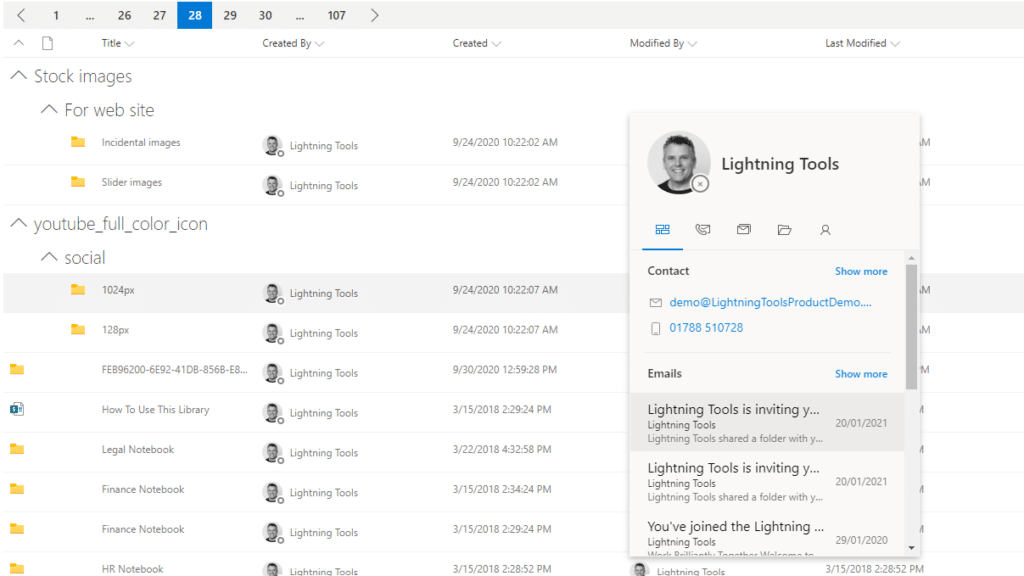
The Lightning Conductor is a SharePoint Content Aggregator that can be configured quickly by business users. The Lightning Conductor can be used to aggregate content from SharePoint Lists such as Tasks, Document Libraries, Contact Lists, and Custom Lists making it easy to view content in one place even if it is distributed across many sites and site collections. Key data can be highlighted using conditional formatting and data-bars as shown. Content from Search and Microsoft Graph can also be aggregated with the Lightning Conductor.Screenshot of CONTENT AGGREGATION WITHIN MICROSOFT TEAMS
The Lightning Conductor Web Part can be used within Microsoft SharePoint or Microsoft Teams. Even if content is stored within SharePoint sites, it is useful to have aggregated Documents, Tasks, Announcements, Calendars or Custom Lists from multiple sites displayed in a single handy view in Microsoft Teams. The Lightning Conductor can be added as a Teams Tab in any Microsoft Teams Channel.Screenshot of BUILDING REPORTS ON MICROSOFT GRAPH
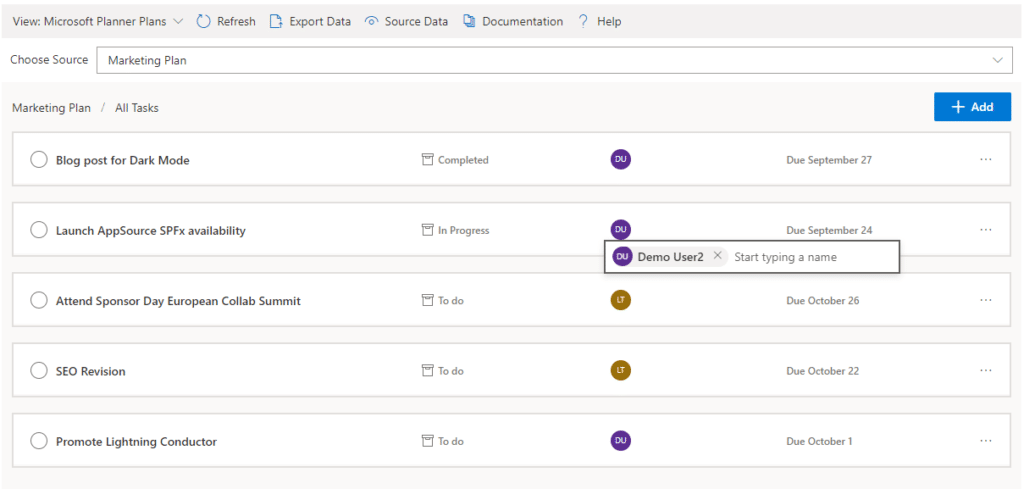
The Lightning Conductor can be used (without code) to aggregate content from Microsoft Graph as well as Search and SharePoint Lists. This example displays Microsoft Planner Plans and Microsoft Planner Tasks where users can Add new Tasks, Assign Users to Planner Tasks, Delete Tasks, and Complete Tasks. The same can be performed on Microsoft To Do items and displayed within Modern SharePoint pages or Microsoft Teams Tabs. The Lighting Conductor can also contain multiple views of content, making it ideal to display all of your tasks from SharePoint Task lists, Microsoft To Do and Microsoft Planner in a single web part or Teams Tab.

*Microsoft Graph Reports are only available for SharePoint Online and not SharePoint 2019.Screenshot of BUILDING REPORTS ON MICROSOFT 365 GROUPS
Powered by Microsoft Graph, the Microsoft 365 Group Rollup Provider enables users to aggregate content by browsing and selecting Microsoft 365 Groups. Within Microsoft 365 Groups, you’ll be able to select entities such as Drive Items, Owners, Members, Planner Plans, Planner Tasks, Events, Posts,  Sites, Lists, and Calendars.

*Microsoft Graph Reports are only available for SharePoint Online and not SharePoint 2019.Screenshot of AGGREGATING USING SEARCH
When performance is critical, search can be used for rollups. The Lightning Conductor offers three data source configurations to get to content. Object Model (Real Time Aggregation from SharePoint Lists), Microsoft Graph (Aggregation from Graph Entities such as Planner, OneDrive, Outlook), and Search. The Search Data Source enables the aggregation of content from large SharePoint lists and libraries when performance is critical. Thousands of documents can be displayed in under a second using Search.Screenshot of HIGHLIGHTING KEY BUSINESS DATA WITHIN VIEWS
End users and Site Owners can highlight the data that is important to them, the data that they need to prioritize. Using conditional formatting, data bars, and icons, conditions can be configured to highlight the data that is most important. Icons and Data Bars can be any color or size desired. Examples include highlighting High Priority tasks, Showing data bars for the completion progress of Tasks, or indicating which tasks are assigned to any particular user.

ProofHub Screenshots

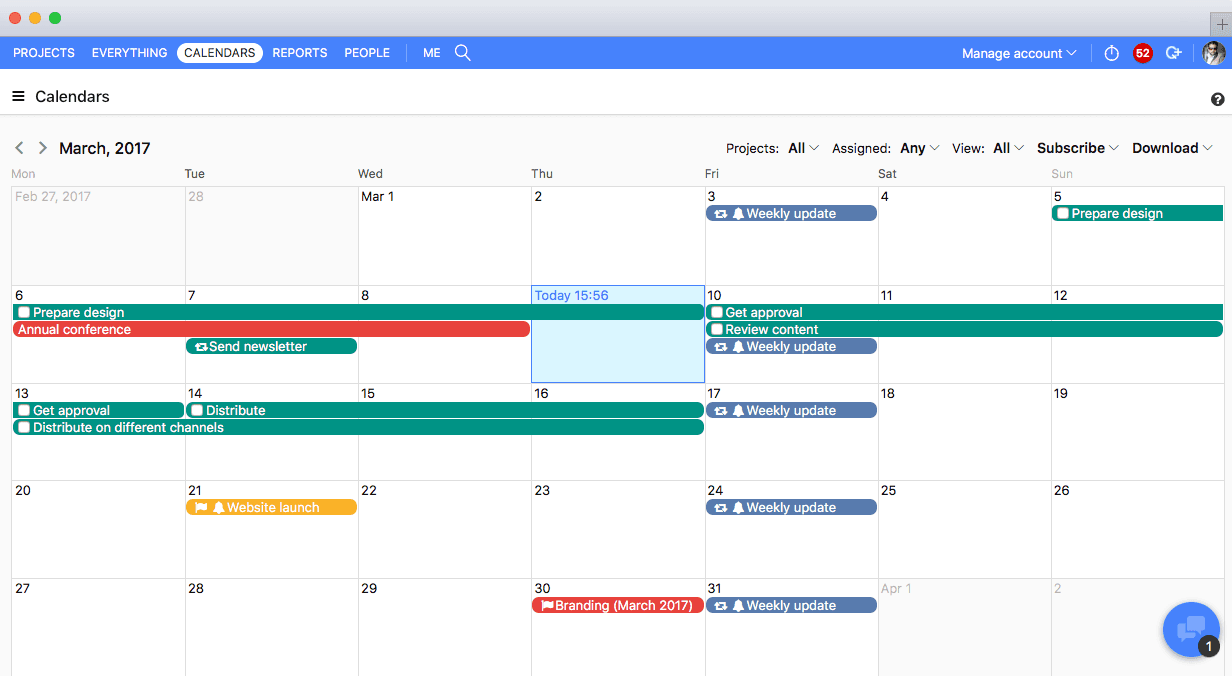
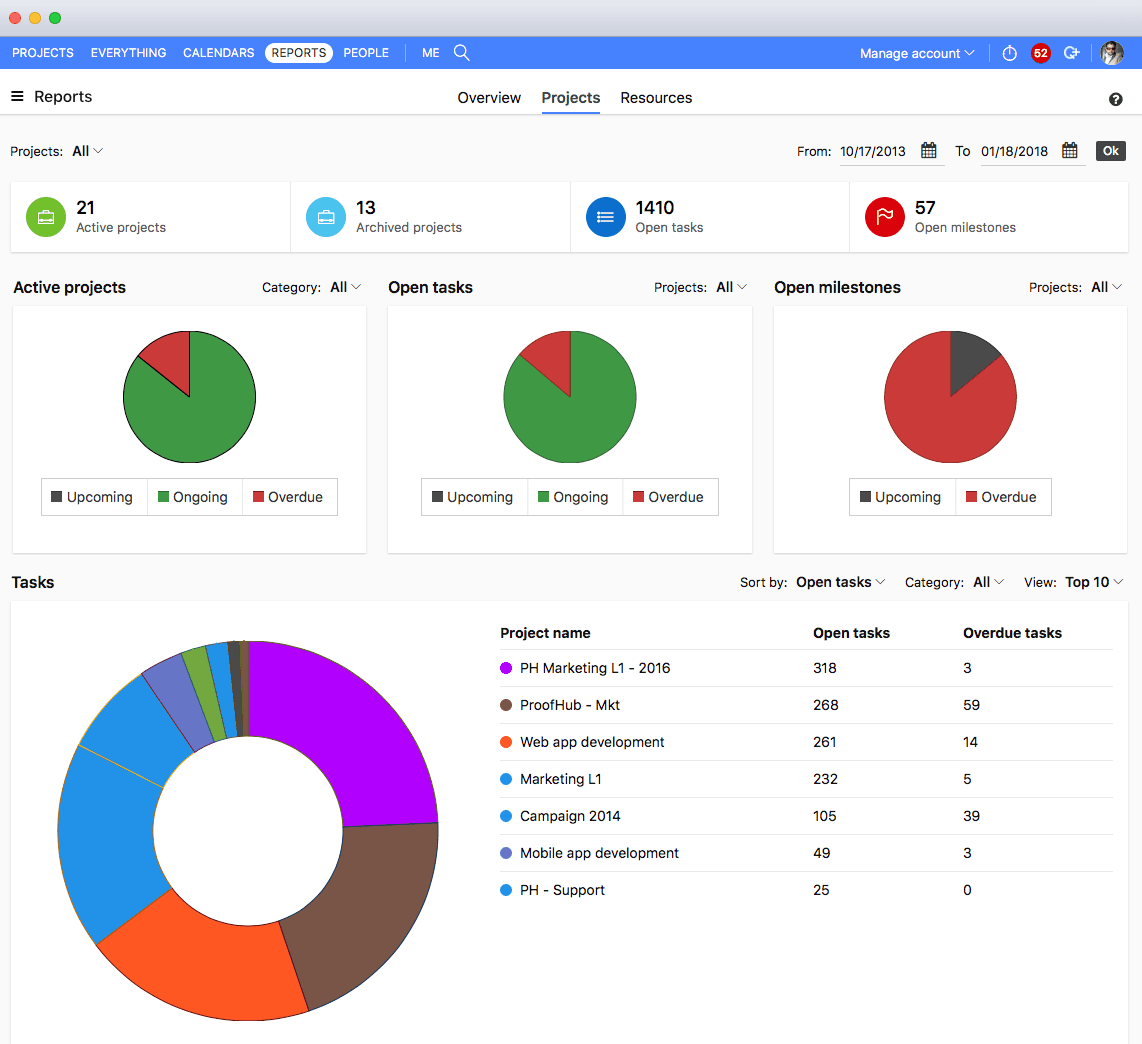
Screenshot of All devicesScreenshot of ProofHub CalendarScreenshot of ProofHub Gantt ChartScreenshot of ProofHub ReportsScreenshot of ProofHub Workflow and  BoardsScreenshot of ProofHub Overview

Wrike Screenshots

Screenshot of DashboardsScreenshot of DashboardsScreenshot of DashboardsScreenshot of DashboardsScreenshot of Space workflowsScreenshot of Space workflows