ClickUp vs. LiquidPlanner

Overview
ProductRatingMost Used ByProduct SummaryStarting Price
ClickUp
Score 8.7 out of 10
Small Businesses (1-50 employees)
ClickUp is a productivity platform that brings together work apps, data, and workflows. Also presented as a Converged AI Workspace, ClickUp eliminates work sprawl to provide context and a single place for humans and agents to work together. The platform currently boasts over 20 million users worldwide. ClickUp Brain² is deeply embedded into the workspace, offering conversational intake for project scoping and autonomous task generation. It can transform brainstorming docs…
$10
per month per user
LiquidPlanner
Score 8.3 out of 10
Mid-Size Companies (51-1,000 employees)
LiquidPlanner is a cloud based predictive project management solution. Some key features include: Dynamic Timeline View, Workload View, and Real-Time Activity Stream.
$0
per month per user
Pricing
ClickUpLiquidPlanner
Editions & Modules
Unlimited
$10
per month per user
Business
$19
per month per user
Enterprise
Custom
Free
$0
per month per user
Essentials
$15.00
per month per user
Professional
$25
per month per user
Ultimate
$35
per month per user
Enterprise
CALL FOR VOLUME PRICING
Offerings
Pricing Offerings
ClickUpLiquidPlanner
Free Trial
YesYes
Free/Freemium Version
YesYes
Premium Consulting/Integration Services
NoNo
Entry-level Setup FeeNo setup feeNo setup fee
Additional DetailsDiscount available for annual billing.
More Pricing Information
Community Pulse
ClickUpLiquidPlanner
Considered Both Products
ClickUp
Chose ClickUp
I haven't used Asana very much at all but I wasn't any more impressed with it than ClickUp. However, I wasn't in it long enough to customize it to my liking so that could have been why.
Chose ClickUp
ClickUp is more intuitive than other tools and has more features that assist with processes.

O ClickUp é mais intuitivo do que outras ferramentas e possui mais recursos que auxiliam nos processos.
Chose ClickUp
ClickUp has many more features and is also much better visually, furthermore it allows for integrations with other applications.

ClickUP tiene muchas más funciones y además es mucho mejor visualmente, además permite hacer integraciones con otras aplicaciones.
Chose ClickUp
ClickUp is way more robust than its competitors. Smartsheet is more of a simple spreadsheet-like tool. Asana has nowhere near the customizability. And Trello is too simple. ClickUp is like a mashup of all the PMIS tools out there, combining all of their features into a …
Chose ClickUp
ClickUp is the best tool to use for teams that are scaling up because it comes with a lot of tools that you can eliminate out of the box and their advanced features (so many options for views, templates, custom fields) are unlike any other tool that I have used before.
Chose ClickUp
ClickUp is a powerhouse product that is only limited by your imagination. It has become one of our go to applications that is a jack of all trades.
Chose ClickUp
ClickUp had the best and easiest user segmentation. Asana is a bit heavy to navigate sometimes. I also prefer the ClickUp List Views over the Monday.com list views.
Chose ClickUp
Hard to describe it, but the way it connects everything so much better, that they layout is significantly easier to use, and the capabilities are significantly higher. Cleaner and easier to use than SalesForce, both in capability and in the way the workspace UX is presented is …
Chose ClickUp
I've mentioned most of my thoughts in other comments, but in each of those listed softwares, I only get one main feature. In ClickUp, I consolidate all of the above into one. Pretty incredible.
Chose ClickUp
I have never been the decision maker on software like this. They are always decided by someone else before I start working for a company. ClickUp seems like the one with the most features though. My co-worker especially loves it and is the one who insisted we use ClickUp over …
Chose ClickUp
ClickUp got everything connected in one
Chose ClickUp
For me the customizability of ClickUp was unmatched. It really felt like there was no limit on what I could use it for and how I could organize things.

For specific features, their Docs are really my favorite part. The customizability and ability to directly link to related …
Chose ClickUp
Mejor integracion y visualizacion de tareas, la contabilidad del tiempo por tareas/tickets es una de las partes mas robustas de ClickUp, la integration con gitlab es una ventaja y ayuda mucho a la organizacion del trabajo, la posibilidad de agrupar tareas por grupos o tipos …
Chose ClickUp
Purely automations and the ability to use the workspace with different custom fields.
Chose ClickUp
both are people using it for project management and product development and follow the agile teams across the teams to complete the things on time. But in ClickUp, it's all in one platform for all the daily tasks happening in the company, from onboarding to the completion of …
Chose ClickUp
Microsoft Teams is a good project however, there were also software glitches that became detrimental to our success. We tried working it out with the company but found that the product did not meet our needs. ClickUp does so much more and has fewer issues with glitches and …
Chose ClickUp
I used Salesforce at my last job and would recommend ClickUp if utilizing the product for more than just sales. My last company tried using Salesforce for a number of other actions, such as department project tracking, client documentation, and outbound communication which did …
Chose ClickUp
ClickUp offers more ways to set up a project. It's not just one or two ways - which makes it a bit more stealthy in its way to fit a variety of team sizes and project types. For us, having so many features within one tool makes it a no-brainer for our team.
Chose ClickUp
The main reason I initially chose ClickUp over all of the others was price. Because we are a small nonprofit, our funds for this were basically $0. So the robust free version of ClickUp really sold me. Once I got in there and worked with it, I realized just how valuable this …
Chose ClickUp
ClickUp has more features integrated and well organized. Especially the concept of having Spaces, folders and lists helps a lot in organizing the projects and each having its own workflows.
Chose ClickUp
Once I found ClickUp I migrated everything to it, I started with Trello and then went to Asana.

But ClickUp showed truly being the one tool to replace them all since the beginning.
Chose ClickUp
It stands out as more feature-rich and customizable, especially for handling multiple projects in one place.
LiquidPlanner
Chose LiquidPlanner
LiquidPlanner offers centralized tools to manage the requirements and objectives of each project, as well as the management of deliveries, monitoring, and team management. The tool integrates with Hubstaff and other platforms.
Chose LiquidPlanner
Wanted to try other products in the same group to evaluate which can better. Had heard good reviews from common friends so wanted to have data points for competitive analysis
Chose LiquidPlanner
Miro is a more versatile tool, but not quite made for planning and organizing. LiquidPlanner is very intuitive, fast to learn and easy to communicate. The added value of prioritizing tasks, personalized boards and gantt charts are really important during the planning and design …
Chose LiquidPlanner
Like LiquidPlanner, Monday.com is designed to plan our projects perfectly. Project management is easy and effective, they offer integrations with third-party software without any problem.
Chose LiquidPlanner
MS Project is more complicated to use, we needed a more simple solution that is based around collaboration, and MS Project wasn’t suitable for this and costs more.
Chose LiquidPlanner
We had a "homebrew" time track program previously. It did one thing and it did it well--track time spent on an individual tactic or project, and it was deployed across all departments. It did not, however, capture the conversations or the work that could shed light on where …
Chose LiquidPlanner
I have tried many project trackers, and in my opinion LiquidPlanner fits in somewhere in the middle of them. It's more powerful than some of the trackers I've used (such as Trello), but it's also more complicated and harder to navigate and collaborate with others on than some …
Chose LiquidPlanner
We use Teamwork for managing projects and love it for that, but we stick with LiquidPlanner for the high-level overview of our project workload, as well as for time-tracking (specifically for being able to bill out actuals). Teamwork and LiquidPlanner each have their merits; we …
Chose LiquidPlanner
We ruled out Microsoft Project because of its complexity, cost, and perception that is is more of a project manager's tool rather than a collaborative solution that anyone could use. We evaluated Clarizen quite rigorously alongside LiquidPlanner, but we selected LiquidPlanner …
Chose LiquidPlanner
LiquidPlanner is far more robust. Basecamp worked great for managing smaller projects, but LiquidPlanner was a great improvement as our company and project management needs grew.
Chose LiquidPlanner
LiquidPlanner beats all other project management software for these reasons:
  • Web based
  • Priority based
Chose LiquidPlanner
LiquidPlanner is not nearly as integrated and extensive as Project, but offered us a low-cost alternative for general project management functions and resource tracking.
Chose LiquidPlanner
MS Project was much more difficult to use for entering tasks. LiquidPlanner was more user-friendly.
MS SharePoint was not used for Gantt charts, but really excelled in document and data sharing between different teams.
Chose LiquidPlanner
LiquidPlanner is leaps and bounds ahead of NetSuite - at least for Project Management. It's much more user friendly and more pleasing on the eyes. Since NetSuite isn't a true project management software, the benefits far outweigh some of the negatives like limited reporting …
Features
ClickUpLiquidPlanner
Project Management
Comparison of Project Management features of Product A and Product B
ClickUp
8.4
Ratings
9% above category average
LiquidPlanner
8.1
Ratings
5% above category average
Task Management9.40 Ratings8.70 Ratings
Resource Management8.50 Ratings8.60 Ratings
Gantt Charts8.10 Ratings8.60 Ratings
Scheduling8.60 Ratings8.80 Ratings
Workflow Automation8.30 Ratings8.40 Ratings
Team Collaboration9.30 Ratings8.90 Ratings
Support for Agile Methodology8.70 Ratings7.70 Ratings
Support for Waterfall Methodology8.40 Ratings8.40 Ratings
Document Management8.00 Ratings9.90 Ratings
Email integration7.60 Ratings7.90 Ratings
Mobile Access7.40 Ratings4.80 Ratings
Timesheet Tracking8.20 Ratings7.20 Ratings
Budget and Expense Management00 Ratings7.60 Ratings
Professional Services Automation
Comparison of Professional Services Automation features of Product A and Product B
ClickUp
7.7
Ratings
0% below category average
LiquidPlanner
8.3
Ratings
7% above category average
Project & financial reporting7.70 Ratings8.40 Ratings
Quotes/estimates00 Ratings8.60 Ratings
Integration with accounting software00 Ratings7.90 Ratings
Best Alternatives
ClickUpLiquidPlanner
Small Businesses
Stackby
Stackby
Score 8.9 out of 10
Stackby
Stackby
Score 8.9 out of 10
Medium-sized Companies
InEight
InEight
Score 8.2 out of 10
InEight
InEight
Score 8.2 out of 10
Enterprises
InEight
InEight
Score 8.2 out of 10
InEight
InEight
Score 8.2 out of 10
All AlternativesView all alternativesView all alternatives
User Ratings
ClickUpLiquidPlanner
Likelihood to Recommend
8.8
(0 ratings)
8.5
(0 ratings)
Likelihood to Renew
9.3
(0 ratings)
4.4
(0 ratings)
Usability
8.5
(0 ratings)
10.0
(0 ratings)
Availability
9.5
(0 ratings)
-
(0 ratings)
Performance
8.0
(0 ratings)
-
(0 ratings)
Support Rating
9.4
(0 ratings)
9.0
(0 ratings)
Online Training
10.0
(0 ratings)
-
(0 ratings)
Implementation Rating
7.9
(0 ratings)
-
(0 ratings)
Configurability
8.0
(0 ratings)
-
(0 ratings)
Ease of integration
7.0
(0 ratings)
-
(0 ratings)
Product Scalability
8.9
(0 ratings)
-
(0 ratings)
Vendor post-sale
5.0
(0 ratings)
-
(0 ratings)
Vendor pre-sale
5.0
(0 ratings)
-
(0 ratings)
User Testimonials
ClickUpLiquidPlanner
Likelihood to Recommend
It has been great for all of my needs - tracking elaborate tasks/subtasks and their timelines, instructions, time spent, reporting on time, etc. I did try to use it for lesson planning and time tracking for homeschool and it got too hard to view and keep track of all the automations I had set up and if they were firing at the right times. But that's the only time I can think of where it didn't really work for what I needed!
Read full review
LiquidPlanner is amazing for any time of project management scenario where you have to manage several teams and details. Running a project through LiquidPlanner is so easy because it lets you break down the project into sections and folders and small tasks that you can assign to specific people. With a small to medium size team-- LiquidPlanner is amazing for organizing and tracking details. If you have a huge team or not a ton of details to track LiquidPlanner might not be right for you because it is a software that requires some good training to learn and has tons of functions that can be utilized so it seems better suited to be used by a smaller group looking to coordinate or for people who have lots of details that can be difficult to track.
Read full review
Pros
  • Customization is huge for us! We do not have the aspects of standard project management, so having the ability to customize basically everything in ClickUp is amazing.
  • An outstanding free version of the software! We are a small nonprofit organization that cannot afford the robust levels of other software, so having access to SO MUCH for free is incredible.
  • The layout and organization of tasks, Spaces, folders, etc. is perfect. I love how I can see which task all of my subtasks belong to on my dashboard. And the option to change colors and icons for everything also really appeals to my obsessive brain.
Read full review
  • Priority based planning. Every other planning software we've used relies on dates and therefore needs constant attention. Priority based planning means that the plan is always up to date.
  • Ease of use. LiquidPlanner has a very short learning curve. This is critical to getting team members to use it.
  • Forecasting. LiquidPlanner makes it very easy to run scenarios by simply dragging and dropping projects and reassigning resources.
  • Awesome Support. I get personal responses very fast. Usually within a couple hours. And, they listen and ask for more information.
Read full review
Cons
  • I would like to see when scheduling a task for someone, their available hours, as I am scheduling instead of having to go back to the workload view
  • I'd like easier UX and understanding of what all of the different levels of folders, lists, tasks, can do and what they should be used for
  • Notifications can be cleaned up
Read full review
  • LiquidPlanner's mobile app definitely needs some work. It doesn't display properly, having many things on the right hand side cut off. It doesn't update/refresh well. I can't imagine the mobile app will ever have the functionality of the Web version, but it needs to come a lot closer.
  • LiquidPlanner requires that everyone actively participate in order to maximize its benefit. However, it can be difficult for everyone to be on top of all of their responsibilities all of the time. Not sure on a solution, but it can be a lot to manage.
Read full review
Likelihood to Renew
It has been a game-changer in terms of project tracking, as animation is a demanding product that requires multiple layers of analysis, revisions, tracking, scheduling, etc. ClickUp simplifies many approvals as anyone can easily add items, and you can tag the people who need to look at them.
Read full review
We may not renew LiquidPlanner's contract, but only because my company has recently been acquired and we'll be adopting some of the software that they're using to standardize process. LiquidPlanner's development team releases new features pretty often, so it seems like the gaps and inefficiencies are slowly getting smaller/less frequent
Read full review
Usability
In general, I think the usability is probably great. The reason I didn't give it as high of a score is because at the last 2 companies I worked at, they each used different software. So I was already used to those. Learning their UI isn't hard, but always a little annoying to learn something new.
Read full review
Easy to learn and utilize. Can export charts and reports for sharing with colleagues.
Read full review
Reliability and Availability
For over a year ClickUp was unavailable to us just twice for a couple of hours. I would say for a system this big and working globally that was a minor issue. They managed to fix all the issues within a couple hours and then it was back up and running perfectly fine.
Read full review
No answers on this topic
Performance
The speed of ClickUp is average to be honest. This is one of the biggest flaws of the system, sometimes it's also lagging a little bit but we also have a lot of documents, lists etc. on our workspace. However, with the next version of ClickUp I've seen they are planning to increase the speed by almost 500%, probably by changing the technology, so I am more than looking forward to it.
Read full review
No answers on this topic
Support Rating
Support are genuinely helpful and really nice to deal with. I had a bug on my workspace that I’d been experiencing for a while. They looked into it for me and asked some questions. Once they found the issue and resolved it, they even filmed a video detailing how they’d fixed it. That level of support is fantastic.
Read full review
They have been great in trying to come up with creative solutions to help us do what we want to do with the platform. I would say their support has been exceptional because we have hit them with some complex requests.
Read full review
Online Training
There are multiple guides on literally all of the functions you can find within the system, therefore it's easy to learn anything you'd really like to use, starting from project and people management, down to Gantts, mind maps, time tracking, inviting Clients as guests to work with you on the projects and so much more.
Read full review
No answers on this topic
Implementation Rating
Start small. Don’t try to build the most elaborate plans first. Resist the urge to get into Gantt charts if no one is used to them. Just get work written, add dates and assignees, and start getting used to it. If you did not use a work management tool before, you need to be gracious with yourself about the fact that you likely do not have the muscle memory for working this way yet. But you will get there.
And leverage people who know it if possible. Look for ClickUp experts and vendors. They can really supercharge your effectiveness at building the tool out and speed up the process.
Read full review
No answers on this topic
Alternatives Considered
Hard to describe it, but the way it connects everything so much better, that they layout is significantly easier to use, and the capabilities are significantly higher. Cleaner and easier to use than SalesForce, both in capability and in the way the workspace UX is presented is far more usable, the features are more rich and flexible than Monday (as well as billing and feature access across plans is way better), and the list + doc + spaces structure is miles ahead of Notion in terms of structure, layout, access, and usability.
Read full review
We had a "homebrew" time track program previously. It did one thing and it did it well--track time spent on an individual tactic or project, and it was deployed across all departments. It did not, however, capture the conversations or the work that could shed light on where problems occurred or issues were encountered.
Read full review
Scalability
Scaling with ClickUp is superb. If you create a workflow best suited for your organization then it's all about creating new accounts and teaching the new employees the workflow you're using. It's that simple. There is no black magic when it comes to Clickup.
Read full review
No answers on this topic
Return on Investment
  • Allows us to meet from anywhere in the world.
  • Allow us to provide reports and updates via computer to leadership.
  • Leadership in our organization have praised IT for the use of ClickUp because the tool is exactly what was needed. Before, we were depending on spreadsheets to keep track of work.
  • ClickUp brings organizatins together in ways that other software has not. It provides everything we lacked and needed to get out organization up to the standard as other large universities.
Read full review
  • LiquidPlanner has improved everybody's visibility into tasks, decreasing the communication load required and increasing client communication and status updates, effectively increasing client satisfaction and likely helping to generate more business.
  • LiquidPlanner has improved our estimation and communication about changing estimates. Allowing us to keep a running estimate of the remaining work lets our account managers bill appropriately for overages ahead of time, preventing issues with customers who may not want to pay for work that was done.
  • LiquidPlanner sometimes takes time to navigate, find the right tasks, etc. and in this way, it may have added time to our day that we are not getting paid for. However, this is fairly negligible.
Read full review
ScreenShots

ClickUp Screenshots

Screenshot of Screenshot of Screenshot of Screenshot of Screenshot of

LiquidPlanner Screenshots

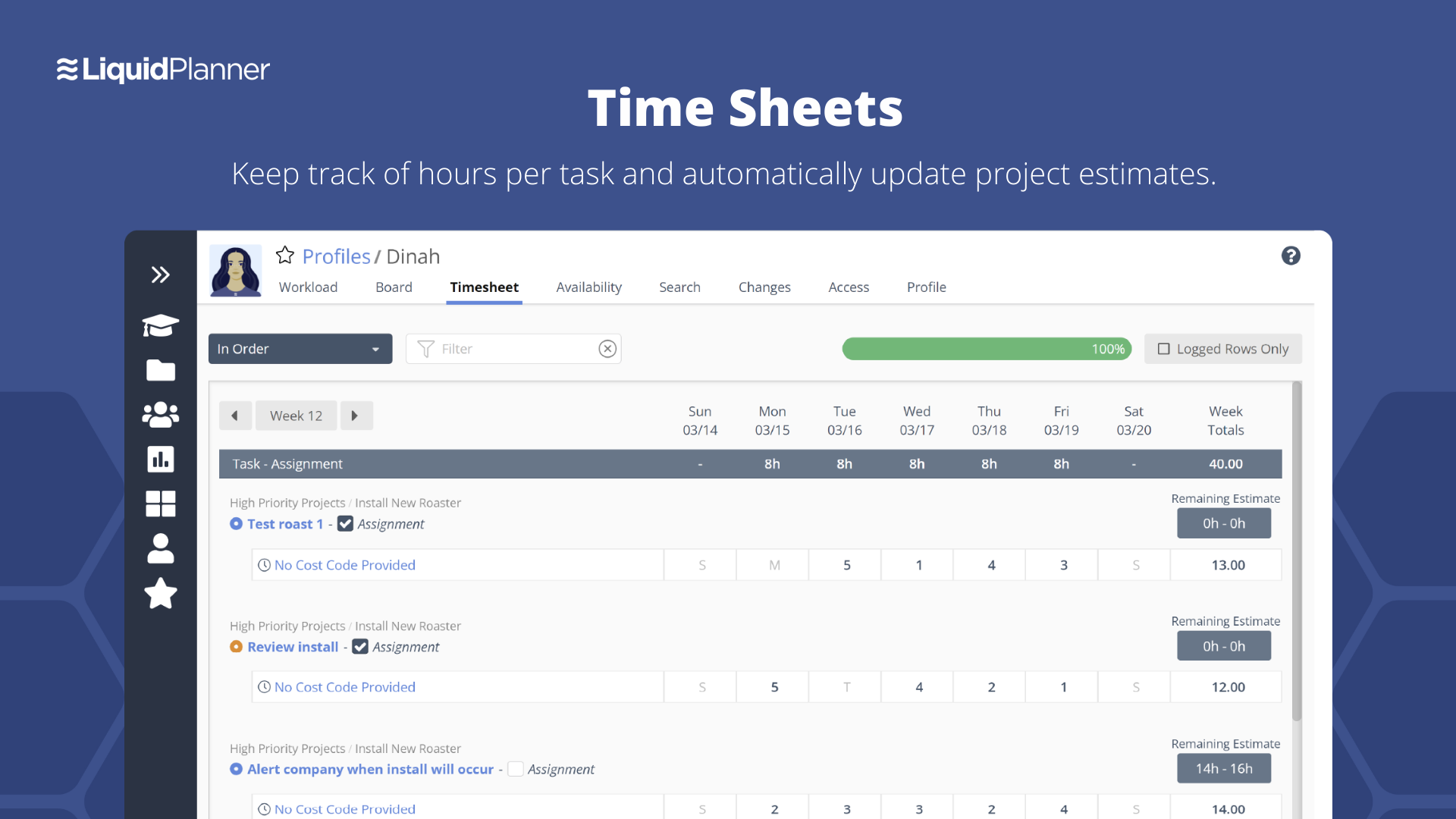
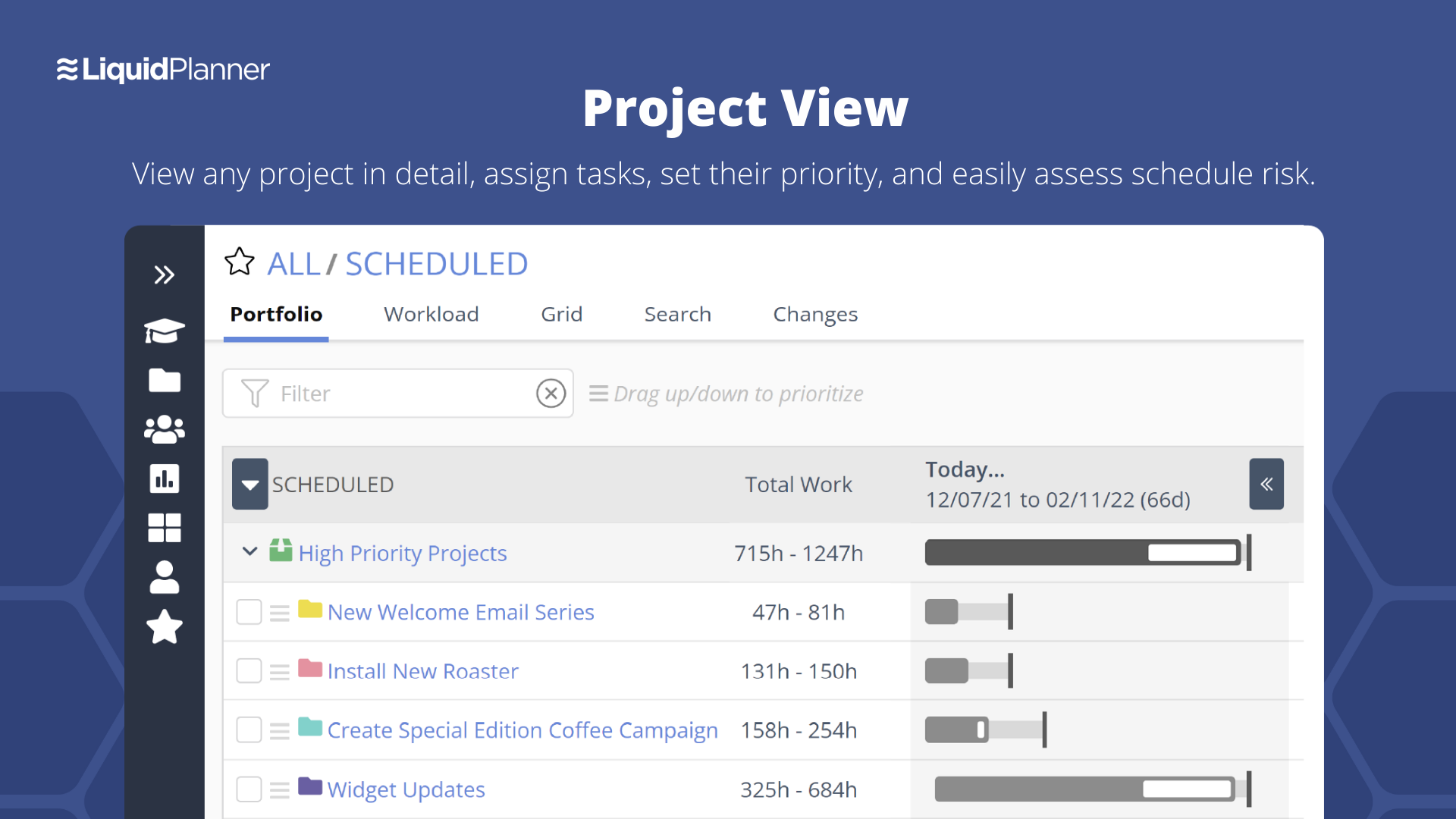
Screenshot of Project Dashboards allow users to build high-level views that help visualize data.Screenshot of Workload Views allow users to see an entire team's workload at once and make resource adjustments in stride.Screenshot of Time Sheets keep track of hours per task and automatically update project estimates.Screenshot of Project View allows users to view any project in detail, assign tasks, set their priority, and access schedule risk.Screenshot of My Work View is a personalized view of all work to always know what to work on next.