monday.com Work OS is an open platform designed so that anyone can create the tools they need to run all aspects of their work. It includes ready-made templates or the ability to customize any work solution ranging from sales pipelines to marketing campaigns, CRMs, and project tracking.
$36
per month (3 seats)
OpenAir PSA
Score 5.5 out of 10
N/A
NetSuite OpenAir is a cloud-based Professional Service Automation (PSA) product which includes capabilities around project management, resource management, project accounting, etc.
N/A
Syncro
Score 7.4 out of 10
N/A
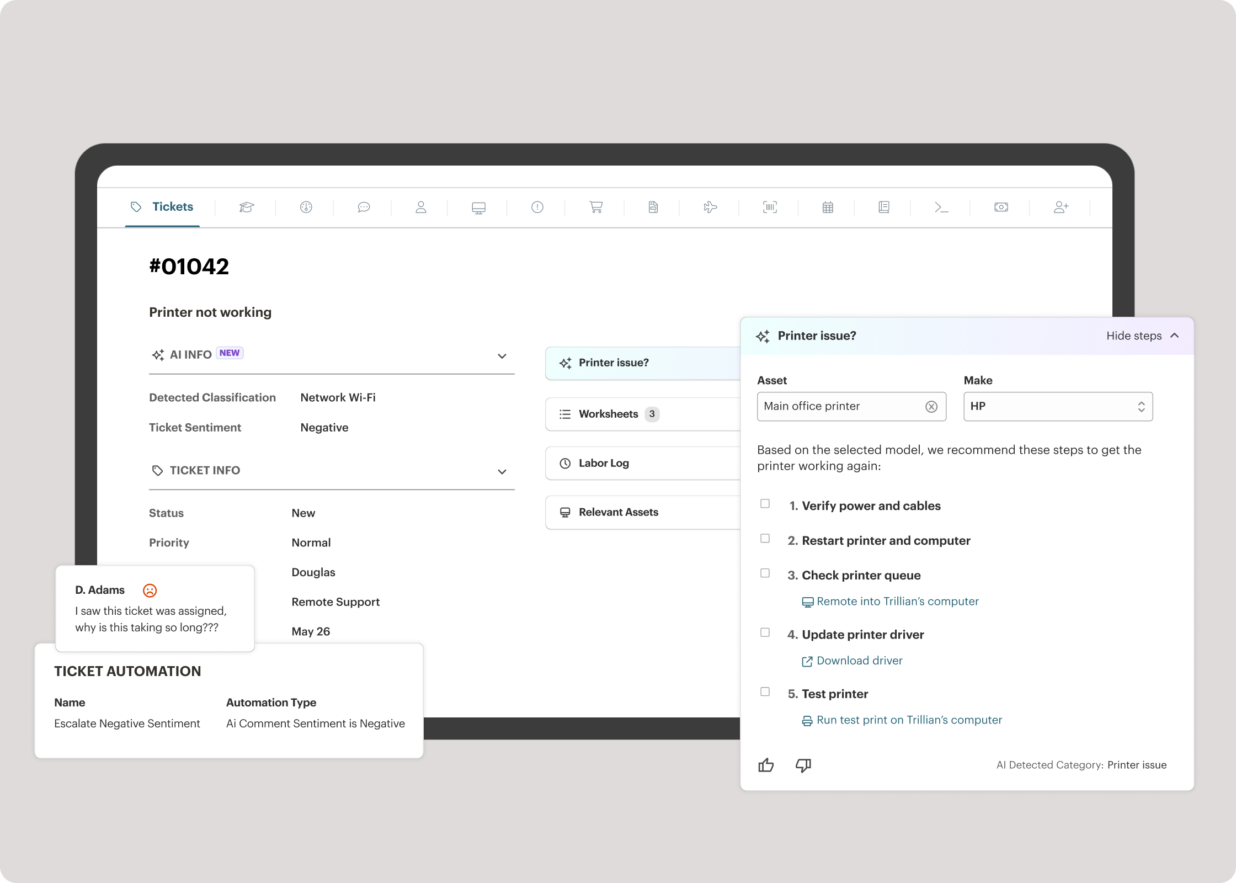
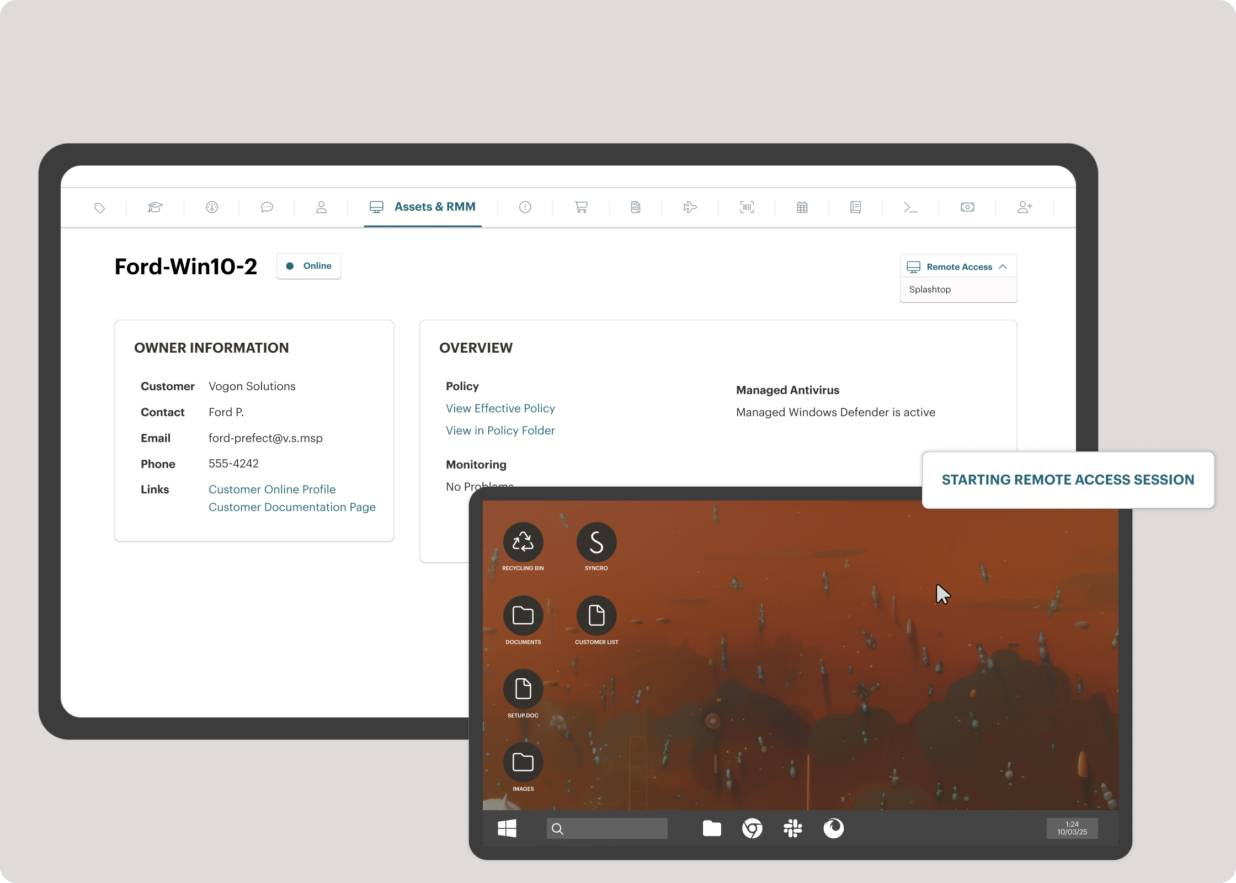
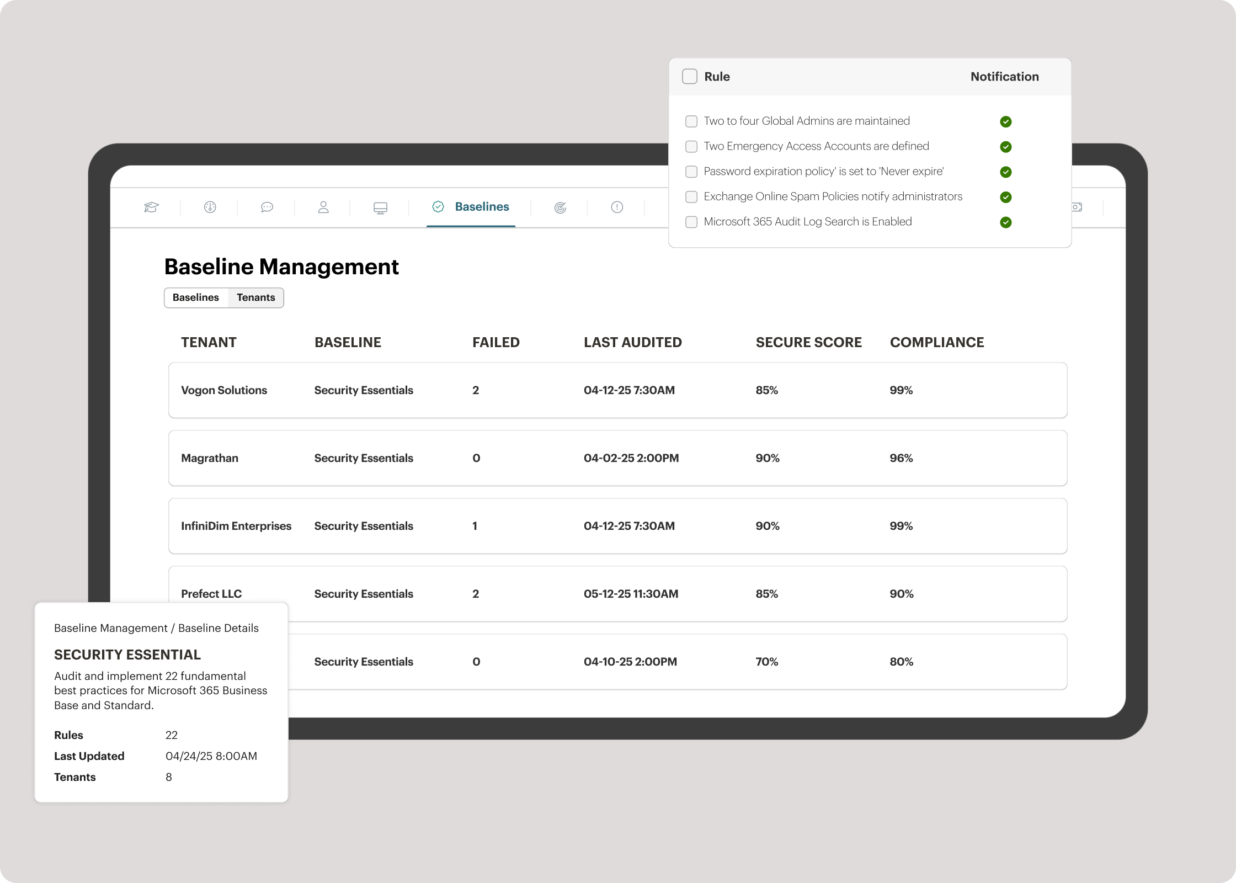
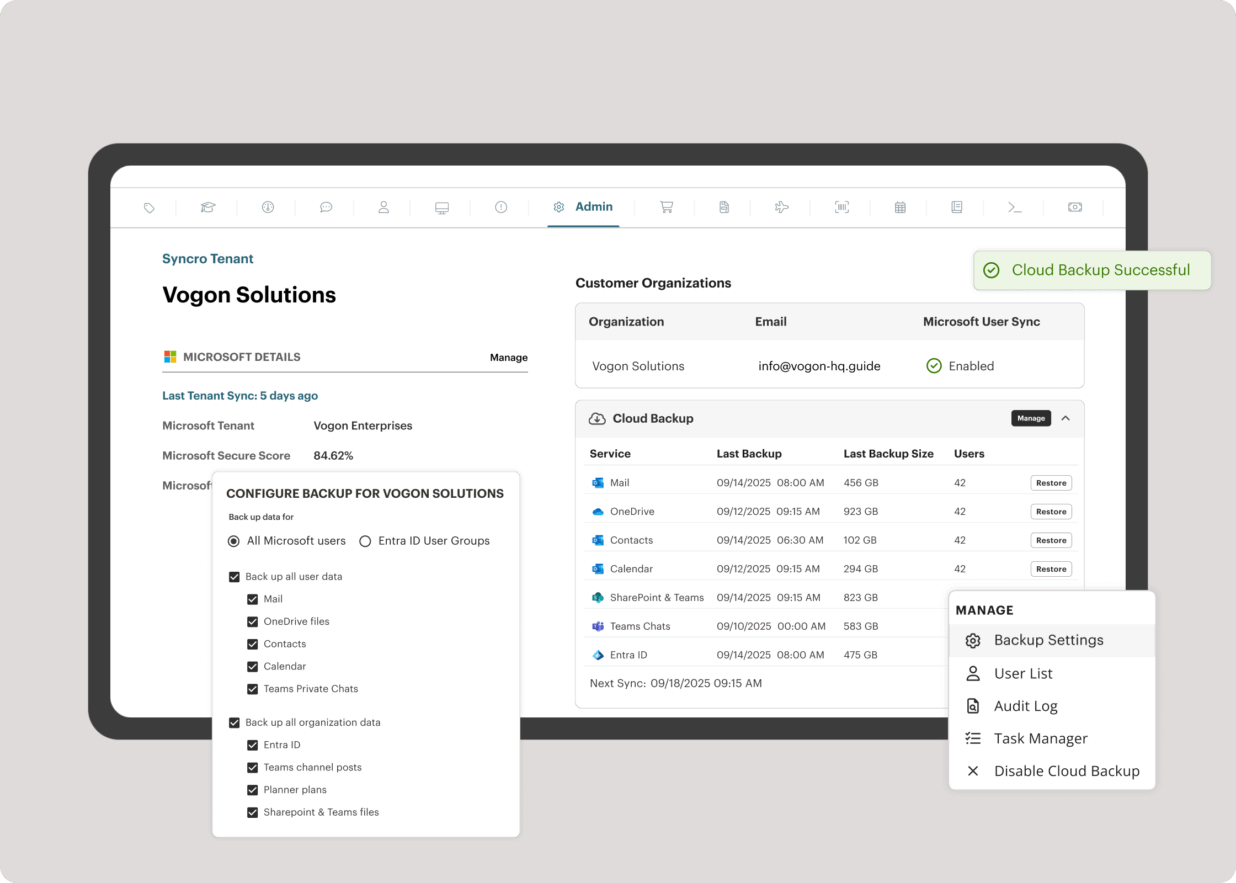
Syncro offers an Extended Monitoring and Management (XMM) platform for midsized MSPs and internal IT teams. The platform integrates RMM (endpoint management), professional services automation (PSA), and Microsoft 365 multi-tenant management to help organizations simplify operations, strengthen security, and scale.
The platform has a good deal of versatility and extensibility, but I do not feel it is well suited for anything too complex. More complexity seems to bog down performance and increase maintenance to keep everything humming. As much as possible, avoid creating too many bespoke workarounds that will end up creating tech debt. The platform seems to work best for more straightforward scenarios and smaller to mid-size companies. Pricing can be reasonable for specific teams, but can feel a little too pricey for company-wide usage. It has served us well for the early stages of our company, but we find ourselves offloading the more complex use cases to other apps specifically developed for those, and reducing to just those teams that are more deeply embedded in the functionality.
This product is well suited for an organization that is focused on client services, project delivery, time tracking, expense reporting, and revenue recognition. From a pure project management perspective, this product is not as feature rich as say Microsoft Project Server. For organizations that are looking for detailed complex project plan and resource management (along with resource leveling, etc.), this is probably not the best suited product
SyncroMSP is great for MSPs starting out or wanting to keep their costs low. Some RMM software will charge per install - and price breaks only available as your base grows to a significant number. As Syncro is a "per agent" cost, the costs for an MSP are (a) known and (b) easily to manage as the team grows. The third-party integration element is very useful for MSPs looking to be able to not only onsell additional services, but the management of these services is simple for anybody to use
I like summary of subitems, especially with subitasks as subitems and add item tracking for each subtask it can show total tracked in parent item. Similar with other columns, like numbers, status, date.
Dashboard features, Many kinds of dashboard view available, we can utilize on the basis of requirements.
monday.com workform is very powerful, easily share form link when submitted it will create line item in board with provided data.
monday.com automation is very helpful in order to automate steps with specific rules and easy setup.
monday.com also provides integrations in order to automate processes if need to integrate multiple app together. or need to transfer data between multiple apps.
Netsuite OpenAir PSA is highly configurable and has a large ecosystem of assets to work with.
Tasks are easily designed to automate processes in your business workflow.
OpenAir is designed in such a way that it can communicate and receive information from external systems without having to re-engineer your systems to make them work if you are following standard business practice.
I would like to see our company logo show up larger on the form feature.
I prefer the version of the form they have now instead of the new version for 2025. The current form shows the questions in bold font, and the new version does not. This may mean it could take our volunteers longer to get to the pertinent information on the form.
It would be nice if monday.com staff had monthly webinars showing how to use some features. such as, using formulas effectively.
Compared to QuickArrow, setting up reports to reflect the data accurately seemed to require a bit more consultant time and collaboration. Getting the numbers correct is essential, so budget extra time for this iniative. We also learned that certain calculations can not be displayed in the executive dashboards. Ask these questions upfront to ensure your dashboards are complete for your needs (again, working backwards in the preparation stages).
Compared to QuickArrow, NetSuite OpenAir PSA falls short in the resource management capabilities. UI, flexibility, and scheduling options all could be improved. This is on their roadmap, timeline yet to be defined. Scheduling is vitally important to our company and this is THE area where we feel is the applications weakest. However, the application does provide everything critical to scheduling and provided the elements we needed in order to be successful. We altered our scheduling process accordingly.
During our System Administration 3 day online training, when a question was asked about detailed functionality, sometimes the trainer would share..."Yes, OpenAir has a configuration for that. Just inquire with your consultant and they can flip that flag in your instance." The responsibility for obtaining these special application configurations was placed on the System Admin [in training] to ask and to take notes. If your company needs the application to work a certain way, speak up and ask your OA consultant. There seems to be MANY flags that can be flipped in the background to allow for the system to meet your needs. My complaint is that these are not published, rather made available if one inquires.
OpenAir is able to generate invoices directly and we strongly encourage using this feature to keep everything housed under one application. However, this did not work for our organization and we leveraged a financial integration. A bit of a pioneer integrating with Softrax -- the integration works well, however is quite fragile. We do receive appropriate support when needed, but would prefer the integration to be a bit more stable. We recommend integrating with their stated supported financial systems, as staying the course will likely net a more stable integration.
Teams involved in content creation, such as marketing or editorial teams, could use monday.com to manage the entire content lifecycle. Boards might track content ideas, assignments, drafts, reviews, approvals, and publication schedules, helping teams collaborate and keep content production on track.
It all depends. We are still looking at moving our consultants to Oracle PAC, in order to get our financial systems in line (we use Oracle Financials currently). We are feeling a lot of pain with integration and segmented systems.
Ultimately,it depends on how much pain is felt there. OpenAir has given us a path to follow on from QuickArrow. I foresee either moving onto Oracle PAC by end of calendar, or staying on OpenAir.
OpenAir to Oracle integration is not easy. From a reporting and process perspective, there’s been pain from being in different systems
I give monday.com a 10/10 because I almost never encounter any lag or connectivity issues despite all of the many templates, boards, and automations we have. As a matter of fact, I feel like the last issue I encountered was over a year ago... and I'm in monday.com every single work day. Not only is monday trustworthy, it is easy to find what I'm looking for... making the overall usability extremely hard to beat.
In this day and age I should not have to read a manual to understand a product. It should be intuitive to administrate and perform basic tasks. It feels like a ton of intelligence was poured into making OpenAir feature rich but no where near as much attention was given to the user experience.
Everything performs fairly well. Every now and then there are user errors where an employee will not click "ok" on a note they've created and simply exit out (I do wish that something was in place to prevent this, such as a pop "are you finished?")
monday.com only really care about accounts that have 20 seats or more. While this is great for monday.com, it pushes smaller organisations to evaluate alternatives. We rate monday.com highly in our organisation because key staff have already got good experience with the application and we know we will get to 20+ seats one day. But, till then the billing model and lack of permanent enterprise features is a dread.
As an admin, I've had more contact with OA support than most. I've found their response to tickets typically timely and helpful, however many of the responses to tickets are "we will file an enhancement request" and then I never hear about it again. So not terrible, but not a very fulfilling experience.
Very knowledgeable and able to articulate how other customers configured the solution to meet their needs as well as the best practices they recommended.
To have someone walk you thru the features and capabilities of Monday.com is priceless. Someone also coming along later in the contract to see if you are maximizing the program to suit your company needs is beyond helpful. The staff that have provided this training are fun, creative and very patient.
We did a 3 day online remote course back in April. NetSuite prefers training to occur before migration. We went over the functionality of tool and three months later we migrated. Personally, I didn’t find it that beneficial. Certain parts of it were beneficial as they applied to me – talked a lot about invoicing capabilities that didn’t apply to me. They also have knowledge base / e-learning assets, but I haven’t referred to them
We signed up for the accounts. Created the accounts. Ran the trial version and tested it live while we were running multiple projects and found that it was fitting our needs perfectly. When the trial ended and we were asked to purchase the full version, we did. We have found other ways to use it and it's a breeze.
It went fine. Everything came over the way we wanted. In addition to migrating the current projects we wanted to migrate historical data – did that seamlessly. The finished product looked pretty good – just needed to tweak – and they helped us with that
monday.com is cleaner, offers more customization and is easier to design out with a team project focus in mind. With the ability to automate steps as well, it is super easy to move tasks along, have stages auto-update and to go through my personal to-do list of tasks to get things done.
OpenAir accurately reflects changes in real-time as well as lends itself to see where a draw is at, when payment is expected and what percentage of the contract has been billed or approved to date. This helps with project billing and tracking as well as cash flow. Quickbooks lacks the ability to show progress draws, approved changes, and pending changes on a given project where OpenAir excels.
For it to work across multiple departments and sites, I would like to see improvements made with integrations and automation. For this question, I am acknowledging not only the addition of internal triggers/automation, but also an expansion on external ones.
Much easier to review my prior month and report to clients on work completed; easy to extract the information and work done to Excel to add budget tracking etc - I see this is possible in monday.com and I will investigate how/if this is possible on our current plan.
Very fast and easy set-up of Boards.
Still lots to learn and grasp - many more opportunities to become more efficient using monday.com. I'm only just getting started.
The initial automations are quick and easy to set up, and if set up correctly.
My month-end client status and progress reports are now more accurate, and I can keep track of all the information in one place (inside monday.com).
The integrated AV solution with Bitdefender is very cheap - yet very a very high quality NGAV solution. It allows us to ensure our clients have access to an NGAV solution at an affordable price
Syncro has allowed us to expend our business into new areas which were not able to be accessed previously. This means that we can now service our clients in different ways than previously.
The fixed cost pricing allows our teams to understand what their costs are - but also allow us to grow the business and customer base with no increase in costs until we increase our technical team.