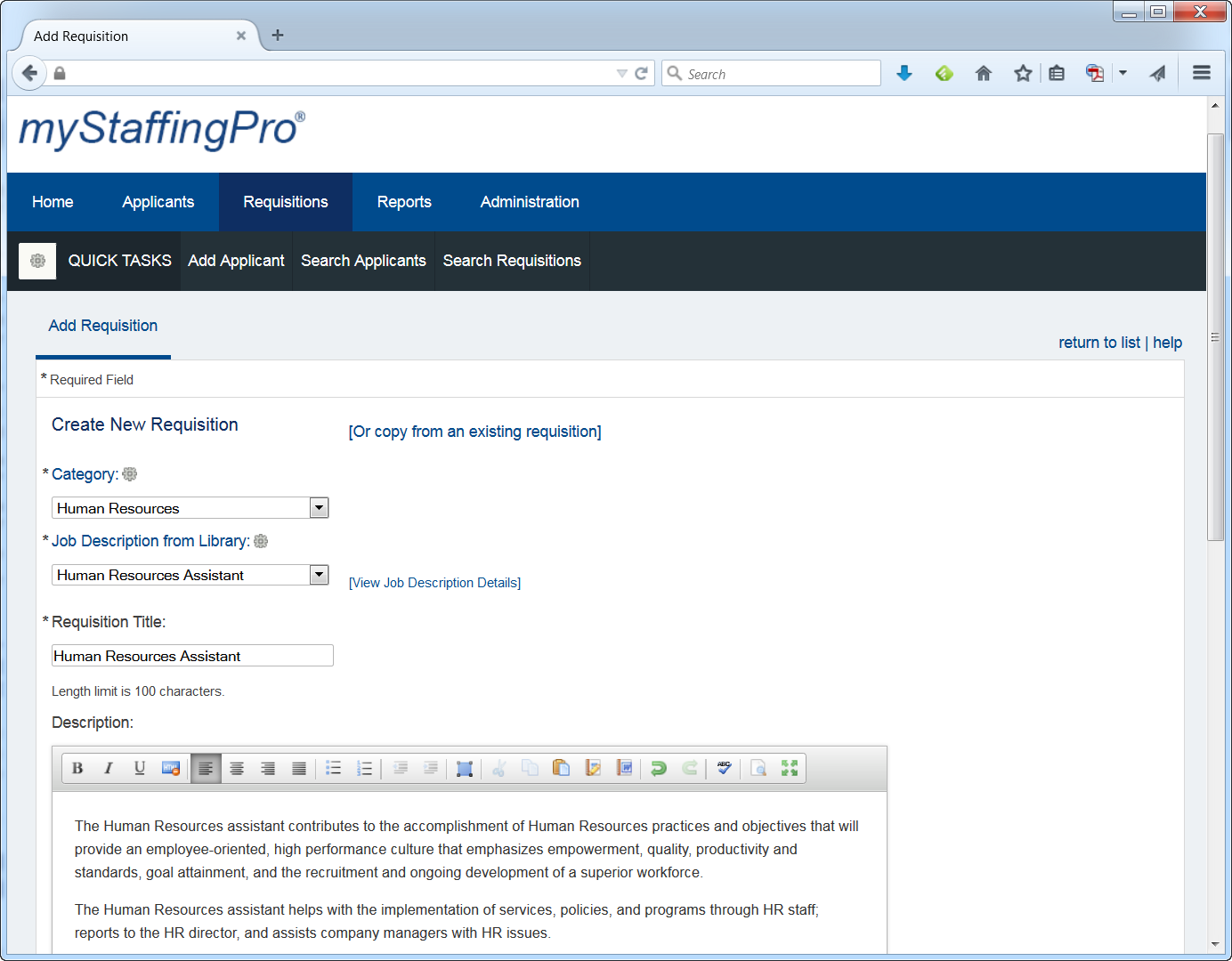
myStaffingPro is a web-based applicant tracking system (ATS) that offers applicant tracking, candidate recruiting, and onboarding in a scalable, configurable solution. It is a SaaS model makes it accessible from anywhere at any time, and offers unlimited integration capabilities. Some key features include: Social Recruiting, Interview Scheduling and Tracking, and Resume and Social Media Parsing.
N/A
Rippling HCM
Score8.9 out of 10
N/A
Rippling HR is a human resources platform for managing employee records, onboarding, benefits, time and attendance, compliance, and other core people operations in one system. It serves as the HR layer of the broader Rippling platform, giving companies a central place to manage the employee lifecycle while connecting HR data to payroll, IT, and finance workflows when needed.
$8
per month per user
Pricing
myStaffingPro
Rippling HCM
Editions & Modules
myStaffingPro Express
$0
Per User per Month
myStaffingPro
$0
Per User per Month
myStaffingPro Premier
$0
Per User per Month
Recommended
$8.00
starting price per user, per month
Offerings
Pricing Offerings
myStaffingPro
Rippling HCM
Free Trial
No
No
Free/Freemium Version
No
No
Premium Consulting/Integration Services
Yes
Yes
Entry-level Setup Fee
Optional
No setup fee
Additional Details
Pricing is based on the number of users and configuration selected.
For additional pricing details visit the Rippling pricing page.
myStaffingPro is very easy to configure and setup and takes less than 2 business days to configure and get it up and running. It facilitates the HR Business Partners in their recruitment activities. For the Open Position in the Organization, with the use of the software, they can quickly shortlist the candidates with quick mix and match of the requirements. Interviews can be scheduled with the candidate. If a Candidate is selected, the proper background screening process is initiated and finally, the Onboarding process is also tightly integrated within the software.
A de minimis incentive was given to thank the reviewer for their time. The incentive was not used to bias or drive a particular response, nor was the incentive contingent on a positive endorsement. More Info
When I first started my new job, it was an additional one on top of a day job I already had. I didn't have time to waste between getting home and starting this new night job, so the first thing that I found was that I was blown away at how quickly and easily I could log in and start. When starting a new job, I didn't need the added stress of learning another app/portal when I had more important things to learn. I am really grateful for those 2 factors alone. Once I got more familiar with the portal, I was able to search around a bit and found some great features that have just enriched the experience even more...no training needed.
One strength of myStaffingPro is because of its heavy manual interface, there is a lot of detail and very specific reason codes. This is very useful for later reporting to get specific information on hires and rejects.
Also the ability to upload documents (CVs, resumes, phone screen notes, etc) is all located in a convenient place
The calendar function is good, there are stop measures to prevent double booking and the time zones are preset
The overall look and feel of Rippling is dated; it looks like it's straight out of the 00's.
The could be more functionality in the LMS, expanded features, more options, it works, and it's basic, but it could be really great with a few added features.
The shift from using people's personal email to log in to their work email, not everyone wants to use their personal information to log into a work system.
If I were a decision maker, I would not choose to renew myStaffingPro because of the overly manual process and lost productivity. I've found other ATS's that have the same functionality but are more intuitive, user friendly and appealing. Getting a hold of customer service and support was difficult and they were rarely able to fix the immediate issue.
I've been fully impressed with the tool so far in my 6 months of being a daily user. It's rare to run into an issue that can't be solved. Customer service is quick to respond and are usually very helpful. The price is great for the upgrade we got from our past tool. We hit our ROI within the first month.
A de minimis incentive was given to thank the reviewer for their time. The incentive was not used to bias or drive a particular response, nor was the incentive contingent on a positive endorsement. More Info
I have used a lot of applicant tracking systems in my career. I've always gone back to MSP saying that it's always been my favorite. It's easy to use, I've never worked with a system so easy to use. It's also easy to figure out if you don't know where something is located - you can typically figure it out on your own without having to ask anyone.
It is easy to use. It has an option to favorite commonly used functions, such as timekeeping and payroll. The app is easily accessible and easy to use, thanks to a quick-use option. This can be managed remotely and is great for all things HR for a company employee.
A de minimis incentive was given to thank the reviewer for their time. The incentive was not used to bias or drive a particular response, nor was the incentive contingent on a positive endorsement. More Info
They are good about scheduling maintenance during overnight periods. There have been a few server issues with the e-signature system over the weekends.
A de minimis incentive was given to thank the reviewer for their time. The incentive was not used to bias or drive a particular response, nor was the incentive contingent on a positive endorsement. More Info
I like that the availability in using Rippling at any given time is useful to me. Getting on the site freely when I need gives me security of knowing that I can be in control of viewing health insurance and hours information. I have yet to get any errors in using the Rippling app.
A de minimis incentive was given to thank the reviewer for their time. The incentive was not used to bias or drive a particular response, nor was the incentive contingent on a positive endorsement. More Info
Rippling's performance has been great, no errors or glitches yet so far. I am confident that Going from one page to the next and all its complexity usage does not lag or times out, it works effectively and efficiently. While using Rippling and other apps it does not tend to slow it down, works great. No complaints.
A de minimis incentive was given to thank the reviewer for their time. The incentive was not used to bias or drive a particular response, nor was the incentive contingent on a positive endorsement. More Info
We recently had an issue where it was brought to our attention by a candidate that specializes in Information Assurance and Network Engineering that their site was missing a secure socket layer for entering in your ssn, which means that when entering it, your ssn is in plain text in plain site. It should hide it with dots or asterisks as you type it to make it secure like when you enter passwords online. I turned off the field that collects SSN's immediately and have been waiting for a response as to when this would be updated so I could turn it back on. I submitted this to our rep back in October 2013 and they said they would forward it to their IT team. I never received any further follow up as to whether or not they would be updating this. I sent a follow up email and left voice messages asking for a status update in Jan. 2014 with no response. I finally called again at the end of Feb. 2014 and emailed. The rep seemed put out that I was telling her I was frustrated with the lack of follow through and that I told her I needed a response on whether or not this would be resolved. She then forwarded me an email from the IT team that said they didn't think this was an actual requirement, they would look into it. Today she emailed to let me know the IT team will not be making any changes.
Whether or not the issue above is a DoD issue or not, the length of time to receive the final response was way too long and involved too much follow up on my part. The fact that they are unwilling to update the SSN field is also troublesome. Even if this is not an actual DoD violation or a mandate, it's a pretty common practice on most websites for collecting private information. Would you enter your PIN number into an ATM if it showed your PIN number until you hit enter? Identity theft is very high these days and people should feel like the company cares enough to help provide that extra layer of protection of their personal information.
This recent development has really changed my opinion of MyStaffingPro drastically since I last wrote my review
I have contacted support one time, and I was assisted by the Artificial Intelligence bot. Not only did it help with my inquiry, but it also went the extra mile by suggesting other options. I was looking for a feature I could not find, and it was very helpful. It would be nice also to chat with an actual person.
A de minimis incentive was given to thank the reviewer for their time. The incentive was not used to bias or drive a particular response, nor was the incentive contingent on a positive endorsement. More Info
It's really easy to implement in comparison to other tools or applications. Different key points are easily configured and implemented as per need, having different configurations in systems. Implementation is something which binds the different parameters of an organization in a single row. Implementation of rippling is much easier, quicker, and error free than any other software. I recommend it strongly!
A de minimis incentive was given to thank the reviewer for their time. The incentive was not used to bias or drive a particular response, nor was the incentive contingent on a positive endorsement. More Info
We thought it would've been better than ADP, but it wasn't. Also, the sales person who sold us on Paychex promised that this and Paychex would be able to do a lot of things we needed, which turned out to be a lie when we were implementing it, and the MyStaffingPro expert told us it wasn't possible, and it never was. It wasn't as user friendly either.
A de minimis incentive was given to thank the reviewer for their time. The incentive was not used to bias or drive a particular response, nor was the incentive contingent on a positive endorsement. More Info
Rippling has a much more modern, user-friendly approach, and it continues to build out their product suite to help create a seamlessly integrated eco-system. BambooHR is also more modern, but doesn't seem to have the broad product suite that Rippling is pursuing. UKG felt so disconnected and archaic to work with... quite painful, actually. I really like that Rippling has been extremely supportive with the onboarding process, ensuring that you work with various members of their implementation team to get things up and running which leads to a better experience and quicker ROI.
A de minimis incentive was given to thank the reviewer for their time. The incentive was not used to bias or drive a particular response, nor was the incentive contingent on a positive endorsement. More Info
I can go on here and see all my hours and pto plus health benefits. I like to have the work handbook handy to refer to legal things. How to work my role within it's limits. Being able to put in my hours and view when they are approved is a huge benefit for me.
A de minimis incentive was given to thank the reviewer for their time. The incentive was not used to bias or drive a particular response, nor was the incentive contingent on a positive endorsement. More Info
A de minimis incentive was given to thank the reviewer for their time. The incentive was not used to bias or drive a particular response, nor was the incentive contingent on a positive endorsement. More Info