ZoomInfo Operations vs. Salesforce Starter

Overview
ProductRatingMost Used ByProduct SummaryStarting Price
ZoomInfo Operations
Score 8.5 out of 10
N/A
ZoomInfo OperationsOS/RingLead is a comprehensive data quality management platform for sales and marketing operations teams to clean, enrich, and route their go-to-market data.N/A
Salesforce Starter
Score 9.0 out of 10
Small Businesses (1-50 employees)
Salesforce Starter (formerly Salesforce Essentials) is a small business CRM that replaces the former SalesforceIQ product. It is priced at $35 per user, on a monthly basis, or at $25 per month for if billed annually ($300) and can be tried free for 14 days on a trial.
$35
per month per user
Pricing
ZoomInfo OperationsSalesforce Starter
Editions & Modules
No answers on this topic
Offerings
Pricing Offerings
ZoomInfo OperationsSalesforce Starter
Free Trial
NoYes
Free/Freemium Version
NoNo
Premium Consulting/Integration Services
NoYes
Entry-level Setup FeeRequiredNo setup fee
Additional Details
More Pricing Information
Community Pulse
ZoomInfo OperationsSalesforce Starter
Considered Both Products
ZoomInfo Operations
Chose ZoomInfo Operations
This was the other tool we reviewed, but the OS applications were more detailed and had better results. Although still a good tool it just did not fit our scope for our sales group. Have yet to find any of the ZoomInfo tools to not be but quality and informational …
Salesforce Starter

No answer on this topic

Features
ZoomInfo OperationsSalesforce Starter
Data Quality
Comparison of Data Quality features of Product A and Product B
ZoomInfo Operations
8.7
15 Ratings
3% above category average
Salesforce Starter
-
Ratings
Data source connectivity8.515 Ratings00 Ratings
Data profiling8.714 Ratings00 Ratings
Data element standardization8.815 Ratings00 Ratings
Match and merge9.213 Ratings00 Ratings
Address verification8.615 Ratings00 Ratings
Sales Force Automation
Comparison of Sales Force Automation features of Product A and Product B
ZoomInfo Operations
-
Ratings
Salesforce Starter
8.7
7 Ratings
11% above category average
Customer data management / contact management00 Ratings7.57 Ratings
Territory management00 Ratings7.67 Ratings
Opportunity management00 Ratings9.07 Ratings
Integration with email client (e.g., Outlook or Gmail)00 Ratings9.66 Ratings
Quote & order management00 Ratings9.45 Ratings
Interaction tracking00 Ratings8.46 Ratings
Channel / partner relationship management00 Ratings9.75 Ratings
Marketing Automation
Comparison of Marketing Automation features of Product A and Product B
ZoomInfo Operations
-
Ratings
Salesforce Starter
7.6
6 Ratings
2% below category average
Lead management00 Ratings7.66 Ratings
CRM Project Management
Comparison of CRM Project Management features of Product A and Product B
ZoomInfo Operations
-
Ratings
Salesforce Starter
8.3
5 Ratings
7% above category average
Task management00 Ratings9.45 Ratings
Billing and invoicing management00 Ratings6.75 Ratings
Reporting00 Ratings8.85 Ratings
CRM Reporting & Analytics
Comparison of CRM Reporting & Analytics features of Product A and Product B
ZoomInfo Operations
-
Ratings
Salesforce Starter
9.0
5 Ratings
16% above category average
Forecasting00 Ratings9.05 Ratings
Pipeline visualization00 Ratings8.85 Ratings
Customizable reports00 Ratings9.35 Ratings
Customization
Comparison of Customization features of Product A and Product B
ZoomInfo Operations
-
Ratings
Salesforce Starter
7.3
6 Ratings
5% below category average
Custom fields00 Ratings7.66 Ratings
Custom objects00 Ratings7.65 Ratings
Scripting environment00 Ratings6.35 Ratings
API for custom integration00 Ratings7.75 Ratings
Security
Comparison of Security features of Product A and Product B
ZoomInfo Operations
-
Ratings
Salesforce Starter
8.8
6 Ratings
4% above category average
Single sign-on capability00 Ratings8.86 Ratings
Role-based user permissions00 Ratings8.86 Ratings
Social CRM
Comparison of Social CRM features of Product A and Product B
ZoomInfo Operations
-
Ratings
Salesforce Starter
8.4
5 Ratings
12% above category average
Social engagement00 Ratings8.45 Ratings
Integrations with 3rd-party Software
Comparison of Integrations with 3rd-party Software features of Product A and Product B
ZoomInfo Operations
-
Ratings
Salesforce Starter
8.1
5 Ratings
8% above category average
Marketing automation00 Ratings8.35 Ratings
Compensation management00 Ratings8.05 Ratings
Platform
Comparison of Platform features of Product A and Product B
ZoomInfo Operations
-
Ratings
Salesforce Starter
8.4
6 Ratings
10% above category average
Mobile access00 Ratings8.46 Ratings
Best Alternatives
ZoomInfo OperationsSalesforce Starter
Small Businesses
HubSpot Data Hub
HubSpot Data Hub
Score 8.3 out of 10
Salesmate
Salesmate
Score 10.0 out of 10
Medium-sized Companies
IBM InfoSphere Information Server
Score 8.0 out of 10
Creatio
Creatio
Score 9.0 out of 10
Enterprises
IBM InfoSphere Information Server
Score 8.0 out of 10
Creatio
Creatio
Score 9.0 out of 10
All AlternativesView all alternativesView all alternatives
User Ratings
ZoomInfo OperationsSalesforce Starter
Likelihood to Recommend
9.2
(126 ratings)
9.0
(7 ratings)
Likelihood to Renew
8.2
(6 ratings)
4.0
(1 ratings)
Usability
9.2
(26 ratings)
8.6
(4 ratings)
Availability
9.1
(1 ratings)
-
(0 ratings)
Performance
9.1
(1 ratings)
-
(0 ratings)
Support Rating
8.5
(4 ratings)
-
(0 ratings)
Online Training
9.1
(1 ratings)
-
(0 ratings)
Implementation Rating
10.0
(3 ratings)
-
(0 ratings)
Configurability
9.1
(1 ratings)
-
(0 ratings)
Ease of integration
9.1
(1 ratings)
-
(0 ratings)
Product Scalability
9.1
(1 ratings)
-
(0 ratings)
Vendor post-sale
9.1
(1 ratings)
-
(0 ratings)
Vendor pre-sale
9.1
(1 ratings)
-
(0 ratings)
User Testimonials
ZoomInfo OperationsSalesforce Starter
Likelihood to Recommend
ZoomInfo
ZoomInfo Operations is very well suited for bulk record updates, list imports, and record ownership assignments and reassignments. The intuitive user interface makes it easy to explore as many scenarios as possible to use the platform. The platform is extremely powerful as well - the volume of scheduled/automated bulk updates that we have running hourly and daily has never seemed to cause any issues with the system. All expected tasks are completed every time, and if any records couldn't be updated, the system does a great job of highlighting those errors for you. Based on my experience, scenarios that would be less appropriate include automated enrichment, specifically for contacts who may have moved to another company. Also, they need to keep up with Salesforce capabilities regarding what objects can be added as Campaign Members - we have to come up with a workaround when we want to add Accounts to campaigns.
Read full review
Salesforce
If you own a business that has complex selling processes or requires integrations with 3rd party tools/systems, you should look at Professional, Enterprise, or Unlimited editions. Salesforce operates very well across pretty much every industry, but not all sales, marketing, and operational processes are created equal. If your marketing process requires a long list of sendable contacts then I would recommend adding on Pardot or Hubspot. Always start small and scale up, to avoid boxing yourself in down the road.
Read full review
Pros
ZoomInfo
  • EverString allows us to build account lists based off in-depth firmographic or technographic data. It's far more accurate than trying to build these lists any other way.
  • EverString is fast. Where it might've previously taken us weeks to build lists of this quality, we now can build them in a matter of minutes (and have them ready to be published in a couple of hours).
Read full review
Salesforce
  • Tracking phone calls is extremely easy when using the app on the iphone. After a phone call is complete it prompts the user to enter in call details.
  • SalesforceIQ also automatically logs emails for us. This has saved us time from entering in information manually.
  • SalesforceIQ was easy to set up and allowed us customization for fields that were relevant to our business.
Read full review
Cons
ZoomInfo
  • Lower pricing tier, some other zoom products have freemium versions which would be nice
  • Faster import/export time for data, depending on the size of the data, it may take close to more than a few minutes.
  • Merging data does not always report 100% of data merged.
Read full review
Salesforce
  • Table views can be sorted by column. Filters can be applied, but only to one column. Multi-column filtering like Excel allows would be extremely useful and a big improvement.
  • The ability to quick copy data in a table view would also be helpful, like (ctrl ') in excel.
Read full review
Likelihood to Renew
ZoomInfo
I give this rating because I feel that ZoomInfo has made our work easier and smoother than before. Like now we manage our sales leads, new engagements, easily, and the data we get from ZoomInfo helps us a lot to move in the right direction. Our customer success rate is higher than before after implementing it.
Read full review
Salesforce
No answers on this topic
Usability
ZoomInfo
ZommInfo OPerations is pretty intuitive once you get the hang of it. I like that the current integrations make it easier to work within our existing flows and processes. Some of the more advanced features take a bit more training to fully understand and use correctly. And the interface could maybe be updated.
Read full review
Salesforce
The system is very user-friendly on a desktop but lacks mobile friendliness. The Customer relationship manager disappears after the deal is signed. We struggled to get the system in a usable format, which was not cost-effective. The CRM system on desktop was great but way more complicated than it should be.
Read full review
Reliability and Availability
ZoomInfo
If I talk about the operation's availibility, it is always available whenever I need it. Yeah, once in a while, I have seen an outage, but that was quickly resolved, so I would say they have a strong team that keeps the tool running, no matter if it is updating itself.
Read full review
Salesforce
No answers on this topic
Performance
ZoomInfo
I would rate its performance 9. I do not doubt its performance, the pages load quickly withour laging or error. It gives a report within the time frame without errors, no matter how complex the report is. We integrated it with our CRM; at first, it tended to slow a little, but later it was fixed and ran smoothly.
Read full review
Salesforce
No answers on this topic
Support Rating
ZoomInfo
I give this rating because I never feel they deserve less than it. Their commitment towards the customer is outstanding, whenever I need to reach out to the supprot, I feel like I am just talking to a person who is sitting beside me. They respond quickly and solve the problems easily, even guiding us on how not to get into the same problem again and again, so we can avoid going back to support.
Read full review
Salesforce
No answers on this topic
Online Training
ZoomInfo
I gave 10 cause , We took an training from their dedicated ZoomInfo university with quick support and valid certifications.
Read full review
Salesforce
No answers on this topic
Implementation Rating
ZoomInfo
Have a plan on how you're going to evaluate. We had a two-month trial period, but a six-month average lead cycle time, making it impossible to evaluate on a purely new-business ROI basis within the trial. We applied the model to our prior data, which demonstrated how much time and effort was devoted to accounts that weren't going to close
Read full review
Salesforce
No answers on this topic
Alternatives Considered
ZoomInfo
I haven't tried stacking it against any competition as I feel no need to. ZoomInfo blows me away like it first did in 2018, and I don't want something different. I hear Clay is good, but I just haven't felt the need to try it out or replace ZoomInfo at all.
Read full review
Salesforce
more expensive but as an industry leader and go, the learning curve pays for itself in ROI in lost time in onboarding
Read full review
Scalability
ZoomInfo
This is the most important and beautiful thing about this tool: it has strong scalability across teams and use cases. It allows us to expand from a single thing to multiple things, like sales to multiple departments, e.g., marketing, Data Accuracy, and Customer Success, without needing complex changes in the setup.
Read full review
Salesforce
No answers on this topic
Return on Investment
ZoomInfo
  • Generate more pipeline - indirectly. Data from anywhere still needs to be transformed and used for a business objective.
  • Saved time in doing research and data population.
  • Assuming a business will purchase a data vendor, the comparison between other vendors is a factor of cost, functionality, and data quality. ZoomInfo has higher costs typically - which would lower the ROI - but with proper incentives or discounts, the comparative ROI grows.
Read full review
Salesforce
  • It made the job more efficient for staff so they can spend time doing other tasks rather than configuring and maintaining Salesforce Starter.
Read full review
ScreenShots

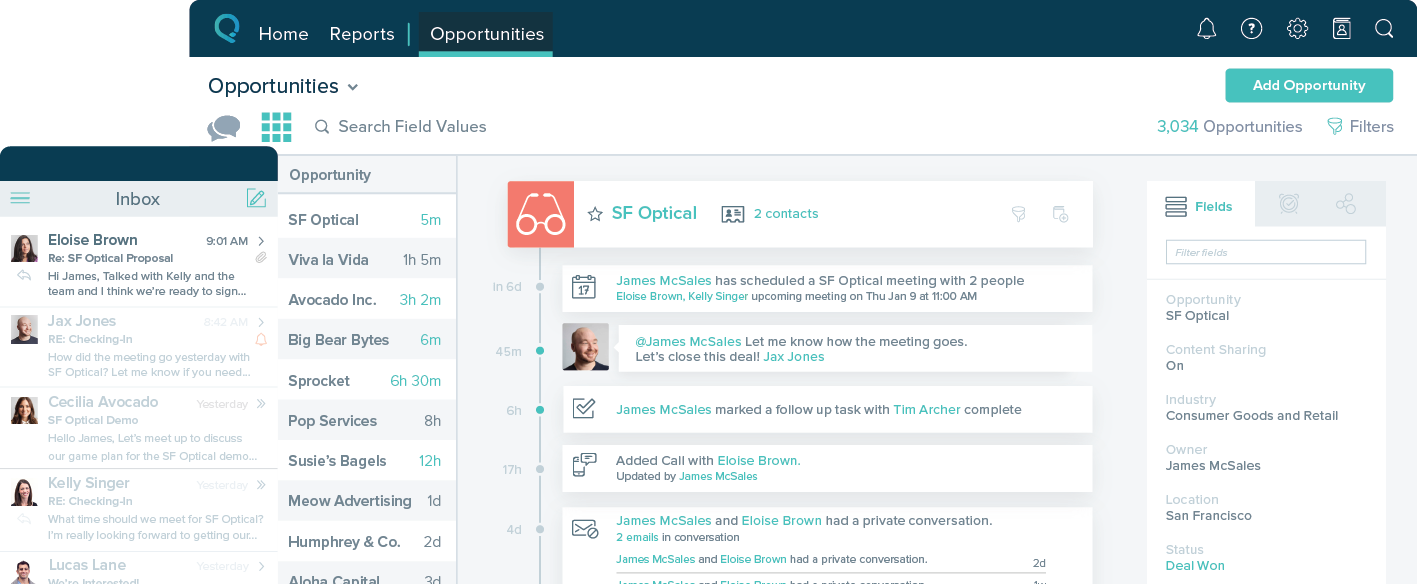
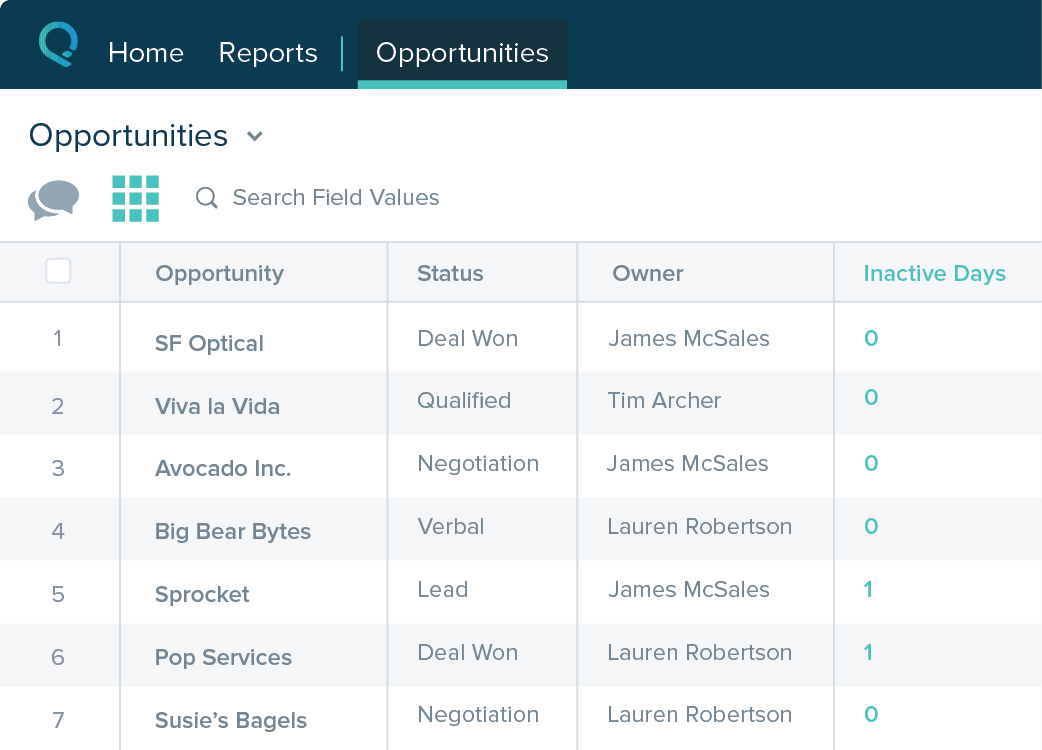
Salesforce Starter Screenshots

Screenshot of Screenshot of Screenshot of Screenshot of