SolarWinds Server & Application Monitor vs. Zendesk Suite vs. Zoho Desk

Overview
ProductRatingMost Used ByProduct SummaryStarting Price
SolarWinds Server & Application Monitor
Score 7.7 out of 10
N/A
SolarWinds Server & Application Monitor (SAM) delivers application and server monitoring capabilities. SAM allows for self-service for easy setup, 1200+ monitoring templates, and customization options, as well as integrate with other SolarWinds products.N/A
Zendesk Suite
Score 8.6 out of 10
N/A
Zendesk is a customer support solution with built-in ticketing, conversational messaging, and live chat, designed to help businesses of all sizes and industries deliver personalized service at scale. Zendesk's AI agents are trained in CX to help Service teams resolve customer issues faster and more accurately while still providing a human-centered experience. Zendesk ultimately aims to help businesses improve time to value, reduce effort per ticket, and keep costs low.
$69
per month per agent
Zoho Desk
Score 8.4 out of 10
N/A
Zoho Support is a Saas help desk / ticketing system aimed at SMBs. I competes most often with Zendesk, and Desk.com.
$9
per month per user
Pricing
SolarWinds Server & Application MonitorZendesk SuiteZoho Desk
Editions & Modules
No answers on this topic
Suite Team
$69
per month per agent
Suite Growth
$115
per month per agent
Suite Professional
$149
per month per agent
Suite Enterprise
Contact Sales
Free
$0
Express
$9
per month per user
Standard
$20
per month per user
Professional
$35
per month per user
Enterprise
$50
per month per user
Offerings
Pricing Offerings
SolarWinds Server & Application MonitorZendesk SuiteZoho Desk
Free Trial
YesYesYes
Free/Freemium Version
NoNoYes
Premium Consulting/Integration Services
NoYesYes
Entry-level Setup FeeNo setup feeOptionalRequired
Additional DetailsSAM pricing starts at $2,995.20% discount available with annual pricing.A discount is offered for yearly billing.
More Pricing Information
Community Pulse
SolarWinds Server & Application MonitorZendesk SuiteZoho Desk
Considered Multiple Products
SolarWinds Server & Application Monitor

No answer on this topic

Zendesk Suite
Chose Zendesk Suite
Much easier to use, better organized, and aligns with business needs much better, so that it's more of a useful tool than a bottleneck.
Chose Zendesk Suite
Hands down winner. Not even a competition.
Chose Zendesk Suite
Although Zendesk Suites has a higher value when it comes to it's pricing, Zendesk offers more features and functionality also Zendesk Suites has already established it's name and is trusted by many businesses and organizations. Other similar products maybe cheaper and simple …
Chose Zendesk Suite
We used Zendesk Suite initially to bring live support to our customers and it was a success, however we have since migrated away from Zendesk Suite in favour of Genesys Cloud CX. Our IT team had previous experience with this platform for our phone system and it offers many …
Chose Zendesk Suite
It prioritizes tickets from the urgent to the least urgent, and the best feature on Zendesk is that it illustrates when the other person is currently interacting with the ticket you are working on.
Chose Zendesk Suite
In my own personal business, I have used Zoho Desk over Zendesk since it is a part of their Zoho One suite of products and it has a tight integration with their CRM. But for larger businesses that can throw some support towards the integrations and want an industry-leading …
Zoho Desk
Chose Zoho Desk
The quality of support provided by Zoho Desk is brilliant. Ease of setup is a very easy process. Also it meets all the requirements that can be expected from such kind of software. Zoho Desk is a company that can be easy to do business with. It is really headed in the right …
Chose Zoho Desk
• In the acquisition of Zoho Desk I did not have the final decision but I have contributed as my analysis in the implementation. We decided to switch services since this tool is much more complete in terms of functionalities that help us to easily resolve and follow up on our …
Chose Zoho Desk
Value for money simply beats the rest. Also, as part of the Zoho Suite, integrations are wonderful, for example to CRM or consolidating Reporting with other apps such as Zoho Projects. Integration to advanced Analytics is also very helpful. In terms of features, they are pretty …
Chose Zoho Desk
Zoho Desk comes at a better price, and it offers integration with other Zoho applications so you can keep your information in a single place. Their support is good and will guide you through many things. Also their API is similar to other Zoho platforms, so employees can …
Chose Zoho Desk
Zoho Desk is easy to set up for small business needs, and its dashboard is well-suited for our organization's needs. We are on a social network, which also helps us to get users' and applicants' queries through the social platform.
Another factor to start with it is its trial …
Features
SolarWinds Server & Application MonitorZendesk SuiteZoho Desk
Application Performance Management
Comparison of Application Performance Management features of Product A and Product B
SolarWinds Server & Application Monitor
6.5
280 Ratings
18% below category average
Zendesk Suite
-
Ratings
Zoho Desk
-
Ratings
Application monitoring7.0270 Ratings00 Ratings00 Ratings
Database monitoring7.0234 Ratings00 Ratings00 Ratings
Threshold alerts6.8275 Ratings00 Ratings00 Ratings
Predictive capabilities6.0219 Ratings00 Ratings00 Ratings
Application performance management console7.3243 Ratings00 Ratings00 Ratings
Collaboration tools5.7151 Ratings00 Ratings00 Ratings
Out-of-the box templates to monitor applications6.5260 Ratings00 Ratings00 Ratings
Application dependency mapping and thresholding5.5220 Ratings00 Ratings00 Ratings
Virtualization monitoring7.3238 Ratings00 Ratings00 Ratings
Server availability and performance monitoring7.0273 Ratings00 Ratings00 Ratings
Server usage monitoring and capacity forecasting6.8254 Ratings00 Ratings00 Ratings
IT Asset Discovery5.7202 Ratings00 Ratings00 Ratings
Incident and problem management
Comparison of Incident and problem management features of Product A and Product B
SolarWinds Server & Application Monitor
-
Ratings
Zendesk Suite
8.9
174 Ratings
8% above category average
Zoho Desk
8.5
5 Ratings
4% above category average
Organize and prioritize service tickets00 Ratings9.4173 Ratings9.05 Ratings
Expert directory00 Ratings8.2119 Ratings7.24 Ratings
Subscription-based notifications00 Ratings8.8120 Ratings7.24 Ratings
ITSM collaboration and documentation00 Ratings8.3123 Ratings10.01 Ratings
Ticket creation and submission00 Ratings9.4174 Ratings8.85 Ratings
Ticket response00 Ratings9.1173 Ratings8.85 Ratings
Self Help Community
Comparison of Self Help Community features of Product A and Product B
SolarWinds Server & Application Monitor
-
Ratings
Zendesk Suite
8.2
158 Ratings
2% above category average
Zoho Desk
9.5
5 Ratings
17% above category average
External knowledge base00 Ratings8.2152 Ratings9.55 Ratings
Internal knowledge base00 Ratings8.2145 Ratings9.55 Ratings
Multi-Channel Help
Comparison of Multi-Channel Help features of Product A and Product B
SolarWinds Server & Application Monitor
-
Ratings
Zendesk Suite
8.8
170 Ratings
10% above category average
Zoho Desk
6.7
5 Ratings
18% below category average
Customer portal00 Ratings9.1139 Ratings8.04 Ratings
IVR00 Ratings8.572 Ratings00 Ratings
Social integration00 Ratings8.4113 Ratings6.63 Ratings
Email support00 Ratings9.2167 Ratings6.25 Ratings
Help Desk CRM integration00 Ratings9.0129 Ratings6.04 Ratings
Best Alternatives
SolarWinds Server & Application MonitorZendesk SuiteZoho Desk
Small Businesses
GitLab
GitLab
Score 8.8 out of 10
Agiloft Service Desk (discontinued)
Score 9.0 out of 10
Agiloft Service Desk (discontinued)
Score 9.0 out of 10
Medium-sized Companies
ManageEngine Site24x7
Score 9.5 out of 10
Agiloft Service Desk (discontinued)
Score 9.0 out of 10
Agiloft Service Desk (discontinued)
Score 9.0 out of 10
Enterprises
ManageEngine Site24x7
Score 9.5 out of 10
SysAid
SysAid
Score 8.9 out of 10
SysAid
SysAid
Score 8.9 out of 10
All AlternativesView all alternativesView all alternativesView all alternatives
User Ratings
SolarWinds Server & Application MonitorZendesk SuiteZoho Desk
Likelihood to Recommend
8.8
(278 ratings)
9.1
(208 ratings)
8.5
(23 ratings)
Likelihood to Renew
8.9
(10 ratings)
10.0
(43 ratings)
-
(0 ratings)
Usability
8.6
(29 ratings)
8.8
(82 ratings)
8.0
(12 ratings)
Availability
9.9
(3 ratings)
9.1
(14 ratings)
-
(0 ratings)
Performance
6.0
(3 ratings)
9.1
(11 ratings)
-
(0 ratings)
Support Rating
9.0
(21 ratings)
5.6
(31 ratings)
8.8
(11 ratings)
In-Person Training
-
(0 ratings)
10.0
(1 ratings)
-
(0 ratings)
Online Training
4.5
(1 ratings)
6.4
(10 ratings)
-
(0 ratings)
Implementation Rating
4.5
(3 ratings)
9.1
(19 ratings)
-
(0 ratings)
Configurability
1.0
(2 ratings)
9.1
(4 ratings)
-
(0 ratings)
Contract Terms and Pricing Model
-
(0 ratings)
9.1
(1 ratings)
-
(0 ratings)
Ease of integration
4.5
(2 ratings)
9.1
(1 ratings)
-
(0 ratings)
Product Scalability
9.9
(3 ratings)
9.1
(1 ratings)
-
(0 ratings)
Professional Services
-
(0 ratings)
9.1
(1 ratings)
-
(0 ratings)
Vendor post-sale
4.5
(2 ratings)
9.1
(1 ratings)
-
(0 ratings)
Vendor pre-sale
4.5
(2 ratings)
9.1
(1 ratings)
-
(0 ratings)
User Testimonials
SolarWinds Server & Application MonitorZendesk SuiteZoho Desk
Likelihood to Recommend
SolarWinds
It is a well-suited software for monitoring and surveillance of your deployed nodes. The error-readability and filter options for filtering out logs and errors could be improved. But overall, it has a good UI design, is user-friendly, and is very easy to learn and access for new users.
Read full review
Zendesk
Being a customer support agent, I found it very good when it comes to send an email or call or chat- with the user. I can do all that from the one single platform which is so easy and time saving for you. It does not take much time to use this, We can chat- with the user and at the same time we can send an email to them as well.
Read full review
Zoho
Zoho Desk is a great customer service tool. It is very easy to track the ability to receive tickets and send responses in Zoho Desk. There are lots of options for customization. The knowledge base feature is very extensive and powerful. It makes creating internal and external FAQs easy.
Read full review
Pros
SolarWinds
  • Monitor Azure Cloud Severs- We use SolarWinds SAM to monitor Active Directory and DNS on Several DCs published on Azure Cloud.
  • Monitor Hyper V and VMware - SolarWinds SAM monitors applications on both Hyper V and VMware, while also monitoring the physical host machines.
  • It also helps us monitor Warranty expiration for physical servers.
Read full review
Zendesk
  • UI/UX; mature macros and automations, slick and well thought out UI.
  • Reporting, reporting, reporting. With user, org, and ticket level tags, we can track every aspect of our ticket flow.
  • Extensibility; the app marketplace is a great resource for expanding functionality from the baseline offering.
Read full review
Zoho
  • It provides a simple widget code with a few clicks once you decide to integrate it with your website or application.
  • There is a very user friendly dedicated mobile application for Zoho Desk for Android and IOS devices.
  • You can easily track all of your tickets and agents from the dashboard interface.
  • You can insert tags with each ticket to group them into specific categories for analysis and troubleshooting.
Read full review
Cons
SolarWinds
  • Custom application monitors can be a little tricky to configure.
  • Logic in custom alerts can be a little hard to follow and figure out.
  • Inability to monitor certificates on custom applications or SQL Server.
  • Can be a little slow at times with on-prem SQL server.
Read full review
Zendesk
  • Is there a way for AEs and CSMs to be informed in a weekly summary of all their accounts and any tickets? Example: Disney submitted a ticket on XYZ. Google has an urgent issue on X still unresolved.
  • Is there a way for CSMs or AEs to have a Dashboard that's specific to their accounts instead of seeing all the tickets in the queue that are not relevant to them?
Read full review
Zoho
  • The biggest drawback that I am facing while using the platform is that their ticketing system is not that great [in my opinion]. It does not give us the option to add sales tax and other charges in the invoices which leads to a big problem for us.
  • [I feel] its customer support needs improvement.
Read full review
Likelihood to Renew
SolarWinds
We are heavily invested in Solarwinds products for a reason. They are generally easy to setup and run with, requiring only some interfacing with support or help articles on rare occasions. They do what we bought them to do and we can't ask for more.
Read full review
Zendesk
Zendesk is an amazing tool for communicating with your customers easily. The communication tickets from sellers to us or from us to sellers are stored, and there are statuses used to make communication easy. We have internal conversations between departments, linked with useful software such as Zingtree, Talkdesk, and Webs.
Read full review
Zoho
No answers on this topic
Usability
SolarWinds
SolarWinds Server & Application Monitor is quite easy to use and super versatile. It allows you to do just about anything you can through premade templates or through scripting. You can use an agent on the servers if you want to, or you can monitor through WMI or SNMP credentials. You can customize thresholds for alerting quickly, and you can configure alerts to be as complex or as simple as you want.
Read full review
Zendesk
Pros: The agent interface is sleek, contemporary, and relatively easy to learn compared to many other enterprise tools. For common tasks, admins are given point-and-click options- adding fields, modifying workflows, constructing macros. The knowledge base (Guide) editor is easy to use for non-developers. Drawbacks: Once you move past the initial things - complex automations, reporting/analytics in Explore, and/or customizations integrating the API, it requires much more advanced training to use successfully. Navigating between the different modules (Support, Explore, Chat, Guide) can feel very disconnected; often you are reminded that it really is a "suite" of products brought together -not really one unified platform. If you're using multiple brands managing simultaneous support tickets, or heavily customizing workflows to meet your brand, you may run into a bit of struggle with usability. So: it's a lot more user friendly than the palaces (Salesforce Service Cloud, ServiceNow), but is not used as quickly or with as much streamlined flow as a product made for a small shop. So if you are looking for a great balance, this is a good option if you are a net new organization or an organization on their way to scaling from 15 - 50 employee. Expect some elbow grease from the admin team once learning, adapting, and working efficiently once you move past the basics with your support tickets and initial customizations.
Read full review
Zoho
I give [Zoho Desk] [an] overall usability score of 9. This is partly due to the search functionality needs improvement. There are several times where I am left unable to find a ticket and have to generate a new one. I am hoping in the future that they will make some changes!
Read full review
Reliability and Availability
SolarWinds
The tool works and monitors items 24x7, it only requires maintenance a little more frequently due to security fixes in the Windows operating system.
Read full review
Zendesk
In the past year, I'd say I have only noticed maybe two hours total of downtime in my own usage. Very minimal.
Read full review
Zoho
No answers on this topic
Performance
SolarWinds
The graphical interface and the performance of the database leave a little to be desired, they could be better explored.Some functionality and screens do not work well depending on the browser used. The integrations never had any problems or caused crashes in other systems.
Read full review
Zendesk
There has been minor performance degradation on a very few days out of the two years I have been using the product.
Read full review
Zoho
No answers on this topic
Support Rating
SolarWinds
I think there was only a couple times I had to open a support case for SAM and one time they got multiple engineers on the phone to get a better idea what I was trying to monitor and was able to point me in the best direction to monitor that system.
Read full review
Zendesk
We rarely need to contact their support team, but when we do they are responsive. However there have been notable times when communication between myself and the support rep was challenging despite me providing clear explanation of the issue, screenshots, and a thorough explanation of the goal we hope to achieve. It took several back and forth attempt, on a few occasions, to get resolution on an otherwise simple request
Read full review
Zoho
As Zoho Support is based in a different timezone to ours it can be an issue that we cannot get an immediate response to an issue. But I will say that once their Support is in the office they are fairly good to respond. they have resolved almost all issues I have told them about, but Zoho have also made system changes and not communicated these beforehand which means we are faced with something new and cannot get support on this until their support team is in the office
Read full review
Online Training
SolarWinds
It was sufficient to read their documentation and watch videos.
Read full review
Zendesk
Zendesk has tons of available material for training - videos, webinars, articles, etc. The only reason this is not a 10 is because it can be hard to figure out how to navigate to these things and find what you are looking for.
Read full review
Zoho
No answers on this topic
Implementation Rating
SolarWinds
Make sure SNMP and WMI are configured ahead of time
Read full review
Zendesk
I was very satisfied. They have a free trial for 30 days and I recommend you do that and use it. It is very easy to get started with the basics and the build on over time.

The only thing technically complex was single sign-on and integration to Salesforce.com required some tweaks – otherwise setting up system was very easy
Read full review
Zoho
No answers on this topic
Alternatives Considered
SolarWinds
Nagios requires far more manual work to configure than SolarWinds does, though that also encourages customization and perfect-fit solutions. Nagios also requires far, far fewer resources to run than SolarWinds: SolarWinds wants great gobs of memory and disk, while Nagios is refreshingly humble. Nagios starts working from the first minute, too, whereas SolarWinds needs lots of set-up time.
Read full review
Zendesk
The customisable reporting every time. Our leadership reply on me to run my team and want to know what customers are telling us so they can elevate our products. We have extensive custom reports that tie up all aspects of our product and customer journeys. I've not found another product that allows me as much freedom as Zendesk Suite explore does, so far.
Read full review
Zoho
We selected Zoho Desk as we needed a platform that was going to allow the business to grow through both usage and staffing numbers. We wanted something cost-effective but still offered standard features in an effective cloud-delivered solution but would still allow customization by our internal dev team, to derive better value from the service where it natively didn't do what we needed it to. FreeAgent was okay for a while, but Zoho Desk has allowed a vast improvement in our service offering to end customers.
Read full review
Scalability
SolarWinds
It is hard to find the recommended SQL setup and convince others that is the way you should configure the server when you set it up
Read full review
Zendesk
WHY we will use Zendesk in HR and PD internally
Read full review
Zoho
No answers on this topic
Return on Investment
SolarWinds
  • Ability to sunset multiple legacy monitoring platforms.
  • A single pane of glass across global locations (Enterprise Operations Console) simplifies monitoring for junior staff.
  • A single toolset allows staff from across the global environment to share knowledge and quickly set up/modify monitoring.
Read full review
Zendesk
  • Integrating other AI solutions for an organization with high volumes can cost about USD5000 monthly. With Zendesk AI and by building onto the same with AI powered apps built for Zendesk Suite we save a projected USD4000 monthly.
  • Robust Zendesk APIs have enabled us to integrate our internal system with a customized app saving us hundreds of hours every quarter spent loading customer profiles that are not loaded instantly from the app.
  • Plug and play apps like Round robin save us weeks of sprint delay timelines as they do not require additional coding or developer support to install and start using.
Read full review
Zoho
  • Zoho Desk has created an organised sytem of support which alows me to help my customers more efficiently.
  • By saving resolutions as articles, Zoho Desk has provided a training resource for current customers and support staff as part of solving problems.
  • All new customers become part of a database of customers who continue to receive support and education from forums created by the articles and customer questions.
Read full review
ScreenShots

SolarWinds Server & Application Monitor Screenshots
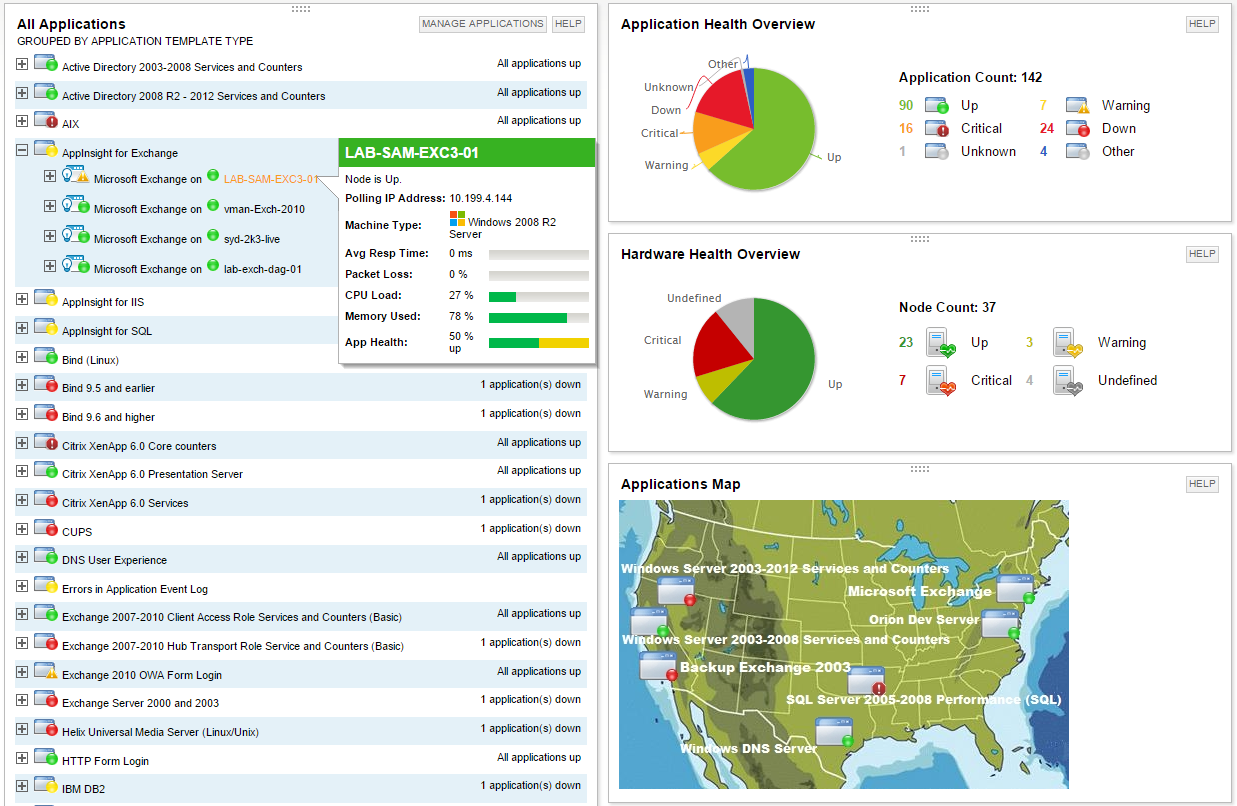
Screenshot of Multi-vendor application performance monitoringScreenshot of Multi-vendor server monitoringScreenshot of Application dependency mapping with AppStack™ dashboardScreenshot of Microsoft Exchange performance monitoring with AppInsight™ templateScreenshot of Microsoft IIS performance monitoring with AppInsight™ templateScreenshot of Server hardware health monitoring

Zendesk Suite Screenshots

Screenshot of the Zendesk Agent WorkspaceScreenshot of Omnichannel MessagingScreenshot of Zendesk TicketingScreenshot of Bots powered by Zendesk AIScreenshot of Tone shift with Zendesk AIScreenshot of Zendesk ticketing side conversations

Zoho Desk Screenshots

Screenshot of Log and monitor phone conversations, convert them into new tickets, or attach them to existing ones. Convert social media interactions and live chat into tickets at the click of a button.Screenshot of Bring a Help Center directly into a website to strengthen self-service. Chat with Zia, an AI-powered conversation assistant. Customers can chat with Zia right from a mobile app or website. Zia processes their questions and suggests appropriate solutions from the Knowledge Base.Screenshot of With advanced process automation, internal processes can be setup within the help desk, implement them automatically, and make sure that all processes are followed precisely.Screenshot of Instant responses for instant happiness. Respond to customers the minute they reach out with Zoho Desk's embeddable chat widget. Customers can get in touch with agents instantly, right from the Help Center, so agents can respond and help them find answers faster.Screenshot of Monitor a team's performance, customize and schedule reports. Custom dashboards can be created.Screenshot of Zia brings together predictions across anomalies, sentiment, trending ticket tags, and more into a common dashboard for decision-makers to consume. They can drill down further into the details from the same dashboard to investigate further.