Acronis True Image vs. Dropbox vs. IDrive Online Backup and Object Storage e2

Overview
ProductRatingMost Used ByProduct SummaryStarting Price
Acronis True Image
Score 8.6 out of 10
N/A
Acronis True Image is a backup, cloning, cyber protection and privacy tool suite for home users.N/A
Dropbox
Score 8.5 out of 10
N/A
Dropbox is a cloud storage solution, equipped with features that help users to save time, improve productivity, and collaborate with others. Users can edit PDFs, share videos, sign documents, and collaborate with stakeholders without leaving Dropbox.
$9.99
per month
IDrive Online Backup and Object Storage e2
Score 9.2 out of 10
N/A
IDrive protects PCs, Macs, mobile devices, Servers, Cloud Applications Data (SAAS) including Office 365, and Google Workspace, and provides S3 compatible Object Storage with IDrive e2. IDrive offers different plans for cloud backup for devices: - IDrive Personal - IDrive Core - IDrive Team - IDrive Small Business - IDrive Enterprise - IDrive360 EndPoint IDrive provides Cloud Applications data (SAAS) Backup: - Microsoft Office 365 Backup - Google…
$99.50
per year One user, unlimited computers 5TB storage
Pricing
Acronis True ImageDropboxIDrive Online Backup and Object Storage e2
Editions & Modules
No answers on this topic
Plus
$9.99
per month
Essentials
$18
per month
Business
$20
per month per user
Business Plus
$26
per month per user
Basic
Free
IDrive Cloud to Cloud Backup
$20
per year
IDrive 360 EndPoint
$29.50
per year
IDrive e2
$49.50
per year
IDrive Core
$79.50
per year
Personal
$99.50
per year
IDrive Team
$99.50
per year
IDrive Business
$99.50
per year
Offerings
Pricing Offerings
Acronis True ImageDropboxIDrive Online Backup and Object Storage e2
Free Trial
YesNoYes
Free/Freemium Version
NoNoYes
Premium Consulting/Integration Services
NoNoNo
Entry-level Setup FeeNo setup feeNo setup feeNo setup fee
Additional DetailsIDrive regularly offers first year discounts for all plans and offers a full-featured 30-day free trial for IDrive 360 Endpoint
More Pricing Information
Community Pulse
Acronis True ImageDropboxIDrive Online Backup and Object Storage e2
Considered Multiple Products
Acronis True Image
Chose Acronis True Image
IDrive is incredibly faster than Acronis on cloud backup. After Acronis' failures on cloud storage I moved to IDrive for peace of mind. IDrive can also do local backups, and either variant of system state, server, outlook, exchange, etc. It does not however have the ability to …
Chose Acronis True Image
Acronis True Image is easier to use, faster, and more reliable than other PC backup solutions I have used in the past.
Chose Acronis True Image
  • This is better than Ghost - lighter images and faster.
  • Acronis True Image is the best imaging software currently on the market.
  • Can restore computer failure within some minutes.
Dropbox
Chose Dropbox
Dropbox blows them out of the water. Google Drive is so bad in every way, the only time we use it is when we have to with a client. idrive does not give the same usability and is more of a in the background backup. Box is clunky and not user friendly.
Chose Dropbox
iDrive and Sync don't remove files from your local storage once they've been unsynced, so it's less clear which files are available and which aren't. Plus Dropbox now selectively offloads files when they haven't been used in a while, so it's managing your storage usage for you …
Chose Dropbox
Dropbox had superior speed and reliability compared to other services, as well as allowing us the flexibility to grow or condense our team as the business needs changed. Gaining extra storage space as team members were added turned out to be a boon for us, and the archived …
IDrive Online Backup and Object Storage e2
Chose IDrive Online Backup and Object Storage e2
Google Drive is pretty clunky and its syncing gave me headaches. Dropbox is fast and reliable but has become very expensive. OneDrive takes up a lot of bandwidth and made my computer slow. I use Box only through institutional login and it's not that affordable as an individual …
Chose IDrive Online Backup and Object Storage e2
I was a Backblaze user for 5 years because they had a very cost effective plan for my storage needs. However, they were very poor at backing up external devices quickly, and made it a pain in the butt to keep the backups active due to their 30 days connectivity policy.

Chose IDrive Online Backup and Object Storage e2
IDrive has a lot more storage for a much lower price, however, lacks a lot of the more in depth features of Dropbox or Box.
Chose IDrive Online Backup and Object Storage e2
Google Workspace became unusable as their policy regarding additional storage was ridiculous, to increase my storage space there to 10Tb was fantastically expensive. Dropbox created thousands of duplicate files in web development folders and broke everything. So not a great …
Chose IDrive Online Backup and Object Storage e2
Those other products save my files as I use them, but they overwrite old files in real time. With Dropbox, if I want to save files that aren't overwritten, I have to upload files online, which is time consuming. They aren't saved per date unless I physically set it up that way.
Chose IDrive Online Backup and Object Storage e2
I decided to choose IDrive Online Backup and Object Storage based on the numerous positive reviews I came across. After comparing it with popular alternatives like Google Drive, OneDrive, and Dropbox, I found that IDrive Online Backup and Object Storage offers better pricing, …
Chose IDrive Online Backup and Object Storage e2
Using IDrive Online Backup and Object Storage e2 in 2024 reminded me of the early days when OneDrive, Google Drive and Dropbox where actually useful, streamlined, interested in being great cloud storage apps and not just a 'lock in' to constantly push other products on you.

Chose IDrive Online Backup and Object Storage e2
MUCH cheaper, and easily set up to back up from Linux environments.
Chose IDrive Online Backup and Object Storage e2
Different use cases to be honest. I'm happy having both as I see and use them for different use cases. I also like having them on separate platforms instead of an all in one solution where I feel less secure knowing that if that solution were to fail that there would be no …
Chose IDrive Online Backup and Object Storage e2
I was a successful computer consultant for almost 30 years and always used a competitors product for small single computer businesses (without servers)or home business users. Now that program has become sluggish and expensive.

I had used IDrive Online Backup and Object Storage …
Chose IDrive Online Backup and Object Storage e2
IDrive is cheaper and easier to manage
Chose IDrive Online Backup and Object Storage e2
Simpler and more straightforward Linux support.
Chose IDrive Online Backup and Object Storage e2
Backblaze is extremely limited in terms of what files I back up — seems to be all or nothing, and I don't need my entire machine backed up. Many of these files are on attached external SSDs, which I could not specify with Backblaze. And if it was possible, I couldn't find such …
Chose IDrive Online Backup and Object Storage e2
IDrive offers a more affordable option and have not tried sharing yet but hopefully it works better.
Chose IDrive Online Backup and Object Storage e2
I moved to IDrive after Acronis cloud backup abysmally failed multiple times then stopped altogether. IDrive is very reliable, does versioning not overwriting, logs are excellent, and it's multitudes faster. I don't feel the need to check it every morning to ensure it backed up …
Chose IDrive Online Backup and Object Storage e2
For us, it really came down to pricing. While there were other solutions available, ultimately, they were all out of our price range. IDrive offered the same (and in some cases even better) options/solutions at a fraction of the price. One of the biggest reasons iDrive was more …
Chose IDrive Online Backup and Object Storage e2
IDrive is less expensive and offers a wider array of services.
Features
Acronis True ImageDropboxIDrive Online Backup and Object Storage e2
File Sharing & Management
Comparison of File Sharing & Management features of Product A and Product B
Acronis True Image
-
Ratings
Dropbox
8.4
1348 Ratings
1% above category average
IDrive Online Backup and Object Storage e2
9.3
93 Ratings
11% above category average
Versioning00 Ratings8.51121 Ratings9.568 Ratings
Video files00 Ratings8.11100 Ratings9.171 Ratings
Audio files00 Ratings8.6996 Ratings9.266 Ratings
Document collaboration00 Ratings8.41169 Ratings10.03 Ratings
Access control00 Ratings8.91246 Ratings9.26 Ratings
File search00 Ratings7.91291 Ratings9.178 Ratings
Device sync00 Ratings8.11240 Ratings9.084 Ratings
Cloud Storage Security & Administration
Comparison of Cloud Storage Security & Administration features of Product A and Product B
Acronis True Image
-
Ratings
Dropbox
8.8
1277 Ratings
2% above category average
IDrive Online Backup and Object Storage e2
8.8
88 Ratings
2% above category average
User and role management00 Ratings8.81138 Ratings9.171 Ratings
File organization00 Ratings8.81258 Ratings8.284 Ratings
Device management00 Ratings8.81119 Ratings9.185 Ratings
Cloud Storage Platform
Comparison of Cloud Storage Platform features of Product A and Product B
Acronis True Image
-
Ratings
Dropbox
8.7
1267 Ratings
1% above category average
IDrive Online Backup and Object Storage e2
9.0
93 Ratings
4% above category average
Performance00 Ratings8.51256 Ratings8.490 Ratings
Reliability00 Ratings9.11263 Ratings9.388 Ratings
Storage Reports00 Ratings8.7963 Ratings9.281 Ratings
Best Alternatives
Acronis True ImageDropboxIDrive Online Backup and Object Storage e2
Small Businesses

No answers on this topic

SugarSync
SugarSync
Score 4.1 out of 10
SugarSync
SugarSync
Score 4.1 out of 10
Medium-sized Companies
Bacula Enterprise
Bacula Enterprise
Score 9.6 out of 10
Druva Security Cloud
Score 9.4 out of 10
Druva Security Cloud
Score 9.4 out of 10
Enterprises
Bacula Enterprise
Bacula Enterprise
Score 9.6 out of 10
Druva Security Cloud
Score 9.4 out of 10
Druva Security Cloud
Score 9.4 out of 10
All AlternativesView all alternativesView all alternativesView all alternatives
User Ratings
Acronis True ImageDropboxIDrive Online Backup and Object Storage e2
Likelihood to Recommend
9.4
(19 ratings)
8.6
(1348 ratings)
9.4
(97 ratings)
Likelihood to Renew
-
(0 ratings)
8.2
(41 ratings)
9.1
(2 ratings)
Usability
9.0
(3 ratings)
8.1
(496 ratings)
9.6
(23 ratings)
Availability
-
(0 ratings)
6.8
(3 ratings)
-
(0 ratings)
Performance
9.0
(1 ratings)
6.0
(8 ratings)
-
(0 ratings)
Support Rating
8.9
(9 ratings)
6.6
(38 ratings)
9.1
(5 ratings)
Online Training
-
(0 ratings)
8.2
(2 ratings)
-
(0 ratings)
Implementation Rating
-
(0 ratings)
7.5
(4 ratings)
5.5
(1 ratings)
Configurability
-
(0 ratings)
6.4
(1 ratings)
-
(0 ratings)
Product Scalability
8.0
(1 ratings)
6.6
(4 ratings)
-
(0 ratings)
User Testimonials
Acronis True ImageDropboxIDrive Online Backup and Object Storage e2
Likelihood to Recommend
Acronis
Acronis Cyber Protect is great for any small/mid-sized business. The price point makes it attractive to all budgets >$100/year for 5 device deployments. Competitors offer less and charge more! Very happy with the suite of products, and renewals are simple and straightforward as well. I hope they don't change a thing!
Read full review
Dropbox
Dropbox is well suited for sending File Requests to clients to upload documents, and for me to send File Transfers to clients with documents for them to download. I can create separate files for each client, and also create files within files, which is very convenient and useful for my business purposes. In Dropbox I can also see all of the File Requests that I have sent and it shows me how many times they've accessed it and how many files they uploaded. I can also see all of the File Transfers that I have made and whether how many times the client has accessed it and how many documents were downloaded. It also sends me notifications if the clients haven't downloaded their files yet so I can remind them. Dropbox Sign has been very easy to use, and I have already stated what could be changed with it
Read full review
IDrive
It scales well from the individual to corporate environments with many different plans to suit your needs and budget. For backing up servers such as Exchange or SQL I've used their sister product iBackup, which is also excellent and we have no problems with, so maybe they should merge the two products into one which would make it a better overall proposition. It also seems to handle backing up mapped drives as well, which is what we used for a while before getting the on server version. That being said it can use up quite a bit of bandwidth so make sure you schedule at night when noone is working. However it does only backup changed files which is great.
Read full review
Pros
Acronis
  • Delta backup makes backups super fast of larger files that do not change in its entirety (e.g. VM images, large PSD files)
  • Easy to use (set it and forget it)
  • Rescue media makes it easy to restore backups to different hardware and migrate to other work stations
  • Lots of backup options on the Windows version of ATI
Read full review
Dropbox
  • I can share projects I need feedback on.
  • I can make projects available to editors so that they can do their work.
  • Dropbox is a place where I can store files that I can access from anywhere, even if I don't have my laptop with me at the time.
  • I have an old friend who is an acting professor in Tokyo. He loves the dialogue that I write in my novels. He converts chapters into scenework for his acting students. They get very excited when there's new material!
Read full review
IDrive
  • I'm using it on MAC, the app works very well in the background
  • Logging activities is something I really like, because I can check whether the backup was successful or not.
  • I really like the option of being able to select external drivers and back up only specific folders or files.
  • The application itself is very easy to use, even though it doesn't have a version in my language (pt-br), I had no trouble setting it up and I'm using it without any problems.
Read full review
Cons
Acronis
  • Some features have actually become more complicated over the years. One that comes to mind is creating a backup plan that can execute daily to an external USB media that is changed daily (older versions would back up to the, for example, "F" drive regardless of which drive was attached - newer versions identify each drive uniquely, and a backup task created with a given external drive will fail due to the lack of media presence if the drive is replaced).
  • Error messages could be less cryptic.
  • Support turnaround time and live assistance could be faster.
Read full review
Dropbox
  • Admid Control Can feels little basic it can be improve by easy access quick tabs for important button.
  • Smart sync behaviour can be little confusing it can be improve by displaying more futuristic way
  • Pricing and storage facility can be improve for really more demanding for a tool can be imporve.
Read full review
IDrive
  • DropBox-protected folders were not initially backed up as IDrive Online Backup and Object Storage e2 did not follow the symbolic links created
  • I experienced some UX confusion in adding new folders to backup; it's a different interface than setting up exclusions, and they should follow the same workflow and page buttons
  • After a reboot, it appears like a full disk scan is performed which can take quite a long time on a disk which has many files and lots of space
Read full review
Likelihood to Renew
Acronis
No answers on this topic
Dropbox
Dropbox is a user-friendly, easy tool which requires little to no skill and they offer a free version with a good amount of storage available. There are other file sharing tools available however at a cost. Dropbox free version I have used for years and it serves every purpose I need.
Read full review
IDrive
It does everything that it needs to to create an effecitve Three level backup to the cloud of all your important data, its reliable, dependable and peformant in its use cases. It overcomes the need to store offsite physical media such as Tape or disk storage. And its cost and level of reporting can be tailored to fit the use case of your business.
Read full review
Usability
Acronis
Protect my system from data loss and also can manage multiple devices via online cloud from any where and also can set Multifactor authentication for more secure login access. Archive any backup which will use less space and we can transfer it to any other space also so it is very easy as server admin to manage acronics utilities
Read full review
Dropbox
It works extremely well, and we have never had any issues with connecting or sharing files. It's very easy to use, and any team member can share, add, and delete files to a virtual drive. This is extremely helpful, and it's an amazing tool to use, ensuring everyone can connect and work together effectively.
Read full review
IDrive
While both the desktop and mobile apps are pretty straightforward and not complicated to navigate with features and settings fairly easy to understand and execute with clear enough descriptions they could use a refresh to be a but more intuitive and improvements made so they are less glitchy. Also backup speeds could use some improvement
Read full review
Reliability and Availability
Acronis
No answers on this topic
Dropbox
I really recommend the product for the Dropbox availability is a great having very very less downtimes, they errors are less I have been faced yet, due to connectivity sometimes we are getting errors. Only sometimes the limitations of some features show some errors.
Read full review
IDrive
No answers on this topic
Performance
Acronis
Backups run fast and no significant performance issues other than the ones discussed previously.
Read full review
Dropbox
Dropbox is really useful, you can access any file from anywhere and you can upload and even edit files online, but, sometimes it can be slow. Downloading, uploading, and syncing is a bit slow, it can take several minutes. Furthermore, the search engine for large amounts of data can be slow too and it is not powerful.
Read full review
IDrive
No answers on this topic
Support Rating
Acronis
Beyond a single instance, I haven't had to approach Acronis' support. I needed a new key following the death of my previous workstation, and they rapidly supplied it. I've heard from colleagues that they've quickly answered any questions that've been asked. If I need something, I'll generally frequent FAQ pages first, although Acronis actually has instructional videos to help users get started, which is forward-thinking. Great software that fills a vital niche for Windows systems.
Read full review
Dropbox
They immediately responded like in an example that I gave where one of our staff members accidentally deleted the whole Special Hope Network Dropbox, we immediately contacted Dropbox they walked us through the steps of how to retrieve the information and luckily enough we were able to retrieve the entire Dropbox and we have had back and forth with Dropbox on what to do when an employee leaves how to remove them how to add another employee.
Read full review
IDrive
I have not had to use their tech support. I did call once but luckily figured out what to do while I was on hold so I disconnected. If I really needed them it would have been a very long hold time I suppose.
Read full review
In-Person Training
Acronis
No answers on this topic
Dropbox
The person for corporate product dealing and knowledge of the product explore and better and secure use are properly handover to us. Also provide full software and tool training from the basic to the pro level with each and every possible explanation. Provide many sessions regarding every doubt. Also Guide better suitable options for our business to migrate and integrate for the expansion in all places employee smoothly.
Read full review
IDrive
No answers on this topic
Online Training
Acronis
No answers on this topic
Dropbox
I did not personally take any training for Dropbox so I am self taught but I know when our Vice President selected Dropbox, he personally did do some training modules on it and I'm assuming it was very easy and simple to understand since he now acts like he is a pro at it!
Read full review
IDrive
No answers on this topic
Implementation Rating
Acronis
No answers on this topic
Dropbox
I needed to stay current in improving my daily operations. Dropbox
was suggested to me by a former colleague two-years ago and I've been using it just fine ever since.
Read full review
IDrive
Did not participate in the implementation.
Read full review
Alternatives Considered
Acronis
IDrive is incredibly faster than Acronis on cloud backup. After Acronis' failures on cloud storage I moved to IDrive for peace of mind. IDrive can also do local backups, and either variant of system state, server, outlook, exchange, etc. It does not however have the ability to do a full image of a bitlocked machine like Acronis, so I'm continuing the local imaging with Acronis.
Read full review
Dropbox
I prefer the layout and visual aspect of Dropbox as it mirrors my files on my computer. I feel that I am more organized, and it's easier to find my files in Dropbox than it was with Google Drive.
Read full review
IDrive
I was a Backblaze user for 5 years because they had a very cost effective plan for my storage needs. However, they were very poor at backing up external devices quickly, and made it a pain in the butt to keep the backups active due to their 30 days connectivity policy.
Dropbox is a great fit for cloud backup when you need to access the backup files in the cloud frequently.
IDrive is the best solution out there for true backup of devices in case they are damaged or lost.
Read full review
Contract Terms and Pricing Model
Acronis
No answers on this topic
Dropbox
I would recommend to this product directly to the sales team of Dropbox for the best deal provide to my referred person and provide the best service to them.
Read full review
IDrive
No answers on this topic
Scalability
Acronis
The Windows version is generally reliable and only ran into one issue thus far. Restores are easy and there are many features. On MacOS, it's a completely different story. There is significant resource leakage related to the updater app that can bog down part of a CPU core continuously until it is disabled. The mobile backup feature also needs to be disabled via UNIX command line or CPU usage will go up when a mobile device on the same network like an iPad or iPhone's screen is turned on.
Read full review
Dropbox
It's easy to integrate with the systems of Windows and Linux, easy to have web versions accessible, which provide the web login credentials. Also, it can be installed for individuals for the best autosync features.
Read full review
IDrive
No answers on this topic
Professional Services
Acronis
No answers on this topic
Dropbox
Their services are highly rated for moving massive, complex data sets from legacy on-premise servers to the cloud with minimal downtime.
Read full review
IDrive
No answers on this topic
Return on Investment
Acronis
  • Peace of mind - knowing that if anything happens to our data, we can recover it.
  • File Versioning has saved us a few times - we can grab prior versions of a particular file if there is a problem.
  • Reasonably priced - there are more comprehensive backup solutions out there, but for online backup, this was the right product for the right price.
Read full review
Dropbox
  • When it works (usually if a client already has Dropbox, so they don't get the solicitation to sign up), it works flawlessly.
  • I've had multiple clients not see the "continue with download only" at the bottom and email me to resend the media another way because they don't have a Dropbox account.
Read full review
IDrive
  • For individual users such as my case, the savings with the Personal plan are important compared to alternatives like ElephantDrive. For 5TB ElephantDrive costs $600/yr in the comparable Family plan, whereas IDrive Online Backup and Object Storage e2 costs only $99.50/yr.
Read full review
ScreenShots

Acronis True Image Screenshots

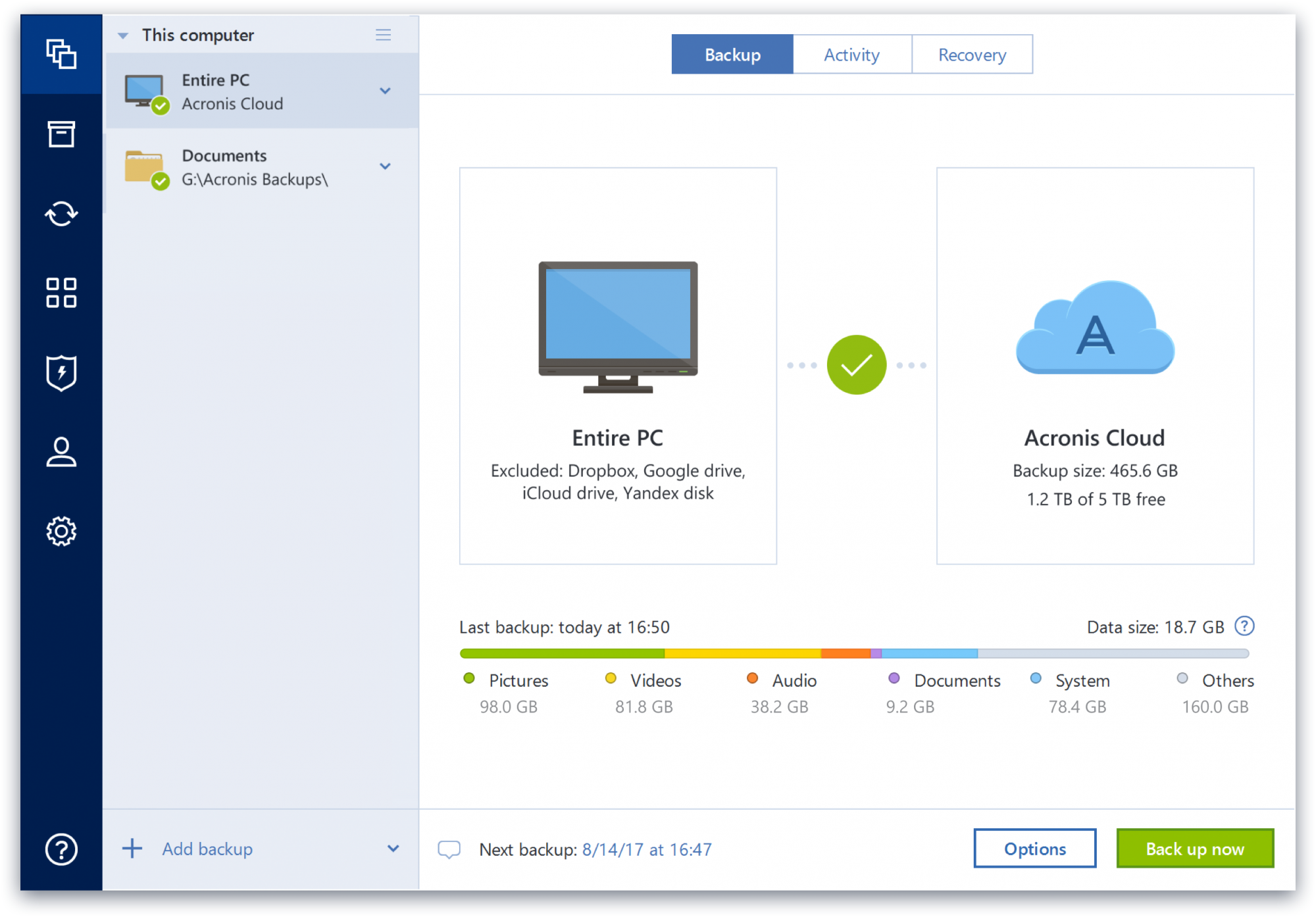
Screenshot of data control, which supports backup in just two clicks, and all data and backup information is displayed in one placeScreenshot of a display of the data that is backed up, the number of backup versions in storage, and how many photos, videos, music and documents that are available to restore.

Dropbox Screenshots

Screenshot of the action bar, that sits across the browser page can be used to record the screen, edit PDFs, upload files, create folders, get signatures, or send and track documents.Screenshot of Dropbox Replay, that lets collaborators leave frame-accurate feedback and markups directly on project files.Screenshot of Dropbox Capture, which can be used to take screen recordings, screenshots, and GIFs with one click and share them with a link.Screenshot of the interface where Dropbox lets users upload, edit, send, and sign PDFs in one place.

IDrive Online Backup and Object Storage e2 Screenshots

Screenshot of IDrive WindowsScreenshot of IDrive WebScreenshot of IDrive Server BackupScreenshot of IDrive 360