Action1 is an autonomous endpoint management platform that is cloud-native, scalable, and configurable in 5 minutes. It is free for the first 200 endpoints, with no functional limits. By pioneering autonomous OS and third-party patching - AEM’s foundational use case - through peer-to-peer patch distribution and real-time vulnerability assessment without needing a VPN, it eliminates costly, time-consuming routine labor, preempts ransomware and security risks, and protects the digital…
N/A
Chrome Remote Desktop
Score8.5 out of 10
N/A
Chrome Remote Desktop from Google is a cross-platform remote administration and remote desktop tool that requires the Chrome browser and an extension. It is free to use.
If your organization is like mine (nonprofit and tight budget) this product is for you. The first 200 endpoints are free and being we are a small organization, this product is perfect for us. I was able to use Action1 to upgrade all my endpoints from Windows 10 to 11 pretty much effortlessly. If you are not a nonprofit and have more endpoints over 200, this is still a great product to use as I don't find it very expensive to incorporate into your infrastructure.
A de minimis incentive was given to thank the reviewer for their time. The incentive was not used to bias or drive a particular response, nor was the incentive contingent on a positive endorsement. More Info
It is well suited in cases where your company/organization is looking for a low/no cost remote desktop solution, or is looking for something that can be used by most anyone right away. Most organizations don't want things to be too complex, especially with a remote desktop solution, which is generally not very complex software to begin with. It would be less appropriate in cases where the company/organization has already purchased licensing for a commercial product, and/or has been heavily using a commercial product for some time.
A de minimis incentive was given to thank the reviewer for their time. The incentive was not used to bias or drive a particular response, nor was the incentive contingent on a positive endorsement. More Info
Easy remote access to devices. That simple. We have some very unskilled users in the field where asking them to access their PC via conventional remote tools like TeamViewer, Anydesk, etc. was always a pain. Now, all they have to do is ensure their PC is online, and we can connect to them.
Remote software deploy. Before Action1, we did have some GPOs and scripts, but again - being able to deploy to PCs outside of our office/LAN, is just beautiful. On top of the standard repository, being able to create new packages is very useful for our scenario.
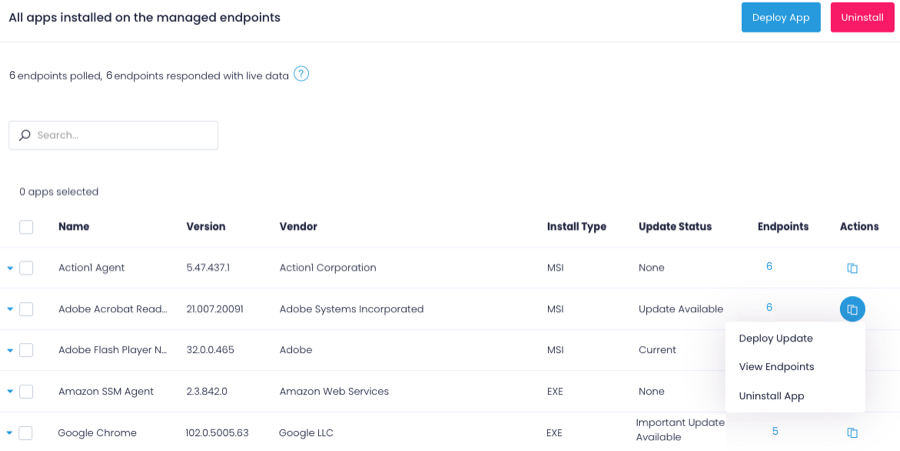
Inventory Reporting. Recently we had to identify PCs running old versions of Windows. Can't highlight enough how easy it is.
A de minimis incentive was given to thank the reviewer for their time. The incentive was not used to bias or drive a particular response, nor was the incentive contingent on a positive endorsement. More Info
Unlike Microsoft's Remote Desktop, this program is the same across platforms, which is helpful for users.
This program also allows direct control over the desktop (like TeamViewer) and doesn't give you a simulated log on (like Remote Desktop). This is advantageous for seeing exactly what's on the screen but can make it a little laggy.
The interface is very nice and clear once it's set up. It's obvious which computer is which and it's just a couple of clicks from opening the program to a connection.
A de minimis incentive was given to thank the reviewer for their time. The incentive was not used to bias or drive a particular response, nor was the incentive contingent on a positive endorsement. More Info
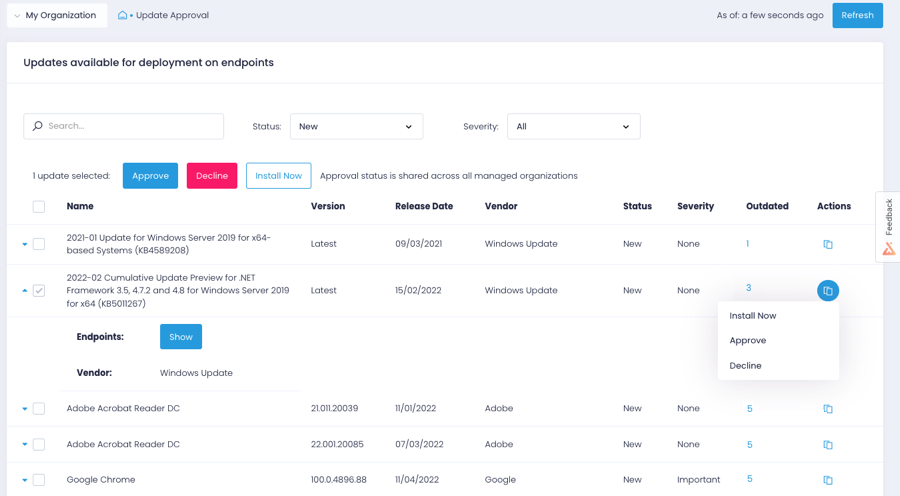
The deployment screens for update deferrals can be hard to understand at first and easy to skip since it carries some default info when you create a new automation rather than a more conspicuous prompt to update.
A de minimis incentive was given to thank the reviewer for their time. The incentive was not used to bias or drive a particular response, nor was the incentive contingent on a positive endorsement. More Info
A de minimis incentive was given to thank the reviewer for their time. The incentive was not used to bias or drive a particular response, nor was the incentive contingent on a positive endorsement. More Info
A de minimis incentive was given to thank the reviewer for their time. The incentive was not used to bias or drive a particular response, nor was the incentive contingent on a positive endorsement. More Info
A very easy lightweight tool that is completely scalable and deployed via google admin platform. The tool is free to use and works extremely well with the chrome devices we currently have deployed. Any organization using chrome or google suites should look into this tool as it's much easier to use then other remote software in the market
A de minimis incentive was given to thank the reviewer for their time. The incentive was not used to bias or drive a particular response, nor was the incentive contingent on a positive endorsement. More Info
Action1 has taken many of the tasks that are time consuming and made them simple automated tasks that can be run on a schedule. I can schedule tasks to run off-hours and know that they will be done and I no longer have worry about it. As someone who does IT support for a living, it just makes my job so much simpler with less stress.
Just a great product that has saved countless hours of commute to work and given the flexibility to be able to work from anywhere, whether at home or when away on holiday overseas. I love that it is a free product and is just as great as its competitors' products. It has also allowed me to prepare for work for the following day.
A de minimis incentive was given to thank the reviewer for their time. The incentive was not used to bias or drive a particular response, nor was the incentive contingent on a positive endorsement. More Info
A de minimis incentive was given to thank the reviewer for their time. The incentive was not used to bias or drive a particular response, nor was the incentive contingent on a positive endorsement. More Info
The only support I ever accessed were help files and web tutorials. I never tried to access personal support, mostly because I don't believe much of it is available. As a free service, my expectations for support are pretty low; that said, Chrome Remote Desktop is easy enough to configure and troubleshoot even with limited technical knowledge.
A de minimis incentive was given to thank the reviewer for their time. The incentive was not used to bias or drive a particular response, nor was the incentive contingent on a positive endorsement. More Info
A de minimis incentive was given to thank the reviewer for their time. The incentive was not used to bias or drive a particular response, nor was the incentive contingent on a positive endorsement. More Info
A de minimis incentive was given to thank the reviewer for their time. The incentive was not used to bias or drive a particular response, nor was the incentive contingent on a positive endorsement. More Info
After looking at different solutions, Action1 [Cloud Remote Monitoring and Management Solution] was the perfect fit for us that delivered all of the features we wanted without being as costly as some of the others alternatives we've looked at. There was no minimum endpoint count and they even offer up to 50 endpoints for free, which is really great for a small organization like us to help us lower our starting costs and still allows us to grow at our pace without having to commit to a defined amount of endpoints to start.
Chrome Remote Desktop seems to be a an easy to use and efficient program. Such as TeamViewer, however TeamViewer offers more program features such as able to control a device's function (shutting down, restarting, audio input, cmd etc). With those added program features I believe Chrome Remote Desktop can almost be up to par with TeamViewer.
A de minimis incentive was given to thank the reviewer for their time. The incentive was not used to bias or drive a particular response, nor was the incentive contingent on a positive endorsement. TR verified that a representative sample of customers was invited. More Info
Saved hours per week on patching and able to ensure a 100% patching success rate.
Able to create custom alerting on potential problems as well as able to create some automation to automatically address problems.
Improved support to our remote locations and users.
Custom deployments allow us to have a mechanism to deploy custom applications we build as well as other third party applications we need to distribute.
A de minimis incentive was given to thank the reviewer for their time. The incentive was not used to bias or drive a particular response, nor was the incentive contingent on a positive endorsement. More Info
A de minimis incentive was given to thank the reviewer for their time. The incentive was not used to bias or drive a particular response, nor was the incentive contingent on a positive endorsement. More Info