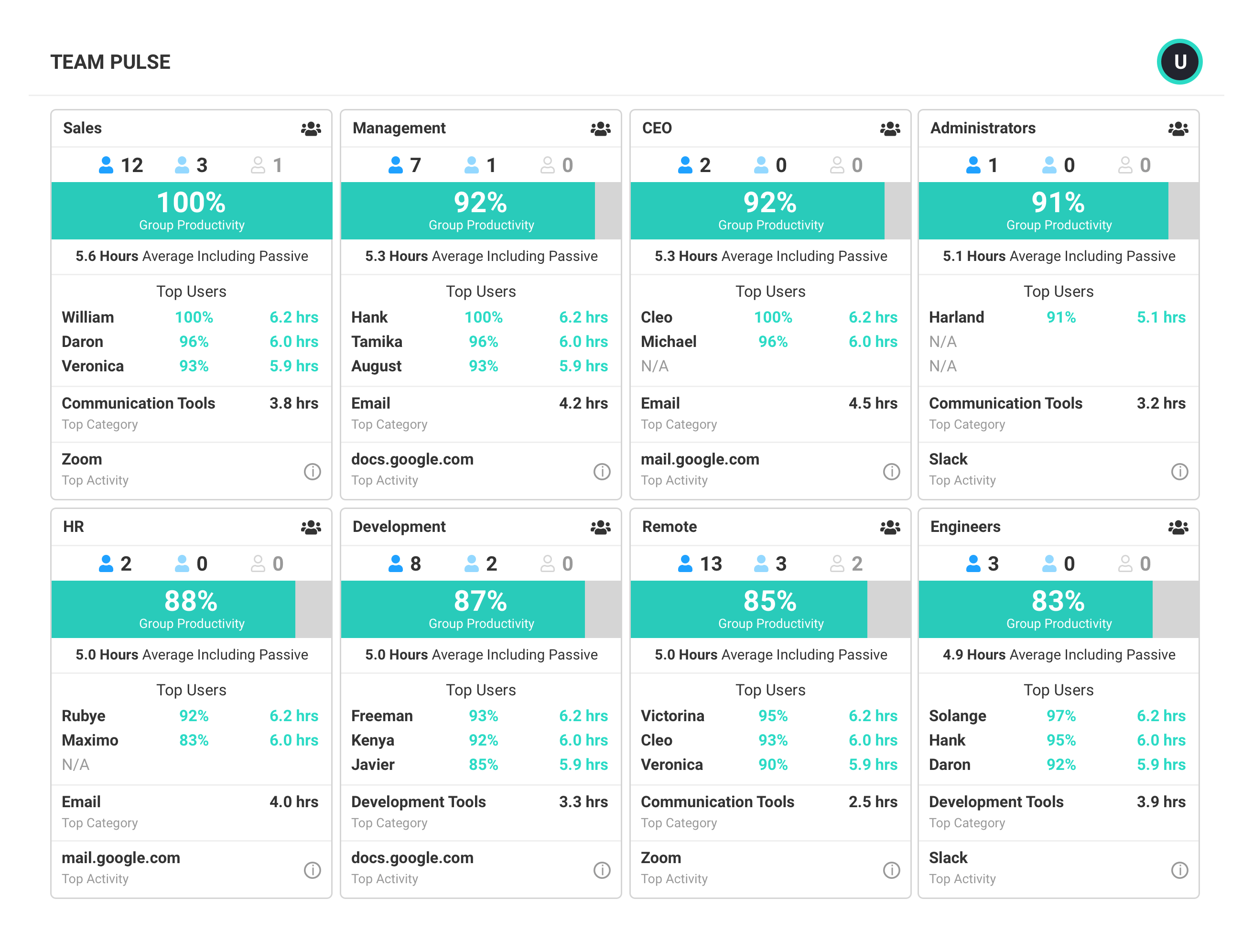
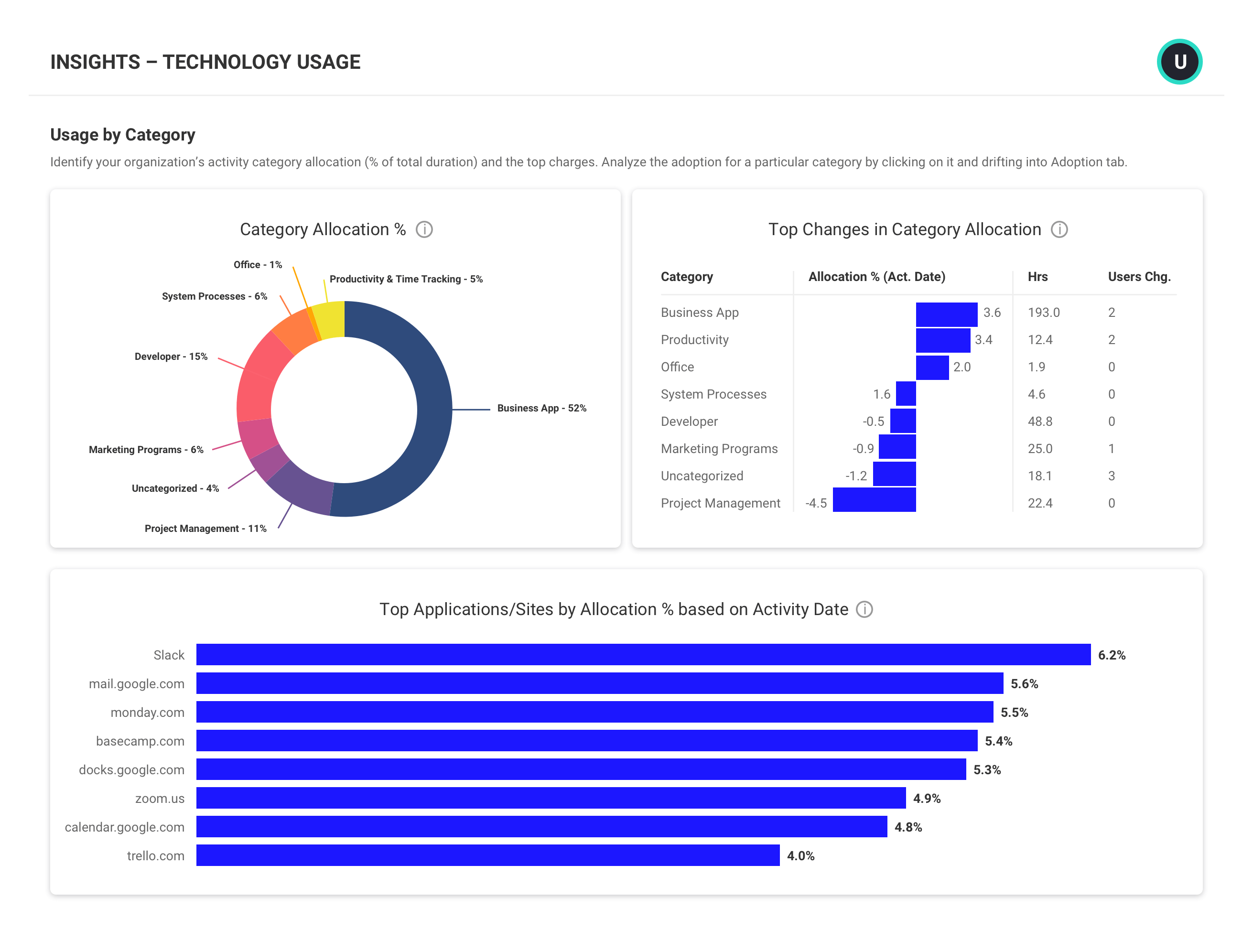
ActivTrak is a cloud-native workforce intelligence platform that transforms work activity data into actionable insights for employee monitoring, productivity and performance management, and workforce planning capabilities. Deployment enables organizations to start collecting data in minutes.
$0
per year (maximum of 3 users)
ADP WorkForce Suite
Score 5.9 out of 10
N/A
The WorkForce Suite, by WorkForce Software, is a mobile-first, cloud-based modern workforce management solution with integrated employee communications and collaboration capabilities. The WorkForce Suite aims to help global enterprise organizations optimize their labor, protect against compliance risks, and maximize productivity while building a highly engaged, resilient, and agile workforce.
N/A
Zoho Projects
Score 9.3 out of 10
N/A
Zoho Project is online project management and planning software that provides project teams with a web-based collaborative environment. Zoho Projects can also include a bug tracking module specifically design to support software development project. It is integrated with other Zoho products including Zoho CRM.
It's well-suited for offices with a mid- to large-sized employee base. I often review ActivTrak first before going to the employee with performance questions. We have 35+ people, and it is hard to keep track of them without a regularly updated performance tracking system. I do think that a small office might be offended by the tracking.
EmpCenter is really well suited for companies with minimal variety in time keeping needs. Certainly somewhere that has fairly regular work schedules and operational needs the system would be programmed for and meet those needs quite well. I think they assert themselves as a product specifically for those more complex companies, and I believe it is one of a few products available for companies with many employee types and complex work schedule and pay needs, but because of those complexities each have their own specific customizations I feel it is difficult for the company to then manage the different products that end up existing. Each ends up being unique so applying large scale changes doesn't work well as something we may request and need if applied over EmpCenter in general may cause problems for another company. Therefore everything has to be done on an individual basis and is more time consuming and costly.
My work involves projects of 5-15 people with numerous projects running simultaneously. Prior to Zoho, I did not have a central location from which to view all project statuses at once. Zoho looks to provide this and also looks like it will deliver. I am anxious to see how our organization's use of it develops. At this time, I feel I am likely to recommend Zoho Projects because my organization has made great software decisions in the past so I have a level of trust already that the research has been done that Zoho is the best solution for our line of work.
Providing the data to managers to see if there is anything to double click into. If an employee is underperforming and ActivTrak gives us data that shows bandwidth issues, we can address that with the employee quickly
works well with other systems. We were able to collect data from another time system, Avaya phone systems and even a point of sale system with not a lot of difficulty.
They know their product and integration points. They were able to troubleshoot problems with hardware time collection devices quite quickly. We found the devices they sold to be quite durable.
Out of the box they have more reports than I would have anticipated. Creating new reports was sometimes a task if it was complex but there were usually similar reports you could use as a starter template
We use it to manage our sales orders as there are lots of moving parts which are necessary to get client orders done properly.
I use it anytime I have a new idea I want to put into motion. As I can create a list for brainstorming, feedback, specific actions necessary in order to test and or implement the idea.
Unrelated to business, it's a great way to plan travel in order to make sure you don't forget those important things like passport, flight arrangement, client meeting confirmation, and meeting prep as far as what specific documents or things do you need to bring with you.
And since everyone is on the go and expected to keep up with work, the mobile/tablet app makes it a breeze to keep up, work on, and create new projects.
A more detailed explanation is required when updating specific titles within the system. For instance, total time has recently become "screen time". An email notification of this change and its implications would have gone a long way.
Easier to read the Activity Log in reporting. Sometimes, when downloading large amounts of reports, it can be cumbersome and challenging to navigate through them.
After spending close to 5 years to decide on which payroll product to acquire for our University, I cannot image we would switch now that we have it in use.
I've reviewed about 8 other project management solutions and Zoho Projects is the best I've seen without being overly complicated. Zoho Projects keeps getting better! Recent new enhancements makes it even easier to navigate. There are new keyboard shortcuts that cut my time way down. The tools are very easy to use.
ActivTrak is a great product that just keeps growing. Having used it for quite some time, we have been able to see ActivTrak grow and evolve as a product. The ActivTrak webinars are also helpful to get to know and learn the product. ActivTrak really just works with little effort needed after the initial installation
Zoho Project has been very user-friendly. As a small business, we have a diverse group of people with varying skill sets. This platform has been easy for our team to learn, implement, and succeed with. The mobile version is also very handy for our team.
Support is always fast and the agents are ready at all times to help when an issue arises, if the tier 1 agent isn't able to provide a solution to the issue they're asked about they quickly escalate the issue to tier 2 or 3 to ensure that the appropriate support is given to the issue at hand to have it quickly solved. No issue we've had so far has taken more than two days to be solved.
Although it might lack intuitiveness, once you get a hang of how Zoho Projects works, you can do a LOT. The impact good project management has on profitability is huge, and it has helped not only improve communication and coordination when working on a project, but more importantly have adequate tracking of time, due dates and potential bottle necks
I am unsure, to be honest. I have not had much exposure to different productivity software. I lucked out by using Active Trak first. I do not feel the need to investigate or review other productivity software. I would recommend ActiveTrak to other companies, users, or those searching for productivity software.
EmpCenter is a new software to the company however, I only trained on the old software for a few months before EmpCenter was introduced. I think EmpCenter has a smoother data entry process and can run more in depth reports, but since this is the system I know best I cannot accurately compare it to previous software.
Zoho Projects provides a more limited set of functionality and customization options than other task/bug trackers on the market, but what it lacks in functionality it makes up for in ease of use. It probably has 80-90% of the features of its competitors but takes about a third of the time to get up and running and realizing value.
Real-time productivity metrics and detailed workforce analytics have allowed us to better understand our workforce and make adjustments for better productivity.
Because we were able to curb bad habits, team behavior is at an optimal level.
Since our productivity level has gone up, the return on our investment in staffing has risen.
EmpCenter has reduced the amount of time administrators are spending on payroll. Certainly it has made our entry to our pay system more efficient since we can simply load the data from the time keeping system and we are not collecting actual physical signatures and paper timesheets that must be reviewed for accuracy and completeness. The system does this for us and some automatic calculating of certain pay due that we were hand adding. However the feedback I am getting is that the supervisors feel their work has been increased greatly. They are spending more time correcting and approving time. Essentially the work we were doing in our central offices to review and correct time the supervisor must now do as they approve the time. We have now asked them to be more responsible for proper reporting and use which requires they know more about the rules and many different aspects of pay than they had before. We have employees who are union represented and get some benefits from the contract others do not receive, contract employees who have certain pay aspects in their contracts that must be known, as well as temporary employees and students who get very different pay from the other employees. While some things have been programmed for the system to know and handle, some things must be added to the time sheet to pay properly or the way time is reported is different (some clock out for lunch some don't) supervisors must now know these differences while that used to be a role that was more mine as an administrator. Now I just help them and audit and review.
We needed a system to organize our growing business, so anything was better than what we had, which was nothing.
Recording time spend is a huge reason for using project software. It has made me aware of the tasks that are taking too long and where we are not being profitable as a company.
It has kept our team accountable for what needs to get completed and when projects are not in motion or completed timely. It's helpful to know in order to get billing out faster.