Chose Adobe Acrobat
Ease of use and avaialbility were better for Acrobat

| Product | Rating | Most Used By | Product Summary | Starting Price |
|---|---|---|---|---|
 Adobe Acrobat | N/A | Adobe Acrobat DC is the current version of the well-established document / PDF management solution, part of the Adobe Document Cloud (the other part being Adobe's eSign services based on technology acquired with EchoSign in 2011). | $29.99 per month per seat | |
 IT Glue | N/A | IT Glue, a Kaseya company since the December 2018 acquisition, is an information management platform that allows for efficient storage and retrieval of all the documentation an organization needs to help their MSP run better. By integrating PSA and RMM data, the vendor says they can help increase efficiency, and reduce onboarding times. | $29 per month per user (5 user minimum) | |
 Wondershare PDFelement | N/A | PDFelement is a document management solution from Wondershare Software headquartered in China. | $79.99 per year per user |
| Adobe Acrobat | IT Glue | Wondershare PDFelement | ||||||||||||||||||||||
|---|---|---|---|---|---|---|---|---|---|---|---|---|---|---|---|---|---|---|---|---|---|---|---|---|
| Editions & Modules |
|
|
| |||||||||||||||||||||
| Offerings |
| |||||||||||||||||||||||
| Entry-level Setup Fee | Optional | $545 one-time fee | No setup fee | |||||||||||||||||||||
| Additional Details | — | — | For Individuals: Yearly Plan: $79.99/user; 2-Year Plan: $109.99/user Perpetual Plan(one-time): $129.99/user For Teams: Yearly plan starts at $109/year for 1 user For Education: Yearly Plan: $47.99/user; Perpetual Plan(one-time): $99.99/user | |||||||||||||||||||||
| More Pricing Information | ||||||||||||||||||||||||
| Adobe Acrobat | IT Glue | Wondershare PDFelement | |
|---|---|---|---|
| Considered Multiple Products | Adobe Acrobat  Joyce Williams Graphic Designer Chose Adobe Acrobat The ability with this software especially of multiple PDF files management and creation is more productive and the performance is effective and easy usability is cost effective. Data security and integration functionalities are also a big point with this system and final …  Allen Gendler President Chose Adobe Acrobat There really is no comparison. Although we use other PDF programs, we mainly utilize Adobe. Not only because we find it to be a better program but also because everyone is more familiar with it. However, the other products are implemented for various reasons, such as a feature …  Joey Harman Sales Assistant Manager - Project Consultant Chose Adobe Acrobat I've had very little interaction with these other three, PDF Studio was probably the most I've played with. But honestly, I just wasn't impressed really. Not impressed enough to see much of a difference or improvement. Adobe has always been the chosen one for our company so …  Paula Byrd IRS Registered e-File Provider / Tax Preparer & Consultant Chose Adobe Acrobat Foxit has an easier interface I think. PDF Element was a need for my iPad and I only used it one time. I like the customizations available in FoxIt and it seems to be cheaper all around. | IT Glue No answer on this topic | Wondershare PDFelement  Amani Ali Admin Associate Chose Wondershare PDFelement Very similiar to Adobe Acrobat. Might actually have more modern features like adding shapes, stamps, and a background color to your PDFs. We ultimately chose this over Adobe because there was a one time fee rather than a monthly subscription.  Allen Schellenberg Executive Director Chose Wondershare PDFelement  Stuart McLellan Business Owner Chose Wondershare PDFelement I have evaluated Acrobat but found it less user friendly than PDFelement and very expensive on a product to product comparison  Anthony Zurica Owner Chose Wondershare PDFelement PDFelement is not only much much easier to use but it is less expensive.  Eric Y General Manager Chose Wondershare PDFelement The experience is different. From a cost perspective, PDFelement is more cost effective and can get things done.  roland goulet Quality Manager Chose Wondershare PDFelement Adobe PDF is the alternative for me but much more expensive. It has more features but I don’t need them. For a small business PDFelement's affordability makes it a cost effective option.  Steve Rafalsky Author Chose Wondershare PDFelement I didn't try or buy other programs, but did a good bit of research on them. I went with PDFelement because of the lower pricing, and because of the rich features I learned it had. I also appreciated the great customer service I received from reps in the community forums, which …  Madson Pinto Diretor Chose Wondershare PDFelement PDFelement has among the several options available in the market, a productivity solution with relevant acquisition costs associated with the benefits offered. Among the functions available in the application, other companies have the same function with lower performance and …  Ricardo Vargas Webmaster Chose Wondershare PDFelement Adobe, it's the top leader in web software solutions. They use SaaS licenses instead of an alternative. This kind of license needs to be paid periodically, and this can be a high-cost solution. PDFelement uses user licenses, that reduces the cost and help to make software less …  Julie Naismith CEO and Founder Chose Wondershare PDFelement Price and ease of use.  Alan Feldman Owner & Photographer Chose Wondershare PDFelement Easy to use and much cheaper than the Adobe products that do the same functions.  Stephen Minder CEO and Managing Director Chose Wondershare PDFelement Value for money judged more beneficial with PDF Element. |
| Adobe Acrobat | IT Glue | Wondershare PDFelement | |
|---|---|---|---|
| Small Businesses |  Square 9 Softworks Score 9.7 out of 10 | Square 9 Softworks Score 9.7 out of 10 | Square 9 Softworks Score 9.7 out of 10 |
| Medium-sized Companies |  MSB Docs Score 9.4 out of 10 | MSB Docs Score 9.4 out of 10 | MSB Docs Score 9.4 out of 10 |
| Enterprises |  Tungsten Capture Score 8.0 out of 10 | Tungsten Capture Score 8.0 out of 10 | Tungsten Capture Score 8.0 out of 10 |
| All Alternatives | View all alternatives | View all alternatives | View all alternatives |
| Adobe Acrobat | IT Glue | Wondershare PDFelement | |
|---|---|---|---|
| Likelihood to Recommend | 8.8 (811 ratings) | 8.1 (27 ratings) | 9.1 (55 ratings) |
| Likelihood to Renew | 9.1 (45 ratings) | 9.0 (1 ratings) | 10.0 (1 ratings) |
| Usability | 9.2 (254 ratings) | 9.5 (9 ratings) | 8.6 (5 ratings) |
| Availability | 9.1 (3 ratings) | - (0 ratings) | 10.0 (1 ratings) |
| Performance | 5.7 (10 ratings) | 8.9 (6 ratings) | 7.5 (2 ratings) |
| Support Rating | 9.3 (63 ratings) | 8.0 (7 ratings) | 8.4 (8 ratings) |
| Online Training | 9.0 (1 ratings) | - (0 ratings) | - (0 ratings) |
| Implementation Rating | 9.8 (15 ratings) | - (0 ratings) | 10.0 (1 ratings) |
| Configurability | 7.9 (4 ratings) | - (0 ratings) | 10.0 (1 ratings) |
| Contract Terms and Pricing Model | 4.5 (2 ratings) | - (0 ratings) | - (0 ratings) |
| Ease of integration | 8.0 (8 ratings) | 7.5 (6 ratings) | 7.5 (2 ratings) |
| Product Scalability | 7.0 (4 ratings) | - (0 ratings) | 10.0 (1 ratings) |
| Vendor post-sale | 1.0 (2 ratings) | - (0 ratings) | 10.0 (1 ratings) |
| Vendor pre-sale | 1.0 (1 ratings) | - (0 ratings) | 10.0 (1 ratings) |
| Adobe Acrobat | IT Glue | Wondershare PDFelement | |
|---|---|---|---|
| Likelihood to Recommend | Adobe
 Alan Gilbertson Creative Director | Kaseya
| Wondershare Technology
 Abbie Duquette Project Manager |
| Pros | Adobe
| Kaseya
 Shaun Joubert Field Support Engineer | Wondershare Technology
 Coleen Carswell Co-Owner |
| Cons | Adobe
| Kaseya
 Jennifer Henney Systems Analyst | Wondershare Technology
 Thomas Myers Vice President Of Marketing And Business Development |
| Likelihood to Renew | Adobe
 Avery Chipman Interior Designer | Kaseya
| Wondershare Technology
|
| Usability | Adobe
| Kaseya
| Wondershare Technology
 Amy Carter Director of Instruction |
| Reliability and Availability | Adobe
 Rod Lott Manager of Marketing Strategy | Kaseya No answers on this topic | Wondershare Technology
|
| Performance | Adobe
 Daniel Epstein Senior Clinical Quality Analyst | Kaseya
 Dale Bradford Network Administrator | Wondershare Technology
Eric Y General Manager |
| Support Rating | Adobe
| Kaseya
| Wondershare Technology
 Juan Pablo Montes Strategic Manager |
| Online Training | Adobe
 Michael Craven President | Kaseya No answers on this topic | Wondershare Technology No answers on this topic |
| Implementation Rating | Adobe
Rod Lott Manager of Marketing Strategy | Kaseya No answers on this topic | Wondershare Technology
|
| Alternatives Considered | Adobe
| Kaseya
 Ian Hansen IT Service Director | Wondershare Technology
Steve Rafalsky Author |
| Contract Terms and Pricing Model | Adobe
 Sean Moore Marketing Specialist | Kaseya No answers on this topic | Wondershare Technology No answers on this topic |
| Scalability | Adobe
 Jamie Caroland Independent Consultant | Kaseya No answers on this topic | Wondershare Technology
|
| Return on Investment | Adobe
| Kaseya
 Joel LaRusic Founder | Wondershare Technology
 Lesley Maple Pet Sitter |
| ScreenShots | Adobe Acrobat Screenshots    | IT Glue Screenshots   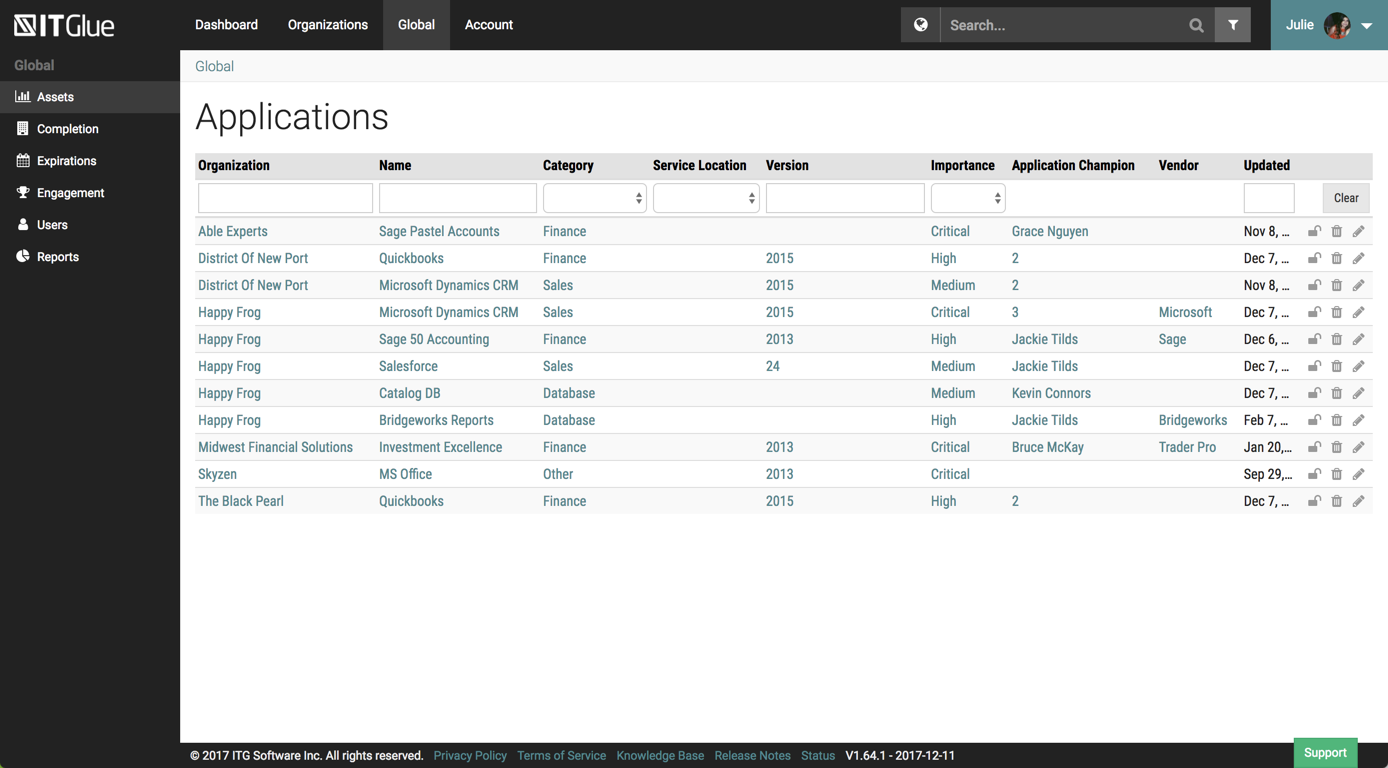 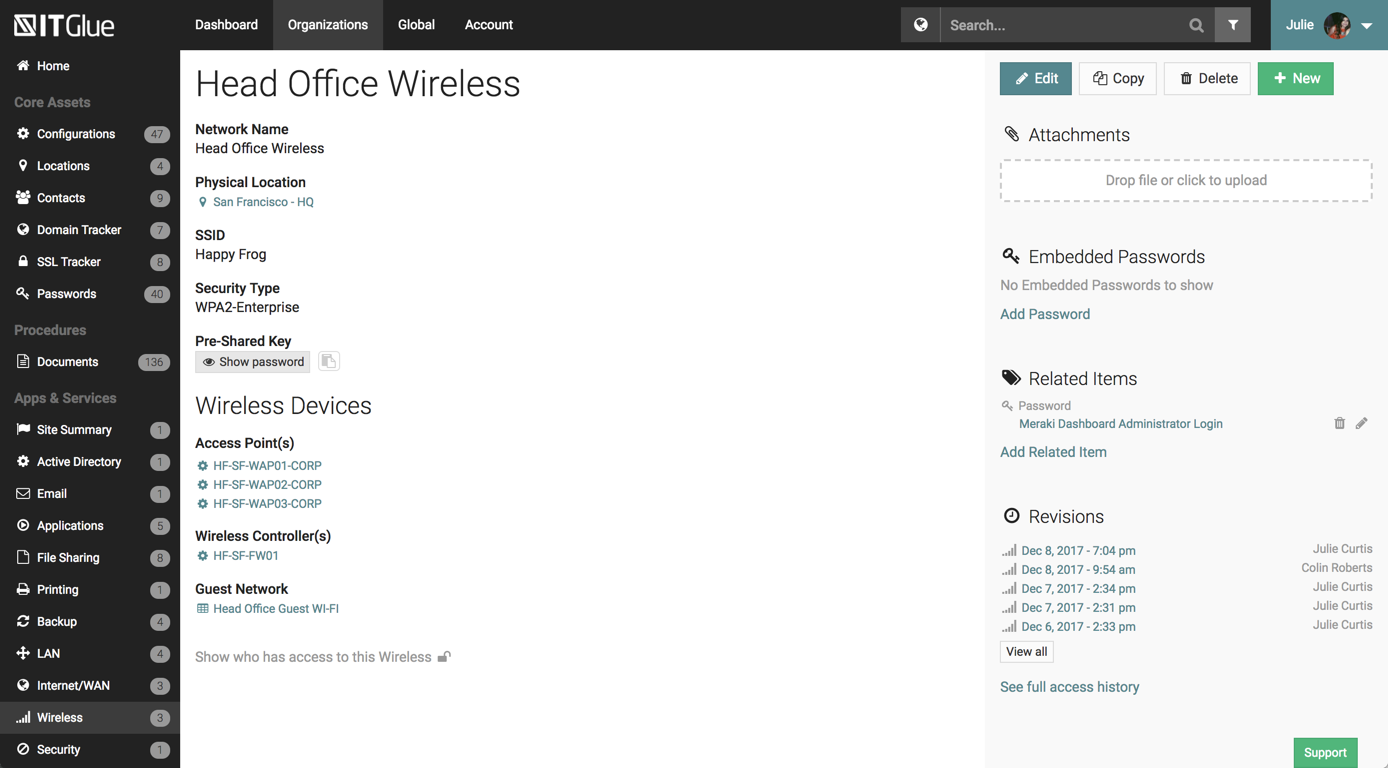  | Wondershare PDFelement Screenshots      |