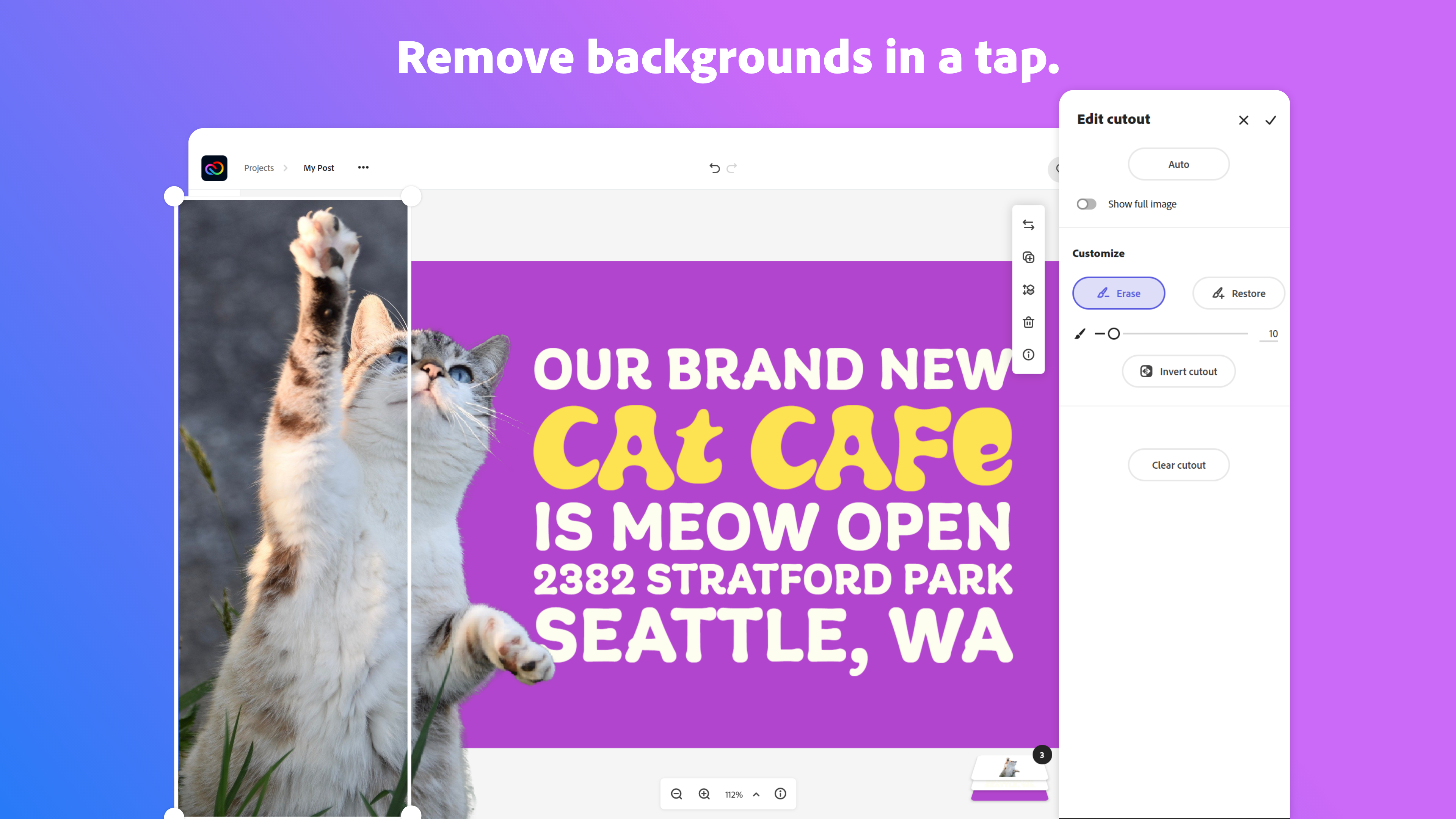
Adobe Creative Cloud Express (formerly Adobe Spark) is a task-based, web and mobile product used to create and share rich multimedia content – from social media posts and stories to invitations to marketing materials like logos, flyers and banners.
$0
Adobe PhotoShop
Score9.2 out of 10
N/A
Adobe Photoshop is the best known graphics product on the market.
$20
per month
Painter
Score9.9 out of 10
N/A
Painter is a digital art and painting application, from Corel Corporation.
N/A
Pricing
Adobe Express
Adobe PhotoShop
Painter
Editions & Modules
Free
$0.00
Premium
$9.99 / $99.99
per month
Teams
$9.99
per month per user
Single App
$20.00
per month
No answers on this topic
Offerings
Pricing Offerings
Adobe Express
Adobe PhotoShop
Painter
Free Trial
Yes
No
No
Free/Freemium Version
Yes
No
No
Premium Consulting/Integration Services
No
No
No
Entry-level Setup Fee
No setup fee
No setup fee
No setup fee
Additional Details
Contact Adobe directly for Enterprise pricing plan details.
Photographer in Marketing at Henrik Heigl (Design, 1-10 employees)
Chose Adobe Express
Adobe Express integrates very well with other products like Adobe PhotoShop or Adobe Firefly. The Images from the other Tools can be integrated in new projects or edited out of Adobe Express into those Adobe Tools. Also the Files can be managed and rearranged in the Creative …
A de minimis incentive was given to thank the reviewer for their time. The incentive was not used to bias or drive a particular response, nor was the incentive contingent on a positive endorsement. More Info
Illustrator & Graphic Designer at Maia Studio Graphique (Arts & Crafts, 1-10 employees)
Chose Adobe Express
It's very easy to generate images or graphics and find them on Adobe Express.In the application, in "Your stuff" > Files section, you'll find all the creations you've made with Adobe PhotoShop and Adobe Illustrator, and you can use them directly in Adobe Express. No need to …
A de minimis incentive was given to thank the reviewer for their time. The incentive was not used to bias or drive a particular response, nor was the incentive contingent on a positive endorsement. More Info
Associate Manager- Visual Communications Men's and Licensee at Michael Kors (Apparel & Fashion, 10,001+ employees)
Chose Adobe Express
I can input creative content and files I've made in other Adobe programs directly into Adobe Express, which helps me create more authentic, original content.
A de minimis incentive was given to thank the reviewer for their time. The incentive was not used to bias or drive a particular response, nor was the incentive contingent on a positive endorsement. More Info
Verified User
Chose Adobe Express
Express is very similar to Canva. I like to express more, except that Canva makes it easier to ensure that text/images are centered and aligned, and that the spacing is correct.
A de minimis incentive was given to thank the reviewer for their time. The incentive was not used to bias or drive a particular response, nor was the incentive contingent on a positive endorsement. TR verified that a representative sample of customers was invited. More Info
Multimedia Specialist in Professional Services at Cal State University, Long Beach, "Academic Technology Services Dept." (Education Management, 5001-10,000 employees)
Chose Adobe Express
In addition to Adobe Express, I have also used Canva because both platforms are quite similar. Basically, the application that I use is typically based on the clients needs, however my personal preference is Adobe Express because I find it too intuitive to my creative persona.
A de minimis incentive was given to thank the reviewer for their time. The incentive was not used to bias or drive a particular response, nor was the incentive contingent on a positive endorsement. More Info
art director at Pauline Goyard (Photography, 1-10 employees)
Chose Adobe Express
I think they all have a different target audience and a different use for them. I love crafting posts with Figma but i think the "Figma look" is a bit cold and super recognizable for my taste. I think creating something with Illustrator still gives me the most options in terms …
A de minimis incentive was given to thank the reviewer for their time. The incentive was not used to bias or drive a particular response, nor was the incentive contingent on a positive endorsement. More Info
Adobe Certified Instructor in Information Technology at A Lifetime Project (Computer Software, 1-10 employees)
Chose Adobe Express
I use Adobe Express for designing social media content, appreciating its ready-made templates which save time and effort. It solves creative blocks by providing design ideas, and I love its voice character feature for making animations. However, the layering feature feels basic …
A de minimis incentive was given to thank the reviewer for their time. The incentive was not used to bias or drive a particular response, nor was the incentive contingent on a positive endorsement. More Info
Illustrator in Marketing at Jimmy Flame (Graphic Design, 1-10 employees)
Chose Adobe Express
In my opinion, Adobe Express blows it away. Canva is great and all and gets the job done. But it lacks the additional value offered by Adobe Express and Adobe. Canva's stock asset library doesn't come close to Adobe's stock asset library, and the Creative Cloud makes using …
A de minimis incentive was given to thank the reviewer for their time. The incentive was not used to bias or drive a particular response, nor was the incentive contingent on a positive endorsement. More Info
Graphic Designer in Social Media at Christiano Theiss (Design, 1-10 employees)
Chose Adobe Express
Software like Illustrator, Photoshop, and After Effects are indispensable for my needs. I used Canva to streamline the process of creating carousels, mainly, and Express effectively replaces Canva. The advantage of having everything under a single subscription was crucial for …
A de minimis incentive was given to thank the reviewer for their time. The incentive was not used to bias or drive a particular response, nor was the incentive contingent on a positive endorsement. More Info
Verified User
Chose Adobe Express
Maybe because I use other Adobe products, but I find that Adobe Express is more intuitive than Canva, especially when trying to format text. As for Adobe Express versus other Adobe products, well I think there is a place for them all. There are just certain things that you …
A de minimis incentive was given to thank the reviewer for their time. The incentive was not used to bias or drive a particular response, nor was the incentive contingent on a positive endorsement. More Info
Verified User
Chose Adobe Express
I prefer adobe products but Canva for quick purposes seems to be a better UI and UX
A de minimis incentive was given to thank the reviewer for their time. The incentive was not used to bias or drive a particular response, nor was the incentive contingent on a positive endorsement. TR verified that a representative sample of customers was invited. More Info
A de minimis incentive was given to thank the reviewer for their time. The incentive was not used to bias or drive a particular response, nor was the incentive contingent on a positive endorsement. More Info
A de minimis incentive was given to thank the reviewer for their time. The incentive was not used to bias or drive a particular response, nor was the incentive contingent on a positive endorsement. TR verified that a representative sample of customers was invited. More Info
Verified User
Chose Adobe Express
Adobe Express stands out for me. This product is amazing!
A de minimis incentive was given to thank the reviewer for their time. The incentive was not used to bias or drive a particular response, nor was the incentive contingent on a positive endorsement. TR verified that a representative sample of customers was invited. More Info
Verified User
Chose Adobe Express
Overall Adobe Express offers a more polished finished product but does take a little time to learn. But worth the time spent to have more unique content
A de minimis incentive was given to thank the reviewer for their time. The incentive was not used to bias or drive a particular response, nor was the incentive contingent on a positive endorsement. More Info
Verified User
Chose Adobe Express
Much better. Canva doesn’t have integration with other Adobe products that are industry standard.
A de minimis incentive was given to thank the reviewer for their time. The incentive was not used to bias or drive a particular response, nor was the incentive contingent on a positive endorsement. More Info
Verified User
Chose Adobe Express
It's a robust tool for a bite sized product. It's not going to go toe to toe with the CC products but that's not it's purpose. It's purpose is to be light weight, intuitive and improve creativity and it checks all the boxes
A de minimis incentive was given to thank the reviewer for their time. The incentive was not used to bias or drive a particular response, nor was the incentive contingent on a positive endorsement. More Info
Verified User
Chose Adobe Express
I think Adobe Express beats out Canva but it doesn't compare to the full Photoshop to an experienced user. It is however the perfect balance of form and function where Photoshop is too robust for most of the teams needs and the training needed is far less with Adobe Express.
A de minimis incentive was given to thank the reviewer for their time. The incentive was not used to bias or drive a particular response, nor was the incentive contingent on a positive endorsement. More Info
Verified User
Chose Adobe Express
I use both Adobe Express and Canva, but of course Adobe Express directly integrates with all of the Adobe programs that I use so it’s automatically better
A de minimis incentive was given to thank the reviewer for their time. The incentive was not used to bias or drive a particular response, nor was the incentive contingent on a positive endorsement. More Info
A de minimis incentive was given to thank the reviewer for their time. The incentive was not used to bias or drive a particular response, nor was the incentive contingent on a positive endorsement. More Info
A de minimis incentive was given to thank the reviewer for their time. The incentive was not used to bias or drive a particular response, nor was the incentive contingent on a positive endorsement. More Info
Art Therapist & Illustrator/Designer at HealthCare for Hire (Hospital & Health Care, 1-10 employees)
Chose Adobe Express
I choose to use Adobe Express because to me it is stress free product I don't have to "invent the wheel" with what I am creating, with the features it has, it helps with the creative process. I also selected because you can add video to it and edit it out in a simple and easy …
A de minimis incentive was given to thank the reviewer for their time. The incentive was not used to bias or drive a particular response, nor was the incentive contingent on a positive endorsement. TR verified that a representative sample of customers was invited. More Info
A de minimis incentive was given to thank the reviewer for their time. The incentive was not used to bias or drive a particular response, nor was the incentive contingent on a positive endorsement. More Info
Verified User
Chose Adobe PhotoShop
A lot of the newer, younger staff, have worked extensively in Express and/or Canva. Some things in those platforms, like one-button background removal, have made it very easy for them to quickly do mock ups. But if they have to do something a bit more complex, Adobe PhotoShop …
A de minimis incentive was given to thank the reviewer for their time. The incentive was not used to bias or drive a particular response, nor was the incentive contingent on a positive endorsement. More Info
CoFounder in Professional Services at Art Garage (Graphic Design, 11-50 employees)
Chose Adobe PhotoShop
[Adobe] Photoshop offers the best photo editing as well as content creation. The layer-by-layer approach of [Adobe] Photoshop helps to work between two apps or even two PCs of entirely different Creative Cloud apps seamlessly. The stability and the speed of the tools in …
A de minimis incentive was given to thank the reviewer for their time. The incentive was not used to bias or drive a particular response, nor was the incentive contingent on a positive endorsement. More Info
Senior Graphic Designer in Marketing at Oregon State University Marketing (Marketing and Advertising, 1001-5000 employees)
Chose Adobe PhotoShop
[Adobe] Photoshop has much more features and abilities compared to its competitors, and often is the first to create a new feature. There is a large learning curve for Photoshop, but for folks that spend years learning Adobe products, it ends up being the most intuitive …
A de minimis incentive was given to thank the reviewer for their time. The incentive was not used to bias or drive a particular response, nor was the incentive contingent on a positive endorsement. More Info
Senior Email and Digital Specialist in Information Technology at Baesman (Marketing and Advertising, 11-50 employees)
Chose Adobe PhotoShop
Other tools are really just trying to clone the success that Adobe Photoshop has held. I've tried others in search of cost savings or unique features, but I always come back to Photoshop. It just feels more solid and works with me so much smoother. And the gimmicky features …
A de minimis incentive was given to thank the reviewer for their time. The incentive was not used to bias or drive a particular response, nor was the incentive contingent on a positive endorsement. More Info
Promotions Director in Marketing at iHeart Media (Broadcast Media, 1001-5000 employees)
Chose Adobe PhotoShop
Canva and Adobe Spark are two programs that are able to accomplish similar tasks as [Adobe] Photoshop. However, Canva and Spark are extremely simplistic when compared to Photoshop. These two apps are perfect for beginners who want to create simple graphics and want help with …
A de minimis incentive was given to thank the reviewer for their time. The incentive was not used to bias or drive a particular response, nor was the incentive contingent on a positive endorsement. More Info
Senior UX/ UI Architect in Engineering at Self Employed (Arts & Crafts, 1-10 employees)
Chose Painter
Like I already mentioned Photoshop is so much more pleasant to work with. Though out of the box Photoshop definitely has a lot fewer brushes; you can definitely download bushes often for free, or otherwise a small fee (you have to pay to add more brushes with Painter as well). …
A de minimis incentive was given to thank the reviewer for their time. The incentive was not used to bias or drive a particular response, nor was the incentive contingent on a positive endorsement. More Info
Every team I work with gets the Express welcome and walkthrough and becomes a permanent Adobe Express user. I have my own workflow when creating content for social, and it is great when others I am working with can hop on and follow the same workflow. We can collaborate on projects, schedule posts, and manage brand assets easily from our own devices. As long as we have access to the same files, we can build campaigns faster and more easily, onboard new designers, and scale our impact on social media.
Photoshop is a useful tool for everything from creating social media graphics to editing and sizing photos. There is a bit of a learning curve, so you need to have a bit of experience to master it and use it for a variety of tasks. You also need to have a good sense of file organization so you can find files quickly without losing track of them.
A de minimis incentive was given to thank the reviewer for their time. The incentive was not used to bias or drive a particular response, nor was the incentive contingent on a positive endorsement. More Info
Corel Painter does have a lot of great brushes, and they do emulate real art supplies very well. Especially the thick paint is well done. But unfortunately there are so many functional and UX bugs that overall it is just horrible to work with. When contacting customer support about it, they really seem clueless about the seriousness of the situation, and clueless about what proper UX is in general. They have tried to make it work a bit like Photoshop, which is a good move but then some things are absolutely not intuitive at all and they are definitely missing the mark horribly with so many issues. I would highly recommend using Photoshop instead, though you'll have to download them separately; it also offers a lot of great brushes nowadays and works much much smoother without all those aggravating bugs of Painter. The price of Corel Painter is just not at all worth all these horrible bugs.
I have used Adobe Express to help maintain my creative catalogs and files, brand management by saving my color scheme palettes, to have full access to its free assets and huge template library.
The main business issue is brand consistency and accessibility, and Adobe Express helps greatly with both of those by providing an option to create brand libraries for various projects, and it has a huge Adobe font catalog to accommodate basically every brand and project scope.
I like how I am able to create a project folder for storing various iterations of a graphic or logo, and being able to view thumbnails of each iteration below the current graphic that I am working on. Plus, it also allows for easy thumbnail rearrangement for exporting selected images in the order of my choice. And it has many editing tools such as a generative AI tool using prompts to help create original art, and both the Effects and Animation tools have many options for colorations and animations. Plus other awesome and easy to use tools such as the Quick Action tool that easily removes backgrounds, and other tools like the Resizing, Quick Replace, Translate, Bulk Create.
Another feature of Adobe Express that I like is its ability for video creation and editing which is available via a mobile device or desktop computer. The footage editing process is very easy and allows for only one track for both video and audio.
Adobe Express allows for the project assets to be either imported via ones on file systems or straight from the Adobe Royalty-Free assets which includes; videos, audio/music, graphics, photos and even a voice overs capability using a "Text-to-Voice" option. And after the video has been created Adobe offers its very easy "Download" option, where you can select what file type that you want the project to export as.
A de minimis incentive was given to thank the reviewer for their time. The incentive was not used to bias or drive a particular response, nor was the incentive contingent on a positive endorsement. More Info
A de minimis incentive was given to thank the reviewer for their time. The incentive was not used to bias or drive a particular response, nor was the incentive contingent on a positive endorsement. More Info
A de minimis incentive was given to thank the reviewer for their time. The incentive was not used to bias or drive a particular response, nor was the incentive contingent on a positive endorsement. More Info
A de minimis incentive was given to thank the reviewer for their time. The incentive was not used to bias or drive a particular response, nor was the incentive contingent on a positive endorsement. More Info
A de minimis incentive was given to thank the reviewer for their time. The incentive was not used to bias or drive a particular response, nor was the incentive contingent on a positive endorsement. More Info
I foresee Adobe Express becoming the "go-to" platform for everyone except professional, high-level designers. It is a relatively easy-to-use tool that allows users to create a wide variety of visuals quickly. Because it is a template-driven tool, the in-house design team has the ability to make brand kit available to keep visuals on point
A de minimis incentive was given to thank the reviewer for their time. The incentive was not used to bias or drive a particular response, nor was the incentive contingent on a positive endorsement. More Info
We get a lot of use out of this software. It's vital for work with production in our industry and has a lot of cross-functionality - creating social media images, retouching photos, editing photos, creating gradients, and more. It's pretty fuss-free in that we haven't had to reach out to support and the program hasn't crashed on us. We are trained on the software (so again, this isn't for beginners), but for detail-oriented designers and creatives like ourselves - it's a no-brainer.
A de minimis incentive was given to thank the reviewer for their time. The incentive was not used to bias or drive a particular response, nor was the incentive contingent on a positive endorsement. More Info
The user interface is pretty straightforward to use. It has easy to navigate navigations, and the canvas UX is also pretty good. One thing i would like to add it to use shortcuts to add elements on canvas. Like if I am on canvas and I press 'T' on my keyboard the text box should be added automatically
A de minimis incentive was given to thank the reviewer for their time. The incentive was not used to bias or drive a particular response, nor was the incentive contingent on a positive endorsement. More Info
Adobe PhotoShop is a professional-grade tool that requires months/years to get a grasp of how to use it well. Even then, after over a decade of using Adobe PhotoShop both casually and professionally, I feel like I'm still unfamiliar with a large percentage of the available tools. Without a dedicated training program, it can be extremely overwhelming and/or you may not get good use out of it. That being said, once you do get comfortable with it, the layout and workspace are excellent with myriad shortcuts that speed up your workflow exponentially. Put in the time to learn it, and you'll love it.
A de minimis incentive was given to thank the reviewer for their time. The incentive was not used to bias or drive a particular response, nor was the incentive contingent on a positive endorsement. More Info
If it wasn't quite clear yet, I'll state it again: the usability of Corel Painter is, simply put, horrid. And I am not talking about rendering, lagging, etc., it is not even all that bad there. I am talking about the weird issues like being unable to move a brush into a custom brush palette when you work on a second screen, like being unable to move the software onto the second screen in the first place unless you separate all the palettes and the windows (and if nobody tells you upfront there is no way of knowing because the manual doesn't state this at all), and then having to drag all your separate windows and palettes over one by one every time your computer wakes up again, and they won't really want to move to the other screen but only through a tiny corner of your screen, and the fact that you have to scroll through lists and lists of fonts but can't search and when you apply this font, add another piece of text the font jumps back to the default font of all the text already applied even when you haven't selected any of the text. Just to name a very small few.
Adobe Photoshop is very reliable, but is never 100%. There have been times when Adobe Photoshop has had trouble opening, but nothing a little computer restart couldn't fix. I use Adobe Photoshop on a Mac for both work and at home on a daily basis, and I would be lost without it.
Speed can be an issue when you are dealing with large files for large format printing or billboards. When working on web images, speed is not an issue.
Overall, the Adobe Creative Cloud Express is worth a try and may be a good fit for many organizations and businesses. At a monthly rate, the cost is not prohibitive, but the tools are somewhat limited and not necessarily worthwhile when compared to standard applications and software that are often available free or through a package of services commonly found on workplace computers.
A de minimis incentive was given to thank the reviewer for their time. The incentive was not used to bias or drive a particular response, nor was the incentive contingent on a positive endorsement. More Info
While I never contacted Adobe directly, there is so much content out there in the form of YouTube videos, Lynda/LinkedIn learning that almost any issue, including bugs, can be worked around (and this method is generally faster as there's no turnaround time involved).
A de minimis incentive was given to thank the reviewer for their time. The incentive was not used to bias or drive a particular response, nor was the incentive contingent on a positive endorsement. More Info
It was really hard to get them to understand what I was having problems with. It was hard to get the message through that Painter has an unacceptable amount of functional and UX bugs. When I finally talked to someone who was easier to communicate with, he was very stoic about the situation, like they didn't really care about the awful amount of bugs.
I took a course so it really helped. I didn’t take the course until much later after beginning to use it, so I wish work would have sent me right off the bat. It would have alleviated a lot of frustratinon
A de minimis incentive was given to thank the reviewer for their time. The incentive was not used to bias or drive a particular response, nor was the incentive contingent on a positive endorsement. More Info
I think Adobe Express is a bit behind Canva, but as an Adobe Community Expert, I try to provide as much feedback as I can to help improve Adobe Express. ADobe Express does a better job than InShot and a few other apps, but isn't quite there against Canva, I'm sorry to say!
A de minimis incentive was given to thank the reviewer for their time. The incentive was not used to bias or drive a particular response, nor was the incentive contingent on a positive endorsement. More Info
[Adobe] Photoshop offers the best photo editing as well as content creation. The layer-by-layer approach of [Adobe] Photoshop helps to work between two apps or even two PCs of entirely different Creative Cloud apps seamlessly. The stability and the speed of the tools in photoshop make it even better to make a canvas of creativity.
A de minimis incentive was given to thank the reviewer for their time. The incentive was not used to bias or drive a particular response, nor was the incentive contingent on a positive endorsement. More Info
Corel Painter has support to multiple OS and across all the devices. Coloring and multi layer imaging works very well. The new enhanced brush settings and the redesigned brush libraries.
A de minimis incentive was given to thank the reviewer for their time. The incentive was not used to bias or drive a particular response, nor was the incentive contingent on a positive endorsement. More Info
Adobe Creative Cloud Express is included with an Adobe Creative Cloud account. Our company has a corporate team membership so it is nice to have a professional and powerful tool that anyone on our team can use for free. The pricing structure of giving the tool away for free will be fundamental to users utilizing the tool. Similar tools, such as Canva, cost significantly more but do not offer the same features
A de minimis incentive was given to thank the reviewer for their time. The incentive was not used to bias or drive a particular response, nor was the incentive contingent on a positive endorsement. More Info
A de minimis incentive was given to thank the reviewer for their time. The incentive was not used to bias or drive a particular response, nor was the incentive contingent on a positive endorsement. More Info
The professional services for Adobe Creative Cloud Express is top notch and should be highly commended. I am thoroughly impressed with how far Adobe has come. In the past, I had several issues with how something were handled, but in the past few years things have been better than ever and they get no complaints from me
A de minimis incentive was given to thank the reviewer for their time. The incentive was not used to bias or drive a particular response, nor was the incentive contingent on a positive endorsement. More Info
A de minimis incentive was given to thank the reviewer for their time. The incentive was not used to bias or drive a particular response, nor was the incentive contingent on a positive endorsement. More Info
It does take a long time for the program to start up, however
The most difficult task is onboarding new employees into Adobe PhotoShop who don't have experience with it. It's an investment for their future so we see value in it.
A de minimis incentive was given to thank the reviewer for their time. The incentive was not used to bias or drive a particular response, nor was the incentive contingent on a positive endorsement. More Info
A de minimis incentive was given to thank the reviewer for their time. The incentive was not used to bias or drive a particular response, nor was the incentive contingent on a positive endorsement. More Info