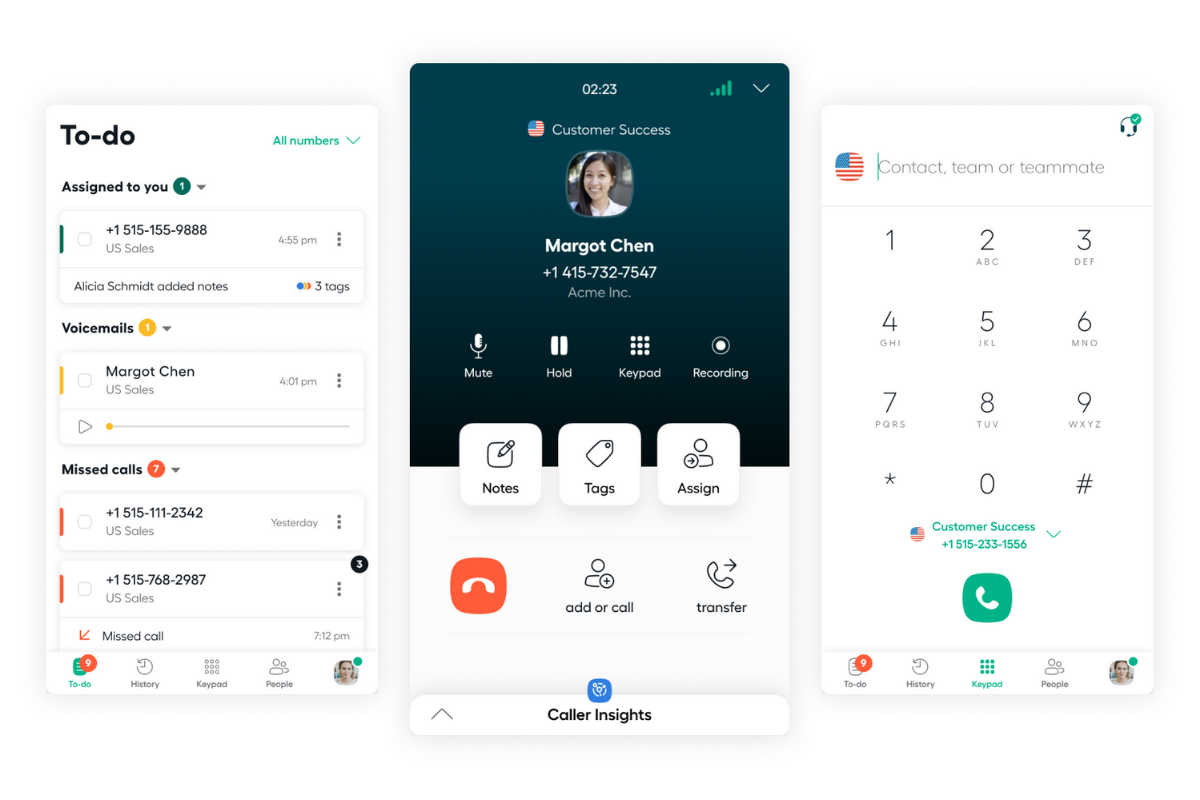
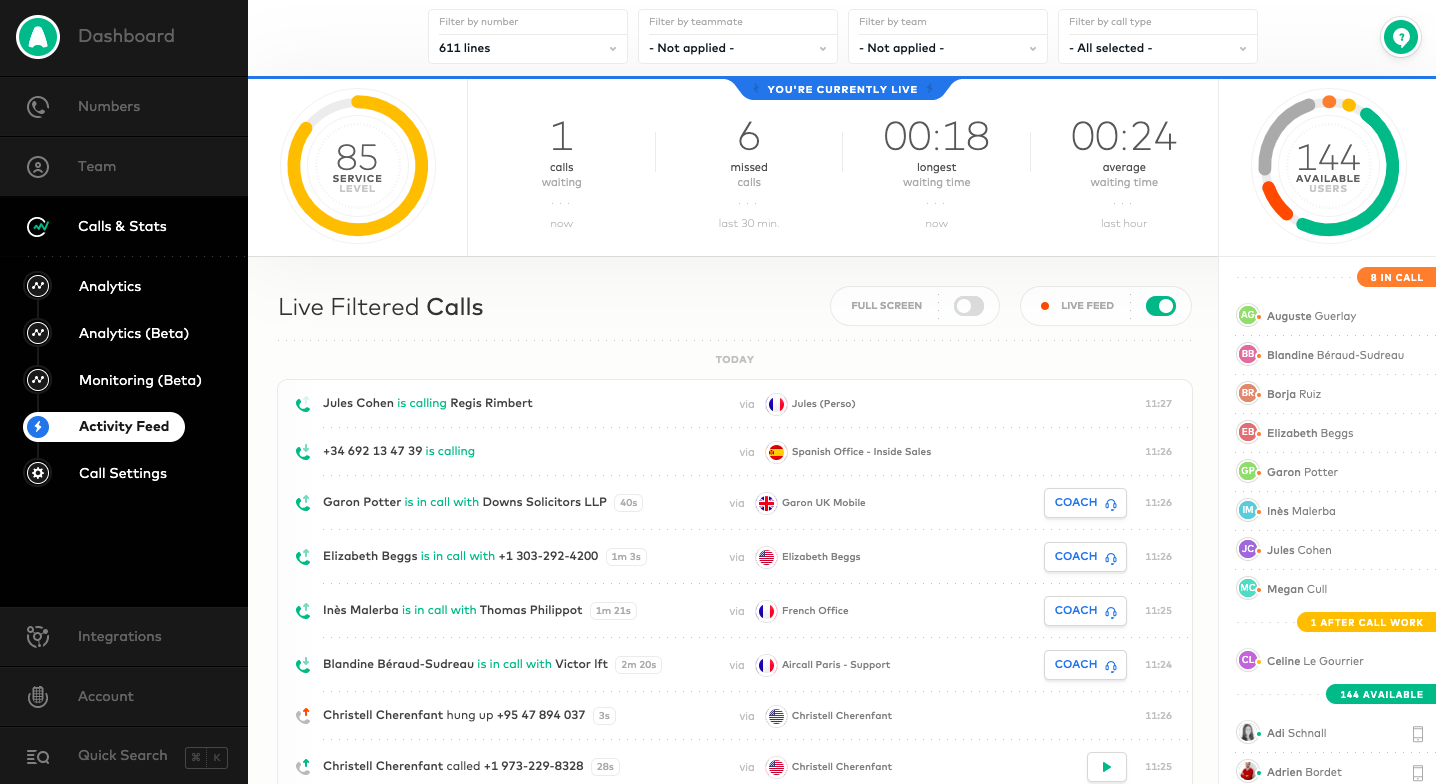
Aircall headquartered in Paris provides a VOIP system for business designed to support contact centers, featuring IVR and automated call routing, conference calls, shared call inbox and call notes, unlimited concurrent calls and call queuing, and many integrations with CRM or marketing systems to support a variety of support or sales purposes.
$120
per month for 3 licenses (minimum)
Dialpad Support
Score 9.1 out of 10
N/A
Dialpad Ai Contact Center is an inbound or outbound call center platform and solution, that helps companies connect with customers across all channels and skip the repetitive questions, retaining reviewable conversations and context history.
$80
per month per user
Kixie
Score 8.6 out of 10
N/A
Kixie is a telephony and VoIP software solution from Kixie.
N/A
Pricing
Aircall
Dialpad Support
Kixie
Editions & Modules
Essentials
$40
per month per license
Professional
$70
per month per license
Custom
Contact Sales
25 license minimum
Essentials
$80
per month per user
Advanced
$115
per month per user
Premium
$150
per month per user
Custom Plan
Custom Pricing
Offerings
Pricing Offerings
Aircall
Dialpad Support
Kixie
Free Trial
Yes
No
Yes
Free/Freemium Version
No
No
No
Premium Consulting/Integration Services
Yes
No
Yes
Entry-level Setup Fee
Optional
No setup fee
No setup fee
Additional Details
Discount available for annual pricing.
—
—
More Pricing Information
Community Pulse
Aircall
Dialpad Support
Kixie
Considered Multiple Products
Aircall
Verified User
Manager
Chose Aircall
Aircall’s integration to our CRM, salesforce is second to none. Right after a call is made it is uploaded into salesforce right away and is a great way for our reps to reference back on.
dialpad was far more of a struggle to access call recordings for my reps as not only was …
Kixie is easier to navigate versus Aircall and Zoominfo. Kixie has clearer audio versus Aircall and Zoominfo. Zoominfo's dialer only dials numbers on their database, and does not allow you to manually dial numbers, unlike Kixie. Also, Zoominfo's voicemails can only be …
Features
Aircall
Dialpad Support
Kixie
Cloud PBX
Comparison of Cloud PBX features of Product A and Product B
Aircall
7.7
29 Ratings
4% below category average
Dialpad Support
-
Ratings
Kixie
-
Ratings
Hosted PBX
8.01 Ratings
00 Ratings
00 Ratings
Multi-level Interactive Voice Response (IVR)
8.320 Ratings
00 Ratings
00 Ratings
User templates
5.01 Ratings
00 Ratings
00 Ratings
Call reports
8.526 Ratings
00 Ratings
00 Ratings
Directory of employee names
8.925 Ratings
00 Ratings
00 Ratings
Call Management
Comparison of Call Management features of Product A and Product B
Aircall
7.7
32 Ratings
8% below category average
Dialpad Support
-
Ratings
Kixie
-
Ratings
Answering rules
9.231 Ratings
00 Ratings
00 Ratings
Call recording
9.029 Ratings
00 Ratings
00 Ratings
Call park
4.01 Ratings
00 Ratings
00 Ratings
Call screening
8.625 Ratings
00 Ratings
00 Ratings
Message alerts
7.827 Ratings
00 Ratings
00 Ratings
VoIP system collaboration
Comparison of VoIP system collaboration features of Product A and Product B
Aircall
5.7
19 Ratings
34% below category average
Dialpad Support
-
Ratings
Kixie
-
Ratings
Audio conferencing
5.719 Ratings
00 Ratings
00 Ratings
Mobile apps
Comparison of Mobile apps features of Product A and Product B
Aircall
8.4
29 Ratings
4% above category average
Dialpad Support
-
Ratings
Kixie
-
Ratings
Mobile app for iOS
8.923 Ratings
00 Ratings
00 Ratings
Mobile app for Android
7.818 Ratings
00 Ratings
00 Ratings
Contact Center Software
Comparison of Contact Center Software features of Product A and Product B
Aircall
-
Ratings
Dialpad Support
8.3
38 Ratings
1% below category average
Kixie
-
Ratings
Agent dashboard
00 Ratings
8.638 Ratings
00 Ratings
Validate callers
00 Ratings
8.635 Ratings
00 Ratings
Outbound response
00 Ratings
8.935 Ratings
00 Ratings
Call forwarding
00 Ratings
8.937 Ratings
00 Ratings
Click-to-call (CTC)
00 Ratings
8.635 Ratings
00 Ratings
Warm transfer
00 Ratings
8.032 Ratings
00 Ratings
Predictive dialing
00 Ratings
7.225 Ratings
00 Ratings
Interactive voice response
00 Ratings
8.332 Ratings
00 Ratings
REST APIs
00 Ratings
7.917 Ratings
00 Ratings
Call scripts
00 Ratings
8.028 Ratings
00 Ratings
Call tracking
00 Ratings
8.034 Ratings
00 Ratings
Multichannel integration
00 Ratings
8.325 Ratings
00 Ratings
CRM software integration
00 Ratings
8.425 Ratings
00 Ratings
Workforce Optimization (WFO)
Comparison of Workforce Optimization (WFO) features of Product A and Product B
Aircall is a great fit for any SaaS organization for sales and support groups. Since I come from sales, I cannot talk about support, but for the sales team, it's a great help. It's intuitive and user-friendly. No need for formal training as it's very easy to access all the features you need. I particularly like the option of taking calls on my mobile phone while I am away from my desk or traveling, and also how I can easily manage my working hours and schedule. I also like its ability to interact with different CRMs and other useful tools like Slack, etc.
We have a mix of Dialpad Support and regular Departments in Dialpad Support - we mostly use Dialpad Support for our high-volume area or areas we need to keep track of in more detail. In our smaller clinics, with few staff, Dialpad Support doesn't make sense to use to we have them setup as Departments instead.
Aircall's integration with HubSpot is fantastic. I can call from anywhere in HubSpot and know that my call is logged automatically. During my call, I have easy access to a contact's record and can pull up any information I need in just the click of a button. The only limit I've found is that it doesn't (yet?) auto-log to tickets. This seems to be pretty common among other integrations so it wasn't seen as a con in our buying decision.
I really like the Aircall dashboard and being able to customize who has access to what number. We even have the ability to give outbound calling privileges only to certain team members. It's also great that you can set up each individual number's answer tree to ring to the correct person.
There's a lot of cool features that don't make sense for our particular business, but I think Aircall's metric tracking and coaching abilities would be really useful for a lot of teams. I remember in my first call hearing about a feature where a manager can listen in and "whisper" tips to a rep during a call that only the rep would be able to hear. I can see how this would add value in a coaching situation.
Kixie integrates seamlessly with our CRM (Zoho), meaning it updates call notes directly on the customer's CRM profile.
The one-click dialing feature directly through our CRM is a great feature. It's so simple; just search for a name, one-click, and you are on the phone.
The local presence feature is a nice touch for cold calls. It provides a local area code when cold calling to increase the likelihood of an answer to the call.
No feature to update more than one phone line at the same time
Admins don't have access to the timeline of a call to see with which agent it rang
Missing agent-specific stats when your phone lines are organized in teams
If calls are setup to ring to a first group and then a second, if the whole first group is already busy, it does not go to the second group but puts the customer on hold
I give this rating as aircall is very easy to use but also lacks a parallel dialing feature which makes it slower to use. aircall has a pretty seamless integration with salesforce which is helpful. For the cost it is definitely very reasonable but it also lacks a live coaching/listening feature which is very valuable as a manager.
I have never had any issues with getting a problem resolved. The dialpad support team is responsive and extremely helpful. As busy as our business is getting, having the AI transcripts and call recordings aid us in being more task productive when helping patients. Other than the patient aspect of it, having no hardware maintenance is amazing
I provide this rating based on my overall experience using Aircall. I have used it on my previous company as well and that being said, it is a proof that Aircall is a great tool to use in contact centers and with B2B businesses that has direct communication with clients.
I always get great customer service when I need help. Even if i just decide to chat online instead of calling in. The reps are always so nice and the customer service is always amazing. I have never had any complaints. Usually my issues are pretty simple and they never make it harder than it needs to be
Kixie provides a nice user interface. There is a bit of a learning curve to load leads but it's not difficult. It's just learning where to go and how to load lists for the reps. Once you have it figured out, it's easy to get lists loaded for reps and give them the ability to manage those leads
We've enjoyed using Aircall so far and have had no issues with it. The platform is easy to use, looks nice, and makes it easy to keep track of everything.
We used to answer phone calls on our fix line when at the office. The quality was very bad but we had in mind that a VOIP solution would be too expensive. When lockdown began last year, I had to redirect calls on my own mobile phone which was not efficient. Also I couldn't receive voicemails, have a history of calls or choose working hours.
We looked at Aria, but we already had Dialpad Support and decided just to move forward with more features. I think the familiarity with the Dialpad app and the basic features made the addition of new features a much more seamless process rather than attempting to try dual software.
Because of the lack of local partnerships with South African telecoms companies, calls to South Africa is very expensive. This was not originally apparent when opening the Aircall account.
Not having the option to display a local South African number in the CLIP, means that people are not always eager to pick up the phone when they see an overseas number ringing.
The only positive impact has been the collaborative experience and being able to maintain a virtual office
The callback feature has saved clients a lot of hold time
The voicemail system has allowed cases to be handled properly by client's being able to leave a message for the proper agent
The Ai transcript feature has helped dozens of agents, as well as the company, avoid a lot of hassle, time, and lost money due to verifying conversations and information that normally would be much harder to confirm without it