Arctera Backup Exec is a backup and disaster recovery solution. It works in virtual, physical, and multi-cloud environments and integrates with several third-party software releases and applications.
N/A
Asigra
Score 8.0 out of 10
N/A
Asigra is an enterprise-level, agentless, cloud-based recovery software to provide data backup and recovery of servers, virtual machines, endpoint devices, database, and SaaS/IaaS-based applications. Asigra charges customers by the amount of data they recover rather than the amount they back up.
N/A
Veeam Data Platform
Score 9.1 out of 10
Mid-Size Companies (51-1,000 employees)
Veeam’s® premier product, Veeam Backup & Replication™, delivers availability for all cloud, virtual, Kubernetes and physical workloads. Through a management console, the software provides backup, archival, recovery and replication capabilities.
$428
per year per 5 instances
Pricing
Arctera Backup Exec
Asigra
Veeam Data Platform
Editions & Modules
Veritas Backup Exec
Contact sales team
No answers on this topic
Veeam Data Platform Essentials
$428
per year per 5 instances
Veeam Data Platform
Contact sales team
Offerings
Pricing Offerings
Arctera Backup Exec
Asigra
Veeam Data Platform
Free Trial
Yes
No
Yes
Free/Freemium Version
No
No
Yes
Premium Consulting/Integration Services
No
No
Yes
Entry-level Setup Fee
No setup fee
No setup fee
No setup fee
Additional Details
—
—
Veeam sells through channel partners. Contact a partner for detailed pricing and quotes. Resellers or sales personnel are available for assistance.
I chose Veritas Backup Exec for my clients Windows Servers about 15 to 20 years ago because that was the ONLY backup software available at the time. Since then, [I feel] the software has gotten bloated, unreliable and cluttered. Veeam Backup & Replication is much more …
Veeam is a vastly superior product. We use Veritas Backup Exec because we have legacy software and equipment that Veeam cannot fully integrate with yet.
Symantec and Acronis are well matched, but Symantec is more flexible in designing jobs. Acronis creates images that are mountable whereas Symantec creates backup files that can be restored quickly and easily. Barracuda and Datto are "total data storage" backup options and …
Veeam is by far superior to Backup Exec in the virtual, SQL, AD, Exchange, and Physical Environments. The way they interact with the Virtual Servers is more streamlined and generates better results. They also support more file system such as AIX and XFS for backup and …
Sorry but Veeam stacks up against Backup Exec. Backup Exec has a million of options, Veeam is clean and more easy to configure and use. Right now I can't recommend Backup Exec, but I hope in the next years I can come back and say something positive.
I would say that it has the same functionality as the three mentioned above in their respective fields (might have a bit less than some of them) but Asigra offers all of this and more so if you are looking for a single backup solution across the entire firm then Asigra is the …
Best of all options, covers most if not all scenarios, granular backup, scheduling, and retention options. Provides self-service restores, centralized web management interface, and granular reporting.
Verified User
Administrator
Chose Asigra
I have used Symantec Backup Exec, Symantec System Recovery, Datto and RBS Cloud Backup.
Asigra has great compression. No need to install additional agents across a company is great. End Users often blame agent installs for messing up workstations etc so not needing an agent in …
When doing a short evaluation of the other products it appears price and value made up our minds that Veeam beat the other products hands down. It's flexibility in covering all of us on premise and cloud environments made the decision easy for us. When it comes to Veeam I like …
Veeam Data Platform is easier to use than Backup Exec and Carbonite. Setting up backup jobs in Veeam is easier than in Backup Exec or Carbonite. Veeam has a modern interface that is easier to navigate that other solutions I've tried in the past. Carbonite was more difficult to …
Veeam is much more robust and easy to manage than the competitors that we used in the past. I never got the same feeling of confidence with those backups that I have now with Veeam. The pricing was also similar or better, and less complicated since there is just one type of …
Talking with other parties about their experiences with various platforms and comments from peers about the ease of use and quality of product with Veeam
For the on-prem workloads Veeam Data Platform is a far superior product in terms of deployment options, flexibility, managability and scalability. It's mature and well developed features make it a no-brainer in this scenario.
For the cloud workloads we found Veeam Data Platform …
VS Networker, its hands down better with support and ease of use. It also has many more features.
Vs Backup Exec, its much less confusing to use as Backup Exec doesn't have an intuitive interface. It also, like Networker, has many more features than Backup Exec.
I've used Unitrends most recently. I really love Unitrends and tried to switch this last time I renewed support for Veeam Data Platform; however, it was not cost effective. Unfriends would have cost 4 times as much as Veeam Data Platform. As for the others, the features of …
Compared to our previous solution The Veeam Data Platform goes beyond comparison. The ease of deployment, maintenance and general operation of this solution is just brilliant and keeps on getting better with every upgrade. We trust in Veaam as a brand because of the high …
Veeam Data Platform offers a different solution from other backup providers, which is replication. We choose Veeam Data Platform for our clients who will benefit from using replication to avoid downtime and keep RTO's lower
Veeam Data platform provides a superior and much more reliable experience than the other solutions mentioned. It kept pace with technological advancements to remain relevant today and has a broader service under its umbrella. Its tools have an easy-to-use user interface, better …
When comparing Veeam Data Platform to Backup Exec, several factors influenced our choice of Veeam:Performance and Scalability: Veeam excels in handling large-scale environments, offering high-speed backup and recovery, while Backup Exec can struggle with performance in larger …
I will try this solution, to give me a better overview off the market place and analays cost/benefic or cost/workload. See if any feature is very suitible to me or not and help Veeam to to improve somewhere. This is just to give me a real state of what the marked can do and …
I've also used a cloud-based backup system written by Datasoft however this was a low-volume system designed for single servers or desktops. As for Backup Exec, I much prefer Veeam for the user interface and the ease of management. BE always seemed to take a lot of time to …
Prior to going with Veeam Backup & Replication, we used Backup Exec to backup up our VMs and data files to tape. The big difference between those two has been the ability of Veeam Backup & Replication to back up to disk first then copy those backups to tape giving us both the …
We have supported and used Veeam with our clients, so the solution definitely had an advantage over all of them except Tivoli. But, the [ease of] deployment really got our hearts. Did I mention we spent only 6 hours deploying it, whereas Nakivo took us 2 days to just understand …
We used to use Backup Exec before we starting using VMware. However, once we started to virtualize our environment, we could no longer use a product that was not built from the ground up for virtualizing. Veeam has so many more options than Backup Exec has and we know our …
Backup Exec works well generally in most environments or situations. The licensing can potentially be a nightmare, but manageable if you have a decent reseller. Backing up and restoring from physical tapes which is not all that common is not as reliable as when backing up and restoring from datastores that reside on hard drives or digital media. It does a good job with large or small backup jobs. Backing up and managing SQL backups requires additional licenses and be a bit clunky. If you are very careful (which you should be anyway) and document as you build these backups you will get better at managing them. Regarding a virtual environment, I have limited experience in that arena, but have done it. Backup Exec can backup VMware environments, but honestly we moved to Unitrends to backup our VM's and are much happier with the backup process. However, restoring a VM in Unitrends can be tedious compared to Backup Exec.
When backing up an entire machine, it does so very effectively. I believe this feature has a lot of experience when it comes to backups, as it clearly specifies—during the restoration process—which days you can restore the machine, with specific dates down to the hour. And the restoration time is quite fast compared to other applications
Manage agent based backups - It is easy to schedule and monitor backups. Verifying backups is done for all jobs. Backup performance is excellent.
Provide a wide ranging contingent of backup options - Despite providing a dizzying array of backup options, it is easy to schedule individual or recurring jobs.
Integrates well with our Active Directory - Restoring even individual Active Directory objects is possible.
Provides capability of local backups while maintaining remote copies on cloud to ensure faster recoveries of recent data and remote protection of all data.
Helps reduce cost of long term retention by leveraging the BLM functionality.
It does not need specialized hardware for it to work. Customers and Service Providers can choose their own infrastructure and do not need to rely on any OS or storage based replication even for deploying replication of backups.
Supports wide range of environments including virtual environments with remarkable features like remote VDR with incremental restores.
The ease of use in creating jobs and adding clients enables our new and less skilled administrators to work efficiently, quickly, and accurately.
The same ease of use is essential for junior admins as well. Backups are quickly and accurately restored, allowing our networking team to bring clients back to production within expected times.
The ability to create a restore for testing and to remove it quickly has proven to be an excellent asset for our production and DB teams.
Could provide better license management from an inventory perspective. How many licenses do I have?.. etc.
When Backup Exec backs up itself it should not select iSCSI backup targets by default. The result is recursive data backup ending in the loss of storage capacity.
We would like to see Asigra come out with a Replication Model for quick Recovery of systems upon Disaster. We can have quicker recovery, DR, with Virtual Machines but we would like to have Physical Machine recovery in less than 2 hours. Replication can accomplish this...
We would like to see Geolocation and remote wipe for endpoint devices
We would like to see the solution provide easy "roll back" after a disaster.
On occasion, the 'reason' for a failed backup can be a little hard to understand. It would be nice if it were a bit more straightforward.
I would love to run the platform natively on Linux, but I don't think it's an option.
Sometimes, locating the correct update file for the platform software can be a bit confusing. If they had an option to download the correct update file from within the console, that would take some of the guesswork out of it.
This software is a mess in my brutally honest opinion. I've spent more time babysitting this software while backing up 20 servers than I did with Veeam backing up 600+. I've had multiple jobs run fine for weeks at a time that just randomly fail out of the blue for seemingly no reason whatsoever. There's no intuitive way to chain jobs, so automation becomes somewhat more problematic if certain jobs depend on other jobs. The forever incremental feature feels tacked on since the merge operation merges all your incremental jobs into the most recent backup and doesn't have the option set a limit on how long to keep your point in time restores.
Compliance is a tricky thing. Jumping backup software means having to deal with previous copies somehow. Asigra is built for the long haul.
Asigra is continuing to increase their feature stack. They have made huge steps in the VM backup in the last 3 years and continue to implement features there.
As far as cloud backup software goes, there are many that can do it, but none that do it as well as Asigra.
I really have no complaints about Veeam Backup & Replication. Their service has been excellent and the cost is minimal in comparison to other services I checked out. Implementation wasn't simple and the Veeam Support team was there to help each step of the way.
It can do a lot of things on paper and sounds terrific, but in practice it doesn't do any of them well. It can easily be sold to non-technical minds and C-levels, but of all the backup solutions I've used in the last 15 years of my career, Backup Exec is easily the least fault tolerant. Unless this software is a sunk cost and you're on a shoestring budget, I recommend almost anything else. Jobs fail often with obscure error codes and the KB articles in the Veritas support portal are a mess. Within 30 days of a fresh deployment I've logged more tickets with their support than I did in 3 years with Veeam.
It is a bit rough around the edges and the GUI feels like a wrap around of a CLI but it is simple to use. The problem comes in when there is an error code you are usually chasing down the error code in the specific vendor's forums rather than Asigra's
It is a very robust solution that has never failed. It also has perfect integration with Windows server volume shadow copies. The processing load is moved from the backup server to the backup proxy. Increased fault tolerance: you can store data on a separate machine, the backup repository. Can perform a bare metal restore.
Over 6 consecutive years our Asigra Backend had 99.99% uptime and provided 7x24 data restore availability. Software is robust in operations, provides N+1 node architecture to protect against failure of half of the nodes (majority of the nodes still up) and software based replication to protect against data loss across two geographically independent datacenter locations. Why not 10 points? Some major upgrades still require short downtime within a planned maintenance windows.
I give Veeam Data Platform a rating of 9 for availability because it consistently performs reliably in critical data protection and recovery tasks. The platform is designed to minimize downtime, ensuring that backup and recovery processes are accessible when needed.While there may be rare instances of maintenance or minor application errors, these do not significantly affect the overall reliability of the system. Veeam’s strong architecture and features like high availability configurations further enhance its performance, allowing us to trust it in crucial situations. Overall, it has proven to be a dependable solution that meets our organization's needs effectively.
Veeam does a good job with backing up our servers in a timely manner. We are still at the beginning of our Veeam use and are pleased with the speed at which we can access the system as well as the backups and restore points. Veeam is definitely superior to our previous backup system in terms of speed and accessibility
In the few instances of having to contact support, our overall outcome was always good. They would have received a better score if the wait time was less, but I attribute this to the timing of support calls - it was during the previous owner's time. We have not had to open a support ticket since Veritas Backup Exec took the product back over.
They respond quickly on your request. They ask for details at the time of logging the support request itself ensuring the first response is not for collecting the basic details only. They refund you the support request if they find it as a functionality issue. They follow up on you to ensure you are satisfied and happy with the response and resolution that they have provided.
The support team has never asked me to jump through silly hoops or waste time on pointless exercises. They seem to truly have a handle on what may be wrong. In fact, when we were having trouble getting our license renewal setup (because of yet another license migration at Veeam) a support incident got us connected to the right people to get our renewal done in time.
I rated the in-person training an 8 because it was generally effective and provided a solid foundation for understanding the Veeam Data Platform. The instructors were knowledgeable and engaged, making the sessions interactive. However, I felt that some topics could have been covered in more depth, and additional hands-on exercises would have further reinforced the learning experience. Overall, it was a positive training session that adequately prepared attendees for using the product, but there's room for improvement.
Anything training past level 1 and level 2 is a waste of time. They do not offer training, just an exam and require you to read 2500 pages of their documentation as their training. They are selling you something which you already have. Training exams are far fetched and cover topics hidden within the documentation. A lot of their documentation does not match across itself. They don't even follow the standard versions Major.Minor.ServicePack.Hotfix. They use the MAJOR.MAJOR.MAJOR.Hotfix method, which doesn't match their documentation. They require you to take training in order to keep your engaged hybrid partnership. If you ask me personally, their training is a scam to make more money.
I gave it a rating of 7 because, although the online training offered valuable content and covered the essential aspects of the Veeam Data Platform, it lacked interactivity and opportunities for direct engagement with instructors. This made it challenging to ask questions or delve deeper into specific topics. Additionally, some sections felt a bit rushed, which could hinder a comprehensive understanding of more complex features. Overall, while the training was useful, improvements in interactivity and pacing could elevate the experience significantly.
Quick to install, easy to create jobs, schedules and retention policies. No large cycles of setting up backup volumes or trash volumes. Retention job itself configures the BLM functionality so you don't need an expertise to handle the BLM module separately.
Plan the process and then work through your plan, i know this should go without saying but its easy to get sidetracked. You tend to want to just get up and running so you can have that sigh of relief, spend the time to talk to your business stakeholder to see what goals they are trying to accomplish and how that may impact your plans first.
If your company is looking at changing solutions or currently does not have any, Veritas Backup Exec is the way to go. Do yourself a favor and try the 60 day trial, you won't be disappointed! Very simple to use and has a great GUI, much better than what the competition has to offer.
I would say that it has the same functionality as the three mentioned above in their respective fields (might have a bit less than some of them) but Asigra offers all of this and more so if you are looking for a single backup solution across the entire firm then Asigra is the much better choice
We had used products like HP VSA, DoubleTake, and Unitrends, but due to the amount of data our file server housed, they were just either too slow or too expensive to maintain. Veeam is cheaper, faster, and better run than any of the others we have experience with. Would never look at going back.
In terms of scalability for our company, Veeam was able to cover our backup needs with ease. They have options for even more individualized backup if we were to need them; i.e. if a specific workstation needs its own independent backup. We have not used these resources yet, but I am confident they will be beneficial to our company in the near future.
Backups by their very nature are difficult to quantify when it comes to ROI. Any monies spent should be seen more as insurance . If you never have to claim on it then that is the best outcome. Backup Exec gives you comfort that you can meet any downtime recovery targets set by your business and this is how to benchmark your solution.
Conduct regular DR tests and your this will be your ROI.
Nightly backups, plus fast restore capabilities, significantly reduce the risk that a hardware failure or ransomware incident will cause extended outages of identity, build, or engineering systems.
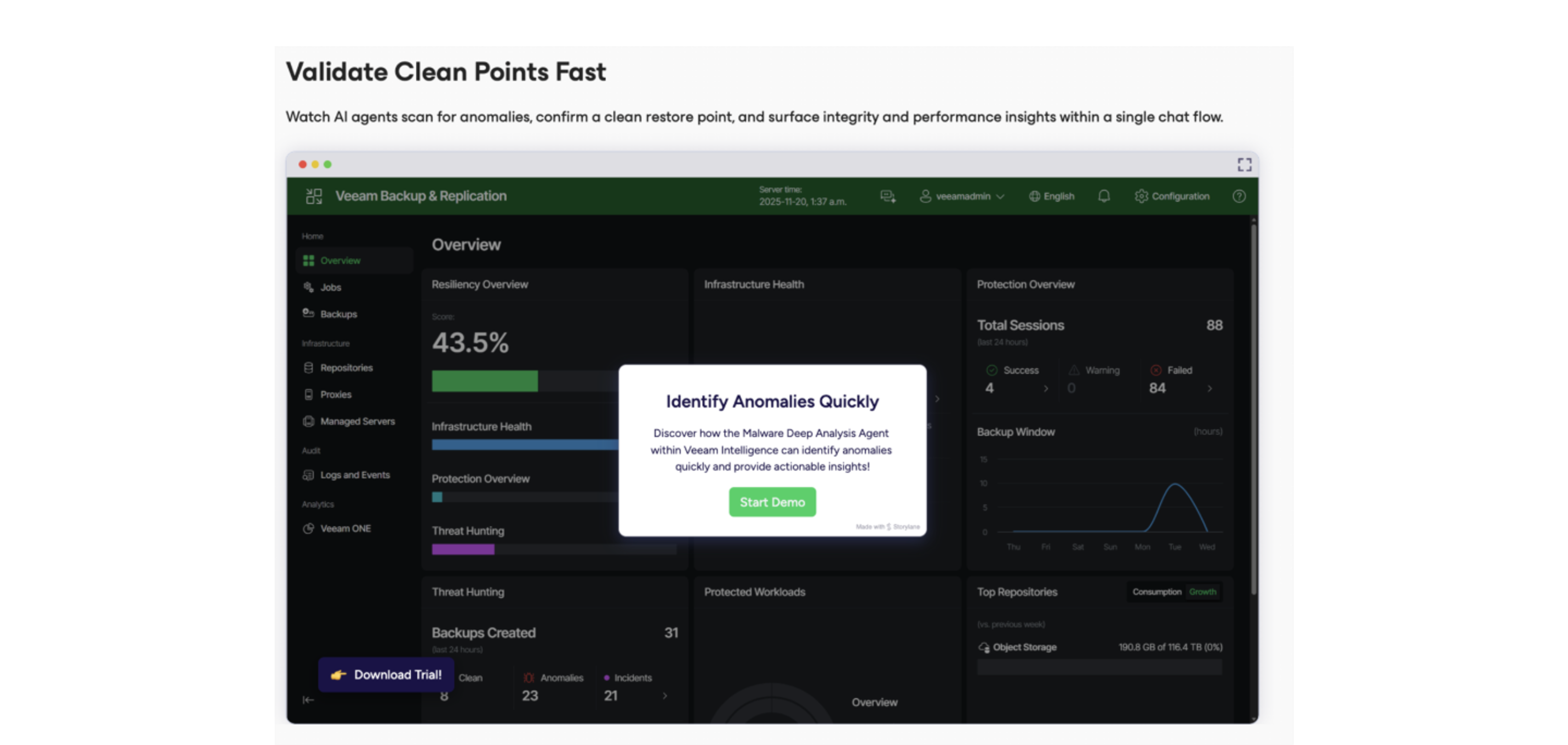
Features like immutable backups, AI-powered “clean backup” verification, and threat-focused tooling such as Recon Scanner help detect suspicious activity earlier and ensure that restore points are trustworthy, improving cyber-resilience overall.