Backlog is a project management and bug tracking tool for teams that want higher productivity, greater visibility, and simple project tracking. Development teams can work together with Design, Marketing, IT, and more.
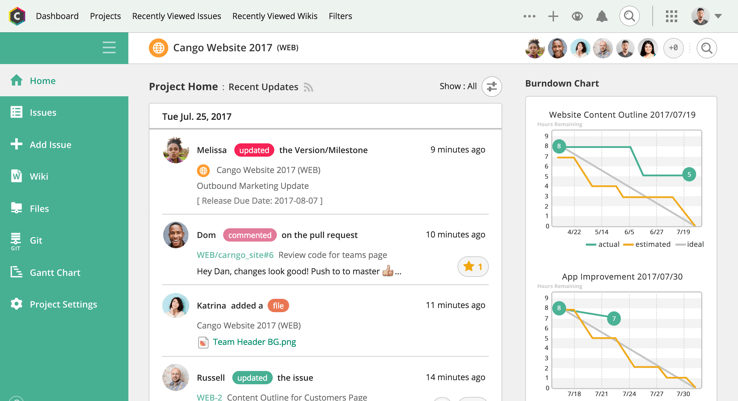
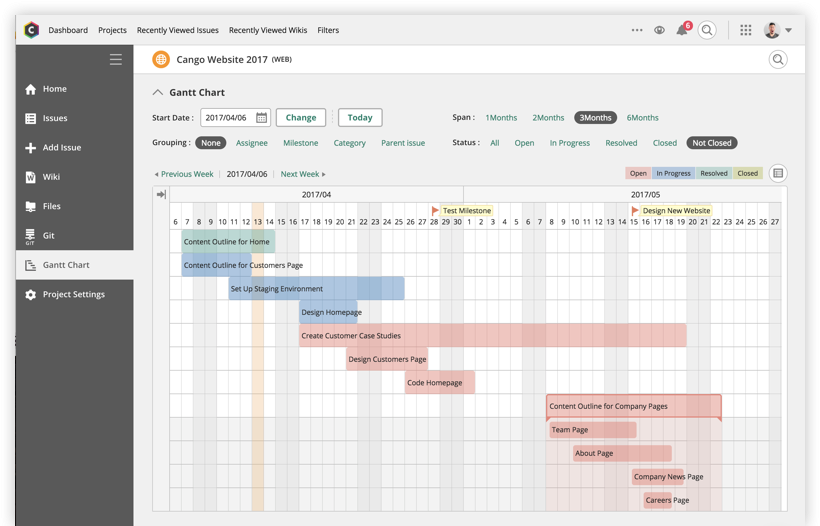
Backlog is designed to get everyone on track by organizing work, teammates, projects and tasks. The activity feed and watchlist are designed to help users keep an eye on relevant work and deadlines. Gantt charts and burndown charts are designed to help users visualize project…
N/A
ClickUp
Score 8.6 out of 10
Small Businesses (1-50 employees)
ClickUp is a productivity platform that brings together work apps, data, and workflows. Also presented as a Converged AI Workspace, ClickUp eliminates work sprawl to provide context and a single place for humans and agents to work together. The platform currently boasts over 20 million users worldwide.
$0
per month per seat
Hive
Score 9.0 out of 10
N/A
Hive Technology offers their eponymous project management and process management application, providing integrations with many popularly used applications for productivity, cloud storage, and collaboration.
Throughout my career, I have used at least a dozen different project management platforms and tools for keeping projects moving along. While I have used project management tools from some impressive names, I found that most of them weren't very impressive at all. In so many …
After an exhaustive search for the right program/app, ClickUp's fully customizable functionality was the reason that we chose the app. Because the needs of sales operations to track product, sales, customer service tickets, and other varied duties; having a generic set-up was …
Hive did what these other tools do. It has Kanban boards, Gantt views, timeline views, reporting, task management, and file uploads. While it is not as feature rich at the lowest subscription level as some of these others, its interface is quite a bit less overwhelming than say …
Features
Backlog
ClickUp
Hive
Project Management
Comparison of Project Management features of Product A and Product B
Backlog
7.0
3 Ratings
10% below category average
ClickUp
8.3
717 Ratings
7% above category average
Hive
9.1
15 Ratings
16% above category average
Task Management
10.03 Ratings
9.3717 Ratings
9.015 Ratings
Gantt Charts
7.03 Ratings
8.0520 Ratings
10.014 Ratings
Scheduling
10.03 Ratings
8.5595 Ratings
7.014 Ratings
Team Collaboration
10.03 Ratings
9.2685 Ratings
10.015 Ratings
Support for Waterfall Methodology
5.03 Ratings
8.5401 Ratings
8.011 Ratings
Document Management
10.03 Ratings
7.9617 Ratings
10.013 Ratings
Email integration
3.03 Ratings
7.6501 Ratings
10.013 Ratings
Mobile Access
1.03 Ratings
7.3575 Ratings
8.011 Ratings
Resource Management
00 Ratings
8.4567 Ratings
9.015 Ratings
Workflow Automation
00 Ratings
8.2568 Ratings
9.014 Ratings
Support for Agile Methodology
00 Ratings
8.6480 Ratings
10.012 Ratings
Timesheet Tracking
00 Ratings
8.1479 Ratings
10.09 Ratings
Change request and Case Management
00 Ratings
00 Ratings
10.011 Ratings
Budget and Expense Management
00 Ratings
00 Ratings
7.09 Ratings
Professional Services Automation
Comparison of Professional Services Automation features of Product A and Product B
ClickUp is well suited to organize projects and communicate internally with teams members and externally with clients or vendors. If you need to track emails, any emails responded to from an email sent within ClickUp is automatically tracked within the task where it originated. It also works great for storing document files within projects and tasks and tracking multiple versions of documents created or copied within ClickUp
Hive is a powerful tool for data analysis and management that is well-suited for a wide range of scenarios. Here are some specific examples of scenarios where Hive might be particularly well-suited: Data warehousing: Hive is often used as a data warehousing platform, allowing users to store and analyze large amounts of structured and semi-structured data. It is especially good at handling data that is too large to be stored and analyzed on a single machine, and supports a wide variety of data formats. Batch processing: Hive is designed for batch processing of large datasets, making it well-suited for tasks such as data ETL (extract, transform, load), data cleansing, and data aggregation.Simple queries on large datasets: Hive is optimized for simple queries on large datasets, making it a good choice for tasks such as data exploration and summary statistics. Data transformation: Hive allows users to perform data transformations and manipulations using custom scripts written in Java, Python, or other programming languages. This can be useful for tasks such as data cleansing, data aggregation, and data transformation. On the other hand, here are some specific examples of scenarios where Hive might be less appropriate: Real-time queries: Hive is a batch-oriented system, which means that it is designed to process large amounts of data in a batch mode rather than in real-time. While it is possible to use Hive for real-time queries, it may not be the most efficient choice for this type of workload. Complex queries: Hive is optimized for simple queries on large datasets, but may struggle with more complex queries or queries that require multiple joins or subqueries.Very large datasets: While Hive is designed to scale horizontally and can handle large amounts of data, it may not scale as well as some other tools for very large datasets or complex workloads.
Backlog is one of the best management and collaboration tools available in the market for better managing of resources at the workplace.
I have been using this platform for a very long time and it has been helping me a lot to manage the business processes, manage employees, managing leads on different projects, and coordinating with colleagues.
It has been helping me a lot to check the issue in the project completion.
It gives me real-time status on the project/gives right insights of the system.
Customization is huge for us! We do not have the aspects of standard project management, so having the ability to customize basically everything in ClickUp is amazing.
An outstanding free version of the software! We are a small nonprofit organization that cannot afford the robust levels of other software, so having access to SO MUCH for free is incredible.
The layout and organization of tasks, Spaces, folders, etc. is perfect. I love how I can see which task all of my subtasks belong to on my dashboard. And the option to change colors and icons for everything also really appeals to my obsessive brain.
Simplicity, it offers a clean environment without risking the outcome. An example of this are the timesheets that allow a fast way to keep track of progress
Interaction, the different options make it faster and easier to interact and collaborate in the development of a product. An example of this would be Hive Notes for meetings
The different visualisations it offers allow to explore the best ways to affront your projects. I really like the Gantt mappings view to understand who can be contacted at each point
It has been a game-changer in terms of project tracking, as animation is a demanding product that requires multiple layers of analysis, revisions, tracking, scheduling, etc. ClickUp simplifies many approvals as anyone can easily add items, and you can tag the people who need to look at them.
Because for me, working with teams, ClickUp has provided a service that we longed for. Something that is non-complicated and easy to maneuver. We understand the learning curve can be steep, but we are willing to give the software a chance because it is everything we hoped it would be. However, leadership found the project works for our organization at this time. Moreover, we can customize to our needs.
For over a year ClickUp was unavailable to us just twice for a couple of hours. I would say for a system this big and working globally that was a minor issue. They managed to fix all the issues within a couple hours and then it was back up and running perfectly fine.
The speed of ClickUp is average to be honest. This is one of the biggest flaws of the system, sometimes it's also lagging a little bit but we also have a lot of documents, lists etc. on our workspace. However, with the next version of ClickUp I've seen they are planning to increase the speed by almost 500%, probably by changing the technology, so I am more than looking forward to it.
I started using ClickUp when it was what most would consider a baby company. There were the occasional bugs that made working in ClickUp a little bit of a headache, but the support feature allowed me to chat with a real persona and communicate my issues. I would always get prompt support and someone willing to really help me, not just point me to FAQ pages. Not feeling like a number really makes a difference.
Our CSR is easily accessible and they have support built into the app itself. They also have a pretty robust support site. We also took advantage of the free trial and learned so much by putting Hive through the paces and figuring out the best way to mold it to our needs.
There are multiple guides on literally all of the functions you can find within the system, therefore it's easy to learn anything you'd really like to use, starting from project and people management, down to Gantts, mind maps, time tracking, inviting Clients as guests to work with you on the projects and so much more.
Start small. Don’t try to build the most elaborate plans first. Resist the urge to get into Gantt charts if no one is used to them. Just get work written, add dates and assignees, and start getting used to it. If you did not use a work management tool before, you need to be gracious with yourself about the fact that you likely do not have the muscle memory for working this way yet. But you will get there.
And leverage people who know it if possible. Look for ClickUp experts and vendors. They can really supercharge your effectiveness at building the tool out and speed up the process.
Backlog has all of the top-notch features to increase productivity, visibility, and project tracking. Backlog is easy to use. I first just logged in to the platform and it was [ready] to go. I easily started working on it and it started giving me the bugs’ details on our project. Always available for queries. Listen to the queries very attentively and try to give a solution on the go if applicable. Otherwise, take some time and respond with the advanced workable solution in the limited time frame.
I used Salesforce at my last job and would recommend ClickUp if utilizing the product for more than just sales. My last company tried using Salesforce for a number of other actions, such as department project tracking, client documentation, and outbound communication which did not work well. ClickUp is far better at managing multiple levels of organization within a company.
Hive is a bit different than Jira and Monday, which I used mostly. Overall does a great job managing project and helps with team communication. Removes dependency of asking team members for updates by going to conference rooms. With Hive, the team updates the status, and we can easily track it.
Scaling with ClickUp is superb. If you create a workflow best suited for your organization then it's all about creating new accounts and teaching the new employees the workflow you're using. It's that simple. There is no black magic when it comes to Clickup.