Overview
ProductRatingMost Used ByProduct SummaryStarting Price
Bluescape
Score 1.1 out of 10
N/A
Bluescape is a cloud-based, software as a service company based in Silicon Valley, CA, that provides a digital whiteboard of the same name.
$10
per month
Miro
Score 9.1 out of 10
N/A
Miro is the AI Innovation Workspace that brings teams and AI together to plan, co-create, and build the next big thing, faster. With the canvas as the prompt, Miro's collaborative AI workflows keep teams in the flow of work, scale shifts in ways of working, and drive organization-wide transformation.
$10
per month per user
WorkCast Present+
Score 9.1 out of 10
Mid-Size Companies (51-1,000 employees)
Present+ is a fully featured webinar tool that is designed to allow users to quickly create webinars. It includes registration, email communications, live and on demand events, and advanced branding capability. All on-demand recordings of live webinars can be recorded automatically and are fully hosted. Present+ is a browser-based, mobile and multi-device friendly platform.  No app installations or plugin downloads are required.N/A
Pricing
BluescapeMiroWorkCast Present+
Editions & Modules
Team
$10
per user, per month (10-50 licenses)
Business
$20
per user, per month (10+ licenses)
Enterprise
Custom Pricing
10+ licenses
1. Free - To discover what Miro can do. Always free
$0
2. Starter - Unlimited and private boards with essential features
$8
per month (billed annually) per user
3. Business - Scales collaboration with advanced features and security
$16
per month (billed annually) per user
4. Enterprise - For work across the entire organization, with support, security and control, to scale
contact sales
annual billing per user
No answers on this topic
Offerings
Pricing Offerings
BluescapeMiroWorkCast Present+
Free Trial
YesYesYes
Free/Freemium Version
NoYesNo
Premium Consulting/Integration Services
NoNoYes
Entry-level Setup FeeNo setup feeOptionalOptional
Additional DetailsMonthly billing also available at $10 per month for the Starter plan, or $20 for the Business plan.
More Pricing Information
Community Pulse
BluescapeMiroWorkCast Present+
Considered Multiple Products
Bluescape

No answer on this topic

Miro
Chose Miro
Ford uses Bluescape as the company standard. Designers use Miro because its better. We wish it was the company standard. The only nice thing about Bluescape is the ability to connect with our Bluescape monitors seamlessly.
Chose Miro
Miro is superior to Figma, and especially Bluescape. The feature sets may be pretty similar, but especially compared to Bluescape, Miro well and truly outperforms in terms of usability and user experience.
Chose Miro
MURAL - comparable, cheaper than Miro, but not as intuitive, user-friendly, and feature-rich. I would use MURAL as needed and really your top competitor. It is missing the fluid of selection.
Bluescape - is inferior in most parts but FedRAMPed
MS Whiteboard - flawed in every way …
Chose Miro
Miro has been my favorite as opposed to Bluescape and Asana. Bluescape felt a bit outdated and not as smooth to use. Asana did not have the extent of flexibility or features for the purposes we wanted.
Chose Miro
Miro offers more features and a better overall experience than Bluescape does. While Microsoft 365 allows for real-time interaction, only Miro provides the open-ended whiteboard format.
Chose Miro
Everything about Miro is better. Bluescape had limited object tools, always froze, was jittery when you tried to move things around, and overall was disliked by everyone in the company. When one group began using Miro, everyone else wanted to use it too, which ultimately led …
Chose Miro
far much better no bugs, faster, more better features
Chose Miro
Easy of use, login process, show colloboations, templates availability, tools that we can use, easy information sharing, relatively faster loading, awareness of tool, help availbility, browser support and app availability on different OS, responsiveness of product, popularity …
Chose Miro
I find Miro to be a superior tool, other tools I have used became unresponsive or too slow to be effective in the roles and jobs I needed them to do. I am currently working in a Miro board with over 1000 discrete elements and it loads fast, I can maneuver and work with the …
Chose Miro
Miro was selected as my org's collaboration solution. Each of the software listed above has its own pros and cons. Miro stacks up quite well as far as collaboration and whiteboard functions are considered.
Chose Miro
TERRIBLE, lagging Issues, formating, terrible updates. I'm glad I dont have to use It anymore
WorkCast Present+

No answer on this topic

Features
BluescapeMiroWorkCast Present+
Reporting & Analytics
Comparison of Reporting & Analytics features of Product A and Product B
Bluescape
-
Ratings
Miro
-
Ratings
WorkCast Present+
8.6
2 Ratings
11% above category average
Dashboards00 Ratings00 Ratings8.62 Ratings
Data exportability00 Ratings00 Ratings8.62 Ratings
Performance & Compatibility of Online Events Software
Comparison of Performance & Compatibility of Online Events Software features of Product A and Product B
Bluescape
-
Ratings
Miro
-
Ratings
WorkCast Present+
9.1
2 Ratings
11% above category average
High quality audio00 Ratings00 Ratings9.12 Ratings
Mobile support00 Ratings00 Ratings9.12 Ratings
Online Meetings / Events
Comparison of Online Meetings / Events features of Product A and Product B
Bluescape
-
Ratings
Miro
-
Ratings
WorkCast Present+
9.0
2 Ratings
10% above category average
Calendar integration00 Ratings00 Ratings9.12 Ratings
Record meetings / events00 Ratings00 Ratings9.12 Ratings
Slideshows00 Ratings00 Ratings8.62 Ratings
Event registration00 Ratings00 Ratings9.12 Ratings
Online Events Collaboration
Comparison of Online Events Collaboration features of Product A and Product B
Bluescape
-
Ratings
Miro
-
Ratings
WorkCast Present+
9.1
2 Ratings
7% above category average
Audience polling00 Ratings00 Ratings9.12 Ratings
Q&A00 Ratings00 Ratings9.12 Ratings
Online Events Security
Comparison of Online Events Security features of Product A and Product B
Bluescape
-
Ratings
Miro
-
Ratings
WorkCast Present+
9.1
1 Ratings
8% above category average
Participant roles & permissions00 Ratings00 Ratings9.11 Ratings
Confidential attendee list00 Ratings00 Ratings9.11 Ratings
Online Events Marketing
Comparison of Online Events Marketing features of Product A and Product B
Bluescape
-
Ratings
Miro
-
Ratings
WorkCast Present+
9.1
2 Ratings
14% above category average
Branding options00 Ratings00 Ratings9.12 Ratings
Integration to Marketing Automation00 Ratings00 Ratings9.12 Ratings
Best Alternatives
BluescapeMiroWorkCast Present+
Small Businesses
Canva
Canva
Score 9.1 out of 10
Lucid Visual Collaboration Suite
Score 8.8 out of 10
BigMarker
BigMarker
Score 6.0 out of 10
Medium-sized Companies
Canva
Canva
Score 9.1 out of 10
Lucid Visual Collaboration Suite
Score 8.8 out of 10
ClickMeeting
ClickMeeting
Score 9.4 out of 10
Enterprises
Whimsical
Whimsical
Score 9.3 out of 10
Lucid Visual Collaboration Suite
Score 8.8 out of 10
ON24
ON24
Score 7.6 out of 10
All AlternativesView all alternativesView all alternativesView all alternatives
User Ratings
BluescapeMiroWorkCast Present+
Likelihood to Recommend
9.2
(5 ratings)
9.1
(6068 ratings)
9.1
(2 ratings)
Likelihood to Renew
-
(0 ratings)
9.4
(185 ratings)
-
(0 ratings)
Usability
-
(0 ratings)
8.6
(451 ratings)
-
(0 ratings)
Availability
-
(0 ratings)
9.5
(20 ratings)
-
(0 ratings)
Performance
-
(0 ratings)
9.0
(19 ratings)
-
(0 ratings)
Support Rating
-
(0 ratings)
7.7
(63 ratings)
-
(0 ratings)
In-Person Training
-
(0 ratings)
1.0
(1 ratings)
-
(0 ratings)
Online Training
-
(0 ratings)
9.0
(7 ratings)
-
(0 ratings)
Implementation Rating
-
(0 ratings)
9.0
(3658 ratings)
-
(0 ratings)
Configurability
-
(0 ratings)
8.7
(14 ratings)
-
(0 ratings)
Ease of integration
-
(0 ratings)
8.1
(3999 ratings)
-
(0 ratings)
Product Scalability
-
(0 ratings)
8.7
(19 ratings)
-
(0 ratings)
Vendor post-sale
-
(0 ratings)
6.5
(7 ratings)
-
(0 ratings)
Vendor pre-sale
-
(0 ratings)
5.9
(8 ratings)
-
(0 ratings)
User Testimonials
BluescapeMiroWorkCast Present+
Likelihood to Recommend
Bluescape
This digital version of a pin-up space is absolutely an improvement to my workflow. The input is so robust. What you do with it is where the magic happens. This program is best suited for team collaboration. It helps to discuss how/where the team will contribute information to it--whether that is discussing the templates or a plan of action. Otherwise, the workspace can tend to get messy. I like the idea of having a presentation mode, where some of the markups could be hidden. The idea of a working session with consultants or clients sounds appealing, but at the same time, there is a desire for a cleaned up, clear shareout.
Read full review
Miro
I often pull up Miro in situations where I need to organize notes and share collaborative spaces. It's so easy to bring people into these spaces and into our boards and collaborative projects, and that often ends up inspiring them to open their own Miro accounts. From experience, I know how easy it is to refer Miro to people, especially when they're working in teams or require a collaborative platform.
Read full review
WorkCast Corporation
We will be using Present+ when we have training sessions, show and tells and new product launches.
Read full review
Pros
Bluescape
  • Allows for a high volume of images and sketches to be put into the canvas
  • Lets you drop in text, freehand sketching, and shapes quick and easy
  • Can connect images and texts together using connectors, which can be customized
Read full review
Miro
  • Makes internal coordination between admin team and tutors extremely painless. It's like a single place where everyone can drop ideas, get updates and notes without loss of context which usually happens in long email threads.
  • Versioning and board history are handled very well, which drastically reduces the workload. They help me track how a policy or math guideline has evolved, and also make it easy to revert changes if something doesn't work.
  • Comments stick exactly where they are meant to, making internal reviews much clearer. Admins don't have to guess which note refers to which rule or section.
  • Exports are clean, so even non-Miro teammates get it instantly.
Read full review
WorkCast Corporation
  • Embedded webinars - embed your webinars directly into your landing pages!
  • Useful features - it's packed full of useful features, focusing on the ones that are going to genuinely be of use (i.e., there's no bloat).
  • Well supported - there's a full team at the end of a phone or email if you have any questions at all.
Read full review
Cons
Bluescape
  • You can use Zoom with Bluescape but it requires solid bandwidth and memory by users.
  • A breadcrumb trail would be nice to watch students performance.
  • I would like individual user analytics for each of my students to see where they’ve been and what contributions each has made.
Read full review
Miro
  • As a designer, I miss some more creative features. I can't even get really into designing small things (like paths). Many of my colleagues have already switched to the Figma board because it is possible there.
  • Things often get lost in the workflow, especially in teams. Working on the same file often leads to misunderstandings and can be frustrating. For example, if text is accidentally deleted and cannot be recovered, or if images become distorted.
  • The scale on the board is missing, which often leads to size differences.
Read full review
WorkCast Corporation
  • The Presenter 'Pods' could do with tips to explain that these can be repositioned.
  • The questions/polls have room for improvement.
Read full review
Likelihood to Renew
Bluescape
No answers on this topic
Miro
Miro saves my day. I would spend at least 4x more time on documenting my projects and work without this tool. It support my day to day role and helps me be successful while saving my capacity. It is not only very easy to start working on it without additional training required, but also adapts to any use case that I might need to implement
Read full review
WorkCast Corporation
No answers on this topic
Usability
Bluescape
No answers on this topic
Miro
I use Miro almost every day in my work responsibilities. I sometimes need elaborate full workflows with multiple swimlanes and collaborative teams. Other times, I am in a meeting when other attendees are just confused about what the requirements mean in real life. I rely on Miro to do both tasks on the end of the spectrum. Whether I need to do comprehensive workflows or just align a team, Miro does the job.
Read full review
WorkCast Corporation
No answers on this topic
Reliability and Availability
Bluescape
No answers on this topic
Miro
I have not encountered events where Miro is not available. It is quite nice and reliable to be fair, even on my freemium version (startup) I don't have reliability issues. It does have sometimes where the screen refresh or "freezes" or "consumes a lot of data" and we have to rewind windows and the likes, this instances are very less
Read full review
WorkCast Corporation
No answers on this topic
Performance
Bluescape
No answers on this topic
Miro
I took the loading quickly to be related to availability which I commented on before, so ditto with those comment on load time here. Although to reemphasize, Miro doesn't crash or just refuse to load like some other programs. The weak point of Miro for me is integration of files like Word, Excel, or PowerPoint (especially the later two). When you embed these, it gets slow, and complicated to bring them up while you're in the application.
Read full review
WorkCast Corporation
No answers on this topic
Support Rating
Bluescape
No answers on this topic
Miro
We have never reached out to or contacted support because Miro's platform has been incredibly intuitive and user-friendly. The comprehensive resources available, such as tutorials, documentation, and community forums, have provided all the guidance we needed. The seamless integration with our existing tools and the reliability of the platform have ensured that we rarely encounter issues that require external assistance. This self-sufficiency has allowed us to focus more on our projects and collaboration without interruptions. Overall, our experience with Miro has been smooth and efficient, eliminating the need for additional support
Read full review
WorkCast Corporation
No answers on this topic
Online Training
Bluescape
No answers on this topic
Miro
There was a series of webinars which Miro hosted with our organization that went over the basics, then progressively became more advanced with additional sections. The instructors were knowledgeable, and provided examples throughout the sessions, as well as answered peoples' questions. There was ample time and experience on the calls to cover a range of topics. The instructors were also very friendly and sociable, as well as honest. Of course Miro isn't a "God-tool" that does absolutely everything, but the instructors were aware and emphasized the strengths where Miro had them and sincerely accepted feedback.
Read full review
WorkCast Corporation
No answers on this topic
Implementation Rating
Bluescape
No answers on this topic
Miro
Easy to learn, Miro has a series of videos on YouTube that effectively taught this program to my team members and me. The program is drag-and-drop and works excellently. People pick up on how to use it efficiently, and it's great for organizing ideas more freely. This product is more challenging for some older audiences who are not accustomed to using a touchpad, but for most, it was very easy to use.
Read full review
WorkCast Corporation
No answers on this topic
Alternatives Considered
Bluescape
We have Workware installed on different computers in our office that were supposed to be great for presentation but we had issues after a user connected their laptop then they no longer had access to our server. If they had files they needed for the presentation they had to save them to their desktop to make sure they were accessible.
Read full review
Miro
I use both for different things really. Figma is better for design and prototype applications with coding being enabled in Figma (which isn't part of Miro's tools). As I said earlier, I use other programmes when there is a lack in Miro, in this case the coding element. Also Miro is better suited for BAU, so I can utilise this by bringing part of the business into using it. Figma isn't collaborative enough for this purpose. Miro overall has a better user experience
Read full review
WorkCast Corporation
Products such as GoToWebinar are great, but they never truly met our expectations or requirements. We used them for years, but the lack of audience engagement was poor, both in terms of when actually in the webinar and when promoting it. The most annoying feature was the fact the process was disjointed - to watch the webinar, you had to leave the landing page, which was massively frustrating.
Read full review
Scalability
Bluescape
No answers on this topic
Miro
Maybe is possible now so... Could be useful to manage in some way source code for the projects? not to edit so when we make solutions with different components in MIro, maybe each component could redirect to the source code of this component
Read full review
WorkCast Corporation
No answers on this topic
Return on Investment
Bluescape
  • Especially in a remote work environment, Bluescape helps us continue collaborating without missing a beat
Read full review
Miro
  • Offer infinite canvas that allow me to brainstorm, organize ideas and think visually.
  • Effective for creating prototypes and wireframes, which saves time, reduces back-and-forth, and prevents costly mistakes.
  • Features like mind mapping, kanban boards, and flowcharts help me to visualize complex projects easily.
Read full review
WorkCast Corporation
  • It's difficult to quantify the ROI financial return but we feel it's had a positive impact on our brand perception.
Read full review
ScreenShots

Bluescape Screenshots

Screenshot of Bluescape Collaborative Workspace

Miro Screenshots

Screenshot of Miro's design sprint templates, used to solve big challenges, create new products or improve existing ones.Screenshot of the Sprint Planning features in Miro, that assists Development Teams in creating a transparent understanding of what can be built and how. Users can run sprints and turn a team into creative and active participants. Today, many organizations use Agile tools to manage software development and other non-IT projects.Screenshot of the PI Planning Template that brings teams toward one vision of what stories to develop. Used to manage a backlog, increase productivity, and build the foundation for a successful PI Planning event. Miro’s PI Planning Template helps to get an overview of any PI Planning event, with step-by-step frames to guide the process.Screenshot of diagrams, concept maps, and system mapping templates used to communicate complex flows and create a shared understanding. Users can check off all the essential steps of the diagramming process and gain a complete overview of operations with Miro's diagramming templates collection.

WorkCast Present+ Screenshots

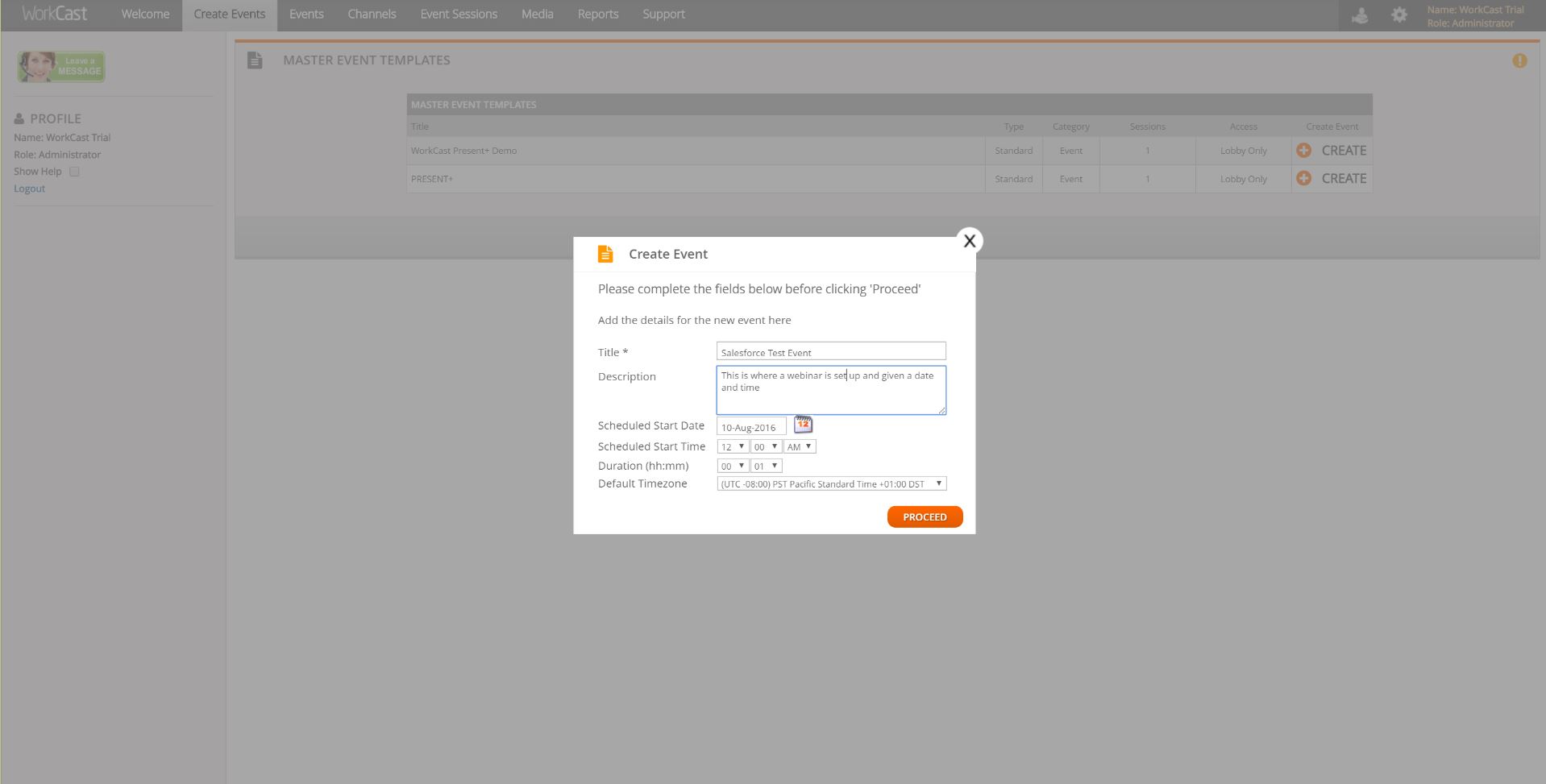
Screenshot of Simple design to create EventsScreenshot of Screenshot of Advanced Analytics available in the platformScreenshot of Advanced, interactive console  for presenters