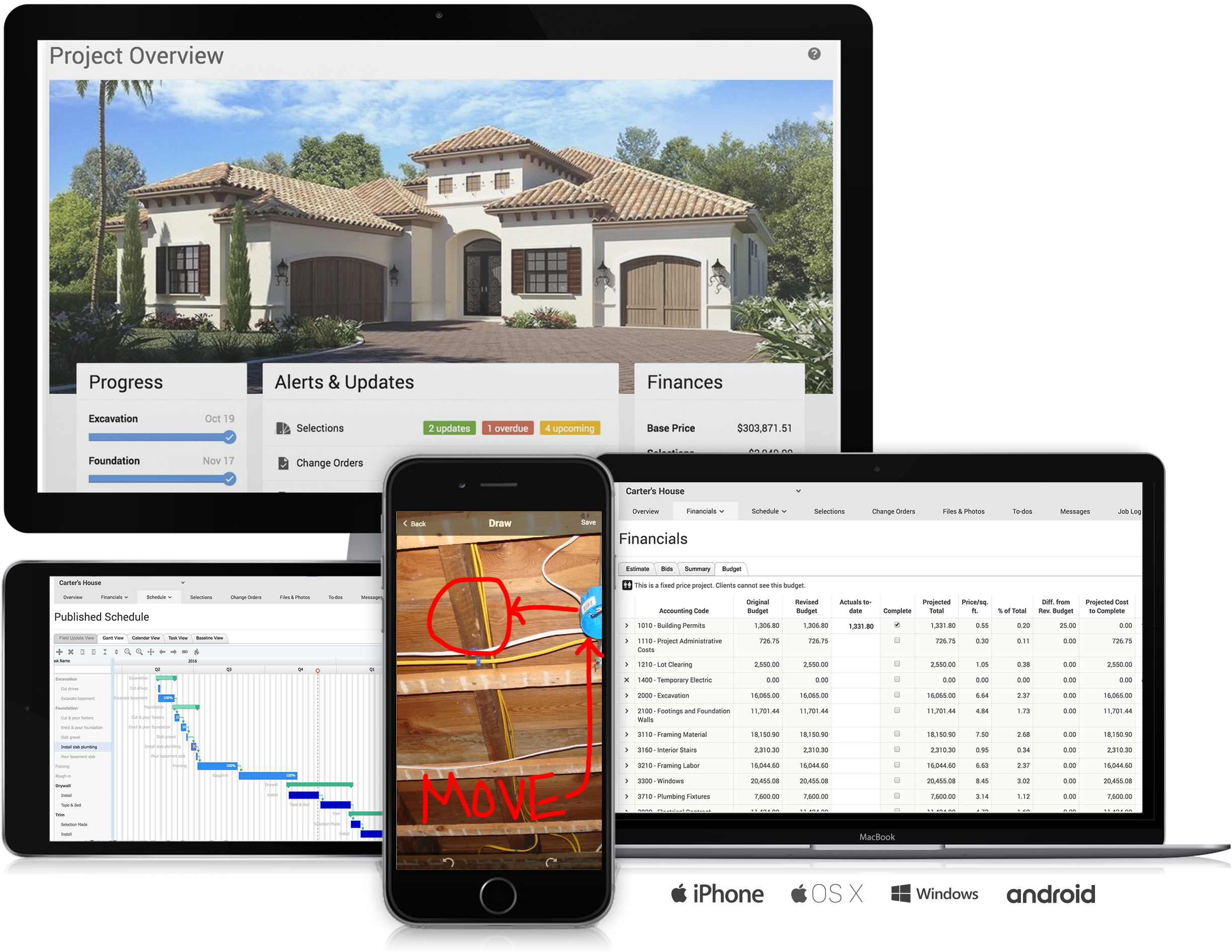
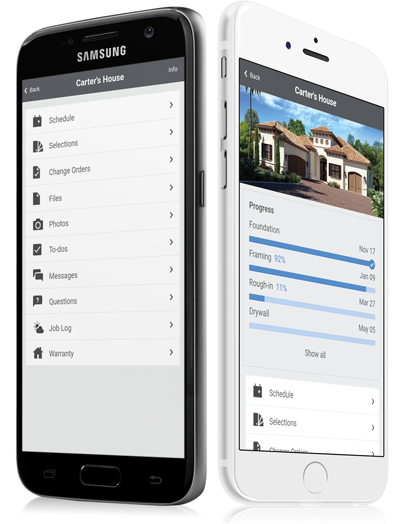
CoConstruct, from Buildertrend since the November 2021 acquisition, is a custom builder & remodeler software. It allows users to enter data once and have that information flow through the estimate, specs, selections, bids, proposals, change orders, and budgets, including to and from QuickBooks. In addition, CoConstruct includes scheduling and 3-way communication between builder, client, and trade partners. Everything is captured via email and texting. Login isn't required for…
$49
per month
e-automate
Score 8.3 out of 10
N/A
ECI Software Solutions offers e-automate, an ERP for office technology companies to automate business workflows and increase contract profitability.
N/A
Agentforce Field Service
Score 9.2 out of 10
N/A
Field Service (formerly known as Field Service Lightning) is a customizable, mobile-friendly field service hub in Salesforce. It provides tools to manage work orders, scheduling, and a mobile workforce.
$600
per year per user
Pricing
CoConstruct
e-automate
Salesforce Agentforce Field Service
Editions & Modules
Ramp
$49
per month
Plus 5
$299
per month
Plus 10
$399
per month
Plus 15
$499
per month
No answers on this topic
Contractor
$50
per month (billed annually) per user
Contractor Plus
$75
per month (billed annually) per user
Dispatcher
$165
per month (billed annually) per user
Technician
$165
per month (billed annually) per user
Field Service Plus
$220
per month (billed annually) per user
Offerings
Pricing Offerings
CoConstruct
e-automate
Agentforce Field Service
Free Trial
No
No
No
Free/Freemium Version
No
No
No
Premium Consulting/Integration Services
No
No
Yes
Entry-level Setup Fee
No setup fee
No setup fee
No setup fee
Additional Details
CoConstruct pricing is based on active job sites that have client access online, which means it is adaptable to builders & remodelers businesses. This means that there are an unlimited amount of projects available for estimates and proposals, so that customers only pay when they win a contract. Also built into the pricing are a myriad of services: a dedicated implementation coach, free estimate & scheduling templates based on industry best practices from successful builders and the NAHB, unlimited storage and users, software branded with the customer's logo, unlimited amount of warranty projects, and unlimited phone & email support. The vendor offers a money-back guarantee that is good for the first 90 days of service.
Having the ability to completely manage a project from start to finish with one app is super helpful. The time reporting feature (when it works correctly) is a nice added bonus as it allows employees to switch from one task to another on the same project or to another project and task with ease, aiding in the accounting process of the total project. This was helpful for running analytics to see where we were spending too much time on certain tasks, thus allowing us to assess any training needs.
If you need a system to place and track sales quotes, sales orders, purchase orders, and service calls then E-Automate is perfect. However, if you want to be able to easily bulk upload customers and contracts or if you want to be able to quickly and easily track contract profitability, customer costs, etc, then you'll likely want/need a secondary or different system to do so.
We've demoed quite a few models, different companies. I know Salesforce has huge backing, but even so they're open to customization and solutions. Some of the competition, keep in mind for my industry, there's not a lot of options out there. We're not your typical Salesforce target market. I mean we're not really selling a lot. I mean, quite honestly, I don't even have a sales department because can't do all of the work that my current customers need me to do. So I don't need to go drum up new business. I just needed it for more of tracking and a work management solution. And in the construction, specifically utility construction, industry, there's not a lot of options, but it definitely was the best option for us.
The integration of all aspects needed to run a remodeling company efficiently: project scheduling and management, financial planning and customer service. Since it’s an all-in-one suite and cloud-based, it enables our team to keep track of all our projects in real-time. Communication breakdown is the last thing we want, so being on the same page is not only desirable but makes for the best possible relationship with our clients.
Product education - We like how CoConstruct helps new users and get them to start using the tool right away. The dashboard resource materials are incredibly useful. We don’t have to spend a lot of time training new hires on the system and onboarding new clients.
Sending Invoices out to customers via email or printing.
Keep track of ordering and inventory.
Sales Tax reporting.
Monitoring customer payment activity/setting up and removing credit holds.
Calculating payments to process each cycle.
Excellent aging reports.
I like the fact that when I am looking at one item, such as an invoice, I have the capability to switch to the customer menu rather than having to exit out of invoices and then enter into customers.
I love the flexibility of the search menus - being able to sort on several factors at once.
Real Time Communication with back-office team When our nurses need anything by using mobile app they can reach out to our back office team to resolve their issues
Utilization of resources We can see the all the appointments view with the assigned representative in a single page so We can assign more appointments if any resources has any free slot it is just a drag and drop
It helps us to automate the process like delay or reach notification we can also route the appointments based on representative skill set, location and urgency of task
Internal Communication - CoConstruct lacks the ability to tag-team members for internal communication using @mentions or any other means. This has been crippling for us and forced us to use alternative software for communicating among our team members.
Pipeline Management - CoConstruct's lead-tracking system feels clunky and hard to navigate and doesn't provide a pipeline view that's easy to navigate. We have moved our Pipeline Management outside of CoConstruct to make it easier for our sales team to track leads.
CRM - CoConstruct doesn't offer anything for customer follow-up after projects are completed. This, in addition to the lack of an effective pipeline system, has led to our decision to use Hubspot as our CRM. Moving projects into CoConstruct for Design and back our after Production.
Make sales invoices not require serial numbers, or be more flexible with it.
Make contract invoices have some sort of flexibility in terms of editing. Our end users complain that QuickBooks made it very easy to edit invoices, and in e-automate, for them, it is practically impossible. (I do personally understand why it has to be as it is myself, I'm just forwarding their observation.)
Make the API actually useful. I spent days looking at the functions and the functions available are not really useful.
Our biggest complaint is the optimizer removes jobs from the schedule at times and they are hard to track down and if missed we may not have a tech show up at all for the customer.
Reporting off of Service Appointment history is challenging
Without having a developer adjust your views the amount of available fields can be overwhelming.
Its really the only option for the industry that does enough of what we need for it to function . I'm not sure if there were better options out there if we would have to renew our subscription. With the addition of AI, hopefully something will be able to become more useful.
As of right now there is not a alternative that seems to offer all of the functionality with a vision of what is needed in the future. It is my belief that ClickSoftware will remain a leader in Mobile Workforce Management for a long time.
The user interface may be slightly outdated, but it is very intuitive and easy to navigate. Once you have learned one module within the system it is very easy to apply that knowledge to any other module. It makes using the system much easier, and it makes training another person on the system quick and efficient.
Within a week a scheduler can confidently navigate the program and from there they learn more niche tools but from the beginning they can hit the ground running. With different user views available the developers can narrow down what is needed based on your job role which has been invaluable.
Reports are the struggle the most with the information being extracted in a way that you need to copy and paste it into a new document so some of the information is not covered
The support staff is brilliant; they don't operate on Australian time, so you can't just dial up support when you need it. The response times are quick, and the staff is knowledgeable. They are also well versed in most of the differences between buildings in the US and the building in Australasia. Despite their funny accents and strange use of the English language, we get by just fine!
Sometimes when you need answers quickly, a voice on the phone is far better than having to wait for email support or a callback. I have found this to have delays and feel ECI e-automate should invest more in its support infrastructure.
Having a program that gives sales leaders a real time view was game changing. Time was always an issue because there wasn't always a sales leader available for closing sales. This has allowed for any sales leader to jump in and help make the sale without the need to do a warm transfer.
Overall the training was quite informative but did lack detail in some areas. It had all of the necessary content for an experience product user but didn't offer enough information for a new user to complete the training and then feel comfortable in real-world situations running or managing the software. I would recommend this course for anyone with at least 1 year of full-time exposure to the ClickSchedule product.
Products like Procore and PlanGrid are geared towards projects with huge projects teams, multiple stakeholders and dozens of subcontractors. CoConstruct can be used for projects big and small (value) and also with small project teams or large projects teams. For small partial renovation or addition projects CoConstruct is a good more cost effective option.
E-automate is much better at understanding the needs of the office equipment industry and provide the necessary tools. SAP Business One has limited features specific to the office equipment industry and includes things that are not useful. E-automate is also priced much better and provides the best value for your investment.
I have added a few of the many Salesforce products we use. We also use HubSpot but they all have different functions so not really comparable as they are used for different things/ teams.
The e-automate will stop working if we stop paying each year. We chose not to go to the cloud and buy the software. QuickBooks and other software are a one-time fee.
E-automate has very few outside vendors for add-on modules.